Instead of collapsing actions into an opaque result, every tool call is logged with its specific input and output in a granular run detail view. This auditability is why companies like MoneyGram and Alan run the platform to manage agentic access at scale. ### Security and permissions in the MCP handshake When an agent requests data through Glean, the MCP handshake enforces that an AI agent never sees information the human user cannot access. The system validates the user's existing credentials against the source system's Access Control Lists (ACLs) at the moment of the request. Sensitive payroll data or private Slack channels are prevented from leaking to unauthorized employees by blocking prompt injection or agentic errors. Because Glean maintains a real-time map of permissions, the security boundary is moved from the agent's logic to the data layer itself. Enterprise governance remains intact even as autonomous agents perform complex, multi-step tasks across the organization. ## Technical architecture of the Glean MCP integration The LLM acts as the client and Glean serves as the MCP server through a standardized client-server architecture, exposing tools for semantic search and document retrieval. This design replaces the traditional "glue code" mess with a single, predictable interface that any compliant agent can query without a custom driver. ### The MCP Server-Client communication loop Operating as a JSON-RPC 2.0 exchange, the communication loop has the following characteristics: * The AI model sends a `tools/call` request and Glean returns a structured knowledge payload. * The LLM functions as the client while Glean acts as the server, executing the search logic and returning the data. * This protocol ensures that whether a developer is using Claude Sonnet 5.5 for rapid coding or Gemini 4 Carbon for complex software engineering, the underlying data fetching logic remains identical. * Once this handshake is complete, the model can autonomously decide when to hit the Glean endpoint to resolve a knowledge gap. ### Semantic search vs. keyword retrieval via MCP Glean’s MCP implementation prioritizes vector-based semantic search over simple text matching to provide the model with conceptual relevance rather than just literal string hits. Keyword retrieval often fails in agentic workflows because a model might ask for "onboarding steps" while the source document is titled "New Hire Guide." By exposing a semantic search tool via MCP, Glean allows models like GPT-6.2 Astra to find documents based on intent and relationship.  Vector embeddings convert company documents into mathematical representations so the agent finds similar concepts even if the vocabulary differs. Hybrid search combines vector results with traditional metadata filtering so a search for "Q3 reports" doesn't return Q2 data just because the text is similar. Permission scoping filters results at the retrieval layer based on the user's identity. The LLM never sees sensitive files it shouldn't have access to. ### How Glean MCP manages real-time data indexing The integration manages the enterprise data stream to fit within the model's active memory by indexing changes at the source and trimming the resulting text. If an agent calls for a massive technical specification, Glean doesn't dump the raw file into the prompt.  Ranked snippets are provided instead to maximize the utility of the context window. This prevents "lost in the middle" phenomena where models like Grok 4.7 might ignore critical details buried in a 100,000-token dump. Because Glean maintains live connectors to the company stack, the information retrieved is current. The agent isn't hallucinating solutions based on deprecated documentation. ## Why teams choose direct API integrations Lower latency and tighter control over payload size are the primary reasons teams choose direct API integrations over standardized protocol layers. When a developer builds a bespoke connector for a specific endpoint, they bypass the abstraction overhead that a middle layer necessarily introduces. For performance-sensitive workloads using a model like Claude Haiku 5.5, which is optimized for sub-second response times, every additional network hop or metadata transformation is a potential bottleneck. | Feature | Direct API Integration | Glean MCP Integration | | :--- | :--- | :--- | | Latency | Minimal; direct request-response cycle. | Moderate; includes protocol translation. | | Security Granularity | Hardcoded; limited by the specific API key. | Dynamic; inherits Glean’s existing permissions. | | Development Speed | Slow; requires writing unique auth and logic. | Fast; uses a unified schema for all sources. | | Maintenance Overhead | High; breaks whenever the source API updates. | Low; Glean handles the connector updates. | While direct calls provide the rawest speed, they force the developer to manually manage security and updates for every new tool added to the stack. Relying on custom integrations creates a "context stuffing" risk where the developer, lacking a smart retrieval layer, sends too much irrelevant data to the model. This inefficiency often negates the speed gains of a direct API. ## The scalability benefits of a standardized protocol layer Standardizing on the Model Context Protocol (MCP) eliminates the N+1 integration problem by allowing any new tool to inherit Glean’s entire library of over 100 enterprise connectors through a single, reusable interface, which means developers no longer need to build custom bridges for every individual application.  ### Reducing integration debt for AI teams Developers are often forced to spend more time debugging authentication flows than building core agent logic because custom connectors require dedicated maintenance for every API version update. By using MCP, teams offload the burden of handling specific schemas for tools like Jira or Zendesk to the protocol layer itself. | Number of Apps | Custom Connector Cost (USD) | MCP Integration Cost (USD) | Cost Reduction | | :--- | :--- | :--- | :--- | | 5 Apps | $75,000 | $30,000 | 60% | | 10 Apps | $150,000 | $52,500 | 65% | | 20 Apps | $300,000 | $90,000 | 70% | Organizations can deploy agents across more departments without hitting a budget ceiling thanks to this drop in overhead. ### Maintaining a single source of truth across agents Fragmented data access leads to conflicting answers and hallucinations when agents pull from different, un-synced snapshots of company knowledge. When Glean acts as the MCP host, it enforces a centralized security and indexing layer. A sales agent and a legal agent will see the exact same version of a contract stored in SharePoint. This consistency prevents "knowledge drift," where different models provide different answers based on which specific API wrapper they were assigned.  ### Future-proofing against LLM provider shifts Switching from Claude Sonnet 5.5 to Gemini 4 Carbon doesn't require rebuilding the underlying data infrastructure because the protocol layer abstracts the data source from the model. Because the MCP interface is model-agnostic, the plumbing remains intact even as the reasoning engine is upgraded. Vendor lock-in is prevented by this modularity. Teams can swap in GPT-6.2 Astra for complex reasoning or Claude Haiku 5.5 for high-volume tasks without touching a single line of connector code. ## Glean MCP licensing and setup requirements Glean MCP requires a Glean Enterprise license and an MCP-compliant host to bridge the gap between static data silos and active agentic reasoning. Without the enterprise-tier subscription, you lack the centralized permissions engine necessary to govern how an agent like Claude Sonnet 5.5 accesses sensitive internal documents. The following components represent the minimum technical and contractual baseline for deployment: * Glean Enterprise License: provides the underlying search index and security API required to expose company data to the protocol. * API Management: must be enabled within the Glean workspace to allow the generation of the secret keys used for server-to-server communication. * **An MCP-compliant Host**, such as Claude Opus 5.5 or a custom orchestration layer, is needed to interpret the protocol's standardized tool definitions. * OAuth 2.0 Credentials: are required to maintain a persistent, secure link between the AI host and the Glean data source without exposing raw user passwords. Pricing follows a seat-based model bundled into the enterprise tier once these prerequisites are met, focusing on the total number of users who can interact with the AI. This consolidation prevents the "integration tax" typically associated with per-connector fees, allowing teams to scale their agentic workflows across different departments without recalculating their budget for every new data source added. ## Automating actions with Activepieces and Glean MCP Every connector registered in Activepieces is immediately available as an agent tool, allowing an agent to act on Glean's insights without a second migration. By exposing its 750+ integrations through a per-project MCP server, the platform ensures that any action used in a deterministic flow is reachable from Claude or ChatGPT as a standardized schema. 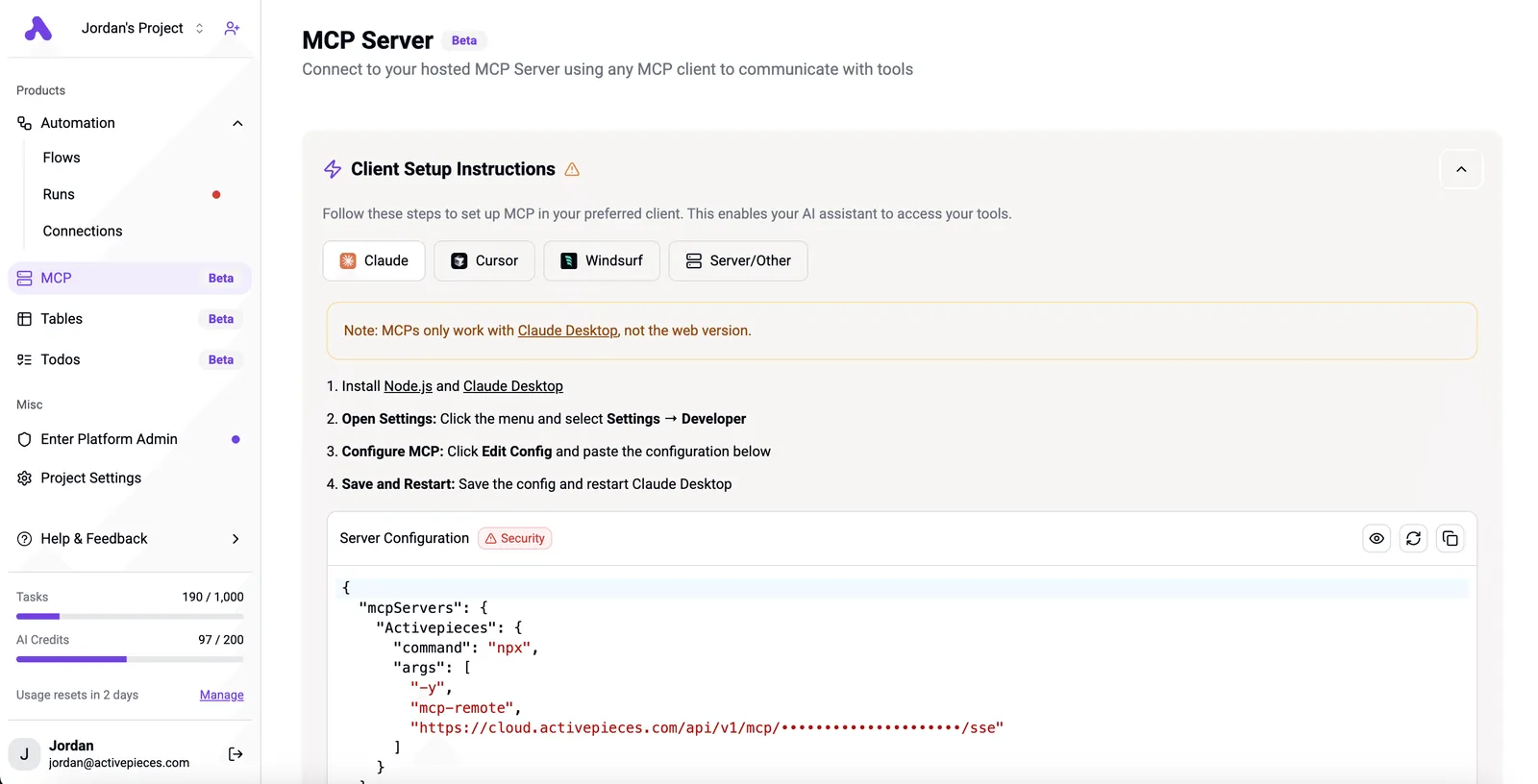 ### Bridging insights and operations Insights no longer sit idle in a chat interface. By using the Activepieces flow builder, teams can construct multi-step sequences where a trigger in one application initiates a search via Glean, processes the result through a model like Claude Sonnet 5.5, and then updates a record in a target database. 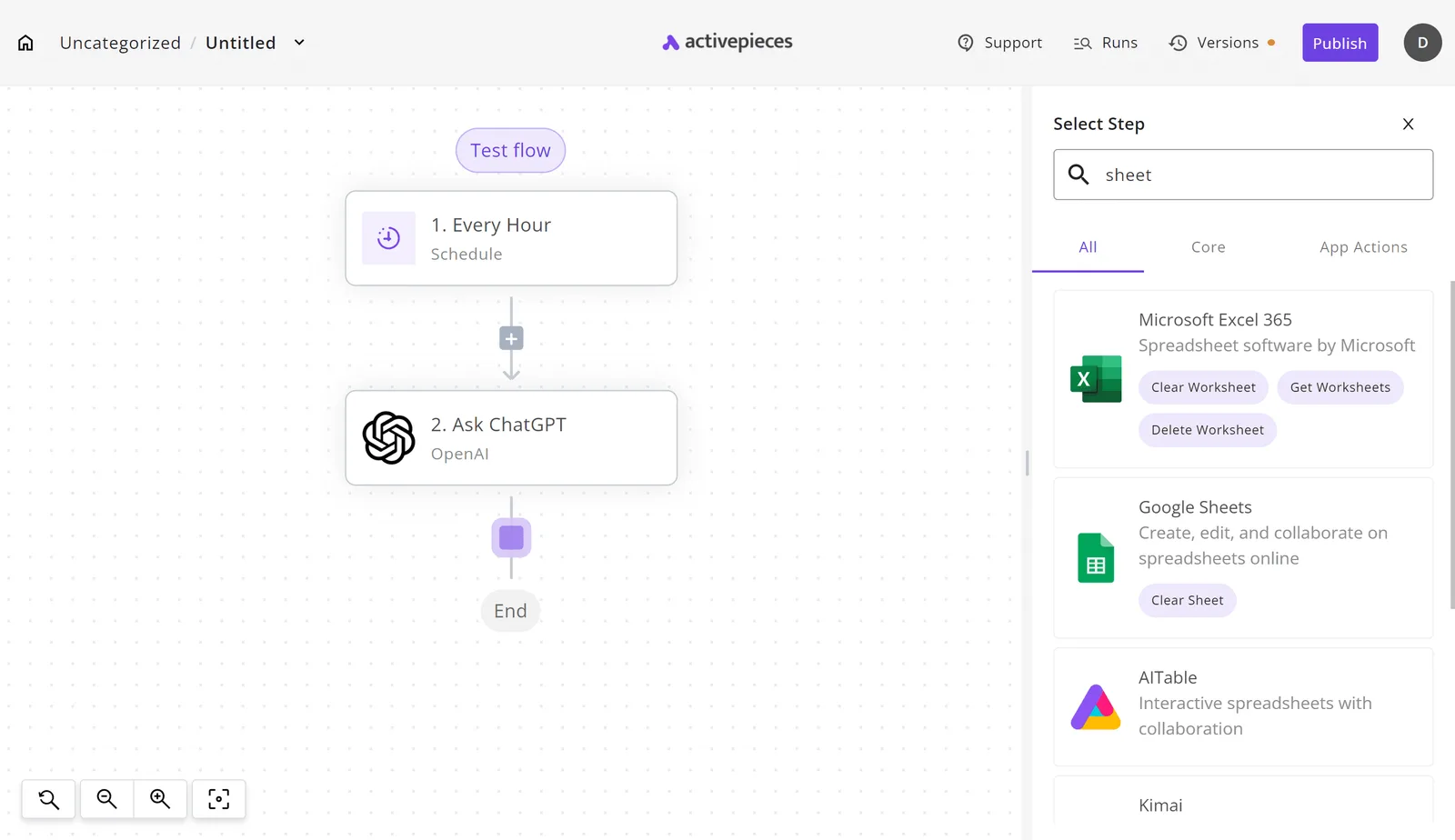 ### Visualizing the automation workflow The moment a connector is configured in Activepieces, an agent can call it. By registering a tool once, it functions simultaneously as a step in a structured flow and as a tool schema on the Activepieces per-project MCP server, accessible by Claude, ChatGPT, or custom agents. This unified catalog removes the need for a second migration or manual export step. According to [Businessmodelcanvastemplate](https://businessmodelcanvastemplate.com/products/glean-business-model-canvas), the "Select Step" panel on the right displays the integration selector interface where a user has searched for "sheet," surfacing connectors for Microsoft Excel 365 and Google Sheets.  Once Glean MCP identifies a specific data point, Activepieces can immediately route it into a spreadsheet or a specialized tool like Kimai for time tracking using its MIT-licensed core. This handoff between discovery and action eliminates the manual copy-pasting that typically breaks agentic workflows. Instead of an engineer writing a new bridge for every workflow, Activepieces uses its 750+ integrations to ensure that the "write" operation is as predictable as the "read" operation provided by MCP. ## The Monday morning checklist for Glean MCP deployment Establishing a secure handshake between your local development environment and the Glean indexed knowledge base is the first step in deploying Glean MCP. **This shift moves engineering teams away from maintaining a fragile web of custom scripts and toward a unified architecture where a single integration effort serves every agent in the stack.** Manual data exports are eliminated by allowing frontier models like Claude Opus 5.5 to browse internal documentation through a standardized interface. To validate that your infrastructure is ready for agentic queries, follow these steps to initialize the connection: 1. Install MCP Inspector to provide a local testing interface for debugging server responses without incurring API costs on every iteration. 2. Configure your Glean API Key in your environment variables to grant the server permission to access your organization’s specific data silos. 3. Run `npx @glean/mcp-server` to launch the transport layer that bridges the model’s requests to your live data index. 4. Query "Who is the lead on Project X?" to test the model's ability to navigate cross-functional permissions and return a specific person. 5. Verify document citations to ensure the model is sourcing answers from the correct version of a file rather than hallucinating from its training data. Identity and permissions must be correctly resolved by the Glean API before you roll it out to a wider team. Once the inspector returns valid JSON objects from your internal wiki, you can move from local testing to production integration. ## Frequently asked questions about Glean MCP By standardizing how agentic platforms communicate with enterprise sources, Glean MCP functions as a secure gateway that allows queries without duplicating the underlying data index. It removes the need for manual API mapping and credential management. ### Does Glean MCP store my data on external LLM servers? Glean MCP doesn't store your indexed data on external servers because the protocol acts as a transient bridge rather than a synchronization engine. When a model like Claude Opus 5.5 requests information, the MCP server retrieves the relevant snippet from Glean’s local index and passes it into the context window of the specific request. This ephemeral transfer ensures that your proprietary documents aren't used to train the provider’s foundational models. ### Can I use Glean MCP with local LLMs like Llama 3? Provided the orchestration layer you use supports the Model Context Protocol, you can use Glean MCP with local models. While frontier models like Gemini 4 Carbon offer native reasoning for complex tool use, a local Llama 3 instance running via a compatible host can still consume the Glean tools to surface internal facts, ensuring that data retrieval remains consistent regardless of the underlying model's architecture, which means organizations can maintain a unified knowledge base without being locked into a single proprietary provider. This setup keeps the entire reasoning loop within your private infrastructure. ### What is the difference between Glean Chat and Glean MCP? Glean Chat is a finished application designed for direct human interaction, whereas Glean MCP is a protocol layer designed for machine-to-machine communication. Employees ask questions and receive cited answers through the Glean Chat web interface. Glean MCP exposes your company’s knowledge as a set of tools that autonomous agents, such as those built on GPT-6.2 Astra, can call programmatically. ### Does MCP respect my existing Google Drive or Slack permissions? The same identity-based access controls used by the core Glean platform are enforced by Glean MCP. An agent cannot see files the user behind the API key is forbidden from viewing. If a contractor lacks access to a specific private channel in Slack, the MCP server will omit results from that channel during the retrieval phase. This parity prevents the over-sharing risks that typically occur when developers hardcode service accounts with global read permissions. ## Related reading - [Glean Pricing in 2026: Cost, Seats, and Minimums](https://www.activepieces.com/blog/glean-pricing-in-2026-cost-seats-and-minimums) - [Best Glean Alternatives for Enterprise Search Teams](https://www.activepieces.com/blog/best-glean-alternatives-for-enterprise-search-teams)Your AI agent is not code; it is a user, and treating it like one requires a platform rather than just a library.