### Standard Google Analytics: what free includes Standard gives you collection, standard reports, explorations, audiences and a BigQuery link, with no invoice. What you pay instead is engineering time. When the daily export ceiling truncates a busy day, someone writes a workaround. When exploration data ages out, someone builds an archive. [Activepieces](https://www.activepieces.com) charges 1 credit per flow run however many steps it has, so splitting that workaround into ten small steps costs the same as the two-step version, where Zapier bills per task and Make per module. The run is the meter, not the steps inside it. 360 raises the ceilings: more events per property, longer retention, a larger daily export, a bigger query budget, and support you can escalate. It doesn't add a different kind of analysis. You're buying headroom, and the quote reflects how much of it you need. This comparison was written on 2026-11-23 and the limits below come from Google's own help pages. Before you decide, read your own property's quota and retention settings in Admin. Then read the current Google documentation for Standard and 360. Compare those numbers against your busiest day of traffic, not your average one. ## Hidden costs and limits of free Google Analytics Nobody checked these limits at setup. They surface when a report comes back thin, an export stops, or a bill arrives from a product you never priced. - Event data retention is 2 or 14 months, so year-on-year comparisons in explorations stop working once you pass that window. - Data thresholds can hide rows in reports when small user counts could identify someone, so a narrow segment can look empty. - Sampling can kick in on large explorations, so the number you quote may be an estimate. - The free BigQuery export has a daily event cap, so a busy day can outrun it. - BigQuery billing, consent tooling and staff time sit outside the Google Analytics price entirely.  Some of these five limits move with 360, and some don't. Retention is a setting you must change yourself. **If you leave it at 2 months, the history is gone before anyone asks for last year's numbers.** Sampling matters most in ad hoc explorations, where an estimated figure can quietly end up in a board deck. ### Quotas on events, dimensions and exports Your tracking is capped at the figures in [Google Analytics Help](https://support.google.com/analytics/answer/12229528): standard properties allow 100 audiences, 25 user dimensions, 50 event dimensions and 50 event metrics, you need to decide what fits your use case. 360 raises those to 400, 100, 125 and 125.  When a store tracks product, campaign and checkout details as custom event dimensions, it can reach 50 quickly. Then every new question means retiring an old one. 360 gives you more room on all four, but it doesn't change how thresholds work for small segments. The export is free to switch on, but the data lands in BigQuery, Google's warehouse, which bills for storage and queries. Nothing about upgrading to 360 removes that bill. A badly written query over a year of raw events is where surprise charges come from.  If you run EU traffic without a consent management tool, you can expect undercounted numbers, and the tool is usually a paid product. Someone also has to maintain the tagging plan, audit the custom dimensions and answer when numbers disagree. That's a salary line, not a Google line, and 360 doesn't reduce it. ## Google Analytics costs versus alternatives Strip out the salary and the licence side is small: Google Analytics costs $0 for a small site and a typical shop. Only a high-traffic publisher runs into the limits that make 360 worth pricing. ### Three usage cases and the bill for each A small site pays nothing and won't hit an export or sampling ceiling, so the only cost is the hour of setup. Switching to a privacy-first tool here is a choice about cookie banners, not about money. An online shop also stays at $0 with Google, but this is where limits start to matter, and you're suddenly evaluating on capabilities rather than price. It's free only if you can live within them. Once you build custom reports on purchase data, sampling and export caps decide whether the numbers you hand finance are complete. If you pay for an alternative, [Compare Analytics](https://compare-analytics.com/analytics/plausible) lists Plausible at $9, $19 and $69 a month across three traffic tiers, which means you can match the tier to your traffic. It lists Fathom at $15, $15 and $60. Fathom is flat across the first two tiers, so a growing shop pays no more for a while. Plausible is cheaper at the bottom and more expensive in the middle. Only a high-traffic publisher has a real 360 question. Even so, the top tiers of both tools, $69 and $60 a month, are small next to a 360 contract and the person who runs it, so mid-market tools remain far more affordable than enterprise. Whoever's picking between them won't be limited by cost. If your reports fit those tools, 360 buys you little. ### Alternatives compared on price, free tier and limits The table shows that only Google Analytics and PostHog start free as hosted products, and that self-hosting changes the price into a server and maintenance cost. Prices for Plausible and Fathom are the entry figures from the sourced tiers above.  | Tool | Entry price | Free tier | Key limits | Self-hosting | Checked | |---|---|---|---|---|---| | Google Analytics | $0 | Yes, standard | Sampling and export ceilings | No | 2026-11-23 | | Plausible | $9/month | No free plan | Price steps up with pageviews | Yes | 2026-11-23 | | Matomo | Free to self-host | Self-hosted version | You run servers and upgrades | Yes | 2026-11-23 | | Fathom | $15/month | No free plan | Price steps up with pageviews | No | 2026-11-23 | | PostHog | Usage-based | Yes, monthly allowance | Costs follow event volume | Yes | 2026-11-23 | | Adobe Analytics | Quote-based | No | Contract negotiated per company | No | 2026-11-23 | _Prices and plan limits checked against [docs.claude.com](https://docs.claude.com/en/docs/about-claude/models/overview) and [claude.com](https://claude.com/pricing) and [openai.com](https://openai.com/chatgpt/pricing) and [gemini.google](https://gemini.google/subscriptions) on November 23, 2026._ Read the Limits column first. If none of those limits touches your reporting, the free tool is the right answer, and the alternatives only matter when one of them does. ## Automating Google Analytics reporting with Activepieces Collecting your data is free; getting it in front of anyone is not covered, and that gap is where [Activepieces](https://www.activepieces.com/pricing), an MIT-licensed automation tool with 750 integrations including Google Analytics, fits. It sends scheduled GA4 numbers to Slack, email or a spreadsheet.  A report built on sampled data stays sampled when it lands in your channel, because Activepieces doesn't change Google's charges, sampling or export limits. What it does change is the cost of delivery: a weekly report is one run at 1 credit however many steps it has, so about 4 or 5 of the Free plan's 1,000 monthly credits. Its own pricing is small next to the problem. The Free plan is [0 $ per month](https://www.activepieces.com/pricing), enough to find out whether a scheduled report is worth having before anyone approves a budget. Plus is 20 $ per month, which is the step to take when the flows become something the team relies on. Team is 200 $ per month, ten times Plus, so it only makes sense if several people are building and maintaining flows together.  ### What the Google Analytics integration can fetch If a report is already sampled in GA4, the flow delivers sampled numbers faster, not better ones. The integration pulls from the GA4 Data API, the same interface that sits behind Google's own reports, so it's bound by the same property quotas and the same sampling you would meet in the interface. Use the integration for the recurring questions: sessions, conversions and top pages by week. Keep one-off deep dives in BigQuery or the GA4 explorer. ### A weekly report to Slack in four steps 1. Add a schedule trigger set to Monday morning, so the numbers arrive before the weekly meeting and nobody pulls them by hand. 2. Add the Google Analytics step and choose your GA4 property, the date range and the metrics. Keep it to a handful, because every extra dimension raises the odds of hitting a quota. 3. Add a Slack, Gmail or Google Sheets step and map the fetched values into the message or row. 4. Run Test flow before turning it on. The test run matters more than it looks. The screenshot below shows a flow of that shape, with Google Calendar as the trigger and Gmail as the action, that failed on its last run. The Run Details panel on the left records each step's execution time and its input and output JSON, and the bottom bar reads "Run failed" with an Edit Run button. Read the failed step's output before you touch anything else. A bad connection, an empty receiver field or an expired credential all show up there, and guessing at the cause costs more time than reading it. 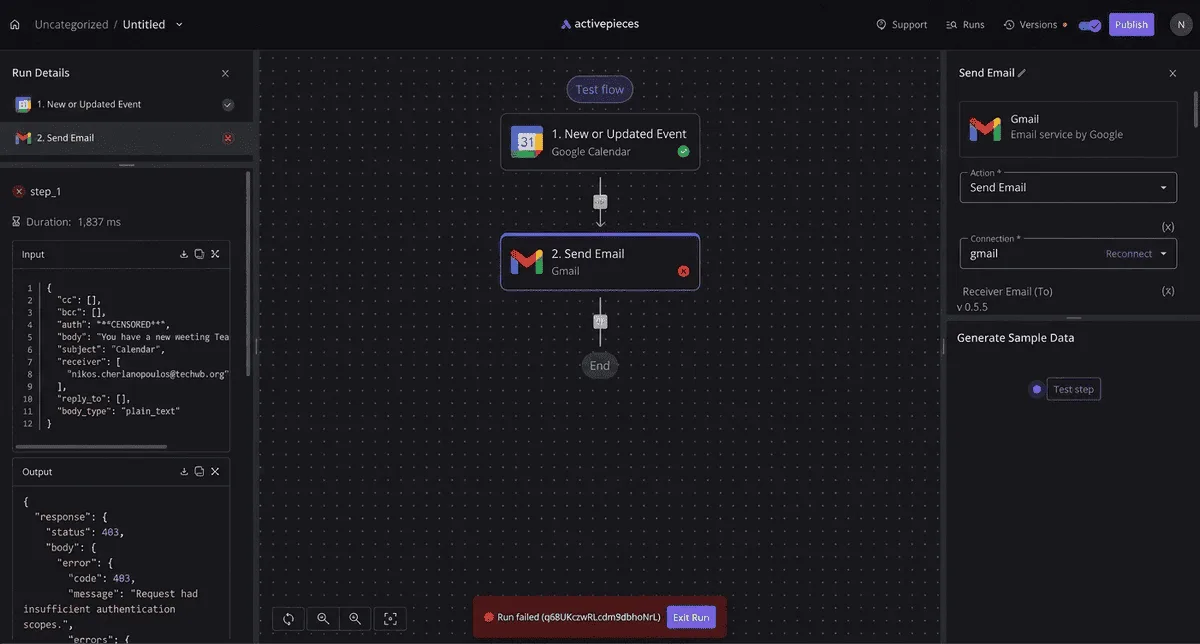 Once a run passes, switch the flow on. ## How to check your Google Analytics plan limits You can answer it in one sitting by reading a few screens in your own property and writing down what each one shows. The list below is the order to work in, and each step leaves one recorded value you'll need at the end. 1. Find the plan, and record whether the property is standard or on Google's paid Analytics 360 tier. 2. Set data retention, and record the retention period now in force. 3. Read event volume against the quota, and record your monthly events and how close that sits to the ceiling. 4. Check the BigQuery links, and record whether a link exists and which export type it runs. 5. Decide: stay free, add BigQuery, or look elsewhere, and record the one-line reason. Those five values are the audit. The subheadings below say where to find each one and what to make of it. Open the admin area and look at the property's account details. Most businesses will see the standard, free property, and that fixes which quotas apply to everything after. Write it down before touching anything else, because a limit quoted for the paid tier tells you nothing about yours. ### Stage 2: set retention and read current event volume The default retention setting, under data settings, is often shorter than people assume, so a year-over-year comparison in explorations can quietly come back empty. Raise it to the longest your plan allows and record the value. Then read event volume from your reports and compare it with the documented quota for your plan. A property well under the quota has headroom. One close to it is where problems start, so note the gap, not just the count. ### Stage 3: check export and sampling exposure If there is no BigQuery link under product links, your raw events live only inside the interface, where exploration queries can be sampled and exports are capped. A daily export gives you unsampled rows but not same-day freshness. Streaming covers that gap but adds cost in BigQuery. Record which one you have, and whether any report you rely on has shown a sampling notice. Stay free if volume has headroom, no report is sampled and nobody needs raw rows. Add BigQuery if sampling or export caps are what hurt, because that fixes them without replacing the tool. Look elsewhere only when the problem is the interface or the data model, which a link can't fix. Write the reason in a single line. ## Frequently asked questions ### Is Google Analytics really free? Yes, for most businesses the standard version of Google Analytics costs nothing to use. What you pay for is what sits around it: the limits on how much data you can export and how much gets sampled in reports, and the paid tools you add when you hit those limits. If your reporting stays inside the ceilings, the bill stays at zero. Do you need Analytics 360 for more than one website? No. The free version can collect data from several websites and apps, and you can combine them in one property or keep them in separate ones. Analytics 360 is the paid tier you move to when limits on volume, export or sampling start to block your reporting. Having a second site isn't the trigger. ### Does Google use my Google Analytics data? Google processes the data to run the product, and that's the trade-off behind a free tool. Several settings control whether it is also shared for other purposes, such as benchmarking or product improvement, and whether it feeds advertising features. You should open the data-sharing settings in your account and switch off what you don't want. Review them after any setup change, because they are easy to leave at their defaults. If you operate under privacy rules such as GDPR, a lawyer or privacy officer should check your configuration, not this article. ### Can I export my Google Analytics data if I switch? Partly, and this is where the real cost of leaving shows up. You can pull reports and raw event data out, but the interface and API cap what you get, and large exports may be sampled or limited. Start exporting to a warehouse before you decide to leave; that's the cleanest route. A warehouse copy is the history you control. If you wait until the day you switch, you take whatever the limits allow, and that may not be everything you need. ### Is Universal Analytics still available? No. Universal Analytics, the previous generation, has been replaced by Google Analytics 4, and new data no longer flows into it. Historical reports from the old system were only available for a limited period, so anything you didn't export is likely gone or going. If you still need that history for year-on-year comparison, find out what you saved before you build any plans that depend on it. ## Related reading - [Google Jules Pricing: Free, Pro and Ultra Plans (2026)](https://www.activepieces.com/blog/google-jules-pricing-free-pro-and-ultra-plans-2026) - [Best Data Automation Tools of 2026 for Analytics Teams](https://www.activepieces.com/blog/best-data-automation-tools-of-2026-for-analytics-teams) - [Agent Analytics: 7 Best AI Agents for Data Analysis in 2026](https://www.activepieces.com/blog/ai-agents-for-analytics) ## References - [Google Analytics Help](https://support.google.com/analytics/answer/12229528) - [Activepieces](https://www.activepieces.com/pricing) - [Compare Analytics](https://compare-analytics.com/analytics/plausible)Every place where 360 wins is a limit, not a feature.