The [US Bureau of Labor Statistics](https://www.bls.gov/news.release/ocwage.t01.htm) wage data supports three freelance rates: $85, $110 and $135 per hour for low, mid and high. A freelancer who loses an hour is therefore out 4.3 to 6.8 times the $19.99 she paid, which costs her the equivalent of **four to seven months of subscription fees**. 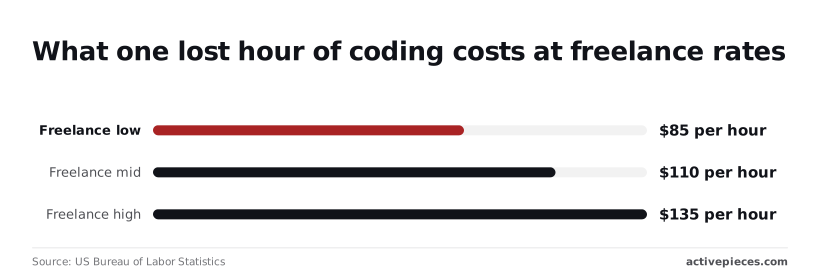 Now count a four-hour afternoon, which is my assumption for a typical stall. That's about $262 at the employee median, $340 at $85, $440 at $110 and $540 at $135. If you price the month by its subscription alone, you understate it by a factor of ten or more. A second cutoff would double those figures. ### Hidden costs and limits she hit She couldn't see how close she was to the cap, so she couldn't schedule around it. That uncertainty was the hidden cost. I haven't found a published figure that would let her predict the next cutoff, so I'm not offering one. What she can control is the exposure. **If a stall costs $340 at the low freelance rate, then any cap, buffer or fallback that costs less than that per incident pays for itself the first time it prevents one.** That's the comparison to run before choosing a plan: not $19.99 against a higher tier, but the higher tier against an afternoon. ## Antigravity against rivals on workload Run one builder's month through each rival and the sticker prices bunch together. What separates them is the limit that forces the upgrade, and what happens on the day you hit it. Each row below uses the tier she would need. ### Price at her usage | Tool | Monthly price of tier needed | Upgrade-forcing limit | Limit-day behaviour | Source page | |---|---|---|---|---| | Antigravity Pro | $19.99 sticker | Agent quota on the plan | Quota exhausted until it refreshes | Google's Antigravity pricing page | | Cursor | Pro plan, as listed by Cursor | Included usage on the plan | Plan usage runs out, then the plan's overage terms apply | Cursor's pricing page | | GitHub Copilot Pro ($10) | $10 | Premium request allowance | Premium models restricted until the allowance resets | GitHub's Copilot plans page | | Claude Code via Claude Pro ($20) | $20 | Usage windows | Usage paused until the window resets | [Anthropic](https://claude.com/pricing) | When a $10 plan restricts premium models mid-sprint, the builder ends up on the next tier anyway, so the two cheaper-looking rows aren't cheaper for this workload. The real comparison is price at the point where work stops. 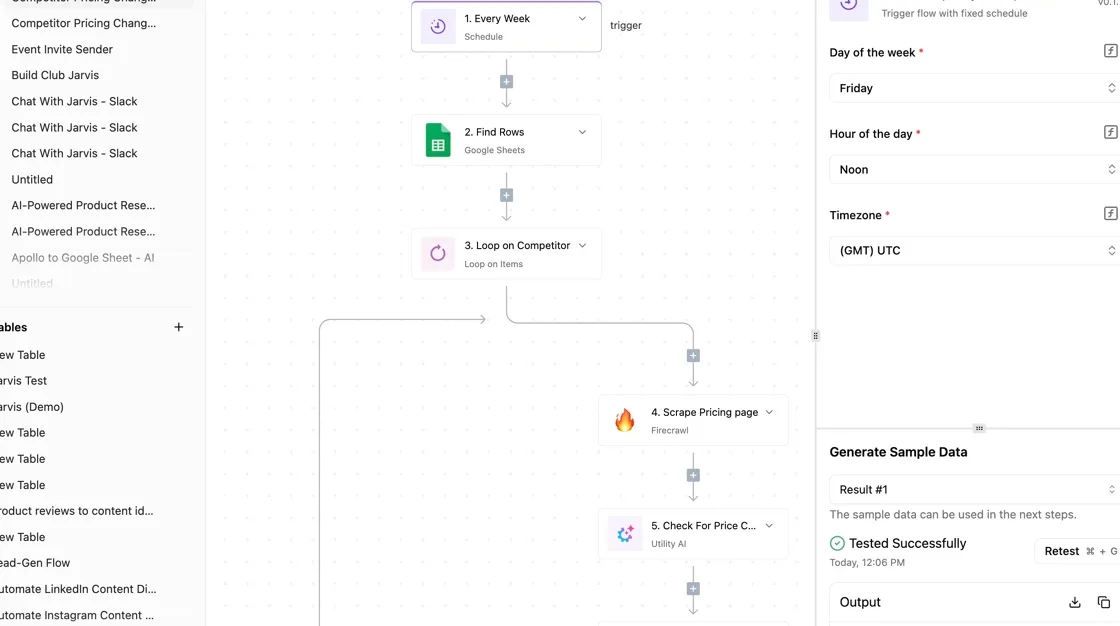 ### Behaviour when the limit hits There are four possible endings: - A throttle - A slower model - Pay-per-use - A hard stop Even Anthropic's free plan offers ["Limited usage every 5 hours and every week"](https://claude.com/pricing), which is how the fourth kind is framed. That means a limit can arrive twice, once mid-afternoon and once mid-week, and the weekly one is the one that wrecks a deadline. Which model you pick decides how quickly you reach either. Per Anthropic's [model overview](https://docs.claude.com/en/docs/about-claude/models/overview), [Claude](https://claude.com/pricing) Haiku 5.5's built for high-volume, latency-sensitive tasks, while Claude Fable 5.1's aimed at demanding reasoning and long-horizon agentic work. Each request to the heavier model costs more tokens and burns more quota, so a builder who defaults to the top model reaches the cap sooner. Routing routine edits to the lighter model is the cheapest way to stretch any of these plans. ## A quota alert workflow built with Activepieces Nothing warned her before the limit arrived and the work stopped mid-task. A small automation that posts a warning to Slack or email as usage approaches the cap would've saved this builder's month.  ### What the workflow watches In Activepieces, an MIT-licensed automation builder with 746 integrations, the workflow has three steps. A trigger fires on an event, a check compares the reading against a threshold you choose, and an action sends the message. Below is the same shape built on a different event. It's a flow named "Calendly Tracking" where a Calendly "Event Canceled" trigger feeds both a Slack "Send Message To A Channel" step and a Gmail "Send Email" step. 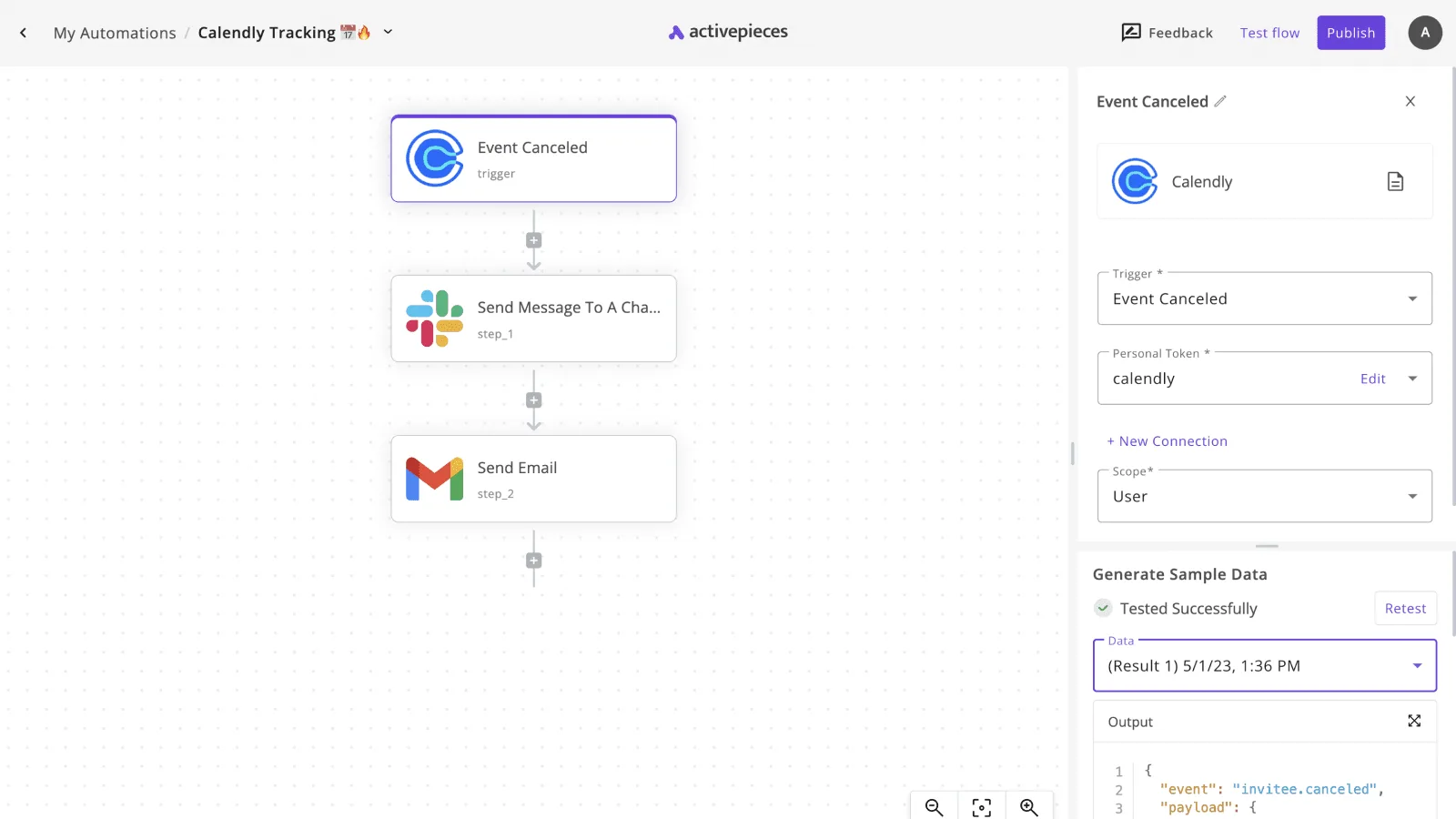 Swap the trigger for a scheduled check on your usage figure and the two outputs stay as they are. One trigger can reach both channels at once, and nobody has to remember to look.  With that in place, the threshold is yours to set. Pick a point well before the wall, say when roughly three-quarters of the allowance's gone. That leaves time to change behavior: route edits to the cheaper model, defer a big refactor, or move the heavy agent runs to next cycle. Name the plan, the percentage used, and the days left in the period in the message, so the reader can do the arithmetic without opening a dashboard. ### Limits of the quota alert workflow It doesn't replace any coding tool, and it doesn't raise, pool or extend your quota. It reports a number you supply; if the tool offers no usage figure you can read or export, the workflow has nothing to check, and you would enter the reading by hand. It also can't stop an agent that's already running. It only moves the moment you find out from "after the failure" to "while you can still choose." It costs little: a run is 1 credit however many steps it has, and the free plan includes 1,000 credits a month with unlimited flows, so a daily usage check spends about 30 of them. Current tiers are on the [pricing page](https://www.activepieces.com/pricing).  ## Antigravity spend caps and budget checks Four checks now stand between her and a surprise bill. They're a per-person budget ceiling, a warning at 70% of quota, a named fallback tool, and a monthly re-read of vendor pricing pages. None of them needs a sales call. ### Rules for Antigravity fallback tools Because the price gaps are wide, the fallback matters. [dataku.ai](https://dataku.ai) listed Claude Opus 4.6 at $5/$25 per million tokens, against $3 for Claude Sonnet 4.6. Today the equivalent choice is between Claude Opus 5.5 and Claude Sonnet 5.5. GPT-4o, at $2.50, sat close enough to Sonnet 4.6 that swapping between them barely moved the bill. Switching to DeepSeek R1 at $0.55 or GPT-5 mini at $0.40 was about one twenty-seventh and one thirty-seventh of Opus 4.6's price, a saving of over 96%. Today, routine edits can run on a lighter model such as deepseek-flash or GPT-6 Luna while Claude Opus 5.5 is kept for the work that needs it.  Because of the ceiling, her worst month is a number she chose in advance, not one she discovers on the invoice. The 70% warning leaves 30% of the quota in hand, enough to finish a task or switch tools deliberately instead of mid-edit. ### Where Antigravity spend ceilings come from A flat subscription has no spend cap to set. The plan price is the ceiling on the bill, and the quota is the ceiling on the work. Here the 70% warning reads from the plan's own usage meter, if the tool shows one. For metered or API use, the cap lives at the provider, as a billing limit or budget alert on the account. The warning then reads from the spend figure that dashboard reports. Where a tool exposes no usage figure, which may be true of Antigravity, keep a log. Tally each session's requests against the free tier's daily count or your own estimate of the paid allowance, and the warning reads from that tally. 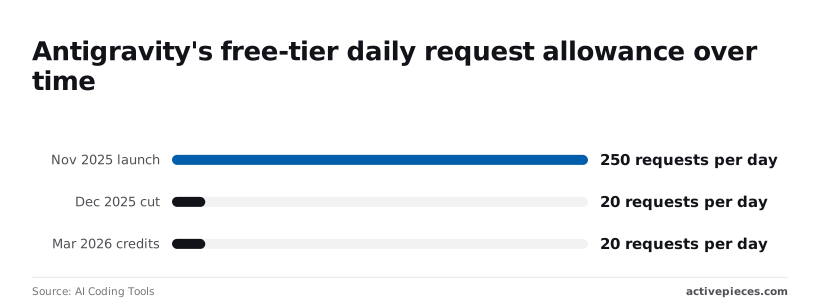 In every case the 70% is a share of a number you can see, so find that number first. ### Antigravity cost control setup checklist Each line below answers one gap from her month, and together they take about an hour to set up: - Set a budget ceiling for every person on the team, not one pooled number for the whole team. - Turn on a warning at 70% of quota, sent to the person using it and to whoever approves spend. - Name one fallback tool, with its login already working, so switching's a decision made in advance. - Re-read each vendor's pricing page once a month and log the date, so a changed limit shows up in your notes before it shows up on a bill. With those in place, her bill stops at the ceiling she set. Her downtime's the few minutes it takes to move to the fallback, not the wait for a quota to reset. ## Frequently asked questions Google's own Antigravity pricing page's the source to confirm against before you pay. ### Is Google Antigravity really free, and for how long? "Free" describes the entry price, not the quota, even though a free individual tier has been part of how Google introduced Antigravity. The limit is what you hit first, and Google hasn't committed to keeping it as is. Read the plan page for the current allowance and any stated end date, and budget as though the free tier could shrink. ### Who else can get access Can students or teams get Antigravity without a personal plan? Google has handled students, workspaces and organizations through separate offers rather than one universal plan. That means the personal price may not be the one you owe. If you work for a company or a school, check whether your Google account type already includes access. ### What happens at the limit, and when prices change Does Antigravity charge extra when I hit my limit? Verify whether the limit stops you or bills you. A hard stop costs you time and nothing else. Metered overage costs money without warning, which is worse for a month you can't forecast. Google's plan terms say which applies to your tier, so read that line before you start a long agent run. How often does Google change Antigravity pricing? Google doesn't publish a schedule. Assume quotas and plan contents can change between billing cycles. Re-reading the pricing page at the start of each month costs a few minutes and protects the whole budget. ### Choosing a plan Which Antigravity plan suits a solo developer? Pick the cheapest plan that survives your heaviest week. Count how many agent-heavy sessions you run, then compare that against each tier's stated limit on Google's page. If you never reach the ceiling, the lower tier wins. If you hit it regularly, the higher tier's cheaper than the hours lost waiting. ## Related reading - [Best AI Agent Builders for Sales Teams, Ranked](https://www.activepieces.com/blog/best-ai-agent-builders-for-sales-teams-ranked) - [Best AI Agent Builders in 2026: Ranked & Reviewed](https://www.activepieces.com/blog/best-ai-agent-builders) - [Best Lovable Alternatives: 5 AI App Builders for 2026](https://www.activepieces.com/blog/best-lovable-alternatives-5-ai-app-builders-for-2026) ## References - [US Bureau of Labor Statistics](https://www.bls.gov/news.release/ocwage.t01.htm) - [AI Coding Tools](https://aicodingtools.im/tools/antigravity/limits) - [dataku.ai](https://dataku.ai)No extra-usage charge appears in this month's math, so the bill looks cheap precisely because the real cost sits somewhere else.