# Google Calendar API: Setup, Quotas and Pricing (2026)
By Leah Goldberg · 2026-11-19 · Source: https://www.activepieces.com/blog/google-calendar-api-setup-quotas-and-pricing-2026
---
**You pay nothing** to call the Google Calendar API. It reads and writes events and calendar settings on behalf of a Google account, and it needs an OAuth consent screen before any call works.
## Google Calendar API capabilities
### What the API lets you do
You create, update, move and delete events, share calendars, check when people are free, and read account settings.
The same seven resources sit behind the API whichever way you call it, including from [Activepieces](https://www.activepieces.com), whose Google Calendar integration is one of the 750 in its MIT-licensed open source monorepo.

Before you write a call, match the task to the right resource; the list below shows what each one holds.
- Events: the individual meetings, with times, attendees and reminders.
- Calendars: the calendar objects themselves, such as title and time zone.
- CalendarList: the calendars a given user has added to their own view.
- Acl: the sharing rules that say who can see or edit a calendar.
- Freebusy: busy and free time blocks, without event details.
- Settings: the user's account-level calendar preferences.
- Colors: the colour palette available for calendars and events.
### What it costs and which account you need
If your users sit on a company domain, a paid plan matters; otherwise a free personal Google account is enough to call the API.
[Google Workspace](https://workspace.google.com/pricing?hl=en_uk&tab_activeEl=tabset-companies) lists Business Starter at $7 per user per month, Business Standard at $14 and Business Plus at $22, all on annual terms.
viz type=step title="What Google Workspace Business plans cost per user" unit="$ per user per month" source="Google Workspace - https://workspace.google.com/pricing?hl=en_uk&tab_activeEl=tabset-companies" xaxis="Workspace plan" yaxis="$ per user per month"2 or
For a ten-person team, that's $60, $120 or $180 a month for the accounts, and none of it's an API charge.
Prices change, so confirm them before you budget. The [Workspace](https://workspace.google.com/pricing?hl=en_uk&tab_activeEl=tabset-companies) prices come from Google's pricing page, and the resource definitions follow the [Google Calendar developer documentation](https://developers.google.com/calendar). Both were checked on 2026-11-19.
## Enabling the Calendar API in Google Cloud
Without a consent screen that lists you as a test user, Google refuses to issue a token. Enabling the Calendar API takes a Google Cloud project, one toggle in the API library, and that entry.
Follow the sequence below top to bottom and don't skip to credentials first.
1. Create a Google Cloud project.
2. Enable the Google Calendar API in that project.
3. Configure the OAuth consent screen and add test users.
4. Create the OAuth client ID credentials.
5. Download the client secret.
Create the project from the Cloud console's project picker, then open the API library, search for Google Calendar API and click Enable. Use a dedicated project for this integration, so a quota or credential problem can't spill into anything else you run.

### Configure the OAuth consent screen
Choose the external user type unless every user sits inside your own Workspace organization. Fill in the app name and support email, add the calendar scope you need, and list every Google account that will test the app.
While the app is in testing, only those accounts can authorize it, and its refresh tokens are short-lived. Users who aren't listed get an access-blocked error, and your own tokens will lapse and force a fresh sign-in.

### Create an OAuth client ID or a service account
If the calendar belongs to a user, skip the API key, because it only reads public data and can't touch a private calendar. Create an OAuth client ID, choose the application type that matches your app, and download the client secret JSON.
For a calendar your own system owns, use a service account instead, and share that calendar with the service account's email address, or it will see nothing.
## Authentication choices compared by use case
Pick OAuth 2.0 user consent for a script or SaaS product that touches people's own calendars, so you won't directly store users' passwords.
Use a service account with domain-wide delegation for a tool running inside one Workspace organization, and skip API keys for anything that writes events.
Look at the table for the reason: only one row combines private calendar access with a consent screen your users actually see.
| | OAuth 2.0 user consent | Service account with domain-wide delegation | API key |
|---|---|---|---|
| Data reachable | The signed-in user's own calendars | Any user's calendars in the domain, by impersonation | Public data only |
| Who consents | Each user, on the consent screen | A Workspace admin, once, for the whole domain | Nobody |
| Scopes | Requested per user at sign-in | Allow-listed by the admin, then requested per call | None |
| Workspace admin needed | No, unless the domain restricts third-party apps | Yes | No |
| Token refresh | Refresh token, stored per user | Your code signs a new token on demand | Nothing to refresh |
| Sensitive-scope verification | Required for public apps | Not applicable; the admin's approval replaces it | Not applicable |
_Prices and plan limits checked against [docs.claude.com](https://docs.claude.com/en/docs/about-claude/models/overview) and [claude.com](https://claude.com/pricing) and [openai.com](https://openai.com/chatgpt/pricing) and [gemini.google](https://gemini.google/subscriptions) on November 19, 2026._
For a script or a SaaS product, OAuth 2.0 is the default. Each user approves access, you store a refresh token per user, and a revoked grant surfaces as an error you must handle.
Calendar scopes count as sensitive, so a public app needs verification before the "unverified app" warning goes away.
Use a service account when you control the whole domain. There's no per-user consent screen, but an admin must allow-list the scopes, and a mistake there grants broad reach across every mailbox owner's calendar.
Don't expect an API key to do more than identify your project for quota purposes. It can read public calendars and can't insert an event.
Request the smallest scope that does the job. An app that only creates events needs the events scope, not full calendar access, and a narrower request means less to justify during verification and less exposed if a token leaks.
## A minimal working request that creates an event
Send one POST to `events.insert` on the `primary` calendar, carrying a summary, a start and an end.
### Calendar API event request endpoint and token
Send the request to `https://www.googleapis.com/calendar/v3/calendars/primary/events`. Use a bearer token whose scope covers event writes. `primary` resolves to the authorizing user's own calendar, so you never look up a calendar ID for this first call.
```json
{
"summary": "Escalation review",
"start": { "dateTime": "2026-12-03T14:00:00", "timeZone": "America/Chicago" },
"end": { "dateTime": "2026-12-03T14:30:00", "timeZone": "America/Chicago" }
}
```
Always set `timeZone` as an IANA name. Without it, the event can land in the wrong zone for a user who travels.
When the insert works, Google returns HTTP 200 with the full event resource. Store `id` and `htmlLink`. The `id` is your only handle for later updates and deletes, and `htmlLink` is the URL you can put in a confirmation email.
A 200 means the event exists, so there's no reason to retry. Retry after a 200 and you create a duplicate.
### Optional Calendar API event fields
- `attendees`, with `sendUpdates` set to control whether guests get an email
- `conferenceData`, which needs `conferenceDataVersion` on the request to create a Meet link
- `reminders`, to override the calendar's default alerts
- `recurrence`, for repeating events
- your own `id`, which makes a retried insert fail with a conflict instead of duplicating
Of the five, the last costs nothing and prevents the most common calendar mess.
## Calendar API quotas and limits
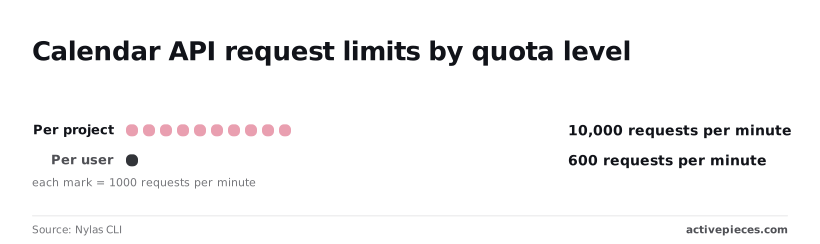
Two numbers cap you per minute: 10,000 requests per project and 600 per user per project, so **which one you hit first depends on how many users are active**.
On Cloud projects created on or after May 1, 2026, both quota figures apply. Both come from [Nylas CLI](https://cli.nylas.com/guides/google-calendar-api-quotas), checked on 2026-11-19. The gap between the two limits means your whole project budget can be spent by about seventeen users each running flat out.
### Calendar API per-project and per-user quotas
Because every user your app serves shares it, the 10,000 requests per minute project ceiling measures total load. The 600 per minute per-user figure measures one account's load.
When a single user runs a bulk import, that user can be throttled while the rest of your users are untouched. A sync job that loops through one person's calendars needs its own pacing, however small your overall traffic is.
**Whatever plan you are on, neither quota changes**. There's no paid tier that raises them, so the Calendar API stays free to call, but **you can request a quota increase**. If you need more, you ask for it, which the last subsection covers.
Whatever plan you are on, the Calendar API stays free to call, and you can request a quota adjustment, though approval isn't guaranteed.
### Calendar usage limits beyond quota
Even with quota to spare, a request can be refused. Google also applies calendar usage limits, which restrict how fast you can create or change events on a calendar, however much quota you have left.
I don't have a documented figure for these that I can verify, so I won't print one.
While your quota dashboard still shows spare capacity, a burst of inserts into one calendar can fail. Spread writes out, and treat a rate-limit error as a signal to back off, not as proof that you've exhausted quota.

### Check Calendar API quota usage in Google Cloud
Open the Google Cloud console, go to APIs & Services, select Google Calendar API, and open its Quotas tab.
It shows your current usage against the limits above, so you can see how close you run to 600 per user before a real user finds out.
From the same page you can request a change to a limit. Do that before launch, not after the first wave of errors, because a request is reviewed and not applied instantly.
## Common Calendar API errors and solutions
Bad or expired credentials, quota limits, stale local state, Google-side failures: most Calendar API errors fall into one of those four groups.
Only some of them are worth retrying, and the table below shows which.
| Status | Reason | Cause | Fix | Retry |
|---|---|---|---|---|
| 400 | badRequest, invalid | Malformed body, bad date format, missing time zone | Correct the payload | No |
| 401 | authError, invalid credentials | Expired or revoked access token | Refresh the token; if refresh fails, re-consent | Once, after refresh |
| 403 | forbidden | Missing scope, or no access to that calendar | Request the right scope or share the calendar | No |
| 403 | rateLimitExceeded | Project-level request rate too high | Slow down, back off | Yes |
| 403 | userRateLimitExceeded | One user is sending too fast | Spread calls out per user | Yes |
| 404 | notFound | Wrong event or calendar ID, or it was deleted | Verify the ID | No |
| 409 | duplicate | An event with that ID already exists | Fetch the existing event instead | No |
| 410 | fullSyncRequired, deleted | Sync token expired | Clear local data and run a full sync | After resync |
| 429 | rateLimitExceeded | Too many requests | Back off with jitter | Yes |
| 5xx | backendError | Google-side failure | Retry with backoff | Yes |
### Auth errors: 401 and 403 forbidden
When you get a 401, the access token is dead, so refresh it and replay the call once. If the refresh itself fails, stop and send the user back through consent.
If an app is left in testing mode on the consent screen, its refresh tokens expire after a short window, so "it worked last week" is a common symptom there. Publish the app before real users arrive.
A plain 403 forbidden is different: retrying never fixes a missing scope or an unshared calendar.
### Quota errors: 403 and 429 with backoff
Check the reason field and not just the status, because Google returns quota problems as either 403 or 429. Retry with exponential backoff plus random jitter, so a batch of failed calls doesn't all return at the same instant and trip the limit again.
Better still, spread bulk writes over time and keep each user's calls on their own pace.
### Sync and state errors: 404, 409, 410
If an incremental sync returns 410, your sync token is gone. Discard your cached events and run a full sync to get a fresh token. To stop polling altogether, use push notifications, which tell you when a calendar changed so you only fetch then.
Supply your own event ID twice and you get a 409, which also makes it a handy idempotency check. A 404 on an event you just created often points to the wrong calendar ID.
When a 5xx comes back, the problem is Google's, not your payload's, so retry with the same backoff and jitter used for quotas, and cap the attempts. After the cap, queue the job and alert someone.
Never retry 400, 403 forbidden, 404 or 409 in a loop, because the answer won't change and you only burn quota.
## Create Google Calendar events without code in Activepieces
To create Google Calendar events without code, chain a trigger to a create-event action in Activepieces, an MIT-licensed open-source automation tool whose Google Calendar integration sits in the public monorepo under `packages/pieces/community`.
It calls the same Calendar API, so the same Google quotas and error codes apply.
Start with a new form row as the trigger and a create-event action with the Google OAuth connection attached, with Google's quotas still applying underneath. Take from it that the tool replaces your code, not Google's limits.
Test Activepieces' failed-run handling before you trust it. That matters given the rule about never retrying 400, 403, 404 or 409. Run a deliberately bad row through and see what happens to it.
Instead of building a request body, you map form fields to event fields, because the Activepieces Google Calendar integration has actions that create and update events through the same API you would otherwise call yourself. You still decide the calendar, the times and the attendees.

That integration is one of the 750 counted straight from the MIT-licensed open source monorepo, under `packages/pieces/community`, so the code behind each action is readable rather than described.
It does the consent screen and the connection for you: you sign in with Google once and the connection is stored for every flow that uses it.
When to stay with direct calls: bulk imports, anything needing per-error branching, and any job where you want to control backoff yourself.
On the Google side, the Calendar API itself is free to enable. You need an account that owns the calendar you are writing to, and a Workspace admin may restrict which apps can connect.
On the Activepieces side, every plan including the free one has unlimited flows, and the free plan includes 1,000 credits a month, with a run costing 1 credit however many steps it has.
You will find no figures in this section. Quota numbers are Google's, and you should read them from your own project's quotas page in the Google Cloud console, since they can differ by project.
The Activepieces behavior described here is what the integration offers as of 2026-11-19; confirm it in the integration's own documentation before you build on it.
## Frequently asked questions
### Is the Google Calendar API free to use?
Yes, Google doesn't charge per call for the Calendar API, and enabling it in your Cloud project costs nothing.
The limit is quota, not price: usage caps apply per project and per user, so a burst of inserts can fail with rate errors long before a bill appears.
Check the current quota page in Google's docs before you size a bulk job.
### Can I use the Google Calendar API without OAuth?
Only for public data. An API key can read a calendar that is shared publicly, but it can't touch a private calendar or write anything.
**Creating events on someone's behalf needs OAuth consent**. A service account is the other route, and it works when the target calendar is explicitly shared with it or when a Workspace admin grants domain-wide delegation.
**Does the API create Google Meet links?** Yes. Include a `conferenceData` object with a `createRequest` when you insert or update the event, and set the `conferenceDataVersion` request parameter so Google processes it.
Leave that parameter off and the request succeeds, but no link appears. Nothing errors, so it's easy to miss in testing.
**How do I get notified of changes instead of polling?** Use push notifications: call `events.watch` with an HTTPS address you control, and Google posts to it when the calendar changes.
The ping carries no event details. Treat it as a signal, then fetch the changes using a sync token.
Watch channels expire, so schedule a renewal. Otherwise your webhook goes quiet without any error.
### Why does my refresh token stop working after a week?
Most likely your OAuth consent screen is still in Testing status. Google expires refresh tokens issued to testing apps after a short window, so users get an `invalid_grant` error and have to consent again.
Move the app to In production and the tokens stop expiring on that schedule. Scopes that Google classes as sensitive may then trigger a verification review, so start it early.
## Related reading
- [Google Docs API Rate Limits for Developers (2026)](https://www.activepieces.com/blog/google-docs-api-rate-limits-for-developers-2026)
- [Create Weekly Google Calendar Events Automatically](https://www.activepieces.com/blog/create-weekly-google-calendar-events-automatically)
- [Zoom Google Calendar Integration: How to Set It Up](https://www.activepieces.com/blog/zoom-google-calendar-integration-how-to-set-it-up)
## References
- [Google Workspace](https://workspace.google.com/pricing?hl=en_uk&tab_activeEl=tabset-companies)
- [Nylas CLI](https://cli.nylas.com/guides/google-calendar-api-quotas)