### Generative processors and page limits Which processor you call changes with generative processors and Workbench, not the per-page logic. Price them as their own line, not as a variant of the extractor. Go over a request's page limit and the file must be split, which means more calls and more chances to re-run pages. Splitting a file is the disciplined fix, and [Activepieces](https://www.activepieces.com) doesn't charge you for doing it properly: a flow run is 1 credit whether it holds two steps or ten, so the split, the duplicate check and the retry branch cost the same as the shortcut they replace, whereas Zapier's per-task billing counts each of them. Google still bills every page processed, retries included, and that is the meter to watch. ## Cost per page at monthly volumes Whatever your workflow tool does before the call, the bill is still pages times the rate of the processor you chose. At 100,000 pages that rate moves the total from $150 to $3,000, so costs don't scale linearly. Read these figures as arithmetic, not quotes: they come from Google's published per-1,000-page rates. They assume every page is processed once with no add-ons, retries or volume discounts. ### Document AI pricing at 1,000 pages per month At 1,000 pages, OCR costs $1.50, the invoice processor $10, and Form Parser and a custom extractor $30 each, per [Google Cloud's pricing page](https://cloud.google.com/document-ai/pricing). 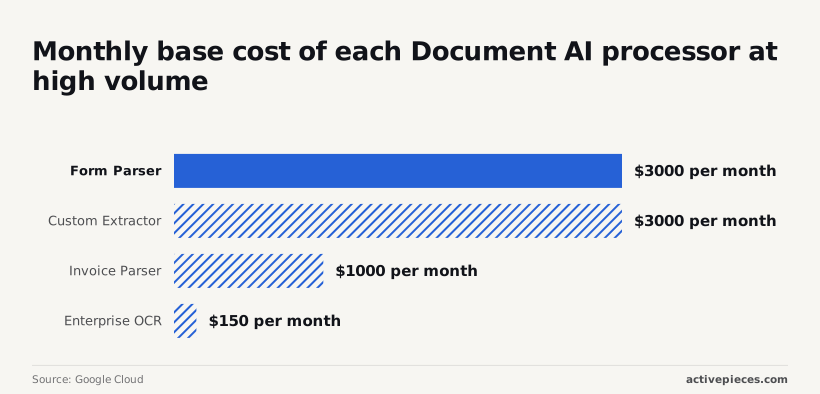 Even the dearest option is the price of a lunch, so at this volume accuracy and build time should decide the processor, not cost. ### Mid volume: 10,000 pages At 10,000 pages, OCR costs $15, the invoice processor $100, and Form Parser and a custom extractor $300 each. The $285 gap between OCR and Form Parser is now a line item someone will ask about.  If you only need text from clean scans, paying $300 for field extraction you discard is waste. If you need key-value pairs, the cheaper OCR route means writing your own parsing code, and an engineer's hours will outrun the $285 quickly. Across all three volumes the bars scale in lockstep. *(chart)* ### High volume: 100,000 pages and committed discounts At 100,000 pages, Enterprise OCR costs $150 a month. The invoice processor costs $1,000, which is nearly seven times as much for pre-built invoice fields, yet only valuable if your invoices fit the model.  At $3,000 each, Form Parser and the custom extractor run twenty times the OCR bill. That means a pipeline that sends every page to Form Parser by default is paying $2,850 a month for structure that many pages never needed. Route instead of haggling. **Send plain-text pages to OCR and only the forms to a costlier processor.** A 30% form share cuts the Form Parser-only bill from $3,000 to $1,005 (30,000 pages at $30 per 1,000 plus 70,000 at $1.50 per 1,000). Until you have the terms in writing, I wouldn't count on committed-use discounts lowering these rates further. ## Additional charges beyond page pricing On the invoice, the page price is only one line, and five other items can each outgrow it: - OCR add-ons at $6 per 1,000 pages - Re-processed files, billed again - Custom model training and hosting - Human review - Surrounding Cloud storage and compute charges ### Add-ons and custom model hosting At $6 per 1,000 pages, an add-on is $0.006 a page. Enabled on every page of a 200,000-page month, it adds $1,200 to a bill you may have budgeted from the base rate alone. Enable add-ons only on the document types that need them. Leave a custom model idle and it still costs money, because training and hosting a deployed version are separate charges from per-page processing. Human review has its own price, and it scales with how many documents you route to people. Treat every re-run as a new billed request. A pipeline that resubmits a file after a parsing bug, or reprocesses an archive after a schema change, pays for those pages twice. Budget a re-run rate in your monthly estimate. Google's docs don't give a standard rate for retries, so measure your own over a trial month. ### Quotas: pages per request, requests per minute How much splitting code you write is decided by page limits per file. According to [Google's limits page](https://docs.cloud.google.com/document-ai/limits), Form Parser accepts [100 pages per file](https://docs.cloud.google.com/document-ai/limits), so a 350-page contract needs four files. 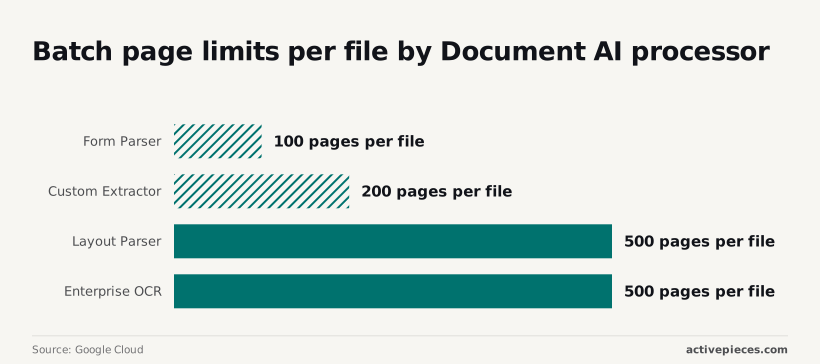 For that same contract, Custom Extractor's [200 pages per file](https://docs.cloud.google.com/document-ai/limits) still means two files. Layout Parser and Enterprise OCR each take [500 pages per file](https://docs.cloud.google.com/document-ai/limits), so the contract goes through whole. You pay for the same page count however you split, but splitting adds orchestration and more places for a failed chunk to trigger a re-run. Requests-per-minute quotas are set per processor and can differ by project. Check yours before a bulk backfill, because throttled requests that you retry feed straight into the re-run cost above. Cloud Storage, compute and the database or warehouse where results land don't appear under Document AI. Add storage, compute and egress to the per-processor estimate, or the comparison with another vendor will flatter Google. ## Document AI versus Textract, Azure and Mistral OCR Among the four, Document AI isn't reliably the cheapest or the dearest. Each vendor splits its price differently, so the comparison only holds when you match the same job, not the same headline rate. To see where a like-for-like comparison breaks, read the table below for how each vendor bills. The one figure it carries is Mistral's, because it's the only vendor here that publishes a single OCR rate. Fill the other cells from each vendor's own pricing page. | | Plain OCR per 1,000 pages | Forms/tables | Invoices | Free tier | Custom billing | Check date | |---|---|---|---|---|---|---| | Document AI | Separate OCR processor | Form parser processor | Dedicated invoice processor | Read the pricing page | Per-page extraction, plus hosting for deployed custom models | Stamp your own | | Textract | Text-detection API | Analysis API with tables and forms features | Separate expense API | Read the pricing page | Custom queries and adapters, billed on top | Stamp your own | | Azure Document Intelligence | Read model | Layout model | Prebuilt invoice model | Read the pricing page | Custom models billed per page | Stamp your own | | Mistral OCR 4.1 | $4 standard, $2 batch | Same OCR call, with structured output | No dedicated invoice model | Read the pricing page | No custom-model tier in the table | Stamp your own | If the backlog can wait overnight, it costs half as much as the same pages sent live, because Mistral's batch rate is half the standard one. An upload form with a user waiting can't use it. For plain text, Mistral's $4 is the only price you can read straight off the page. The other three bill plain OCR as one product among several, so their cheapest line is the right comparison only if your documents truly need nothing else. ### Invoice and form processor pricing compared Here the vendors diverge. Document AI, Textract and Azure each sell a dedicated invoice model, billed apart from plain OCR. Without a dedicated model at Mistral, you pay the OCR rate and then write and maintain the field-mapping yourself. That saves money on the invoice and costs engineering hours at month's end. Price the hours too, or the cheap rate will mislead you. ### Custom processor hosting fees and free tiers Where custom models are involved, a flat per-page comparison fails. Document AI charges for hosting a deployed model on top of page fees, so a low-volume month can cost more per page than a busy one. When you're prototyping, a free tier is worth the most, and once volume is steady it is worth the least, so use it to test accuracy, not to choose a vendor. Run your own page mix through each row, and let that month decide the ranking. ## Cost optimization and automation Cut the bill by matching each document type to the cheapest processor that passes your own accuracy test, then stopping repeat runs and capping spend. Do these five things on Monday, in order: 1. Run a 50-document sample through each candidate processor, using real files from your own queue. 2. Pick the cheapest processor that meets your accuracy bar on that sample. 3. Block duplicate re-runs, so the same page is never billed twice. 4. Set budget alerts and quotas on the project. 5. Recheck the pricing page, then put the next check on a calendar. ### Test Document AI processors before committing You can label fifty documents by hand in an afternoon, and fifty is large enough to expose a processor that fails on your scans while acing the vendor's demo. Score each processor on the fields you actually use downstream, not on overall impressions. If a cheaper general processor extracts those fields correctly, the specialized one is a premium you pay for nothing. For re-runs, store a hash of each file and the processor version you used. Check it before every call. A page that failed because of a downstream bug should be reprocessed from the saved output, not sent back to the API and billed again. ### Set Document AI budget alerts and quotas Know the difference: an alert tells you the month is drifting, and a quota stops it. Set both, because an alert on its own depends on someone reading email before a runaway loop finishes. Set the alert thresholds below your planned monthly spend so you get warning while there's still room to react. Set the quota just above your realistic peak so a bug hits a wall instead of your invoice. ### Where Activepieces fits around Document AI Around the extraction call, not inside it: Activepieces has 747 integrations and an MIT-licensed core, so the steps on either side of Document AI are already there to connect. A flow can watch a folder, check the duplicate hash, call Document AI, and route low-confidence results to a person for an approval step before anything reaches your accounting system. Where Activepieces earns its place is the approval gate, because it catches the errors your accuracy test predicted, and the free plan, at 1,000 credits a month with unlimited flows, is enough to run that 50-document sample through it before you pay for anything. Activepieces doesn't change what Document AI charges, so keep the quotas in Google Cloud. ## Frequently asked questions Because quotas cap your throughput, not your invoice, the questions that move the bill are the ones below. Google revises its rates, so confirm each answer against the current pricing page before you budget. ### Does Google Document AI have a free tier? Not as a standing per-page allowance that I can confirm for any processor. New Google Cloud accounts get trial credit, but that credit is attached to the account, not to Document AI. It'll cover a proof of concept, then stop, so don't build a steady-state budget on it. Price your first production month as if the credit didn't exist. ### Is Document AI billed per page or per document? Per page for the document processors, which means a 40-page contract costs forty times what a one-page receipt does. Counting documents gives you the wrong denominator. Count pages, and use your longest realistic files in the estimate, because averages hide the outliers that carry the cost. **Custom models add charges beyond pages**, such as training and keeping a deployed version hosted, so a custom processor needs its own line in the estimate. ### Can I get a discount on Document AI for committed volume? Volume pricing exists, and Google has published lower per-page rates once usage passes a threshold for some processors. Whether a given threshold applies to your processor, and whether it resets monthly, is exactly what you should read off the pricing page, not assume. Be wary of any tier you can only understand by booking a call. If the rate for your volume isn't published, treat the unpublished price as unknown and leave it out of your comparison until someone puts a number in writing. ### Which Document AI processor is cheapest for scanned PDFs? Of the general processors, plain OCR is the least expensive per page, because it only reads text and doesn't extract structure. That advantage disappears if you then need tables or key-value pairs, since the specialised parsers charge more per page. Enabling OCR add-ons also raises the rate. Compare on the output you need, not on the lowest line in the table. ### Do I pay for pages that fail to process? **Requests that return an error aren't generally billed**, but a request that succeeds with unusable output is billed in full. The second case is the expensive one: a badly scanned page that comes back garbled costs you once, and costs you again when you re-run it. Budget for a re-run rate, and fix scan quality before you pay to repeat the work. ## Related reading - [Ultimate Guide: Automating Document Creation in Google Docs from Clickup Tasks](https://www.activepieces.com/blog/clickup-tasks-to-google-docs) - [Azure Document Intelligence Pricing per Model in 2026](https://www.activepieces.com/blog/azure-document-intelligence-pricing-per-model-in-2026) - [ContextGem: Document Data Extraction Guide (2026)](https://www.activepieces.com/blog/contextgem-document-data-extraction-guide-2026) ## References - [Google Cloud](https://cloud.google.com/document-ai/pricing) - [Google Cloud](https://docs.cloud.google.com/document-ai/limits)Because the custom extractor also costs $30 per 1,000 pages, training your own model buys flexibility, not a discount.