### LinkedIn Premium InMail and search limits You will usually hit the plan's ceiling in outreach and search, not in features. InMail credits, the messages to people outside your network, are capped each month, and unused credits only partly carry over. Commercial-use search limits apply to heavy profile searching and can restrict anyone prospecting for clients. Check the current limits on your plan's page before committing, since they've changed and secondary sources disagree. Someone who sends outreach all day will hit these caps before anyone else, and the cheaper plan's cap is then the real price. ### LinkedIn Premium auto-renewal and cancellation traps If you bill monthly for a two-month search, the plan keeps charging until you cancel, because plans renew automatically. Annual terms are worse: a missed cancellation date means another $239.88 for the job seeker, so the job seeker who misses it loses that amount. Put the cancel date in your calendar on day one.  Prices also vary by region and by promotion, so the figures above are a US-dollar baseline rather than what every account will see. Confirm the amount at checkout before you enter a card. ## LinkedIn Premium compared with the closest alternatives **Cheapest does not mean most useful**: Premium Business is the cheapest of these tools, but it buys the least, which is more visibility on LinkedIn, not lead lists, verified contact data or per-seat contracts. The table shows how the options differ, so match the column that matters to your invoice, not the headline price. | Option | Price per seat | Contact data | Search depth | Outreach limits | Contract terms | |---|---|---|---|---|---| | Premium Business | Shown at checkout | Only what members share | Standard search with extra filters | Monthly InMail allowance | Monthly or annual | | Sales Navigator Core | Shown at checkout | Only what members share | Lead and account search with saved lists | Larger InMail allowance | Monthly or annual | | Free account | None | Only what members share | Basic search | Connection requests only | None | | Apollo (3 tiers) | Rises with each tier | Emails and phone numbers outside LinkedIn | Database search by role and company | Sequences, scaled by tier | Tiered plans | | Lusha | Per seat | Emails and phone numbers by credit | Lookup-oriented | Few built-in tools | Credit-based plans | | ZoomInfo | Quoted by sales | Deepest of the group | Deepest of the group | Built into the platform | Negotiated contracts | If you need an email or phone number, only the last three rows give you one, so that is where the real cost starts. Each tool is detailed below. ### Sales Navigator versus Premium Business Sales Navigator Core is built for selling: saved lead lists, account alerts and deeper filters. Premium Business is built for looking people up. If you prospect daily, Core pays back. If you check ten profiles a week, you're paying for search depth you never use. On a shared team login, one heavy user also drags the rest along, so price per seat, not per account. ### Job-search tool costs versus LinkedIn Premium Job tools charge monthly. [Jobhawk's price roundup](https://jobhawk.app/blog/what-job-search-tools-cost) puts Teal+ at 29 USD, Huntr Pro at 40 USD and Jobscan at 49.95 USD. Teal+ is the cheapest of the three, and it costs less than Huntr Pro by 11 USD a month.  Jobscan, which scores your résumé against a posting, runs about 150 USD over a three-month search, so cancel it when the search ends. When it comes to contract terms, contact-data tools differ most. Apollo and Lusha sell self-serve plans, while ZoomInfo is quoted by sales, so budget for a negotiated term, not a card swipe. Free is enough when you're not messaging strangers. A complete profile, applications through the job board and replies from existing connections cost nothing. Pay only when a specific limit, such as a missing InMail or a hidden viewer list, blocks work you can already name. ## Fix manual lead handoff from LinkedIn with Activepieces If the work you can name is retyping contacts, that's a handoff problem, and Activepieces fixes the handoff, not the subscription. It chains steps together across 747 integrations, counted from its open source monorepo, and it starts working once a lead is already in a system you control. Built to categorize HubSpot support tickets, the workflow below fires a HubSpot trigger on each new ticket, two AI steps rewrite and categorize it, a router splits it into branches with an "Otherwise" fallback, and three steps send messages to Slack, which means every new support ticket is automatically sorted and routed without manual intervention. 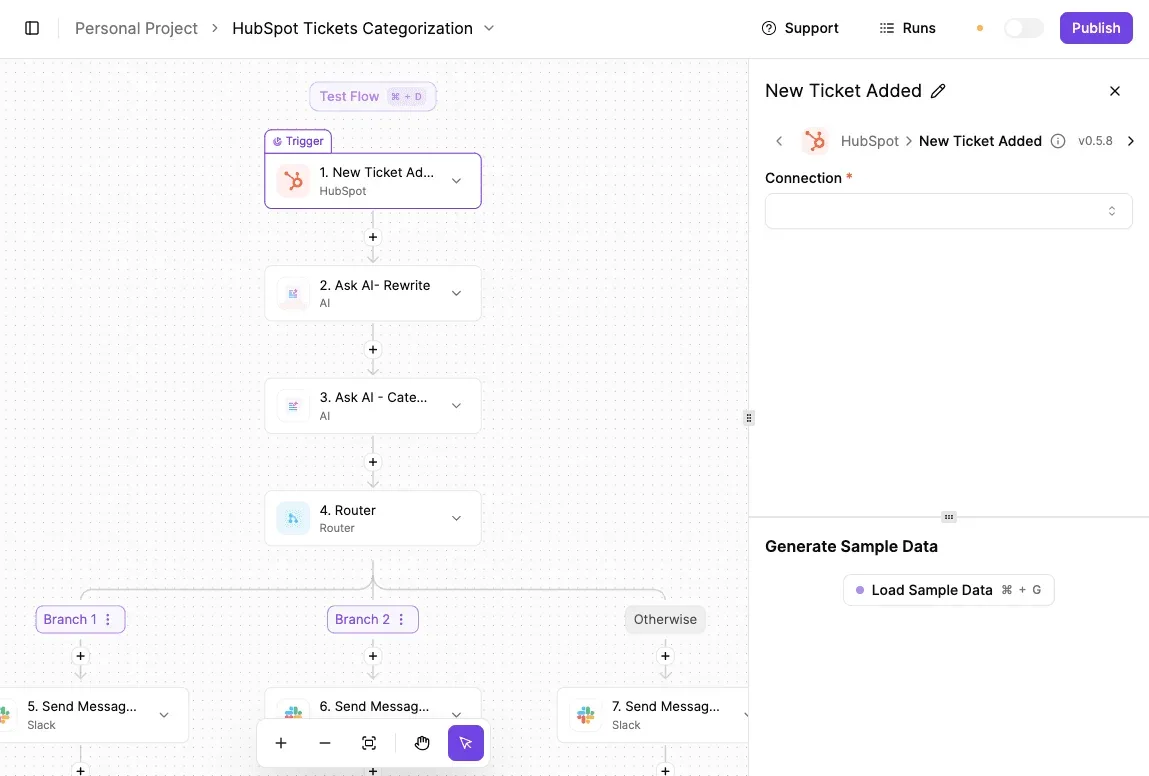 Swap the ticket for a lead and the structure holds: a contact lands in the CRM (customer database), the AI steps tidy the notes and tag the lead, the router assigns an owner, and Slack tells that person. Renewal reminders for your own subscription follow the same trigger-and-notify pattern. Activepieces' published pricing page lists 1 credit per flow run, any number of steps, so that router, those two AI steps and three Slack messages cost the same single credit (AI steps are the exception, priced higher), and the free plan carries 1,000 credits a month with unlimited flows.  Zapier's pricing page bills per task and Make's pricing page per module, so the same flow costs more on each of them with every step you add. What it can't do is reach into LinkedIn and pull profiles out. LinkedIn's User Agreement prohibits bots and scrapers that automate activity on the site, so build only from the point where a lead is saved or entered by a person. Check what your plan syncs to a CRM before you build anything. If Sales Navigator already pushes saved leads into your CRM, let it, and use Activepieces for what happens next: routing, reminders, alerts, which fit inside the Plus plan at $20 a month flat with 10,000 credits.  If your plan lacks that sync, you're paying for lead tools and still funding a manual step. On a shared agency login, that step is also where one client's lead volume quietly gets absorbed by the account holder's hours. ### Third-party LinkedIn contact-data tools and risks The common shortcut is browser extensions that harvest contact details from profiles, and they sit on the wrong side of the same automation rule. The risk lands on the account that runs them, which means a restricted login can stall every client on a shared seat. A data provider with its own API, connected to Activepieces, where roughly 60% of the integrations are community-contributed, keeps the automation off LinkedIn entirely. You still pay that provider, so put its fee on the client's invoice rather than absorbing it. If you save only a handful of leads in a week, pasting them into a sheet by hand costs less than building and maintaining a workflow. Automation pays back when the same copy-paste repeats daily across several people. Below that, the free tier plus a shared spreadsheet is the honest answer, and no flow builder changes that. ## Monday checklist before paying for LinkedIn Premium Above that line, LinkedIn Premium earns its fee only if you can name the one job it does, and every check below measures against that job. Run these steps in order, because each one is cheaper to fix before money moves than after. ### Checklist before starting the LinkedIn Premium trial Though the trial is free, the card on file turns it into a paid plan on a date you won't remember. Treat the first two steps as the setup, so that the trial tests one purpose instead of becoming a month of browsing. 1. Name the one job. Write one sentence: find a role, book sales meetings, source candidates or widen a network. If you write two jobs, you're shopping for a bundle you won't use, and the plan that fits one job will look overpriced against the other. 2. Set a reminder before the trial converts. Put it in your calendar a few days ahead of the conversion date, with the cancel path in the note. A reminder on the day itself is too late to decide anything. Once the trial is running, spend it only on the job from step 1, so you have real usage to price at renewal. ### Checklist before LinkedIn Premium first renewal Unless you use the plan for most of the year, the annual discount doesn't pay back. Billing terms matter here more than the headline price, so read what you agreed to, not what you remember. 3. Compare the annual price to the months you'll actually use. A job search often ends in a few months. If yours might, the monthly plan can cost less per month used than the annual plan you're not using by month six. 4. Count the InMails you need against your plan's monthly allowance. Tally the messages you sent during the trial and the replies you got. If you came nowhere near the allowance, you paid for capacity that sat idle. If you ran out, the cheaper tier was the wrong choice. 5. Review seats at renewal. On a team account, list who logged in and did the job. An idle seat is a cost another person's usage quietly covers, and it usually belongs on the invoice of whoever isn't using it. 6. Record the check date. Write down the day you verified prices and allowances, next to the figures you relied on. Prices and limits vary by plan and country, so re-verify them on LinkedIn's own Premium pricing page rather than from this article. With the date on file, the next renewal review starts from a baseline instead of from memory. ## Frequently asked questions The date you put on file is the date every answer below turns on, because refunds, trials and plan changes all key off it. Read the last column before you budget around any row. The table gives the short answer for each billing question and says whether LinkedIn's own wording has been confirmed. | Topic | Short answer | What LinkedIn's help page says | Verified or unverified | |---|---|---|---| | Refunds | Assume none once a renewal posts. | Billing help covers refund handling, but its conditions are not reproduced here. | Unverified | | Student pricing | Don't plan around a discount. | Any education offer would be described on LinkedIn's own pricing pages, which vary by region. | Unverified | | Switching plans mid-term | Treat the switch as a new purchase until you see the billing screen. | Plan changes are managed in account settings. | Unverified | | Free trial and later charges | The trial converts to a paid plan unless you cancel first. | Trial terms are shown at sign-up. | Unverified | ### What the table leaves unconfirmed Nothing in the table is confirmed, so confirm each row on your own billing screen before it goes into a budget. What follows explains why each one matters. ### Job search and refunds Is LinkedIn Premium worth it for a job search? Yes, if the search has a defined window and you cancel on the date you logged. The cost is the months the plan sits idle after you've landed interviews, not the monthly price, and those months are the ones to avoid paying for. Can I get a refund on LinkedIn Premium? Plan on no refund once a renewal has posted. Any exception depends on LinkedIn's billing support and your region, and I haven't verified the terms. A missed cancellation date therefore costs the full term, which is why the renewal date comes first. ### Discounts and plan switching Is there a student or nonprofit discount? I can't confirm one, so don't price it in. If you're a student, check the pricing page for your region before paying list price. If you're buying for a nonprofit team, ask whether anyone on the team is already paying personally, because those are seats you'd otherwise fund twice. Can I switch between Premium plans mid-term? Assume a switch is billed as a fresh purchase until the billing screen shows otherwise. Moving to a higher plan to use one feature for a single project is the move to question, because you may be paying for the whole tier when you need one capability.  ### Free trials Does LinkedIn Premium come with a free trial? A trial is offered at sign-up for many accounts, but the offer varies by account and region, so check yours. Treat it as a paid plan with a delayed first charge. The card on file is billed unless you cancel before the trial ends, so set the reminder the day you start. ## Related reading - [Speechify Pricing Plans in 2026: Free vs Premium Cost](https://www.activepieces.com/blog/speechify-pricing-plans-in-2026-free-vs-premium-cost) - [TickTick Pricing in 2026 for Free and Premium Plans](https://www.activepieces.com/blog/ticktick-pricing-in-2026-for-free-and-premium-plans) - [LinkedIn API Access, Limits and Errors in 2026](https://www.activepieces.com/blog/linkedin-api-access-limits-and-errors-in-2026) ## References - [Linkediz pricing data](https://www.linkediz.com/api/pricing.csv) - [Fastapply, Jobhawk, Itechguides](https://jobhawk.app/blog/what-job-search-tools-cost) - [Linkediz](https://www.linkediz.com/linkedin-premium)An unused seat on an annual term is paid for in full, so someone is subsidizing it.