# How Much Is Microsoft Office? 2026 Price Guide
By Marielos Chévez · 2026-11-10 · Source: https://www.activepieces.com/blog/how-much-is-microsoft-office-2026-price-guide
---
Microsoft Store reports that the cheapest Microsoft Office plan is Office Home 2024 at a one-time $179.99 for one person.
The alternative is Microsoft 365 Personal at $99.99 a year if you want updates and storage, which matters for anyone who keeps files synced across devices or feeds documents into [Activepieces](https://www.activepieces.com) workflows.

For businesses, Business Basic at $7 per user per month is the cheapest tier, but only if nobody needs desktop apps. Microsoft, and Sherweb, most teams will exceed it immediately.
Microsoft Office is the suite of Word, Excel, PowerPoint and Outlook, sold either as a one-time purchase or as a Microsoft 365 subscription.
Prices were checked against Microsoft's pages on 2026-11-10.
| Plan | Monthly | Annual | Desktop apps | Storage | Copilot | Usage limits |
|---|---|---|---|---|---|---|
| 365 Personal | $9.99 | $99.99 | Yes | 1 TB | Included, with monthly AI credits | One person |
| 365 Family | $12.99 | $129.99 | Yes | 1 TB each | Included, with monthly AI credits | Up to six people |
| 365 Premium | $19.99 | $199.99 | Yes | 1 TB | Included, higher AI limits | One person |
| Office Home 2024 | One-time $179.99 | None | Yes, no updates | None | No | One PC or Mac |
| Business Basic | $7 | $84 | Web and mobile only | 1 TB | Copilot Chat only | Per user |
| Business Standard | $14 | $168 | Yes | 1 TB | Copilot Chat only | Per user |
| Business Premium | $22 | $264 | Yes | 1 TB | Copilot Chat only | Per user |
Business annual figures are twelve months of the monthly price.
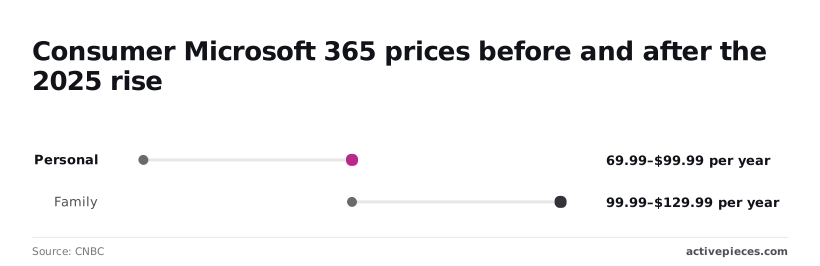
$30 more for the same apps is what a solo user now pays: [CNBC](https://www.cnbc.com/2025/01/16/microsoft-raises-price-of-consumer-microsoft-365-first-time-since-2013.html) reported Personal rising from $69.99 to $99.99 a year.
Family went from $99.99 to $129.99, which is about $21.67 per person if six people share it, and far less than six Personal plans.
During year two, Office Home 2024 beats Personal, because it costs $179.99 once. It gets no feature updates and no storage, so it suits one machine that only needs Word and Excel.

### Microsoft Office business plan prices per user
Per user per month, Microsoft's 2026 packaging update puts Business Basic at $7, Apps for business at $10, Business Standard at $14 and Business Premium at $22. Office 365 E3 is $26 and E5 is $41.
If a team already hosts mail elsewhere, Apps for business is the fit, since it buys desktop apps without email.
A seat for someone who only approves requests may be better handled in [Activepieces](https://www.activepieces.com) than by paying $14 for them.
It bills 1 credit per flow run however many steps the flow has, so a ten-step approval costs the same as a two-step one, and the free plan includes 1,000 credits a month.

## Microsoft Office plan costs at realistic usage
Strip out the AI premium and the number to price from is Microsoft 365 Personal at $99.99 a year. It overtakes a one-time Office Home 2024 purchase at $179.99 during year two. Everything below assumes list prices, no promotions, and no price rises.
### Solo user: subscription versus one-time
Per Microsoft Store, Personal costs $99.99 after year one, against $179.99 for Office Home 2024, so the one-time purchase is the more expensive way to start.

By year two Personal has cost $199.98, which is $19.99 more than Office Home, and **the lines have crossed**, meaning the subscription path is now costlier going forward.
Personal reaches $299.97 in year three, $399.96 in year four and $499.95 in year five.
Over three years you pay $119.98 more for the subscription, and over five, $319.96 more. Spread across five years, Office Home works out to about $36 a year.
### Microsoft Office cost for a family of four
Buy Personal four times and it costs $399.96 a year, or $1,999.80 over five years. Four copies of Office Home cost $719.96 once, and each copy covers a single PC or Mac.

So the one-time route wins on price, but **every new laptop needs a new license**.
### 10-person and 50-person teams
$999.90 a year buys ten seats at Personal's price, and $4,999.50 buys fifty.
When a team buys consumer plans, which are priced for individuals, it ends up with ten unmanaged accounts and no central billing.
## Hidden costs and limits of Microsoft Office plans
The limits that bite are specific to who bought. A one-time Office license gives no cloud storage and no feature updates, and Microsoft 365 Business Basic gives no desktop apps.
### Microsoft Office desktop apps missing on cheaper plans
Open Business Basic and you get the web and mobile versions of Word, Excel and PowerPoint, plus Teams and cloud services, but not the installed desktop apps. That suits a seat that only reads, comments and edits lightly, such as a front-desk or warehouse account.
It's a bad fit for the person who builds financial models, runs long mail merges or works offline on a flight, because the browser versions cover fewer features.
### Storage and device limits
Buy Office once and it installs the apps on a single computer, with no cloud storage.
That's fine for a solo buyer with one machine and stable needs. It's a poor deal for anyone who works across a laptop, a phone and a tablet, or who expects shared files, because you'd have to supply storage and sync yourself.
The allowance is finite. Subscriptions bundle OneDrive storage, but a seat that stores large project files, scans or media will hit it, and extra storage is a separate charge.
### Copilot add-on costs for Microsoft Office plans
On the standard plans, Copilot, Microsoft's AI assistant inside the Office apps, is included in the base price, with usage limits. Business customers add it per seat as its own license, so the real price of an AI-enabled seat is the plan plus the add-on.

The paid Microsoft 365 Copilot license is $30 per user per month. **Business Standard at $14 plus Copilot at $30** comes to $44 per user per month, or $528 a year, a little over three times the cost of the plan alone.
Across ten seats, that is $440 a month if everyone gets it, against $140 for the plan by itself. Give it to three heavy users and leave the other seven on the base plan, and the bill is $230 a month.
Buy it for the people who draft, summarize and analyze all day, and leave it off the seats that open a spreadsheet twice a week.
### Microsoft Office commitment and renewal terms
If a contractor leaves in March, you're still paying for that seat through the term. Business plans are typically sold on monthly or annual terms, and the annual term usually carries the lower per-seat rate.
With stable teams and predictable headcount, annual billing is the fit. Monthly suits seasonal or project-based staffing, even at a higher rate per seat. Also check auto-renewal before the term ends, since unused seats renew along with the used ones.
## Microsoft Office alternatives and how their prices compare
If a team never needs Microsoft's desktop apps or exact file fidelity, it shouldn't pay for Microsoft 365, because Google Workspace, LibreOffice or Apple iWork will cover it for less.
| | Microsoft 365 Business Standard | Google Workspace Business Standard | LibreOffice | Apple iWork |
|---|---|---|---|---|
| Price per user per month | Paid, per seat | Paid, per seat | Free | Free with Apple devices |
| Storage | Cloud storage included | Cloud storage included, pooled by plan | None included | iCloud's free allowance, upgradeable |
| Desktop apps | Yes | No, browser-first | Yes | Yes, Apple hardware only |
| Compatibility | The reference for Word, Excel and PowerPoint files | Converts on import, so complex files can shift | Opens Microsoft formats, with layout drift on complex files | Imports and exports Microsoft formats, with formatting drift |
| AI | Copilot, with access depending on tier | Gemini built in | None built in | Apple Intelligence on supported devices |
| Offline use | Full | Limited, needs setup beforehand | Full | Full on the device |
### Google Workspace as a Microsoft Office alternative
If your team already lives in a browser and shares documents more than it sends them, Google Workspace suits it. You pay per seat, so every contractor with a login is a cost; audit who actually needs one.
The catch is fidelity: a complex spreadsheet from a Microsoft-using client can arrive altered, and the person fixing it is working unbilled.
### LibreOffice and Apple iWork
At nothing per seat, LibreOffice and Apple iWork are the right answer for solo operators and for staff who only draft and print. What you give up is a shared account, support and cloud collaboration at the standard a client expects.
IWork also locks you to Apple hardware, so one Windows machine on the team breaks the plan.
When clients send you Microsoft files and expect them back untouched, Microsoft 365 wins. One hour of repairing formatting per month per person costs more than the seat.
It also wins when macros, desktop Excel or offline work are part of the job.
## What to do before buying Microsoft Office
### Five-minute Microsoft Office licence audit
Do this on Monday with the team list open, because each step removes people from the purchase before you spend anything:
1. Mark each person as desktop or web-only. Anyone who only opens, edits and comments in a browser doesn't need the tier that includes installed apps, so every desktop seat you assign them is a subsidy.
2. Check for existing licences. Students and staff at schools often have Microsoft 365 through the institution, and some employers provide it. Anyone covered goes off the list, and a personal plan on top of that is paid twice.
3. Compare billing terms. Monthly billing costs the same over a year as annual billing, but it lets you drop seats in a slow month. Decide which risk you'd rather carry.
4. Check storage. Look at how much each person actually keeps in cloud storage. A plan with generous storage is wasted on someone who keeps files elsewhere, and a thin allowance forces an upgrade later.
5. Apply the break-even, then buy.
The break-even is simple. Compare the recurring cost per person for the subscription against the one-time Office purchase divided by the years that person will realistically keep the same version.
The subscription wins when someone needs updates, cloud storage or several devices. The one-time purchase wins for a single machine used for years.
### Choosing the right Microsoft Office plan
With the audit done, the list usually splits into three groups. Web-only users go on the cheapest tier that covers browser editing.
Heavy desktop users, such as the person living in Excel or building client decks, get the full desktop plan. Anyone who works on one computer and never needs new features is a candidate for the one-time purchase.
**A personal plan used for client work can break the licence terms, which is a bigger cost than any seat price.**
Price each person on their own line. If one heavy user justifies the expensive tier, don't move everyone to it for the sake of a tidy invoice.
**A personal plan used for client work can break the licence terms, which is a bigger cost than any seat price.
## What Activepieces does about this
The article's point is that the seat price matters less than what each seat does, and the seats that cost the most for the least are the ones held by people who only approve, notify or route something. Activepieces is built for that case.
Instead of buying a $14 Business Standard seat so someone can click "approve" on a purchase request, you build the approval as a flow and the person answers from an email or a chat message.
The billing is where it ties to the per-person arithmetic above. Activepieces charges 1 credit per flow run however many steps the flow has, so a ten-step approval costs the same as a two-step one, and the free plan includes 1,000 credits a month.

That lets you price a workflow by how often it runs, not by how many people touch it, which is the opposite of how a per-seat licence behaves.
The code is open too. Activepieces is open source under the MIT licence for its community edition, so a team that wants to keep data in-house can self-host it rather than rely on the hosted service.
You can read the source at [activepieces.com](https://www.activepieces.com) before committing, which is more than a seat licence lets you check.
It doesn't replace Word, Excel or Outlook, and it won't help the analyst who lives in desktop Excel. Use it for the seats the audit above marks as web-only or approval-only, and keep the paid desktop tier for the people who need it.
## Frequently asked questions
### Is Microsoft Office free for students?
Often yes, but only if your school pays for it. Many schools license Microsoft 365 for enrolled students, and the free version is tied to your school email.
Without that, the free option is the browser-based Office for the web, which has fewer features than the desktop apps.
Check with your school's IT desk before you buy anything, because a personal plan bought on top of a school license is money spent twice.
### Can I buy Microsoft Office without a subscription?
Yes. Microsoft still sells one-time Office purchases for a single computer, and you pay once. The catch is what you give up: feature updates stop, and the cloud storage and AI features that come with subscription plans aren't part of it.
If you need Word and Excel on one machine for years, a one-time purchase suits you. It's a poor fit for anyone who works across several devices.
### Do all Microsoft Office plans include Word and Excel?
No. Most consumer plans and the business tiers that include desktop apps do. Some lower-priced business plans give you only the web and mobile versions of Word and Excel, and email-only plans give you no Office apps at all.
Before you assign seats, check each plan's app list. A cheap seat that can't open the macro-heavy spreadsheet your analyst lives in will cost you more in workarounds than the difference in price.
### Do Microsoft 365 prices go up when I renew?
They can. Introductory and promotional rates usually end at renewal, and Microsoft has repriced plans when it added features such as Copilot. Treat the first-year price as a promotion and the renewal price as the real one.
Read the renewal notice when it arrives, and do your budgeting from the renewal figure. Otherwise the increase lands on next year's invoice unannounced.
### Can I share a Microsoft 365 subscription with family?
Yes, on the Family plan, which is built for sharing within a household up to a seat limit. Personal is licensed for one person and can't be split.
Confirm the current seat limit on Microsoft's plan page, since it's the number that decides whether Family beats buying individual plans.
If the people sharing aren't in one household, Family is the wrong tool, and you're better off with separate seats than with a shared account that quietly subsidizes someone else's usage.
## Related reading
- [Activepieces Cloud Pricing Plans: 2026 Price Guide](https://www.activepieces.com/blog/activepieces-cloud-pricing-plans-2026-price-guide)
- [Oracle Cloud Infrastructure Pricing: 2026 Price Guide](https://www.activepieces.com/blog/oracle-cloud-infrastructure-pricing-2026-price-guide)
- [Microsoft Copilot Alternatives in 2026](https://www.activepieces.com/blog/microsoft-copilot-alternatives-in-2026)
## References
- [Microsoft Store](https://www.microsoft.com/en-us/microsoft-365/buy/compare-all-microsoft-365-products)
- [Tech Advisory, Microsoft, Sherweb](https://www.microsoft.com/en-us/licensing/news/2026-m365-packaging-pricing-updates)
- [CNBC](https://www.cnbc.com/2025/01/16/microsoft-raises-price-of-consumer-microsoft-365-first-time-since-2013.html)