# How to Choose a ClickUp Pricing Plan in 2026
By Desmond Achebe · 2026-10-12 · Source: https://www.activepieces.com/blog/how-to-choose-a-clickup-pricing-plan-in-2026
---
ClickUp has evolved into a comprehensive productivity powerhouse, aiming to replace multiple tools with a single, unified workspace for task management, documentation, and team collaboration.
As organizations scale their operations, many choose to connect their workflows to external services using [Activepieces](https://www.activepieces.com) to automate repetitive data entry, ensuring that the platform remains the central source of truth.
Understanding the 2026 pricing structure is essential for teams to balance these advanced capabilities with their budgetary constraints, as the shift toward AI-driven features has introduced new tiers and add-on costs.
This guide breaks down each plan to help you determine which version of ClickUp provides the most value for your specific project requirements.
## ClickUp pricing plans and feature limits for 2026
ClickUp structures its costs around a tiered per-user model that gates your operational capacity and data complexity behind increasingly expensive monthly subscriptions. While the platform is marketed as an "all-in-one" solution, **hard caps on automation** and custom metadata define the actual utility of each tier.
Growing teams will often find they must upgrade to maintain existing workflows rather than to acquire new tools. The exhaustion of monthly automation quotas often drives upgrades before the addition of new users does.
### ClickUp plan comparison table
| Feature | Free Forever | Unlimited | Business |
| :--- | :--- | :--- | :--- |
| Price (Monthly) | $0 | $7 per member | $12 per member |
| Storage | 100MB Total | Unlimited | Unlimited |
| Monthly Automations | 100 Actions | 1,000 Actions | 5,000 Actions |
| Custom Fields | 100 Uses | Unlimited | Unlimited |
Pricing that scales with granularity penalizes the exact discipline reliable automation requires (breaking complex work into smaller, verifiable steps) effectively taxing the builder for doing the job correctly.
This is the direct contrast to [Activepieces](https://www.activepieces.com), which offers unlimited flows on every tier and uses credits to meter AI usage, ensuring that architectural best practices don't inflate the bill.
### ClickUp Free Forever plan for individual users
Rather than a viable business tool, the Free Forever tier is a limited sandbox for individual users.
By capping storage at 100MB, the plan prevents you from hosting significant project documentation or high-resolution assets directly within your tasks, which means your team must rely on external file-sharing services to maintain workflow continuity.
Once you hit the limit on custom field uses, you can no longer categorize or tag data before the interface locks. This effectively ends its utility for structured project management.
### Unlimited: The entry point for small teams
The Unlimited tier removes the storage ceiling but introduces a restrictive **1,000-action limit** on native automations. For a team of five, this allows only 200 automated updates per person per month, a threshold you'll easily breach with simple status changes or notifications.
Unlimited custom fields are unlocked for better data organization, yet the lack of advanced reporting tools like Google Drive folders or Box integrations means files remain siloed within the ClickUp ecosystem.
### ClickUp Business plan features and automation limits
Complex workflows only become sustainable once you reach the Business tier. It provides **5,000 automation actions** to handle high-volume data processing.
Included in the tier are Goal Folders and Time Estimates. You'll need these to track your team's velocity against deadlines.
Even at this price point, the most sophisticated security features (such as network isolation or HIPAA compliance) are gated behind the Enterprise tier. Accessing these requires a direct sales consultation for pricing.
## ClickUp as a cost-effective productivity suite
The "Everything App" premise is the foundation of ClickUp’s primary value proposition. A single per-user subscription replaces the cumulative cost of a fragmented software stack.
By consolidating disparate tools into one environment, you'll eliminate the administrative overhead of syncing data between separate vendors. You'll also remove the redundant licensing fees associated with maintaining a diverse portfolio of point solutions.
Specialized software finds a universal substitute here, as the platform embeds native modules for documentation, data management, and visual collaboration directly into its task hierarchy.
This replacement map illustrates how ClickUp attempts to absorb the functions of a dedicated task manager, a doc editor, a spreadsheet tool, a whiteboarding app, and a goal-tracking suite into a single interface.
### ClickUp Mind Maps and Timelines for project scheduling
A Business tier user has access to Mind Maps for brainstorming and Timelines for project scheduling. You don't have to pay for separate seats in specialized diagramming or Gantt chart software.

Strategic goals, scope documents, and execution tasks all exist in a unified database under this consolidation model. This prevents the data silos that occur when you use one tool for planning and another for tracking.
As you migrate more of your operational workflows into the platform, the perceived ROI of the Business tier increases. However, this density of features creates a "complexity floor."
Savings on monthly subscriptions are often offset by the cost of implementation and training. While the interface can technically replace five different tools, the cognitive load of navigating a multipurpose environment is high.

You must invest heavily in workspace architecture to ensure the tool remains functional as you scale.
## Hidden costs that inflate the monthly ClickUp bill
ClickUp’s pricing model hides the total cost of ownership by gating essential scalability features behind per-user add-ons and restrictive seat ratios. While the entry price points appear competitive, the functional requirements of a growing team often trigger immediate, compounding expenses.
### The true cost of ClickUp AI add-ons
The ClickUp AI add-on is priced at a flat $5 per member per month when billed annually, or $8 per member per month when billed monthly, which means choosing the wrong billing cycle significantly impacts the total cost of ownership.
However, this cost is **mandatory for every seat** in your workspace once activated. You cannot assign AI capabilities to a subset of power users; if you have 50 employees, you must pay for 50 AI licenses.
A team of 50 using modern reasoning models like Claude Sonnet 5.5 for task summarization could see their annual bill increase by thousands of dollars, so leadership must carefully weigh the utility of these features against the bottom line.
This all-or-nothing requirement transforms the AI feature from a targeted tool into a significant overhead tax for the entire organization.
A significant software investment is born from what used to be a standard project management budget because of this per-head tax.
According to data from [Pulse Signal](https://getpulsesignal.com/compare/clickup-vs-niftypm), the annual cost for a 50-user team on ClickUp Business reaches $11,400, leaving a substantial footprint on a department's yearly software expenditure.
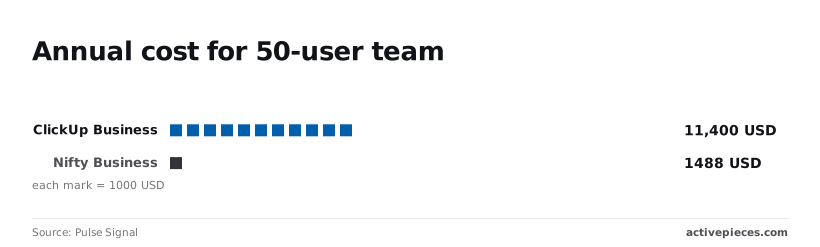
For the same headcount, a platform like Nifty Business costs $1,488, representing a significantly lower barrier to entry for mid-sized organizations, allowing teams to allocate more budget toward growth initiatives, which means the platform pays for its own adoption through saved operational overhead.
This represents a **near tenfold increase in overhead** for teams choosing ClickUp.
This $9,912 gap is the premium paid for ClickUp’s tiered feature access rather than a linear increase in project value, indicating that the cost is driven by platform complexity rather than direct output, so users may be paying for tools they never actually utilize.

### ClickUp guest seat limits and collaborator costs
A specific ratio of paid members limits how many "Full Access" guests you can have. If you're working with multiple external contractors, you'll often have to purchase additional full-price seats just to grant those contractors editing rights.
Free users face further restrictions via a 60-use limit on Custom Fields. Once this cap is hit, the workspace becomes read-only for those attributes, forcing an immediate upgrade to maintain basic data entry.
### Automation credit overages and top-up costs
ClickUp meters automation by "Actions." Exceeding the monthly allotment requires purchasing top-up credits that are significantly more expensive than competitors.
While Monday.com charges $40 per 1,000 overage actions, data from [Get Price Pulse](https://www.getpricepulse.com/blog/monday-pricing-2026-complete-guide.html) shows that Zapier can cost up to $100 per 1,000 overage actions, making automation scaling a potentially volatile expense for high-volume users, which means operational costs can spiral unexpectedly as workflows expand.

This places you in a position where high-volume workflows create unpredictable monthly spikes.
Forecasting operational expenses becomes a struggle for budget managers. These triggers (including AI fees, guest seat costs, and automation add-ons) ensure that as work volume increases, the cost per task rises rather than stabilizes.
Furthermore, this financial friction forces you to choose between manual labor and budget overruns.
## Compare ClickUp costs with Monday and Asana
Aggressive caps on automation and restrictive guest seat ratios often mean ClickUp’s total cost of ownership exceeds that of Monday.com and Asana.
While the sticker price suggests a bargain, the functional cost scales poorly as soon as you move beyond basic task tracking into cross-departmental workflows.
The primary point of divergence is automation efficiency. When comparing the value provided per dollar spent, ClickUp Business has significantly fewer monthly actions than Monday.com Pro.
This forces high-volume teams to upgrade tiers just to keep their existing triggers running.
### ClickUp user limits versus Monday.com scaling
Long before they would on Monday.com, a growing operations team will hit a hard ceiling on ClickUp. This effectively turns a software subscription into a recurring tax on efficiency.
Long before they would on Monday.com, a growing operations team will hit a hard ceiling on ClickUp.
A third layer of financial unpredictability is introduced by the cost of external collaboration. ClickUp uses a strict ratio for guest seats. Every additional contractor or client requires the purchase of more full-member licenses even if those members aren't needed.
Asana has unlimited guests on its paid tiers. This ensures that agencies can collaborate with any number of clients without their monthly bill fluctuating based on external headcounts.
Monday.com takes a different approach. It has guest access in specific increments, providing a middle ground that allows for predictable scaling as project portfolios expand.
These structural differences ensure that while Asana and Monday.com have higher initial barriers to entry, they offer a more stable cost-per-project as the work becomes more complex.
## Run this in Activepieces: Offload ClickUp automations
Moving the execution logic to an external workflow engine allows you to bypass ClickUp’s restrictive automation credits. While ClickUp gates advanced logic like conditional branching behind its Business and Enterprise tiers, this workflow enables complex routing using only a single webhook trigger.
1. Create a [ClickUp](https://www.activepieces.com/pieces/clickup) Webhook trigger in Activepieces to capture task updates, which avoids consuming ClickUp's internal automation "uses."
2. Map the task data to a Branch step to filter the information. This ensures only specific data packets proceed to the next stage.
3. Send the filtered output to a [Google Sheets](https://www.activepieces.com/pieces/google-sheets) row or a [Slack](https://www.activepieces.com/pieces/slack) message to maintain a record of work without hitting native platform limits.
Computational load shifts away from ClickUp with this configuration, preventing the sudden billing spikes that occur when you outgrow your monthly action quota.
Organizations like MoneyGram and Moneypenny run Activepieces in production to handle high-volume logic without the per-step tax that makes native project management automations so expensive to scale.
## The Monday morning ClickUp audit checklist
Every week, you must manually prune your workspaces to prevent the platform from automatically triggering seat upgrades or billing for unused capacity.
Because ClickUp scales costs by user count rather than just usage, a single forgotten contractor or an inefficient automation loop can inflate your monthly invoice by hundreds of dollars without warning.

Identify 'Inactive' members still occupying paid seats, count remaining monthly automation actions, and check 'Guest' permissions to safeguard your budget. This ensures you haven't accidentally converted them to paid members by granting them full folder access.
### Auditing ClickUp Brain AI add-on costs
If you're using AI features, this audit is critical. ClickUp layers these costs on top of base subscriptions.
The Brain AI add-on costs $5 per user per month on an annual plan, meaning that scaling the tool across a large organization requires a substantial upfront financial commitment.
An admin forgetting to revoke AI access for a ten-person department is wasting $50 every month on tools no one is opening, by the time anyone notices the discrepancy.
As the total workspace cost increases with every new hire, the financial risk scales with the size of the team.
A small team of five could see a $25 monthly swing in costs just by failing to audit whether the entire workspace truly requires AI capabilities to function, effectively throwing away capital that could be better spent elsewhere, so neglecting these administrative checks directly erodes the team's available resources.
The next step, once you've identified these leaks, is to offload the heaviest processing tasks to external systems. Moving high-volume logic out of ClickUp ensures that your seat count remains the only variable you have to manage manually.
## Frequently asked questions about ClickUp pricing
### Does ClickUp offer a discount for nonprofits?
For qualifying non-profit organizations, ClickUp provides a specific discount. This reduces the annual overhead for charities and community groups.
You must submit documentation of your tax-exempt status through a formal application process to access these rates. This verification ensures that budget-conscious entities can redirect saved capital toward their core missions rather than operational software.
### What happens if I run out of automation credits mid-month?
Once the monthly limit is reached, automations will cease to function immediately. All status changes, task creations, and external integrations will stop firing until the next billing cycle.
A "pay-as-you-go" overage model for these credits does not exist in ClickUp. To restore functionality before the month ends, the only available path is to upgrade the entire workspace to a higher tier. This permanently increases the fixed monthly cost for every seat.
### Can I pay for ClickUp AI for only some users?
ClickUp AI is a workspace-wide add-on. It must be purchased for every member of the team.
The expense cannot be limited to only those who perform heavy writing or analysis. Even if only one department utilizes the advanced reasoning of Gemini 3.8 Flash or GPT-6 Astra within the platform, the billing department is charged for every active seat.
### External collaborator access and AI billing
Guests are currently exempt from the mandatory AI add-on fee.
While you must pay for every internal member, you can invite external contractors as guests without incurring the $5 per month AI charge for their seats, meaning you can scale your collaborative workforce without triggering a proportional increase in your recurring software expenses.
This exemption provides a rare moment of relief in an otherwise rigid billing structure. It allows you to maintain a large pool of external collaborators who can view AI-generated content without doubling your add-on costs.
This requirement forces a significant price jump for your entire organization regardless of individual adoption rates.
### Is there a way to get ClickUp Business features on an Unlimited plan?
Strictly behind the Business tier are advanced features like Goal Folders, Custom Task IDs, and granular Time Estimates. There's no modular way to add specific tools to the Unlimited plan.
Picking and choosing capabilities is not an option. You must accept the higher per-seat price of the superior tier to access even one restricted feature.
This structure dictates that your team's budget is determined by your most sophisticated workflow requirement rather than your average user's needs.
## Related reading
- [Grok Pricing 2026: Every Plan, Rate, and Real Cost](https://www.activepieces.com/blog/grok-pricing-2026-vs-gpt-for-enterprise-teams)
- [Jasper Pricing: Which Plan Is Worth Buying in 2026?](https://www.activepieces.com/blog/jasper-pricing-which-plan-is-worth-buying-in-2026)
- [Cursor AI Pricing 2026: Free Plan Limits and Features](https://www.activepieces.com/blog/cursor-ai-pricing-2026-free-plan-limits-and-features)
## References
- [Pulse Signal](https://getpulsesignal.com/compare/clickup-vs-niftypm)
- [AI Tools Atlas](https://aitoolsatlas.ai/tools/clickup-brain/pricing)
- [Get Price Pulse](https://www.getpricepulse.com/blog/monday-pricing-2026-complete-guide.html)