This setup transforms the LLM from a text generator into a data-aware agent capable of inspecting segments and metrics directly. By moving beyond static reporting, you address the **51% of marketing dashboards** that [Dataslayer](https://www.dataslayer.ai/blog/marketing-dashboard-best-practices-2025) identifies as lacking interactivity, so users are currently unable to explore their own data insights.  ### Step 1: Install the MCP server package via NPM To ensure the executable is available to your system’s background processes, you must install the MCP server package globally. Use the command `npm install -g @klaviyo/mcp-server` to pull the latest binaries. This installation step is critical. Without the local bridge, your LLM client can't translate natural language prompts into the specific JSON-RPC calls required by the Klaviyo API. ### Step 2: Edit your global MCP settings file The configuration file acts as the secure handshake between your API credentials and the model's runtime environment. 1. Locate the `claude_desktop_config.json` file. This is typically found in the `Application Support` folder on macOS or `%AppData%` on Windows. 2. Insert the server definition block. 3. Generate a Klaviyo Private API Key with "Read-Only" permissions to ensure the LLM can't accidentally delete production lists. 4. Open the Claude Desktop configuration file in a code editor like Cursor. 5. Paste the Klaviyo MCP JSON block. 6. Map the environment variable to your secret key. 7. Restart the client to initialize the server and load the new tool definitions. ### The server configuration block The Claude Desktop app requires a specific JSON entry within the mcpServers object to locate and execute the Klaviyo bridge. You must provide the absolute path to the node executable and the npx command to ensure the server starts correctly upon application launch. ```json { "mcpServers": { "klaviyo": { "command": "npx", "args": [ "-y", "@klaviyo/mcp-server" ], "env": { "KLAVIYO_API_KEY": "your-private-api-key-here" } } } } ``` This block instructs the host to run the package using npx while injecting your scoped API key into the environment. If you are on Windows, ensure your shell path is correctly configured so npx is globally accessible. ### Step 3: Verify the Klaviyo connection status Once the client restarts, you must confirm the server is "Active" in the developer settings to avoid silent failures during query execution. In Claude Desktop, look for the hammer icon in the bottom-right corner. If the client lists the Klaviyo server, the model now has access to your live schema. 40% of dashboards offer no decision support according to [Dataslayer](https://www.dataslayer.ai/blog/marketing-dashboard-best-practices-2025). This often happens because the underlying data connection is stale or broken, leading to misplaced trust in the output. Real-time validation is necessary to prevent this. ### Running your first Klaviyo audience query Begin with a low-complexity retrieval task, such as "List the top 5 segments by member count," to test the model's ability to parse the API response. Using a frontier model like Claude Sonnet 5.5 for this task allows for sophisticated reasoning over the returned JSON without the latency of larger models. **34% of marketing interfaces** are considered too cluttered by Dataslayer; precise queries solve this issue, so users can finally isolate the specific metrics they need without visual distraction. Instead of wading through dense UI tables, the LLM extracts only the specific data points requested. These include recent campaign open rates or specific profile attributes. Users can bypass the overwhelming visual noise. ## Supported actions and data retrieval capabilities By mapping natural language prompts to specific API endpoints, the Klaviyo Model Context Protocol (MCP) server enables direct execution of CRUD operations on customer records and marketing workflows. The average enterprise manages a portfolio consisting of 56 Private APIs, 26 Partner APIs, and 18 Public APIs according to [API Evangelist](https://apievangelist.com/2024/11/26/how-many-apis-does-the-average-enterprise-have/).  The Klaviyo implementation focuses strictly on the public-facing set to ensure external LLMs can't traverse internal-only service meshes. This distinction means a marketing agent is physically restricted from accessing sensitive backend infrastructure. This remains true even if the underlying model (such as Claude Opus 5.5) attempts to hallucinate unauthorized system calls. ### Retrieving Klaviyo customer profiles and events Marketers can extract granular behavioral data by instructing the model to call the `get_profile` or `get_events` tools. Because the system relies on the 18 Public APIs identified by API Evangelist, the LLM can only view data points explicitly exposed in the documentation. This prevents it from accidentally exposing raw database schemas. The following table outlines the core capabilities available to the model: | Capability | Supported Operations | Marketing Use Case | | :--- | :--- | :--- | | Profiles | Lookup, update, list membership | Personalizing support responses based on recent purchases. | | Events | Query activity, track custom events | Identifying customers who abandoned a cart in the last hour. | | Lists/Segments | Retrieve members, add/remove | Automating the cleanup of unengaged subscribers. | This structured access ensures that a query for "high-value customers" translates into a precise call to the `/profiles` endpoint with specific revenue filters. It avoids a broad, inefficient data dump. ### Managing Klaviyo lists and segments with AI The MCP server handles list management by exposing the `add_to_list` and `remove_from_list` functions to the agent's reasoning engine. This specific marketing server excludes the 26 Partner APIs mentioned by API Evangelist. Unless explicitly configured through a separate authenticated bridge, the model can't trigger cross-platform syncs with third-party CRM partners. This isolation means that if a user asks to "move this customer to the VIP list," the action stays within Klaviyo’s ecosystem. No unintended data propagates to external vendor systems without a secondary handshake. ### Triggering workflows and campaigns through the model The `track_event` tool engages automated workflows, which acts as a trigger for pre-defined Klaviyo Flows. Because the enterprise relies on 56 Private APIs for its internal business logic, the public MCP server can't modify the underlying flow logic or change email templates. It can only supply the event data that puts a profile into a specific track. Consequently, a model like Gemini 3.8 Flash can initiate a "Welcome Series" for a new sign-up. It lacks the administrative permissions to delete the flow itself, providing a safety buffer against accidental campaign destruction. ## Troubleshooting Klaviyo MCP connection and timeout errors Connection failures in a Klaviyo MCP setup typically stem from misaligned API scopes or unhandled HTTP 429 responses during high-volume tool calls. While the MCP protocol simplifies the interface between a model and the Klaviyo API, the underlying transport remains subject to strict authentication and throughput constraints. These will break an agentic workflow if not explicitly managed. ### Resolving 403 Forbidden and scope errors spinning in MCP When a 403 Forbidden error appears in the MCP logs, it indicates that the API key lacks the specific granular permissions required for the tool the model is attempting to execute. Klaviyo’s v2024-10-15 API requires explicit Read or Write scopes for every resource. A model attempting to fetch a segment will fail if only the "Profiles" scope is active. To resolve this, you must audit the `mcp-server-klaviyo` configuration file. You must ensure the `KLAVIYO_API_KEY` environment variable maps to a key generated with scopes for Profiles, Segments, Subscriptions, and Events. A model like GPT-6 Astra may enter a "hallucination loop" when it encounters a scope mismatch. It repeatedly attempts the same failed call because the MCP server returns a generic error string rather than a descriptive permission requirement. ### Handling Klaviyo API rate limits in long-form chats Success in natural language querying depends on managing Klaviyo's tiered rate-limiting architecture, which throttles requests based on the complexity of the data being retrieved. Because an MCP server is a pass-through, a single prompt asking for "all customers who bought shoes but haven't opened an email" can trigger dozens of sub-requests. This quickly exhausts the burst capacity of the API. The following table outlines the throughput constraints for standard API endpoints, which dictates how aggressively your MCP server should implement retries: | API Tier | Burst Limit | Consequence for the Marketer | | :--- | :--- | :--- | | Events | 350/s burst | Allows high-volume ingestion of real-time behavior without dropped packets. | | Standard Profiles | 75/s burst | Supports rapid lookups for individual customer records during support chats. | | Profiles with Includes | 1/s burst | Severely restricts complex queries that join profile data with external segments. | If these limits are exceeded, the MCP server will return a 429 Too Many Requests status. To prevent the session from crashing, you must implement a "Backoff and Retry" logic within the MCP server’s transport layer. This ensures the agent waits for the duration specified in the `RateLimit-Reset` header before re-attempting the query. ### Local vs. Cloud: When to use a dedicated server for Klaviyo automation Choosing between a local MCP execution and a cloud-hosted environment involves balancing immediate data privacy against the reliability of long-running agentic tasks. Local MCP setups, where the server runs on your machine via a tool like Claude Desktop, keep API keys within your local environment. This ensures that sensitive customer data never touches a third-party middleware provider. However, local connections are prone to "socket hang-ups" if your machine sleeps or switches networks. This makes them unsuitable for autonomous workflows. Cloud-hosted MCP servers provide a persistent URL and higher uptime. This is necessary when using Claude Fable 5.1 for scheduled tasks like daily segment cleaning or automated list hygiene. Use a local setup for ad-hoc data exploration and a cloud-hosted instance for any workflow that must trigger independently of your active desktop session. ## What Activepieces does about this Activepieces provides a production-grade environment for the Klaviyo MCP server that moves beyond the limitations of local desktop setups. By running the MCP server as a managed cloud service or a self-hosted Docker instance under the MIT license, you eliminate the "socket hang-ups" that occur when a local machine sleeps. 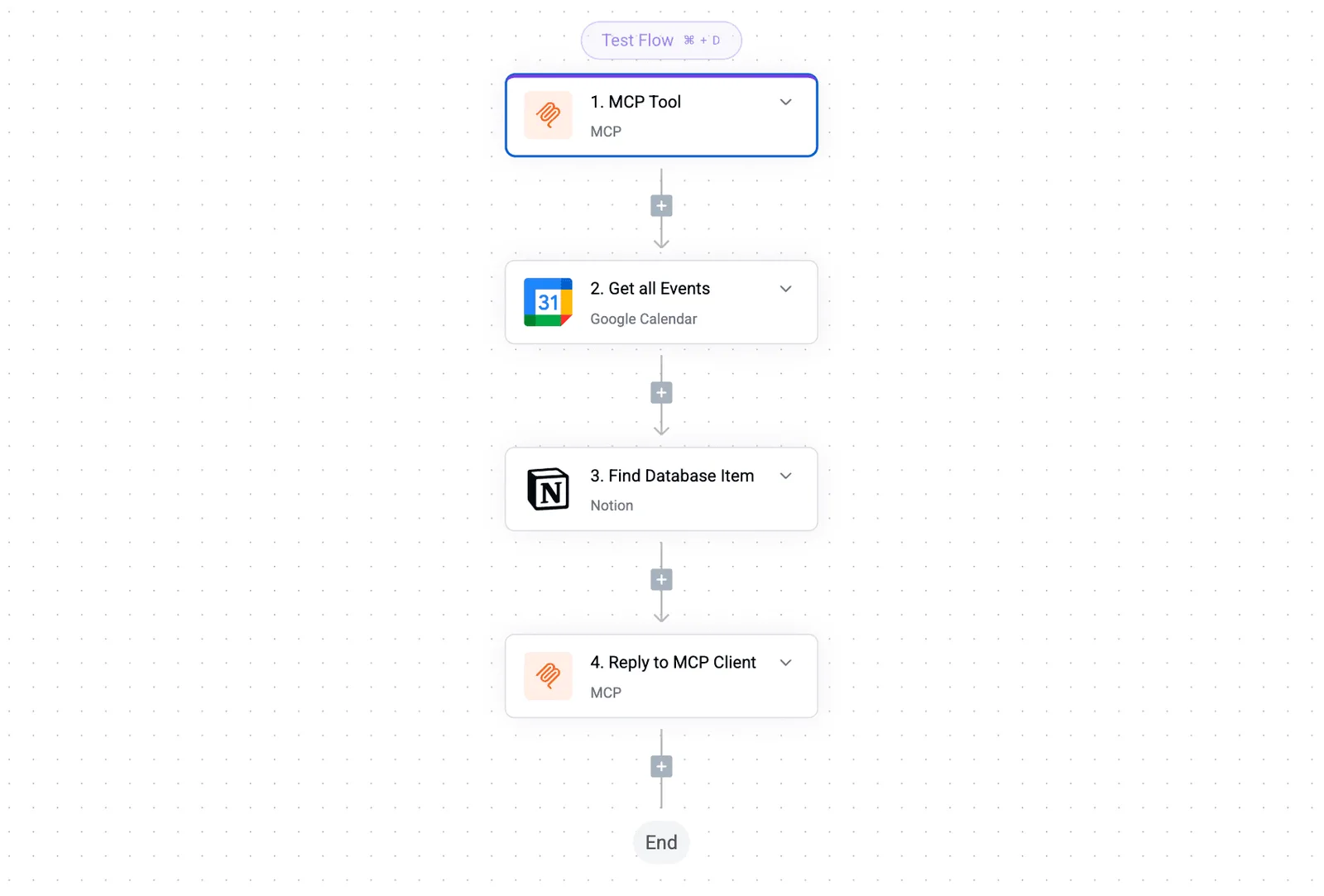 This ensures that agentic workflows, such as those used by customers like Rakuten to automate marketing operations, remain active 24/7 without requiring a persistent terminal session or manual client restarts. The platform addresses the "Least Privilege" challenge by providing a visual interface to manage Klaviyo API scopes and environment variables. Instead of manually editing JSON configuration files, you register the Klaviyo integration once within Activepieces. This automatically maps the necessary `Profiles: Read` and `Segments: Read` permissions to the tool schema. Because Activepieces functions as a centralized hub for 100+ integrations, it acts as a secure vault for your Private API Keys, ensuring they are encrypted at rest and never exposed to the LLM's prompt context. To solve the inherent rate-limiting issues described in the **75/s burst** constraints for profiles, Activepieces includes built-in error handling and retry logic. When the Klaviyo API returns a 429 Too Many Requests status, the platform automatically manages the "Backoff and Retry" sequence. This prevents the LLM from entering a hallucination loop or crashing the session, allowing the model to wait for the `RateLimit-Reset` window before continuing its data retrieval. This structural reliability is what enables marketers to scale from ad-hoc queries to autonomous, long-running audience synchronization tasks. 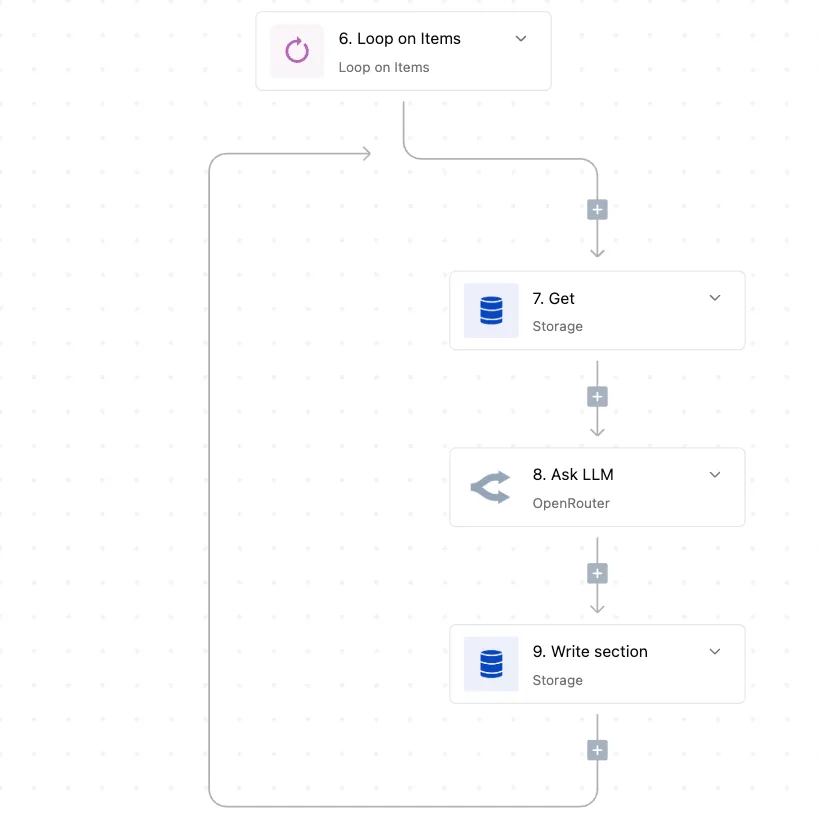 Finally, Activepieces bridges the gap between natural language reasoning and multi-account management. You can deploy distinct "Projects" for different Klaviyo accounts, each with its own isolated MCP server instance and set of credentials. This eliminates the need for complex port mapping or custom routing scripts. Whether you are using Claude Sonnet 5.5 in a web browser or a mobile interface, Activepieces serves the tool definitions over a stable cloud endpoint, making your Klaviyo data accessible to any MCP-compliant model without the constraints of a local filesystem. ## Frequently asked questions about Klaviyo MCP servers ### Is my Klaviyo API key stored locally or in the cloud? Your Klaviyo private API key is stored on the machine where the Model Context Protocol (MCP) server process is executed. This means the LLM provider never sees your raw credentials. When using a local desktop client, the key resides in your environment variables or a local configuration file. The security of your data depends entirely on your local machine's filesystem permissions. If you transition to a cloud-hosted MCP implementation, the key is stored in that specific cloud provider’s secret management system. You must audit their encryption standards before deployment. ### Can I manage multiple Klaviyo accounts with one MCP server? Managing multiple accounts requires either running separate server instances on different ports or implementing a custom routing layer within your MCP configuration. Since the standard Klaviyo MCP server typically binds to a single `KLAVIYO_API_KEY` at runtime, a single instance can't natively toggle between different company IDs without a restart. You can manage this complexity by defining unique environment profiles for each account and launching distinct server processes for each client. You might also use a container orchestration tool to manage a fleet of MCP instances, each mapped to a specific account’s credentials. Another option is to develop a wrapper script that dynamically injects the correct API key based on the specific directory or project context in your IDE. ### Does the Klaviyo MCP server work on mobile LLM apps? Mobile support is currently limited to LLM applications that allow custom WebSocket or SSE (Server-Sent Events) connections to a remote MCP host. Most native mobile apps for frontier models don't yet support local filesystem MCP drivers. This means you can't run the server directly on your phone. To query Klaviyo data from a mobile interface, you must host your MCP server on a publicly accessible URL and point your LLM client to that endpoint. The mobile app acts as a thin client for the remote server logic. Success in this configuration relies on the mobile app's ability to handle tool-calling definitions over a network protocol rather than a local stdio pipe. ## Related reading - [Klaviyo Alternatives for Ecommerce Brands in 2026](https://www.activepieces.com/blog/klaviyo-alternatives-for-ecommerce-brands-in-2026) - [Managing Klaviyo Pricing Plans to Prevent Budget Overruns](https://www.activepieces.com/blog/managing-klaviyo-pricing-plans-to-prevent-budget-overruns) - [Monday MCP: Connect AI Agents to Your Account](https://www.activepieces.com/blog/monday-mcp-connect-ai-agents-to-your-account) ## References - [Fast.io](https://fast.io/resources/gemini-1-5-pro-context-window/) - [Dataslayer](https://www.dataslayer.ai/blog/marketing-dashboard-best-practices-2025) - [API Evangelist](https://apievangelist.com/2024/11/26/how-many-apis-does-the-average-enterprise-have/)A single hallucinated tool call could lead to irreversible data loss or unauthorized communication with your entire customer base if you fail to restrict these scopes.