# How to Set Up the Exa MCP Server for AI Search
By Winston Bracewell · 2026-10-08 · Source: https://www.activepieces.com/blog/how-to-set-up-the-exa-mcp-server-for-ai-search
---
When you deploy an Exa MCP server, local AI development environments gain the ability to execute neural web searches, much like how developers use [Activepieces](https://www.activepieces.com) to automate their internal workflows, without the need for custom API integration logic on every new project.
The server acts as a translator, turning Model Context Protocol (MCP) requests from a host application into structured queries that Exa's search engine processes for semantically relevant data.
Models like Claude Opus 5.5 or GPT-6 Astra access real-time information through a unified configuration file by offloading the retrieval mechanics to this server. It is a cleaner way to work than relying on hard-coded fetch scripts.
## Install the Exa MCP server
### What is an MCP server for Exa?
Exa's search-to-result pipeline is exposed by the MCP server as a set of tools visible to an AI agent. Training data restricts an agent in a standard setup; however, the agent triggers web crawls and content extraction autonomously once the MCP server is active.
Activepieces exposes every connected integration as an agent tool the moment it is configured, allowing a single integration to run as a flow step and a tool schema on a per-project MCP server simultaneously.
This mechanism, visible in the `packages/pieces` directory of the open source repository, ensures that tools reachable by Claude or Cursor require no separate catalog publication or second migration.
### Exa MCP server setup prerequisites
**80% of the setup** depends on a verified environment where the host application can execute the Exa binary and authenticate against the neural search cluster.
You must ensure a valid credit balance exists on the [Exa](https://exa.ai/pricing) dashboard before modifying your configuration to avoid `402 Payment Required` errors. The cost structure dictates your search strategy.
| Search Type | Cost per 1,000 Requests | Best Use Case |
| :--- | :--- | :--- |
| Standard Search | $7 | Broad topical queries |
| Deep Search | $12 | Complex technical lookups |
| Monitors | $15 | Persistent tracking of specific web changes |
| Page Contents | $1 | Pull full text from a known URL |

Node.js 18 or higher is required beyond credits to support the server’s asynchronous runtime. You also need an MCP-compliant host, such as Claude Desktop or Cursor, to manage the JSON configuration. Populate the environment variables once you have these assets.
## Step 1: Configure the MCP host environment
Within a specific JSON file, the configuration of the Model Context Protocol (MCP) host dictates how local or remote tools interface with the model's runtime.
The host is prevented from defaulting to local file-system tools by explicitly defining the Exa server here, ensuring neural search capabilities are reachable during an active session.
### Locating your configuration file
The path to the configuration file depends entirely on the operating system, as the MCP host looks for a specific directory structure to initialize its environment.
For the MCP host, identifying the correct path is the only way to ensure that changes persist across application restarts.
Root application folders or standard documents directories are ignored by the host. On macOS, the file is at `~/Library/Application Support/Claude/claude_desktop_config.json`.
On Windows, the path is `%APPDATA%\Claude\claude_desktop_config.json`. You must create a plain text file named `claude_desktop_config.json` to act as the central registry if the file doesn't exist at these locations.
### Adding the Exa server definition
By inserting a specific object into the `mcpServers` block of your configuration file, the Exa server is integrated. This JSON structure tells the host which command to execute to start the server and passes the necessary API credentials as environment variables.
Launch failures are prevented by proper syntax in this block, avoiding common errors like trailing commas or mismatched braces.
The configuration requires the following key-value pairs. The command is the executable used to run the server, typically `npx`. The args is an array containing the package name, `@exa/mcp-server`. The env is a nested object containing your `EXA_API_KEY`, which authorizes the neural search requests.
### Configuring the Exa MCP JSON file
The following code block represents the exact structure required for the configuration file. You must replace the placeholder text with your actual API key retrieved from the Exa dashboard.
```json
{
"mcpServers": {
"exa": {
"command": "npx",
"args": [
"-y",
"@exa/mcp-server"
],
"env": {
"EXA_API_KEY": "YOUR_EXA_API_KEY_HERE"
}
}
}
}
```
The host will attempt to initialize the connection upon the next launch once these values are saved. High-reasoning models like GPT-6 Astra or Gemini 3.8 Flash can invoke Exa's search tools directly within their reasoning loops under a successful configuration.
This setup connects the model's internal weights and live web data without requiring custom middleware.
## Step 2: Initialize and verify the Exa connection
A complete restart of the Model Context Protocol (MCP) host is required for successful initialization to force a reload of the configuration file.
Simply saving the JSON file isn't sufficient to register a new binary path or API credential because most hosts, such as the desktop interface for Claude Sonnet 5.5, cache environment variables at launch.
### Restarting the MCP host correctly
You must fully terminate the parent process of the LLM interface to ensure the host recognizes the Exa server.
1. Closing the active window often leaves a background process running in the system tray or task manager, which prevents the host from reading the updated `mcpConfig.json` file.
2. Once the process is killed and reopened, the host attempts to spawn the Exa server using the command defined in your configuration.
3. If the path to the executable is incorrect or the Exa API key is missing, the host will log a connection failure immediately upon startup.
The connection status is indicated by the "Plug-ins" or "MCP Servers" status menu in your interface. A green indicator confirms the runtime environment is stable and the server is listening for instructions.
### Testing the Exa MCP search query
Sending a natural language prompt that forces the model to use the `exa_search` tool rather than its internal training data validates the data flow. Use a specific query regarding events from the current morning to ensure the model can't rely on its static weights.
A JSON-RPC call to the Exa server is generated when a model like Gemini 3.8 Flash receives this request. The server then executes a neural search to retrieve filtered web results.
The handshake is functioning if you observe the tool-use notification in the chat interface, a list of sourced URLs from the Exa API, and a synthesized response citing specific, real-time data points.

The issue is likely a syntax error in the JSON configuration if the model claims it can't access the internet.
## Troubleshooting Exa MCP server errors and limits
Exceeding hard-coded threshold values or providing incorrect credentials within the host configuration file is typically the cause of Exa MCP server errors.
An administrator can distinguish between a localized syntax failure and a provider-side restriction by identifying the specific HTTP status code returned by the server.
Common Exa MCP Error Codes include 401 Unauthorized (invalid API key), 429 Too Many Requests (exceeding 10 queries per second), and 400 Bad Request (query exceeds character limits). These codes provide the telemetry to adjust the `args` array in your JSON configuration.
### Managing rate limits and API quotas
The 429 status code must be monitored by administrators to ensure the MCP host doesn't overwhelm the Exa gateway.
Because Exa enforces a rate limit of **10 QPS on standard tiers**, high-concurrency agents like Claude Opus 5.5 or Gemini 3.8 Flash must be throttled at the application level to prevent service interruptions.
The API key in the environment variables is likely malformed or lacks the permissions required for neural search if a 401 error persists despite the server being active.
### Search API query character limits
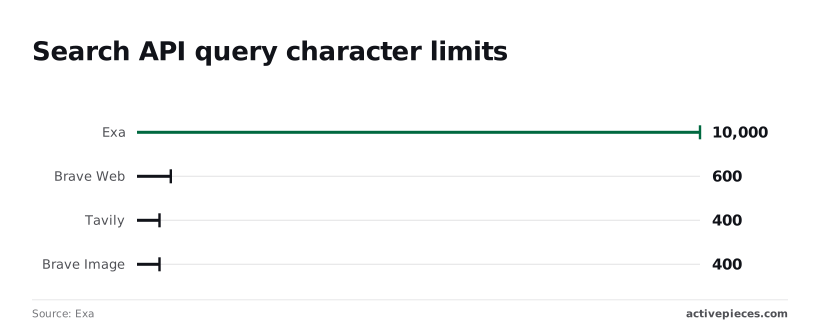
**10,000 characters per search query** is the maximum permitted by Exa, according to the [Exa SDK Specification](https://exa.ai/docs/sdks/python-sdk-specification).
This high ceiling allows users to paste entire paragraphs or code snippets into the search tool to find semantically similar documentation without the server truncating the input.
In contrast, other providers impose much tighter restrictions. Brave Web limits queries to 600 characters per the [Brave API Reference](https://api-dashboard.search.brave.com/api-reference/web/search/get), which forces users to manually summarize their intent before searching.
Tavily Query supports only 400 characters as noted in the [Tavily Skills Documentation](https://github.com/tavily-ai/skills/blob/main/skills/tavi), requiring highly compressed keywords. Brave Image search is also capped at 400 characters, limiting the descriptive detail available for visual retrieval.
**Because Exa's limit is 25 times larger than Tavily's, it supports long-horizon agentic workflows where context preservation is more valuable than brevity.**
## Maintaining your Exa MCP search infrastructure
Periodic updates to the underlying Node.js package are required to maintain a functional Exa MCP server and ensure the host can translate neural search queries into valid API requests.
**Because Exa's limit is 25 times larger than Tavily's, it supports long-horizon agentic workflows where context preservation is more valuable than brevity.
Outdated packages lead to schema mismatches where the Model Context Protocol (MCP) host, such as Claude Desktop, fails to recognize new tool parameters introduced by Exa’s API.
### Updating the server package
The local executable for the Exa MCP server will match the current capabilities of the Exa API if you run a global update via the Node Package Manager (npm).
Neglecting this step leaves the environment vulnerable to breaking changes in the JSON-RPC communication layer, causing the LLM to return execution errors when it attempts to call the search tool.
First, close the MCP host application to release any file locks on the active server process. Then, execute the global install command for `@exa/mcp-server` to overwrite the existing binary with the latest stable version.
Finally, relaunch the host to force a refresh of the tool definitions provided to the model.
### How to automate search triggers
Every tool call an agent makes to Exa appears in the run trace because the logic for retries and state management resides in the MIT-licensed core, which is why MoneyGram and Moneypenny run Activepieces in production.
You can verify the execution flow by matching the Flow Execution Engine code in the open source repository against the step-by-step trace in the UI.
In this architecture, the Exa API acts as a data source for workflows, while the automation platform handles the logic for routing that data into other enterprise systems.
The API Key authenticates the connection, preventing unauthorized credit consumption. The Search Endpoint receives the query parameters, defining whether the system looks for specific URLs or broad topics.
The Result Parser extracts the text content from the neural search so that downstream steps receive clean data rather than raw JSON metadata.
## What Activepieces does about this
Activepieces simplifies the precise configuration required for Exa by moving the environment setup from fragile JSON files into a visual automation designer.
Instead of manually editing `claude_desktop_config.json` and risking syntax errors that break the host, you connect Exa through a pre-built integration that handles the Model Context Protocol handshake automatically.
This approach ensures that your API keys and environment variables are encrypted at rest rather than stored in plain text on your local machine.
The platform provides a structured way to bridge Exa’s neural search with other applications without writing custom middleware.
Because Activepieces is open source under the MIT license, you can inspect the exact execution logic in the `packages/pieces/exa` directory to see how queries are formatted before they reach the search cluster.
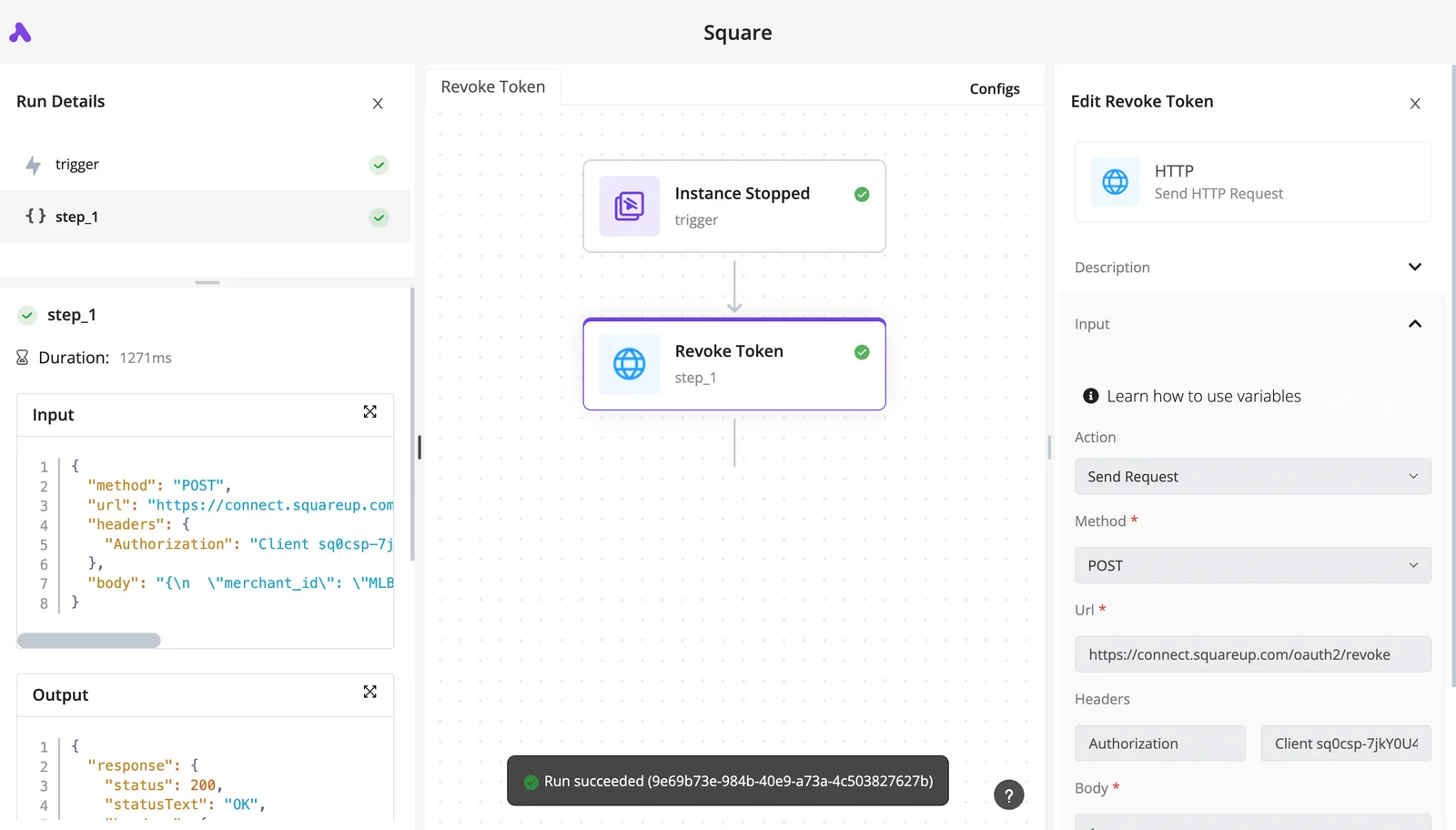
This transparency is why security-conscious organizations like MoneyGram and Moneypenny utilize Activepieces to manage their internal agentic workflows and tool integrations.
By using the visual flow builder, you can add logic to your Exa searches that a standard MCP server definition cannot handle alone.
You can configure a flow to automatically truncate search results if they exceed the context window of a specific model or route Deep Search results into a database for persistent tracking.
The platform acts as a managed host for your tools, ensuring that when Exa updates its API, the underlying integration is updated centrally without requiring you to manually run `npm` commands across multiple local development environments.
Every search triggered through this setup is documented in a centralized run log, providing the telemetry needed to monitor credit consumption and rate limits.
If a search fails due to a `429 Too Many Requests` error, Activepieces can execute an exponential backoff strategy to retry the query, a feature that standard MCP host configurations lack.
This transforms the Exa MCP server from a simple local binary into a resilient piece of enterprise search infrastructure.
## Frequently asked questions about Exa MCP?
### Does the Exa MCP server work with VS Code?
Through the use of an MCP-compatible extension, such as the Claude Dev or Roo Code plugins, the Exa MCP server functions within VS Code.
These extensions act as the host client, interpreting the JSON configuration file to expose Exa’s search tools directly to the editor's sidebar or terminal.
The editor remains unaware of the MCP lifecycle without a supporting extension, meaning the server will fail to initialize. Once configured, the integration allows models like Claude Sonnet 5.5 to execute web searches and ingest documentation updates without the user leaving the active workspace.
### Search API request costs
Costs are incurred based on the volume of requests sent to the Exa API, which are billed according to your selected tier.
Each search or "find similar" action triggered by the model consumes credits, so an agentic loop left running without constraints can rapidly deplete an account balance.
To prevent unexpected overages, administrators should set hard monthly spending limits within the Exa dashboard. Monitoring these logs provides visibility into which specific automated workflows are driving the most traffic, allowing for the refinement of system prompts to reduce redundant queries.
### Can I use Exa MCP with local LLMs like Llama 3?
Exa MCP is compatible with local models provided the hosting software, such as the LM Studio or Ollama desktop clients, supports the Model Context Protocol.
The MCP server is a standardized bridge. As long as the local model is capable of tool calling, it can send structured requests to Exa and receive neural search results in return.
This setup provides real-time data to private instances of Llama 3, giving the model access to current events that occurred after its training cutoff. Data sovereignty for the local model's reasoning is maintained while leveraging cloud-based indexing for external discovery.
## Related reading
- [Shopify MCP Server: 2026 Setup Guide](https://www.activepieces.com/blog/shopify-mcp-server-2026-setup-guide)
- [Asana MCP Server: Setup Guide and Config 2026](https://www.activepieces.com/blog/asana-mcp-server-setup-guide-and-config-2026)
- [Connect Claude to Webflow with the MCP Server](https://www.activepieces.com/blog/connect-claude-to-webflow-with-the-mcp-server)
## References
- [Exa](https://exa.ai/pricing)
- [Exa](https://exa.ai/docs/sdks/python-sdk-specification)
- [Exa](https://exa.ai/docs/sdks/python-sdk-specification,)