Ask for a presentation or a document from a prompt, an outline, or pasted notes. Give the assistant the audience, the length and the tone, because it passes those along as inputs and vague asks produce vague decks. Expect a generated draft in your account, not a finished deliverable. You still open it in Gamma and edit. You need three things: - A Gamma account on a plan that allows this access. - Credits, because generation spends them. - An MCP-capable client where you can add a server and approve its tools. ## Stage 1: Check plan, credits and access first Check three things before connecting anything: whether your plan includes MCP or API access, what each generation costs in credits, and which limits apply. As of 2026-11-18, Gamma's published material leaves several of these unconfirmed. ### Which Gamma plans include access I could confirm prices for the Free, Plus, Pro and Ultra tiers but access for none. The table below shows the monthly price per plan, whether Gamma states MCP or API access for it, and the card limit. Verify your plan in your account before promising anyone a rollout.  | Plan | Monthly price | MCP/API access stated by Gamma | Card limit | |---|---|---|---| | Free | $0 | Unconfirmed | Unconfirmed | | Plus | $9 per month, or $108 billed annually | Unconfirmed | Unconfirmed | | Pro | $18 per month, or $216 billed annually | Unconfirmed | Unconfirmed | | Ultra | Unconfirmed | Unconfirmed | Unconfirmed | Because access is unconfirmed on every row, don't assume the cheapest paid tier works. **Run one test generation on your actual account before you plan anything around it.** ### Gamma MCP credit costs per generation Spend swings most on one setting you control: the image model. Per [Gamma's image model reference](https://developers.gamma.app/reference/image-model-accepted-values), Flux 1 Quick, Flux 2 Fast and GPT Image Mini Low each cost 2 credits per image.  According to Gamma [Developers](https://developers.gamma.app/reference/image-model-accepted-values), GPT Image 2 Mini costs 5, Ideogram 3 Turbo costs 6, and Flux 1 Pro costs 8. Take a 10-card deck with one image per card. On a 2-credit model the images cost 20 credits, and on Flux 1 Pro they cost 80, per Gamma Developers. **That's a fourfold gap for the same prompt**. If your assistant picks the image model itself, you may never see why credits drain. So set the model explicitly in your instructions rather than leaving the default in place. ### Gamma MCP limits for team rollouts I couldn't confirm Gamma's rate limits or the card limit per plan, so treat both as unconfirmed. Don't size a team rollout on a guess. Have one person generate a realistic batch, note the credits consumed and any refusals, then multiply by headcount.  Check permissions too: whoever connects the server authorizes it against their own workspace, so decks and credits land on that account. ## Stage 2: Connect Gamma MCP to your client To connect Gamma, make four moves. Copy the server URL or install command from Gamma's docs, add it in your client's MCP or connector settings, authorise with Gamma, and confirm the tools appear. Do it while signed into the Gamma account you want billed, because that login's the one the connection inherits. ### Add the server in client settings **Copy the connection details from Gamma's own docs**, not from a blog post or a forum thread. Client config formats shift, and a stale snippet fails quietly. 1. Open your client's settings and find the MCP or connectors section. 2. Add a new server and paste in what the docs give you: a remote URL for clients with a connector form, or a command for clients that read a config file. 3. Save, then restart the client if it asks. Though the screenshot below comes from a different product's setup page, it shows the pattern you'll meet. Separate tabs per client, a JSON block with an `mcpServers` key, an `npx` command wrapping `mcp-remote` around a URL, and a warning that MCP works only in the desktop app, not the web version.  ### Authorise your Gamma account After you save, the client should open a Gamma sign-in and consent page in your browser. Approve it with the right workspace selected. If nothing opens, or you see `401 Unauthorized` or a bare "connection failed", the server is reachable but the handshake never finished. Remove the entry, re-add it, and run the authorisation again before touching anything else. ### Confirm Gamma MCP tools appear in your client Approval isn't proof. Open the client's tool or connector list and look for Gamma's tools under the server you just added. If the server shows as connected but lists no tools, treat it as broken: restart the client fully, not just the chat window. Then ask the assistant to name the Gamma tools it can call. If it can't, it'll invent a deck-making answer from its own knowledge, which looks fine and does nothing. That's why this check comes before any real prompt, and what follows is running one. ## Stage 3: Generate a first deck and refine it Send one prompt and let the assistant call Gamma. The prompt names the topic, audience, tone, card count and image style; then you open the link it returns and do the editing there, not in chat. ### Example Gamma MCP prompt for a deck You waste a run most often with a vague prompt. "Make me a deck about onboarding" will return something, and you'll have paid credits for a generic deck you then rewrite by hand. Say everything the tool needs up front:  ``` Use Gamma to create a presentation from the notes below. Audience: new customer-success hires in their first week. Tone: friendly but direct. Length: 10 cards. Image style: flat illustration, no stock photos. Format: presentation. Notes: [paste your outline or source text] ``` Pasting real source text beats giving a bare topic. The generator then rearranges your material instead of inventing it, and there's far less to fact-check afterwards. Anything you leave out gets a default you didn't choose. - Topic or source text: either a one-line subject or the full notes to build from. - Card count: how many slides you want, so the deck isn't left to sprawl. - Tone: formal, casual, persuasive, whatever fits the room. - Audience: who's reading, which sets vocabulary and depth. - Image style: illustration, photography, minimal, and so on. - Format: presentation, document or social post. If the assistant asks a clarifying question instead of calling Gamma, that's usually the missing setting, not a fault. Answer it and the call goes through. ### Edit and export in Gamma When a call succeeds, it returns a link, and that link's the real output. Open it and the deck's in Gamma's editor, where you fix wording, swap images and reorder cards. The chat assistant can't do any of that for you after the fact. Every generation spends credits, including the ones you throw away. Regenerating through chat because one card's off costs more than editing that card directly. Generate once, then correct by hand. **Export happens from Gamma, not from the assistant**. Once the deck reads the way you want, export it in whichever format your audience needs. That whole loop of prompting, opening the link and editing assumes someone is sitting there. When a deck has to come from an event or a schedule rather than a chat, [Activepieces](https://www.activepieces.com) can call Gamma's API from a workflow, and the client you just connected can build that workflow for you. ## Mistakes that break Gamma MCP setups When a Gamma MCP setup breaks, it's usually a setup error, not a server bug. The usual causes are the wrong plan, the wrong workspace, a loose prompt, or a job that needs a scheduler instead of a person typing. The six below cover nearly every broken setup. - Wrong plan or no credits: the call's refused or comes back empty. Confirm your plan includes MCP access and that credits remain before you start a session. - Wrong workspace authorised: decks land somewhere unexpected, or your theme's missing. Disconnect, then reauthorise and pick the workspace you actually work in. - Vague prompt: "make a deck about Q3" spends credits on generic filler. Give audience, length, tone and source material in the first message. - Expecting unattended runs: **nothing fires at 8am because nobody typed**. Move that job to a scheduler. - Client without remote MCP: the server URL never connects. Switch to a client that supports remote MCP servers. - Expired connection: it worked yesterday and now tool calls fail on auth. Reconnect and approve access again. Because a chat assistant will happily retry and generation costs credits, a fuzzy request that you regenerate three times is three charges. So settle the outline in conversation first and generate once. Check plan and balance before connecting, not after the first refusal.  Since authorisation's scoped to a workspace, the assistant won't tell you it picked the wrong one. If output looks off-brand or goes missing, suspect the grant before the prompt. If it looks generic, suspect the prompt. Expiry looks like the first case but fixes like the second: reconnect. ### When chat is the wrong trigger For a weekly report that must exist every Monday with nobody awake, MCP doesn't help, because MCP's a conversation and conversations need someone present. A workflow tool calling Gamma's API on a schedule's the better fit: it runs without a person, and you can handle its failures in one place. Keep chat for drafting and revising decks you'll read before anyone else does. ## What Activepieces does about this The gap this article keeps returning to is the unattended job: a deck that has to exist every Monday, or fire when a deal closes, with nobody in a chat window. Gamma MCP can't do that, and Activepieces is what we offer for it. You build a workflow with a schedule or an event trigger, add a step that calls Gamma's API, and the run happens without a person present. Every execution is logged, so a failed generation shows up in one place rather than as a deck that silently never appeared. The credit problem from Stage 1 gets easier to manage there too. In a workflow, the image model, card count and tone sit in the step's fields. They are fixed once and reviewed once, instead of being left to an assistant to pick differently each time. You can see what a run was told to do, which a chat session doesn't always show you. You don't have to give up the client you just connected. Activepieces runs a per-project MCP server, so Claude Desktop, Cursor or Windsurf can build, change and explain a flow through tool calls. 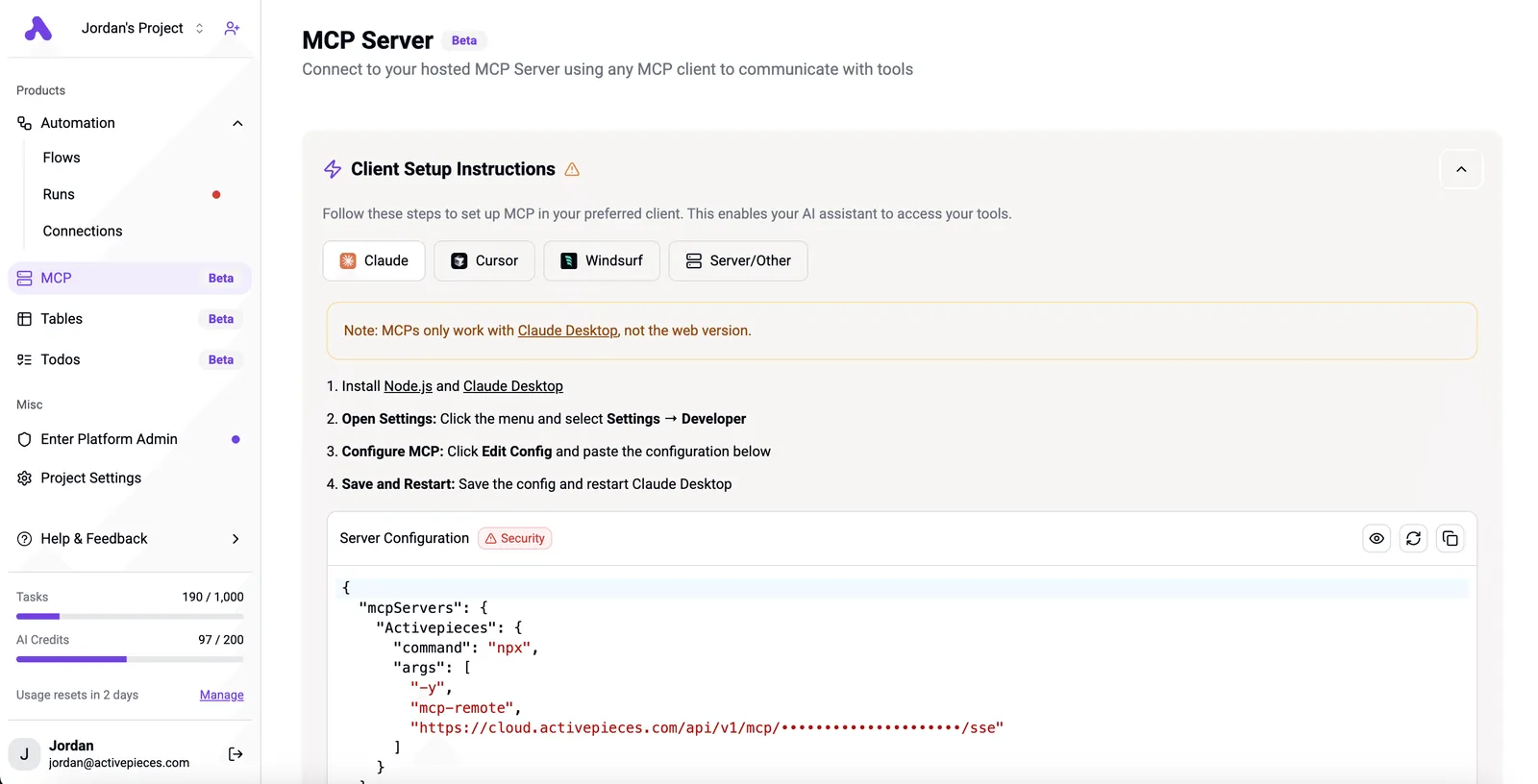 What comes out is an ordinary flow you can open, read and review before it runs on a timer. That suits the split this guide recommends: use chat to draft and revise, and use a workflow for anything that has to run alone. The core of Activepieces is MIT-licensed, so you can read the code and self-host it. Run one test generation on your own account before you build a schedule around it. ## Frequently asked questions These are the questions the rest of the article leaves open, answered short. Where a figure matters, the answer points you to Gamma's own pages, because plan details change and a number copied from an article goes stale. ### Is Gamma MCP free to use? Don't assume so. Whether your plan includes MCP access, and how many credits a generated deck spends, is set by Gamma's pricing and help pages, not by the MCP server. **Generation spends credits whichever way you call it**, so a chat that regenerates a deck five times pays for five decks. Check your plan and credit balance before you connect anything. If an assistant can connect to an MCP server and complete the sign-in flow, Gamma MCP works with it. The practical test is whether your client lets you add a remote server and shows you its tool list afterwards. If the tools never appear, the problem is the client's MCP support, not your Gamma account. ### What is the difference between Gamma MCP and the Gamma API? MCP lets an assistant call Gamma for you inside a conversation, under your sign-in, with you watching. The API's for code you write and run yourself, which is what you want for anything scheduled or unattended. A chat session needs a person present to start it and to read the result. A job that has to run without one needs the API. Treat Gamma MCP as create-only unless your client's tool list shows an editing tool. The dependable pattern's to revise your input in chat and generate a new deck from it. ### Is it safe to give an AI client access to my Gamma account? It's as safe as the access you grant and the content the assistant reads. Read the permission screen before approving, and use an account you'd be comfortable seeing it act in. Be wary of pasting in documents or web pages you don't trust, because text inside them can steer the assistant into calls you never asked for. If something looks off, revoke the connection from both the client and your Gamma account settings. ## Related reading - [Gamma Pricing 2026: Plans, Credits and Limits](https://www.activepieces.com/blog/gamma-pricing-2026-plans-credits-and-limits) - [Langchain MCP Server (2026 Guide)](https://www.activepieces.com/blog/langchain-mcp-server-2026-guide) - [Shopify MCP Server: 2026 Setup Guide](https://www.activepieces.com/blog/shopify-mcp-server-2026-setup-guide) ## References - [Gamma Developers](https://developers.gamma.app/reference/image-model-accepted-values)You'll hit one failure more than any other: a client that connects fine and lists nothing, which means the handshake worked and the permissions didn't.