# How to Use Cloudflare Workers (2026 Beginner Guide)
By Petra Vlk · 2026-11-13 · Source: https://www.activepieces.com/blog/how-to-use-cloudflare-workers-2026-beginner-guide
---
You use Cloudflare Workers by writing a small JavaScript function, running `wrangler deploy` from your terminal, and receiving a public workers.dev address, which you can then point a webhook from a tool like [Activepieces](https://www.activepieces.com) at if you want. **The whole trip takes about ten minutes**.
Cloudflare Workers is a serverless platform that runs your JavaScript, TypeScript, or WebAssembly code on Cloudflare's global network in response to HTTP requests and other events, without you provisioning or managing any servers.
## Cloudflare Workers Setup in Ten Minutes
### What a Cloudflare Worker is
You get a public endpoint without renting, patching or restarting a server. That is what a Worker is: a function that runs on [Cloudflare](https://www.cloudflare.com/plans/developer-platform-pricing/)'s servers and answers HTTP requests. You write the handler, and Cloudflare decides where to run it.
You wouldn't be early to this. IO Fund reports 2 million active Workers developers in Q1 2024, 2.4 million in Q2 and 3 million in Q4.
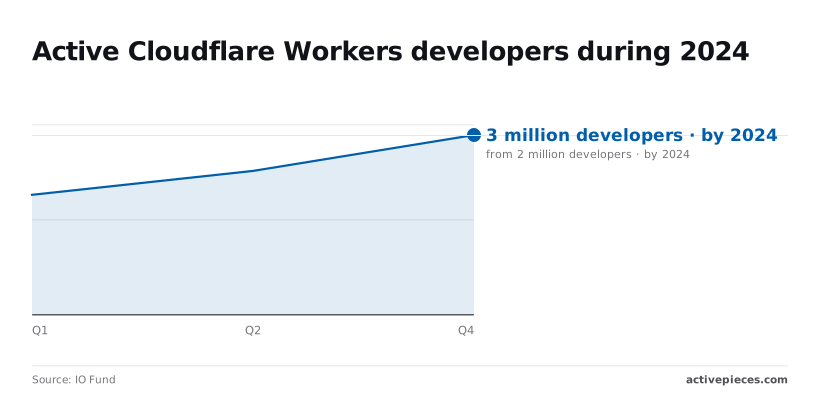
That's a **50 percent increase in three quarters**, which means doubling within roughly eighteen months.
You need three things in place:
- A Cloudflare account. Sign-up is where you get the workers.dev subdomain your Worker will live under.
- Node.js with npm installed. Wrangler, the command-line tool that uploads your code, comes from npm, so without it you can't run the deploy command.
- A terminal and any text editor. Nothing else is required to reach a working Worker.
### What a deployed Cloudflare Worker looks like
You'll have a Worker deployed on Cloudflare's network and reachable from any browser. The route is short.
You run `wrangler deploy` in a terminal on your laptop. Wrangler uploads the code to Cloudflare, where it becomes a live Worker. A browser pointed at your workers.dev address then returns "Hello World".

## Which Cloudflare Workers Plan Fits You
Start on the Free plan at $0 if you're working alone, so you don't pay while solo.
**Move to Workers Paid at $5 a month** the day a limit starts returning errors instead of responses, forcing you to upgrade then, so you can't prepare or migrate before service breaks.
The table maps four common situations to a plan and names the catch in each.
| Situation | Plan | Monthly price | The catch |
|---|---|---|---|
| Solo | Free | $0 | 100,000 requests a day, then requests fail until the counter resets |
| Team of 5 | Workers Paid | $5 | Free's 10 ms CPU limit and lower subrequest cap hit a shared project first |
| Team of 25 needing admin controls | Workers Paid, then a higher Cloudflare tier | $5 to start | Some admin features, such as single sign-on, are locked to higher tiers |
| Heavy volume | Workers Paid | $5 plus usage | Traffic past the included amount is billed, so watch the dashboard |
**Hit the 100,000-request daily cap** and a webhook that gets popular on a Tuesday can go dark by afternoon with no warning.
When a Worker parses large JSON, it can still trip the 10 ms CPU limit, because compute time counts toward it and waiting on a network call does not.
You don't have to pick a plan first, because new accounts begin on Free, and nothing in the first ten minutes needs more than that.
You'll have a Worker answering requests on a workers.dev address, running under Free's limits.
## Your first Worker deployment in four stages
You can go from an empty folder to a live workers.dev URL in four commands, so the limits above are something you can test against today rather than read about. The sequence is below.
1. `npm create cloudflare@latest` scaffolds the project.
2. `npx wrangler dev` serves it at localhost:8787.
3. `wrangler login` authorises Wrangler against your Cloudflare account.
4. `wrangler deploy` publishes it to workers.dev.
Once the four have run, the loop you repeat is edit, test locally, deploy.
### Stage 1: Create the project
Run `npm create cloudflare@latest` and answer the prompts, choosing the simplest starter Worker. It writes a project folder with a source file and a Wrangler config file.
Of everything in that config, three fields matter now. `name` becomes the first part of your workers.dev hostname, so pick something you're happy to share.
`main` points at the entry file, and if you rename the file without updating it, the deploy fails.
`compatibility_date` pins the runtime behaviour to a day, so a later platform change doesn't alter your Worker without you choosing it.
### Stage 2: Run it locally with wrangler dev
Run `npx wrangler dev` inside the project. It serves your Worker at localhost:8787, so you can open that address in a browser or call it with curl and see the response your code produces.
The server reloads when you save, which means you can change a line and check it without publishing anything.
### Stage 3: Deploy to your workers.dev URL
Run `wrangler login`. A browser window opens and asks you to authorise Wrangler for your Cloudflare account. If you skip this, the next command stops and asks for credentials anyway.
Then run `wrangler deploy`. Wrangler bundles the code, uploads it, and prints the workers.dev address. That address is public as soon as it prints.
### Stage 4: Edit and redeploy
Change the response in your entry file, confirm it on localhost:8787, and run `wrangler deploy` again. Each deploy replaces the live version under the same URL, so nobody has to update a link.
## Custom domains, secrets, and storage for a Worker
Attach a custom domain from your own Cloudflare zone, store credentials with `wrangler secret put`, and choose KV, D1 or R2 by what you're saving. Each is a one-line fix when it goes wrong.
### Custom domain versus workers.dev
On a custom domain, the Worker is the origin for a hostname like `api.example.com`. Cloudflare creates the DNS record and certificate for you, provided the domain's DNS is already on Cloudflare.
If you use a route instead, the Worker sits in front of a hostname that already has an origin server, matching a pattern such as `example.com/api/*`. That means a route silently does nothing if the hostname isn't proxied.
Use a custom domain for a new service and a route when you're adding logic to an existing site.
Run `wrangler secret put API_KEY` and paste the value when prompted. Cloudflare stores it encrypted and never writes it to your config file.
Values under `vars` in the config are plain text, so anything committed there is readable by everyone with repository access. **Put tokens in secrets and keep only non-sensitive settings, such as a base URL, in `vars`.**

### KV, D1 and R2: which binding for which job
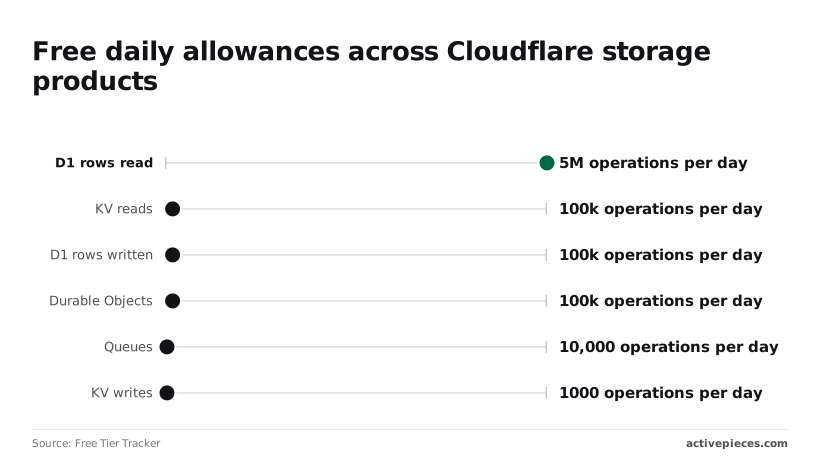
Look at KV writes first, because that is the free tier's tightest number: [Free Tier Tracker](https://freetiertracker.com/cloudflare/) lists 1,000 a day. A Worker that updates a counter on every request will hit that in minutes, and later writes fail until the daily reset.
KV reads are 100,000 a day, so it suits configuration that's read often and changed rarely.
Move to D1 and the allowance gets more generous: 5,000,000 rows read and 100,000 rows written per day.
A query that scans a whole table counts every row it touches, so an unindexed lookup can burn through the read allowance faster than the request count suggests.
If you reach for Durable Objects, the allowance is 100,000 operations a day, and for Queues it is 10,000, which caps a queue-based pipeline at 10,000 messages' worth of operations.
A query that scans a whole table counts every row it touches, so an unindexed lookup can burn through the read allowance faster than the request count suggests.
| | Purpose | Consistency model | Free allowance |
|---|---|---|---|
| KV | Config, cached lookups, small values read often | Eventually consistent; a write can take up to a minute to appear in other locations | 100,000 reads/day, 1,000 writes/day, 1 GB |
| D1 | Relational data you query with SQL | SQLite database; writes go to a single primary | 5,000,000 rows read/day, 100,000 rows written/day, 5 GB |
| R2 | Files and large objects | Strongly consistent, S3-compatible | 10 GB storage, 1 million writes and 10 million reads per month |
Anything you need to read back immediately after writing belongs in D1 or R2, not KV. Anything bigger than a row or a small value belongs in R2.
When a webhook's follow-up work starts eating CPU time and subrequests, the Worker can forward it to an [Activepieces](https://www.activepieces.com) workflow, and the person who needs it doesn't have to be a builder: they describe the process in Activepieces' built-in chat, and what comes out is a published flow in their account, the same kind of flow someone would otherwise assemble step by step.
It sits alongside every other flow there, with the same RBAC, audit logs and run traces, so any run can be opened and read afterwards. MoneyGram, Moneypenny, Alan and FundingSocieties run Activepieces in production.
## Cloudflare Workers Limits and Errors, With Fixes
When something fails after deploy, it is nearly always one of the Free plan's ceilings. The main ones are 10 ms of CPU and 50 subrequests, and a few error codes each have a one-line fix.
### Limits table: Free versus Paid
Look at the Free column first, because that is where Workers die: a 10 ms CPU budget runs out on JSON parsing or crypto long before the 100,000 daily requests do. Five limits matter, and the table shows them.
| Limit | Free | Paid |
|---|---|---|
| Requests | 100,000 per day | Billed per request, no daily cap |
| CPU time | 10 ms | 30 s default, up to 5 min |
| Subrequests | 50 | 10,000 |
| Workers per account | 100 | 500 |
| Script size | 64 MiB | 64 MiB |
Once the daily request count is spent, **further requests fail until the quota resets**.
### Cloudflare Workers errors 1101 and 1102 explained
When you see error 1101, your code threw an uncaught exception, so wrap the handler in try/catch and read the stack in the logs.
If you see 1102, the Worker exceeded its CPU time or memory limit. The fix is to move heavy work off the request path, or to go Paid, where the CPU default rises from 10 ms to 30 s.
A 429 means you were rate limited, either by an upstream API or by your own rules, so back off and retry rather than looping.
### Subrequest, size and deploy failures
Inside a loop, fetch calls are the usual way to hit the 50-subrequest Free cap. Batch them, or accept that 10,000 on Paid is the real fix.
When `wrangler login` fails, it is almost always a stale browser session, so run `wrangler logout`, then log in again, and confirm with `wrangler whoami`. A deploy that complains about `compatibility_date` is missing that line in your config, so add today's date and redeploy.
You will rarely trace these errors to cold starts, but one benchmark is worth knowing. [TanstackShip](https://tanstackship.com/blog/edge-computing-workers-vs-lambda-edge) measured average cold start latency from 1.4 to 82.2 ms across Workers and Lambda@Edge, and p99 from 4 to 412 ms.

What a user feels is the slowest 1% of requests, not the average, and that is what the spread means. It's one benchmark, so measure your own route before you quote it.
Run `wrangler tail` in your project directory and it streams live requests, console output and uncaught exceptions, so a 1101 shows its stack trace the moment you trigger it. Start it before you reproduce the error, because it shows only what happens while it's connected.
## What Activepieces does about this
The limits above all bite on the request path: 10 ms of CPU and 50 subrequests on Free. Activepieces takes the work that overruns them off that path. Your Worker answers the webhook and hands the payload to an Activepieces flow through a webhook trigger.

The flow then makes the calls that would have burned through your subrequest budget, with no 10 ms ceiling on the Worker.
Each run is recorded, so when a step fails you open the run and read its inputs and outputs. That is the same job `wrangler tail` does for the Worker, applied to the part Wrangler can't see.
The community edition is open source under the MIT licence, so you can self-host it before deciding whether the cloud version is worth paying for. MoneyGram, Moneypenny, Alan and FundingSocieties run it in production.
## Frequently asked questions
Short answers follow, each one checkable against Cloudflare's documentation, and the log you just started is the first place to look when any of them goes wrong. Four questions the walkthrough skipped come first, with one line each:
- Is workers.dev permanent? Yes, for as long as the Worker exists and you leave the workers.dev route enabled; you can switch it off per Worker.
- Can I use a custom domain on the Free plan? Yes, provided the domain's DNS is managed in your Cloudflare account.
- How do I set cpu_ms? Add it under `limits` in your Wrangler configuration file, and expect a ceiling above the default to require the Paid plan.
- Do Node.js packages work? Many do once you add the `nodejs_compat` compatibility flag, but a package that needs a real filesystem or raw sockets still won't.
If a line was not enough, the two answers that needed more are below, along with the two questions people ask most.
### Is Cloudflare Workers free to use?
Yes, there's a Free plan, and it's enough to finish this walkthrough and keep a small Worker running.
There is a catch, though: Free carries daily request limits and a tighter CPU allowance.
When you cross them, requests start failing instead of quietly costing you money. That's the signal to read the limits page and move to the Paid plan, not a bug in your code.
### Can I use Cloudflare Workers without installing anything?
Yes. The Cloudflare dashboard lets you create a Worker, edit it in the browser, and deploy it to a workers.dev URL with nothing on your machine. The cost is that you give up version control and local testing.
Once the Worker matters to anyone but you, move it to Wrangler so every change is a file you can review and undo.
Yes, Cloudflare supports Python Workers. Cloudflare documents Python Workers alongside JavaScript and TypeScript.
Treat the Python page in the docs as the authority on status and supported packages, because both have changed more often than the core JavaScript runtime. If your project depends on a specific library, check that it is listed before you commit to the language.
### How do I roll back a bad Worker deployment?
Run `wrangler rollback`, or pick an earlier version from the Deployments view in the dashboard, and the previous version goes live.
Do not expect a rollback to restore data: it restores code and configuration only.
If the bad release changed what is stored in a KV namespace, a database or a Durable Object, that change stays.
Cloudflare also documents cases where a rollback is refused, such as when the version being restored is incompatible with a storage migration that already ran.
## Related reading
- [Cloudflare Workers Automation: Free vs Paid Limits](https://www.activepieces.com/blog/cloudflare-workers-automation-free-vs-paid-limits)
- [Cloudflare Workers Pricing 2026: Free vs Paid Plans](https://www.activepieces.com/blog/cloudflare-workers-pricing-2026-free-vs-paid-plans)
- [Cloudflare Workers Review: Pros, Cons, Limits (2026)](https://www.activepieces.com/blog/cloudflare-workers-review-pros-cons-limits-2026)
## References
- [IO Fund](https://iofund.substack.com/p/encouraging-growth-in-key-metrics)
- [TanstackShip](https://tanstackship.com/blog/edge-computing-workers-vs-lambda-edge)
- [Free Tier Tracker](https://freetiertracker.com/cloudflare/)