### What people automate between the two apps When something changes on a person's HubSpot record, such as a new contact or a form submission, the most common job is adding them to Constant Contact. When the trigger fires twice on the same person, the connector's "Create or Update Contact" action should amend the existing contact rather than pile up duplicates. It updates as well as creates, which is why it covers this job.  If you need a field the standard action doesn't expose, that falls to "Custom API Call". That's the escape hatch, and it means you handle Constant Contact's request format and errors yourself. 1. Connect your HubSpot account and pick one trigger event on contacts. 2. Connect your Constant Contact account and add "Create or Update Contact" as the action. 3. Map email first, then name, and leave every other field empty for now. 4. Run it with one test contact you own and check it in Constant Contact. Keep it this small. Each extra field is another place a mismatch can reject the record, and you want to see failures one at a time. Before you build anything that depends on a specific action, recheck the source, because vendors change connectors. The Constant Contact action and trigger list above comes from the public integrations API and was read on 2026-11-18. ## Five HubSpot and Constant Contact Workflows For the first weeks, **five workflows are enough**. They are to add new contacts to a list, push edits, write activity back, route by filter, and fall back to HTTP when a connector step is missing. Each appears in the table with its trigger and action in quotes where the findings list them. Rows marked HTTP or webhook have no listed step on that side, so take those as the routes to build yourself. | Workflow | Trigger and owning app | Action and owning app | What it does for the work | |---|---|---|---| | New contact to list | "New Contact" (HubSpot) | HTTP request to the contacts endpoint (Constant Contact) | Keeps the list current without CSV uploads | | Contact edits | "New or Updated Contact" (HubSpot) | "Create or Update Contact" (Constant Contact) | Stops names and emails drifting apart | | Activity write-back | Webhook or scheduled HTTP poll (Constant Contact) | HTTP request to HubSpot's API (HubSpot) | Shows sales who engaged | | Audience routing | "New or Updated Contact" (HubSpot) | Filter, then "Create or Update Contact" (Constant Contact) | Sends each contact to the right list | | Missing step | Any listed trigger | HTTP request | Covers gaps without a new tool | _Prices and plan limits checked against [activepieces.com](https://www.activepieces.com/pieces/hubspot) and [activepieces.com](https://www.activepieces.com/pieces/constant-contact) on November 18, 2026._ Start with the first row and leave the rest until it's run clean. "New Contact" in HubSpot fires once per record. The list add is the step I couldn't confirm as a listed Constant Contact action, so build it as an HTTP request and test with a throwaway address first. When an import runs, "New or Updated Contact" fires on every edit and the flood begins. Add a filter that checks the email field actually changed before you call Constant Contact.  If you want opens or clicks, no listed trigger covers them, so use a webhook if your account offers one, or a scheduled HTTP poll. Poll sparingly; every call counts against rate limits you'll meet early. Branch on a HubSpot property such as lifecycle stage, and send each branch to its own list. Pair it with "New Email Subscription Change" so an opt-out in HubSpot never gets re-added by a later edit. When the step you want isn't listed, send an authenticated HTTP request to the vendor's documented API and log every non-success response. That log is how you'll find your first failures. ## Building the Contact Sync Step by Step Build the sync as eight steps in a fixed order, so that when a run fails, the log points to the one step that stopped. Every step after the trigger exists to keep a bad contact out of Constant Contact, which is why the filter comes before the action. 1. Connect HubSpot. 2. Connect Constant Contact. 3. Choose the HubSpot trigger. 4. Filter for a valid email and consent. 5. Add the Constant Contact action. 6. Map email, first name, last name and list. 7. Test one record. 8. Check the result in both apps. Authorize HubSpot and Constant Contact with the accounts that will own the sync in production, not a personal login. If the person who connected them leaves, the connection can break, and the failure will look like a mystery auth error weeks later.  ### Set the trigger and filter Pick the trigger that fires when a contact is created or updated in HubSpot, then add a filter directly beneath it. Let a record through only when the email field is filled in and your consent property says the person agreed to marketing email. Anything that fails the filter stops there, so a blank or unconsented contact never reaches a mailing list. In the Constant Contact action, map HubSpot's email to the email address, then first name and last name to their matching fields. Choose the list explicitly rather than leaving it to a default. 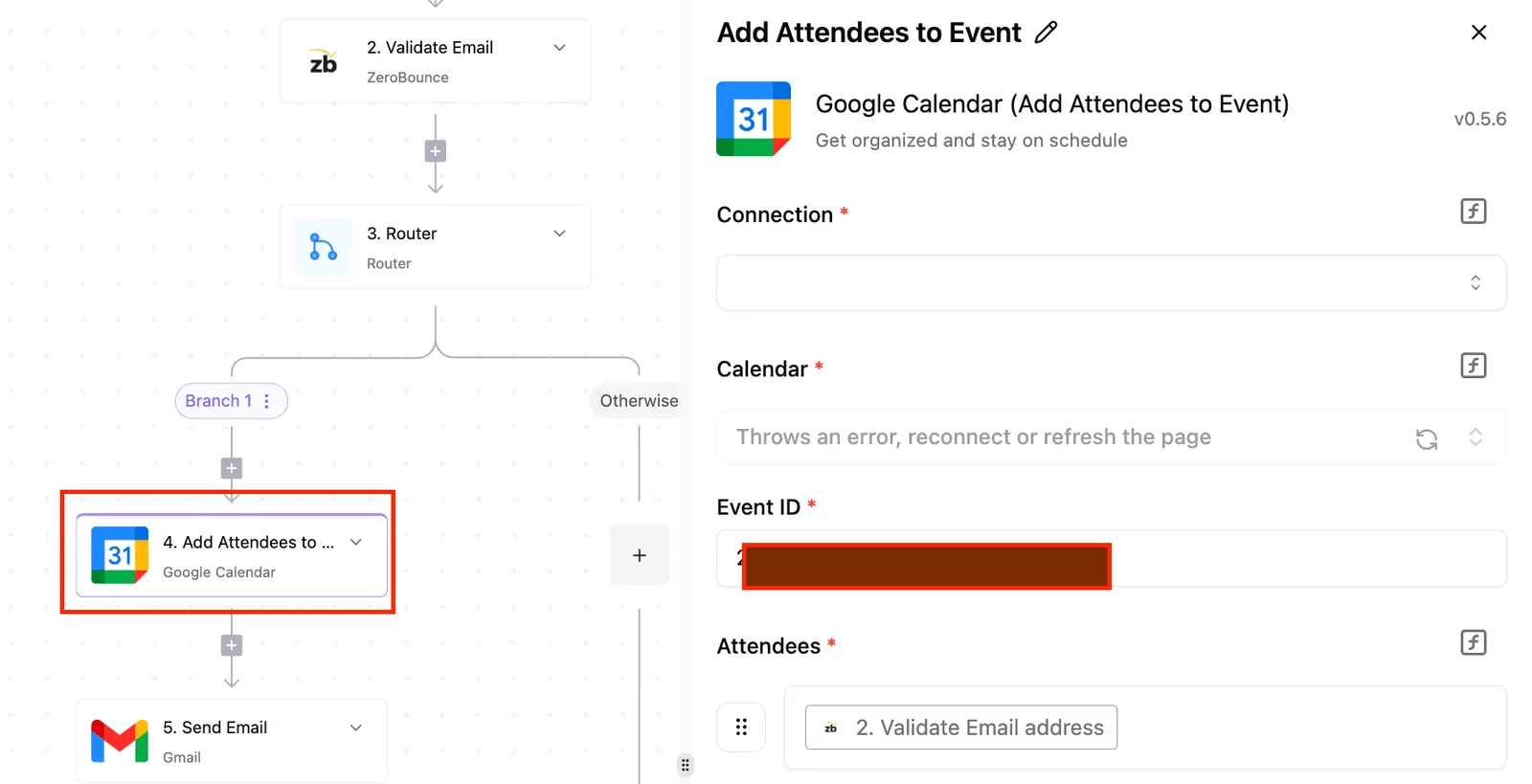 A contact dropped onto the wrong list is the mistake that's hardest to spot later. ### Testing the HubSpot Constant Contact workflow before publishing Run the test with a single contact you control, one that passes the filter. Open the run log and confirm each step reports success. Then check Constant Contact itself: the contact should be there, with the right names, on the right list. Run it once more with a contact that has no consent and confirm the filter stops it. Publish only after both runs behave as expected. You can also skip the manual build: describe this sync in a platform's built-in chat, with the consent filter and the one list, and it publishes a live flow in your account, the same artifact you'd have assembled by hand. That flow comes with a run trace showing exactly what happened at each step, so the no-consent test contact appears stopped at the filter, and it runs under the same RBAC and audit logs as every other flow. MoneyGram, Moneypenny, Alan and FundingSocieties run an open source automation platform of this kind in production. ## Limits and Errors When HubSpot Meets Constant Contact Once live, the first failures come from expired connections, duplicate or malformed emails, blank required fields, contacts who opted out, and API caps. Each leaves a different trace in your run history. When someone revokes access, changes a password, or loses permission to a list, a **connection that worked in testing can stop working**. The run fails at the first step that calls the expired account, so reconnect it and rerun rather than debugging the data. ### Duplicates, invalid emails and missing fields If the email in HubSpot is empty or malformed, the step fails, because Constant Contact keys contacts on email address. Filter for a non-empty email before the action runs. When two HubSpot records share one address, they should update one Constant Contact contact, not create two. Test with a record missing a first name, because that's the gap you'll meet first. If a contact unsubscribed in Constant Contact, a sync that only reads HubSpot shouldn't re-add them. Check subscription status before writing, and never let the workflow overwrite an opt-out. Treat it as a stop condition, not an error to retry. ### HubSpot API rate limits and failed workflow runs HubSpot's daily API allowance rises with plan. [Scopious Digital](https://www.scopiousdigital.com/blog/hubspot-api-rate-limits-production) lists **250,000 requests per day on Free and Starter**, so a one-contact-at-a-time workflow is safe, but a job that re-reads every contact on each run can burn through it. 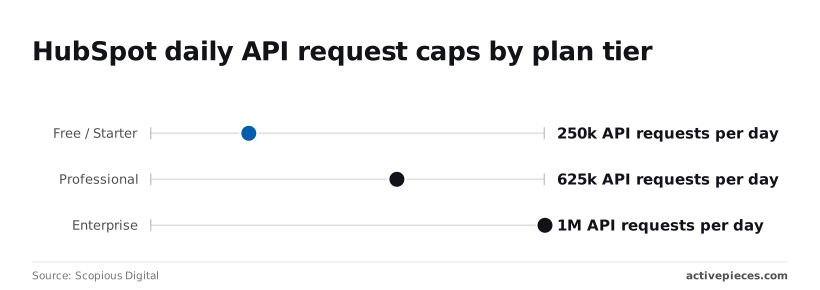 At Professional, you get 625,000 per day, enough headroom to run a sync several times daily on a mid-sized list. Enterprise gets 1,000,000, which matters only if several integrations share the same account's quota. In the run view below, a three-step flow has a trigger, email action, and end node, with step timings and input/output data on the left, and a failed run flagged at the bottom with an edit option. 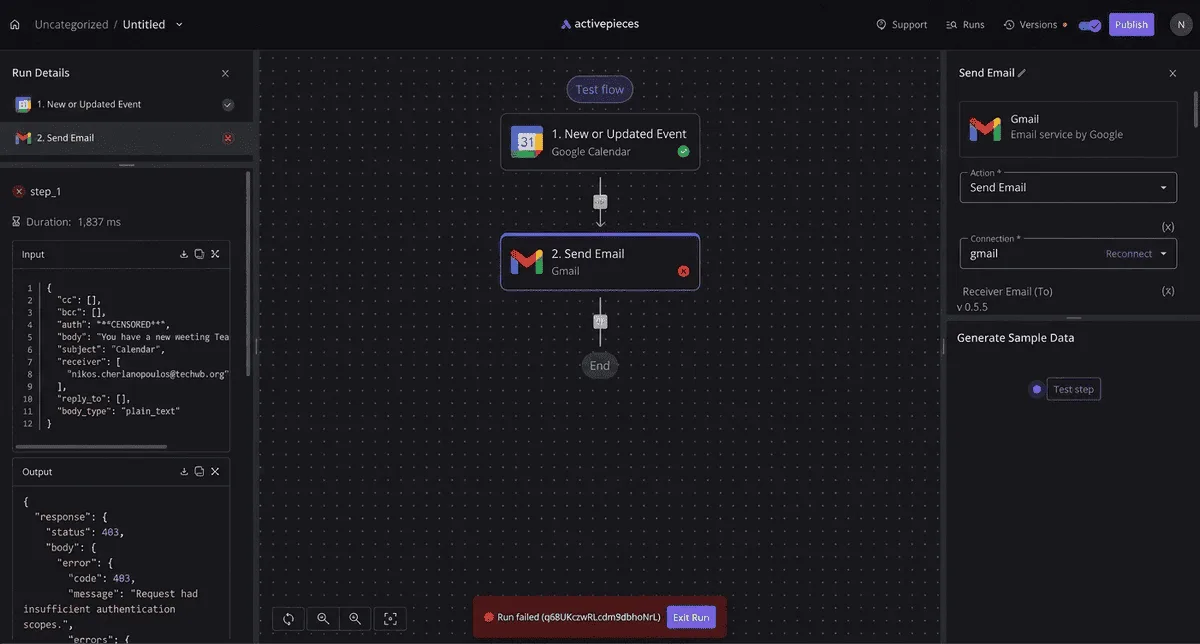 Open the failed step first, read its output, and compare it with the input to see whether the cause was the connection, the data, or a limit. After diagnosing a failure, fix the one cause and rerun that single contact before releasing the next batch. ## Activepieces Compared With Other Ways to Connect Activepieces is one of several ways to connect HubSpot and Constant Contact. It fits best when you want to self-host and don't want a step cap on the contact workflow you just tested. Whichever you pick, check the limits before you release the next batch. ### Native options and other automation tools To run this same contact sync, you can also use other automation tools or each app's own integration. Four things decide whether a batch finishes, and the table shows where they differ. Read the step-limit and cost columns first, because those are the limits you hit in the first weeks. | | Hosting | Step limits | Cost model | Code needed | |---|---|---|---|---| | Activepieces | Open source; self-host or use it hosted | Unlimited steps, per its docs | Your own infrastructure if self-hosted | Not for a basic flow | | Other automation tools | Usually vendor-hosted | Varies by plan | Usually metered by runs or tasks | Usually none | | HubSpot native option | Inside HubSpot | Set by your HubSpot plan | Part of your HubSpot subscription | None | | Constant Contact native option | Inside Constant Contact | Set by your Constant Contact plan | Part of your Constant Contact plan | None | Confirm the step and run limits on your own plan before trusting any row. Then price the Constant Contact side, because list growth sets that cost whichever tool moves the contacts. On the Constant Contact side, price follows plan and list size. According to [Dreamlit](https://dreamlit.ai/blog/constant-contact-review), Lite runs $12 to $120 a month, Standard $35 to $160, and Premium $80 to $275, so your actual cost depends on factors beyond the tier you select. viz type=deltacards title="What Constant Contact plans cost as your list grows" unit="$ per month" source="Dreamlit - https://dreamlit.ai/blog/constant-contact-review"2 to A list that grows from small to large can multiply your bill by roughly ten on the same plan. A cheaper connector won't change that. ### When to self-host your workflow Activepieces runs on your own infrastructure under an MIT licence on its core, with 750 integrations counted from its open source monorepo, so pick it when you want to host the workflow yourself. Pick it too when the flow needs many steps (field mapping, dedupe check, subscription status, error branch), or when per-run metering would punish a bulk import. With unlimited steps per its docs, you can add a check after each action without paying for it. Pick a native option when one trigger and one action cover everything and you'd rather maintain nothing outside the two apps. Either way, run one contact through first and read the result.  ## Monday Checklist for Your First Contact Workflow Start with a trigger you can say in one line: "a contact is created in HubSpot, so add that contact to one Constant Contact list." If you need an "and" or an "unless" to describe it, it's two workflows, and the first one to fail will take the second down with it. To keep a failure small enough to trace to a single cause, follow the steps below. 1. Pick one workflow. Choose one trigger, one action and one destination list. Anything with a second branch waits until this one has run cleanly. 2. Confirm the consent rule. Decide which HubSpot contacts are allowed into Constant Contact, and write that condition into the trigger. If you skip this, the first sync can push people who never agreed to marketing email into a list you are about to send to. 3. Connect the accounts. Authorize both apps with a login that will still exist next quarter. A connection tied to a departed employee fails quietly, and you find out when the list stops growing. 4. Test with one record. Create a single contact you control, then check the field values on the Constant Contact side. One record shows you a mapping error immediately, while a batch buries it. 5. Turn on failure alerts. Send them to a shared inbox, not a personal one. A failed run that nobody is told about looks the same as a quiet week. 6. Review run history after a week. Read every failed or retried run, not only the count. **Repeated failures on the same field** point to a mapping problem, while scattered ones point to rate limits or expired connections. Once the week is up, the history is the real output of this checklist. It tells you which limits and errors your workflow actually hits, and that list decides what you add next. ## Frequently asked questions ### Native integration, cost and connecting the apps Does HubSpot have a native Constant Contact integration? Check the HubSpot App Marketplace and Constant Contact's integrations directory, because listings change and both vendors' pages are the authority. Even if a connector is listed, it syncs a fixed set of fields. A workflow you build yourself lets you decide which properties map and what happens on an error. Can I connect HubSpot and Constant Contact for free? Possibly, but the cost sits in your plans, not in the connection. Read HubSpot's pricing and developer docs and Constant Contact's API documentation to confirm that your tier of each allows API access. Then check the limits on whichever tool runs the workflow between them. ### Syncing, missing steps and hosting Can I sync contacts both ways without duplicates? Yes, if you treat the email address as the match key and give each field one source of truth. Constant Contact's V3 API documents a create-or-update contact call that matches on email, and HubSpot's contacts API documentation covers searching by email before creating. Without a designated owner per field, a two-way sync produces update loops. Decide that owner first. What do I do if the step I need isn't available? Call the vendor's REST API directly through an HTTP request step. HubSpot's developer docs list the CRM endpoints, and Constant Contact's V3 API reference lists its contact and list endpoints. You take on authentication and error handling that a prebuilt step would've hidden, so test that step with a throwaway contact first. Can I self-host the workflow? The two vendors can't be self-hosted, since both are cloud services. Only the layer between them can run on your own server, and that depends on the automation tool you pick. Read that tool's deployment documentation before committing. Self-hosting also moves upgrades, uptime and secret storage onto you. ## Related reading - [HubSpot BigCommerce Integration Setup Without Code](https://www.activepieces.com/blog/hubspot-bigcommerce-integration-setup-without-code) - [Constant Contact Pricing Explained (2026): All Plans](https://www.activepieces.com/blog/constant-contact-pricing-explained-2026-all-plans) - [Stripe HubSpot Integration: Setup Guide (2026)](https://www.activepieces.com/blog/stripe-hubspot-integration-setup-guide-2026) ## References - [Scopious Digital](https://www.scopiousdigital.com/blog/hubspot-api-rate-limits-production) - [Dreamlit](https://dreamlit.ai/blog/constant-contact-review)Because the Constant Contact connector offers no triggers, only actions, HubSpot usually starts the run and Constant Contact mostly receives, apart from the webhook or polling write-back. Direction matters.