- Invoice totals and line items, where a dropped digit or a merged row changes what is owed. - Form field mapping, where text landing in the wrong field sends a value to the wrong place. - Contract clause lookup, where garbled or reordered text means the search misses the clause or returns the wrong one. - The approval or posting step, which trusts all of the above and writes it into the system of record. Nothing in that last step looks at the original document. If the number is wrong when it arrives, it's wrong when it posts. A routing rule or an approval threshold can't repair a bad read; it can only act on it.  For an automation team, an openly available model shifts the work, using only what Datalab has put on record: - you can decide where the call sits in a flow - you can decide what you check after it - you can decide where a human reviews the output It doesn't mean the model is right for your documents. Treat the maker's published material as the boundary of what you know, and **test on your own invoices, forms and contracts before anything posts automatically.** ## What's new in Indra OCR **At 25.2, handwriting is still too weak** to post unchecked, even though version 1.1 beats 1.0 in every category Datalab scores, which is why your own samples matter. 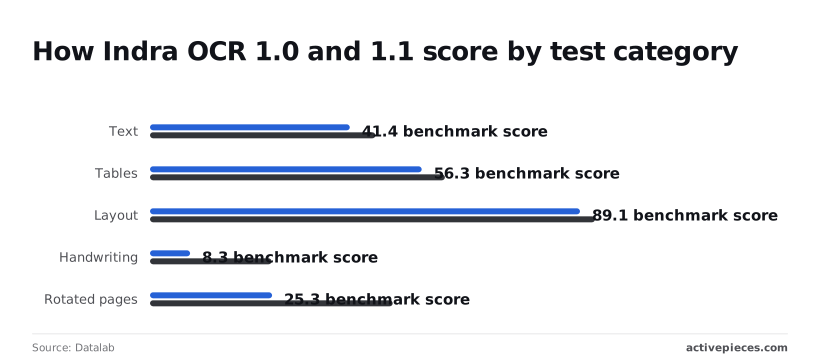 To see what you can plan around and what you can't, read the table below, which sets out what the [Hugging Face model card](https://huggingface.co/datalab-to/indra-ocr) states. | Item | What the maker states | Source page | |---|---|---| | Size | 1M parameters | Hugging Face card | | Hardware | Runs on CPU | Hugging Face card | | Inputs | PDFs and images | Hugging Face card | | Outputs | Markdown, text, or JSON with boxes | Hugging Face card | | Not stated in the material cited here | Code licence, weights licence | none | With a CPU-only model you need no GPU server, and JSON with boxes lets a workflow map fields by position. ### Indra OCR 1.1 benchmark scores versus 1.0 From 62.3 to 66.7: that is how far the headline score rose on [Datalab's own OmniParseBench results](https://www.datalab.to/blog/indra-ocr-1-1). Datalab reports text went from 41.4 to 46.7, tables from 56.3 to 61.1 and layout from 89.1 to 92.2. Table gains matter most for invoice line items. **From 25.3 to 50.3, rotated pages jumped**, so scans fed in sideways are less of a gamble. Handwriting climbed from 8.3 to 25.2, still the weakest category. The math flag trades categories. Switching it on lifts the headline from 66.7 to 71.4 and text from 46.7 to 62.7. 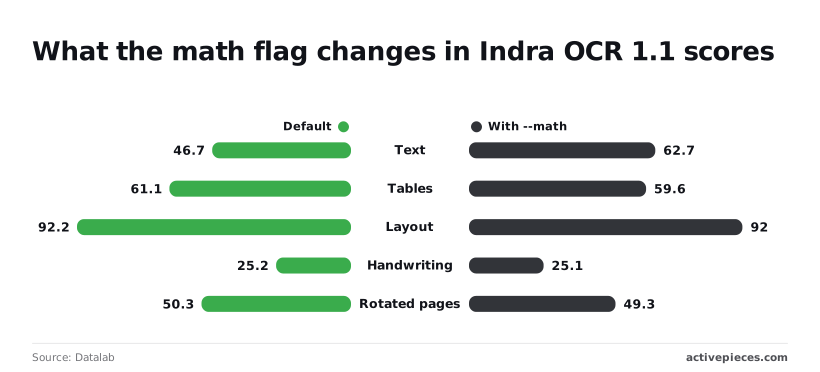 Tables slip from 61.1 to 59.6, layout from 92.2 to 92, handwriting from 25.2 to 25.1, and rotated pages from 50.3 to 49.3. Turn it on for equation-heavy text. Leave it off for table-led invoices, where it costs you. Read the licence on the model card before anything commercial ships, because the pages cited here give no licence text for code or weights, and no price. Beyond licences and price, the cited material gives no accuracy figures on your document types. Those you measure yourself. ## Activepieces has shipped nothing for Indra OCR yet We checked the Activepieces repository and its integration catalog on 2026-10-26 and **found nothing specific to Indra OCR**. There's no native integration to drop into a flow, and we claim no native support. What you can do today is reach the model through generic steps, listed here from least effort to most. We haven't run any of these ourselves, so treat each as a wiring plan, not a tested recipe. ### 1. HTTP request step to a hosted Indra OCR This fits when you already serve the model behind an endpoint you control and want one document in, one block of text out. Map the file or its URL into the request body, set the headers your server expects, and map the response field you need into the next step. Check that field mapping first. If the response nests the text differently than you assumed, every downstream step receives empty values without raising an error. ### 2. AI step with an OpenAI-compatible provider This fits when you want OCR to sit beside other model calls and share their configuration. It only works if whatever serves the model speaks the OpenAI-style chat interface, and we haven't confirmed that Datalab ships such a server. 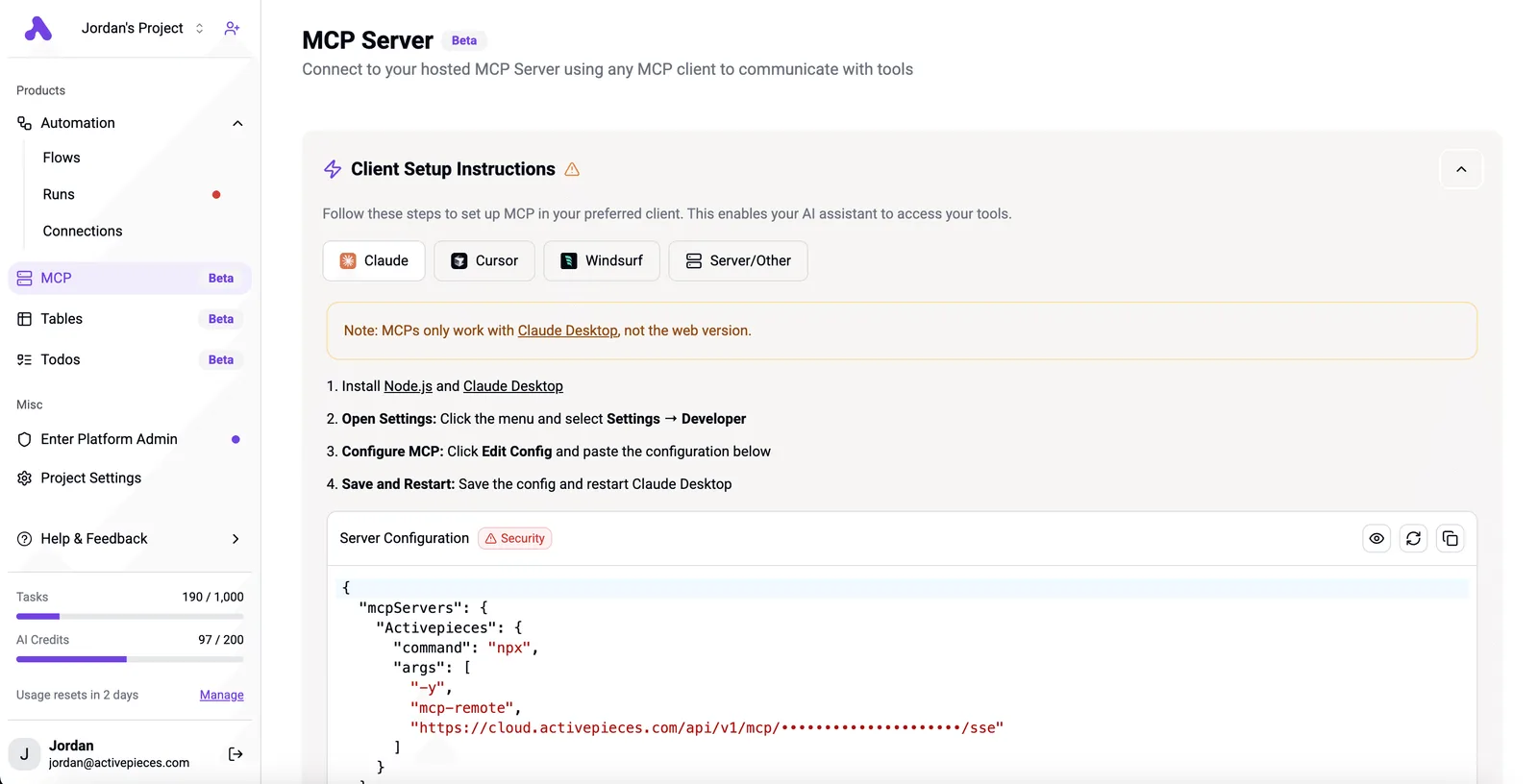 Many open-model serving tools offer that interface, so check yours before building. Reselling you a model is deciding your AI strategy for you, so Activepieces doesn't: the AI step runs the major model you choose, or your own provider key from the Plus plan at $20 a month, so no vendor owns your strategy. Indra OCR is not a built-in option there. If you need a route to it, a missing integration can be generated with AI and added privately to your instance. Every AI step is then 1 credit and the model cost lands on your provider bill. You can also reach it from Claude, ChatGPT, Cursor or any MCP client. Confirm that the step can pass a document or image, not just text, or you'll hit a dead end after the setup is done. ### 3. An MCP server for agent-style workflows This fits when an agent decides for itself when a document needs reading, instead of a flow that always runs OCR. It's the most work, because you wrap the model in a tool server and describe its inputs clearly enough that the agent calls it correctly. For a fixed pipeline of intake, extract, and file, steps one or two are simpler and easier to debug. ## Compare OCR cost and speed Self-host Indra OCR and the trade is CPU time and upkeep instead of per-page fees. The hosted API, Textract and a general AI model all bill the vendor's way and leave the servers to them. Read the "what you operate" column first in the table below, because that's where self-hosting's savings get spent. The table sets the four routes side by side on terms, location and workload. | Route | Licence or price terms | Where it runs | What you operate | Source, checked 2026-10-26 | |---|---|---|---|---| | Self-hosted Indra OCR | Openly published; read the licence file before commercial use | Your own CPU machines | Servers, updates, queueing, retries | [AI Primer](https://www.ai-primer.com/engineer/stories/indra-cpu-ocr-release) | | Datalab hosted API | Paid, priced by Datalab | Datalab's infrastructure | API calls and error handling | Datalab's own pricing page | | Amazon Textract | Paid per page | AWS | API calls, AWS permissions | AWS pricing page | | General AI model | Paid per token | Vendor's cloud | Prompts, output checks | Vendor pricing page | No row carries a dollar figure because this section rests only on what the makers publish, so price your own page volume against each pricing page. ### Indra OCR speed on one CPU **At 49.4 pages per second**, Indra OCR tops Datalab's chart, as reported by [AI Primer](https://www.ai-primer.com/engineer/stories/indra-cpu-ocr-release). PaddleOCR PP-OCR manages 4.28 and Tesseract 5 manages 2.92. That makes Indra roughly 11 times faster than PaddleOCR and 17 times faster than Tesseract. At Indra's rate, a 10,000-page backlog would take about 3.4 minutes, against about 39 minutes on PaddleOCR and 57 on Tesseract, so anyone processing large OCR batches faces a choice between a solution that runs in minutes and one that takes an hour. 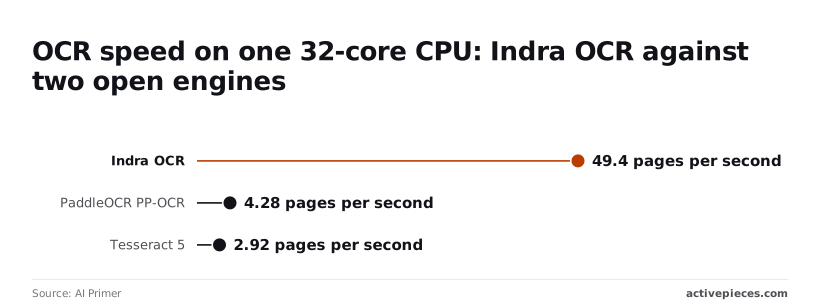 These are the maker's numbers, not ours, and they measure speed, not accuracy. Because every correction is paid for in review time, and speed doesn't tell you how many pages come back wrong on your scans, test a sample of your real documents before comparing totals. ## What to watch next as Indra OCR matures Watch the model card and the `indra_ocr` folder on GitHub first. Those are where Datalab publishes changes, and your own document sample is the yardstick for every update that lands there. ### Where Indra OCR updates will appear first Since the model card and the GitHub folder are the maker's own record, a new version number there is the only change you can treat as confirmed. The version I can point to is 1.1.2. Anything past it means your earlier results describe an older model, so rerun your sample before you touch a workflow. Whether you call an endpoint or run the model yourself depends on hosted availability. If a hosted option appears, check what it accepts and returns before you plan a field mapping around it. Rank community reports last for reliability. A forum post saying a model misreads tables is a lead to test against your own files, not a verdict. ### Test Indra OCR on your own documents Keep the same handful of files you used earlier, including the ugly ones: skewed scans, stamped pages, tables with merged cells. Then work in this order: 1. Run them through whatever version is current and save the output next to the source. 2. When a new version appears, run the identical files again. 3. Compare field by field. Whether an update helps your documents is what a rerun on unchanged inputs tells you, which a headline claim can't. Four places would show a change this week, and each check takes about a minute, so run all four before deciding anything. - Model card and GitHub folder: open both and look for any version past 1.1.2. - Hosted availability: look for a hosted endpoint or service listed by Datalab itself. - Community reports: search for first-hand accounts that name document types similar to yours. - Integration catalog: search your automation platform's catalog for a listing under the Indra OCR name. If none of these has moved, keep your current wiring and spend the week on the sample. ## Related reading - [FTP File Drop Automation for Modern Workflows](https://www.activepieces.com/blog/ftp-file-drop-automation-for-modern-workflows) - [Latest Automation Tools to Streamline Workflows](https://www.activepieces.com/blog/latest-automation-tools-to-streamline-workflows) - [QuickBooks Automation Workflows to Build in 2026](https://www.activepieces.com/blog/quickbooks-automation-workflows-to-build-in-2026) ## References - [AI Primer](https://www.ai-primer.com/engineer/stories/indra-cpu-ocr-release) - [Datalab](https://www.datalab.to/blog/indra-ocr-1-1)Once a character is misread at extraction, it doesn't stay a misread character. It becomes a wrong value in a field, and the next step treats that value as fact.