Think of a quote that covers the lumber but not the labor. It's accurate, and it'll still surprise you at the end. Plan names and prices are on the vendor's pricing page, and the sections below price what sits around them. ### What Instantly sells and how it bills Connect email accounts, load a list of prospects, write a sequence of messages, and the software sends them on a schedule and tracks replies. That is what Instantly, a cold email outreach platform, does.  Cold email means writing to people who haven't asked to hear from you, which is why the sending setup matters as much as the software. ### How Instantly billing and subscriptions work You pay a recurring subscription, with higher tiers raising your limits on how much you can send and store. Other products, such as lead data, are priced on their own meters. The extras may not show up on the card you compare first. ### How to read a pricing page Almost every vendor lays out pricing the same way. Activepieces does too: its pricing page runs from a free plan at $0, through Plus at $20 and Team at $200 a month, to Ultimate, which is a custom quote, with feature rows underneath.  Read the rows, not the headline price, because the limits on each row are what you outgrow first. The screenshot below shows that layout. Next come the figures behind the rest of this article, and where they came from. ### Sources for the Instantly pricing figures Before any number appears, know where it came from: every [Instantly](https://instantly.ai/pricing.md) figure in this article was read from instantly.ai/pricing on 2 November 2026. Vendors change plans and prices without notice, so check the live page before you commit. Where I describe a cost that sits outside the plan, such as domains or lead data, I say so, and I don't fold it into the plan price. ## Every Instantly plan in one table **From $47 to $358 a month**: that is the spread in plan prices alone. The table below sets every plan and separately billed product side by side so you can see where the money goes. Where the figures I have are missing, it says "not stated" rather than guessing. | Item | Monthly | Annual | Emails/month | Contacts | Sending accounts | Features | |---|---|---|---|---|---|---| | Growth | $47 | not stated | not stated | not stated | not stated | not stated | | Hypergrowth | $97 | not stated | not stated | not stated | not stated | not stated | | Light Speed | $358 | not stated | not stated | not stated | not stated | not stated | | Credits (Nano $9) | not stated | not stated | not stated | not stated | not stated | not stated | | Dedicated IPs | not stated | not stated | not stated | not stated | not stated | not stated | | Website Visitors | not stated | not stated | not stated | not stated | not stated | not stated |  Because the limits that set your real bill are the ones I can't confirm here, the empty cells matter as much as the filled ones. By [Astra GTM](https://astragtm.io/playbooks/instantly-pricing-2026)'s figures, Growth is $47 a month, Hypergrowth is $97, and Light Speed is $358, so tier selection directly impacts your baseline spend. Hypergrowth costs roughly double Growth. **Light Speed costs nearly four times Hypergrowth**, so moving from the middle plan to the top adds $261 a month. Don't climb a tier until you know which limit you are hitting. Three items are billed apart from the plans. Credits start at the Nano level, $9, which means even low-budget prospects can begin testing without major commitment. Dedicated IPs and Website Visitors are also separate rows, and none of the three is included in the outreach prices above. Each one adds to the bill on top of whichever plan you pick. None of this is stated in the figures I have confirmed: annual prices, emails per month, contact limits, sending-account counts, and prices for Dedicated IPs or Website Visitors. Get those numbers before you commit, because they decide which tier covers your volume. ## What Instantly costs at realistic sending volumes Expect about $74 a month at 3,000 emails, $321 at 25,000 and $1,249 at 100,000, suggesting per-email costs improve as you scale. Past the first tier the plan price is the smaller line. I assumed 20 emails per mailbox per day, three mailboxes per domain and $15 a year per domain. Size the mailboxes first, because the table shows that they, not the plan, grow fastest as volume rises. | Scenario | Plan | Mailboxes | Domains | Plan price | Mailboxes at $5 | Domains | Monthly total | |---|---|---|---|---|---|---|---| | Solo founder, 3,000/mo | Growth | 5 | 2 | $47 | $25 | $2 | $74 | | Small team, 25,000/mo | Hypergrowth | 42 | 14 | $97 | $210 | $14 | $321 | | Agency, 100,000+/mo | Light Speed | 167 | 56 | $358 | $835 | $56 | $1,249 | Check the plan prices against Instantly's pricing page before you budget, since they are monthly-billing list prices. For the solo founder at 3,000 emails a month, five mailboxes at 20 emails a day cover 3,000 sends. Here the plan is $47 of a $74 bill, so this is the one size where the sticker price still matters. For the small team at 25,000 emails a month, forty-two mailboxes cost $210, more than twice the $97 plan, making mailboxes a significant hidden expense. Budgeting from the plan page alone understates this bill by about two-thirds.  For the agency at 100,000 emails and up, the 167 mailboxes cost $835, which is 67% of the $1,249 total, so **mailbox seats drive the total cost**. At this scale mailbox count is the number to negotiate and plan around. Skip cost per email, because it is the wrong yardstick; use cost per meeting. In [Sales.co's benchmark](https://sales.co/research/cold-email-conversion-rate-benchmarks), 10,000 emails sent became 9,846 delivered, so about 154 never arrive. Of those, 2,727 were opened and 209 got a reply. Only 29 replies were positive, and 11 became booked meetings. 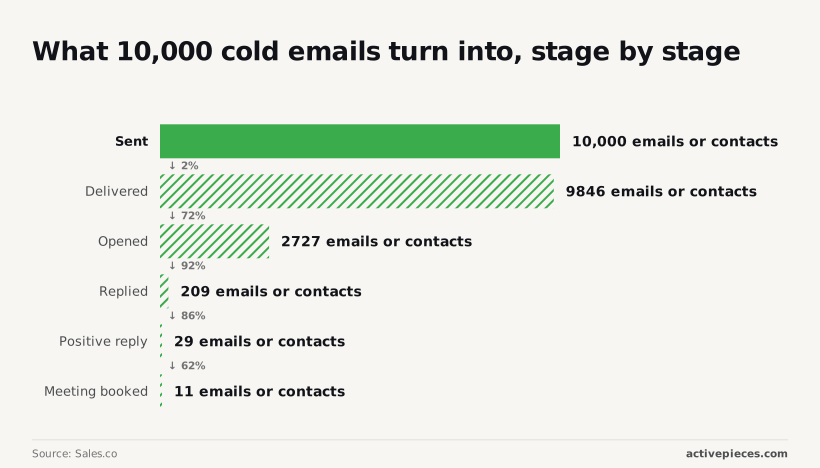 That works out to about 1.1 meetings per 1,000 emails. The solo founder's $74 buys roughly 3 meetings, about $22 each, and the tool only pays for itself if those meetings convert. The small team's $321 buys about 27, near $12 each. The agency's $1,249 buys about 110, roughly $11 each. ## Hidden costs and limits Like the agency's bill, yours is mostly lines other than the plan: sending mailboxes, domains, lead credits, add-ons and billing terms. These are the figures to price, and the third-party ones need checking before you budget. Add ten sending accounts and the bill grows roughly $50 monthly, since mailboxes run about $5 a month each. At about $15 a year, domains stay small until you buy several to keep your main address out of the line of fire. Load a list of a few thousand prospects and Nano lead credits run out quickly: $9 a month buys 150 credits. Growth also caps uploads at 1,000 contacts, so a larger list forces a higher tier regardless of how much sending you need. Ask for the exact gap at your tier before choosing, because paying monthly costs more than paying annually. Dedicated IPs start at $99 a month, which can exceed the plan itself. Website Visitors costs $97, so skip it unless you'll act on the data. ### Deliverability limits no plan removes **Paying more doesn't buy inbox placement**. 91% of cold email to Apple Mail reaches the inbox, so those prospects are your easiest. Gmail manages 68%, meaning about one in three messages to a Gmail address misses the inbox. Outlook sits at 64%, the weakest of the three.   Budget for sends that never get seen, because a list heavy with Gmail and Outlook addresses will cost more per reply than the plan price suggests. ## Instantly against Smartlead, Lemlist and Apollo on price Of the four, Instantly isn't the cheapest entry point. The gap in sticker price is small enough that the extras, not the plan, decide which one costs you least. Those extras are lead data, extra sending accounts and warm-up, so compare them before you compare tiers. ### Comparison table Two things differ most in how each tool is bought, and the table shows them: the entry price, and whether lead data comes with the plan. Instantly's $47 against Smartlead's $39 is an $8 monthly difference, which a single extra sending domain can wipe out. Look to the last column for the bigger split, because paying a second vendor for contacts changes your bill more than $8 does. | Vendor | Entry monthly price | Lead data | |---|---|---| | Instantly | $47 | Bought separately | | Smartlead | $39 | Bought separately | | Lemlist | Set per seat on its own pricing page | Own contact database | | Apollo | Set per seat on its own pricing page | Own contact database | Read the monthly email caps and sending account limits off each vendor's pricing page for the tier you would actually buy, since they change by tier. ### Where Instantly wins on cost If you already have a list, or a cheaper source for one, and your main cost is volume, Instantly wins. You're paying for sending, not for a bundle of contacts you may not use, and a tool that does one job is easier to price. If you add sending accounts as you grow, you can see each step coming before it lands on the invoice. ### When Smartlead, Lemlist or Apollo is cheaper If the $8 monthly difference matters and your volume fits its entry tier, Smartlead's the better buy. Apollo and Lemlist suit someone with no list at all, because their contact databases sit inside the plan and you skip a second subscription. For a new team, that can cost less than Instantly plus a data vendor, even when the per-seat price looks higher. ## Automating the work around Instantly with Activepieces It won't lower what Instantly charges you to send, but Activepieces, a workflow automation tool, can take over the manual handling of what happens after Instantly sends, and its free plan gives you 1,000 credits a month and unlimited flows to do it with.  That distinction matters, because the cheapest stack is the one where nobody on your team is copying replies by hand. ### Tasks around Instantly worth automating Once a prospect replies, bounces or books a meeting, that's your problem; Instantly bills for sending. Doing nothing about it has a cost too: a warm reply sits in an inbox for a day, or a bounced address gets mailed again. Three jobs are worth handing to a workflow: - Moving a positive reply into your CRM (the system where your team tracks deals) as a new contact or deal. - Posting replies and booked meetings to Slack so a person sees them quickly. - Flagging bounced addresses so they are pulled from future lists. To see how this looks in practice, take the sample workflow on the Activepieces homepage, which sits on top of the 746 integrations counted in its open source monorepo. A sample workflow starts when a new lead arrives in HubSpot, passes it to an AI step that decides whether the lead qualifies, then branches: qualified leads go to Salesforce and Slack, the rest go into a nurture loop and get an email through Gmail. 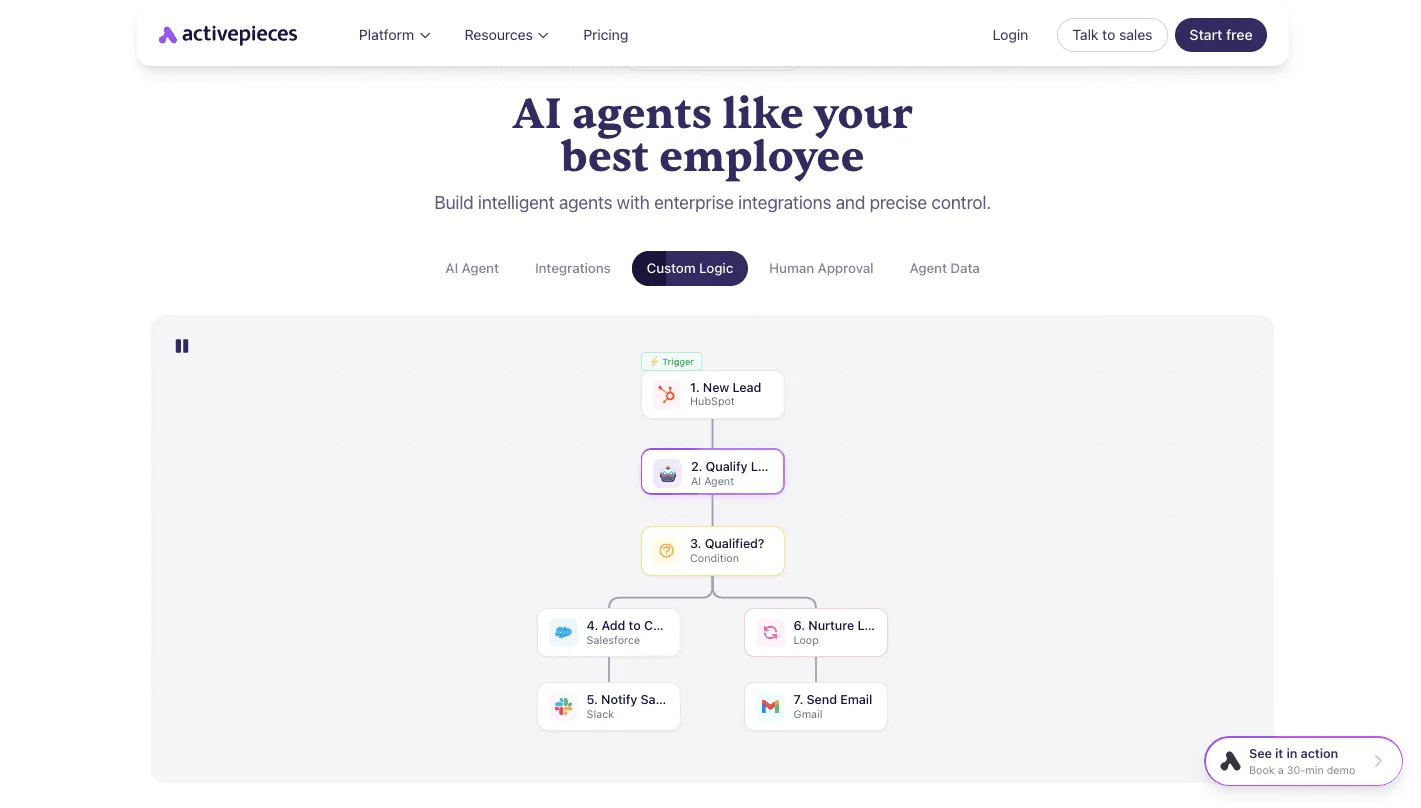 The same shape fits reply handling, with an Instantly event as the starting point instead of a HubSpot lead. Each step's a box you configure rather than code you write. ### How tools connect with approvals It does the routing: when something happens in one tool, it makes the matching change in another, and it can pause for a person to approve a step. That removes hand-copying and slow follow-up. The Activepieces pricing page states 1 credit per flow run, whatever the number of steps, so a reply that goes to the CRM, to Slack and onto a bounce list costs the same one credit as a reply that only goes to Slack. Zapier's pricing page bills per task and Make's bills per module, so on both of those the longer flow costs more. The free plan includes 1,000 credits a month and unlimited flows. It doesn't send email, warm up accounts, supply leads or replace Instantly. Your sending accounts, domains and data costs stay as they are. Before you build around it, look for Instantly in the community integrations folder of the Activepieces repository, which holds all 746 integrations, and confirm it covers the events you need. If it doesn't, you'll be setting it up through Instantly's API, which is more work and may need a developer. ## Budgeting your Instantly plan Work out your bill from your own volume, in order, before you look at a pricing page. Skipping that arithmetic means paying for a tier that doesn't fit and finding out a month later. ### Four-step budget Do the sums in the steps below, which take you from the list you plan to contact to a monthly total. The chart that follows shows how the tier price shrinks next to the mailbox and lead lines once you've done them. What to take from it: **the plan fee is rarely the biggest bar**. 1. Multiply your number of leads by the steps in your sequence (first email, follow-up, last nudge). That's the total emails you need to send. 2. Divide that by the daily sending limit you consider safe for one inbox, then by the days you'll send over. The result is how many mailboxes you need. Guess the limit too high and you'll burn your sending reputation, so mail starts landing in spam and the whole spend is wasted. 3. Pick the lowest tier whose caps cover your leads, emails and mailboxes. Don't buy headroom you can't yet use. 4. Add what the tier doesn't include: the mailboxes and their domains, plus the lead data you'll buy to fill the list. Those lines are the real bill. Once you have a total, check it against what's actually on offer today. ### Checking the live Instantly pricing page first Treat any figure in an article, this one included, as a prompt to look rather than a quote, because plans, caps and add-on pricing change. Open the live pricing page and confirm which limits sit on your tier, and which features are sold separately. If a feature you counted on is an add-on, put it back into your total and rerun step three, since it may push you up a tier. Then start on monthly billing, not annual. A discount for committing a year ahead is a poor trade when you haven't yet seen your real reply rates or how many mailboxes you truly need. Run a month, compare actual usage to your estimate, and only then decide whether to lock anything in. ## Frequently asked questions Track a month of usage and most pricing questions settle themselves, but a few are worth answering before you start. ### Trials and changing plans Does Instantly AI have a free plan or free trial? Budget as if you'll be paying, because Instantly has offered a trial rather than a permanent free plan. Trial terms change, so confirm on the pricing page what a trial includes, and whether it covers the features you plan to depend on, before you build a campaign around it. Can I cancel or change my Instantly plan at any time? If you want flexibility, choose monthly billing: you can generally move tiers or stop without waiting out a long commitment. Annual billing is where you should read the terms first, because stopping early may not return what you prepaid. That's why a trial month comes first. ### What the price is counted by Is Instantly's pricing per user or per sending account? Neither, at the plan level: the plan price is a tier with feature and volume limits, not a per-seat charge. The cost that grows with you sits underneath it: every extra mailbox and domain you send from is billed by someone, even if not by Instantly. ### Discounts and extra costs Does Instantly offer discounts for annual billing? Yes, paying yearly has typically been cheaper than paying monthly. Treat it as a bet that you'll still be on the same tier in twelve months. If your volume is still unsettled, the discount can cost you more than it saves. Do I need to pay separately for email accounts with Instantly? Generally yes. You connect mailboxes you already own, usually through Google Workspace or Microsoft, and those carry their own monthly charges, as do the domains behind them. Lead data and add-on products are typically separate line items too. Add all of them to the plan price before you compare tiers. ## Related reading - [How To Build AI Sales Agents For Cold Email Outreach](https://www.activepieces.com/blog/how-to-build-ai-sales-agents-for-cold-email-outreach) - [Prevent Temperature Excursions: Cold Chain AI Agents in 2026](https://www.activepieces.com/blog/prevent-temperature-excursions-cold-chain-ai-agents-in-2026) - [GitLab Pricing in 2026: What Teams Pay](https://www.activepieces.com/blog/gitlab-pricing-in-2026-what-teams-pay) ## References - [Astra GTM](https://astragtm.io/playbooks/instantly-pricing-2026) - [Genesis](https://getgenesis.app/blog/cold-email-deliverability-2026) - [Sales.co](https://sales.co/research/cold-email-conversion-rate-benchmarks)**The email accounts you send from, the domains behind them and the contact lists are bought separately, so the sticker price understates the bill.