# Intercom HubSpot Integration: Setup and Limits (2026)
By Ossian Kettunen · 2026-10-21 · Source: https://www.activepieces.com/blog/intercom-hubspot-integration-setup-and-limits-2026
---
Install [Intercom](https://www.intercom.com/integrations)'s native HubSpot app if you only need contacts, companies and conversations kept in step between the two tools.
It takes minutes, but it's a **fixed mapping with no room for custom logic**, so anyone who later wants rules of their own will end up looking at a workflow builder such as [Activepieces](https://www.activepieces.com). This was checked on 21 October 2026.

## Intercom HubSpot integration: the fastest working path
### What the native integration syncs
Three objects are covered: contacts, companies and conversations. Contacts and companies mean your **support and sales teams see the same people** and accounts in both tools.
Conversations mean a rep working a deal in HubSpot can see what the customer asked support last week, without opening Intercom. For a team whose whole need is "sales sees support history," that's the job done.
### What it does not do
You can't start an action from an event the integration didn't anticipate, because custom triggers aren't covered.
Arbitrary field transforms aren't covered either, which means a value lands in HubSpot as Intercom holds it, not reformatted, split or recalculated. Multi-step logic is missing as well: no "if the plan is Enterprise, create a deal, then notify the owner."
If your job needs any of those, [Activepieces](https://www.activepieces.com), whose core is MIT-licensed, is the usual addition. Everything the native connection already handles can stay as it is.
### Intercom HubSpot integration plans and permissions required
Because the connection is authorized once and then acts for both teams, you need an admin-level user in Intercom and a HubSpot user allowed to install apps.
Cost is the bigger variable, since HubSpot charges per seat.
According to HubSpot's product and services catalog, Core Seats cost $20 per seat per month on Starter, $50 on Professional, and $75 on Enterprise.
For a five-person team, that jump is roughly $45 a month on Starter at the top of its range against $450 on Professional, so the **upgrade to Professional adds $405 per month**.
Enterprise at five seats is $750, which represents $9,000 in annual costs for this team size.
## Connect Intercom to HubSpot in six steps
Six steps do the install, and the decisions that matter sit in the middle ones, where you choose what syncs and in which direction.
The sequence below shows the whole path from the Intercom App Store to a verified record, so you can see where the choices fall before you start clicking.
### Install and authorise the Intercom HubSpot integration
1. In Intercom, open the App Store and search for HubSpot.
2. Open the HubSpot listing and click Connect.
3. A HubSpot window opens. Sign in, pick the HubSpot account you want to link, and approve the permissions it requests.
Step 3 is where installs fail. If you belong to several HubSpot accounts, the picker will happily let you choose the wrong one, such as a sandbox or a client's portal. **Check the account name before you approve.**

If you are on an ordinary user seat, the install may stall here, because the person authorising also needs enough rights in HubSpot to grant the connection. That's the permissions point from the previous section showing up in practice.
### Steps 4 and 5: choose what syncs
Back in Intercom, open the HubSpot app settings and review the sync options (step 4). These control which Intercom data goes to HubSpot and how contacts are matched. Then turn on only what your use case needs, and save (step 5).
Read each option as a promise about behaviour, not a convenience. The native connection uses fixed mappings, so you're choosing from a set list, not defining your own field-to-field rules.
If a field you need isn't offered, no setting here will add it. That limit is what pushes some teams toward a workflow tool later.
Start narrow. Switching on everything at once makes it hard to tell which setting caused a surprise in HubSpot.
### Step 6: test with one contact and verify
Pick a single test contact in Intercom, trigger the sync, then open that contact in HubSpot and check the record.
Use a contact you can safely edit, ideally one with a distinctive email address so it's easy to find. In HubSpot, confirm three things: the contact exists once and not twice, the fields you expected are filled, and the conversation activity appears on the timeline.
If a duplicate turns up here, matching isn't working the way you assumed, and it's far cheaper to find that with one record than with your whole contact list. Only widen the sync once this one record looks right.
## Review field mapping and sync settings
Contacts and companies go through a mostly fixed set of attribute pairs, and conversations reach HubSpot as timeline activity, not as records you can edit. The table shows where each object lands and how much of that you control.
| | Sync direction | Mapping | Where it appears in the other tool | Stated sync timing |
|---|---|---|---|---|
| Contacts | Two-way | Mostly fixed pairs, with limited custom attribute matching | HubSpot contact record, Intercom user or lead | Ongoing; no interval promised |
| Companies | Two-way where enabled | Fixed | HubSpot company record, Intercom company | Ongoing; no interval promised |
| Conversations | Intercom to HubSpot only | Fixed | Activity on the HubSpot contact timeline | Not stated |
Read the last column as a warning. Without a stated interval, you can't build a process that depends on HubSpot reflecting an Intercom change by a certain moment.
### Contacts and companies
Name, email, and the basic identity fields line up on their own, and that covers most routine syncs. Anything beyond them is where you hit the edge.
If your team keeps a lifecycle stage, plan tier, or lead score in a custom property, check that it has a counterpart before you rely on it.
The link between a contact and its company comes through, but the company fields aren't yours to redraw. Companies follow the same pattern.
### Conversations and timeline events
**Conversations flow one way, from Intercom into HubSpot**, and they show up as timeline entries on the contact.
Your sales team can read the history, but a HubSpot workflow cannot treat a conversation like a deal or a ticket with properties of its own.
If you need a conversation tag to set a HubSpot property, the native connection doesn't do that job. That gap is the one worth adding a workflow tool for.
### Intercom HubSpot sync settings you can change
You can choose which side of the connection creates contacts and whether companies are included. You can also switch the connection off for a segment by limiting what gets sent.
Renaming the pairings, adding a transformation step, or changing the direction of conversation data is off the table. Nor can you set the timing. The docs describe behavior, not tunable controls, so treat the install screen as the whole configuration surface.
## Troubleshoot Intercom HubSpot sync errors and limits
Four causes account for most sync failures: a connection that lost its permissions, contacts matched on the wrong key, a rate ceiling that HubSpot hits before Intercom does, and two systems writing to the same field.
### Fix Intercom HubSpot authorisation and permission errors
The sync stops without warning, or the connection shows as active while no new records arrive. If that happens, look at the person who authorised it first.
If that user was removed, downgraded, or lost access to contacts or conversations in either tool, the token goes with them.
The fix is to reconnect under a dedicated admin account that no one will offboard, then confirm the connection can read and write contacts in both apps. Reconnecting doesn't backfill what was missed, so check the gap period by hand.
### Fix duplicate and missing contacts in HubSpot
When a lead chats in Intercom as `jo@work.com` and fills a form as `jo@gmail.com`, HubSpot sees two people, because it matches contacts on email address. The fix is to merge in HubSpot and standardise which email your Intercom messenger collects.
Leads with no email never match anything, so they never arrive. That is the cause of missing records. Require an email in the messenger before the conversation starts, or accept that anonymous visitors won't reach HubSpot.
Property type mismatches belong here too. A text value pushed into a HubSpot number or dropdown field is rejected, and the record may skip the field or fail entirely. Align the field types on both sides before you map them.
### Rate limits and sync delays
If updates arrive late, you're being throttled. The ceilings are uneven.
Per the Macha Intercom API guide, an Intercom app gets 1,667 calls per 10 seconds, while HubSpot Free allows only 100 per 10 seconds, so HubSpot Free supports **only about 6% of Intercom's API throughput**.
HubSpot Pro and Enterprise both allow 190, according to the Macha Intercom API guide.
Even on a paid plan, HubSpot admits roughly one call for every nine Intercom can make. A bulk import or a busy afternoon of conversations backs up on the HubSpot side first.
On Free, the same burst is cut almost in half again, so large backfills will crawl.
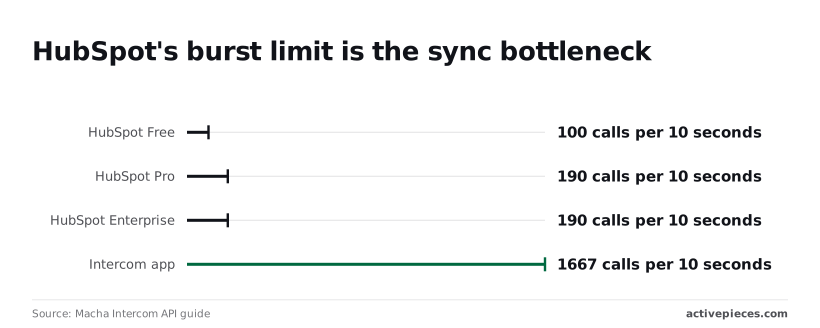
The fix is to stagger bulk imports, avoid running a historical sync during support peaks, and upgrade only if you truly need the higher 190 ceiling.
### Prevent two-way overwrites in Intercom HubSpot sync
When both tools can write the same property, the last write wins. A rep corrects a job title in HubSpot, and the next Intercom update puts the old one back.
When both tools can write the same property, the last write wins.
The fix is to pick one system as the source of truth for each field, and set the other to one-way or leave that field unmapped.
## When to add Activepieces, Zapier or n8n instead
Add a workflow tool only when you need one job the native connection can't do, such as creating a HubSpot deal from a tagged Intercom conversation; for plain contact and conversation sync, stay native.
Why do people reach for outside tools? The size of the marketplaces explains it. [APIs.io](https://apis.io/markets/customer-support/) counts 6,233 apps for Salesforce, 2,384 for HubSpot, 1,784 for Zendesk, 1,587 for Freshworks and 565 for Intercom.
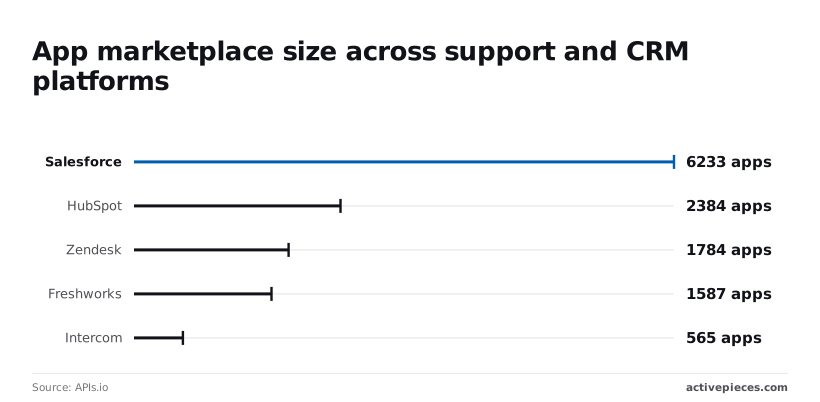
Of the five, Intercom has the smallest catalogue, so the exact connector you want may not exist. Treat the catalogue count as a rough signal, not proof the one trigger you need is there.

When the connector you need is missing, Activepieces is less likely to leave you waiting on a vendor release, because its catalogue isn't built by the vendor alone.
**The catalogue stands at 743 integrations**, counted from the `packages/pieces/community` directory of the public monorepo, whose core is MIT-licensed, and roughly 60% of them were contributed by the community, so roughly 446 of the integrations are community contributions.
MoneyGram, Moneypenny, Alan and FundingSocieties run it in production.
### Control and cost across integration methods
The table shows where each option gives you control and where you pay for it in upkeep. The native connector costs nothing to run but has the least say over triggers and fields.
| | Custom triggers | Field control | Price model | Hosting | Maintenance |
|---|---|---|---|---|---|
| Native | Fixed set | Fixed mappings | No separate tool to pay for | Vendor-hosted | Lowest |
| Zapier | Yes | Per-step mapping | From $19.99/month annual; 100 free tasks | Cloud only | You fix broken zaps |
| n8n | Yes | Full, including code | Paid cloud or self-host | Cloud or self-hosted | You own upgrades if self-hosted |
| Activepieces | Yes | Per-step mapping | Free cloud sign-up or self-host | Cloud or self-hosted | You own upgrades if self-hosted |
On a busy inbox the free Zapier tier's 100 tasks run out fast, because every step that runs counts. Only the self-hosted options let you keep conversation data on your own servers, and they cost you patching time.
### A custom workflow: Intercom conversation to HubSpot deal
The native connector can't turn a qualified conversation into a deal. This is that job. The flow in [Activepieces](https://www.activepieces.com/pieces/intercom) runs as follows:
1. Trigger: an Intercom conversation is tagged, for example "sales-qualified".
2. Filter: continue only if the contact has an email, since you match on it.
3. Search HubSpot for a contact with that email, so a rerun does not create a duplicate.
4. Create the deal in [HubSpot](https://www.activepieces.com/pieces/hubspot), with the conversation subject as the deal name.
5. Associate the deal with the contact you found.
Skip step 3 and a retried run files the same deal twice. It matters most.
You can [start the flow free](https://cloud.activepieces.com/sign-up). If you only need contacts and conversations to sync, skip it; the native install is enough.
## Frequently asked questions
### Is the Intercom HubSpot integration free?
The connection itself carries no separate charge, but it depends on your plans. You still need a HubSpot account and an Intercom workspace on a plan that includes the app, so confirm the plan requirement in both tools before you budget around "free".
Source: Intercom's HubSpot integration help article and the HubSpot listing in its app marketplace, checked 21 October 2026.
### Can HubSpot data show inside the Intercom inbox?
Yes. The integration puts HubSpot contact and company details in the Intercom conversation sidebar, so an agent sees the record without switching tabs.
What appears is set by the integration's fixed field list, so a custom property you rely on may not show, and you should check it on a test conversation first.
Source: Intercom's HubSpot integration help article, checked 21 October 2026.
### Does the sync work in both directions?
Partly. Intercom people and conversation activity flow into HubSpot, and HubSpot data is read back into Intercom's sidebar. It's not a free-form two-way field sync, so an edit in HubSpot won't necessarily overwrite the matching Intercom attribute.
Test one record in each direction before you trust it. Source: Intercom's HubSpot integration help article and HubSpot's Intercom integration documentation, checked 21 October 2026.
### How do I disconnect the integration without losing data?
Disconnect from the integration settings in Intercom or HubSpot. Syncing stops, while records and logged conversations already created in either system stay where they are.
Export a contact list from both sides first, because you can't assume a later reconnect will reconcile the gap cleanly.
Source: Intercom's HubSpot integration help article and HubSpot's app management documentation, checked 21 October 2026.
### Do I need a developer to set it up?
No. Setup is an authorisation step: sign in to HubSpot from Intercom's app settings, approve the permissions, and choose what to sync. A person with admin rights in both tools can do it.
You only need a developer or a workflow tool when your use case falls outside the fixed mappings. Source: Intercom's HubSpot integration help article, checked 21 October 2026.
## Related reading
- [AI Agent Builder for Customer Support Teams](https://www.activepieces.com/blog/ai-agent-builder-for-customer-support-teams)
- [Stripe HubSpot Integration: Setup Guide (2026)](https://www.activepieces.com/blog/stripe-hubspot-integration-setup-guide-2026)
- [Shopify HubSpot Integration vs Zapier or n8n in 2026](https://www.activepieces.com/blog/shopify-hubspot-integration-vs-zapier-or-n8n-in-2026)
## References
- [APIs.io](https://apis.io/markets/customer-support/)
- [HubSpot](https://blog.hubspot.com/service/hubspot-service-hub-pricing)
- [Macha Intercom API guide](https://www.getmacha.com/blog/intercom-api-guide)