# JumpCloud API: Documentation, Rate Limits, Pricing
By Amit Patel · 2026-10-29 · Source: https://www.activepieces.com/blog/jumpcloud-api-documentation-rate-limits-pricing
---
Users, groups, devices and their associations are all readable and changeable through the JumpCloud API, a REST API that authenticates with an API key sent in a request header, which means workflow tools such as [Activepieces](https://www.activepieces.com) can call it with the same key as any script.

Everything below is a composite incident, not one named customer's postmortem, built from failure patterns that recur in this kind of job.
## JumpCloud API sync failure
### What the JumpCloud API is, in one paragraph
A script that has to create, update and suspend users without anyone clicking through the admin console goes through JumpCloud's REST API.
JumpCloud's a cloud directory service: it holds the user accounts that decide who can sign in to laptops, apps and networks, and the API exposes that directory over HTTPS.
The key's tied to an admin identity, so whoever holds it can change the accounts it reaches.
Confirm any limit or endpoint detail in JumpCloud's developer documentation, not here. The reference lives there.
### The nightly job and its first error at 02:10
Picture a 300-person company. HR drops an export file each night, and a sync script reads it and pushes every change into the directory.
The script's a plain cron job, though you can describe the sync to the built-in chat in [Activepieces](https://www.activepieces.com) instead: it builds and publishes a real flow you can read, with retries and schedules, and each run appears in run history under the same RBAC and audit logs as a hand-built one.
It starts at 02:10, so nobody is watching when it fails.
### Why the first full run failed
It worked in testing because testing used a handful of users. On the first full run it fired requests in a tight loop, and JumpCloud answered with **HTTP 429, "too many requests."**

According to JumpCloud, that status is a rate limit, not a verdict on the data, so the right response is to wait and retry. This script treated it as a fatal error and exited.
### What the failure left behind
No existing staff account was touched, because the run went from export to script to directory and stopped at the rate-limit response. **That outcome was luck, not design**.
There was no backoff, no record of how far the script got, and no alert. The half-finished sync would sit unnoticed until someone's new-hire account failed to appear in the morning.
Numbers change, and a copied number goes stale quietly, so this section deliberately carries no rate-limit values, page sizes or quota figures. Where later sections cite a limit, it comes from JumpCloud's own documentation with the check date beside it.
## Sync failure costs by morning
None of the figures in this section belong to JumpCloud; they belong to the illustrative incident. What a failed overnight sync costs by morning is leavers who can still sign in, starters who can't, and IT hours spent reconciling by hand.
The table says what each loss is, how it's counted, and why none of it's a documented limit, so read it as a way to size your own exposure.
| Item | Illustrative figure for 300 staff | How counted | Case-not-JumpCloud label |
|---|---|---|---|
| Leavers' accounts left active | Every leaver processed since the last good run | Accounts in the directory with a termination date in the past and a live login | Case assumption, not a platform figure |
| Starters without logins at 09:00 | Every starter whose creation call was skipped or failed | New hires with no working account at start of day | Case assumption, not a platform figure |
| IT hours reconciling | Time to compare the HR export against the directory by hand | Hours logged by whoever does the diff, per incident | Case assumption, not a platform figure |
| Exposure window | Last good run to the moment the last account is corrected | Timestamps from the run trace | Case assumption, not a platform figure |
Track the exposure window first, because the other three rows grow with it. The run trace is where you can read it off.
When a leaver's deactivation call fails, the account keeps access to everything the directory unlocks, and nothing in the HR system shows it. The sync reported a failure, but no one was reading the log overnight, so the account stays live until someone notices.
Silence is what makes it dangerous: a retry that exhausted its attempts and gave up looks the same as success unless the trace records the outcome per account.
### New hires locked out by JumpCloud API failures
Creation fails the same way in reverse, when a call errors out for the same reason. A starter arrives at 09:00 with a laptop and no login, and the first hour of their employment becomes a ticket.
If the sync stopped partway through a paginated read, the starters at the end of the list are the ones dropped. That's why the pattern looks random until you check where the run stopped.
Once you can't trust the run, you diff the HR export against the directory yourself.
That means checking every account, not just the failed ones, because the trace doesn't say which records were skipped. A run that logs each record's result turns this from a full audit into a short list of exceptions.
## Get JumpCloud API keys, pricing and limits
That log only helps if you know what JumpCloud hands you to call: one API key, two API versions, and a bill per user rather than per call.
viz type=groupedbars title="What JumpCloud self-serve plans cost, billed annually or monthly" unit="$ per user per month" source="JumpCloud - https://jumpcloud.com/pricing" cols="Billed annually,Billed monthly"3 against viz type=groupedbars title="What JumpCloud self-serve plans cost, billed annually or monthly" unit="$ per user per month" source="JumpCloud - https://jumpcloud.com/pricing" cols="Billed annually,Billed monthly"5."
Device Mgmt: 9, 11
SSO: 11, 13
Device Identity: 13, 15
### Getting access and creating an API key
To get a key, an admin generates it in the admin console, under the account menu's API key option.
It acts with that admin's permissions, so create it from **a dedicated admin account, not a person's**. If that admin is later removed, every run using the key starts failing.
Store it in your platform's secret store, never in the workflow body, and check the trace to confirm the key never appears in logged request headers.
### JumpCloud API v1 and v2 endpoint groups
You send the same key, in the `x-api-key` header, to both versions. They differ in base URL and in what they cover. Find the group you need before choosing a version, because a v1 call for a v2 resource returns an error, not partial data.
| | v1 API | v2 API |
|---|---|---|
| Base URL | `https://console.jumpcloud.com/api` | `https://console.jumpcloud.com/api/v2` |
| Auth header | `x-api-key` | `x-api-key` |
| Endpoint groups | Users, systems, commands, applications | Groups, policies, directories, associations |
| Max page size | 100 (default 10) | 100 |
| Rate limit | Unpublished | Unpublished |
| Per-call price | None listed | None listed |
The practical trap, per GitHub, is the default page of 10. A 1,000-user org takes 100 requests unless you set `limit=100`, which cuts it to 10, meaning each API call retrieves roughly 100 users instead of 10. Set it explicitly.

### Pricing per call versus plan pricing
No per-call charge is listed, so the bill's per user. JumpCloud's pricing page shows Device Management at $9–$11 per user per month, SSO's $11–$13, and Device Identity's $13–$15, so the cost depends on which products an organization selects.
Take the lower figure as the annual rate. For 100 users on SSO, that's $1,100–$1,300 a month, and a bulk run adds nothing to it.
You can't plan around a number, because JumpCloud doesn't publish limit figures per tier. Plan around the response instead: the trace should show 429 responses being caught, backed off and retried, not counted as failed records.
```bash
curl -H "x-api-key: $JC_API_KEY" \
"https://console.jumpcloud.com/api/systemusers?limit=100&skip=0"
```
If this returns users, the key works. It says nothing yet about the second page.
## JumpCloud API sync failure causes
Most failed bulk syncs come down to four causes: bursts that hit 429 with no backoff, pages cut off at the default size, a departed admin's key, and retried writes that repeat. The second page is where the first three tend to surface.
JumpCloud's [best-practices page](https://jumpcloud.com/support/best-practices-jumpcloud-api) documents 13 client-error codes, 4 success codes, 4 server-error codes and 3 redirects, so the documentation includes more than 3 client error codes for every server error.
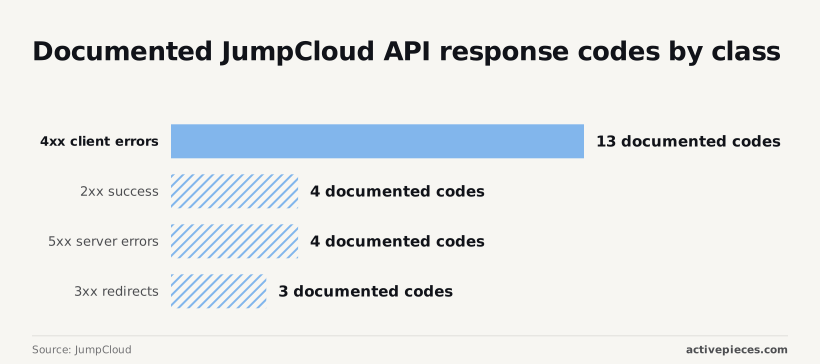
Most failure paths are ones your own code can prevent, because the server isn't the one at fault.
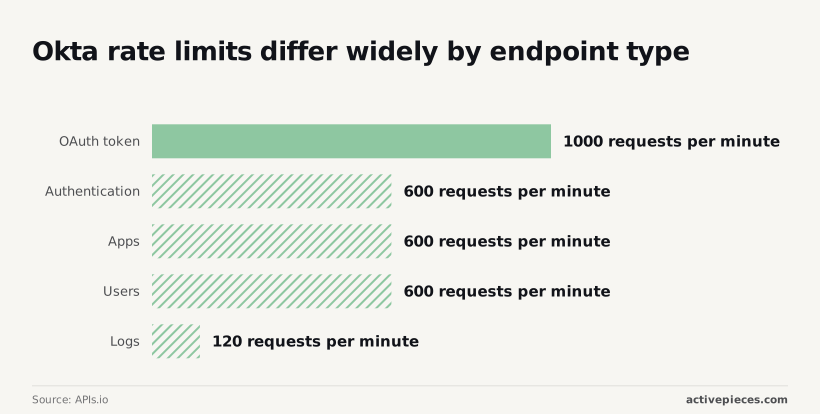
**Limits vary by endpoint**. Okta, a rival identity provider, publishes [per-minute limits](https://apis.io/rate-limits/okta/okta-rate-limits/) of 1000 for OAuth tokens, 600 each for authentication, apps and users, and 120 for logs.
A loop tuned on users runs five times too fast against logs, so a single hard-coded rate will fail somewhere.
```python
for n in range(6):
r = session.get(url)
if r.status_code != 429: break
time.sleep(float(r.headers.get("Retry-After", 2**n)) + random.random())
```
Honor the header, add jitter, and cap the attempts.
**A list call can return 100 records with a 200 and no error, so a sync of 340 users quietly imports 100.** **Page until a short page arrives**:
**A list call can return 100 records with a 200 and no error, so a sync of 340 users quietly imports 100.
```python
skip, rows = 0, []
while True:
page = get(url, params={"limit": 100, "skip": skip})
rows += page
if len(page) < 100: break
skip += 100
```
When an admin leaves, a key issued to them starts failing the day their account is removed, usually mid-run. Retrying won't help. Fail on the first 401 or 403, alert someone, and issue the key from a dedicated service account with a named owner.

After a timeout, you can't tell whether the write landed. Retrying a POST can create a second user or send a second command. Retry only reads blindly, and for writes look up the record by a stable identifier before sending again.
Check for those four fixes in the run trace, which the next section walks through.
## Rules protecting JumpCloud API syncs
Six rules, run in a fixed order, now let the sync that reads users and devices from JumpCloud, our directory service, survive a bulk run. Each one maps to something you can see in the trace.
The steps below show that order, so take from it that no rule works without the one before it:
1. Store the service-account key in a secrets store, with its rotation date beside it.
2. Cap the request rate below what the API tolerates.
3. Back off with jitter when a call is refused.
4. Page to the end, never stopping at the first full page.
5. Check the fetched count against the expected count.
6. Write idempotently, and alert when a run finishes short.
The sections below take these in the order they fail.
To avoid refusals, you cap the rate; to handle the ones that still arrive, you back off.
Jitter matters because retries from parallel workers otherwise land together and trigger the same refusal again. Batch reads so each worker owns a slice, and the cap applies to the whole run, not per worker.
Once a key is pasted into a script, it belongs to whoever pasted it. Keep it in the secrets store under a service account, record its rotation date, and the sync keeps working when that person leaves.
An expired key should fail loudly at the first call, not halfway through a page.
A run can finish with no errors and still be wrong, because it stopped paging early and wrote a clean, partial result.
So the count check compares fetched records with the expected total, and a short run raises an alert. Idempotent writes mean the rerun that follows changes nothing it already changed.
Open last week's run trace and look for these:
- A rotation date on the key, and a secrets store holding it
- A request cap that applies across all workers
- Retries that wait different lengths of time
- Paging that ran until the API said it was done
- A fetched count compared with an expected count
- An alert that fired, or a record of why it didn't
Whatever the trace can't show you, the integration isn't yet handling.
## Automate JumpCloud API workflows with Activepieces
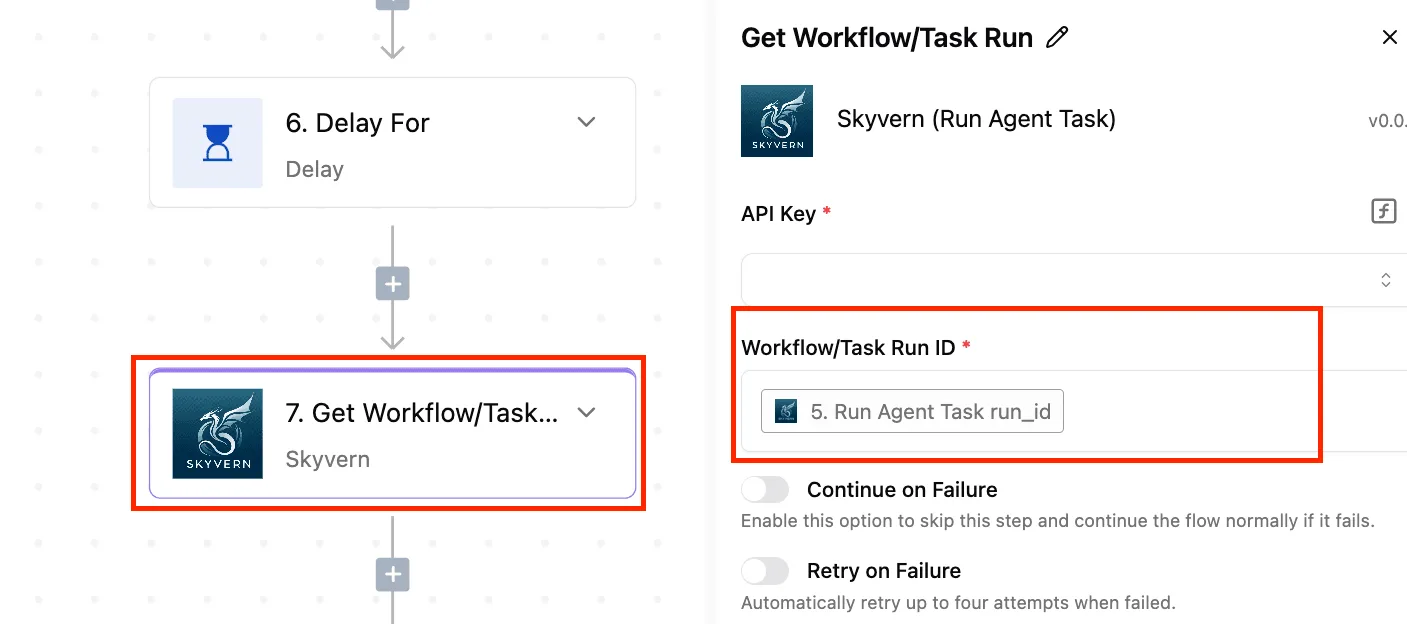
Activepieces fits this sync as the layer that keeps the run trace for you, not as a replacement for the sync's logic.
It's an open-source workflow builder that runs flows on a schedule. Each run records what every step received and returned, so the unhandled parts show up as a failed step instead of a silent gap.
### What a JumpCloud API workflow replaces
Three things go away: the cron entry, the log file you meant to read and the credential sitting in an environment variable on one machine. Test any candidate flow against four things before you trust it with a bulk run:
- Retries on a step, so a rate-limit response or a dropped connection re-runs that call instead of aborting the whole flow. Confirm the retry setting exists on the step type you use, and that a retried page doesn't duplicate work you already wrote downstream.
- Failure notification, so a run that dies at page forty reaches a person. Deliver it by email or chat, and check that it fires on a real forced failure, not just in the settings screen.
- The API key held as a connection, stored once and referenced by name, so it never appears in step inputs or in the run history you share with colleagues.
- An HTTP step when no connector covers the call. Look through the catalog of prebuilt integrations for a JumpCloud one and read which actions it exposes. If it lacks the endpoint you need, a generic HTTP request step with the key attached through the connection does the same job, and you handle the paging and the limit headers yourself.
You still build the pagination loop either way. The tool gives you a place to build it and to see it run, not a guarantee that it is correct.
### When a script beats a JumpCloud API workflow
If the sync is a single pass with heavy logic, such as comparing thousands of records in memory, a plain script is better.
It's also better when the sync must live in version control with tests and code review. Visual flows are awkward to diff and awkward to unit test.
When the task is something JumpCloud already does natively, such as its built-in directory integrations or admin console actions, its own tooling is better. Writing a flow to reproduce a feature the product ships means maintaining code against a behaviour the vendor already maintains.
## Frequently asked questions
### Is the JumpCloud API free to use?
There's no separate per-call charge that I can confirm, and API access comes with a JumpCloud account rather than as a metered add-on. **The cost you do hit is rate limiting**.
What your contract allows for automation is worth confirming with JumpCloud before a bulk run, because a throttled job costs you time even when it costs no money.
JumpCloud publishes API reference documentation and open-source client libraries generated from its API specifications, and it has offered Postman collections for exploring the endpoints.
Treat any generated client as a starting point. Check that it handles pagination and retries on throttled responses, since generated code often leaves both to the caller.
### How do I tell which API version an endpoint belongs to?
Look at the URL path: the older API is v1 and the newer one is v2, and each has its own base path and its own reference pages.
The split isn't tidy, because related objects such as users and groups can live on different versions. So confirm the version per endpoint in the reference rather than assuming one base URL covers a whole workflow.
### Can I use the JumpCloud API when MFA is enabled on the admin?
Yes. MFA protects the interactive console login, while API calls authenticate with a key sent in a request header, so no second-factor prompt interrupts a script.
The key acts with the permissions of the admin who created it, so create it from a dedicated service admin rather than a person's account. If that admin is removed or demoted, your integration fails or loses access without warning.
### Where does JumpCloud publish API changes?
None of its channels will alert your running job, so pin the version you tested against.
Its release notes and developer documentation are the first places to look, and the repositories for its open-source libraries show spec changes as they land. Re-check the reference before a large run, and watch your run trace for unexpected response shapes or new error codes.
## Related reading
- [Cohere API Trial Key, Rate Limits and Pricing in 2026](https://www.activepieces.com/blog/cohere-api-a-2026-developer-guide)
- [Doubao API Pricing 2026: Models, Tiers and Rate Limits](https://www.activepieces.com/blog/doubao-api-pricing-2026-models-tiers-and-rate-limits)
- [Grok Pricing 2026: Every Plan, Rate, and Real Cost](https://www.activepieces.com/blog/grok-pricing-2026-vs-gpt-for-enterprise-teams)
## References
- [JumpCloud](https://jumpcloud.com/support/best-practices-jumpcloud-api)
- [JumpCloud](https://jumpcloud.com/pricing)
- [APIs.io](https://apis.io/rate-limits/okta/okta-rate-limits/)