# Klaviyo API: Keys, Scopes, Rate Limits (2026 Guide)
By Grace Muthoni Kariuki · 2026-11-21 · Source: https://www.activepieces.com/blog/klaviyo-api-keys-scopes-rate-limits-2026-guide
---
The [Klaviyo](https://www.klaviyo.com/pricing) API is a REST interface that exchanges JSON, runs against one Klaviyo account, and lets code, whether a hand-written script or a workflow built in a tool like [Activepieces](https://www.activepieces.com), read and change that account's profiles, events, lists and campaigns.
Klaviyo API access is the set of credentials, request limits and versioning rules that govern how code authenticates to a Klaviyo account, how often it may call the API, and which errors it receives when a request is throttled, mis-versioned or not yet processed.
## Klaviyo API and its capabilities
### Klaviyo API private key scopes and ownership
Before any call goes through, it needs an API key, so the first question is whose key it is. **A private key carries scopes chosen at creation**.
A key limited to reading lists can't send a campaign, and whoever created it owns everything it does.
I didn't verify whether Klaviyo charges for calls, so read Klaviyo's pricing page before assuming either way.
### What it is and is not
Through the API, a script can reach eight objects, each with a specific action, and [Activepieces](https://www.activepieces.com), with Klaviyo among its 750 integrations, connects through that same API, so both scripts and Activepieces depend on those same four objects.
That's the boundary of what either can do against the account:
- Profiles: create and update the records of the people you email or text.
- Events: track activity such as purchases against a profile.
- Lists: add and remove members.
- Campaigns: read their details and send them.

It also makes no decisions for you: who belongs on a list or when a campaign goes out is logic you must supply.
As of 21 November 2026, the description of the API reflects Klaviyo's published documentation. Scopes and endpoints change, so check the key's permissions against the current documentation before relying on any of it.
## Klaviyo API key creation and first request
Create a private API key in your Klaviyo account's settings, grant it only the scopes the flow needs, and send it with an authorization header and a revision header.
### Private key versus public key
**A private key authenticates server-side calls and must never reach a browser, a repository or a chat transcript.**
The public key, which is your company ID, only identifies the account for client-side tracking, so it's not a secret and grants no read access. Mixing them up is the common failure: a private key pasted into front-end code is a credential leak.
**A private key authenticates server-side calls and must never reach a browser, a repository or a chat transcript.
Each scope is a read or write permission on one resource, such as lists, profiles or flows. Start with read-only scopes, add write scopes one at a time, and note which scope each step needs.
Two headers are required: `Authorization: Klaviyo-API-Key ` and `revision`, which pins the API version. This request lists your lists and needs the read scope for lists:
```bash
curl --request GET \
--url https://a.klaviyo.com/api/lists \
--header 'Authorization: Klaviyo-API-Key YOUR_PRIVATE_KEY' \
--header 'accept: application/vnd.api+json' \
--header 'revision: 2024-10-15'
```
Confirm the current revision values at developers.klaviyo.com before relying on this one. A response with your lists confirms the key, scope and headers work together.
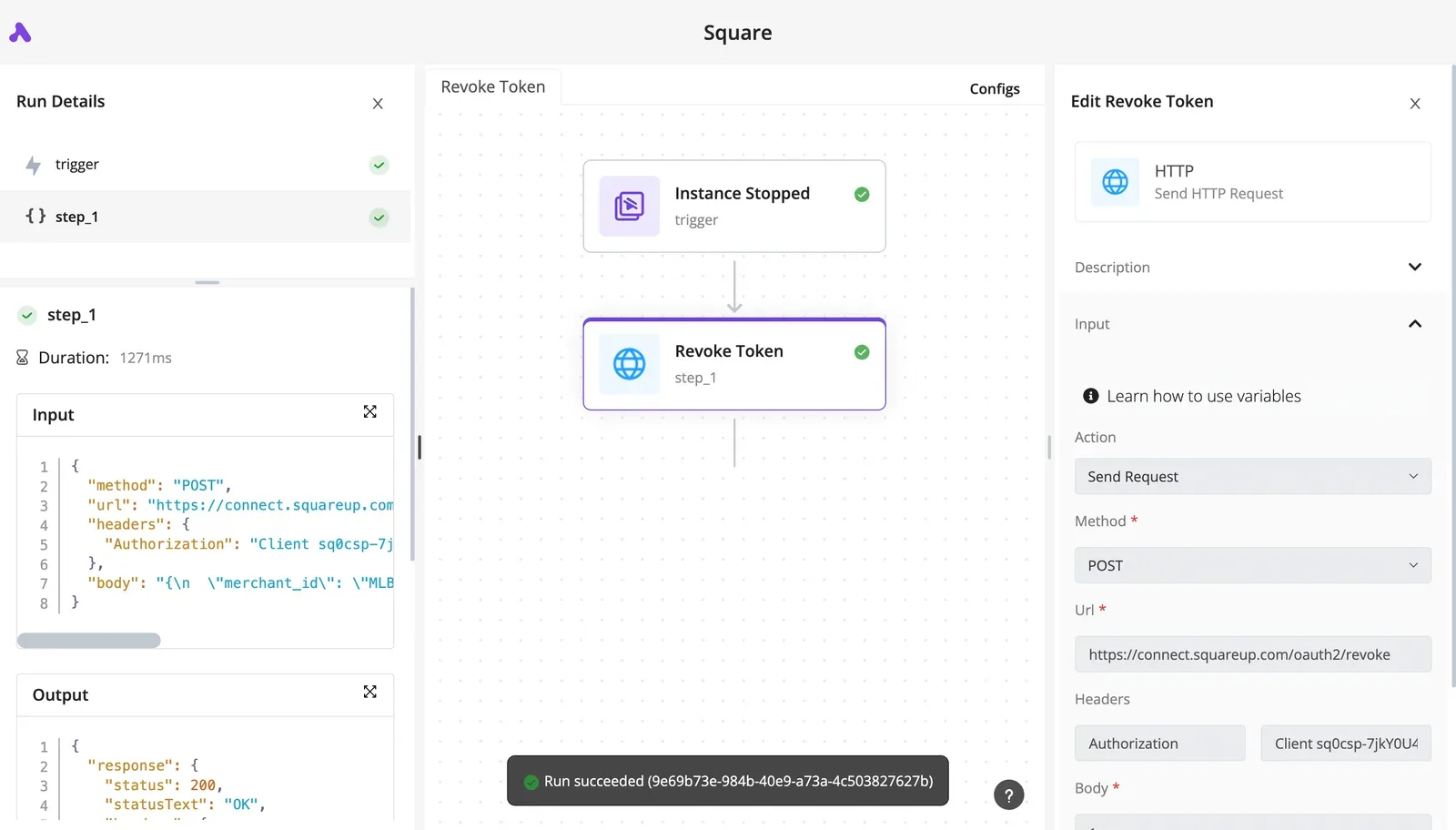
If you build one app for many Klaviyo accounts, private keys don't scale. OAuth lets each account owner approve specific scopes, and your app then sends a bearer token instead of a key. Each customer can revoke access without touching the others.
## Klaviyo API endpoints, revisions and per-unit pricing
Klaviyo's API splits into eight endpoint families, each pinned to a dated revision.
Some writes finish immediately and some return 202 and finish later; the table shows which families do which.
| Family | Purpose | Sync or queued (202) writes | Typical use |
|---|---|---|---|
| Profiles | Customer records | Single writes sync; bulk imports queued | Upsert on signup |
| Events | Behavioral activity | Queued (202) | Trigger flows from orders |
| Lists and Segments | Audience membership | List membership writes sync; segments computed | Target a send |
| Campaigns | One-off sends | Create sync; send jobs queued | Schedule a newsletter |
| Flows | Automations | Mostly reads and status changes, sync | Audit what is live |
| Catalogs | Product data | Single items sync; bulk jobs queued | Sync inventory |
| Webhooks | Outbound notifications | Sync configuration | Push events to your systems |
| Reporting | Metrics queries | Reads, sync | Pull performance data |
Every request names a dated revision in a header. That pins behavior to that date, so an unpinned call can change shape when defaults move, and a pinned one eventually reaches a deprecation date.
Record which revision each connection uses and who owns it, because an old revision fails only when someone finally calls it.
### What Klaviyo charges, and per what unit
**You pay by profile count, not request count**, so a retry storm costs rate-limit headroom rather than money, while a bad import that creates profiles raises the bill.
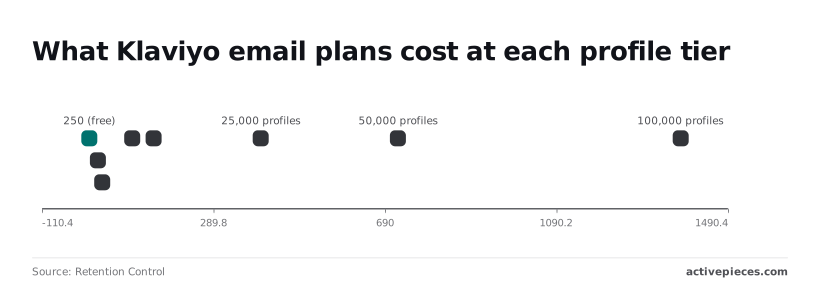
Per [Retention Control](https://retentioncontrol.com/blog/klaviyo-pricing/), the free tier covers 250 profiles at $0 per month, so a test account costs nothing. At 500 profiles the plan is $20, and at 1,000 it's $30, so early growth is cheap.
At 5,000 it reaches $100 and at 10,000 it's $150. At 25,000 it's $400, so a duplicate-heavy import at that scale costs real money each month.
## Klaviyo API rate limits by tier
That import also runs into Klaviyo's rate limits. They span from 1 request a second and 15 a minute at XS to 350 a second and 3,500 a minute at XL, according to [Klaviyo Developers](https://developers.klaviyo.com/en/docs/rate_limits_and_error_handling), so **each endpoint's tier determines its maximum API throughput**.

### Burst versus steady limits
At each tier there are two ceilings: a burst limit per second and a steady limit per minute.
According to [Jetstack](https://jetstack.ai/answers/hubspot-api-rate-limits/), S allows 3 a second and 60 a minute, M allows 10 and 150, so Klaviyo will throttle a script that runs comfortably on M almost immediately if you point it at an XS account.
Because the scale is logarithmic, **XL isn't "a bit bigger" than XS**. Per [Developers](https://developers.klaviyo.com/en/docs/rate_limits_and_error_handling), it's 350 times the burst and over 200 times the steady allowance, so a loop tuned on one tier tells you nothing about another.
### Klaviyo API endpoints by rate limit tier
It is not one tier per account. Klaviyo assigns tiers per endpoint. Per the [Klaviyo API reference](https://developers.klaviyo.com/en/reference/get_profiles), get profiles and bulk subscribe each allow 75 calls a second in their top tier.
Predictive profiles, bulk create events and campaign send jobs allow only 10 a second.
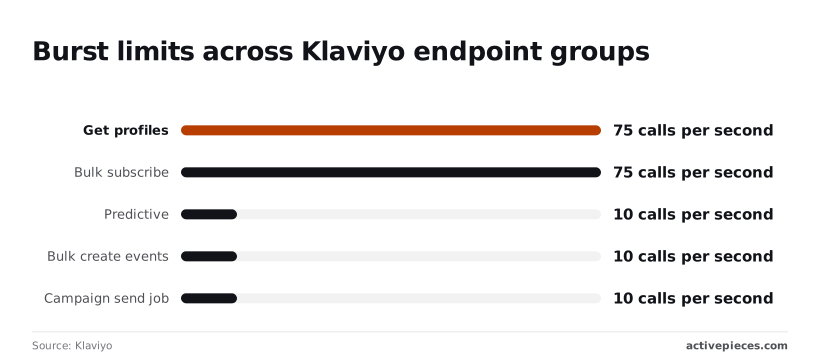
A flow that reads profiles quickly and then fires events in bulk will therefore pass the first step and stall on the second, and the run trace should show which step it was.
### Reading the rate-limit headers
When a 429 response shows up, check first who owns the key and what else is calling with it, because limits apply to the account and every tool using that account's private API key draws from one shared budget.
A nightly sync from another tool can exhaust the allowance without your flow doing anything wrong.
When a 429 comes back, it carries a Retry-After header. Honour it instead of retrying on a fixed timer, and log it per step so the trace shows where the pause came from.

## Klaviyo API errors in production and fixes
When production fails, it's usually one of a short list of status codes, and each has a cause you can name and a fix you can apply.
The table pairs each one with both, so a failed step in the trace tells you where to look first.
| Error | Cause | Fix |
|---|---|---|
| 429 | Request rate exceeded | Wait for the retry-after value, then back off with jitter |
| 400 | Missing or unsupported revision header, or malformed payload | Pin the revision on every call and validate the body |
| 401 | Invalid, revoked or wrong-type key | Re-issue the key and confirm which account owns it |
| 403 | Key lacks the scope the endpoint needs | Add the specific scope, nothing broader |
| 409 | Profile already exists | Treat as an update, using the existing profile ID |
| 202, not applied yet | Write accepted but processed asynchronously | Poll or confirm before reading back |
| Bulk job over 10,000 profiles or 5MB | Job exceeds the size limit | Split into smaller jobs |
For a 429, read the retry-after value, wait that long, then add jitter so parallel steps don't retry together. A fixed timer sends them back at the same moment and triggers the limit again.
Check the key type and its scope before the code. A 401 means the credential is wrong; a 403 means it's valid but under-scoped. A 400 usually points to the revision header.
When you get a 409, the profile already exists, so it's not a failure. Fetch the existing ID and update it. Retries then become safe to repeat, because **a second attempt can't create a second profile**.
On a 202, the write is accepted, not applied. Confirm completion before any step reads the data back. Keep bulk jobs under the size limits, and page through large reads with the cursor from each response rather than computing offsets.

## Activepieces for Klaviyo workflows without custom code
### Building Klaviyo workflows for smaller jobs
For the smaller, steadier jobs that sit well under those bulk limits, Activepieces lets a team that doesn't write code build the flow itself, with the Klaviyo connection among its 750 integrations and unlimited flows on every plan, including the free one, which means there's no cost barrier to getting started.
These are syncing events, profiles or list membership between Klaviyo and other tools, built by a team that doesn't write code. That's the use its own Klaviyo page describes, and it's the fit to hold it to.
### The connection and who owns it
Start with the connection, because it decides everything after it. The Klaviyo connection holds a private API key, and that key's scopes set what a flow may read or write.
Record who created it and who is responsible when it's rotated or revoked. If the owner leaves and someone removes the key, every flow using it stops, and the failure appears in the run history rather than in anyone's inbox.
### Reading the builder and the run trace
The builder below uses a Discord workflow rather than a Klaviyo one, but the layout is the same.
It shows a trigger, a record write, an AI check, a router and a send step, with the trigger's connection and read limit set in a side panel. A publish button and an unpublished-changes notice sit at the top.

You can audit who owns the credentials and how much a step pulls without reading code, because each step names its connection and its read size in a plain field.
What follows from that layout is the run trace.
Describe a Klaviyo process in the built-in chat, one that also touches your other connected apps, and what it publishes is a live flow in your account, listed beside any flow built by hand, plus a run trace for every run that names the step that hit the 429, the 409 or the unapplied 202.
You still have to read that trace. What you skip is building the plumbing first.
### Rate limits and async behavior persist
**Don't expect Activepieces to lift Klaviyo's limits**. Flows run under the same rate limits and the same asynchronous behavior as hand-written calls. For high-volume bulk loads, or for retry logic tuned to your own data, hand-written code remains the better choice.
## A Monday checklist for shipping a Klaviyo integration
These eight steps stand between hand-written code and the production failures named earlier. Use them if you keep that route for bulk loads or custom retry logic; the order matters because each one assumes the one before it.
1. Mint a private API key with the least scope the job needs. A flow that only subscribes profiles to a list should hold write access to profiles and lists, not full access, so a leaked key can do limited damage.
2. Store the key in a secrets manager, never in the repository or a plain environment file.
3. Pin the revision header on every request. Without it you're trusting a default that can change underneath you, and the first sign will be a changed response shape in production.
4. Load test against your account tier's rate limits before launch.
5. Add exponential backoff with jitter on 429 and 5xx responses. Jitter stops parallel workers from retrying in lockstep and tripping the limit again.
6. Log the full body of every 4xx response. Klaviyo's error payloads say which field or permission failed, and a bare status code throws that away.
7. Put a recurring review of the API changelog on the calendar, so a deprecated revision becomes a planned ticket rather than an outage.
8. Schedule key rotation on that same calendar, and record who performs it, so the key never outlives the person who created it.
## Frequently asked questions
### Is the Klaviyo API free to use?
You don't buy API access on its own; it comes with a Klaviyo account rather than as a separately priced product. Your costs follow the account's plan, such as profile counts and send volume.
Check the current pricing page for your plan before you build, because that's where the limits that affect your integration are set.
The practical consequence: a flow that creates many profiles or sends many messages is billed as account activity, whether a person or a script triggered it.
### Does the Klaviyo API have a sandbox or test account?
I can't confirm a dedicated sandbox environment, so don't assume one exists. The safer approach is a separate Klaviyo account used only for testing, with its own private key, owned by a named person.
That way a test run can't write to your production lists. Whoever holds that key should be recorded, since a test key that nobody owns tends to outlive the project.
### How do I rotate or revoke a Klaviyo API key?
Private keys are managed in the account's API keys settings, where you create a new key, move your integration onto it, then delete the old one.
Create the replacement first. Revoking the old key before the switch breaks every call that still uses it, and the first sign will be failed requests in production.
When you create a key, give it only the scopes the integration needs, such as read access for reporting and write access only where it updates profiles.
### Can I use the Klaviyo API from the browser?
Server-side calls need a private key, and a private key in browser code is exposed to anyone who opens the developer tools. Don't ship one there.
Klaviyo provides a separate public identifier for client-side use, designed for limited actions such as tracking activity and collecting sign-ups. Anything that reads data or edits flows belongs on your server.
### How long are old Klaviyo API revisions supported?
Each request names a revision through a header, and Klaviyo retires old revisions on a published schedule. I'm not giving a window here, because the dates are on Klaviyo's own deprecation page and change over time.
The consequence is that a hand-written integration pinned to an old revision will work until the day it doesn't. Look up the retirement date for the revision you pin, and put it in your calendar.
## Related reading
- [Klaviyo Composer: Features, Limits and Cross-App Use](https://www.activepieces.com/blog/klaviyo-composer-features-limits-and-cross-app-use)
- [Mailgun API: Sending, Webhooks and Rate Limits](https://www.activepieces.com/blog/mailgun-api-sending-webhooks-and-rate-limits)
- [Apify API Tokens, Rate Limits and Errors in 2026](https://www.activepieces.com/blog/apify-api-tokens-rate-limits-and-errors-in-2026)
## References
- [Klaviyo Developers](https://developers.klaviyo.com/en/docs/rate_limits_and_error_handling)
- [Klaviyo](https://developers.klaviyo.com/en/reference/get_profiles)
- [Retention Control](https://retentioncontrol.com/blog/klaviyo-pricing/)