Reserved and private cloud capacity trade flexibility for a committed term, so you pay for the reservation whether or not you fill it. Because Lambda changes its rates and the GPU models on offer, the hourly rates quoted here come from Lambda's pages and may go stale. Read current prices directly from Lambda's own pricing page before you budget, and treat anything that doesn't trace back to that page as unverified. ## Current Lambda plans and GPU pricing Though the table shows every Lambda offering, only the H100 rates are confirmed here. Every other price reads "contact sales" rather than a guess, so treat those cells as open questions for your quote. | Offering | Configuration | $/GPU-hour | Included | Limits | Commitment | |---|---|---|---|---|---| | On-demand H100 SXM | 1x, 4x, 8x GPUs | 4.29 / 4.09 / 3.99 | Instance as specced on Lambda's page | Regional availability | None, billed hourly | | Other GPUs | Per Lambda's page | Contact sales | Instance as specced | Regional availability | None, billed hourly | | 1-Click Clusters | Multi-node | Contact sales | Cluster networking | Capacity-dependent | Contact sales | | Reserved / private cloud | Dedicated capacity | Contact sales | Dedicated capacity | Contract-defined | Term contract | | Inference API | Per-model | Contact sales | Hosted endpoints | Rate limits apply | None | 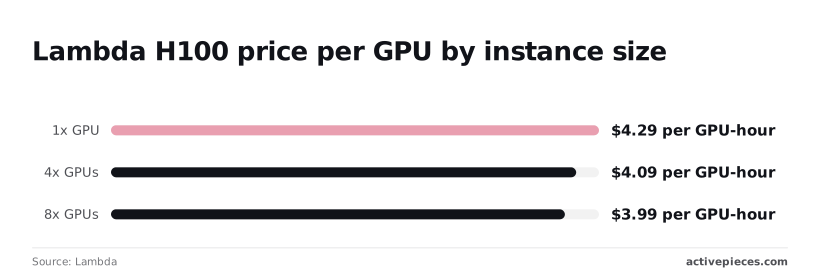 The sections below say what each row means for the bill. ### On-demand GPU instances Leave a single H100 running overnight and it **burns roughly $51 before anyone has trained anything**, at [$4.29 per GPU-hour on Lambda's instances page](https://lambda.ai/instances). At 4x the rate is $4.09, and at 8x it's $3.99, so the cost savings from scaling are minimal. **The move to 8x saves only $0.30**, meaning there's negligible financial incentive to upgrade. Going from one GPU to eight saves $0.30 per GPU-hour, about 7%. But an idle 8x node still costs $31.92 an hour, so you can't afford idle time. The discount only pays if the GPUs are busy.  If you want multi-node 1-Click Clusters, ask for a quote, because pricing isn't listed. Get capacity and minimum-term terms in writing, since those drive cost more than the hourly rate. Before you commit to reserved capacity, whose pricing is also contact sales, compare it against the 8x on-demand rate of $3.99, and only commit if your utilization stays high. I have no confirmed per-token prices for Lambda's inference API, so none appear here. Check the pricing page before comparing it with renting GPUs. ## What Lambda plans cost at realistic usage At realistic usage the bill is the hourly rate times the hours an instance exists, not the hours anyone works on it. The same rate gives totals more than tenfold apart. The table prices four scenarios in units of *r*, the on-demand rate for one GPU-hour, so you can substitute whatever the pricing page shows today. | Scenario | GPUs | Hours | Rate | Arithmetic | Total | |---|---|---|---|---|---| | Weekend fine-tune | 1 | 48 | r | 1 × 48 × r | 48r | | Workday instance | 1 | 176 | r | 1 × 176 × r | 176r | | Always-on inference | 1 | 730 | r | 1 × 730 × r | 730r | | Two-week multi-GPU run | 8 | 336 | r | 8 × 336 × r | 2,688r | Because the rate is the same in every row, hours and GPU count decide the total. What follows is what each row hides. For a weekend fine-tune, on-demand clearly wins: you pay for 48 hours and nothing after. The risk is forgetting to terminate on Monday, because every extra idle day adds 24r. Leave the workday instance up overnight and you pay for 730 hours while using about a quarter of them, so the effective rate per useful hour is roughly four times the listed one.  The 176 hours assume eight hours a day over 22 working days, anchoring this to roughly one calendar month, so the task spans a full calendar month. At 730r for an always-on inference server you're paying for every hour of the month, which is where a reserved commitment starts to make sense. Reserved beats on-demand once utilisation exceeds the reserved rate divided by the on-demand rate. If your server is busy for a smaller share of the month than that ratio, the commitment costs you more. When eight GPUs run for 336 hours, the total is 2,688r, and the multiplier is the GPU count, so doubling your GPU allocation doubles your resource consumption. Capacity limits matter more than price here: if eight GPUs aren't free on your start date, a cheap rate doesn't help. The next question is what sits outside this arithmetic, starting with storage. ## Hidden costs and limits Lambda users run into Outside the hourly rate, storage, idle instances, regional stock, account limits and minimum terms all bill or bind you, and Lambda's docs confirm it. This is what the docs state outright, so none of it is inference: - Persistent storage at $0.20/GB/month - Billing continues while an instance sits idle: - B200 available only in Virginia - Capacity that varies by region - Account limits - Minimum terms - Data lost on termination They surface in different places, the invoice, the console and the contract, so they tend to get missed one at a time rather than together. ### Storage and idle-time charges Leave a 2 TB dataset sitting for a quarter and the $0.20/GB/month line stops looking trivial. That comes to **roughly $1,200 for files nobody is computing on**. That is small next to the idle charge. [AI Industry Reviews](https://ai-industry-reviews.com/research/gpu-utilization-rate-statistics-2026/) puts **real computing at 52% of accelerator time**, with 24% allocated but idle and another 24% unallocated. 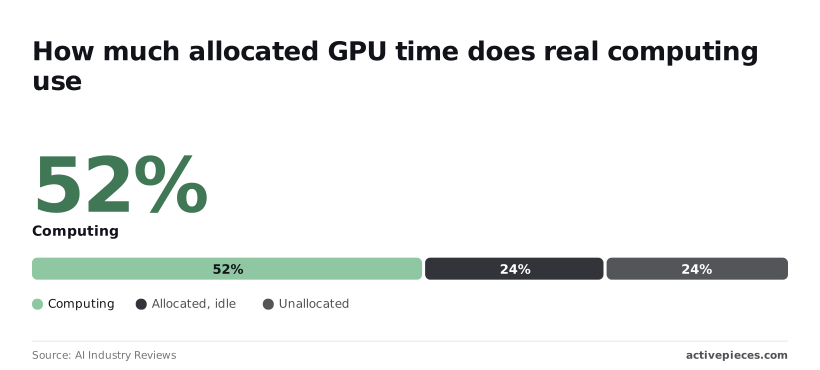 If your team looks like that average, about a quarter of accelerator time is paid-for hardware doing nothing, because Lambda bills while idle. If your data or your users sit outside Virginia, B200 means you either move data, accept latency, or skip that GPU, since it is offered only there. Availability varies by region and GPU type, which means the cheapest-looking card may not exist where your storage lives. ### Lambda account limits and commitment minimums When you scale up suddenly, you can stall at the ceiling rather than at your budget, because account limits cap how much you can launch. Minimum terms turn a flexible hourly rate into a fixed obligation, which only pays off if utilization stays high. And because data is lost on termination, shutting down to stop the meter means copying out anything you need first. ## Lambda against CoreWeave, RunPod and AWS on price ### Lambda GPU price comparison table Even after paying for that copy-out time, Lambda's on-demand H100 is the cheapest of the big names at [$3.99 per GPU-hour](https://galactic.inc/analytics/compute-markets/), making the copy-out cost worthwhile. The hourly gap is real before any extras arrive. The table shows the rate and nothing more, because the rate is the only dimension with a confirmed figure. | Provider | H100 $/GPU-hour, on demand | Basis | |---|---|---| | Lambda | 3.99 | Galactic comparison | | CoreWeave | 6.16 | Galactic comparison | | RunPod | Not in the Galactic comparison | None used here | | AWS | 6.88 | Galactic comparison | Billing granularity, storage and egress charges, availability and commitment terms aren't in that data. Read them from each vendor's own page and date your notes, because they change the total more than the rate does. ### Where Lambda is cheaper and where it is not Run one H100 around the clock and CoreWeave at $6.16 costs roughly $1,580 more per month, about 54% above Lambda (about 730 hours), meaning the premium adds up fast for continuous workloads. AWS at $6.88 widens the gap to roughly $2,110 a month. Google Cloud at $11.06 and Azure at $12.29 are close to three times Lambda's rate, which makes them hard to justify on price alone. 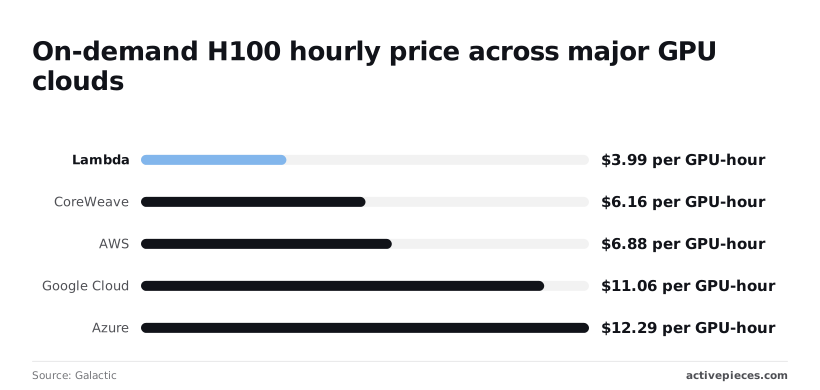 That's the whole case for Lambda on cost, and it holds only while you can get the GPU. A $3.99 rate on a machine you can't launch costs nothing and delivers nothing.  So a team with a deadline may rationally pay AWS's $2.89 more per hour for capacity it can count on. The same applies if your data already sits in AWS, where moving it out can erase the saving. The cheaper plan wins when your workload is flexible about when and where it runs. When it isn't, **price the availability, not the hour**. ## Automating idle Lambda instance shutdown with Activepieces When someone forgets to terminate an instance, no pricing plan can fix that line item. Activepieces, an MIT-licensed open-source workflow automation tool, can catch it by checking your account on a schedule and asking a human before anything gets shut down. Describe that check in its built-in chat and what gets published is an ordinary flow in your own account, governed by the same RBAC and audit logs as a hand-built one, with a run trace for every execution showing what each step did, from the list call to the approval. It controls spend, not prices: the hourly rate stays whatever it was, and you only stop paying it sooner. ### What the workflow checks and does Because the last step is destructive, the order of the flow's six steps matters. 1. A schedule trigger starts the run at an interval you choose, so the check happens whether or not anyone remembers it. 2. An HTTP step calls Lambda's list-instances API with your API key, returning everything currently running in the account. 3. A filter keeps only instances that have been up longer than your threshold, so a job that started an hour ago is left alone. 4. A Slack or email step posts the overdue instances, with names and how long each has been running, to whoever owns them. 5. The flow waits for approval, which means a long-running training job is never killed because a timer said so. 6. On approval, a second HTTP step calls Lambda's terminate endpoint for the instances that were approved. Since uptime alone can't tell a busy instance from an idle one, the alert is a prompt to look, not proof of waste. Terminating also discards anything on the instance's local disk, so confirm that checkpoints are saved elsewhere first. Check the field names and endpoints against Lambda's current API documentation before you build. ### Alternatives: cron scripts and manual audits If one engineer owns the account and is comfortable maintaining it, a cron job running a short script against the same API does the listing and alerting with fewer moving parts. The trade is that approval flows and notifications become code you write and keep working. A manual audit, someone opening the dashboard each week, costs nothing to set up and fails the first busy week. ## A Monday checklist for cutting a Lambda bill Replace the weekly dashboard visit with five steps. Two are done before you commit money and three run on their own after the first invoice, so a busy week can't skip them. Only the first two steps need a human decision, so they're worth doing slowly. The steps run in order because each feeds the next: a stale rate poisons the break-even calculation, and a wrong break-even sends you to the wrong plan. 1. Re-check the pricing page on the day you budget. A rate copied from a spreadsheet last quarter is the line item that breaks the forecast, so read the current figure and note the date next to it. 2. Match each workload to on-demand or reserved using the break-even point. Divide the committed price by the on-demand rate to get the share of hours you must actually use. Bursty experiments that miss that share stay on-demand; training that runs most of the week goes reserved. Once real bills exist, the work moves from estimating to catching waste. These three steps are where the money leaks, so those are the priorities for cost optimization. The last one only makes sense after the first two have run for a while, which means this processing is inherently sequential. 3. Audit running instances and attached storage. List every instance and every filesystem, and match each to a named owner. Storage keeps billing after the instance that used it is gone, so an orphaned filesystem is a charge nobody is watching. 4. Set shutdown rules. An instance with no job should stop on a schedule or an idle threshold, not on someone's memory. Put the rule in the launch script so new instances inherit it. 5. Request a quote only when usage is steady. Sales teams price against demand they can see, and a few months of flat, documented usage is the evidence that earns a negotiated rate. Asking earlier gets you a guess. What the weekly dashboard check was meant to do, steps three and four do without depending on a free afternoon. ## Frequently asked questions ### Does Lambda Labs charge when an instance is stopped? I can't confirm a stopped-instance billing rule from what I've verified, so check Lambda's current billing page before you rely on one. What I can say is that the line item that bites is usually the persistent storage attached to your work, which stays on the invoice whether or not a GPU is running. That means a "paused" project can keep costing you quietly, so audit what's attached before you walk away from it. Is there a free tier or free credit on Lambda? I have no confirmed free tier or credit program to point you to, and promotional offers change often enough that anything I told you could be stale. Look at the current sign-up and pricing pages. Treat any credit as a way to test real workloads, including storage and startup time, rather than as a reason to pick a plan. ### Can I get a discount for a long-term commitment? Lambda has offered reserved and committed arrangements, but I won't quote terms I can't verify. The useful question is what happens if your usage drops: a commitment lowers the hourly rate and raises the cost of being wrong. Read the clauses on early exit and on changing GPU type before you sign, because those decide whether the discount holds up. Has Lambda Labs changed its name or domain? I can't verify a rename or a domain change, so I won't claim one. If you're following an old tutorial, a stale link or an outdated product name is a good reason to start from Lambda's current site and the account you actually hold, not from a bookmark. ### Which Lambda GPU is cheapest for fine-tuning a 7B model? Rarely is the cheapest GPU per hour the cheapest for the job. A 7B fine-tune that fits comfortably in memory on a mid-range card, using parameter-efficient methods, will usually cost less than a bigger card that finishes sooner but sits idle while you debug. Pick the smallest GPU that holds your model and batch size without out-of-memory restarts, then compare total cost per finished run, not the rate on the listing. ## Related reading - [Amazon Lambda Pricing: Cost Breakdown for 2026](https://www.activepieces.com/blog/amazon-lambda-pricing-cost-breakdown-for-2026) - [Top AI Training Programs for Employees in 2024](https://www.activepieces.com/blog/top-ai-training-programs-for-employees-in-2024) - [GitLab Pricing in 2026: What Teams Pay](https://www.activepieces.com/blog/gitlab-pricing-in-2026-what-teams-pay) ## References - [Galactic](https://galactic.inc/analytics/compute-markets/) - [Lambda](https://lambda.ai/instances) - [AI Industry Reviews](https://ai-industry-reviews.com/research/gpu-utilization-rate-statistics-2026/)**Forget an instance and it costs the same as a busy one, because on-demand instances accrue charges for every hour they are up.