# Lemlist Pricing 2026: Every Plan and Cost Per User
By Petra Vlk · 2026-11-01 · Source: https://www.activepieces.com/blog/lemlist-pricing-2026-every-plan-and-cost-per-user
---
Lemlist is a sales outreach tool, and its Email plan costs 55€ a month billed annually or 69€ billed monthly, capped at 50,000 emails a month, according to Lemlist, which is worth weighing against [Activepieces](https://www.activepieces.com) and other automation tools teams often pair with outreach software.
### The Email plan, checked against lemlist's pricing page
On [Lemlist's French pricing page](https://lemlist.com/fr/pricing), the Email plan is listed at 69€ a month billed monthly and 55€ a month billed annually. It sets a limit of 50,000 emails a month and does not include a free trial.
Read the two prices as one decision: the annual toggle takes 20% off the monthly figure, so you pay less for committing a year in advance.
A full month of real sending is long enough to hit the 50,000 ceiling and see what happens at the limit, which is worth doing before you sign.
### How per-user billing and the annual toggle work
On one seat, the 14€ gap between 69€ and 55€ looks small. Multiply it by every seat and by twelve months, and the toggle decides whether the plan fits your budget.

Mind the usage limit just as much. If you route leads through an automation tool, every extra sequence still counts against the same monthly send cap. Automation can use up the allowance faster than the people on the plan do.
### What each lemlist pricing tier includes
The Email plan covers email sequences and nothing else. Before you compare tiers, write down the three things you actually need:
- the number of seats
- the add-ons you would otherwise buy separately
- the monthly send volume you expect
Then compare each tier's limit with that volume, not with the sticker price. A tier that costs more per seat but removes the cap you were about to hit can be cheaper than the plan below it plus the workaround.

## What lemlist costs at realistic team sizes
**Your lemlist bill is the number of people who send, multiplied by a plan price, then checked against that plan's email limits.**
The four steps below run in that order, and skipping the last one is how a correct-looking total goes wrong.
1. Count the seats that send.
2. Match the features you need to a plan.
3. Multiply by the monthly or annual price, per workspace for Email and per seat for Multichannel.
4. Test your email volume against the plan's limits.
For stage 1, count the people who will launch campaigns or connect a mailbox, not everyone who might want to look at replies. Check how the pricing page defines a seat before you count, because the definition sets your multiplier.
### Stage 2: match features to a plan
Write down the channels you'll use. If the team sends only email, the Email plan covers it. If anyone needs LinkedIn or calling steps in a sequence, that's the Multichannel plan, and it changes how the bill scales.
### Stage 3: price three example teams
Take the monthly or annual figure from the pricing page and apply the plan's billing logic.
A solo founder pays for one seat on Multichannel, or the single workspace price on Email, so the two plans may be close.
With three people, the split shows. On Email, adding the second and third sender changes nothing, because **the price is workspace-flat**. On Multichannel, the total is the per-seat price times three, so the plan choice is now the biggest line in the estimate.
At ten people it widens further. Email stays flat, while Multichannel multiplies ten times. Ask whether all ten need multichannel steps, since that decides whether the plan is worth it.
For stage 4, estimate emails per sender per day, multiply by sending days, and compare the result with the plan's stated email limits.
If you exceed them, your price isn't the plan price plus nothing. It's the plan plus whatever the page says about add-ons or a higher tier.
## Hidden costs and limits lemlist users hit
Five costs never show up in the per-seat price:
- enrichment credits
- daily sending caps
- domains and warm-up
- LinkedIn limits
- plan-gated features
### Credits and data costs
**Finding an email costs 5 credits** and finding a phone number costs 20. A list of 1,000 contacts where you want both therefore burns 25,000 credits before you send anything.
A plan's credit allowance is a cap on how many people you can research, not a bonus.
I haven't confirmed the cost of email verification, so check it before you budget.
### Lemlist sending costs beyond the subscription price
According to [Lemlist](https://lemlist.com/fr/pricing)'s [help centre limits article](https://help.lemlist.com/en/articles/7210709-set-account-limits), the recommendation is 50 email actions per day per account. One mailbox therefore reaches about 1,100 emails across 22 working days.
A team that wants 10,000 a month needs **roughly ten mailboxes**, according to [Help](https://help.lemlist.com/en/articles/4452692-add-a-secondary-email-address-to-your-account). Each mailbox usually means a Google Workspace or Microsoft 365 licence you pay for separately.
On LinkedIn the cap works the same way: 30 profile visits, 30 messages and 20 invites per day, per lemlist Help Center.

The invite limit is the tightest, so at most 100 connection requests a week per account. Plan your LinkedIn pipeline around that figure, not the number of seats.
I couldn't verify what lemlist charges for warm-up or whether it bundles it, so domain and warm-up costs are unconfirmed. Treat both as open lines in your estimate.
Some features sit only on higher tiers, and the pricing page is where you check which. I haven't confirmed the exact split.
If a feature your process depends on is gated, the upgrade applies to every seat, which can multiply the headline price faster than adding users does.
### Seat changes and billing mechanics
I couldn't confirm how lemlist prorates a seat added or removed mid-cycle, or whether credits are pooled or per seat. Both change your number.
With per-seat credits, a new hire arrives with a fresh allowance, while with pooled credits the same allowance is split further. Ask support or read the billing docs, then write the answer next to your total.

## Lemlist against the closest outreach alternatives
If a few reps run multichannel sequences with LinkedIn steps and lead data under one login, lemlist is the right pick. It's the wrong pick when you need many mailboxes sending at volume. That's where **per-seat billing stops paying for itself**.
Plan structures were checked November 2026, and prices can change, so the pricing page is the only source worth trusting.
| Tool | Entry price | Seat vs volume model | Email/contact limits | LinkedIn support | Built-in lead data |
|---|---|---|---|---|---|
| lemlist | Lowest paid tier, billed per user | Seat-based, with add-ons on top | Sending limits sit per user and per connected mailbox | Native steps, on plans that include them | Lead database, paid from credits |
| Instantly | Lowest paid tier, billed per plan | Volume-based | Capped by monthly sends and uploaded contacts | Not a core feature | Separate lead finder, paid from credits |
| Smartlead | Lowest paid tier, billed per plan | Volume-based | Capped by monthly sends and active leads | Limited, mostly through integrations | Separate lead finder add-on |
| Apollo | Free tier, then paid tiers per user | Seat-based, with credits | Credit allowances for exports and contact data | Chrome extension and manual tasks | Large contact database, the core product |
| Woodpecker | Lowest paid tier, billed by contacts | Volume-based, with add-ons | Capped by the prospect count you contract for | Through add-ons or integrations | Lead finder as an add-on |
Read the table by the second and third columns. On a volume plan, adding a rep changes nothing, but adding a campaign can push you past the send or contact cap. On a seat plan, the reverse is true.
Watch the built-in lead data column; it's the one most likely to mislead you.
Apollo is the clear choice if the database itself is what you're buying. If you already own a clean list, you're paying lemlist, Instantly and [Woodpecker](https://woodpecker.co/blog/lemlist-integrations/) for something you won't use.
Before you commit, rebuild your total for the two closest rivals using the same four questions, and compare the three numbers rather than the three headlines.
If you already own a clean list, you're paying lemlist, Instantly and Woodpecker for something you won't use.
## Syncing lemlist leads and replies with your stack
Once you've picked lemlist, a workflow tool can carry its leads and replies into your CRM, Slack or a spreadsheet, and it changes nothing about what lemlist charges you.
### Avoiding missed lemlist replies and lead handoffs
The failure here is usually quiet. A prospect replies, the reply sits in the sending tool, and the salesperson who owns the account finds it days later, or never. Nothing errors and no limit trips. The handoff was simply never built.

Two steps close that gap: a trigger that fires when something happens, and an action that does something with it, so the gap closes itself the moment something changes.
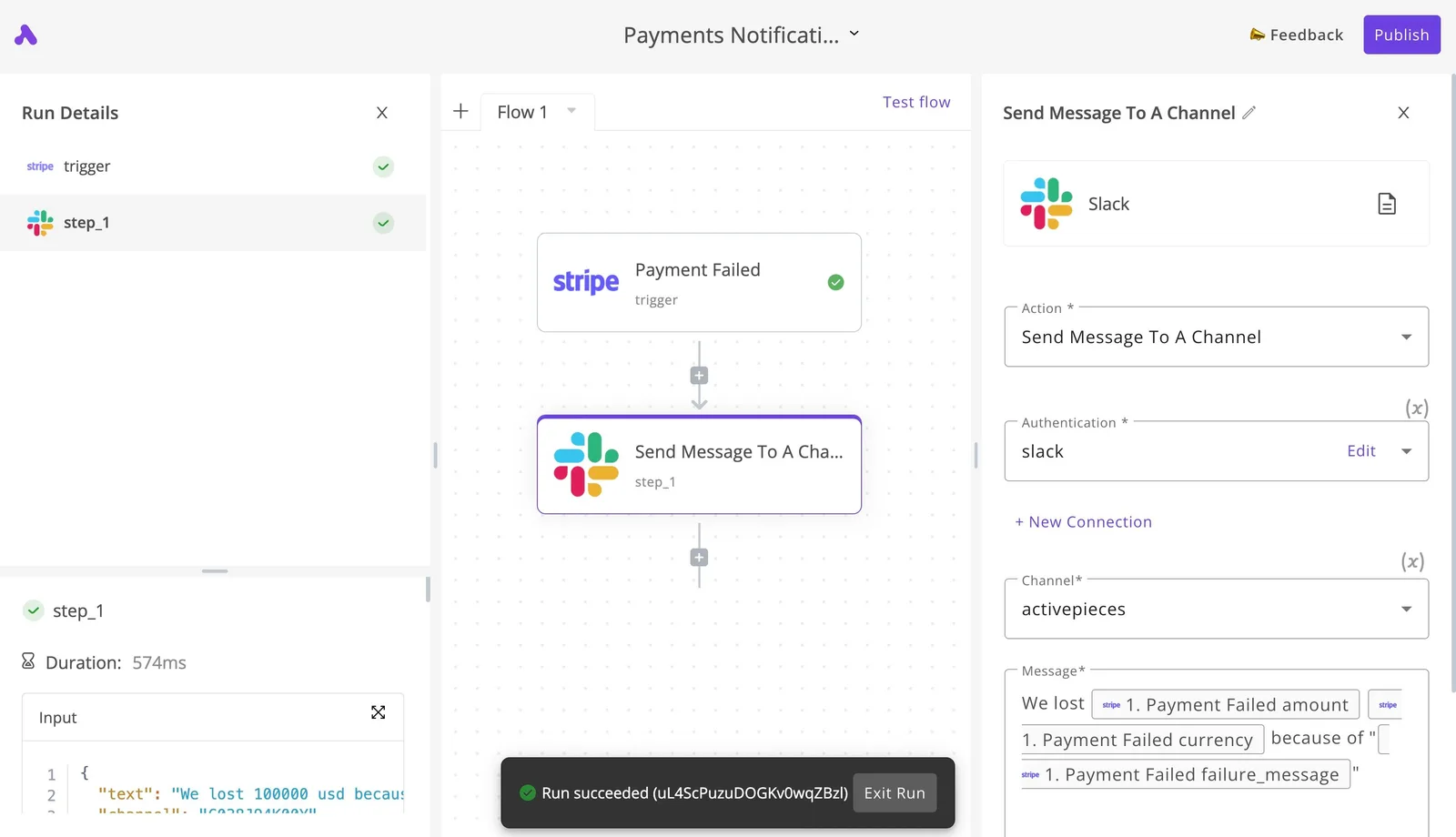
The canvas below shows that shape with a failed Stripe payment as the trigger and a Slack message to a channel as the action.
The run details on the left show the first step completed, and the banner at the bottom confirms the run succeeded.

Take the structure, not the payment example. Replace the trigger with a lemlist event, such as a lead replying, and keep the Slack action. Your team then sees each reply in a channel where people already look.
Point the action at a CRM record or a spreadsheet row instead and the same two steps keep your pipeline current without anyone copying data by hand, which means the hours spent on copy-paste and the typos baked into it both go away.
The canvas above is Activepieces, whose MIT-licensed core carries 746 integrations, counted from the community integrations directory of its open source monorepo on GitHub, covering the CRMs, sheets and Slack channels in question, and Alan and Funding Societies are among the teams that run Activepieces.
Before you rely on it, check on lemlist's pricing and integration pages that the event you need is exposed on your plan. A trigger you can't reach is the same silent gap again.
### When lemlist's native CRM sync is enough
If lemlist already connects natively to your CRM and does what you need, skip the workflow tool. It adds one more login, one more thing that can break, and possibly one more bill.

A native sync that covers lead creation and reply logging is enough for many teams.
When you need a step the native connection lacks, a separate tool earns its place. Examples are routing replies to different people, posting to Slack, or writing to a sheet your finance team keeps.
If your list of needs stops at "lead appears in the CRM," skip it, and keep your total to lemlist's own cost.
## What Activepieces does about this
The problem in this article is a total that drifts away from the sticker: seats, add-ons and send limits each move it, and the places where they move it are the handoffs between tools. Activepieces doesn't change what Lemlist charges.
What it does is stop the work around that bill from adding cost, such as a reply nobody sees or a lead someone retypes into a CRM.
The core is MIT-licensed, so you can self-host it and pay nothing for the engine, and the 746 integrations counted from the community directory in its open source monorepo on GitHub cover the CRMs, sheets and Slack channels most outreach teams already use.
A flow is a trigger and one or more actions, the same two-step shape as the canvas above. Alan and Funding Societies are among the teams that run it.
For a pricing decision, the useful part is that a flow can also protect the limits you just budgeted around.
If you route leads from forms or a CRM into Lemlist, a flow can check a list before it enters a sequence, so duplicates and contacts you already own don't burn the monthly send cap or your credits.

It's one extra step, and it keeps the number you wrote down from creeping.
Keep it honest in your estimate, though. Add the workflow tool as its own line, even if it is zero on a self-hosted install, and confirm on Lemlist's pricing and integration pages that the trigger you need is exposed on your plan.
If native sync already covers your needs, as the section above says, skip it.
## Frequently asked questions
Does lemlist have a free plan or free trial? Look for a trial on the pricing page, and don't assume a permanent free plan. A trial ends and a free plan doesn't, so they belong in different budgets.
If sign-up asks for a card, put the end date in your calendar the same day. The first charge will arrive without a reminder.
### Can I pay for lemlist monthly instead of annually?
If the pricing page offers both, compare both totals for your seat count, because the cheaper annual figure is paid for with a commitment.
Monthly costs more per seat but lets you leave. Annual costs less but binds you for the term, so a team that's still testing whether outreach works should price the monthly option first.
### Is lemlist cheaper per user as the team grows?
Not automatically. The per-user price drops only if the plan you move up to lists a lower one. A bigger team usually needs more of the things billed on top of the seat: add-ons, and usage limits that are shared or counted per account.
Read the limits on the plan you would land on, not the one you're on. A lower sticker price with a tighter limit per person is a rise in cost once you buy the difference.
### Does lemlist charge extra for LinkedIn outreach?
Assume it might, until the plan comparison says otherwise. LinkedIn steps can sit behind a particular tier, an add-on or their own limits, and the sticker price won't tell you which.
Find the line for LinkedIn on the plan you intend to buy and read what it covers. If the line is missing or vague, ask support and keep the reply.
### Can I downgrade or cancel lemlist mid-term?
Before you pay, check the terms for your billing period, because the answer differs between monthly and annual. On a monthly plan, cancelling usually just stops the next charge.
On an annual plan, the fee for the term may already be spent. Whether a downgrade takes effect now or at renewal is a question for the terms, not for a sales call.
Whatever you're told about seat changes, refunds or timing, get it in writing. A support ticket with a timestamp is worth more than a remembered conversation.
## Related reading
- [Zapier alternatives with a lifetime deal (Multiple deals)](https://www.activepieces.com/blog/zapier-alternatives-lifetime-deal)
- [Webflow Pricing 2026: Plans, Seats, and Real Costs](https://www.activepieces.com/blog/webflow-pricing-2026-plans-seats-and-real-costs)
- [ChatGPT Team Pricing 2026: Plans, Seats & API Costs](https://www.activepieces.com/blog/chatgpt-team-pricing-2026-plans-seats-api-costs)
## References
- [lemlist Help Center](https://help.lemlist.com/en/articles/7210709-set-account-limits)