# Linode Automation: CLI, API and Tools (2026 Guide)

By Petra Vlk · 2026-11-17 · Source: https://www.activepieces.com/blog/linode-automation-cli-api-and-tools-2026-guide

---
<aside class="tldr"><p class="tldr-label">Summary</p><p>CLI, Terraform and StackScripts all call the Linode API but differ in state tracking: CLI keeps none and duplicates on reruns, Terraform maintains a state file, and StackScripts execute once at boot.</p><ul><li>Forty-five minutes to progress from token through creation, tagging and deletion operations.</li><li>Most API operations allow 1600 requests per minute; bulk work must be throttled.</li><li>Powered-off instances continue billing; only deletion halts all charges.</li></ul></aside>

**Linode automation means calling the Linode API v4**, which Akamai documents and which the CLI and Terraform provider both wrap, and which no-code tools such as [Activepieces](https://www.activepieces.com) can also reach over plain HTTP.

The fastest start is one scoped personal access token and the Linode CLI.

## Linode automation is scripting the Akamai cloud API

Linode automation is the practice of creating and managing Linode (Akamai cloud) resources such as instances, volumes and firewalls through code instead of the Cloud Manager, using the Linode CLI for one-off scripts, Terraform for repeatable infrastructure, and StackScripts for first-boot setup.

Create a personal access token with only the scopes the job needs. Give it to the CLI, and run a list command before you run anything that creates.

About 45 minutes is enough to get from no token to a script that creates, tags and deletes a server, so the first afternoon is spent on scopes and cleanup rather than on tooling.

**Nothing fails when a token has broader scope** than the script needs. That's the problem: it'll do exactly what it's told with permissions nobody meant to grant.

If you later hand the same calls to [Activepieces](https://www.activepieces.com), which runs them as flows and allows unlimited flows on every plan, including free, the token's scope is still what limits the damage.

<blockquote class="pull"><p>Nothing fails when a token has broader scope than the script needs. That's the problem: it'll do exactly what it's told with permissions nobody meant to grant.</p></blockquote>

### Linode CLI, Terraform provider and raw API compared

Same API, same requests. What differs is what each tool remembers between runs, and that decides which one you pick.

| Tool | Best job | Where it falls short |
|---|---|---|
| Linode CLI | One-off scripts and quick inspection | Keeps no record of what it created, so repeating a run duplicates resources |
| Terraform provider | Repeatable infrastructure you'll change and rebuild | Heavy for a single throwaway server |
| Raw API | Anything the other two don't expose, or a language with no wrapper | You handle pagination, errors and retries yourself |

All three feed one API, with the token on the line between them, as the diagram below shows.

Whichever tool you choose, the token and the API's rate limits are shared constraints. A loop that behaves in the CLI will be throttled just the same inside Terraform. StackScripts, the first-boot scripts that configure a server as it starts, enter through the same door.

![Activepieces MCP Server configuration page with client setup instructions and server configuration code](https://ap-marketing-media.fra1.cdn.digitaloceanspaces.com/uploads/0eed6f5f-5a12-4a89-88f0-78055256395d/claude-enterprise-automation-a-complete-2026-gui-577ef85d.webp)

Next come the three tools, in the order you're likely to need them.

If you read this later, treat any scope name or rate limit as something to confirm in the current docs before you build on it. A changed limit surfaces as a failed run, not a notice.

The behaviour described here was checked against the public Linode API and CLI documentation on 17 November 2026.

## Step 1: Create a scoped personal access token

Open Cloud Manager, go to your profile, choose API Tokens, and create a personal access token with an expiry date and only the scopes the job needs. The scope and expiry choices decide how much damage a leaked token can do.

![A Cloud Manager API Tokens form on a screen: a short list of scope rows with only a few switched on, an expiry date field…](https://ap-marketing-media.fra1.cdn.digitaloceanspaces.com/uploads/4a4b7f5e-95e0-43f8-8983-0b73bceb9b25/linode-automation-cli-api-and-tools-2026-guide-i-8507d4b2.webp)

### Choose token expiry and scopes

Give the token a label that names its job, such as `cli-snapshot-script` or `terraform-staging`. A label like "test" will still be on the token list months later, and nobody will know whether revoking it breaks something.

Set an expiry. The form offers a "never expires" choice, and it's the wrong default for anything you can re-issue. An expired token fails with an authentication error. A forgotten permanent token keeps working for whoever finds it.

When you reach the scope list, every resource type has its own setting: no access, read only, or read/write. Start everything at no access, then raise only what the task touches. A script that lists instances needs read only on Linodes and nothing else.

![Panel of sliders all at the bottom except one nudged up](https://ap-marketing-media.fra1.cdn.digitaloceanspaces.com/uploads/d7e13263-9c14-4bdf-9d3a-07692cf65a54/linode-automation-cli-api-and-tools-2026-guide-i-c745cd8f.webp)

If a later call returns a permissions error, that error tells you which scope to raise. Check the current scope names in the docs, since this form is the part most likely to change.

You see the token once, when you create it. Copy it before you close the dialog. If you lose it, you revoke it and make a new one, and everything that used the old one breaks.

### Test your Linode API token with curl

Export the token into your shell, then make one read-only call:

```bash
export LINODE_TOKEN="paste-token-here"

curl -H "Authorization: Bearer $LINODE_TOKEN" \
 https://api.linode.com/v4/linode/instances
```

If a JSON body comes back listing your instances, or an empty list on a fresh account, the token authenticates and the Linodes read scope works.

When you get a 401, the token is wrong or expired. A 403 means it's valid but missing a scope for that endpoint. Those two codes separate "bad token" from "bad scope," and you'll want that distinction later.

### Store the API token outside your scripts

Keep the token in an environment variable or a secrets manager, never in a file that gets committed. A token pasted into a script ends up in version history, and deleting the line later doesn't remove it from the history.

Scripts and the tools in the next steps should read `LINODE_TOKEN` from the environment, so rotating the token means changing one value in one place.

## Step 2: Create and delete a server with the Linode CLI

With `LINODE_TOKEN` set in your environment, the Linode CLI can create a server and remove it again in five commands. The only thing that costs money in between is the time the instance exists.

### Install and configure the CLI

Install the CLI with `pip3 install linode-cli`, then run `linode-cli configure`. The prompt asks for your token, so paste the scoped one from the previous step, then choose default region, plan type and image.
![A workflow execution interface showing a completed two-step Square OAuth token revocation flow with HTTP configuration](https://ap-marketing-media.fra1.cdn.digitaloceanspaces.com/uploads/ab58d76a-e150-4da2-b368-e9390d90658a/how-to-evaluate-telemetry-dev-llm-observability-bc2ee918.webp)

Skip those defaults and each `create` call has to carry every flag, and a missing one fails the call instead of falling back to a guess. Set them and later commands can leave out flags you would otherwise type every time.

### Create, list and delete a Linode instance

Run the sequence below in order, because the ID that `list` prints is the one `delete` needs. It is the whole lifecycle.

1. `pip3 install linode-cli`
2. `linode-cli configure`, then paste the token when prompted.
3. `linode-cli linodes create --region us-east --type g6-nanode-1 --image linode/debian12 --root_pass '<a strong password>' --label cli-test`
4. `linode-cli linodes list`
5. `linode-cli linodes delete <ID>`

To create a new instance the API wants five values: region, type, image, root password and label. Leave out `root_pass` and the call is rejected rather than creating a server you can't log into.

The label is what you'll recognise in the list, so make it specific.

You are billed from the moment the instance is created, not when you log in to it. According to [learnwithhasan.com](https://learnwithhasan.com/vps-providers/linode/), a shared 1 GB plan is $5 a month, which makes shared hosting very affordable.

![Dark powered-off server beside a running meter](https://ap-marketing-media.fra1.cdn.digitaloceanspaces.com/uploads/ce90221e-1fe0-4841-bdb6-b1f57c4fd689/linode-automation-cli-api-and-tools-2026-guide-i-aecfab00.webp)

![What a shared Linode costs by plan size](https://ap-marketing-media.fra1.cdn.digitaloceanspaces.com/uploads/ed6566ed-8c8d-4761-858a-30ab4501765f/linode-automation-cli-api-and-tools-2026-guide-s-631192f3.svg "Source: learnwithhasan.com")

A 4 GB plan is $24 and an 8 GB plan is $48.

Forget a test box on the smallest plan and it's a $5 line on the invoice; the same oversight on the 8 GB plan is nearly ten times that, so infrastructure cleanup becomes critical at scale. **Powering an instance off doesn't stop the charge; only `delete` does.**

Run `linodes list` once more after deleting. An empty result is your confirmation that nothing is still billing. With the manual loop working, the next step is to write the same server down as configuration, so it can be recreated identically.

## Step 3: Make it repeatable with Terraform and StackScripts

To recreate the instance from Step 2 identically, you declare the server in a file and let Terraform make the account match it. A StackScript handles what runs on first boot.

### Write the Terraform configuration

Keep the token out of `main.tf`, because a token committed to version control is readable by everyone with access to the repository. The official Linode provider reads it from the `LINODE_TOKEN` environment variable anyway. Use the scoped token from earlier, not a full-access one.

The file needs two blocks: the provider, and a `linode_instance` resource carrying the label, region, plan type and image you chose by hand.

Terraform stores what it created in a state file. That file is the record it compares against, so treat it as something to protect.

### Add a StackScript for first-boot setup

A StackScript is a script stored in your Linode account that runs once, when the instance first boots. Reference it from the resource by its ID, and pass any inputs it expects as data. Nothing reruns it later.

From an empty file to a running server and back to nothing, the sequence below shows the full lifecycle in the order the commands must run; take from it that `plan` is the step where you read before you spend.

1. Write the provider block and the `linode_instance` resource in `main.tf`.
2. Run `terraform init` to download the provider.
3. Run `terraform plan` and read the proposed changes line by line.
4. Run `terraform apply`, with the StackScript ID set on the resource, to create the instance.
5. Run `terraform destroy` to remove everything Terraform created.

Once `apply` finishes, check the instance boots and the StackScript's work is present. A failure here is usually in the script, not in Terraform.

### Choosing between Terraform and StackScripts

Different questions, different tools. Terraform keeps asking whether the account still matches the file, so a change made by hand in the Cloud Manager shows up as drift on the next `plan`.

A StackScript asks nothing after first boot. Edit it later and the running server is unaffected.

Use Terraform for what must stay true, and a StackScript for what only has to happen once. Step 4 covers the limits that bound both.

Neither of them tells anyone the server exists, though, and a Slack message when an instance is created is a different job.

**Activepieces has 750 integrations**, counted directly from the `packages/pieces/community` directory of its [open source monorepo on GitHub](https://github.com/activepieces/activepieces/tree/main/packages/pieces/community), and roughly 60% of them were contributed by the community rather than the vendor, meaning the platform's growth is shaped by what users want to build, not just what the company plans.

If the connector you need isn't in that directory, you can generate it with AI and add it privately to your own instance, and the core stays under the MIT licence.

## Troubleshoot API errors and limits

When a Linode API call fails, it almost always traces to one of six causes.

The six are a rate limit, a bad token, a missing scope, an account cap, a rejected value, or a list that returned only its first page. The table shows each symptom beside its fix.

| Symptom | Cause | Fix | Documented where |
|---|---|---|---|
| 429 response | Per-minute request limit exceeded | Back off and retry; batch calls | [Akamai rate limits](https://techdocs.akamai.com/linode-api/reference/rate-limits) |
| 401 | Token missing, expired or revoked | Issue a new token | Linode API reference, authentication |
| 403 | Token lacks the scope for that endpoint | Re-issue with the needed scope only | Linode API reference, OAuth scopes |
| Create fails at a cap | Account resource limit reached | Delete unused resources or ask support | Linode API reference, errors |
| 400 | Invalid type or region value | Fetch valid IDs from the API first | Linode API reference, errors |
| Missing items in a list | Only one page returned | Walk every page | Linode API reference, pagination |

![Linode status-page incidents by month in 2026](https://ap-marketing-media.fra1.cdn.digitaloceanspaces.com/uploads/a4480696-6cf6-47ff-b252-24b9ac83f4d8/linode-automation-cli-api-and-tools-2026-guide-c-04a6ddd4.svg "Source: Rewindex")

Fix the cause, not the retry loop. Only the 429 row is safe to retry blindly, which means your retry logic must check the error code.

### Linode API 429 rate limit errors

According to [Akamai's rate limit page](https://techdocs.akamai.com/linode-api/reference/rate-limits), most operations are limited to **1600 requests per minute**, so bulk operations must be paginated or throttled. Paginated GETs and the events list drop to 200, create volume to 100, and statistics to 50.

![Linode API request limits by operation type](https://ap-marketing-media.fra1.cdn.digitaloceanspaces.com/uploads/5fa72f9b-cd3c-4b1b-9964-df5b5b486490/linode-automation-cli-api-and-tools-2026-guide-s-5bd98245.svg "Source: Akamai")

A dashboard script polling statistics once a second gets throttled after 50 calls, ten seconds short of the minute. Poll less often, and spread bulk creates over time.

Because the platform itself wobbles, retries matter. [Rewindex](https://rewindex.com/company/linode-akamai/reports) counts 10 status incidents in April 2026, 11 in May, 12 in June, 10 in July, 9 in August and 4 in September.

That's roughly nine a month, so a script with no retry will meet one eventually. Use exponential backoff with a cap.

When you see a 401, the API doesn't know who you are: the token is wrong, expired or revoked. A 403 means it knows you and refuses. The token is valid but lacks the scope.

Don't fix a 403 by minting a full-access token. Add the one scope the call needs, so a leaked token can do only that.

### Account resource limits and 400 validation errors

However correct the request is, a create call past the cap fails, and new accounts carry caps on resources such as Linodes. Terraform surfaces this midway through an apply, leaving half a stack built. Check usage before large runs.

When a create call returns a 400, it usually means a type or region ID that doesn't exist. Query the types and regions endpoints instead of hardcoding IDs, and a script survives a retired plan.

## Connect Linode events to other apps with Activepieces

For the narrow job of reacting to a Linode event, Activepieces fits. It calls the Linode API from an HTTP step, using the API token stored as a connection, and posts the result to Slack, while provisioning stays with the CLI and Terraform.

![A workflow canvas showing an Instance Stopped trigger connected to a Revoke Token HTTP request step, with the right panel…](https://ap-marketing-media.fra1.cdn.digitaloceanspaces.com/uploads/6562aaca-2f20-4c5f-929c-5a24b3c9a908/linkedin-api-access-limits-and-errors-in-2026-sc-d387a7d6.webp)

A run is 1 credit however many steps it has, and the free plan includes 1,000 credits a month.

### When a workflow tool helps and when it does not

A workflow tool earns its place where one system's event has to reach a person or another app. A scheduled flow that asks the Linode API for instance status and sends a message to a Slack channel when something is off is a good example.

Because it lives in one connection, rotating the token means editing one record instead of hunting through scripts. And because the token is scoped, a leaked connection can only do what you granted it, such as reading instances, not deleting them.

### What a run looks like

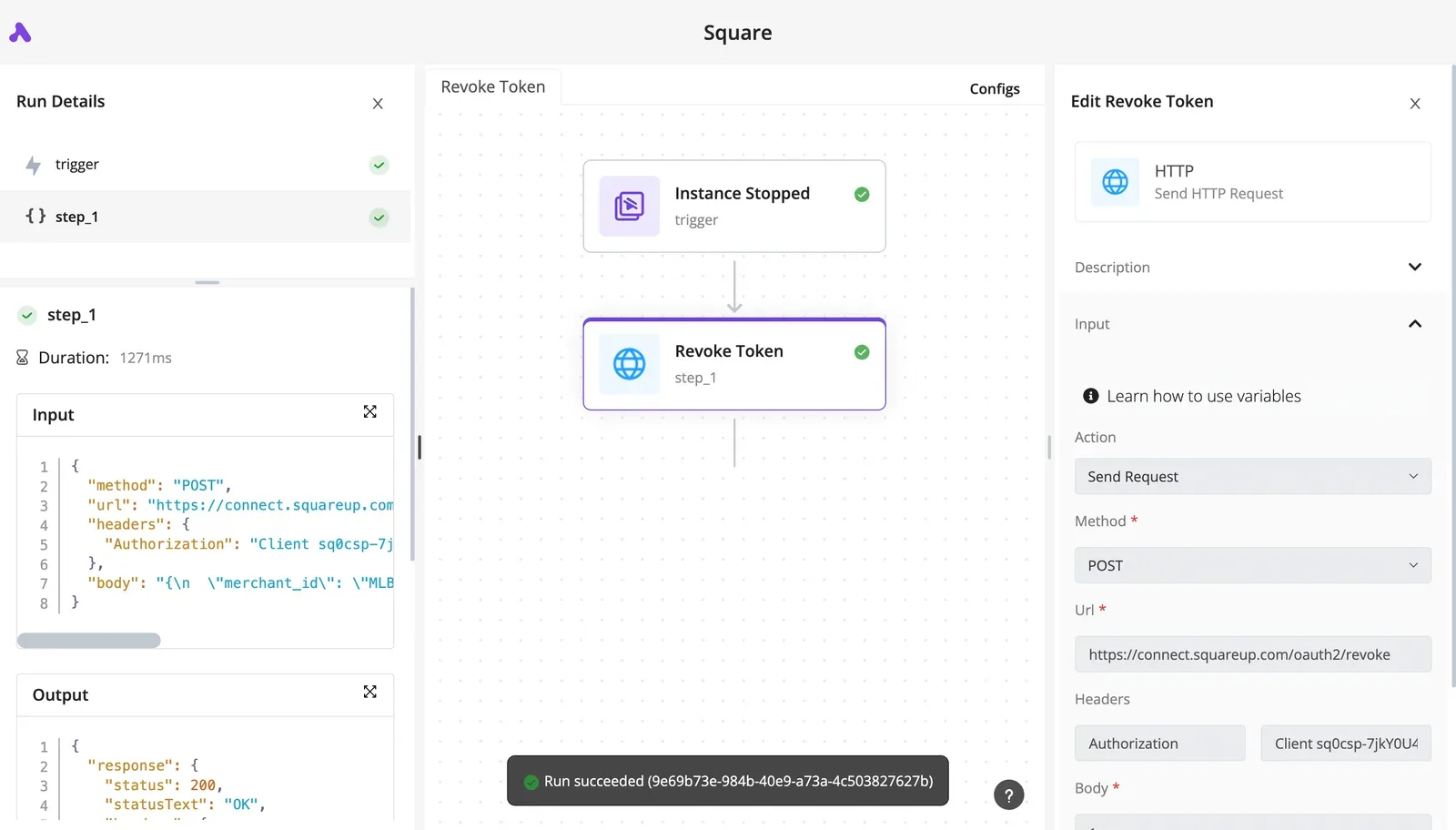
On a different service, the screenshot below shows the shape of that pattern.

An "Instance Stopped" trigger feeds a single "Revoke Token" step, which is a Send HTTP Request action set to POST against an OAuth revoke URL, with the Authorization header supplied by the flow.

Both steps carry green success marks, and the run details show the request input and a 200 response with OK.

Read the screenshot as proof that an HTTP step is enough. No custom plugin sits between the flow and the API, so a Linode call is the same kind of step with a different URL and token.

It also shows what you can audit afterward. Each run records the exact request and response, which is the first place to look when a notification never arrived.

### Where the boundary sits

What follows from this is a boundary. Don't have a flow create or resize servers. Provisioning needs to be repeatable, reviewable and diffable, and a canvas of steps gives you none of that.

**Terraform keeps state and shows a plan** before it changes anything, and the CLI suits a one-off task you run once and discard. Keep those two in charge of building infrastructure.

Give Activepieces, which MoneyGram, Moneypenny, Alan and FundingSocieties run in production, the read-and-notify work around it: telling a channel that a machine changed state, opening a ticket, or handing a payload to another app.

Respect the API's documented rate limits by keeping polling flows infrequent, because a flow that checks too often spends the same request budget your scripts depend on.

## Frequently asked questions

Once the rate limits are settled, these are the questions that come up, and each answer rests on what Linode and Akamai document, not on folklore.

### Is Linode now called Akamai Cloud, and do the old tools still work?

Yes, Akamai acquired Linode and now markets the service as Akamai Cloud, but the tooling keeps the Linode name. The Linode CLI, the v4 API and the `linode` Terraform provider are the same ones your scripts already call. Nothing needs rewriting.

The practical risk is searching: older tutorials say Linode, newer ones say Akamai, and both describe the same API.

### Can I automate Linode without writing code?

Yes. Cloud Manager, the web interface, covers creating, resizing and deleting instances by hand.

For repeatable work you still need a text file, but not a program: a Terraform configuration is declarative, and a StackScript is an ordinary shell script that runs on first boot. If you can read a config file, you can maintain either.

### Does Linode have a free tier or credits for testing automation?

Linode has offered promotional credit to new accounts, but the terms change, so confirm the current offer on Akamai's pricing and signup pages before relying on it.

Test in a way that doesn't depend on credit. Billing continues for an instance that is powered off, because the resources stay reserved, so a script that "stops" test machines hasn't stopped the charge. Only deleting them does.

### How do I automate backups and snapshots on Linode?

You need no script of your own for scheduled backups: Linode's Backups service is a paid add-on enabled per instance. Manual snapshots are different: you trigger them through the API or CLI, and a new one replaces the previous manual snapshot.

If you need history beyond what the service keeps, copy data off the instance yourself. Whichever you choose, run a restore into a throwaway instance. A backup you've never restored is an assumption.

### Is it safe to put my Linode token in a script?

No. Keep it in an environment variable or a secrets manager, never in the script or in version control.

Create the token with only the scopes the job needs, give it an expiry when you create it, and revoke it in Cloud Manager the moment it leaks or the job ends.

A scoped, expiring token turns a leaked credential into a small incident instead of a full account takeover.

## Related reading

- [Linode Pricing: Plans, Costs and Extra Fees (2026)](https://www.activepieces.com/blog/linode-pricing-plans-costs-and-extra-fees-2026)

## References

- [learnwithhasan.com](https://learnwithhasan.com/vps-providers/linode/)
- [Akamai](https://techdocs.akamai.com/linode-api/reference/rate-limits)
- [Rewindex](https://rewindex.com/company/linode-akamai/reports)
