* Universal Upscaling increases resolution while adding plausible detail to low-fidelity source files. * Creativity Control adjusts the "hallucination" level of the enhancement, allowing your agent to choose between a faithful restoration or a transformative redesign. * Style Transfer instructs the API to apply specific aesthetic characteristics from a reference to a target image. By exposing these features, the protocol ensures that your agent can maintain visual consistency across a project without your intervention. ## Step 1: Install the Magnific MCP server locally Integrating Magnific into a local environment requires establishing a secure bridge between the Magnific API and the Model Context Protocol (MCP) host. This setup transitions the tool from a manual web interface to a background service that high-reasoning models, such as Claude Sonnet 5.5, can call to execute image enhancements. ### Generate your Magnific API credentials Accessing the Magnific engine programmatically requires a unique API key to authenticate requests and bill usage to the correct account. Without this credential, the MCP server can't authorize the external processing of high-resolution image data. You must navigate to the Magnific User Dashboard, locate the API Settings tab, and generate a new secret token. This key acts as a sensitive administrative password; exposing it in public version control allows unauthorized third parties to consume your processing credits.  ### Download and install the Magnific MCP server The Magnific MCP server is distributed as a Node.js package that you can install directly from the official repository or via the Node Package Manager. You must have Node.js installed on your machine to execute the server as a background process for your AI agent. To install the server, add `https://mcp.magnific.com` as a streamable HTTP MCP server in your client — no local installation is required. This command downloads the latest stable build and places the executable in your global path, making it accessible to Claude Desktop. ### Configure Claude Desktop to use Magnific MCP Claude Desktop relies on a specific configuration file to identify and launch local MCP servers during startup. By modifying this JSON file, you instruct your AI agent to recognize the Magnific server as an available capability. 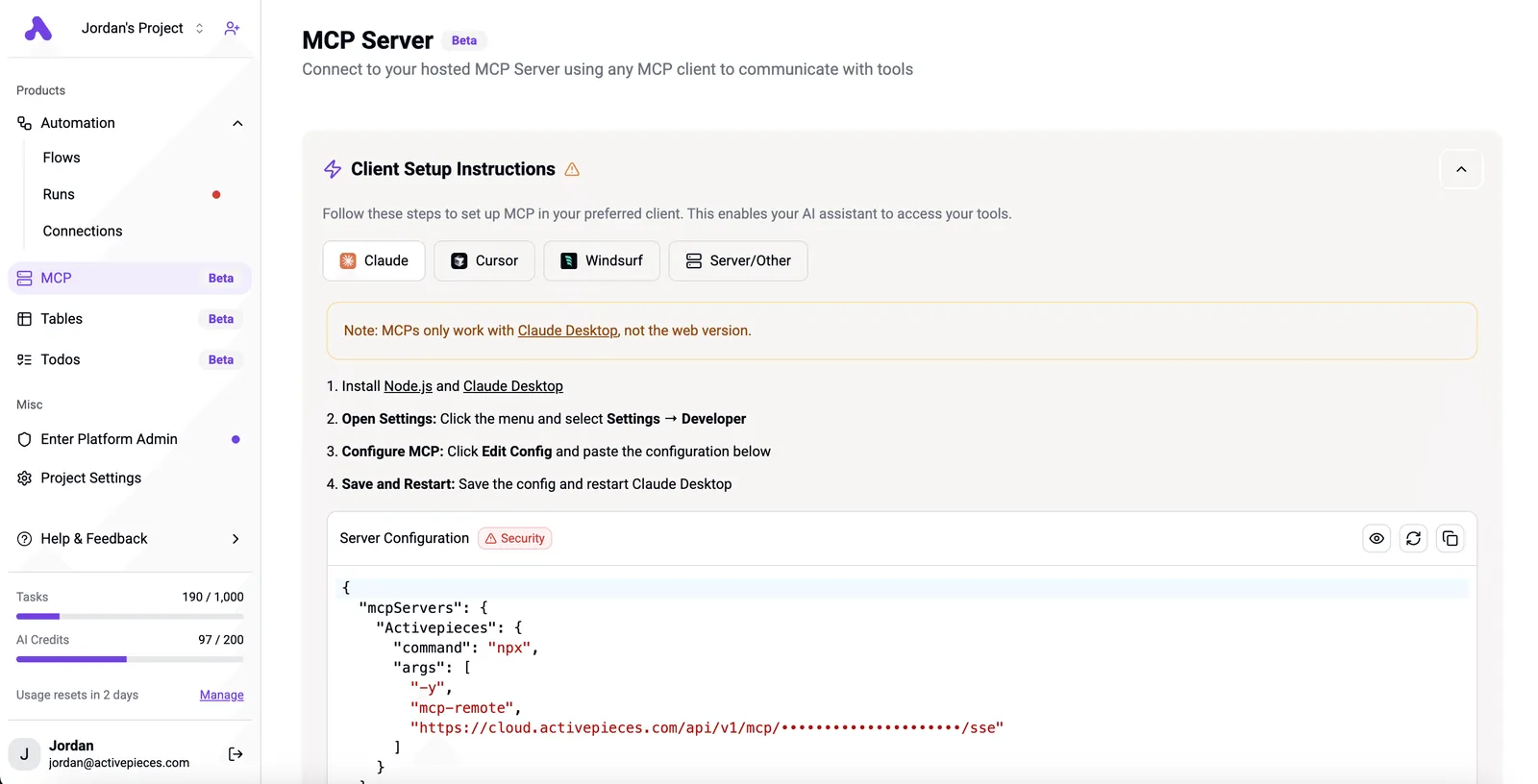 The configuration file is located at `~/Library/Application Support/Claude/claude_desktop_config.json` on macOS and `%APPDATA%\Claude\claude_desktop_config.json` on Windows. You must ensure the directory exists before attempting to save your edits. The following JSON structure registers the Magnific server within the `mcpServers` object. You must replace the placeholder with your actual secret token to enable the connection. ```json { "mcpServers": { "magnific": { "command": "npx", "args": ["-y", "@magnific-ai/mcp-server"], "env": { "MAGNIFIC_API_KEY": "your_api_key_here" } } } } ``` Successful execution of these steps ensures your agent loads the necessary environment variables, including the `MAGNIFIC_API_KEY`, which is required for the server to communicate with the enhancement engine. ### Verify the Magnific MCP server connection Confirming the installation ensures that your agent can successfully handshake with the server before you attempt complex automation workflows. In the Claude Desktop interface, a hammer icon or "Tools" menu will display the active Magnific functions if your configuration is valid.  If the tools don't appear, the application logs will typically show a file path error, indicating your agent can't find the server executable. Once verified, your agent gains the ability to autonomously upscale images, allowing it to handle visual refinement tasks without manual file uploads. ## Run your first image enhancement command The Magnific AI MCP server enables you to trigger complex image processing workflows by sending natural language instructions directly to a connected model. This interface replaces the manual toggle-and-slider experience of the web dashboard with a command-driven utility that integrates into your existing terminal or IDE workflow. ### Passing image URLs to the MCP server To initiate a task, you provide a direct link to a hosted image file within the chat interface of an MCP-compatible host. Because the server operates on publicly accessible or authenticated URLs rather than local binary streams, your agent can instantly fetch the source asset to begin the enhancement process. This architectural choice shifts the burden of file management away from your local machine. Your agent can process assets stored in cloud buckets or staging environments without requiring you to download and re-upload large files. ### Setting Magnific creativity and HDR parameters You control the intensity of the hallucination and dynamic range by specifying descriptive values for "Creativity" and "HDR" within your prompt. When a model such as Claude Sonnet 5.5 receives these instructions, it maps your natural language intent to the specific API parameters required by Magnific to alter the pixel density and lighting balance of the frame. This programmatic control introduces a risk of unpredictable visual artifacts if your agent over-interprets a request for "maximum detail." You must define strict boundaries to ensure the output remains faithful to the original composition. ### Retrieving the processed high-resolution output Once the Magnific engine completes the render, the MCP server returns a unique URL pointing to the newly upscaled asset. Your agent presents this link within the terminal or chat window, allowing for immediate inspection or further downstream automation.  The system delivers the result as an accessible link. This ensures that the high-resolution file doesn't saturate your local terminal’s memory or bandwidth until you explicitly choose to retrieve it. ## Hardware requirements and Magnific API pricing tiers ### API credit consumption per upscale Every image processing request consumes a specific quantity of credits based on the selected magnification factor and the complexity of the chosen enhancement engine. Higher scaling ratios, such as moving from a 2x to an 8x upscale, require exponentially more compute cycles, which means the process becomes significantly more expensive and time-consuming to execute. You must budget for variable costs. Because the system deducts credits at the moment of execution, an autonomous agent like Claude Opus 5.5 requires **budget guardrails to prevent a recursive loop** from exhausting your entire monthly allocation on a single high-resolution batch. ### Magnific AI subscription tiers and pricing Magnific operates on a tiered subscription model where higher monthly commitments lower the effective cost per individual upscale. This structure forces a choice between immediate liquidity and long-term volume efficiency, as the entry-level tier provides a smaller pool of credits suitable only for prototyping. | Tier | Monthly Credits | Monthly Price | Yearly Price (Effective) | | :--- | :--- | :--- | :--- | | Pro | 20k | $39.00 | $32.50/mo | | Plus | 45k | $99.00 | $82.50/mo | | Premium | 112.5k | $299.00 | $249.17/mo | The discrepancy in yearly pricing versus the monthly commitment reflects a steep discount for you if you're willing to lock in annual capacity. While the Pro tier allows a small team to validate the MCP integration, the Premium tier is the **only operational choice for production-grade agentic workflows** that require consistent, high-volume image refinement. ### Magnific MCP local hardware vs cloud processing The MCP server acts as a bridge, meaning your local hardware only handles the orchestration of the API calls rather than the heavy lifting of the neural rendering. While the actual upscaling occurs on Magnific’s remote GPU clusters to ensure consistent output quality, your local machine running the server must maintain a stable connection. Your local machine also needs sufficient RAM to handle the incoming image buffers. This dependency creates a performance ceiling where network latency and the API's concurrent request limits govern the speed of a task. ## Automating high-resolution content pipelines with Activepieces Activepieces, an MIT-licensed AI automation platform, bridges the gap between static cloud storage and the Magnific MCP by treating image enhancement as a logic-gated step rather than a manual intervention. By removing the need for you to download, upload, and re-download assets, you reduce the risk of version control errors where low-resolution drafts accidentally reach production. ### Triggering upscales from cloud storage updates Automated upscaling begins when a new file enters a monitored directory in a storage service like Google Drive, which acts as the primary listener for your workflow. When the Activepieces trigger detects a new upload, it passes the file URL directly to the Magnific MCP. Activepieces exposes every integration as an agent tool by design, allowing any registered integration to function as both a workflow step and a tool schema on a per-project MCP server. This mechanism, which you can verify in the `packages/pieces` directory of the MIT-licensed core, ensures that agents in Claude or Cursor can call Magnific without a second migration. Once the enhancement is complete, the resulting high-resolution file is routed to a notification channel like Slack, allowing you and your stakeholders to verify the output without leaving your primary communication environment. ### Syncing enhanced images to social media queues Integrating Magnific into a social media pipeline ensures that only optimized, high-fidelity assets are scheduled for publication. As Magnific outlines, a workflow can be configured to watch for approved images in a content management system, send them to Magnific for a 2x or 4x detail pass, and then deliver the final file to a scheduling tool like Buffer, so the entire production pipeline is automated from creation to publication. This prevents the degradation of visual quality that often occurs when social platforms apply their own aggressive compression algorithms to sub-optimal source files. ### Batch image upscaling for e-commerce catalogs Claude Sonnet 5.5 evaluates which images in a batch require specific Magnific presets, such as "Portrait" for apparel or "Product" for electronics. Large-scale product updates utilize these agentic capabilities to manage high-volume assets. Companies like MoneyGram and FundingSocieties run Activepieces in production to handle these complex logic chains, iterating through spreadsheets of image links and calling the Magnific MCP for each row to update databases with high-resolution URLs.  This systematic approach allows your creative team to refresh an entire seasonal catalog without the linear time cost of manual retouching. ## Frequently asked questions about Magnific AI MCP ### Does Magnific MCP support video upscaling? Magnific MCP currently focuses on static high-resolution image enhancement rather than temporal video processing. Because the Model Context Protocol (MCP) requires discrete state transfers between the host and the tool, the computational overhead of frame-by-frame consistency remains outside the current utility’s scope. This limitation means you can't yet use an agent to automate the upscaling of a 60-frame-per-second sequence without risking significant flickering and artifacts between frames. ### Why is my MCP server failing to connect? Connection failures typically stem from improperly configured environment variables or network-level restrictions that block the tool's handshake with the Magnific API. When an agent like Anthropic’s Claude Opus 5.5 attempts to initialize the server, it requires a verified path to the executable and a valid secret key to authorize the session. The following table identifies common error signals and the specific operational failures they represent: | Error Signal | Operational Meaning | | :--- | :--- | | 401 Unauthorized (API Key) | The server is rejected because the provided credential is missing or has been revoked in the Magnific dashboard. | | 429 Too Many Requests (Rate Limit) | Your account has exceeded its allocated concurrency, requiring a pause in agentic loops to avoid temporary IP blacklisting. | | Invalid File Path (Syntax) | The host application cannot locate the MCP bridge, so the agent remains unable to call any enhancement functions. | | Timeout Error (Image Size) | The network request expired before the high-resolution data could upload, indicating your local bandwidth is insufficient for the current payload. | Each failure point represents a break in the chain of trust between your local environment and the remote utility. ### Can I use Magnific MCP with VS Code? Magnific MCP integrates with VS Code by adding `https://mcp.magnific.com` as a streamable HTTP MCP server, the same way as other MCP-compatible clients. By configuring the `claude_desktop_config.json` file, you enable Claude Desktop's MCP tools to manipulate image assets directly within your workspace. This setup eliminates the need to context-switch between a browser and the IDE. It grants your agent permission to read your local directory, which creates a new surface for data exposure. ### What is the maximum file size for MCP transfers? The maximum file size is dictated by the memory limits of your host agent and the specific payload constraints of the Magnific API. Large assets consume significant context window space during the encoding process, which can lead to truncated requests or failed processing in models like Gemini 4 Carbon. Exceeding these limits results in a failed task execution. High-resolution source files must often be downsampled or hosted at a stable URL before your agent can successfully initiate an upscale command. ## Related reading - [Magnific AI Automation (2026 Guide)](https://www.activepieces.com/blog/magnific-ai-automation-2026-guide) - [Magnific AI Pricing 2026: Plans and Credit Costs](https://www.activepieces.com/blog/magnific-ai-pricing-2026-plans-and-credit-costs) - [Brave Search API x402 for Autonomous AI Agent Payments](https://www.activepieces.com/blog/brave-search-api-x402-for-autonomous-ai-agent-payments)Quality checks no longer exist as a separate post-production step.