### Mailchimp audience and list data model The `/lists` resource is the primary container for all contact data. Every member has a unique identifier consisting of an MD5 hash of their lowercase email address. Before querying or updating a subscriber, you must implement a pre-processing step, as the API doesn't accept plain-text email strings in the member-specific URI. ### How to generate the subscriber MD5 hash To target a specific member, you must generate an MD5 hash of the email address. The API requires the email to be converted to lowercase before hashing to ensure consistency across different input sources. If a user changes their email address, the old hash becomes invalid for future updates. You must use the new email's hash for all subsequent calls, as the `subscriber_hash` is a derived value rather than a static database ID. In Node.js, you can generate this identifier using the native crypto module. The following snippet creates a valid hash from a standard email string. ```javascript const crypto = require('crypto'); const email = "User@Example.com".toLowerCase(); const subscriberHash = crypto.createHash('md5').update(email).digest('hex'); ``` Because Mailchimp treats each list as a siloed database, custom fields (known as merge tags) must be defined individually for every audience. The system doesn't support a global schema across the entire account. ### Mailchimp campaign creation and sending endpoints Moving from a `save` state to `schedule` or `send` through distinct sub-resources, the `/campaigns` endpoint manages the lifecycle of an email. To ensure delivery, developers must first populate the `/campaigns/{campaign_id}/content` resource, which separates the structural wrapper of the email from the actual HTML body. This decoupling means a campaign can exist as a shell without content. A secondary validation call to the `/campaigns/{campaign_id}/actions/test` endpoint confirms that all required merge tags and footer links are present before authorizing the final broadcast. ### Mailchimp e-commerce and activity tracking endpoints Transactional data and behavioral triggers are managed through the `/ecommerce/stores` and `/reports` resources. These link external purchase history to specific audience members. By associating a unique `store_id` with a list, the API allows for automation triggers based on cart abandonment or lifetime value. The structure of these calls is strictly hierarchical. Stores are the top-level entity representing your external storefront. Carts and Orders are sub-resources that track intent and completed transactions. Lines are individual items within an order that drive product-specific recommendations. 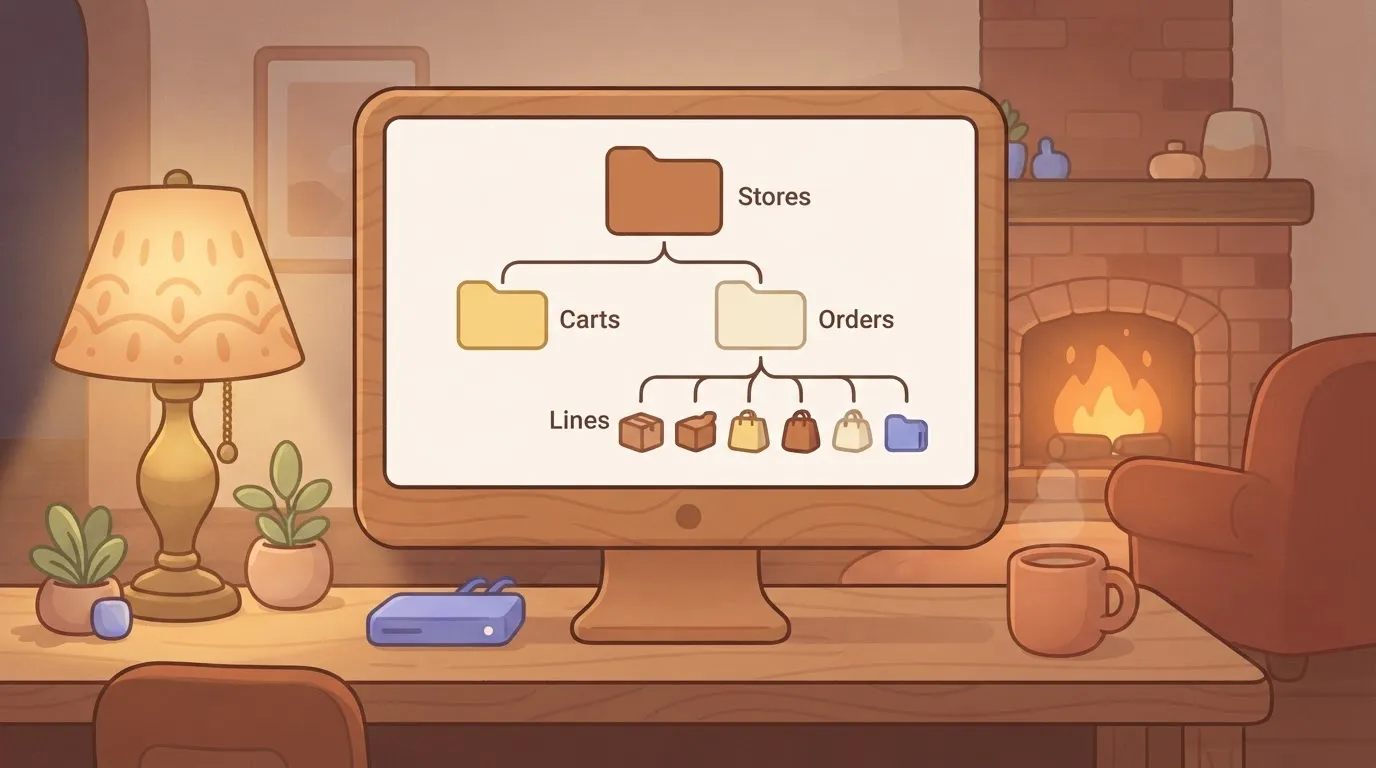 ### Routing and shard identification Correct routing depends entirely on the API key suffix. [Probecast](https://probecast.io/vendor/mailchimp)’s analysis puts an API key ending in -us19 as an indicator that the account resides on the nineteenth US shard, requiring all calls to point to https://us19.api.mailchimp.com/3.0/. An authentication failure, not a connection timeout, will result from using any other shard prefix, since credentials are valid only for your assigned shard. Once the base URL is established, the developer can begin polling the `/reports` endpoint to aggregate open and click data for specific member segments. ## Minimal working request in Bash and node.js To avoid immediate connection timeouts, a successful connection to the Mailchimp API requires a valid API key and the correct data center prefix. The following examples demonstrate how to authenticate and perform basic operations using the standard cURL utility for shell environments and the `https` module in Node.js. To verify that your API key is active and your data center routing is correct, you should target the `/ping` endpoint. The following bash cURL request demonstrates the basic authentication format. ```bash curl -X GET \ "https://${DATA_CENTER}.api.mailchimp.com/3.0/ping" \ --user "anystring:${API_KEY}" ``` The following Node.js request performs the same connectivity check using the native https module. ```javascript const https = require('https'); const options = { hostname: `${DATA_CENTER}.api.mailchimp.com`, path: '/3.0/ping', method: 'GET', auth: `anystring:${API_KEY}` }; const req = https.request(options, (res) => { res.on('data', (d) => process.stdout.write(d)); }); req.on('error', (e) => console.error(e)); req.end(); ``` Adding a member requires a POST request to the `/lists/{list_id}/members` endpoint with the subscriber's email address and a specific status. The following bash cURL request shows the required JSON payload. ```bash curl -X POST \ "https://${DATA_CENTER}.api.mailchimp.com/3.0/lists/${LIST_ID}/members" \ --user "anystring:${API_KEY}" \ -d '{"email_address": "user@example.com", "status": "subscribed"}' ``` The following Node.js request handles the same subscriber addition with appropriate headers. ```javascript const https = require('https'); const data = JSON.stringify({ email_address: 'user@example.com', status: 'subscribed' }); const options = { hostname: `${DATA_CENTER}.api.mailchimp.com`, path: `/3.0/lists/${LIST_ID}/members`, method: 'POST', auth: `anystring:${API_KEY}`, headers: { 'Content-Type': 'application/json', 'Content-Length': data.length } }; const req = https.request(options, (res) => { res.on('data', (d) => process.stdout.write(d)); }); req.write(data); req.end(); ``` ## Rate limits and concurrency constraints by tier To ensure API stability, Mailchimp enforces a strict cap on simultaneous connections, meaning developers must manage a narrow window of execution for every integration. This architectural choice forces a shift from simple sequential requests to managed queues that prevent overlapping calls from triggering system-wide blocks.  ### Mailchimp's 10 concurrent connections limit Every account is restricted to a maximum of **ten concurrent connections**, per user. This limits the throughput of multi-threaded applications attempting to sync large datasets. If an application opens an eleventh socket before one of the previous ten closes, the server returns a 429 error. Because this constraint applies globally across all endpoints for a single key, a background sync for list members will compete for resources with a front-end form submission. [Developers](https://developers.klaviyo.com/en/reference/bulk_create_data_source_records) using high-concurrency environments like Gemini 4 Hydrogen for automated agent actions must implement a global semaphore to track active requests. This ensures the application never attempts to exceed this ceiling. ### Per-key request thresholds Beyond the concurrency cap, Mailchimp monitors the volume of incoming traffic to protect shard performance. The system enforces a connection-based limit of **10 simultaneous connections** per user. This secondary limit means that even if you stay under the ten-connection ceiling, a rapid burst of short-lived requests can still trigger a lockout. Developers must pace their calls to ensure they do not exceed this 10-per-minute frequency. ### Handling HTTP 429 Too Many Requests errors Exceeding the connection limit or the per-key rate threshold results in an HTTP 429 error, which is a hard stop for all incoming traffic from that source. The following table compares how Mailchimp manages these constraints against Constant Contact, a primary competitor in the email marketing space. | Metric | Mailchimp Marketing API | Constant Contact | | :--- | :--- | :--- | | Concurrent Connections | 10 per user | 4 per account | | Daily Request Limit | Unlimited (throttled per second) | 10,000 per day | | Error Code | 429 Too Many Requests | 429 Too Many Requests | Receiving this status code indicates that the server has temporarily blacklisted the requestor, requiring a back-off strategy to resume operations. A standard exponential back-off algorithm is necessary to prevent a retry storm that would further extend the lockout period. ### Mailchimp batch operations endpoint for bulk requests To bypass the latency inherent in individual calls, the Batch Operations endpoint allows developers to group multiple instructions into a single asynchronous request. This method moves the processing burden to Mailchimp’s infrastructure. While the server processes thousands of updates in the background, the local application only consumes one of its ten connection slots. Once submitted, the system provides a status URL to poll for completion, reducing the total number of active connections required for massive data migrations. ## Pricing and usage costs for API integration Mailchimp includes Marketing API access in every paid subscription tier. Developers don't face a specialized "API-only" gate to begin integration. The Free plan is for limited testing. On the Free plan, moving to a paid tier is the only way to remove the "Sent via Mailchimp" footer from automated messages and access the higher rate limits required for production-level synchronization. The monthly cost scales based on the total number of contacts stored in the database. A developer must account for database growth in the long-term maintenance budget. The following table compares the base monthly costs for the three primary paid tiers across common contact volumes. | Contacts | Essentials Plan | Standard Plan | Premium Plan | | :--- | :--- | :--- | :--- | | 500 | $13.00 | $20.00 | $350.00 | | 10,000 | $100.00 | $135.00 | $450.00 | | 50,000 | $350.00 | $410.00 | $870.00 | These figures represent the starting point for bulk marketing, but transactional requirements introduce a separate billing logic. ### Transactional email costs Transactional Email (formerly known as Mandrill) is a paid add-on rather than a core feature of the Marketing plans. Instead of paying per contact, developers purchase monthly blocks of credits, where one credit equals one email sent. This separation means that a high-volume notification system for password resets or order confirmations will incur costs independent of the size of the marketing audience. Because credits expire at the end of each billing cycle, a system architect must precisely forecast monthly send volumes to avoid paying for unused capacity. Once the base subscription and transactional blocks are active, the focus shifts to the technical constraints of the connection itself. ## Automate Mailchimp workflows with Activepieces By offloading the retry logic to a managed environment, Activepieces abstracts Mailchimp’s rigid concurrency limits and complex error-handling logic into pre-configured, visual blocks. Companies like MoneyGram and FundingSocieties run Activepieces in production to manage their enterprise automations, ensuring that a `429 Too Many Requests` error triggers a controlled retry rather than a system-wide stall.  The platform manages the underlying API handshake, allowing teams to map data fields between services without manually parsing Mailchimp’s nested JSON structures. The following interface shows how a user coordinates data movement between a scheduling trigger and secondary storage applications. ### Visual workflow building The Activepieces flow builder displays a test flow where an "Every Hour" Schedule trigger is active; the automation runs on a predictable cadence. If the specific Mailchimp action needed for a niche audience segment is missing, builders can use AI to generate the integration and add it to their instance. This extensibility is why roughly 60% of the 750+ integrations in the catalogue are community-contributed rather than vendor-locked. Below the canvas, a integration selector modal reveals integrations for Google Sheets, Microsoft Excel 365, AITable, and Retable, providing the specific actions like Insert Row or Update Row needed to log Mailchimp activity for auditing. The configuration panel confirms the trigger is set to run on weekends. It shows a successful sample data generation, which verifies the connection is stable before the flow is published. Once the trigger and spreadsheet actions are linked, the developer can layer in conditional logic to handle specific Mailchimp outcomes. 1. Select the Mailchimp integration to define the event, such as a new subscriber or a tagged contact. 2. Insert a "Branch" step to filter users based on their subscription status or interest groups. 3. Connect a secondary "Action" integration, like GPT-6.2 Sol, to summarize user data before it hits the CRM. ## Frequently asked questions ### Is Mailchimp API v2.0 still supported? Mailchimp has officially sunset API v2.0, meaning any integrations relying on this version will encounter broken endpoints and failed authentication. Developers must migrate to v3.0 to maintain service continuity, as the older architecture lacks the security protocols required by modern mail clients. If you use a legacy library like `mailchimp-api-python` that hasn't seen a commit in years, your scripts will return connection errors. The underlying endpoints no longer exist on the Mailchimp servers. ### How do I find my Mailchimp list ID? Located within the Audience settings of the web interface rather than the general account dashboard, the Audience ID is often referred to as the list ID. Go to the All Contacts view and select the Settings dropdown to find the unique alphanumeric string in the Audience name and defaults section. This specific identifier is required for every member-related API call. Failing to capture the exact string, which differs from the human-readable audience name, will result in a resource not found error.  ### Error handling for audience IDs To ensure your error-handling logic covers the most common points of failure, your code should be prepared to parse specific response codes. These include 429 (Rate Limit Hit), 400 (Malformed JSON), 403 (Data Center Mismatch), and 500 (Internal Server Error). These statuses provide the diagnostic data needed to determine if a request failed due to a temporary network blip or a fundamental configuration error. ### What is the maximum batch size for the batch API? The Batch API supports a high volume of operations in a single call, though exceeding the recommended payload size will trigger a gateway timeout. While the system can process thousands of operations per batch, developers should monitor the total file size of the JSON body to avoid hitting the web server's upload ceiling. Splitting large datasets into multiple smaller batches ensures that a single malformed record doesn't invalidate the entire synchronization process. ## Related reading - [Shopify Mailchimp Integration: Setup Guide (2026)](https://www.activepieces.com/blog/shopify-mailchimp-integration-setup-guide-2026) - [Gmail Mailchimp Integration: How to Set It Up (2026)](https://www.activepieces.com/blog/gmail-mailchimp-integration-how-to-set-it-up-2026) - [Slack Mailchimp Integration: How to Set It Up (2026)](https://www.activepieces.com/blog/slack-mailchimp-integration-how-to-set-it-up-2026)Because the central gateway doesn't proxy requests between regional clusters, Mailchimp routes API requests through data centers assigned at the account level.