# Mailgun API: Sending, Webhooks and Rate Limits
By Petra Vlk · 2026-11-01 · Source: https://www.activepieces.com/blog/mailgun-api-sending-webhooks-and-rate-limits
---
The [Mailgun](https://mailgun.com/features/email-validation-api) API is a REST HTTP API for sending email and for managing domains, events and suppressions. You authenticate with a private key over basic auth and post to a regional base URL, so one curl command is enough to prove the setup works.
Whether it comes from your own code or from [Activepieces](https://www.activepieces.com), which has 746 integrations and runs unlimited flows on every plan, including free, every call is an ordinary HTTPS request. I won't state which tier unlocks which endpoint, because plan terms change.
Read your account's plan page before you build, since **a limit you find after launch** is a failed send you find in a log.
## Mailgun API access and your first working request
### Creating an API key and choosing US or EU region
Create a private API key in the dashboard and store it as a secret, because it can send mail as your domain.
Then match the base URL to the region where you created your domain: `https://api.mailgun.net` for US, `https://api.eu.mailgun.net` for EU.
A key pointed at the wrong region fails to find your domain, and the error looks like a **credentials problem when it's really an address problem**.
### Authenticating and sending a minimal curl request
To authenticate, use HTTP basic auth with the username `api` and your key as the password. The sequence below is the whole path from plan to first message.
1. Confirm your plan includes API access.
2. Create a private API key.
3. Pick the US or EU base URL.
4. Use basic auth with user `api`.
5. Send one POST to `/v3/YOUR_DOMAIN/messages`.

```
curl -s --user 'api:YOUR_API_KEY' \
https://api.mailgun.net/v3/YOUR_DOMAIN/messages \
-F from='Test ' \
-F to='you@example.com' \
-F subject='First send' \
-F text='It works.'
```
**A JSON response with a message id means Mailgun accepted the request, not that the recipient received it.** Delivery outcomes arrive as events, and Mailgun delivers them to your webhook endpoint.
If the webhook endpoint fails, [Mailgun's retry schedule](https://documentation.mailgun.com/docs/mailgun/user-manual/webhooks/webhook-retries) waits 5, 10, 15, 60, 120 and 240 minutes between attempts. That adds up to 450 minutes, or 7.5 hours.
An endpoint that stays down longer than that has outlasted the schedule, so the next step is building that error handling before your first production send.
## Mailgun endpoints, pricing and rate limits per plan
Read the included volume, the overage price and the API rate limit for your plan before you send anything, because each one fails differently and none of them fails loudly.
The numbers are left out here because they change; copy them from the pricing page on the day you decide.
### Endpoints: messages, domains, events, suppressions, webhooks
You will rely on five endpoint groups in a production integration. Messages accepts the send itself, domains holds sending-domain setup and verification, and events returns what happened to each message afterwards.

Suppressions lists the bounces, complaints and unsubscribes Mailgun will refuse to send to again, and webhooks push delivery outcomes to your server so you stop polling Events.
Poll Events and you will exhaust a rate limit before anything else, so **treat webhooks as the primary signal** and Events as the fallback for reconciliation.
Past the monthly volume of emails that each plan bundles, Mailgun bills per thousand. That makes the overage price the number to multiply against your worst month, not your average one.
A retry loop that resends a failed batch counts twice, so a bug in your error handling turns directly into a larger invoice.
### Rate limits and sending quotas by plan
You can have a job that runs fine against one endpoint and hits the limit on another, because rate limits apply per endpoint group and the Events and Metrics endpoints are limited on different windows from each other.
The limit arrives as an error response, not as slower delivery.
| Dimension | What it governs | What failure looks like |
|---|---|---|
| Included volume | Sends covered by the base price | Nothing breaks; the bill grows |
| Extra per 1,000 | Cost beyond the bundle | A surprise invoice after a retry storm |
| API rate limit | Requests per window, per endpoint group | Rejected requests until the window resets |
| Log retention | How long Events can answer questions | An old message returns no history |
| Support | Who answers during an incident | A slower route to a human |
If you investigate a complaint after the window closes, the evidence is gone, which is why log retention is the quiet one. Once you know these five limits for your plan, the next job is deciding which errors your code retries and which it surfaces.
## SMTP's advantages over the HTTP API
Ask SMTP's believers and the retry question hardly reaches your code: every framework already speaks it, no SDK is needed, and changing provider is an edit to a config file.
### Sending through Mailgun SMTP without code changes
Because your framework's built-in mailer already knows SMTP, you only supply a host, a port, a username and a password, and the password reset emails, receipts and invitations your application already sends begin flowing through Mailgun.
No new dependency enters the lockfile, nothing needs upgrading when a vendor releases a new library version, and no one on the team has to learn a provider-specific client.
The same argument covers leaving. If Mailgun's pricing changes, or a deliverability problem drags on through a support thread, you replace four values in the environment and redeploy.
With the HTTP API it goes the other way. Request shapes, field names and error formats from one vendor spread through your codebase, and moving away means rewriting every call site and every test that mocks them.

The API is also a second failure surface: an HTTP client library, a JSON payload and a set of status codes that SMTP never makes you handle.
### When SMTP is enough for Mailgun sending
For a framework that already sends mail, and an application where email is incidental, this is correct. Prototypes, internal tools and low-stakes notifications should use SMTP, because the integration cost is close to nothing and the exit is cheap.
It's also correct that the API couples you to one vendor. That's a cost, not a myth, and a thin internal wrapper reduces it without removing it.
Where the objection stops holding is on the signals you need once a failed send has consequences.
On the first three rows, framework support, SDK requirement and ease of switching, SMTP wins, indicating SMTP's advantages in initial setup and avoiding vendor lock-in, which means you can integrate and test email workflows before making your final vendor choice.
On the last three, structured errors, rate-limit signals and webhooks, the HTTP API does.
What follows is what those last three rows cost you in practice: a rejected message that arrives as a bare SMTP reply instead of a field you can branch on.
## Handling common Mailgun API errors in production
Over the API, each failure comes back as an HTTP status and a JSON message, so your code can branch on it instead of parsing a bounce string.
The list below shows the five failures you'll meet first, and what to do about each; Mailgun's reference lives at [documentation.mailgun.com](https://documentation.mailgun.com/).
- A 401 means the key is wrong, revoked, or sent to the wrong region's endpoint. Check the key and the base URL, and don't retry.
- A 400 carries a validation message naming the problem, such as a missing field or a malformed address. Fix the payload, because resending it changes nothing.
- A sandbox or unverified domain rejects recipients it hasn't been told to accept. Verify the sending domain's DNS records, or add the recipient as authorized on a sandbox domain.
- A 429 means you're sending faster than your plan allows. Slow down and retry later.
- A suppressed recipient is skipped because of a prior bounce, complaint or unsubscribe. Look the address up in the suppression lists and remove it only if the cause was resolved.
In the docs, each entry sits under the account and domain setup pages, which are the authority if wording differs.
These are configuration faults, so they fail the same way every time. Treat them as permanent, log the response body, and alert a person. A retry loop around a 401 only fills your logs.
Only a few errors here are temporary: the 429 and server-side errors. Read your plan's limits before launch, then put sends behind a queue so a burst drains at a controlled pace.
When a 429 arrives, wait, lengthen the wait on each repeat, and add random jitter so parallel workers don't retry together.
When the response says success, it means Mailgun queued the message, **not that the inbox received it**. Delivery failures, bounces and complaints arrive afterward as events.
Subscribe to webhooks for them, verify each webhook's signature, and update your own records from the event, not from the send response.
**Retry only rate-limit responses and server-side errors**. Never retry 400 or 401.
If a request times out, you don't know whether it was accepted, so check your stored message ID and recent events before sending again. Otherwise a recipient gets the same email twice.

## Call Mailgun endpoints without code using Activepieces
When sends are triggered by a form submission, a CRM record or a database row, Activepieces can call Mailgun for you.
Describe that process in the built-in chat and what it publishes is a live flow in your account, the same kind a builder would assemble by hand, with a run trace listing what happened at every step of each run.

MoneyGram, Moneypenny, Alan and FundingSocieties run Activepieces in production.
It uses the same API key and the same region you would use in code, so a retry that fires twice is still your problem to prevent.
In Activepieces, a trigger starts a flow, and each later step is an action from one of its 746 integrations, roughly 60% of them contributed by the community, so your workflows will depend on community-maintained code.
Although the example below is a form flow rather than a Mailgun one, it shows the layout you'll work in. Step 1, "New Form Response" from Fillout Forms, starts the flow.
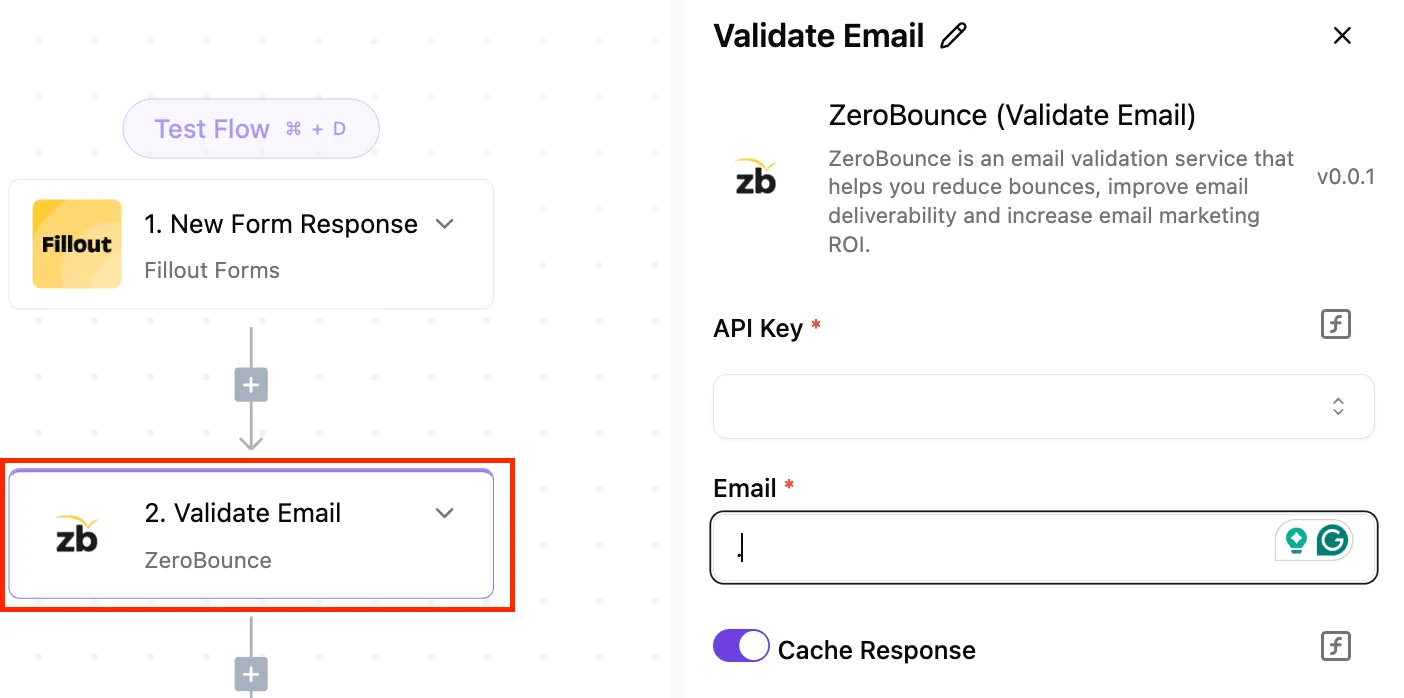
Step 2, "Validate Email" using ZeroBounce, is selected, and its panel on the right lists the required API Key and Email fields and a Cache Response toggle.
Notice that every step is a credential plus a few mapped fields. A Mailgun step has the same shape, and that's all the builder does for you.
### Using the Mailgun integration with your API key
Add the Mailgun integration, which wraps the send endpoint, as an action after your trigger. Paste in your Mailgun API key, and map fields from the trigger into the message: recipient, subject and body.

Check that the region setting matches the region your domain was created in. A domain created in the EU region won't accept calls sent to the US API base, and the error you get back looks like a bad credential, not a bad region.
This suits the cases the article has been arguing about. Those cases are a confirmation email after a form, a notice when a CRM deal changes stage, an alert when a database row is inserted.
You still need to read your plan's sending limits first, because the workflow will hit them exactly as your code would, and a flow that **fails at the limit doesn't tell anyone** unless you add a step that does.

### Using an HTTP step for endpoints without a ready action
The integration covers sending, and its source sits in the MIT-licensed Activepieces repository, so you can read which endpoint it calls. For anything else, such as pulling events or managing a suppression list, use Activepieces' generic HTTP step to call the Mailgun endpoint directly.
You supply the URL, the method, the authentication header and the body yourself, so you also read the response yourself.
Keep code for high volume, or when you need retry logic of your own, such as backing off on a rate-limit response or de-duplicating by message ID. A visual flow can retry a failed step, but it can't make that decision for you.
## Your Monday mail checklist
Make the decisions your workflow tool won't make for you, in this order, before the first production send: domain, key, limits, retries, webhooks, alerts. Each step guards against a failure that otherwise shows up only as a customer asking why nothing arrived.
Since each step depends on the one before it, the order matters. A key created before the domain is verified will authenticate fine and still send mail that mailbox providers treat with suspicion.
The list below is that order, and the first three steps are done once, while the last three keep running afterwards, meaning you'll need to manage the system continuously after the initial setup.
1. Verify the sending domain. Add the DNS records Mailgun asks for and wait until the dashboard shows the domain as verified. Until then, any mail you send is a test that happens to reach real people.
2. Create a restricted key and keep it in a secret manager. Use a key scoped to sending rather than your account-level key. Load it at runtime from the secret manager, never from a file in the repository. If it leaks, you revoke one narrow key instead of rotating everything.
3. Check your plan limits against peak volume. Read the plan's sending and rate limits, then compare them to your busiest hour, not your average day. A limit you only discover by hitting it arrives as rejected requests during exactly the burst that mattered.
4. Add retry with backoff. Retry only the errors the API marks as temporary, wait longer between attempts, and stop after a fixed number of tries. Never retry a rejection that's permanent, such as a bad address or a failed authentication; repeating it adds load and fixes nothing.
5. Wire up webhooks. Subscribe to delivery, bounce and complaint events and store them against the message they belong to. An accepted request only tells you Mailgun took the message, not that anyone received it.
6. Alert on bounces and complaints. Set a threshold on each and send the alert to a person who'll read it. A rising bounce or complaint rate damages your sending reputation quietly, and the first symptom is mail landing in spam.
Once these six are in place, the API's structured errors, rate-limit signals and webhooks are doing the job you chose it for.
A rising bounce or complaint rate damages your sending reputation quietly, and the first symptom is mail landing in spam.
Only low-volume senders, or teams that need to swap providers without touching code, have a good reason to stay on SMTP and give those signals up.
## Frequently asked questions
Is the Mailgun API free to use? Yes, up to the limits of the free plan, and those limits are what you hit first.
The API isn't priced separately from sending, so every call counts against your plan's allowance. Read the current plan limits on Mailgun's pricing page before launch, because a quota you discover in production arrives as a rejected send, not a warning.
### Does Mailgun have a sandbox for testing the API?
Yes. Every account comes with a sandbox domain, and it only delivers to recipients you have added and verified as authorized. That makes it safe for checking authentication and request shape, and useless for judging real deliverability.
If your test sends succeed to your own address, you've learned that the key works and nothing about how a customer's inbox will treat you.
### Can I use one API key for several domains?
Yes, with the right kind of key. The account-level private API key works across every domain on the account, so it's convenient and also dangerous: if it leaks, every domain is exposed.
For a service that only ever sends from one place, the better choice is a domain sending key, which is scoped to one domain. Mailgun's documentation on API keys describes the key types and what each can do.
How do I verify a Mailgun webhook signature? Compute a keyed hash of the timestamp and token Mailgun sends, and compare it to the signature it sent. Specifically:
1. Take the `timestamp` and `token` values from the `signature` object in the webhook payload.
2. Concatenate them, timestamp first, and compute an HMAC-SHA256 hex digest using your webhook signing key.
3. Compare your digest to the `signature` value, using a constant-time comparison.
4. Reject the request if the timestamp is old or the token has been seen before.
When every signature appears invalid, the usual reason is the wrong key: the signing key is a separate credential from your API key.
### Does Mailgun have official SDKs?
For several popular languages, Mailgun publishes client libraries, and its documentation lists them. You're not locked to them, since the API is plain HTTP and any HTTP client can call it.
Check a library's recent activity before depending on it, and remember that a thin wrapper won't add the error handling and retry logic you still have to write yourself.
## Related reading
- [Ultimate Guide: Automating Emails on SMTP for New Wordpress Posts](https://www.activepieces.com/blog/ultimate-guide-automating-emails-on-smtp-for-new-wordpress-posts)
- [Detailed Guide to Get Email Alerts for New GitHub Issues with SMTP](https://www.activepieces.com/blog/step-by-step-guide-to-automating-email-alerts-for-new-github-issues)
## References
- [Mailgun documentation](https://documentation.mailgun.com/docs/mailgun/user-manual/webhooks/webhook-retries)