When someone leaves, their licence keeps billing until someone unassigns it, so each forgotten seat costs the full per-user rate every month. Mis-tiering works the same way: a user on a higher plan than their work needs pays the difference indefinitely. Reconcile the admin centre's user list against current staff before every renewal.  A scheduled Activepieces workflow can do that reconciliation beside the admin centre's own reports, listing licensed users through its Microsoft 365 connector and flagging departed accounts for review. A run costs 1 credit however many steps it holds, so a ten-step audit costs what a two-step one does, whereas Zapier's per-task and Make's per-module billing, both on their pricing pages, charge more for every check you split out. ### Add-ons priced on top At [$21 per user per month](https://workaicompare.com/pricing/microsoft-365-copilot/), Copilot Business, Microsoft's AI assistant for work apps, is the priciest add-on here. **For 40 people that's $10,080 a year**, more than the entire annual Standard bill.  It's not in the scenario invoice, but a rollout to everyone would **more than double the spend**. Buy Teams Phone only for the people who take calls. It adds cloud calling and costs $10 per user per month, which is $4,800 a year for 40 seats. The smaller items add up more quietly: - Defender P2, the advanced security tier, is $5 per user per month, or $2,400 a year across 40 seats. - Exchange Plan 1, a standalone mailbox, is $4 per user per month, or $1,920 a year. - Defender P1, the entry security tier, is $2 per user per month, or $960 a year. 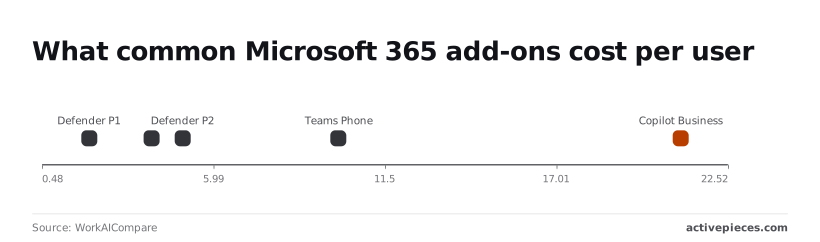 Scrutinise Copilot Business and Teams Phone first, because those two dominate. ### Microsoft 365 plan limits that force upgrades Nobody pays for a plan limit until someone hits it. Then the choice is an upgrade or an add-on, usually for one person's need but billed at whatever tier the fix requires. Check Microsoft's plan comparison for the limits your heaviest users approach, and assign the higher tier only to them. Your invoice will land higher than the figures here, because tax is added on top of every line above and these figures are pre-tax. ## Google Workspace and other alternatives compared on price Google Workspace and Zoho Workplace compete with Microsoft 365 Business Standard by trading installed desktop apps for a lower or more flexible bill. Tax lands on the alternatives too, so compare pre-tax against pre-tax. I have no verified prices to quote, so the table compares what each plan includes and where its limits sit. Check the live price page on the day you buy, because a quote that needs a sales call to decode is a warning sign by itself. | | Per-user price | Storage | Email | Meetings | Desktop apps | Limits | |---|---|---|---|---|---|---| | Microsoft 365 Business Standard | Cheaper on annual billing than monthly | OneDrive per user | Exchange mailbox on your domain | Teams | Installed Word, Excel, PowerPoint and Outlook | Capped seat count; larger firms move to Enterprise plans | | Google Workspace Business Standard | Annual commitment or flexible monthly billing | Drive storage, pooled across the account | Gmail on your domain | Meet | Browser-based, with offline mode in Chrome | Meeting size and recording depend on tier | | Zoho Workplace | Usually the lowest of the three | WorkDrive, allowance varies by plan | Zoho Mail on your domain | Zoho Meeting | Mostly web and mobile apps | Smaller ecosystem and fewer third-party integrations | Don't stop at the price column. The rows below it decide whether a cheaper seat costs you something elsewhere. ### Google Workspace and Zoho Workplace pricing compared For a team that already lives in the browser, Google's Business Standard is the closest like-for-like tier, and the better fit. Anyone who exchanges complex Excel models or Word documents with outside parties will pay for it in conversion fixes, so the cost is on the Microsoft side of the ledger. That time never shows up on an invoice. On paper, Zoho is the cheapest route and covers the same basics: email, documents, meetings, storage. Its weakness is the ecosystem. Fewer integrations mean more of your existing tooling needs rework, and that migration labour can erase a year of per-seat savings. Switching isn't worth it if your team depends on desktop Office files or on Teams as the phone and chat layer. In that case, cut cost inside Microsoft 365: remove unused licences, drop add-ons nobody opens, and take the annual term. That recovers most of the drift without a migration. ## Fix Microsoft 365 licence drift with Activepieces Review seats monthly, write down the billing-term decision when you make it, and give every add-on a named owner. Microsoft's own admin tools cover most of that, and Activepieces fills the one gap they leave, which is a recurring check of licences against the leaver list. ### What Microsoft's admin tools already do To spot a seat nobody has used lately, the Microsoft 365 admin centre is enough: it shows which licences are assigned and which are unassigned, and it can report on sign-in activity. A person doing the review has the evidence in front of them without buying anything. Tie a licence to a group and removing someone from the group takes the licence away. That is group-based licensing in Microsoft Entra ID (the directory behind the tenant), and it goes further than the reports. The drift then stops depending on whether someone remembered a separate step when a person left. Nothing in the native tools tells you that a leaver on the HR list still holds a paid seat, and they don't remind you to review either. Both depend on a person opening the right page on the right day, and that's the first thing to lapse in a busy month. Write your decisions about billing term and add-on ownership in a record next to the review, because nothing in the admin centre records why you chose them. ### A monthly licence audit workflow This audit can run on a schedule in Activepieces, an open-source automation tool with a visual flow builder. The workflow is short: a timer trigger, a step that reads assigned licences from Microsoft 365, and a step that reads the leaver list from a spreadsheet. A last step compares the two and sends a message listing the matches. The builder makes the wiring easy to see. The screenshot shows a three-step flow on the canvas with an hourly trigger, while the open step selector, searched for "sheet", lists Microsoft Excel 365 and Google Sheets among the integrations you can drop in. 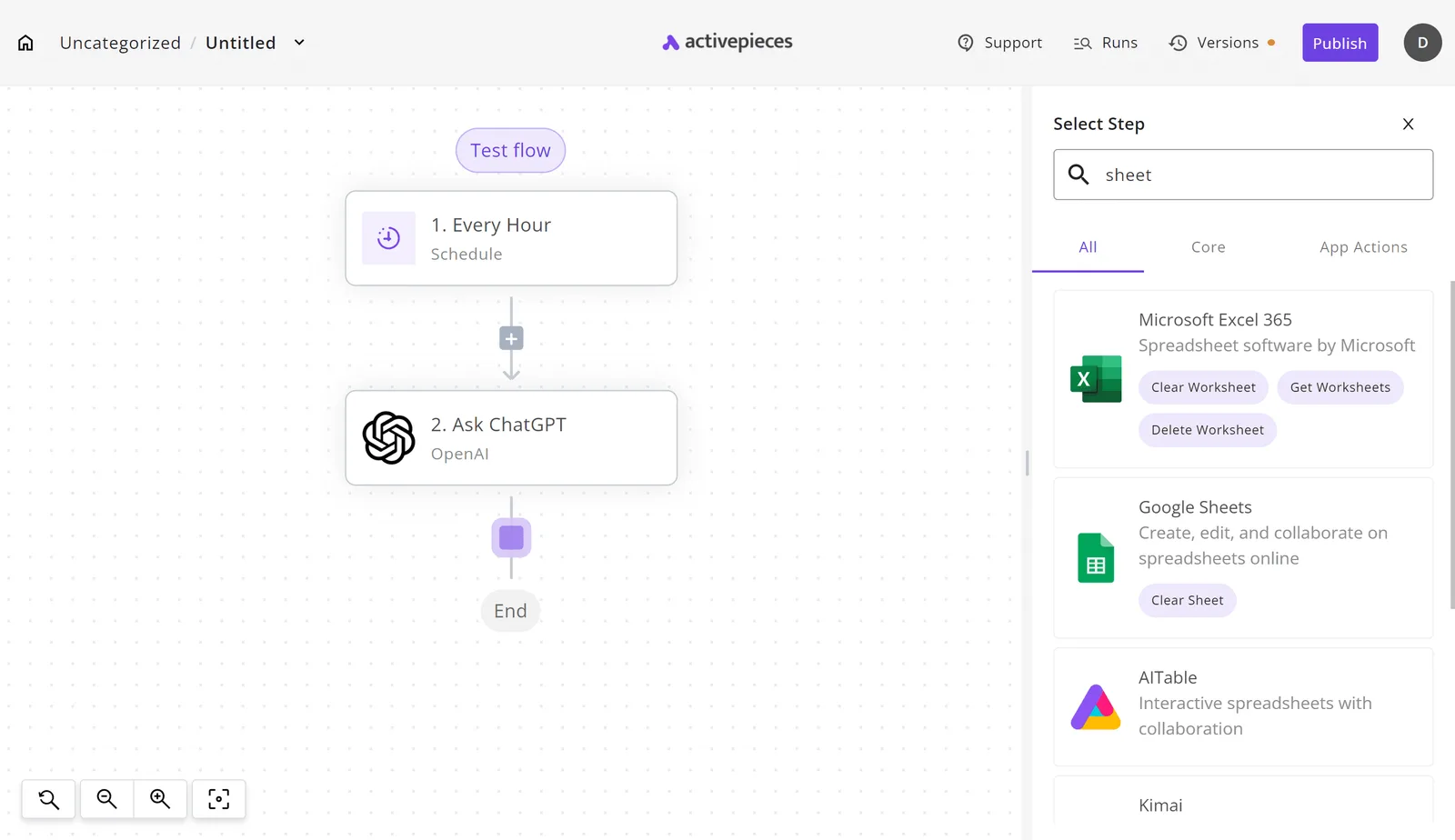 Take from the screenshot that the leaver list can live in whichever spreadsheet your team already keeps, and that you swap the trigger to monthly rather than hourly. Next, the design rule that matters more than the tooling: the workflow only flags. It posts the names of people who hold a licence and appear on the leaver list to whoever owns the review, and that person approves each removal. If removal were automatic, it would eventually take a seat from someone who still needs it, and an unwanted removal costs more than a month of one unused seat. ## Monday checklist for cutting Microsoft 365 bills Do the removal by hand, on a fixed day, with the export open in front of you, so every seat you cut is one you chose to cut. The list runs from the cheapest check to the slowest, so each step narrows what the next one has to examine. 1. Export the assigned licences from the Microsoft 365 admin centre, so you work from a record of who holds what. 2. Remove seats nobody has used recently, and confirm with the person's manager first. 3. Check each person's tier against what they actually open, since a licence above their needs is a recurring charge for features they never touch. 4. Compare monthly against annual billing for the seats that remain. 5. Review every add-on and ask who uses it. 6. Set a renewal reminder 60 days ahead, so the decision lands before the term rolls over on its own. 7. Re-verify every price on Microsoft's own pricing page before you sign off, because the figures in your last invoice may predate a change. The notes below cover where the money sits behind these steps. Pay monthly and each seat costs more, but you can cut next month. Annual billing is cheaper per seat but locks the count in. Seats you remove mid-term usually keep billing until the term ends, so run step 2 before the renewal date, not after it. When people leave or change role, seats get left behind. A departed contractor keeps costing money until someone unassigns the licence, and nobody gets an alert for that. The export in step 1 is the only reliable way to catch them, because the bill itself shows a count, not names. Assign an add-on to a whole team "to be safe" and you pay for every seat, including people who never open it, because add-ons are billed per user, separately from the base plan. Where a price only appears after a sales conversation, treat that as a reason to ask for it in writing. When a team hits a cap on mailbox size or user count, some plans push you to a pricier tier. Check how close each team is to those limits before you downgrade anyone, or the saving reverses within a quarter. ## Frequently asked questions ### Is Microsoft 365 cheaper billed annually than monthly? Yes: a seat on an annual commitment is normally priced below the same seat on a monthly term. The monthly premium is what you pay for the freedom to leave. Moving from monthly to annual mid-term is generally not offered, and the switch is usually made at renewal. Confirm that in your admin centre or with your reseller before you plan around it. Also check whether your quote is tax-inclusive. Business prices are often shown before tax, so a tax-inclusive line next to a tax-exclusive one will mislead you. You can buy Microsoft 365 without the desktop apps. Microsoft 365 Business Basic includes the web and mobile versions of the apps but not the installed desktop ones. It fits people who work in a browser or on a phone, such as frontline staff. It'll cost you if someone needs offline editing or heavy spreadsheet work, because you'll then upgrade that seat mid-year. ### Do I pay for shared mailboxes and external guests? Usually not for the basics. A shared mailbox generally needs no licence of its own until you need extras such as larger storage or an archive. External guests can typically collaborate in Teams or SharePoint without a seat, though some advanced features can add charges. Count both before you trim licences, because the extras are where an unlicensed convenience turns into a line item. There's a free version of Microsoft 365 for individuals. A personal Microsoft account gets browser versions of Word, Excel and PowerPoint with reduced features. That's not a business tenant: you get no email on your own domain, no admin controls and no support commitments, so a team that needs those is buying a paid plan regardless. ### Does Microsoft 365 pricing include Copilot? For business plans, generally no. **Copilot is sold as a separate per-user add-on**, so it appears as its own line on the quote and multiplies by every seat you assign it to. Consumer plans have gained some Copilot features, and their prices have moved with that. Assign the add-on only to the people who will use it, and read the quote line by line. ## Related reading - [DeepSeek Search API vs Exa Pricing for Small Teams (2026)](https://www.activepieces.com/blog/deepseek-search-api-vs-exa-pricing-for-small-teams-2026) - [No-Code Automation Statistics 2026: Adoption for Small Teams](https://www.activepieces.com/blog/no-code-automation-statistics-2026-adoption-for-small-teams) - [ADP Payroll Pricing for Small Businesses in 2026](https://www.activepieces.com/blog/adp-payroll-pricing-for-small-businesses-in-2026) ## References - [WorkAICompare](https://workaicompare.com/pricing/microsoft-365-copilot/) - [Microsoft](https://www.microsoft.com/en-us/microsoft-365/business/microsoft-365-business-standard) - [On-Site Technology](https://www.on-sitetechnology.com/microsoft-365-price-increase-july-2026/)Flexibility is priced as a surcharge, so a team that hasn't changed headcount in a year is paying for optionality it never uses.