# Microsoft Office MCP Servers: Which One to Use (2026)
By Iben Skovgaard · 2026-11-16 · Source: https://www.activepieces.com/blog/microsoft-office-mcp-servers-for-ai-agents-2026
---
## Recognize Microsoft Office MCP as multiple servers
### Is there an official Microsoft Office MCP server?
Ask for the product called Microsoft Office MCP and there isn't one.
The phrase **covers at least four separate servers** that differ in publisher, hosting and what they can touch, from community projects to [Activepieces](https://www.activepieces.com), which some teams reach for when they want an MCP server that isn't tied to one vendor's suite.
Microsoft Office MCP is an informal label for any Model Context Protocol server, published by Microsoft or a third party, that lets an AI assistant read or act on Office data such as Word, Excel, Outlook, Teams or SharePoint content through a standard interface.
The table shows the split, so check which row you mean before you ask about price or permissions.
| Server | Publisher | Hosted or local | What it reaches |
|---|---|---|---|
| Agent 365 MCP servers | Microsoft | Hosted | Microsoft 365 workloads, governed through Agent 365 |
| Microsoft MCP Server for Enterprise (preview) | Microsoft | Hosted | Tenant directory data in Microsoft Entra |
| Community ms-graph-mcp | Community maintainers | Runs on your machine or infrastructure | Whatever Microsoft Graph scopes you grant it |
| Community local .docx/.xlsx servers | Community maintainers | Local | Files on disk, not tenant data |

Don't carry a permission answer from one row to the next: each has its own authentication and its own failure mode.
### What MCP is in one paragraph
Instead of a custom integration per app, an AI assistant can call tools and read data through a server, and the open standard that allows this is Model Context Protocol (MCP).
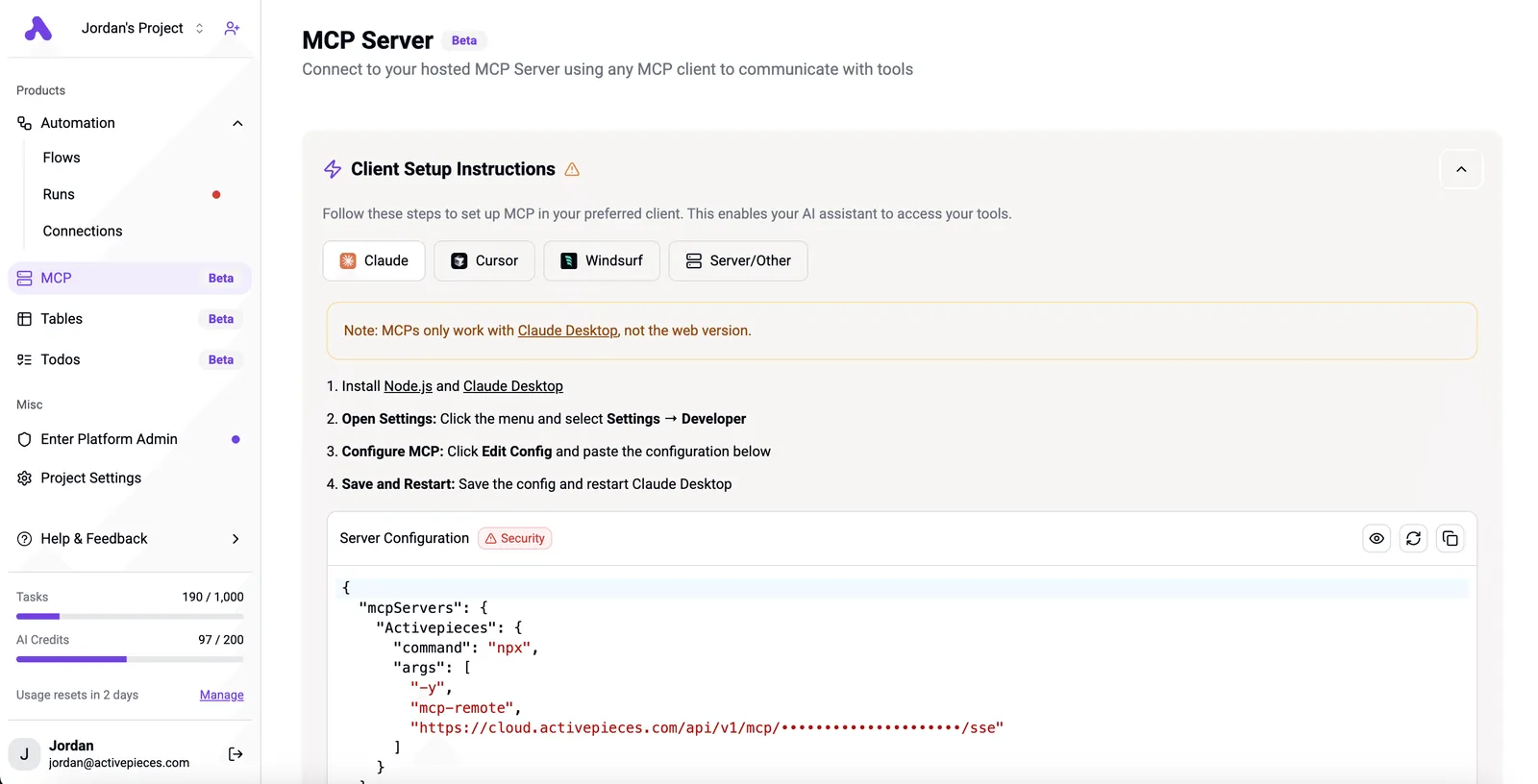
The server decides what to expose, and the client, whether Claude or Copilot, only sees what the server has. That's why "Office MCP" is ambiguous: four servers mean four permission models and four places to look when something breaks.
[Activepieces](https://www.activepieces.com) keeps agents, integrations, MCP tools and approvals in one product under one set of RBAC, SSO, SCIM and audit-log controls, and MoneyGram, Moneypenny, Alan and FundingSocieties run it.
### Microsoft Office MCP server growth and sources
Growth explains the muddle. [Gravity's MCP adoption data](https://gravity.fast/data/mcp-adoption-statistics/data.csv) puts registry servers at an index of 456, then 1,206, then 4,707, then 14,194 (September 2025 = 100). That's **roughly 31 times growth**, so thousands of servers now compete for similar names.
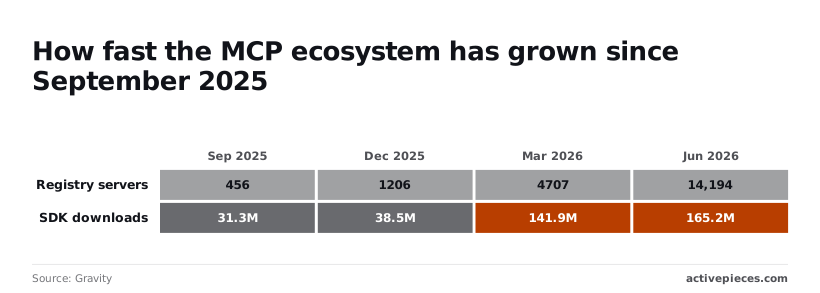
Listings outran real usage. Over the same readings, SDK downloads went from 31,258,519 to 38,516,712, 141,911,796 and 165,176,305, which is about 5 times growth. A registry entry says little about whether anyone maintains a server.
As of 16 November 2026, the sources here are Microsoft's documentation, the community repositories and the [Gravity](https://gravity.fast/data/mcp-adoption-statistics/data.csv) dataset.
## How Office MCP servers access your files
Every Office MCP server follows the same pattern. A client sends a tool call, the server turns it into either a Microsoft Graph request or a local file operation, and the result comes back as text.
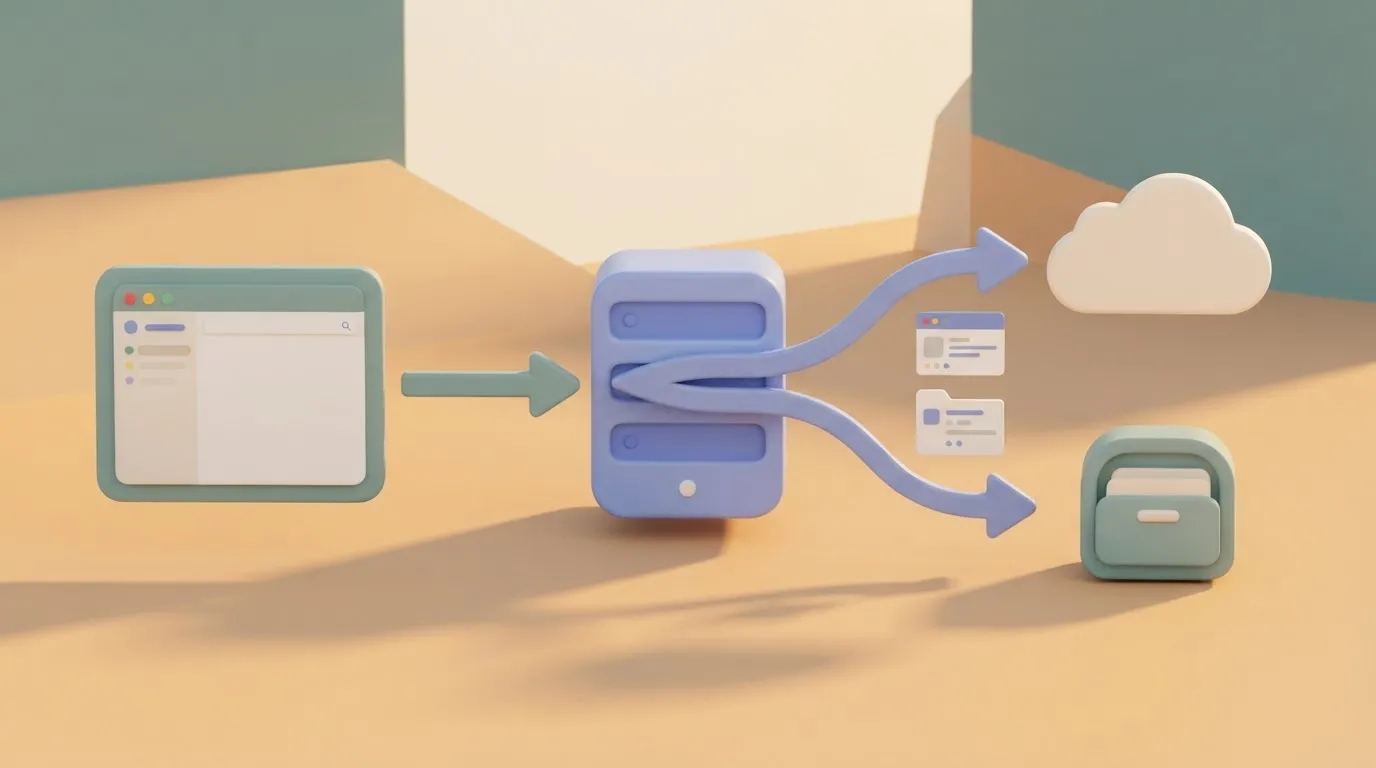
Which of those two paths your server takes decides what it can reach and where it breaks, which is why the date-stamped check above matters.
### Client, server and tools
The client is the AI application: Copilot, Claude or VS Code. It asks the server which tools it offers, such as "read a range" or "list recent mail", and the model chooses among them. The server runs the call and returns the result.

If a server exposes no "edit a table" tool, the model can't edit a table, however capable it is. That is the practical consequence: the model only knows what the tool list says.
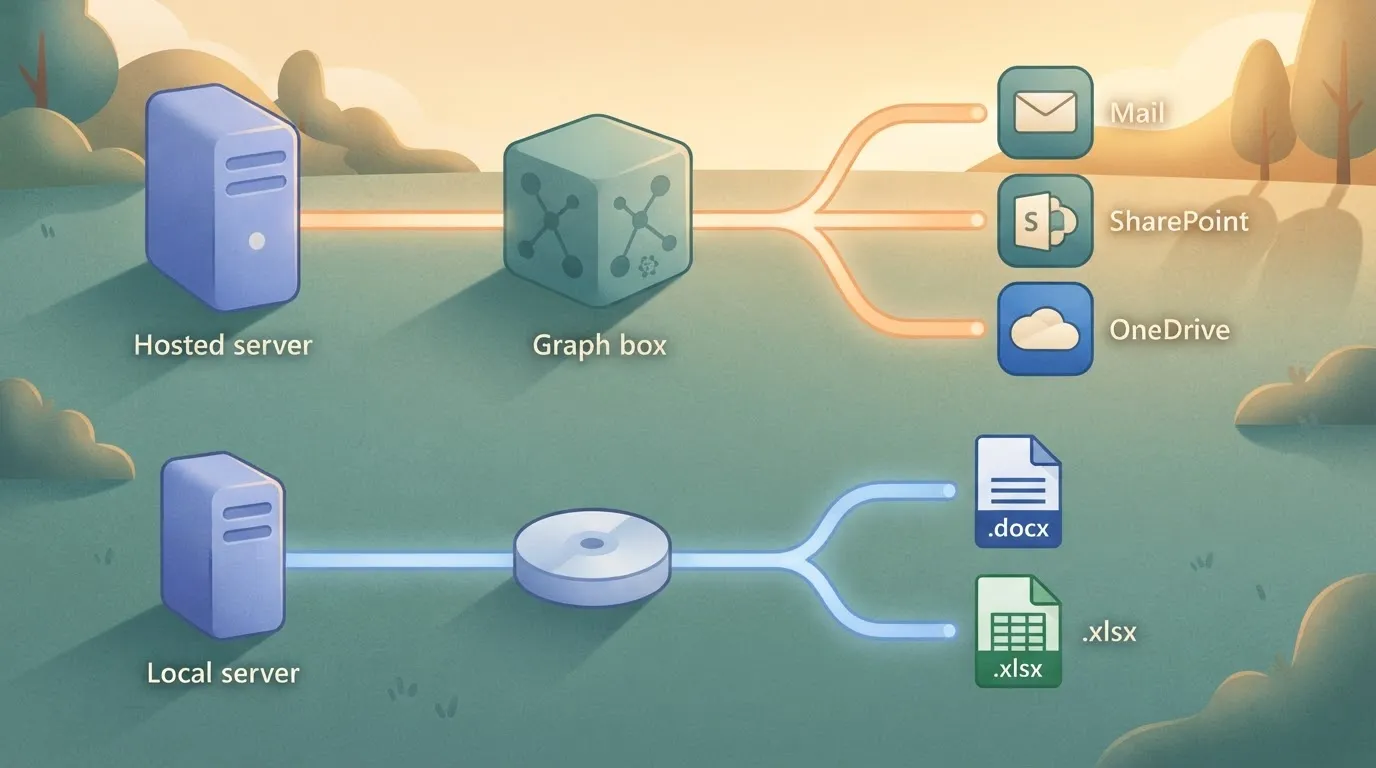
Read the illustration below as two different products sharing one protocol. Clients sit on the left and the MCP server in the centre.
The top path runs from a hosted server through Microsoft Graph to mail, SharePoint and OneDrive. The bottom path runs from a local server straight to a .docx or .xlsx file on disk.
### Graph-backed servers versus local file servers
Hosted in Microsoft's cloud, a Graph-backed server works on whatever your tenant holds there, so it sees live mail and shared documents but inherits Microsoft's service limits.
A local server runs on your machine and opens a file directly with a library. It ignores those limits but can't see anything you haven't downloaded.
Check the file size against the surface your server actually uses, not the largest number you have seen.
### Authentication and what the server can see
When a hosted server signs in through Microsoft Entra ID, its reach is the set of permissions you consent to. A local server usually has no sign-in at all: it can read whatever the operating system lets your user account read.
That difference is the permission model. **Scopes limit hosted servers, while only your file permissions limit local servers, so the fix is to point a local server at a dedicated folder.**
## Who runs Office MCP servers
Ask who runs them and the answer splits in two: community servers that read local files are mostly run by individual developers, and Microsoft's hosted servers are run by licensed organizations through Copilot Studio.
The dedicated-folder fix therefore applies to the first group far more than the second.
### Microsoft-published servers
Because these servers run in Microsoft's cloud, behind tenant sign-in and scopes, an admin can see and revoke what an agent touches.
The audience is large. Paid Microsoft 365 Copilot seats reached 15 million in Q2 FY26, then 20 million in Q3, according to [CNBC](https://www.cnbc.com/2026/04/29/microsoft-msft-q3-earnings-report-2026.html), and 30 million in Q4. **That's a doubling in two quarters**.
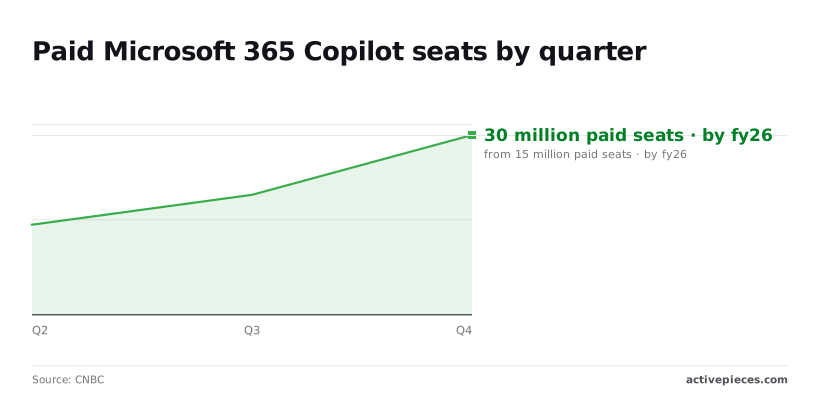
Seats aren't MCP users, but they're the pool of tenants where a hosted server is a permissions decision rather than a hobby project.
Nothing sits between the agent and your file permissions when a community server opens Word and Excel files directly from disk, which is why they need the dedicated folder.
Developers choose them when they want to edit a workbook without a tenant, a license, or a sign-in flow.
### Common Office MCP tasks and their publishers
The five tasks below cover most real use, each tagged by who publishes the server behind it:
- Copilot Studio agent calling MCP tools (Microsoft-published)
- Mailbox summary (Microsoft-published)
- Excel editing (community)
- Word document generation (community)
- SharePoint file search (Microsoft-published)
Tasks that read tenant data, such as mail and SharePoint, land on Microsoft's side. Tasks that write files, such as Excel and Word, land on community servers.
So the permission model you inherit depends on the task, and you should check which server a task uses before you approve it.
## What Microsoft Office MCP costs and requires
You will not cover all four options with one budget line or one approval, because costs run from nothing to a per-user licence and each option needs a different admin sign-off.
Checked 16 Nov 2026, the table below shows that the options differ on every column, price included. Read the consent column first, because it decides who has to say yes before anything runs.
| Option | Licence | Admin consent | Where it runs | Price | Checked |
|---|---|---|---|---|---|
| Microsoft 365 Copilot | Per-user Copilot licence | Tenant admin controls which connectors are available | Microsoft's cloud | Published per user; I give no figure here | 16 Nov 2026 |
| Copilot Studio | Separate from the Copilot seat | Admin approves connectors and data access for agents you build | Microsoft's cloud | Not priced here | 16 Nov 2026 |
| Microsoft-hosted servers | Depends on the service behind them | Consent per service and scope | Microsoft's cloud | Not priced here | 16 Nov 2026 |
| Free community servers | None from Microsoft | You grant permissions yourself, or an admin must if the tenant blocks user consent | Your machine or your host | Free to download | 16 Nov 2026 |
Only the last row is free in licence terms, and it's the one where you own the hosting and the security review.
Buying seats does not get you consent, because a licence lets a person use a feature while consent lets an app read tenant data.
Expect a request to your tenant admin even after procurement is done. Scope that request to the data the task needs, not to everything the server could reach.
Look past the price page, because several costs sit outside it. Community servers need hosting, patching and someone to own them.
Custom agents need testing and an admin's time for reviews. A change in permissions means repeating the consent step. Budget for those before comparing sticker prices.
## Avoid Office MCP deployment mistakes
When an Office MCP deployment fails, it is **usually one of four mistakes**: over-broad permissions, unvetted servers, unreviewed writes, and stale setup guides. All four follow from treating several separate servers as one product with one permission model.
Because Microsoft Graph, the API that exposes mail, files and calendars in Microsoft 365, issues permissions per scope, a server that summarises a folder needs read access to that folder, not tenant-wide `Files.Read.All`.
Consent once at the wide scope and every prompt, bug and compromised token inherits it. Start narrow, and widen only when a specific call fails.
### Untrusted servers and prompt injection
Nobody has audited its code for you, and a community server runs with whatever token you hand it. Prompt injection is the second half of the problem: an email or document the assistant reads can contain instructions it then follows, using your permissions.
The count of published MCP-related vulnerabilities shows how fast this surface is growing.
Zero were recorded in 2024, **99 in 2025, and 474 in 2026** as of 14 November. A server you vetted last year was vetted against a much smaller body of known attacks.
That trend argues for pinning versions, reading the code of anything third-party, and treating all retrieved content as untrusted input.
### Risks of unchecked Office MCP write access
When a read-only call goes wrong, data leaks. When a write goes wrong, the data changes: a sent email, an overwritten spreadsheet, a deleted event.
Prefer read-only connections, and where writes are needed, make the assistant propose the change and require a person to approve it.
An approval step costs seconds. Cleaning up after a mass edit costs an afternoon, and some sends can't be recalled.
Often a guide written for one server describes another server's auth flow, tool names or limits. Check each guide against the current documentation of the exact server you are installing, and note its publication date.
An approval step costs seconds. Cleaning up after a mass edit costs an afternoon, and some sends can't be recalled.
A guide that predates the server's last release is describing a schema that has probably moved.
## Set up Office MCP safely, step by step
Follow an order of operations rather than a copied config, because schemas move. The sequence is to choose the server by task, start read-only, scope permissions, test on a copy, log calls and review against the changelog.
The list below fixes that sequence, and the order matters, because write access granted before a read-only pass leaves you debugging live data.
1. Choose the server by task.
2. Start with read-only access.
3. Scope delegated permissions to the signed-in user's actual needs.
4. Test on a non-production tenant or a copy of the file.
5. Log every tool call.
6. Review quarterly against the changelog.
Name the job before the server: reading mail, editing a spreadsheet, searching SharePoint. Each job maps to a different server, with its own tools and its own permission model. Picking one server for everything just moves the mess into a single over-privileged connection.
### Use read-only, narrowly scoped Office MCP access
Connect with read tools only and run your real prompts. If the assistant needs to write, add that one capability afterward.
Delegated permissions act as the signed-in user, so the assistant can reach everything that user can. Grant the narrowest scopes that cover the task, then run the first write against a copy of the file or a non-production tenant, never the original.
### Log and review Office MCP tool calls
Record each tool call: which tool, which arguments, which account, and when. Without that, you can't answer what the assistant touched after something goes wrong.
Then put a quarterly review on the calendar and compare your configuration with the server's changelog. Tool names and parameters change between releases, and a config that worked last quarter may now call something that no longer exists, or miss a permission it now requires.
## When a workflow tool fits better, including Activepieces
If a task runs the same way every time, a workflow tool **fits better than an MCP server**. The steps are fixed, and the thing that drifts between releases is a tool name you no longer have to hope a model picks correctly.

### Ad hoc AI requests versus repeatable workflows
For the question you've never asked before, such as "what did legal change in that contract last week?", an MCP server is the right fit. The assistant chooses tools at run time, so the same prompt can call different tools on different days.
That's acceptable for exploration and a poor property for a job that must produce the same output on the first of every month.
For repeatable work, write the steps down once and let a model handle only the step that needs judgment, such as summarizing or classifying.
The schema assumption that breaks first is that the model will always find the right tool. A fixed workflow removes that assumption instead of re-prompting around it.
### What Office automation capabilities are available
Activepieces runs repeatable Office work as fixed flows, with Microsoft Excel 365 among its 750 integrations and an MIT-licensed core you can self-host.
Its integrations, the connectors it calls integrations, include Microsoft Excel 365, and it can expose flows as an MCP server so an assistant calls a named flow instead of raw Office tools.
In the screenshot, the builder shows a three-step flow: an Every Hour trigger, an Ask ChatGPT action, and an End node. The Select Step panel is searched for "sheet" and returns Microsoft Excel 365 next to Google Sheets, AITable and Kimai.
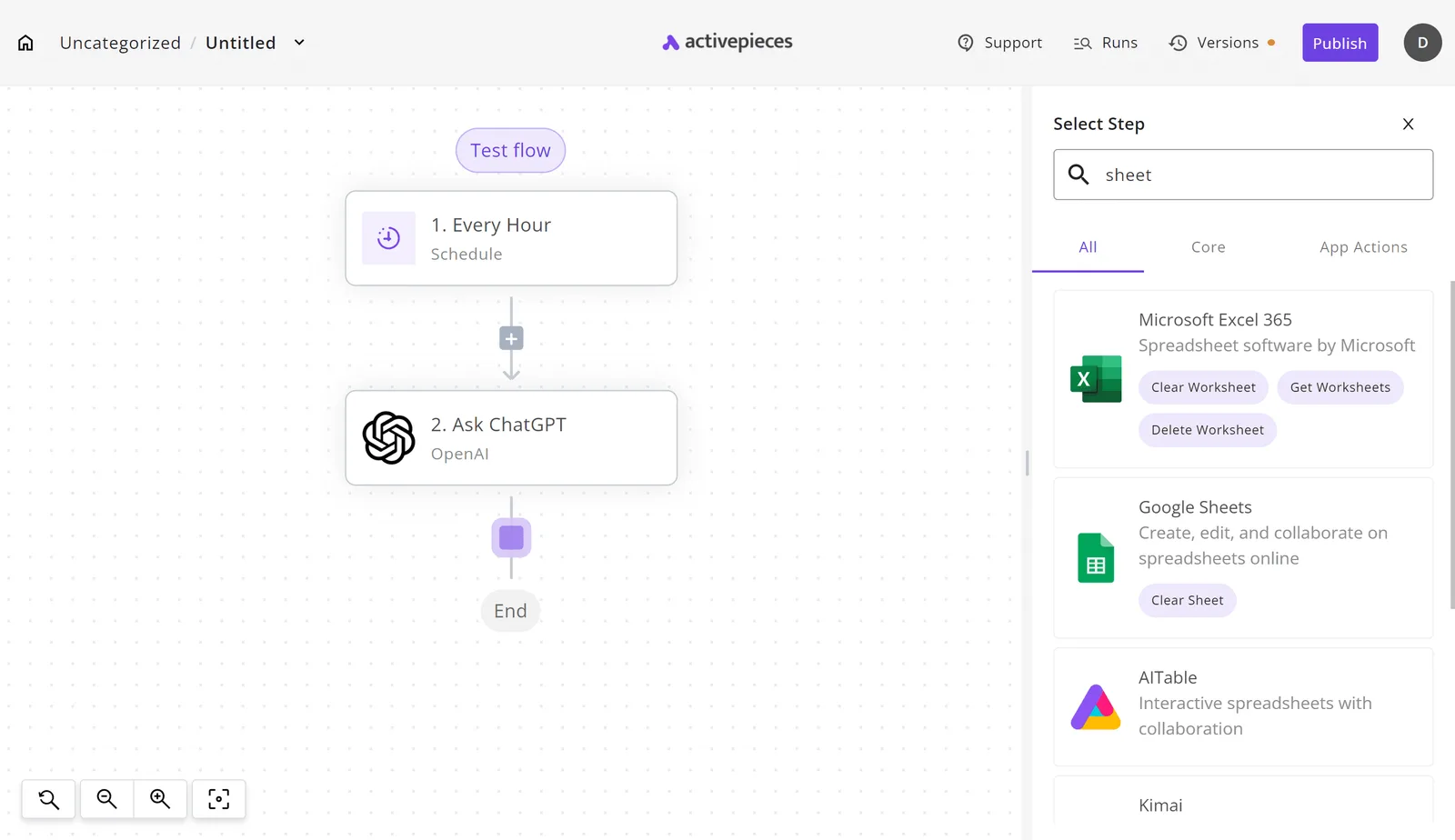
Take from it that the Microsoft connector is one pick in a shared catalogue, not a special case.
Before you publish a flow, check what that account can reach, because each connection still carries its own sign-in.
Stay with Power Automate when your flows live inside Microsoft 365 and your tenant policies already govern connectors, since a second platform adds a second place to audit access.
Activepieces earns its place when a flow crosses into non-Microsoft apps, or when you want to self-host. Otherwise you've moved the mess to another tool rather than removed it.
## Frequently asked questions
Is there an official Microsoft Office MCP server? No single server carries that name.
Microsoft publishes several separate MCP servers for different products, and each has its own scope, authentication and licensing, so "the official one" depends on which data you need. Check the vendor's own documentation for the product you are actually connecting, not the label.
### Does Microsoft Office MCP work with ChatGPT or Claude?
Yes, where the server speaks the MCP standard and the assistant can act as an MCP client. ChatGPT and Claude both can, but support varies by plan and by whether the connection is remote or local.
That means a server working in one assistant tells you little about the other, so test the exact pairing before you build a workflow on it.
Is Microsoft Office MCP free? There's no one price, because there's no one product.
A server may be free to run while the data behind it still requires a Microsoft 365 licence. A third-party server may charge for hosting or per call.
Add up the licence, the hosting and the assistant plan separately, or the budget will miss a line.
### Can MCP edit Word and Excel files directly?
Only if the specific server exposes write tools for them. Many servers are read-only or work through Microsoft Graph, which handles files and workbook content differently from a desktop app.
Before you rely on edits, confirm which operations the server lists. Then run a test against a copy, because formulas, tracked changes and formatting are where a write most often goes wrong.
Is it safe to use with company data? It's safe to the extent you scope it, and no further.
Each server inherits whatever permissions you grant it, so a broad consent hands the assistant broad access. Grant the narrowest scopes that work, prefer read-only first, and have your admin review which third-party servers are allowed. Otherwise a convenient connector becomes an unreviewed data path.
## Related reading
- [How Much Is Microsoft Office? 2026 Price Guide](https://www.activepieces.com/blog/how-much-is-microsoft-office-2026-price-guide)
- [Microsoft 365 MCP Servers: What They Are (2026 Guide)](https://www.activepieces.com/blog/microsoft-365-mcp-servers-what-they-are-2026-guide)
- [Best MCP Servers: 12 Ranked Picks for 2026](https://www.activepieces.com/blog/best-mcp-servers)
## References
- [CNBC](https://www.cnbc.com/2026/04/29/microsoft-msft-q3-earnings-report-2026.html)
- [Microsoft Learn](https://learn.microsoft.com/en-us/connectors/excelonline/)
- [Gravity](https://gravity.fast/data/mcp-adoption-statistics/data.csv)