# n8n Audit Logs: What Each Plan Includes (2026)
By Nalani Reeves · 2026-10-26 · Source: https://www.activepieces.com/blog/n8n-audit-logs-what-each-plan-includes-2026
---
**No single n8n feature delivers an audit log**, meaning a record of who did what. The Security Audit report, execution history and log streaming each record something different, and only one comes close to answering that question.
An n8n audit log is a record of who did what in an n8n instance, such as who created, changed, ran or deleted workflows and credentials, and in n8n it has to be assembled from separate features rather than switched on in one place.
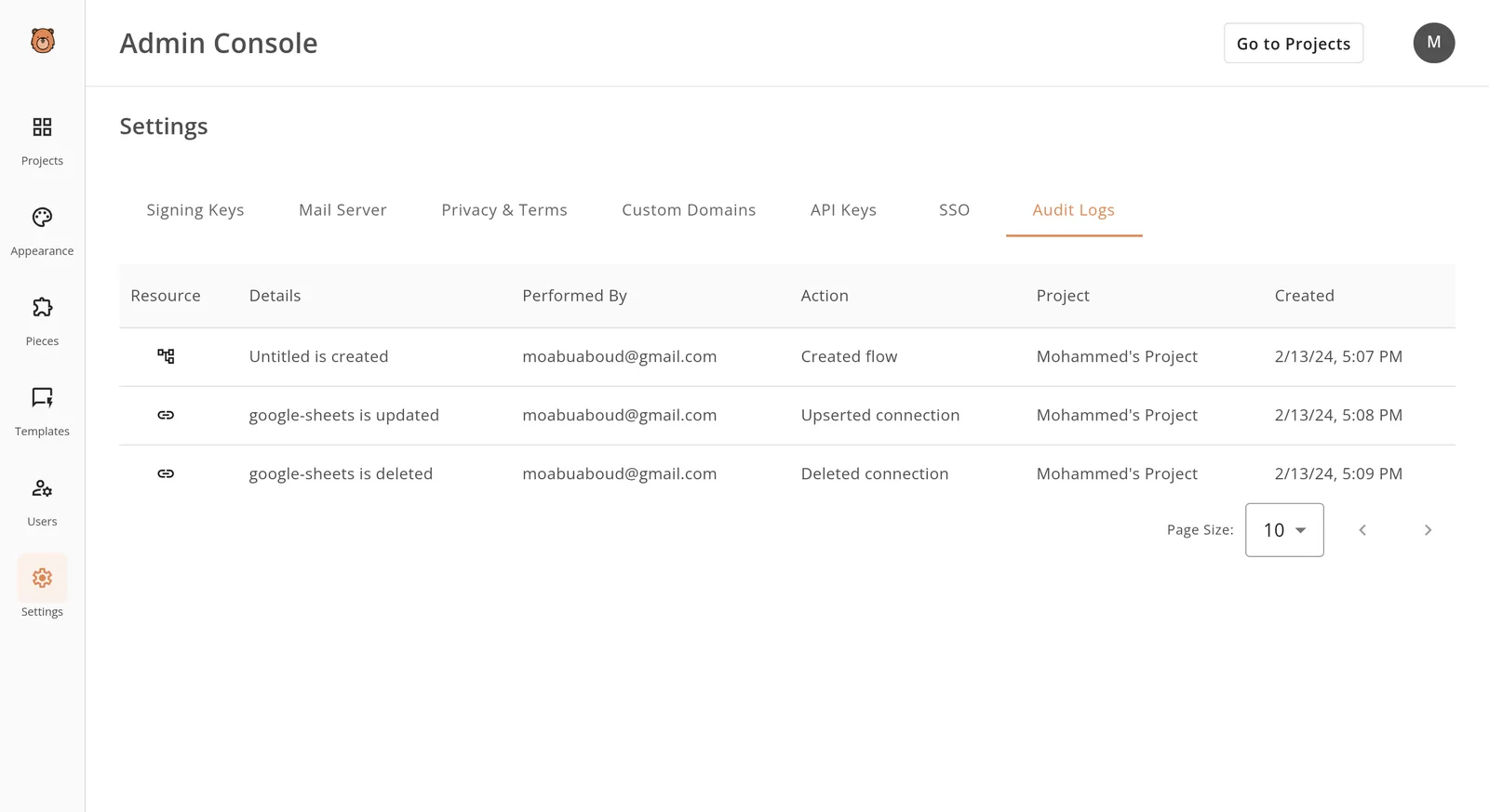
Under GDPR Article 5(2) you must be able to demonstrate accountability, and Article 32 expects you to test your security measures. An auditor reads that as "show me the person, the action and the time."
This article reflects n8n's documentation as of 26 October 2026; the audit figures come from n8n's security audit documentation. Anyone weighing alternatives, [Activepieces](https://www.activepieces.com) included, should ask the same question of each tool.
Read the table as a warning against treating "n8n has audit logging" as one claim: **the three features record different objects**, and only log streaming is built around user and system events, meaning that simply having "audit logging" tells you nothing about which of the three features you'd get.

## n8n audit log coverage and boundaries
| Feature | What it records | Where you find it in n8n | Answers "who did what"? |
|---|---|---|---|
| Security Audit report | Risky settings across your instance | CLI command or API call | No |
| Execution history | Each workflow run, with its input and output data | Executions view | Partly: it shows what ran, not who changed things |
| Log streaming | Event logs sent to an external destination | Log streaming settings | Closest of the three |
### The Security Audit report
Think of it as a settings scan, not a log. It runs **13 checks across five risk reports**: Credentials, Database, Nodes and Instance each run 3, and File system runs 1.


So the report tells you whether your configuration is risky, such as unused credentials or risky nodes, but 13 checks of settings can never tell you which person did anything. It's useful evidence for Article 32 testing and useless as a record of activity.
### Execution history is not an audit trail
When you need to know what a workflow processed, execution history has it. It shows that a run happened and what data passed through it, which is valuable for debugging.
It doesn't tell you who edited the workflow beforehand, who changed a credential or who invited a user.
Keep it longer to "have a trail" and you widen your retention exposure, because execution history is also data about your data subjects.
Outside the instance itself is where a real who-did-what trail can live, and log streaming is how n8n's event logs get there, sent to a destination you control.
## n8n audit logging and plan pricing
**If you want log streaming, the integration that ships events to your own log store, you need Enterprise.** The cheaper plans leave you with a security report and execution history rather than a trail you control.
That matters because GDPR Article 5(2) makes you responsible for demonstrating compliance, not just claiming it.
Take from the table which row stops you at which requirement; it shows where each capability lands as of 26 October 2026.
| Plan | Log streaming | Security Audit | Execution retention | Published price |
|---|---|---|---|---|
| Community (self-hosted) | No | Yes, run by you | Whatever you configure | Free licence, you pay for hosting |
| Cloud Starter | No | Yes | Limited by plan | 20-24 EUR per month |
| Cloud Pro | No | Yes | Longer, still plan-limited | 50-60 EUR per month |
| Enterprise | Yes | Yes | Negotiated | Ask sales |
Read the table by column, not by price: moving from Starter to Pro buys retention headroom, not a streamed trail.
Look at the Starter and Pro rows: both leave log streaming empty, and their price ranges are the only figures you can budget from.
The monthly cost of either plan therefore buys you no compliance trail on its own, so a team that treats 50-60 EUR as "audit-ready" is buying history, not evidence.
### Self-hosted versus Cloud differences
On Community you decide how long execution data lives, so retention is your design choice and your liability. On Cloud, the vendor sets the window by plan, which means an auditor asking for older records may find they're already gone.
Where the data sits differs too: self-hosting lets you pin data to a chosen jurisdiction, while Cloud places that decision with the vendor's regions.
Because **Enterprise has no published price** and several details aren't on the page, you have to ask sales for these:
- the retention period and whether it's adjustable
- which destinations log streaming supports
- which event types it streams
- where it stores the logs and execution data
- whether a data processing agreement covers that location
Those answers decide whether Enterprise fits your Article 30 records.
## Setting up n8n log streaming and audits
You get there in four stages: run the security audit, add a streaming destination, choose which event groups to send, and confirm the events land somewhere you control. Only the last two produce a trail you can show an auditor.
### Stage 1: Run the Security Audit and read the report
Run the audit from the n8n command line or its API. It returns a report grouped into risk categories: credentials, database, filesystem, instance and nodes.
Read the report as a point-in-time configuration review, so it tells you what's risky today, not who did what last Tuesday. Keep the output as evidence of your settings, but don't file it as your activity log.
### Stage 2: Add a log streaming destination
Open the log streaming settings, which sit behind the Enterprise plan, and add a destination. n8n supports a webhook, a syslog server and Sentry. For an Article 30 record, choose one in the region your data-residency commitments name.
If a US-hosted collector receives EU user identifiers, that is a transfer you now have to justify, however convenient the endpoint is.
### Choosing n8n log streaming event groups and testing
Pick carefully, because the groups are uneven. According to the [n8n docs mirror](https://n8n-docs.teamlab.info/log-streaming/), audit events account for 19 event types, workflows for 3 and nodes for 2.
So the audit group carries most of your accountability data, such as user and credential changes, while workflow and node events are mostly operational.

Leaving audit events unticked gives you a log that's almost silent on administrative actions. Subscribe to audit events first, then add workflow events if you need run-level evidence.
Then trigger something harmless, such as saving a workflow or logging in, to generate a real event.
### Confirming n8n audit events arrive and are retained
Check the destination, not n8n, for the event. Match the timestamp, event name and user identifier against what you just did.
Then check retention at the receiving end, because n8n streams events out and doesn't keep them for you.
If your collector rotates logs after 30 days and your policy requires a year, you have a gap that no n8n setting will close. Write the retention period into your records alongside the destination's location.
## Common n8n audit trail mistakes
When an audit trail fails, it is usually one of five mistakes, each traceable to a documented default rather than a fault in n8n. The list pairs each mistake with the setting behind it, so you can check your own instance against it.
- Execution history mistaken for an audit log: it records workflow runs, not who changed a credential or a user role.
- Default pruning left in place: 336 hours, so n8n deletes runs older than 14 days.
- An unmonitored destination: you configured log streaming, but no one reads or alerts on what arrives.
- A shared owner account: every action is attributed to one identity.
- An unchecked plan: the retention cap and streaming access are assumed, not confirmed against the plan.

Within days, a busy workflow can push out its own history, because pruning deletes stored executions by age and by count. According to [NordFlux](https://nordflux.de/en/guides/execution-history-retention-by-n8n-plan-7-days-to-unlimited), Starter keeps 2,500 executions.
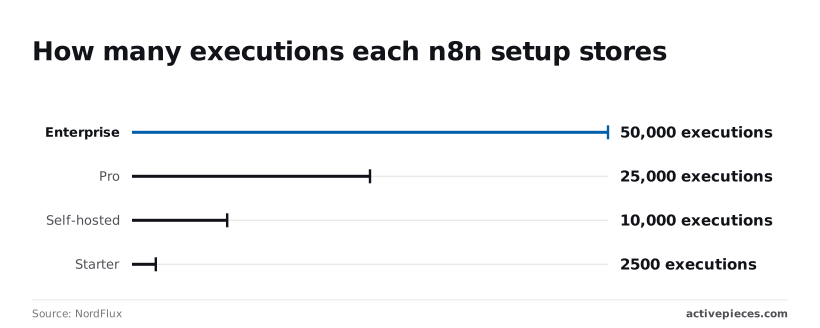
On a self-hosted instance the default is 10,000, which gives a team running a few hundred executions daily a few weeks, not the year many internal policies assume.
Pro holds 25,000 and Enterprise 50,000, which is more room but still a count, not a retention period.
Under GDPR Article 5(2) you must be able to demonstrate compliance, and a deleted record can't do that.
If three administrators use one owner account, the log shows an owner changing a workflow and nothing more. **Shared logins make the log meaningless**.
That fails the attribution an auditor expects under Article 32, because you can't say which person accessed personal data. Give each person a named account and remove the shared credential.
Nobody reads the stream, and that is the other common failure. Log streaming moves events to a destination you control, which only helps if something reads them.
A destination without alerts or a named reviewer is a second place for events to go unread. Assign an owner, set an alert on failed or unusual events, and test that a deliberate change appears at the destination.
## Using audit events in other tools, including Activepieces
Send n8n's streamed audit events by webhook into Activepieces, a workflow automation platform with an MIT-licensed core and 744 integrations, and each one can be routed to a ticket, a Slack alert or a SIEM, which means you're not locked into any single destination for audit data.

That makes the stream something people act on.
Under GDPR Article 5(2) and Article 32, it's not enough to hold logs; you have to show that someone reviews them and responds. A stream that lands in a storage bucket nobody opens proves retention and nothing else.
Downstream is where Activepieces closes that gap. It doesn't generate audit data and it doesn't replace n8n's own logging. It sits downstream and decides what happens to an event after n8n emits it, and MoneyGram, Moneypenny, Alan and FundingSocieties run it in production.
A stream that lands in a storage bucket nobody opens proves retention and nothing else.
### Routing streamed events to alerts
This is the path. An n8n instance sends streamed events by webhook into an Activepieces flow, which fans out to three destinations, a ticket, a Slack alert and a SIEM (the security information and event management system where your analysts correlate logs).
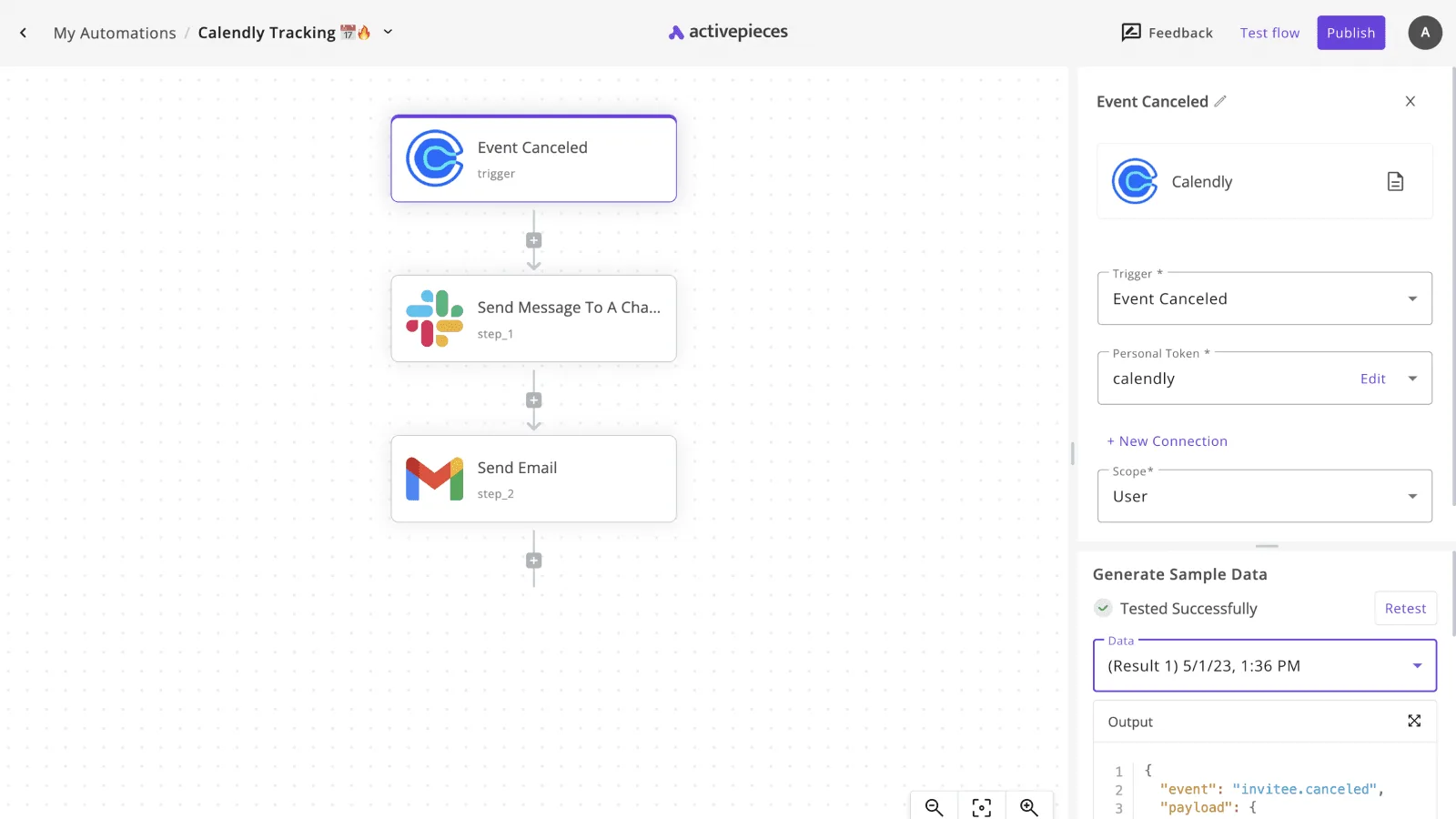
The fan-out is one flow, and a run costs 1 credit however many steps it has.
Take from this flow that one inbound event can feed three audiences at once, so the SIEM keeps the full record while humans only see what needs a decision.
### Routing n8n audit events to the right teams
Who sees what is decided in the flow. A failed login or a changed credential can open a ticket and post to Slack, while **routine workflow activity goes to the SIEM alone**.
That split matters for compliance because an alert channel flooded with routine events trains people to mute it, and a muted channel isn't a control an auditor will accept.
### Personal data and hosting for n8n audit events
Before they reach the SIEM, your events pass through Activepieces, so the flow becomes a processor of whatever personal data the events contain, such as user emails or IP addresses.
That is why the data processing agreement and the sub-processor list, both sent on request, belong in the same Article 30 record as your n8n destination.
On Activepieces' hosted service the EU cloud runs in Frankfurt. If your data must stay in one region, the MIT-licensed core can be self-hosted in that region, or run fully air-gapped on your own servers, which keeps the events inside infrastructure you already document.
### n8n audit logging alternatives and next steps
Check each platform's current documentation for streaming and self-hosting terms before you commit, because both products change their plan boundaries.
If you prefer another automation platform, it can play the same role: the stream leaves n8n, and something else owns routing and escalation.
What to do on Monday:
1. Write down which of the three things you rely on today: the security audit report, execution data, or log streaming. Do not treat them as one.
2. Confirm in n8n's documentation whether your plan includes log streaming. If it does not, no downstream tool can fix that.
3. Decide which event types need a human and which only need storage, and write that list before you build any flow.
4. Build the webhook flow in a test environment and send a deliberate failed login through it, confirming the ticket, the Slack alert and the SIEM entry all appear.
5. Record the processing location and the agreement covering the routing tool in your register of processing activities.
## Frequently asked questions
Is n8n audit logging free on self-hosted? Partly: the security audit report and execution data come with a self-hosted install, but log streaming is a licensed feature.
Running the software costs nothing, yet the streaming of audit events to an external destination sits behind a paid license.
A self-hosted Community team therefore has a risk report and execution history, not a tamper-resistant trail held outside n8n.
### How long does n8n keep audit data?
It keeps execution data for as long as your pruning settings allow, and nothing in n8n sets that period to match a regulation. Self-hosters control pruning through configuration, so retention is whatever you chose, or whatever the defaults left you with.
Generated on demand, the security audit report isn't an archive. Anything you must prove later has to be stored somewhere you control.
Regulatory retention is where teams get caught, so settle these before relying on n8n:
- Whether your PCI DSS and HIPAA retention periods are longer than your execution pruning window, and what holds the records after pruning.
- Whether Community can stream logs at all, which should be confirmed against the current license terms, not assumed.
- What to ask sales: which audit events are streamed, whether the stream covers cloud and self-hosted equally, and what the plan guarantees about retention.
### Can I export n8n logs to Splunk or Datadog?
Yes, on a plan that includes log streaming, which sends events to a destination such as a syslog server, a webhook or a logging platform. Splunk and Datadog, both log-aggregation and monitoring services, can receive those events if you route them through a supported destination.
Without the feature you are left scraping execution data yourself, which isn't an audit stream.
### Does n8n log who edited a workflow?
Not reliably on every plan, because version history and audit events are separate features. For earlier versions of a workflow, look to workflow history.
Who changed what and when is answered by the audit event stream, which is the licensed integration. If an auditor asks for a named user behind each change, confirm which of the two you actually have before you answer.
## Related reading
- [Activepieces Audit Logs: Plans, Features and Retention](https://www.activepieces.com/blog/activepieces-audit-logs-plans-features-and-retention)
- [FedRAMP Audit Success: Workflow Automation for Compliance](https://www.activepieces.com/blog/fedramp-audit-success-workflow-automation-for-compliance)
- [What Auditors Check When Reviewing AI Action Logs](https://www.activepieces.com/blog/what-auditors-check-when-reviewing-ai-action-logs)
## References
- [NordFlux](https://nordflux.de/en/guides/execution-history-retention-by-n8n-plan-7-days-to-unlimited)
- [n8n docs mirror](https://n8n-docs.teamlab.info/log-streaming/)
- [n8n Docs](https://docs.n8n.io/deploy/host-n8n/configure-n8n/security/run-security-audits)