# n8n Tutorial for Beginners 2026 (Your First Workflow)
By Halvor Kristiansen · 2026-10-16 · Source: https://www.activepieces.com/blog/n8n-tutorial-for-beginners-2026-your-first-workflow
---
n8n is a node-based automation platform: you connect apps by wiring boxes on a canvas. In about 30 minutes you'll turn one incoming web request into a spreadsheet row and a Slack message.
## Create your first n8n workflow
### What n8n is and where teams use it
Each node does one job, such as receiving a request, writing a row or posting a message, and data passes from node to node as JSON. Teams use it for lead routing, alerting, report delivery and syncing records between systems that have no native integration.
[Activepieces](https://www.activepieces.com) covers the same ground as an open-source alternative, with an MIT-licensed core and 741 integrations counted from its repository.
Because adoption is so large, the tutorials and community answers are plentiful. According to [GitStarClub](https://gitstarclub.com/n8n-io/n8n), the repository reached 10,000 GitHub stars in October 2020, 40,000 by November 2024 and **50,000 by June 2025**.
That's 10,000 stars in roughly seven months of 2025.
Those two readings don't reconcile with each other, so rely on the order of magnitude, tens of thousands, and not on either exact number.
Stars measure interest, not production use, but a project this widely starred is unlikely to leave your question unanswered.
### What your finished n8n workflow contains
The finished workflow contains three nodes.
- A Webhook trigger that receives a POST request
- A Google Sheets node that appends a row
- A Slack node that sends a message
- A check date of 16 October 2026, with the sources named above
Build the three nodes and the build is done; each is one node. The fourth matters because n8n's pricing, limits and license terms change, so I dated every claim in this article.
Nodes run in the order you place them. n8n counts pricing per workflow run, which is why the decisions in the later sections come before the build.
Confirm these four constraints before you open the editor:
1. An n8n instance, either a cloud account or a self-hosted install you can reach in a browser. Later sections cover the choice, and either works for this build.
2. A Google account with one spreadsheet whose first row holds your column headings.
3. A Slack workspace where you can authorize an app and post to one channel.
4. A way to send a POST request, such as `curl` from a terminal, so you can test without any external service.
If step 3 needs an administrator's approval, request it now. Waiting on that approval is the most common cause of a stalled first build.
## Choose n8n Cloud or self-hosted n8n
Pick n8n Cloud if nobody on your side will own upgrades and backups; pick self-hosting if someone will, and settle the license question before you build anything. The approval you were waiting on decides which of these you may use.
### n8n Cloud vs Community Edition vs paid self-hosting
Look at the table and you see that the price you pay buys you less maintenance work, not more features. Take from it the column on upgrades and backups, because that's where the cost moves from the invoice to your calendar.
| Option | Listed price per month | Upgrades and backups | License terms |
|---|---|---|---|
| n8n Cloud Starter | 20 € | n8n | Hosted service, n8n's terms |
| n8n Cloud Pro | 50 € | n8n | Hosted service, n8n's terms |
| Self-hosted Community Edition | Your server cost only | You | Sustainable Use License |
| Paid self-hosting | Server cost plus the license fee | You | Commercial license for paid features |
According to n8n's pricing page, Cloud Starter is 20 € per month and Pro is 50 €. **Pro costs two and a half times Starter**.
The price rises with the number of executions you buy, so a workflow that polls every minute pushes you up a tier sooner than one that fires on a webhook.
On the same page, a Hetzner CX22 server is 4.51 € per month, a CX23 is 5.49 € and a CX21 is 5.83 €. Even the dearest of those is under a third of Starter.

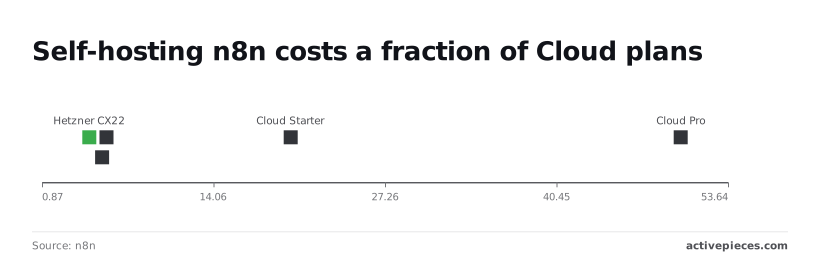
The saving is real only if you count the hours spent patching and restoring backups as free.
Start the next step from whichever row you chose.
1. Cloud: create an account and start the trial. This needs outbound internet from your browser and nothing else.
2. Self-hosted: on a machine with Docker installed, run `docker volume create n8n_data`.
3. Then run `docker run -it --rm --name n8n -p 5678:5678 -v n8n_data:/home/node/.n8n docker.n8n.io/n8nio/n8n`. The image pull needs outbound internet once; after that the container runs from the local copy.
4. Open `http://localhost:5678` and create the owner account.
Keep the `n8n_data` volume. It holds your workflows and credentials, so deleting it deletes the build.
### Check the empty n8n workflow canvas
You start with an empty workflow with a name, nothing more. Create a new workflow, rename it from "My workflow" to something you'll recognise in a list of fifty, and save it.
The check is that your screen shows the canvas with a prompt to add a first step, and the name appears in the top left.
If the name reverts after a reload, the save failed. On self-hosting, that usually means the volume wasn't mounted.
## Build and test your n8n workflow
If a workflow survives a restart, it is worth building on. Build the smallest one that crosses three systems: a webhook receives an email address, a spreadsheet records it, and a chat channel announces it.
The list below gives the order, and the one thing to take from it is that you can check each step before you add the next.
1. Add a Webhook node and set its HTTP method to POST.
2. Copy the test URL shown in the node.
3. From a terminal, send a test call with an email in the body using curl.
4. Add a Google Sheets node, choose Append row, and map the email column to `{{ $json.body.email }}`.
5. Add a Slack node, choose Send message, and pick the channel.
6. Run the workflow once and confirm one row and one message.
Stage 3 covers steps one to three; stages 4 and 5 cover the rest.
### Stage 3: Webhook trigger and a test call
Prove the Webhook node first, because it's the only step here that needs no outside account. Set the method to POST, then copy the test URL, not the production one.
The test URL only listens while the editor is waiting for a test event, so click to listen before you call it. Then send the request:
```
curl -X POST -H "Content-Type: application/json" -d '{"email":"test@example.com"}'
```
Once the call lands, the node should display the payload. The address sits under `body`, which is why the later expression reads `$json.body.email` and not `$json.email`. If the call is refused, the editor wasn't listening, and nothing downstream is at fault.
### Stage 4: Append a row to Google Sheets
This is the first step with an external dependency: a credential for Google and a spreadsheet that already exists with a header row. Without outbound access to Google, you can't test this node, so settle that constraint before blaming the expression.
Choose the Append row operation, select the document and sheet, and put `{{ $json.body.email }}` in the email column. Execute the node alone. One new row confirms the mapping, and the same node would write a blank cell if the path to `body` were wrong.
### Stage 5: Post to Slack and run the whole chain
Add the Slack node with the Send message operation, select a channel you have invited the connected app to, and write a message that can include the same expression.
Then run the workflow once from the editor and repeat the curl call. The result to expect is exactly one row in the sheet and one message in the channel.
Two of either means the call was sent twice. Zero of either means the editor wasn't listening, so the next question is what the production URL does differently.
## Activate and monitor your workflow
From the moment you publish, the production webhook URL is live, and each triggered run counts as one execution, however many nodes it passes through. The constraint is that only the production URL fires without the editor open.
1. Save the workflow, then publish it (older versions call this the Active toggle).
2. Open the Webhook node and select the Production URL tab. The path contains `/webhook/`, where the test URL contains `/webhook-test/`.
3. Replace the test URL in the calling system with the production one.
4. Trigger it once from outside and confirm the run in the Executions list.
If you skip step 3, the caller keeps hitting a URL that only answers while the editor is listening, and n8n records nothing.
### How n8n workflow executions are counted and limited
A ten-node workflow that runs once is **one execution, not ten**. One execution is one complete run of the workflow from trigger to last node. Your cost therefore follows how often the trigger fires, not how large the workflow is.
Set to every minute, a schedule trigger produces **1,440 executions a day** whether the workflow has two nodes or twenty, so optimizing the workflow doesn't reduce the daily execution count.
Check the current cloud plan allowance against that arithmetic before you choose a trigger interval.
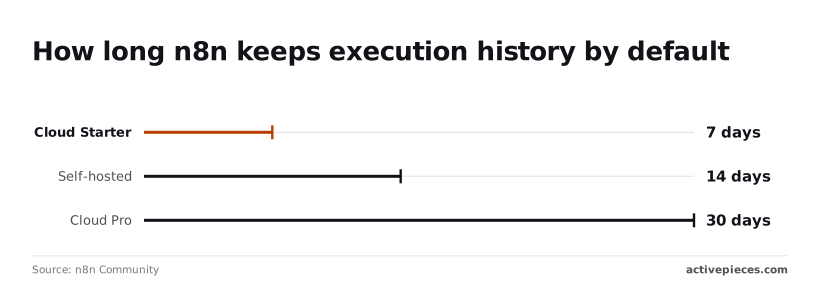
Separately, there is a limit on history. According to an n8n Community thread on viewing past logs, Cloud Starter keeps execution history for 7 days, self-hosted keeps it for 14 days by default, and Cloud Pro keeps it for 30 days. In practice:
- On Starter, a failure from a week ago has already been deleted, so a Monday audit cannot inspect the previous Monday's run.
- On self-hosted, you have two weeks by default, and the pruning settings are yours to change if you accept the disk cost.
- On Pro, you can look back about a month, enough to cover a monthly reporting cycle.
If anyone will ask what a run did after the window closes, write that record somewhere you control as part of the workflow.
### Add an error workflow
Nobody is notified by default when a production run fails.
The failure sits in the Executions list until someone looks, and on Starter that list expires in 7 days, by which point any undiscovered failure is irretrievably lost, so **you could be running broken code without knowing** for a full week.

1. Create a new workflow whose first node is the Error Trigger.
2. Add one action after it, such as an email or chat message that includes the workflow name and the execution URL.
3. Save and publish it.
4. Open the production workflow, go to Settings, and select the new workflow under Error Workflow.
On manual runs from the editor the Error Trigger stays silent; it fires only on failed automatic runs. To test it, make a published workflow fail on purpose and wait for the alert.
## Mistakes first-time n8n builders make
When a first week goes wrong, six mistakes account for most of it.
Each traces to one decision made early: which URL you gave out, whether you switched the workflow on, where the instance lives, who can call it, who maintains it, and which license you read.
Run the list below as a checklist before a workflow goes live; each mistake is paired with its cause, and the subsections after it cover the three that need more than a line.
- Test URL in production: the webhook node shows two addresses, and the one copied during building is the test address, which only listens while the editor is waiting for an event.
- Inactive workflow: the workflow was saved but never published, so triggers never fire and nothing appears in the execution list.
- OAuth redirect wrong when self-hosted: the redirect address registered with the app provider doesn't match the public address of your instance, usually because the instance doesn't know its own external URL.
- Unauthenticated webhook: the address was treated as secret, but anyone who obtains it can call it, and no credential was attached to the node.
- No upkeep plan: nobody was assigned to updates, backups or certificate renewal, so the instance drifts until something breaks.
- Sustainable Use License misread: the source being visible was taken to mean the terms are the same as open source licenses, which they aren't.
Once you have walked the list, the three explanations below give the reasoning.
### n8n webhook test URL vs production URL
Use the production webhook address in every external system, because the test address works only while the editor is listening. After you close the editor, a sender that posts to the test address receives an error, and you'll see no execution on your side.
To fix it, publish the workflow, copy the production address, and replace the test one wherever you pasted it. Then add authentication to the node, since a production address that accepts anything is open to anyone who finds it.
Before you install, write the duties down, because self-hosting moves every operational duty to you. State the constraints first: who owns the server, whether it reaches the internet, and how long a restart may take. Then:
1. Set the instance's external address so OAuth redirects and webhook addresses are generated correctly.
2. Put the instance behind HTTPS and renew the certificate.
3. Back up the database and the encryption key, and test a restore on a spare machine.
4. Schedule version updates and read the release notes first.
Skip step 3 and a lost key makes stored credentials unreadable, so the backup is not complete without it.
### Understand the n8n Sustainable Use License
Under the Sustainable Use License you may use n8n for your own internal business purposes, but selling or hosting n8n itself as a service to others is limited. Visible source code doesn't make it an open source license.
If your plan involves client deployments or embedding n8n in a product, read the current license text and confirm the terms with n8n directly. Terms can change, so check them again at each renewal or major upgrade.
Visible source code doesn't make it an open source license.
Fixing these six puts the first workflow on solid ground; what remains is scale, where the pricing and execution questions matter.
## Run the same workflow in Activepieces if n8n's limits get in the way
### Rebuilding the job for better pricing
If the scale and pricing questions are your constraint, you can rebuild the same webhook, Google Sheets and Slack job in Activepieces. It's an open-source automation tool with an MIT-licensed core, a free cloud plan that needs no card, and self-hosting.
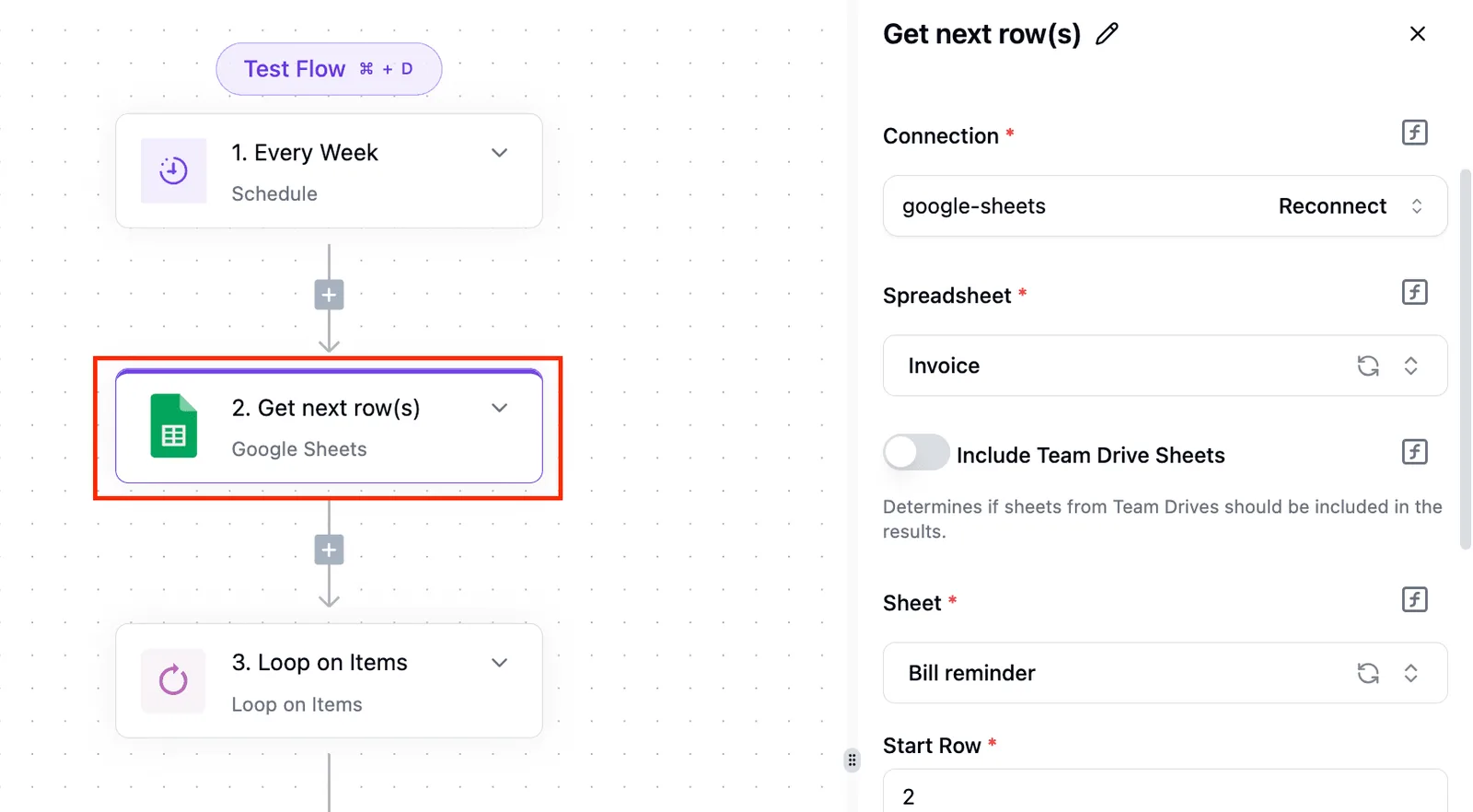
It doesn't import n8n workflows. You rebuild each one by hand, so **the cost of switching is your build time**, and it's smallest while you have one workflow.
### How the two tools compare
Below, two sentences set the tools side by side on the points that decide the first ten minutes. The takeaway is that the license and the sign-up terms differ, while the work of moving is the same either way.
n8n uses the Sustainable Use License, offers a time-limited trial that needs no card, and can be self-hosted under that license, with nodes maintained by n8n.
Activepieces has an MIT core, a free cloud plan with no card, self-hosting, and integrations listed at activepieces.com/integrations; in both directions, workflows are rebuilt, not imported.
If you self-host or embed the tool in something you sell, the license difference matters most. MIT and the Sustainable Use License set different limits on what you may do. Read the license text before you commit, not after.
### Rebuild steps and checking the result
To count as done, the workflow must behave as it did on n8n, with the same trigger, the same row appended, and the same message sent.
1. Create a flow and choose the [Webhook](https://www.activepieces.com/pieces/webhook) integration as the trigger. Copy the URL it gives you and send a test request so the payload shape is captured.
2. Add the [Google Sheets](https://www.activepieces.com/pieces/google-sheets) integration, connect your account, and map the payload fields to the columns of the sheet.
3. Add the [Slack](https://www.activepieces.com/pieces/slack) integration, connect the workspace, and build the message from the same mapped fields.
4. Publish the flow, repoint whatever calls the old webhook at the new URL, and keep the n8n version running until a real event has passed through both.
Step 4 is the one people skip. Running both until one live event succeeds gives you a rollback path.
### When staying on n8n is the right call
Stay if your workflow already runs and you have no limit pressing on it. A rebuild buys nothing there.
Stay too if you depend on a node that has no matching integration; check the integrations directory for each app before you start.
If you do want to test the move, [sign up for Activepieces](https://cloud.activepieces.com/sign-up) and rebuild the three steps above; flows are unlimited on every plan, including free, so the test costs you build time and nothing else.
Where a flow runs should never decide whether you can leave, and here it doesn't: cloud and self-hosted share one codebase, and Git Sync and Releases, a documented feature, carries a flow from the free plan to your own Docker, Compose or Kubernetes install, with RBAC, SSO, SCIM and audit logs on both.
MoneyGram, Moneypenny, Alan and FundingSocieties run Activepieces in production.
## Related reading
- [Zapier ChatGPT Integration Tutorial for Beginners](https://www.activepieces.com/blog/how-to-use-zapier-with-chatgpt-examples-included)
- [Why Your First Monday.com MCP Server Will Crash](https://www.activepieces.com/blog/why-your-first-monday-com-mcp-server-will-crash)
- [Building Your First Wix Chat Automation Without a Loop](https://www.activepieces.com/blog/building-your-first-wix-chat-automation-without-creating)
## References
- [GitStarClub](https://gitstarclub.com/n8n-io/n8n)
- [n8n Community](https://community.n8n.io/t/see-logs-for-past-one-months/214854)
- [n8n](https://n8n.io/pricing/)