# Nano Banana API Pricing: Cost Per Image in 2026
By Femi Adegoke · 2026-10-15 · Source: https://www.activepieces.com/blog/nano-banana-api-pricing-cost-per-image-in-2026
---
**Between $0.0336 and $0.24 per generated image**: that is what Nano Banana costs, depending on the tier and the resolution you request, meaning premium choices can cost seven times what budget choices do. The tier you pick moves the bill about seven-fold before any retries.
## Nano Banana API pricing table, checked October 2026
### What Nano Banana is and which page is the source
[Activepieces](https://www.activepieces.com) has 741 integrations in its open source monorepo, but the meter is the same whether you call Nano Banana from a script or from one of its flows: one generated image, so your costs are identical regardless of invocation method.
Nano Banana is the name for Google's [Gemini](https://gemini.google/subscriptions) image generation and editing models, sold per image through the Gemini API.
Trust Google's own pricing page over anything here, because it is the authority. The figures below come from two trackers, so confirm them against Google before you commit a budget.
### Every tier in one table: price, inclusions, limits
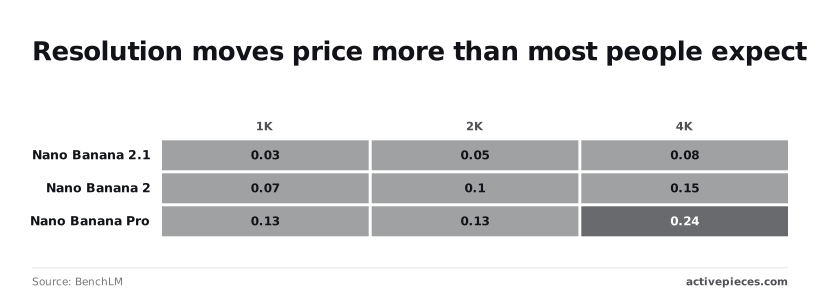
Where the sources checked publish nothing, the table says so, and the price per image is filled in only where a source gave one. Price and resolution are separate dials, and the cheap and expensive ends sit in different tiers. Prices run 1K, 2K, 4K.
| Tier | Price per image (1K / 2K / 4K) | Token price | Free tier | Batch discount | Rate limits | URL | Checked |
|---|---|---|---|---|---|---|---|
| 2.5 Flash Image | $0.039 | not published | not published | not published | not published | [LiteLLM](https://models.litellm.ai/models/gemini-3.1-flash-lite-image) | 2026-10-14 |
| 2 Lite | $0.0336 | not published | not published | not published | not published | [LiteLLM](https://models.litellm.ai/models/gemini-3.1-flash-lite-image) | 2026-10-14 |
| 2 | $0.067 / $0.101 / $0.151 | not published | not published | not published | not published | [BenchLM](https://benchlm.ai/media-pricing/nano-banana) | 2026-10-14 |
| 2.1 | $0.0336 / $0.0504 / $0.0756 | not published | not published | not published | not published | [BenchLM](https://benchlm.ai/media-pricing/nano-banana) | 2026-10-14 |
| Pro | $0.134 / $0.134 / $0.24 | not published | not published | not published | not published | [BenchLM](https://benchlm.ai/media-pricing/nano-banana) | 2026-10-14 |
_Prices and plan limits checked against [docs.claude.com](https://docs.claude.com/en/docs/about-claude/models/overview) and [claude.com](https://claude.com/pricing) and [openai.com](https://openai.com/chatgpt/pricing) and [gemini.google](https://gemini.google/subscriptions) on October 14, 2026._
For the entry-level prices, go to [LiteLLM's listing](https://models.litellm.ai/models/gemini-3.1-flash-lite-image). Pro is $0.134, Nano Banana 2 is $0.067, 2.5 Flash Image is $0.039 and 2 Lite is $0.0336, which means the most expensive model costs four times what the cheapest model costs.
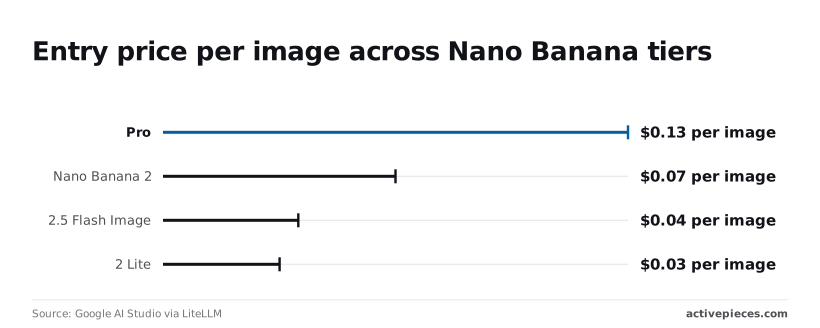
Pro therefore costs about four times what 2 Lite does for the same single image.
With no published batch discount or rate limit, you can't assume either when you model volume. The empty columns matter just as much as the filled ones.
### How the per-image price derives from tokens
According to [BenchLM](https://benchlm.ai/media-pricing/nano-banana), image output is metered in tokens, and the per-image figure is that token cost converted to a flat price at each resolution size.
Nano Banana 2 rises from $0.067 to $0.151 across its three sizes, a 2.25x jump. Nano Banana 2.1 climbs from $0.0336 to $0.0756, the same ratio, meaning the upgrade preserves 2.0's cost-scaling relationship.
Ask for the largest size by default and your cost can more than double on 2 and 2.1, whereas on Pro the middle size costs nothing extra over the smallest. Pro holds at $0.134 for the first two sizes and then reaches $0.24, about 1.8x.

## Cost at realistic monthly image volumes
At a fixed 1K size, monthly cost is finished images times your tier's per-image rate, divided by the share of generations you keep, so **rejects raise the bill in proportion**.
[Aifreeapi](https://www.aifreeapi.com/en/posts/nano-banana-pro-pricing)'s table below shows that arithmetic at three volumes, with S as the standard rate and B as the batch rate for your tier at 1K.
Treat the retry rate r as an assumption, not a measured figure. Replace it with your own rejection rate from a week of real use.
| Finished images a month | Standard | Batch | Standard with assumed retry rate r | Batch with assumed retry rate r |
|---|---|---|---|---|
| 100 | 100 × S | 100 × B | 100 × S ÷ (1 − r) | 100 × B ÷ (1 − r) |
| 1,000 | 1,000 × S | 1,000 × B | 1,000 × S ÷ (1 − r) | 1,000 × B ÷ (1 − r) |
| 10,000 | 10,000 × S | 10,000 × B | 10,000 × S ÷ (1 − r) | 10,000 × B ÷ (1 − r) |
Because every row scales the same way, the retry column matters more than the row. The divisor (1 − r) multiplies the cost at every volume, and a batch discount is cut by exactly the same factor.
### 1,000 images a month
At this volume the gap between the first and third columns is small enough to ignore in dollars and large enough to notice in habits. Take 1,000 kept Pro images. Generate them with no rejects and you pay for 1,000 generations.
Reject one in four and you pay for roughly a third more, because you generate until 1,000 survive.
That's why Pro's free middle size matters here: if you regenerate at a larger size to fix a flaw, you pay the retry and the size premium together.
### 10,000 images a month
At 10,000, the standard-versus-batch choice becomes the larger lever, because the rate difference is multiplied across every image. Batch only helps if your workflow can wait for results, so check that before building a budget on it.
At this scale a fixed prompt template produces a stable rejection rate you can measure, and a measured r replaces the assumption in the table.
### Cost per kept image, not per generated image
**Divide your monthly spend by the images you actually shipped, and that's your price.** It's the per-image rate divided by (1 − r), and it's the only figure that responds to prompt quality, tier choice and resolution at once.

When a cheaper tier has a high rejection rate, it can cost more per kept image than a dearer one that lands first time, so compare tiers on that number.
## Hidden costs and limits that break budgets
Before you trust the headline price, know the four charges it leaves out, because they decide what a kept image costs: output resolution, input images, quota ceilings and refused or retried requests. Each is documented by Google except where marked below.
### Resolution changes the price per image
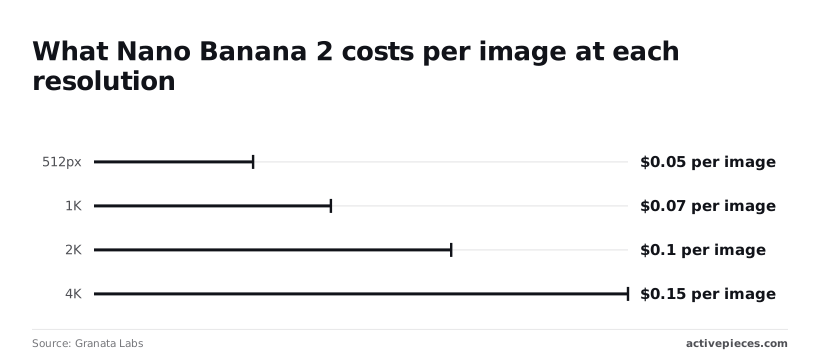
Metered per generated image, Nano Banana 2 still charges a rate that depends on output size. [Granata Labs](https://www.granatalabs.com/ai/image) lists 0.045 $ at 512px, 0.067 $ at 1K, 0.101 $ at 2K and 0.151 $ at 4K.
4K costs about 3.4 times the 512px rate, so a team that defaults to 4K for drafts pays for pixels it discards.
At 1,000 images, 1K costs $67 and 4K costs $151, so **upgrading to 4K more than doubles the cost**. That's a gap of $84. Generate at 512px or 1K while iterating and render at 2K or 4K only the image you intend to keep.

*(Chart sits here.)*
At 0.101 $, the 2K rate is 1.5 times the 1K rate, so 2K is the cheaper way to get a larger final file when 4K isn't needed.
Before generation even starts, every reference photo or edit source adds a charge, because Google bills input images as tokens.
An edit that sends three reference images costs more than a plain text prompt, and the extra is repeated on every retry. Budget the inputs per attempt, not per project.
### Rate limits and free-tier restrictions
A batch job that fits your budget can still stall on RPD.
Google sets quotas in requests per minute (RPM), tokens per minute (TPM) and requests per day (RPD), and applies them per project and tier, so check your tier's published limits before you size a run.
On the free tier, different data terms apply too: Google's documentation says unpaid-tier content may be used to improve its products. Client images should go through a paid tier. Paid tiers are also the route to higher quotas.
### Nano Banana API refused prompts and retry costs
When a safety filter refuses a prompt or an output, you still pay a retry's worth of time and tokens for inputs. Because a retry bills at the same resolution, a 4K retry costs 0.151 $ each time it repeats.
Don't expect refusals to be predictable: community reports, which aren't documentation, say they are inconsistent across near-identical prompts.
Treat claims that blocked requests are free as unverified until your own billing export confirms it. Log refusals as a separate line so the kept-image cost shows what they add.
That logging is where a second meter can creep in.
Activepieces has unlimited flows on every plan, including free, so a router, a retry counter, a spend log and an alert add no flow charge; credits meter AI usage, bring-your-own-key is available from the paid tiers up, and AI caps can be set per project and per person.
The free plan gives you 1,000 credits a month with unlimited flows, and MoneyGram, Moneypenny, Alan and FundingSocieties run it in production.
## Nano Banana versus the closest image API alternatives
Set against Nano Banana, the closest rivals are OpenAI's GPT-Image models and Black Forest Labs' FLUX. The comparison turns on what each vendor meters, not on the sticker price, so the kept-image ledger you just built is the right yardstick.
### Price per image side by side
In the table below I list the unit each model is metered in, whether it edits, and how the bill is built.
Read them from each vendor's pricing page on the day you buy, then drop them into your own kept-image formula.
| Model | Metered unit | Editing | Billing model |
|---|---|---|---|
| Nano Banana 2 Lite | Output image tokens | Built for low-latency generation | Token-based, through Google's API |
| GPT-Image-2.5 Flare and Sunburst | Text and image tokens, varying with size and quality | Edit endpoint accepts input images | Token-based, through OpenAI's API |
| FLUX.1 schnell and FLUX.2 | Depends on the host | FLUX.2 takes reference images; schnell is generation-focused | Per image or per megapixel on hosted services, or your own GPU time if self-hosted |
OpenAI's current image models are GPT-Image-2.5 Flare (fast everyday generation) and GPT-Image-2.5 Sunburst (most capable generation and editing), so compare against those and read their rates from OpenAI's pricing page.
### Billing models: tokens versus flat per-image
A token-billed model charges for what the request contains, so a long prompt, several input images or a higher output size all raise the bill.
A flat per-image host charges the same whether the prompt is five words or fifty, which makes the budget easy to forecast but hides nothing about retries.
Either way, a failed attempt costs the same as a kept one.
If you self-host FLUX, you swap a per-image price for GPU time. The cost then depends on how busy the card is: an idle card still bills, so the math only favours hosting at steady volume.
### When a cheaper Nano Banana model is enough
Pick the cheaper model when the job is a draft, a thumbnail or a bulk variation, where you can accept a lower hit rate.
Cheap pays off only if the kept rate stays close to the dearer model's. A model that's half the price but keeps half as many images costs the same per kept image.
Don't expect price to capture quality, and don't treat published text-rendering claims as a substitute for your own prompts.
A model that's half the price but keeps half as many images costs the same per kept image.
Run a fixed batch through each candidate, count the keepers and divide spend by that count. **The cheapest per kept image wins**, and the headline price never enters the decision.
## Control image spend with an Activepieces workflow
If you generate images inside automations, Activepieces, the open-source AI automation platform, fits. It lets one flow send each request to the cheaper or pricier model tier, cap retries, log what every run cost, and alert you when spend crosses a line.

The core is MIT-licensed and sits on GitHub, where the 741 integrations behind those steps can be counted in the open source monorepo, which means you can verify the count yourself.
If you make a few images a week, skip it and check your bill by hand.
Because every control in the previous section's math (tier choice, retry count, cost of each kept image) is a decision made per request, that is the reason to automate.
Left to individual scripts or people, those decisions drift. In a flow, they sit in one visible place.
### Route each job to the right tier
Start the flow with the request: a prompt and a purpose, plus any input images. A branch step then reads the purpose and sends the job down one of two paths.
Send drafts, thumbnails and internal mockups to a cheap tier, such as Nano Banana 2 Lite. Final, customer-facing assets go to a premium one, such as Nano Banana Pro.
The metered unit differs by path, so the branch condition should be a field you control, not a guess made after the fact.
Keep the rule boring. A "purpose" field with two or three allowed values is easier to audit than a clever classifier, and every misrouted job shows up as a visible row, not a mystery on the invoice.
Read it as a map of where each cost decision lives, then notice that every box is a step you can inspect.
*(diagram)*
### Cap retries and log spend per run
Because each regeneration is billed like the first attempt, retries are where budgets quietly leak. Add a counter that increments on every failed or rejected result and stops the loop at three.
When it stops, the flow should hand the job to a person, not try again. A capped loop means the worst case for one job is known before it runs.
After each run, write a row to a spreadsheet: timestamp, tier, resolution, number of input images, attempts and whether the image was kept. Then add a threshold step that posts to your team chat when the running total passes the limit you set.
With attempts and kept status in the same row, you can divide spend by kept images, the only number that matters here.
1. List the image jobs your automations already run and label each draft or final.
2. Build the branch so drafts take the cheap tier and finals take the premium one.
3. Set the retry cap at three and route failures to a person.
4. Create the spreadsheet with the columns above and log every run.
5. Set a chat alert at a spend level you'd be unhappy to find unannounced.
6. After a week, divide logged spend by kept images and compare it with what you assumed.
## Frequently asked questions
### Is the Nano Banana API free to use?
Not reliably, and not for anything you'd call production.
Google has offered limited free access to some Gemini models through its developer tooling, but whether a given Nano Banana model is covered, and at what rate limits, changes by model and by account.
Treat free access as a way to test prompts, not as a budget line.
Once you move to paid use, every retry counts as a generated image, so the free allowance tells you nothing about your cost per kept image.
Check the current free-tier terms on Google's Gemini API pricing page before you rely on them, and note the date you checked.
### Does Nano Banana Pro cost more per image than Nano Banana?
Yes, expect the Pro tier to cost more per generated image than the base model. The more useful question is what each image costs once it's kept.
If Pro gets a usable result in one attempt where the cheaper model needs several, the per-kept-image gap can narrow or even reverse.
Run the same fifty prompts through both, log attempts and kept status, and divide spend by kept images. That comparison is yours to make, because it depends on your prompts and your standard for "good enough."
### How often does Google change Nano Banana pricing?
Often enough that a price copied into a spreadsheet will go stale.
Google has added new Nano Banana variants, including Nano Banana 2, Nano Banana 2 Lite, Nano Banana 2.1 and Nano Banana Pro, and each arrives with its own pricing. Preview models in particular can change terms when they reach general availability.
Store the price, the model name and the date you read it next to your cost log. Re-check at least whenever you switch models or see a surprise on an invoice.
### Can I set a spending cap on the Gemini API?
An alert isn't the same as a hard stop, and that's the catch with the billing controls Google has, such as budgets and alerts in its cloud billing tools.
Depending on how your project is set up, a budget may only notify you after spend has crossed a line.
If you need a firm ceiling, enforce it in your own code: count attempts per job and stop the loop when the counter hits your limit. Confirm in Google's current billing documentation what each control actually does before you depend on it.
### Is batch mode cheaper for image generation?
For some Gemini workloads, Google has offered discounted batch processing in exchange for slower, asynchronous results.
Whether it applies to a specific Nano Banana model is something to verify on the pricing page for that model. If it does apply, it suits jobs where nobody is waiting, such as catalogue backfills.
**Batch doesn't fix a high retry rate**, though. A discount on every attempt still leaves you paying for the attempts you discard, so measure cost per kept image under batch the same way you would under live calls.
## Related reading
- [Nano Banana 2.1 Launch: What's New in 2026](https://www.activepieces.com/blog/nano-banana-21-launch-whats-new-in-2026)
- [n8n Pricing 2026: Plans, Free Tier & Costs Explained](https://www.activepieces.com/blog/n8n-pricing-2026-plans-free-tier-costs-explained)
- [Supabase Pricing: Free Tier Limits, Pro Costs & Egress](https://www.activepieces.com/blog/supabase-pricing-free-tier-limits-pro-costs-egress)
## References
- [Google AI Studio via LiteLLM](https://models.litellm.ai/models/gemini-3.1-flash-lite-image)
- [Granata Labs](https://www.granatalabs.com/ai/image)
- [BenchLM](https://benchlm.ai/media-pricing/nano-banana)