| | Illustrative count or amount | Who absorbs it | How it was found | |---|---|---|---| | Orders unposted | 340 | Sales operations | Customers asking about missing confirmations | | Duplicate orders | 55 | Warehouse and customer support | Double shipments flagged at dispatch | | Reconciliation hours | 60 | Finance staff | Manual comparison of store and ledger totals | | Delayed close days | 2 | Controller | Month-end checks failing to balance | Read it by who pays: none of those four rows is an engineering cost. Every one lands on a team that learns of the failure last. Retry rejected calls without a cap or idempotency check and you create orders that did post twice. That is why the duplicates are the costly row, and why the 60 hours go mostly on sorting real orders from copies, which means your team wastes over a full workweek on this problem. ### What NetSuite charges for API use On [Oracle](https://www.oracle.com/news/announcement/q2fy22-earnings-release-2021-12-09/)'s [concurrency governance page](https://docs.oracle.com/en/cloud/saas/netsuite/ns-online-help/bridgehead_1500275603.html), as read in November 2026, the metered unit is simultaneous requests, and I found no per-request price stated. **The base tier allows 20 concurrent requests**, so a 21st call made while 20 are in flight is rejected. **SuiteCloud Plus raises that to 120**, which means a sixfold larger ceiling that's still a ceiling.  The page ties limits to tier and licences. It doesn't publish what a rejected burst costs you downstream, or a way to buy the cap away entirely, so I'm not claiming either. ### Why more NetSuite licences don't fix concurrency limits Without a cap of its own, a sync just hits a higher wall later, since more licences add finite slots and even an Ultimate account at its maximum draws capacity from those two sources. It fails the same way, with bigger batches behind it. Licences also cost money every month, whereas a limit in our own integration costs an afternoon of code. The sensible order is to enforce a cap below the account's ceiling first, then buy capacity only if the capped sync still runs too slowly. ## Why NetSuite limits concurrent requests Your calls were refused because every integration on the account draws from one shared concurrency limit, and any request over that number is rejected instead of queued. The unit metered is simultaneous requests, not calls per month. ### Concurrency limits by account tier According to [Oracle NetSuite's documentation](https://docs.oracle.com/en/cloud/saas/netsuite/ns-online-help/bridgehead_1500275603.html), checked in November 2026, the concurrent request allowance by tier is: | Tier | Concurrent requests | |---|---| | Standard | 5 to 15 | | Premium | 15 to 25 | | Enterprise and Ultimate | 20 to 30 | With ten parallel workers, a sync fails on the base Standard tier. Premium gives you headroom but not much if a second integration shares the account. Enterprise and Ultimate share the same range, so moving up a tier doesn't separate the two. 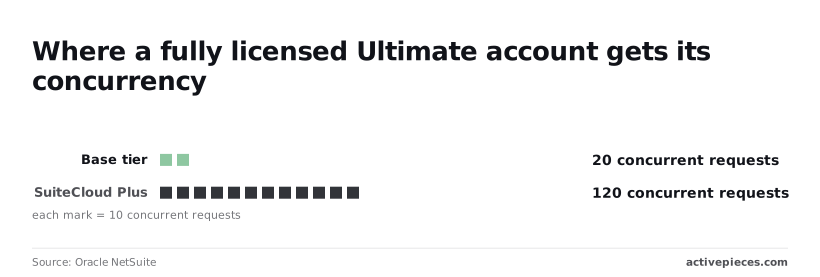 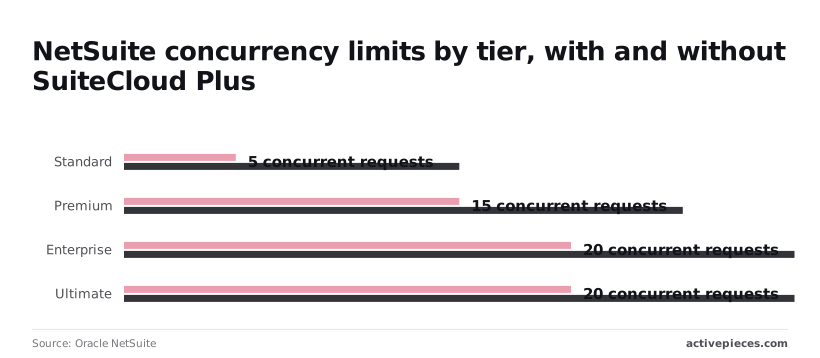 Both ends of each range appear in the chart: the low end is the base cap, and the high end is what you get with one SuiteCloud Plus licence. The chart also shows a Premium account with three licences at 45. Set your own cap below the figure, because a licence adds capacity but every tool pulling from the same account still shares it. | Error | Trigger | Status code | Handling | |---|---|---|---| | Concurrency limit | More simultaneous requests than the account allows | 429 | Back off and retry; lower your worker count | | RESTlet governance | Script exceeds its usage units | Varies; read the error body | Split the work into smaller batches | | Record lock | Two writers update the same record | Varies by endpoint | Retry after a delay, serialise writes per record | | Invalid or expired token | Bad credentials or a lapsed access token | 401 | Refresh the token once, then stop and alert | | Pagination cap | A query returns more rows than one page holds | No error; results truncate | Page through with offsets until the result is empty | Four of those five rows fail at any concurrency, so retrying them blindly wastes slots you're already short of. Only the first is a capacity problem. ### Choosing NetSuite REST, SOAP, RESTlets or SuiteQL For reads, SuiteQL over REST returns up to 1,000 rows per page, which means any extract larger than 1,000 rows requires multiple API calls. A 100,000-row extract therefore takes 100 requests, which you should run one after another, not in parallel, so attempting parallelization offers no performance benefit. For writes, a RESTlet can batch many records into a single call, which uses one concurrency slot instead of many but spends governance units per record. SOAP still works but adds nothing here, since it draws on the same shared limit. ## NetSuite concurrency caps, queues and retry rules Because SOAP and REST draw on the same shared concurrency limit, the fix had to live in our integration rather than in the choice of protocol. It now caps its own concurrency before NetSuite does. The list below is the full set of rules added after the incident, and the sections that follow explain how each one works. - Client cap below the account limit - One shared queue - Backoff with jitter and a retry ceiling - External IDs - Token expiry monitoring - Alert on the first 429 ### A concurrency cap below the account limit **Set the integration's cap below your account's concurrency limit, so other scripts and users still have headroom.** NetSuite meters simultaneous requests, so a cap of your own turns a surprise rejection into a short wait in your queue. Route every caller through one shared queue; two workers each respecting the cap on their own still add up to double it, which means decentralized rate limiting cannot prevent collective overages. ### NetSuite retry backoff that avoids retry storms Retry with exponential backoff, add random jitter, and stop after a fixed number of attempts. Without jitter, every rejected worker retries at the same instant and collides again. For the ceiling on the wait, compare the maximum delays in the [AWS, Google Cloud and Stripe SDK documentation](https://docs.aws.amazon.com/sdk-for-go/v2/developer-guide/configure-retries-timeouts.html). Stripe's SDK waits at most 8 seconds between retries, so it favors fast failure over patience. 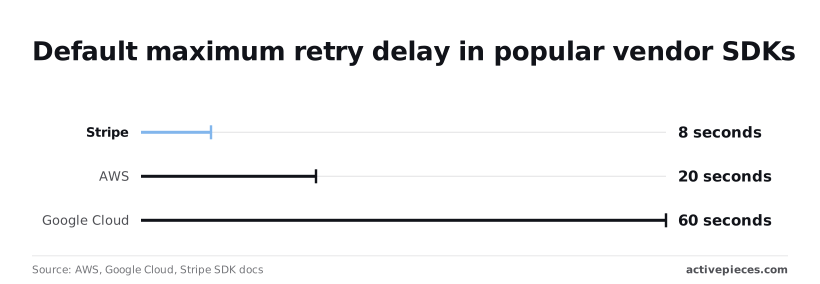 Twenty seconds is what the AWS SDK allows, which gives a congested service room to drain. Google Cloud's allows 60 seconds, a long enough pause that a batch job can sit idle for a minute per retry, which means failed batches experience minute-long stalls. For a concurrency limit that frees up as soon as in-flight calls finish, a ceiling nearer the AWS figure is a sensible starting point. Waiting a full minute usually just leaves capacity unused. When a request succeeds in NetSuite but the response is lost, the retry creates the record a second time. **Give every record an external ID** derived from the source system's own key. The retry then updates the existing record instead of duplicating it. The Monday checklist: 1. Find your account's concurrency limit and set the client cap below it. 2. Confirm every caller goes through the one shared queue. 3. Add jitter and a retry ceiling to every retry loop. 4. Check that every write carries an external ID. 5. Put token expiry dates on a calendar or monitor. 6. **Alert on the first 429, not the hundredth**. ## Activepieces for NetSuite Workflows ### Where it fits and where custom code is better Activepieces can hold the rules above in one flow: a NetSuite step with its retry and error branch sits beside an Agent step that reads a failed response, and both run on one engine rather than two products joined by a callback. 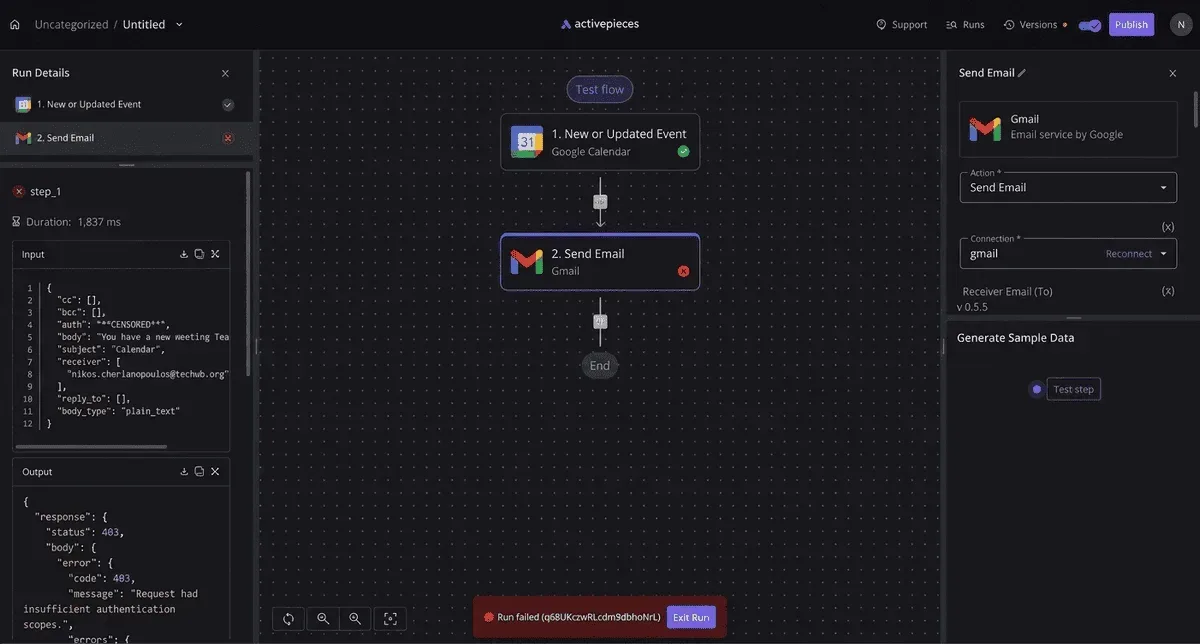 MoneyGram, Moneypenny, Alan and FundingSocieties run Activepieces in production. NetSuite's own limits still apply. The retry that updates instead of duplicating is still a design choice you make in the flow. The run trace is where you confirm it, as a single execution logged start to finish. ### Error handling on the canvas On the canvas below, a four-step flow has a middle step selected, and its configuration panel has an Add Error Handler option and a Retry on Failure toggle. Both are set per step, so you can wrap the step that calls NetSuite in them without touching the steps around it. The same panel also shows how a step reads earlier output, which is how a retried run gets the record identifier it needs to update rather than create. ### When to use workflow automation That leaves the question of fit. Activepieces earns its place when the integration is a sequence of steps with a clear failure path: a scheduled or event-driven trigger, a NetSuite action, and a branch for when the call fails. 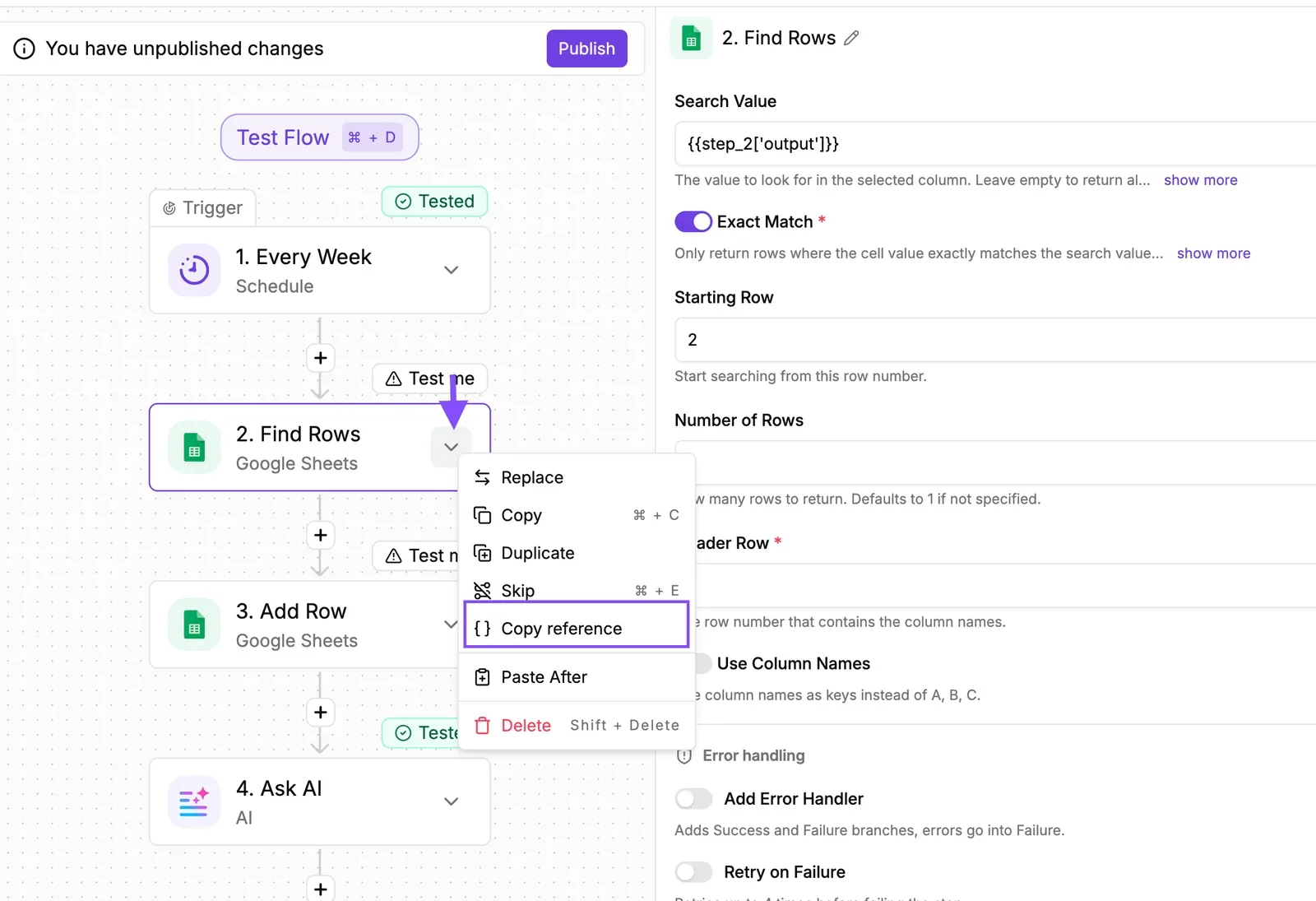 Where hand-written code costs a retry loop you then maintain, a retry setting costs one toggle. The core is MIT-licensed, so you can self-host it and the flow definitions aren't hostage to one vendor's hosted plan; the enterprise directories sit under a separate commercial licence. Before you commit, look at which unit your plan meters, whether runs or steps, and multiply by your volume, because retries add to that count. ### Where custom code is better Custom code is the better choice in three cases. First, when the cap must be shared. If several services call NetSuite under one account, a limit inside a single flow can't see the others, and you need one gate that all callers pass through. Second, when you need to react to the response itself. If you want to back off based on the exact error NetSuite returned, or spread load across time, you want that logic in code you can test. Third, when throughput is the product: at high volume, a general workflow engine adds overhead per step that a purpose-built worker doesn't. In every case NetSuite still enforces its concurrency limit for your account tier. Activepieces allows unlimited flows on every plan, including free, and that doesn't change the ceiling: each additional flow that calls NetSuite is one more caller drawing on the same allowance, so the cap has to hold across all of them. ## Frequently asked questions Recheck before you build on any of them, because NetSuite revises these pages every release. Each answer below was checked against NetSuite's help center on 2026-11-22. Is the NetSuite API free to use? There's no published per-call price, so you don't pay by the request. The cost sits in the license: your account tier sets how many requests can run at once, and a call over that cap is rejected rather than billed. Budget for the tier, not the traffic. Should I use REST or SOAP for a new integration in 2026? Use REST. SOAP is on a announced path to removal, with its last supported release and final removal both scheduled in NetSuite's release notes. Anything you build on it now has a rewrite date attached. Move existing SOAP integrations on your own schedule rather than NetSuite's. Does NetSuite still support token-based authentication? Yes, as of the check date it works for both REST and SOAP. OAuth 2.0 is the method to plan around for new work, though. Token-based setups aren't a safe long-term bet, so read the release notes each cycle for changes to either method. ### How do I find out my account's concurrency limit? Look in the integration governance area of your account's setup menu, where NetSuite shows concurrency usage for your integrations. The limit itself comes from your service tier and any add-on licenses, so your NetSuite account manager can confirm the exact allowance. Set your integration's own cap just below that number. Then NetSuite never has to reject a request for you. ### Can I test the NetSuite API in a sandbox? Yes, and you should, but a sandbox only tells you part of the story. It's a copy of production as of its last refresh, so your tests may run against stale records. Its concurrency allowance can also differ from production. Passing a load test there doesn't prove your production cap is safe, so confirm the production limit separately and test against it carefully. ## Related reading - [n8n Concurrency Limit: How to Set It (2026 Guide)](https://www.activepieces.com/blog/n8n-concurrency-limit-how-to-set-it-2026-guide) - [NetSuite QuickStart for Startups](https://www.activepieces.com/blog/netsuite-quickstart-for-startups) - [NetSuite HubSpot Integration: Unify Sales and Finance Data](https://www.activepieces.com/blog/netsuite-hubspot-integration-unify-sales-and-finance-data) ## References - [AWS, Google Cloud, Stripe SDK docs](https://docs.aws.amazon.com/sdk-for-go/v2/developer-guide/configure-retries-timeouts.html) - [Oracle NetSuite](https://docs.oracle.com/en/cloud/saas/netsuite/ns-online-help/bridgehead_1500275603.html)Skipping our own cap cost us unposted orders, duplicate orders, reconciliation hours and a late close, all absorbed by people who never saw the API.