# Notion MCP Server: Setup, Security and Rate Limits
By Emeka Vantongeren · 2026-11-16 · Source: https://www.activepieces.com/blog/notion-mcp-server-setup-security-and-rate-limits
---
Notion MCP is a server run by Notion that lets an AI assistant read and write your workspace content through a standard protocol, much as [Activepieces](https://www.activepieces.com) and other tools expose their own data to assistants.
## What Notion MCP does
**The trade-off is convenience for control**: you get fast setup, and what you permit defines the access.
### What Model Context Protocol means here
When an AI assistant needs to call outside tools, Model Context Protocol (MCP) is the shared way it does so. Notion's docs describe its server as the route by which an assistant searches, reads and edits pages and databases on your behalf.
The assistant never sees the whole workspace, only what the connection exposes.
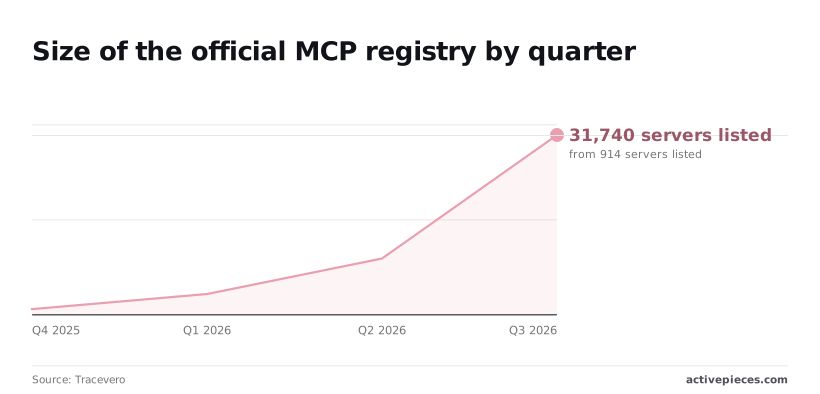
Per [Tracevero](https://tracevero.com/zeitraum/), the official MCP registry listed 914 servers in Q4 2025, then 3,597 in Q1 2026, 9,883 in Q2 and 31,740 in Q3.
That's **roughly 35 times as many in three quarters**, so you can't vet your way through the catalogue by browsing it.
Because the assistant calls a single gate at mcp.notion.com, only pages inside the permitted boundary are reachable.
### Hosted server versus the open-source local server
You have two routes. Notion runs the hosted server at mcp.notion.com, and you approve access through a sign-in flow. The open-source local server runs on your own machine and works from a token you create, which gives you more control but also more to maintain.

Choose hosted when you want the least setup and a vendor-managed gate. Choose local when you need to own the runtime.
## How Notion MCP authenticates users
Sign in through OAuth and the assistant acts with your own permissions, so it can reach only what you can already open. That's a scoping decision, and it's the safer default.
### Notion MCP authentication and permission options
Most servers don't make this choice. In [MCPtrove's registry scan](https://mcptrove.com/research/mcp-authentication-statistics), 47.1% of listings required no credential and 42.7% relied on an API key, which means nine in ten MCPs operate with minimal authentication.
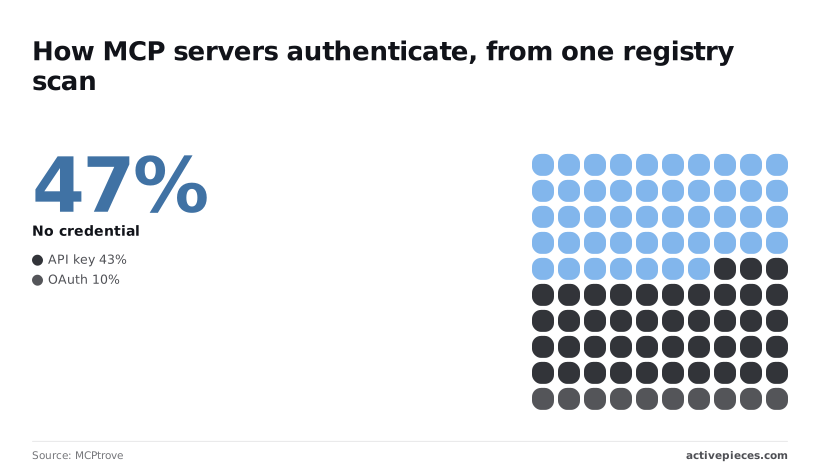
Only 10.2% used OAuth, which means nine in ten teams had not adopted it.
When something goes wrong, an admin needs to revoke access per person, and OAuth makes that possible by tying access to a named person.
Expect the assistant to work through a small set of actions:
- search across the workspace
- fetch a page or database
- create new pages
- update existing pages
- read and add comments
**Create and update are the risky ones**. They run as you, so edits carry your name and your reach.
### How it differs from the Notion API
With the hosted server, you pay for speed in flexibility. The standard API gives you more control but makes you build the plumbing.
| | Setup effort | Who authenticates | Reach in workspace | AI-friendly output |
|---|---|---|---|---|
| Hosted MCP server | Low: sign in and approve | The individual user, via OAuth | What that user can open | Yes, built for assistants |
| Local open-source MCP server | Medium: you install and configure it | You, with a token you supply | What that token's integration can access | Yes, built for assistants |
| Standard Notion API | High: you write the integration | Your code, with an integration token | Only pages shared with the integration | No, you shape the responses yourself |
Do not read much into "it worked through the API". The server checks permissions against a different identity, so test with the account the assistant will actually use.
## Where teams use Notion MCP today
Look at what teams actually do and three jobs dominate: looking things up in the wiki, writing back to pages and databases, and handing specs to coding tools, making these three workflows the core of platform success, so platforms that excel at only one or two leave teams underserved.
Each works only as far as the connected account can see and edit.
### Searching Notion pages with Notion MCP
This is the cheapest use to approve, because it's read-only in spirit. Someone asks Claude or ChatGPT where the onboarding policy lives, or what the team decided in last quarter's planning page, and the assistant searches and reads on their behalf.
The answer is only as good as the pages the account can reach, and that is the trade-off. A tidy, narrowly shared workspace gives sharp answers. A sprawling one gives confident answers drawn from stale pages.
### Editing Notion pages and databases with MCP
Drafting a page, appending meeting notes, and turning those notes into task rows are the next step up. Value rises here, and so does risk, because the assistant now changes shared records.

Do this well by granting edit access to one database or section, not the whole workspace, and by reviewing what the assistant wrote before anyone relies on it. This is interactive work, with a person present.
When a job must run without someone watching, such as unattended bulk updates or scheduled syncs, MCP is a poor fit, and the regular Notion API is the better tool for it.
### Coding assistants reading specs
To have the assistant read the spec while it writes the code, rather than working from a pasted copy, [developers](https://developers.notion.com/guides/mcp/rate-limits) connect Cursor and similar editors. Client support is uneven, so check the client before you plan around it.

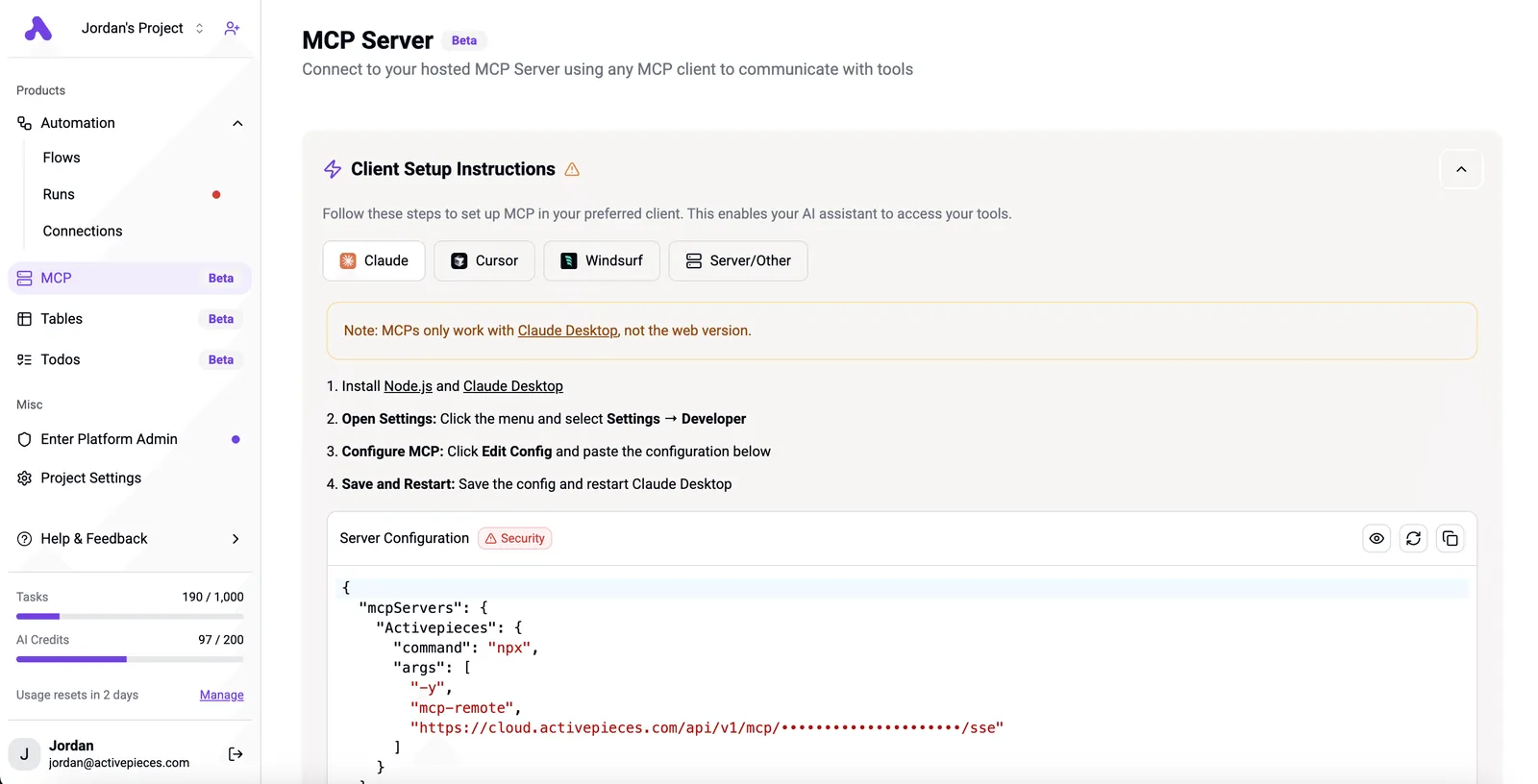
Look at a client's setup page: it offers tabs for Claude, Cursor, Windsurf and a generic server option, yet warns that the connection works only with Claude Desktop.
Once it connects, the same scoping rule applies. Share the spec pages, not the whole workspace, and the assistant reads what the build needs and nothing else.
## What Notion MCP costs and what it requires
You will not find a separately confirmed fee for Notion MCP. Your cost is the Notion plan you already hold plus whatever your AI client charges, and the limits you'll feel are rate limits, not price.
### Notion plan requirements
I haven't verified which plans include MCP against [Notion](https://www.notion.com/pricing)'s pricing page or help centre, so check both before committing a team to it. The same goes for plan prices, any MCP surcharge, and the admin controls over who may connect.
Treat each as unconfirmed until you've read the current page, because the practical question is whether a workspace admin can switch the connection off for members. If they can't, your scoping rests on page sharing alone.
If you only budget for Notion's bill, you will miss the other one: the assistant that connects to Notion has its own, separate from Notion's. I haven't confirmed whether your client's free tier supports connecting to MCP servers, or what it charges.
### Notion MCP rate limits by plan
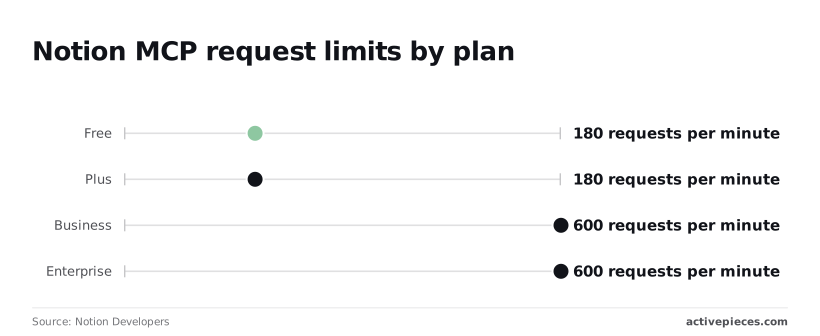
**180 requests a minute on Free and Plus**, 600 on Business and Enterprise: that is the ceiling per connection in Notion's [rate limit documentation](https://developers.notion.com/guides/mcp/rate-limits), so tier selection directly determines when you hit the rate limit.
The step up is the one commercial lever in the whole arrangement.
At 180 on Free and Plus, that works out to three requests a second, per Developers. That's plenty for an assistant answering questions, but an agent that reads a dozen spec pages, follows links and writes back can use it faster than you would guess.

On Business and Enterprise, the 600 gives ten a second, according to Notion Developers' analysis, which is room for heavier agent runs without hitting the ceiling.
### Shared limits with the Notion API
Run a sync script or integration beside your assistant and both draw on the same allowance, because MCP and the regular Notion API share these limits. A busy script can leave the assistant stalled partway through a task.
For the recurring half of that split, [Activepieces](https://www.activepieces.com) has a Notion integration: connect Notion once and the integration runs as a step in a trigger-driven flow and, from the same registration, as a tool on the project's MCP server, which Claude, ChatGPT, Cursor or an agent you built yourself can call.
There is no second catalogue to publish to and nothing to wire up twice, and you can confirm it in packages/integrations in the open source repo, where the action a flow runs is the one exposed as an MCP tool.
Every connector is an agent tool, and Notion is one of the 750 integrations counted there, meaning a Notion integration is expected, not exceptional.
So pick your plan by the heaviest job you expect the assistant to run, not by the average one, and keep other automations off the same connection where you can.
## How limiting AI access protects Notion
Keeping the connection narrow answers the strongest objection. An assistant with write access can follow instructions planted in page text, edit the wrong page, or expose data, and scoping contains most of that, not all of it.
### Prompt injection through page content
Start with the sharpest version of the risk: prompt injection. The assistant reads page text as input, and a comment, a pasted web clip or a shared doc can carry instructions written to look like a request.
The assistant has no reliable way to tell your instruction from text it merely happened to read.
One test shows how much configuration matters. Across 30 attack prompts, **the default setup fell for 87% of them** in GitHub's testing, a failure rate that mandates security hardening in any production environment.
A hardened configuration fell for 37%, and the hardened setup with a filtering proxy called MCPGuard, which sits between the assistant and the workspace, for about 10%, meaning MCPGuard reduces attack success to roughly one-quarter that of hardening alone.
Hardening cuts that by more than half, and even the best result in this test still lets roughly one attempt in ten through.
It's a single test on one prompt set, so treat it as direction, not a guarantee.
That residual rate is why read access and write access need separate decisions.
### Why scoped Notion MCP access limits risk
Because Notion MCP acts with the permissions of the user who connected it, an injected instruction can only reach pages that person could already open or edit. Share a narrow set of pages with the connecting account and the worst case shrinks to that set.
Behind that sits a second layer: a workspace admin decides who can connect an assistant at all.
In practice, go read-first. Start with summarising, searching and drafting elsewhere, and add write access only for specific jobs where a wrong edit is cheap to undo. **Leave anything holding customer data, credentials or financials out of reach entirely.**
What remains is the injection risk on pages the assistant can touch. Scoping limits the damage but doesn't remove the cause, so keep a human checking edits to anything that matters.
## How to avoid Notion MCP mistakes
**Five mistakes account for most Notion MCP failures**, and each fix costs less than the incident it prevents. The list below shows the pattern: every mistake is a gap between what the assistant was allowed to do and what you assumed it would do.
- If you connect through an admin account, connect as a user whose access matches the task instead.
- If you assume hosted and local servers behave the same, test the setup you actually deploy.
- If you let writes land unreviewed, require a human check on anything that matters.
- If you expect pages the user can't see, share them deliberately or set expectations.
- If you run recurring jobs from a chat window, move them out of chat.
### Connecting Notion MCP with admin access
Connect through an admin account and a convenience becomes a liability. The assistant inherits everything that account can reach, so one bad instruction can touch pages nobody meant to expose. Use an account scoped to the task.
Then comes the mirror-image mistake of expecting pages the user can't see. MCP works inside the connected account's permissions, so a "missing" page is the system working correctly. Share the page with that account, or accept that it's out of scope.
Prove a workflow on one server and you've learned little about the other, because hosted and local servers differ in how they authenticate and in what they expose. Test on the one you'll run.
Reading is cheap to get wrong; writing is not.
Keep a review step on writes to anything that matters, and prefer drafts or a staging page over direct edits to the source of record.
Reading is cheap to get wrong; writing is not.
### Using chat for scheduled work
For one-off, supervised work, chat-driven MCP is a good fit. It's a poor fit for recurring jobs, because nothing runs unless someone is there to start it and watch the result.
If the job repeats on a schedule, build it as an automation with defined triggers, and keep chat for the exploratory work where a person is present.
Recurring or trigger-driven jobs that span Notion and other apps are the ones to build as a flow in Activepieces, leaving the assistant to ad hoc requests.
## What Notion MCP users ask
Once someone starts using chat, most of these questions come up, so the table below shows where each answer stands as of today.
Read the last column first: wherever it says unconfirmed, treat the short answer as a working assumption and test it before relying on it.
| Open question | Short answer | Notion page checked | Date checked | Status |
|---|---|---|---|---|
| Extra cost | No separate MCP charge found; plan costs still apply | Notion pricing page | 16 Nov 2026 | Unconfirmed |
| Which clients work | Claude connects; ChatGPT depends on plan and settings | Notion MCP help documentation | 16 Nov 2026 | Unconfirmed |
| Rate limits | Notion MCP uses the standard API request limits; every tool call counts toward them | Notion developer documentation | 16 Nov 2026 | Confirmed |
Three of the four rows are open, so the answers below say what to verify rather than guess.
Is Notion MCP free to use? I found no separate MCP charge, but that's unconfirmed. Your Notion plan and your AI client's subscription still apply, so budget for those and check the pricing page for your own tier.
Does Notion MCP work with ChatGPT and Claude? Claude is a straightforward fit. ChatGPT support depends on your plan and workspace connector settings, so confirm it in the client's own settings before you promise it to a team.
Can Notion MCP delete pages or databases? Don't assume it can't. The tools the connection exposes and the access you grant set what the assistant can do. Read the tool list at connection time, and give read-only access wherever the job allows.
Is the open-source Notion MCP server still maintained? I couldn't confirm this. Check the repository's latest commits and open issues, and whether Notion's current documentation still points to it before you build on it.
What should I check on Monday before connecting it?
1. Confirm which plan and client you are on, and whether MCP is available on both.
2. Read the list of tools the connection exposes.
3. Share only the pages the task needs.
4. Run one read-only test on a page you can afford to lose.
## What Activepieces does about this
The failure this article keeps returning to is a chat window asked to do a job it was never scoped for: recurring work, run unattended, through a connection that holds more access than the task needs.
Activepieces is our answer for that half of the split. The scheduled or trigger-driven job becomes a flow with a defined trigger and defined steps, and the assistant is left with the supervised, ad hoc requests where a person is watching.
The Notion integration is a integration in the open source repo, under packages/integrations. You connect Notion once, and the same integration runs as a step in a flow and as a tool on the project's MCP server.
Claude, ChatGPT, Cursor or an agent you built can call it from there.
Because the action a flow runs is the action exposed as a tool, you aren't keeping two definitions in step, and you can read the code to see exactly what the tool does before you hand it to an assistant.
Scoping works the same way it does for Notion's own server. The connection is a credential you create for one purpose, so share the single database a flow writes to with that account and leave the rest of the workspace alone.
A flow also gives you what a chat session can't: a run history showing what executed and when, and a place to put an approval step before a write lands on a page that matters.
The community edition is MIT-licensed, so you can self-host it and inspect the code behind every connection. Notion is one of roughly 750 integrations in that repo, so the same flow can reach the other tools a recurring job usually touches.
None of this changes the rate-limit point above. A flow that calls Notion still draws on the shared allowance, so schedule heavy runs away from the hours your team is chatting with an assistant.
## Related reading
- [Best Notion Alternatives for 2026 (Free & Paid)](https://www.activepieces.com/blog/best-notion-alternatives-for-2026-free-paid)
- [Notion Auto Pricing: Credits Per Task (2026 Guide)](https://www.activepieces.com/blog/notion-auto-pricing-credits-per-task-2026-guide)
- [Notion Pricing 2026: Plans, AI and What Each Costs](https://www.activepieces.com/blog/notion-pricing-2026-plans-ai-and-what-each-costs)
## References
- [MCPtrove](https://mcptrove.com/research/mcp-authentication-statistics)
- [Tracevero](https://tracevero.com/zeitraum/)
- [Notion Developers](https://developers.notion.com/guides/mcp/rate-limits)