# OneDrive Pricing 2026: Plans, Costs & Changes
By Petra Vlk · 2026-11-05 · Source: https://www.activepieces.com/blog/onedrive-pricing-2026-plans-costs-changes
---
## OneDrive Pricing Today: Every Plan in One Table
### The direct answer
If a Microsoft 365 plan is already on your bill, OneDrive, Microsoft's cloud storage service, costs least that way; the standalone storage plans give you less for each dollar.
The free tier **stops at 5 GB**, so most people hit the wall quickly, whether they're backing up photos or feeding files into an automation built with [Activepieces](https://www.activepieces.com).
Microsoft 365 Personal sat at [69.99 $ per year from 2020 through 2024](https://www.cnbc.com/2025/01/16/microsoft-raises-price-of-consumer-microsoft-365-first-time-since-2013.html).
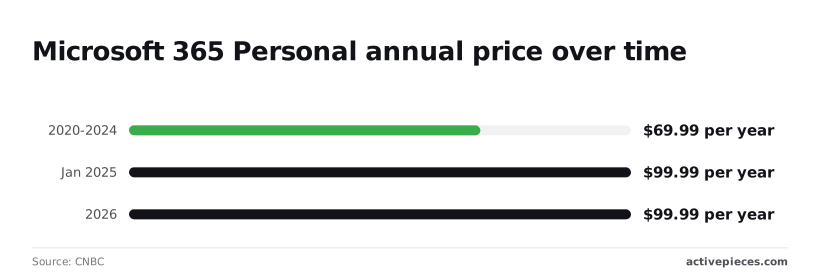
In January 2025 it rose to 99.99 $, **a 30 $ jump, or about 43 percent**. That's the price still in force in 2026, so there's no cheaper renewal waiting.
### The plan table, checked 5 November 2026
Read a blank cell as "verify before buying" and not as "free." Some cells below are blank because I couldn't confirm the figure on the check date.
| Plan | Monthly price | Yearly price | Storage cap | Users | Other caps |
|---|---|---|---|---|---|
| Free 5 GB | 0 $ | 0 $ | 5 GB | 1 | |
| OneDrive Basic 100 GB | | | 100 GB | 1 | |
| Microsoft 365 Personal | | 99.99 $ | | 1 | |
| Microsoft 365 Family | | | | | |
| OneDrive for business plans | | | | Per user | |
I've confirmed only the Personal yearly price, so compare plans on cost per terabyte and per user once you have the real figures from Microsoft's own pricing page.
### OneDrive monthly versus yearly and regional pricing
Paying monthly usually costs more over twelve months than paying annually, so the yearly column is the one to budget against. Prices also differ by country and currency, which means a figure quoted in dollars here may not match what your checkout shows.
If you later move files between OneDrive and other tools, [Activepieces](https://www.activepieces.com) can connect them through its 747 integrations, and the storage bill stays the same, so price the plan on its own.
## Judging OneDrive Plans by Cost at Realistic Usage
Judge each plan by what one person pays per month once its users split the storage, because the headline price hides how many people it covers.
Every plan in this article gets four checks:
- Cost per terabyte per year, which tells you what the storage itself costs without the bundle.
- Cost per user, which shows whether a price that looks high is cheap once enough people share it.
- What else is bundled, meaning Office apps and Copilot, because software you already pay for elsewhere is money you could stop spending.
- Limits that apply after purchase, since these surface only once you upload files and the refund window is closing.
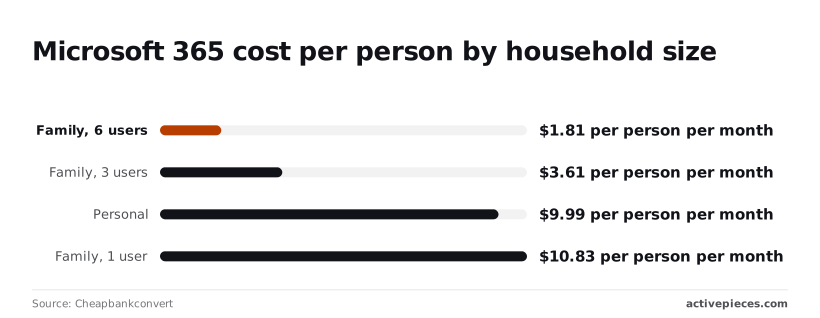
Depending only on how many people use it, the same subscription is cheap or expensive.
Personal costs 9.99 $ per month for one person, while Family with a single user comes to 10.83 $. That is 0.84 $ more for a plan designed for sharing, and the solo creator gets nothing extra for it.
### A 5-person team's monthly bill
At 3 users, Family is 3.61 $ per person per month, and at 6 users it falls to 1.81 $. Five people sit between those two figures, so each pays less than 3.61 $, a fraction of the Personal price.

The catch is that Family is a household plan, so check that your team's use fits it before you rely on the arithmetic.
Three Family plans wouldn't give 20 people individual accounts under one admin, limiting it to smaller organizations, which means a 20-person team is too large for this model.
That's the wrong shape, and the comparison has to move to business plans priced per seat.
## Hidden Costs and Limits That Surprise OneDrive Buyers
Once you've paid, the limits the price table leaves out start to show, and the ones below come from Microsoft's documentation:
- **Maximum file size: 250 GB**, so a large video project or disk image won't upload as a single file.
- Path length: 400 characters, so deeply nested client folders can fail to sync.
- **Work or school recycle bin: 93 days**, so a deletion noticed in month four is out of your hands.
- Lapsed subscription: files become read-only.
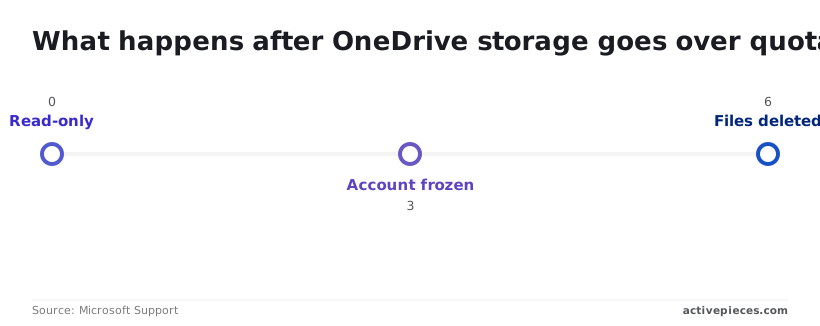
Over quota: Microsoft freezes the account after 3 months, meaning you have roughly 90 days to restore quota compliance or face lockout.
None of these shows up on the invoice.
### What happens when a subscription lapses or you exceed quota
According to Microsoft Support, going over quota makes the account read-only at month 0. You can open and download files, but you can't save changes, so a team mid-project stops being able to work the day the card fails.
Microsoft freezes the account at 3 months and deletes files at 6 months, by which point you've been locked out for 90 days, which means you cannot retrieve your files yourself.

### File size and path limits
For office documents the 250 GB file cap rarely matters, but for anyone shipping raw footage or backups it matters at once, so anyone storing a month's worth of raw video or backups quickly exceeds it.
The 400-character path limit is the quieter problem: a folder structure that works on a file server can stop syncing after migration.
### Recovery and added storage
If a departing employee deletes something, or a sync glitch removes it, you can recover it only inside 93 days. That is the practical undo window for work and school accounts.
Check the version history retention on your own tenant before relying on it as a backup.
Add storage on top of a plan and Microsoft bills it separately, which raises your cost per terabyte above the figure in the table.
A leaver's licence works the same way: remove it carelessly and their files start the over-quota clock above. **Move or reassign their data first, then cancel the seat.**
## OneDrive Versus Google One, Dropbox and iCloud+
Only when Microsoft 365 is already on your invoice does OneDrive beat Google One, Dropbox and iCloud+; as a standalone purchase it's priced on the same terms as the others, and **the extra cost buys nothing**.
### Comparison table on identical measures
In the table below, only the measures that hold across all four vendor pages are kept. It shows that only OneDrive's extras are a full office suite, and that **iCloud+ has no team tier at all**.
Check the current price and the recovery window on each vendor's page on the day you buy, then divide by terabytes and by seats yourself.
| | Team plan offered | Bundled extras | Free tier |
|---|---|---|---|
| OneDrive | Yes, through business plans | Word, Excel, Outlook with Microsoft 365 | Yes |
| Google One | Yes, through Google Workspace | Storage shared across Gmail, Drive and Photos | Yes |
| Dropbox | Yes, through team plans | Shared folders, Paper docs, transfer links | Yes |
| iCloud+ | No | Private Relay, Hide My Email, custom email domain | Yes |
Since every vendor has a free tier, none of them is a reason to pay.
If your staff already pay for Microsoft 365, the storage is already in the bill. Adding a second vendor means paying twice for a terabyte you may never fill. That's the one case where the per-terabyte price is effectively zero.

If nobody uses Microsoft's apps, the bundle is shelfware, and the comparison reverts to plain storage price. Google One suits households already living in Gmail and Photos.
iCloud+ covers Apple devices, but with no team plan it can't cover a company. Dropbox sells sharing and transfer features as its product, which matters if you send files to outside clients.
Only if Microsoft 365 is paid for and used is OneDrive the cheapest of the four.
## Automating OneDrive File Chores with Activepieces
Filing attachments, copying files to a second service and alerting you when a folder changes are all things Activepieces can do.
Only if Microsoft 365 is paid for and used is OneDrive the cheapest of the four.
It is an open-source automation tool whose public repository holds 747 integrations, OneDrive among them, and whose core carries an MIT licence (the enterprise directories sit under a separate commercial one), so you're unlikely to hit integration limitations.
It doesn't do anything to what OneDrive costs or how much it holds, leaving OneDrive's pricing and storage limits in place.
Describe a chore such as filing email attachments into a named OneDrive folder in its built-in chat, and what comes back is a published flow, live in your account, with a run trace for every execution that lists each step and what it did.
That matters here because nothing in the earlier comparison moves: the bundled plan is still the cheapest, and the standalone plan still has no pricing edge.
### Tasks worth automating
In the screenshot below, a five-step workflow sits in the Activepieces builder: Webhook Trigger, Get from the database, Ask ChatGPT, Send SMS, then Put back to the database.
On the Free plan, which allows unlimited flows and 1,000 credits a month, a run costs 1 credit however many steps it has, and AI steps like the ChatGPT one cost more, starting at 2 credits on a fast model.
The "Ask ChatGPT" step is selected, and its panel holds a Question field with instructions for a customer support agent and a Business Details block describing StoreX, an IT repair shop in San Francisco that fixes Apple devices and is open 8am to 10pm Pacific, every day.
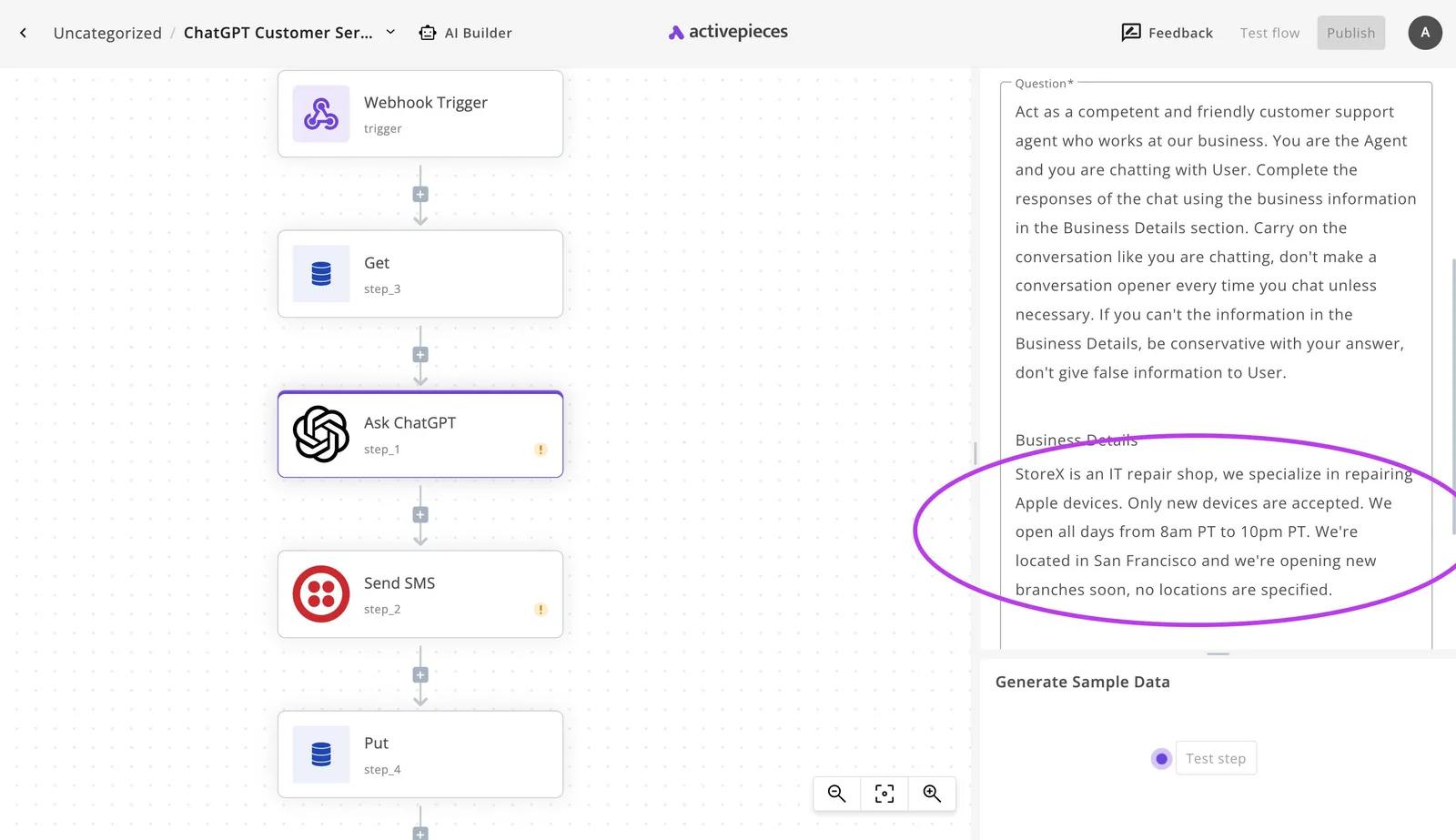
It is a support-reply flow, not a OneDrive one, so take only the shape from it: a trigger, a few steps you can read in order, and a result at the end.
A OneDrive chore is built from the same blocks, so you can see what each step does before you switch it on.
Pick any of three chores and the shape holds. First, filing email attachments into a named OneDrive folder, so nobody drags them over by hand.
Second, copying new files to a second storage service, which gives you a backup that doesn't depend on a single vendor's account. Third, sending a message when something changes in a watched folder, so a shared drive stops being something you have to check.
### What automation doesn't fix about OneDrive storage costs
None of this changes your bill. Every file the automation saves still counts against your OneDrive storage, so a flow that files attachments all day fills the quota faster, and the per-terabyte math from earlier gets worse, not better.
A backup copy also lands in a second service you may pay for separately, which adds a cost line instead of removing one.
After purchase, the limits that bite, the 250 GB file size, the 400-character path and the 93-day recycle bin, stay exactly where Microsoft sets them. Activepieces works around OneDrive; none of its 747 integrations raises any of those ceilings.
Pick the plan on cost per terabyte and per user first, then decide whether the chores are worth automating.
Activepieces is the better fit for people who want to set up OneDrive file chores, such as filing email attachments into a named folder, by describing them in plain language rather than building them by hand or hiring someone to do it.
The built-in chat publishes a live flow in your account, and each run leaves a trace listing every step and what it did, so you can check the result yourself.
That advantage is about ease of setup and visibility, not cost: OneDrive's pricing and storage limits stay as they are, and the earlier comparison on price is unchanged.
## Six checks before a OneDrive purchase
Run six checks in order before any card goes in, because each one can remove a purchase the next one would have made.
1. Check which Microsoft 365 plan you already own, as it determines which features you have access to.
2. Measure how much storage you actually use.
3. Pick the plan by the monthly bill and the limits, not the headline price.
4. Check that your largest file and longest folder path fit.
5. Set a renewal reminder.
6. Test a restore.
### Audit your existing OneDrive and Microsoft 365 plans
Open the admin center or your account page and read the plan name exactly as printed. Many people pay for standalone OneDrive while a Microsoft 365 subscription they already hold includes OneDrive storage.

Check every user, too. A bundled allowance is per person, so a team of mixed licences may be covered for some seats and paying twice for others.
### Measure your storage need
Use the folder sizes your own machine reports, not your estimate. Include the archive folders nobody has opened in years, the shared libraries, and each person's recycle bin, since deleted files still count against the quota until someone purges them.
The number you want is current use plus what you expect to add before the next renewal.
### Test limits and restore before committing
Find your single largest file and your deepest folder path, then upload both to a trial account. A file or path over the limit doesn't fail at purchase. It fails later, as a sync error on one machine, and the file simply stays unsynced.
Then put the renewal date in a calendar with a lead time long enough to cancel or downgrade.
Finally, delete a test file and recover it, and do the same with an older version of an edited document.
Time how long it takes and note who has permission to do it. If you can't restore it on a quiet Monday, you won't manage it during an incident.
## Frequently asked questions
Settle these on a quiet Monday, before a lapsed payment or a wrong assumption becomes a support ticket.
### Is OneDrive free to use?
Yes, any Microsoft account includes a free OneDrive with a small storage allowance. Treat that allowance as a fixed cap, not a trial, because a photo library or a shared project folder will hit it quickly.
Once you're over it, uploads and sync stop until you free space or pay. Check the current allowance on Microsoft's plans page, because it's the figure most likely to be out of date elsewhere.
Yes, Microsoft sells standalone OneDrive storage plans. They cover storage only, with none of the Office apps, so you pay for capacity and get nothing else.
Compared per terabyte, that makes them the weakest value in the lineup. A Microsoft 365 plan you already pay for includes OneDrive storage at no extra charge.
Yes. Microsoft sets prices by region and currency, and local taxes may be added at checkout.
A price you read in a US-based article or forum thread may not match your checkout page. Compare plans using the price shown after you sign in with the account and country you'll actually pay from.
### Can I cancel OneDrive and keep my files?
At the moment of cancellation, your files aren't deleted. If your stored data exceeds the free allowance, the account goes read-only after a grace period. You can still view, download and delete, but you can't upload or sync new changes.
Microsoft's documentation warns that files may eventually be removed if the account stays over its limit. Download a full copy before you cancel, not after.
On Microsoft 365 Family, several people share one subscription, and each member gets their own storage under their own account. Members don't see each other's files unless someone deliberately shares a folder.
A standalone storage plan is tied to one account, so it's not a way to pool space across a household.
## Related reading
- [GitLab Pricing in 2026: What Teams Pay](https://www.activepieces.com/blog/gitlab-pricing-in-2026-what-teams-pay)
- [1Password Pricing 2026 for Teams and Businesses](https://www.activepieces.com/blog/1password-pricing-2026-for-teams-and-businesses)
- [Snowflake Pricing Explained for 2026 Data Teams](https://www.activepieces.com/blog/snowflake-pricing-explained-for-2026-data-teams)
## References
- [Cheapbankconvert](https://www.cheapbankconvert.com/blog/microsoft-365-family-cost-per-person)
- [Microsoft Support](https://support.microsoft.com/en-us/accounts-billing/subscriptions/what-happens-when-my-microsoft-365-subscription-expires)
- [CNBC](https://www.cnbc.com/2025/01/16/microsoft-raises-price-of-consumer-microsoft-365-first-time-since-2013.html)