# OpenAI Embeddings Automation: How to Schedule It
By Petra Vlk · 2026-11-12 · Source: https://www.activepieces.com/blog/openai-embeddings-automation-how-to-schedule-it
---
## Embeddings automation quick start
### What OpenAI embeddings automation is
OpenAI embeddings automation is a scheduled job that finds new or changed text, embeds only that text, and stores each vector under a stable ID.
The fastest route is four stages, **about two hours to build**, whether you script it yourself or wire the stages together in a workflow tool like [Activepieces](https://www.activepieces.com), with details checked on 2026-11-12.
### Components of an embeddings pipeline
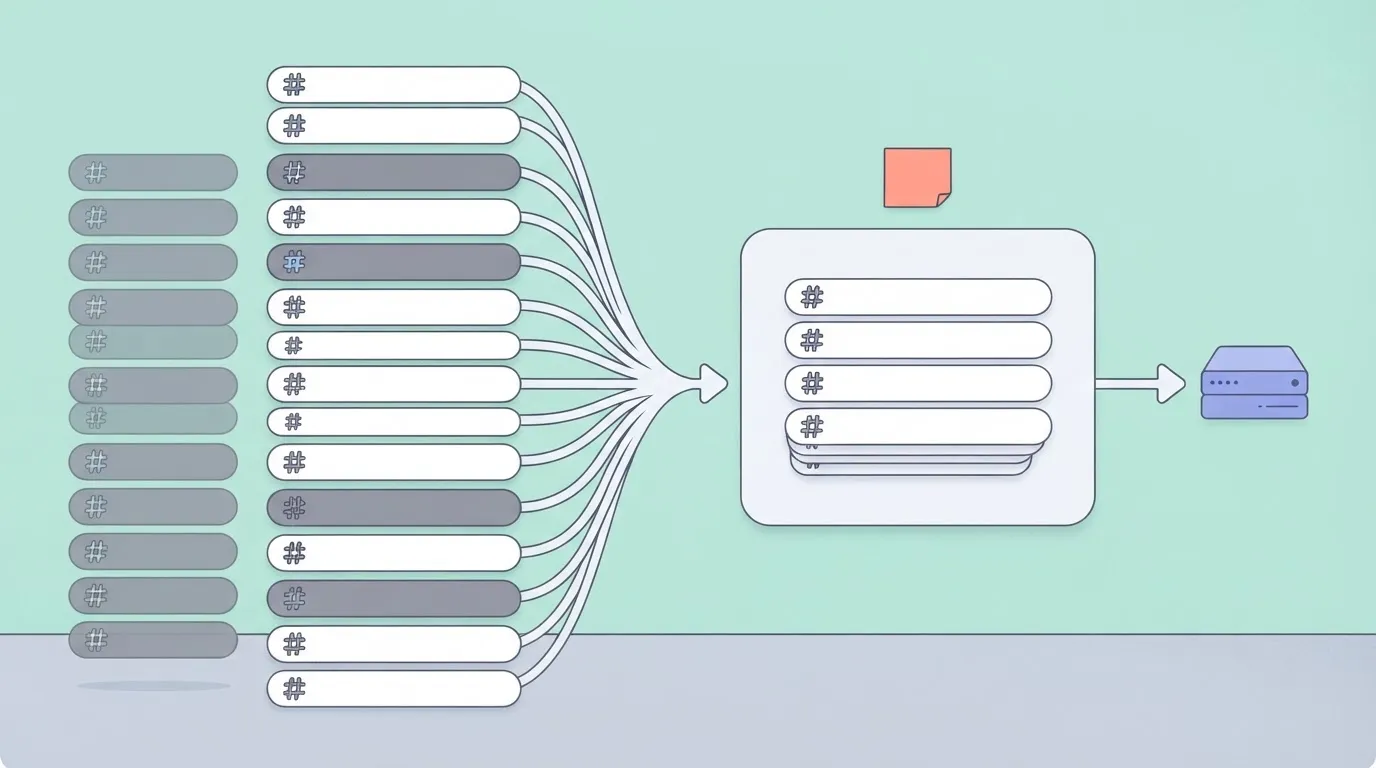
- Change detection that skips any text whose hash matches the one stored on the last run.
- Batching that groups the remaining texts into requests sized to stay under your rate limits.
- An embeddings call that returns one vector per input, in the same order you sent them.
- Stored vectors, each saved with an ID that ties it back to its source text and its hash.
### Which embedding model to choose and what it costs
Choose the size by what you can afford to store, because quality falls slowly until the vector gets quite small.
This guide covers three OpenAI embedding models. `text-embedding-3-large` returns 3072 dimensions natively and `text-embedding-3-small` returns 1536. The legacy `text-embedding-ada-002` is fixed at 1536 and is worth keeping only for an index you already built on it.
The `dimensions` parameter shortens a vector only on the two v3 models, which are trained Matryoshka-style so the leading values still carry most of the meaning when the tail is cut. Ada-002 does not support it.

The examples here use `text-embedding-3-small` at its native 1536: it is the cheaper of the two v3 models, it needs no truncation setting, and it matches the default used below. Move to the large model, or shorten it, only when a test on your own queries shows a gain.
In the [OpenAI Devs](https://openaidevs.com/thread/t50/reducing-embedding-dimensions-with-matryoshka-representation) test of reduced dimensions, retrieval quality is measured as NDCG@10, a score of how well the right documents land in the top ten results.
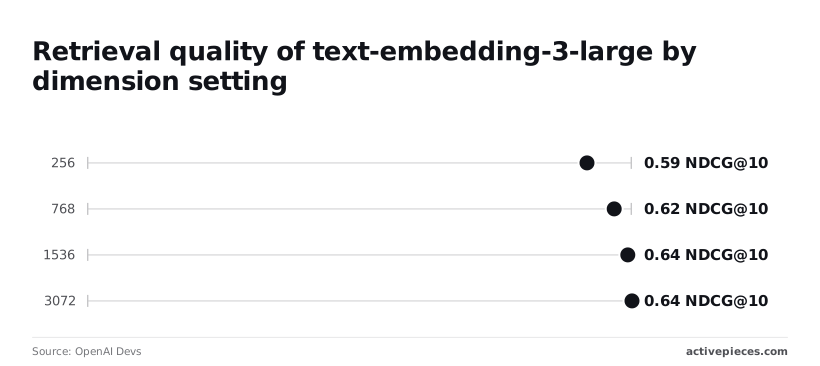
| Dimensions | NDCG@10 | Loss from full size | What it means |
|---|---|---|---|
| 3072 | 0.642 | None | Full size |
| 1536 | 0.637 | 0.005 | Halving the vector halves your storage |
| 768 | 0.621 | 0.016 | Most search features will not notice |
| 256 | 0.589 | 0.053 | The first point where users could plausibly see worse results |
_Prices and plan limits checked against [docs.claude.com](https://docs.claude.com/en/docs/about-claude/models/overview) and [claude.com](https://claude.com/pricing) and [openai.com](https://openai.com/chatgpt/pricing) and [gemini.google](https://gemini.google/subscriptions) on November 11, 2026._
Use 1536 as the safe default, and test 768 before you commit.
I have no per-token price I can confirm for this section, so check OpenAI's pricing page before you size a budget.
## API key and first embedding call
Once you've checked the price, all you need is one project API key, stored in an environment variable, and one POST to `/v1/embeddings` to get a vector back.
### Create and store the key
Create the key from a project, not from your personal account, so you can revoke it without breaking anything else.
Fund the account first, because an unfunded account is a likely first failure, and it looks like a code bug.
At runtime, export the key as `OPENAI_API_KEY` and read it from the environment. Never paste it into the script or commit it.
Send the key as a bearer token in the `Authorization` header. The JSON body takes five fields:
- `model`: required. Use an embedding model name such as `text-embedding-3-small`.
- `input`: required. A string, or an array of strings. The array is how you batch in Stage 3, so start using it now.
- `dimensions`: optional. It shortens the returned vector. Omit it and you get the model's full native size, and you can't ask for more than that.
- `encoding_format`: optional. `float` is the default. `base64` returns a more compact payload that your code must decode.
- `user`: optional. A stable identifier for your end user, which OpenAI can use to trace abuse back to one account.
For the first call, send `model` as `text-embedding-3-small` and `input` as one short string, with no `dimensions` field. **The vector that comes back has 1536 values**, which is a quick check that you are talking to the model you meant to.
### Reading the embeddings API response
Look for the vector at `data[0].embedding`, an array of floating-point numbers. When you send an array of inputs, `data` holds one object per input, each with an `index` that matches its position in your request.

Pair vectors to your records by that index and never by assumption.
Then read `usage`. It reports `prompt_tokens` and `total_tokens`, and for embeddings the two match, since you are billed on input only.
## Batched vectors and safe reruns
For a rerun to be safe, every stored vector has to carry its row ID, the hash of its source text and the name of the model that produced it.
### Embeddings batch sizes and token limits
**Send more than 2,048 inputs or 300,000 tokens** in one request and it is rejected.
Each single input is also capped at 8,192 tokens, so the job runs in this order, with the hash check ahead of any paid token:
1. Read rows from the source table.
2. Hash each row's text.
3. Skip rows whose hash matches the stored one.
4. Chunk remaining text so each integration is under 8,192 tokens.
5. Send arrays of fewer than 2,048 inputs and 300,000 tokens.
6. Write id, hash, vector and model name.
### Chunk and hash before you embed
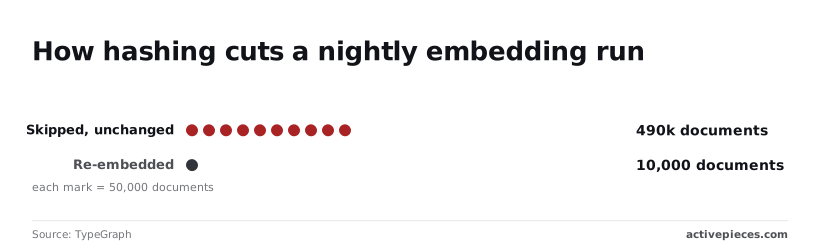
In [TypeGraph's incremental re-indexing example](https://typegraph.ai/blog/incremental-re-indexing-rag-change-detection), a 500,000-document corpus with 2% change skips 490,000 unchanged documents, so **effort scales with change volume, not corpus size**. It re-embeds only 10,000.
### Where to store the vectors
Pick the dimension count and you have picked the disk bill. According to [SSD Nodes](https://www.ssdnodes.com/learn/pgvector-hnsw-index-on-a-small-vps), a million vectors take 4.104 GB at 1024 dimensions, meaning storage requirements scale directly with vector volume.
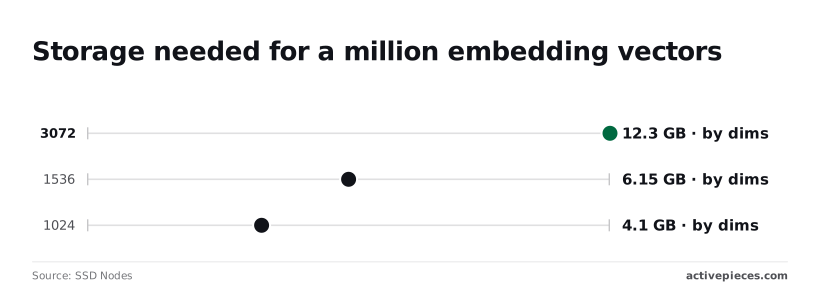
The same million take 6.15 GB at 1536 and 12.296 GB at 3072, so embedding dimension is the primary factor in storage cost.
| Option | Setup effort | Scale ceiling | Query support |
|---|---|---|---|
| Spreadsheet | Minutes, no new service | Lowest; one file, slow to open as rows grow | No similarity search; you export and compute elsewhere |
| Postgres with pgvector | One extension on a database you may already run | Set by the server's memory and disk | SQL plus similarity search |
| Vector database | Most work: a separate service to run and secure | Highest | Built-in similarity search and filtering |
For a scheduled job, Postgres is usually the sensible middle. The hash and ID columns sit beside the vector, so the skip check in step 3 is a single query.
## Scheduled embedding jobs with retries
You can run the job on a schedule with a plain cron script, but you add the retry rule and the failure alert yourself, because the scheduler won't give you those two.
### Ways to schedule embeddings jobs
| Option | Setup effort | Retry handling | Failed-run visibility |
|---|---|---|---|
| Cron script | Lowest: one file and one crontab line | None unless you write a backoff loop around the API call | A log file nobody reads, unless you add an alert |
| Cloud function | Moderate: deployment, credentials, a trigger | Often built into the trigger, but check whether it re-runs the whole batch | Platform logs, searchable but not pushed to you |
| Workflow tool | Moderate: a hosted or self-run instance | Per-step retry settings | Every run is listed with its failed step shown |
When a rate-limit error hits at midnight, the cron script leaves a log line and a stale index until someone looks.
You don't hire for this on Activepieces, you describe it.
Type something like "every night, embed rows whose hash changed and write vectors back with the row ID" into the built-in chat, and it builds and publishes the flow in your account: the same artifact a builder would have wired by hand.
Build the flow in this order:
1. Add a schedule trigger and set it to the interval your content actually changes at.
2. Query your table for rows where the stored hash differs from the current text hash.
3. Loop over those rows in batches, not one row at a time.
4. Send each batch to the OpenAI embeddings step, with retry enabled on that step.
5. Write the returned vectors back with the row ID and new hash.
6. Add an error branch that sends a message naming the failed batch.
Without step 6 you have a nicer-looking cron job.
### Testing the first scheduled run
Trigger the flow by hand first and compare the rows written against the rows you expected to change.
Then run it a second time with no edits: it should embed nothing, and if it calls the API, the hash comparison is broken.
Finally, break the API key on purpose and confirm the error branch delivers a message.
## Embeddings errors limits and solutions
Realistically, a scheduled embeddings job will hit six errors.
Read the message body, not just the status code, because the two 429s look identical in a log line but need opposite responses.
| Error | Cause | Fix |
|---|---|---|
| 401 | Missing, revoked or wrong API key, or a key from a different organization | Check the secret the scheduler actually loads, rotate it, and stop retrying |
| 429 rate limit | Too many requests or tokens per minute for your tier | Back off with jitter, shrink batches, or move the backfill to the Batch API |
| 429 quota | Billing limit or credit balance exhausted | Add credit or raise the limit; retrying cannot help, so alert instead |
| 400 context length | One input exceeds the model's token limit | Count tokens first and split long text into chunks |
| Empty input | Empty or whitespace-only string in the request | Filter blanks before batching |
| 5xx | Server-side failure on OpenAI's end | Retry with the same backoff, cap attempts, leave the item for the next run |
### Embeddings rate limit and quota errors
Because limits depend on your usage tier, and the free tier sits far below paid ones, a backfill that finishes on a paid account can stall at once on a free one.
Retry rate-limit errors with exponential backoff plus random jitter.
Backing off only delays the same failure when a quota error is a billing problem, not a speed problem, so the job should stop and tell a person.
### Embeddings context length and input errors
When you get a 400 for context length, a single input was too long, and no retry will shorten it. Count tokens before sending and split on paragraph or heading boundaries.
Backing off only delays the same failure when a quota error is a billing problem, not a speed problem, so the job should stop and tell a person.
### Embedding model and dimension mismatches
Even when their lengths match, **vectors from different embedding models aren't comparable**. Store the model name and dimension count beside every vector.
**If you change either, re-embed the whole set rather than mixing old and new, or search results will quietly degrade.** A vector index created for one length will also refuse vectors of another, which at least fails loudly.
## What Activepieces does about this
The pipeline in this article is four stages with a retry rule and a failure alert wrapped around them, and Activepieces is the place we built to run that wrapper.
You describe the job in plain language, something like "every night, embed rows whose hash changed and write vectors back with the row ID", and the built-in chat builds and publishes the flow in your account.
The result is the same schedule trigger, row query, batch loop, OpenAI step, write-back and error branch listed above, so you can open it and check each stage against the article.
The failures that matter here are the ones a cron script hides: a 429 at midnight, a quota error that no retry can fix, a hash check that quietly stopped matching.
In Activepieces the retry setting lives on the OpenAI step itself, every run is listed with its failed step shown, and the error branch can message a person with the batch that failed.
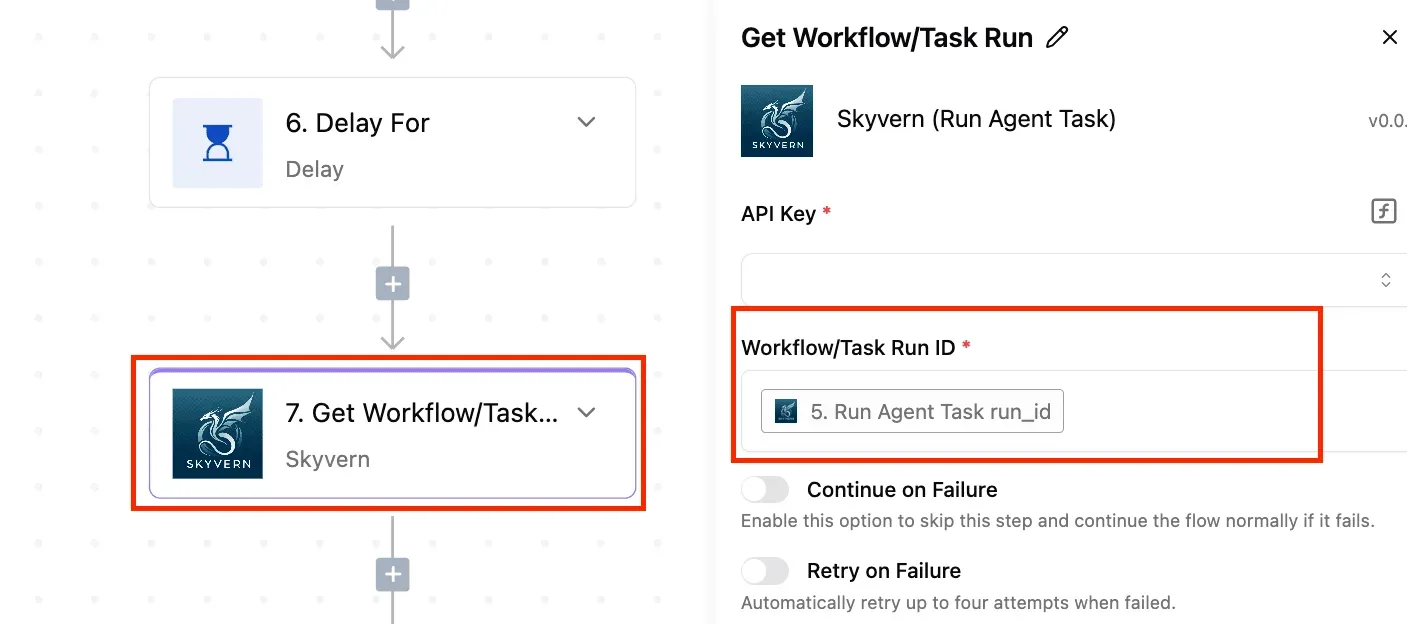
That is step 6 in the build order, and it is the step the platform makes hard to leave out. You still decide the batch size, the dimension count and what counts as a change. The flow does not decide those for you.
The platform is open source under the MIT licence for the community edition, so you can self-host it and keep the API key and the vectors inside your own network.
Flows built through chat get the same RBAC, audit logs and run traces as any other flow.
MoneyGram, Moneypenny, Alan and FundingSocieties run Activepieces in production, which is the kind of operations team that wants a failed run to be readable by someone other than the person who wrote it.
To start, build the flow from the six steps above, run it by hand, run it again with no edits to confirm it embeds nothing, then break the key on purpose and watch the error branch fire.
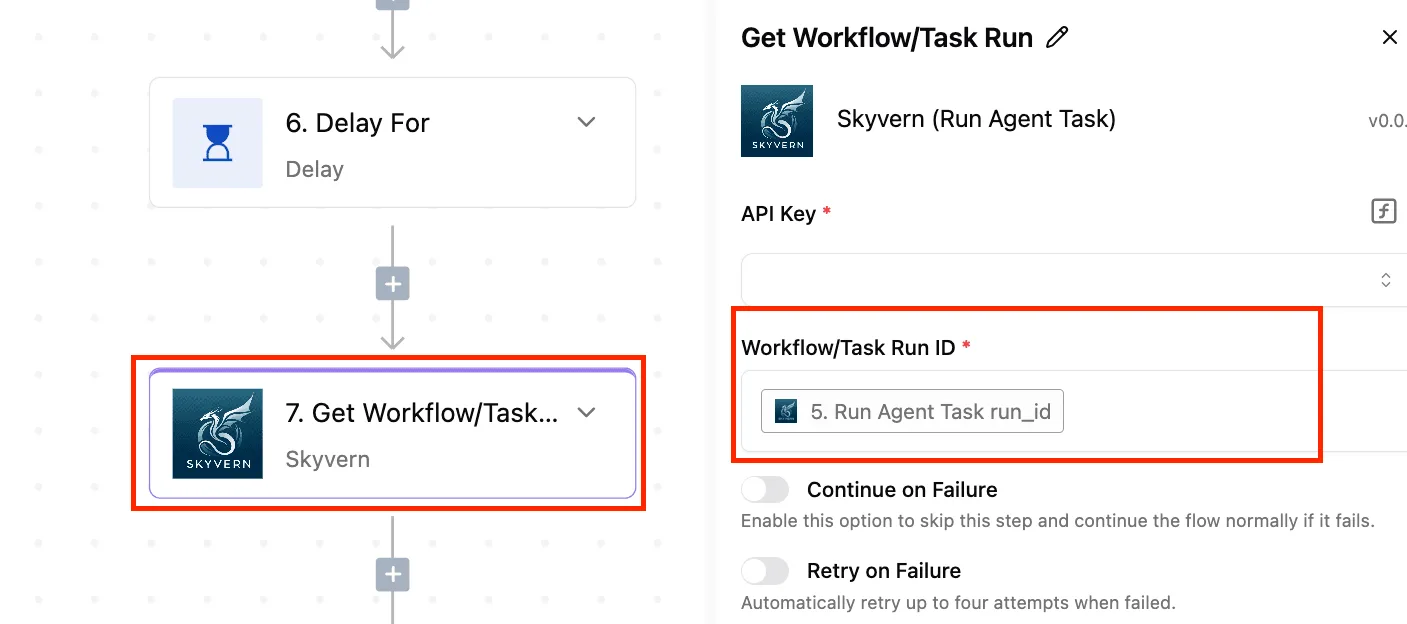
If all three behave, the job is safe to leave on a schedule.
## Frequently asked questions
Because a mismatched length at least announces itself, the questions that follow are the quieter ones. Vendor facts here were checked on 2026-11-12, and pricing and policy pages change without notice.
### Can I re-embed old data when a new OpenAI embedding model is released?
Yes, but you must re-embed everything you want to search together, because vectors from different models aren't comparable. Mixing two models in one index returns results that look plausible and rank wrongly, with no error.
The same goes for changing dimensions on a model that allows it, and for migrating off ada-002.
Build a second index, fill it, and switch queries over once it's complete.
For a large backfill, use OpenAI's Batch API, its asynchronous endpoint for big jobs, which trades speed for a lower price and fewer rate-limit collisions.
You are billed only for generating embeddings, not for storing them. Storage is a separate bill from wherever you keep the vectors, whether that's a database or a managed vector service.
As of the check date, OpenAI's stated policy is that data sent through the API to the embeddings endpoint isn't used for training by default. Read its current data-controls documentation before sending anything sensitive.
### How do I embed PDFs and other files automatically?
Extract the text first, because the embeddings endpoint accepts text and not files. Then split it into chunks, hash each chunk, and embed only chunks whose hash is new.
Scanned PDFs need text recognition before any of this works. If extraction quietly returns an empty string, you'll embed nothing and see no failure, so log the character count per file.
On Monday, pick one source of text and write down what counts as a change to it. Then do these in order:
1. Hash each record's text and keep the hash in a small table.
2. Send only new or changed records to the embeddings endpoint in batches.
3. Store each vector with its record ID, model name and length.
4. Schedule the job to run daily, and log how many records it skipped.
If the skip count is near zero on the second day, your change detection is broken.
## Related reading
- [OpenAI Embeddings API Pricing in 2026, Dated and Checked](https://www.activepieces.com/blog/openai-embeddings-api-pricing-in-2026-dated-and-checked)
- [Automate Blog Writing with AI: A Step by Step Guide using OpenAI](https://www.activepieces.com/blog/automate-blog-writing-with-ai-a-step-by-step-guide-using-openai)
- [EmbeddingGemma 2: The Developer Guide to Multimodal Embeddings](https://www.activepieces.com/blog/embeddinggemma-2-the-developer-guide-to-multimodal-embeddings)
## References
- [SSD Nodes](https://www.ssdnodes.com/learn/pgvector-hnsw-index-on-a-small-vps)
- [OpenAI Devs](https://openaidevs.com/thread/t50/reducing-embedding-dimensions-with-matryoshka-representation)
- [TypeGraph](https://typegraph.ai/blog/incremental-re-indexing-rag-change-detection)