# Oracle Cloud Infrastructure Pricing: 2026 Price Guide
By Femi Adegoke · 2026-11-05 · Source: https://www.activepieces.com/blog/oracle-cloud-infrastructure-pricing-2026-price-guide
---
## Oracle Cloud Infrastructure pricing at a glance
### What Oracle Cloud Infrastructure is and costs
[Oracle](https://www.oracle.com/uk/cloud/storage/block-volumes/pricing/) [Cloud](https://cloud.google.com/support/enhanced) Infrastructure charges for what you meter: compute by the OCPU-hour, storage by the GB-month, outbound data by the GB.
Rates are low, but the bill is set by a handful of those meters, which is why teams that wire up cost alerts and scheduled shutdowns with tools like [Activepieces](https://www.activepieces.com) tend to see fewer surprises.
Oracle Cloud Infrastructure pricing is the pay-as-you-go rate structure under which Oracle bills for cloud resources by usage, with compute charged storage per GB-month and outbound data transfer per GB, plus add-ons such as block volume performance, licences and support.
OCI is Oracle's public cloud, billed pay-as-you-go on usage, with committed-spend options layered on top.
### The table: every plan and metered rate
You will not find rates in the table, and that is on purpose. It lists each way of buying OCI and each meter this article keeps returning to, with the unit billed and what is free.
Oracle revises its rates, and a figure copied here would go stale between a reader's check and their signature.
Take every price from Oracle's own pricing page on the day you commit and note that date next to your estimate.
| Plan or meter | Unit billed | Free allowance |
|---|---|---|
| Pay As You Go | Metered usage, invoiced after the fact | None |
| Monthly Universal Credits | A committed monthly spend, drawn down by usage | None |
| Annual Universal Credits | A committed yearly spend, drawn down by usage | None |
| Free Trial | Promotional credit spent on any service | Credit for a limited period |
| Always Free | Fixed small resources, no charge | Limited capacity with no expiry |
| A1 compute (Arm) | OCPU-hour | Some capacity inside Always Free |
| E4 compute (AMD) | OCPU-hour | None |
| Storage | GB-month | Some inside Always Free |
| Egress | GB transferred out | A monthly outbound allowance |
Before anything else, decide whether your usage is steady enough to promise, because **the commitment plans exchange flexibility for a discount**. The meters decide the rest, and the free tiers below are where a small team can test that without paying.
### OCI Always Free tier and Free Trial credit
If you confuse the two free offers, **you get a surprise invoice**. They behave differently.
The Free Trial is a credit that runs out, after which you either upgrade or lose what you built. Always Free doesn't expire, but it covers a small, fixed set of resources, and anything beyond it's billed at the metered rate.

Use the Arm A1 capacity inside Always Free; it's the part worth having. A team running a lightweight internal service can keep it on free capacity indefinitely, provided it stays inside the allowance.
## Every current OCI plan, rate and usage limit
Under five commercial terms, OCI sells one price list. They're Pay As You Go, monthly Universal Credits, annual Universal Credits, Free Trial and Always Free, and they differ in how you commit, not in what a metered unit costs.
| Plan | What you pay for | Commitment | What to watch |
|---|---|---|---|
| Pay As You Go | Metered usage, billed in arrears | None | Nothing caps the bill |
| Monthly Universal Credits | Prepaid spend drawn down monthly | Monthly | Unused credit may lapse |
| Annual Universal Credits | Prepaid spend for a year | Twelve months | You pay for headroom you may not use |
| Free Trial | Promotional credit | Time-limited | Resources can stop when it ends |
| Always Free | A fixed allowance of selected services | None | Capacity limits, and some regions run short |
### OCI Pay As You Go versus Universal Credits
Start from Pay As You Go: you're billed for the unit each service meters, with no minimum. Universal Credits turn that into a prepaid balance that any eligible service can draw down.
Price the commitment against your quietest month, not your busiest one. If the discount doesn't cover the credit you leave unspent, Pay As You Go is the cheaper plan.
### Compute: Ampere A1, AMD and Intel shapes
Because flexible shapes bill processor cores and memory as two separate meters, a small team can pay for a memory-heavy workload without buying cores it won't use.
If you want the Arm-based shape, that is Ampere A1, and Always Free includes an allowance of it. Arm's only a free ride if your software builds for it, so test that before you plan around the allowance.
AMD and Intel shapes cost more per core in exchange for x86 compatibility.
### Storage, database and networking rates
Gigabytes stored, performance units provisioned, or compute hours plus storage: object storage, block volumes and database services each meter something different.
After a free monthly allowance, outbound data transfer's billed per gigabyte. The line looks trivial in a sizing sheet but grows with every download, backup copy and cross-cloud sync.

## A real monthly bill for a five-person team
Add up five metered lines and you have the bill for this workload; four of them are priced by a unit you can read off the estimator before you commit.
Picture a small product: two application servers behind one managed database, with files in object storage and customers downloading from it. The estimate rests on these assumptions:
- Two app VMs run continuously, so compute's billed for every hour of the month, not for the hours the team is awake.
- One managed database instance runs continuously, so its fee doesn't shrink when traffic does.
- 500 GB of block storage's attached at the default performance setting, so any performance upgrade's an extra line you would add.
- Object storage holds the uploads and backups, billed per GB stored per month.
- 2 TB leaves Oracle's network each month, so the outbound line's billed on whatever exceeds the free allowance.
- Pricing's taken from Oracle's cost estimator on the day you run it, and you should note that date beside the total.
### OCI monthly bill total, line by line
| Line | Quantity | Unit rate is billed per | Monthly cost is | Always Free variant |
|---|---|---|---|---|
| App VMs | 2 | OCPU-hour and GB of memory-hour | Quantity × hours × rate | Free-tier shapes, but small and fixed in count |
| Managed database | 1 | Database unit-hour | Hours × rate | A free database exists, with tight size and connection limits |
| Block storage | 500 GB | GB-month, plus performance units | Capacity × rate, plus any upgrade | Covered only up to the free volume allowance |
| Object storage | Your stored GB | GB-month | Stored GB × rate | Free up to a small allowance |
| Outbound traffic | 2 TB | GB transferred | (2 TB − free allowance) × rate | Free up to the allowance, then billed the same |
| Total | | | Sum of the five lines | Sum of whatever the free tier does not cover |
### Where the bill moves if usage doubles
When traffic doubles, **outbound and object storage move first**, because both scale with use while compute and the database are flat until you resize them.
Doubling the data moves block storage and, if you raise performance, the performance line along with it. Rerun the estimator with each quantity doubled in turn, and the line that moves most's the one to price before you sign.
## Hidden OCI costs and billing limits
When you doubled your inputs, outbound data was the line most likely to have moved. OCI gives you **10 TB a month free**, then meters every gigabyte after that at $0.0085.
Licences, support and commitments sit on top of the metered lines.
### OCI egress costs and free outbound data
Nothing is charged for the first 10 TB each month; the meter's gigabytes leaving Oracle's network. At $0.0085 per GB, a team serving 10 TB pays $0 and one serving 50 TB pays $348.16. One serving 100 TB pays $783.36, according to [RateCard](https://ratecard.cloud/egress/).

Check the arithmetic against your own traffic. Going from 50 to 100 TB adds $435.20, so each further 10 TB costs about $87.
The risk, according to [Ratecard](https://ratecard.cloud/egress/), is that the 10 TB allowance's the only protection for a small team, so estimate monthly outbound volume before you sign.
Egress isn't the only line that scales with use. Block volumes bill for performance units as well as capacity, so a database volume tuned for high throughput costs more than the same size at the default setting.
Each load balancer and each reserved public IP that sits unattached still appears on the invoice.
### OCI licence, support and commitment costs
It is licences that turn a cheap compute price into an expensive one. Running Oracle Database or other Oracle software on OCI can add a licence charge per processor-hour, and bringing your own licence only helps if you already own enough of them.

Second comes support. The tier you pick sets your response times, and on some plans it's billed as a share of your monthly spend, so the support line grows with the rest of the bill.
A small team should price the cheapest tier that gives a named contact for production outages and leave the rest.
In return for a lower rate, commitments cost you flexibility. A prepaid or annual commitment lowers the unit price, but you pay for the committed amount whether or not you use it. Commit only to the baseline you're sure of, and leave bursts on pay-as-you-go.
### Service limits, quotas and idle reclamation
On day one, every new tenancy starts with service limits on how many instances, volumes and load balancers you can create in a region.
Quotas work the other way: an administrator can cap a compartment's spending or resource count, which stops a runaway test from becoming a surprise bill. Set them on every non-production compartment.
A cap or an alert only helps if someone sees it, and [Activepieces](https://www.activepieces.com) can pass an OCI budget alert on to a Slack channel or an email list.
It bills a run at 1 credit whether the flow has two steps or ten, where Zapier bills per task and Make per module, so splitting the alert into a lookup, a filter and a message costs nothing extra.
On the free plan, which is $0 with 1,000 credits a month and unlimited flows, a weekly cost report uses about four or five credits a month.
Third, idle reclamation. Oracle can reclaim Always Free compute instances it judges idle, so a side project left quiet may vanish. Do not host anything you can't rebuild on a free instance.
## OCI against AWS, Azure and Google Cloud costs
Roughly a third: that is what a 4 vCPU, 16 GB VM costs on OCI compared with elsewhere. On object storage the picture is mixed: OCI's dearer at standard and cheaper at infrequent access.
### OCI compute and egress cost compared
To see the compute gap, take Emil Klapija's [Frankfurt comparison from September 2025](https://www.linkedin.com/posts/emilklapija_oci-oraclecloud-cloudcomputing-activity-7369310110340386818-LalK), which prices the same mid-size VM on all four clouds. The table shows the compute gap and the standard storage rate, per GB-month, from [S3 Providers](https://s3providers.com/providers/oracle-object-storage).

| Provider | 4 vCPU, 16 GB VM per month | Standard storage per GB-month |
|---|---|---|
| OCI | $55.06 | $0.0255 |
| AWS | $151.11 | $0.023 |
| Azure | $151.84 | $0.0208 |
| Google Cloud | $158.93 | Not covered by the source |
About $96 a month: that is how far OCI's $55.06 sits under AWS, which is **roughly $1,150 a year per VM**. Ten such VMs save over $11,000 a year.
These are September 2025 figures, so recheck each vendor's pricing page before you commit.
### OCI object storage pricing by tier
Standard's where OCI loses. According to S3 Providers, at $0.0255 against AWS's $0.023 and Azure's $0.0208, 10 TB costs $255 a month on OCI, $230 on AWS and $208 on Azure.
Per S3 Providers, infrequent access reverses it. OCI charges $0.01 against $0.0125 and $0.0115, so 10 TB costs $100, $125 and $115. Archive favours OCI over AWS ($0.0026 against $0.0036), but Azure's cheaper at $0.002. Across 10 TB that's $26, $36 and $20.
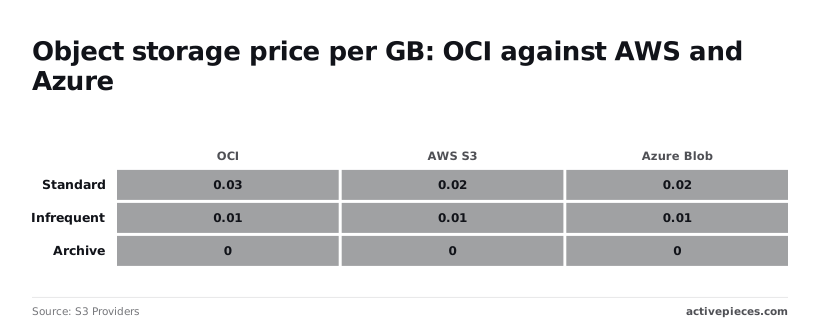
Hot data costs more on OCI. Backups and logs that sit untouched cost less.
A free tier is a place to test, not to run production.
### When OCI costs more than alternatives
If your spend is mostly hot object storage, OCI isn't cheaper. Standard costs more than both AWS and Azure, and the compute saving shrinks as storage grows.
Two checks follow. First, split your bill between VM hours and stored GB. A VM-heavy bill gains most.
Second, confirm that every managed service you rely on exists in your region, because a cheap VM doesn't help if you must rebuild a service yourself.
## Estimate your OCI bill on Monday morning
Build the estimate in Oracle's Cost Estimator first, then put a budget, tags and a weekly review around it so the first invoice can't surprise you. The list below follows the order that works, because each step gives the next one something to measure against.
1. Open the Cost Estimator and add each service you plan to run. Enter the quantities that drive the lines discussed earlier: outbound data transfer, block volume size and performance setting, any licensed software, and the support level. The total's your baseline, so save it.
2. In the console's billing area, create a budget with an alert rule. Set it a little above the baseline and send the alert to a shared mailbox rather than one person. **A budget only warns you; it doesn't stop spending, so the alert's the control.**
3. Create a compartment for each project or environment and apply cost-tracking tags to what goes inside. Without them, Cost Analysis shows one undivided total, and you can't tell which project caused a jump.
4. Review Cost Analysis once a week, grouped by compartment or tag, and compare it with the baseline. Look first at the egress and block volume lines, because they move without anyone deploying anything.
5. Optionally, schedule that weekly view as a report to your team's chat or email, so the review happens even in a busy week.
**A budget only warns you; it doesn't stop spending, so the alert's the control.
Does the estimate match the invoice? It matches only as closely as your quantities do. Egress and storage performance depend on real traffic and real disk behaviour, so treat the estimate as a ceiling you refine after the first full month of Cost Analysis data.
Can a budget cap my spending? No. A budget raises an alert when actual or forecast spend crosses a threshold you set. If you need a hard stop, **you have to act on the alert yourself**, for example by shutting down a non-production compartment.
Why tag compartments if I already have a budget? A budget tells you that you're over, and tags tell you who is responsible. Scoping budgets to compartments gives each project its own alert, which removes the argument about whose workload caused it.
How often should a small team review? Weekly's enough to catch a drift while it's still a small correction. Monthly means you find the problem on the invoice, which is the situation this whole routine exists to avoid.
## What Activepieces does about this
The article's advice comes down to pricing a few lines before you sign and watching them after. The second half is a chore, and chores get skipped in a busy week.
[Activepieces](https://www.activepieces.com) is where we'd put that chore: a scheduled flow that pulls your Cost Analysis view each week, compares egress and block volume against the baseline you saved from the Cost Estimator, and posts the result to a Slack channel or an email list.
If a line has drifted, the message says so before the invoice does.
The pricing model suits this job. A run costs 1 credit whether the flow has two steps or ten, so a lookup, a comparison, a filter and a message cost the same as a single step.

The free plan is $0 with 1,000 credits a month and unlimited flows, and the weekly report described above uses about four or five of those credits.
A small team can run the review routine at no cost, without counting steps or trimming the flow to stay under a limit.
Activepieces is open source under the MIT licence, so a team that doesn't want its billing data passing through a hosted service can run it on its own infrastructure.
That includes an Always Free instance, if you've confirmed the software builds for Arm, which is the same test the article asks you to run before relying on A1 capacity.
Keep the idle-reclamation warning in mind, though: don't make a free instance the only home for a flow you'd miss.
A flow can only report, just as a budget can only warn. It won't cap spending, and it doesn't replace the compartments, tags and quotas set up in OCI.
What it does is make sure the weekly look at the lines that move on their own gets done.
## Related reading
- [Oracle Fusion Cloud ERP Pricing: Costs by Module 2026](https://www.activepieces.com/blog/oracle-fusion-cloud-erp-pricing-costs-by-module-2026)
- [DeepSeek Search API vs Exa Pricing for Small Teams (2026)](https://www.activepieces.com/blog/deepseek-search-api-vs-exa-pricing-for-small-teams-2026)
- [No-Code Automation Statistics 2026: Adoption for Small Teams](https://www.activepieces.com/blog/no-code-automation-statistics-2026-adoption-for-small-teams)
## References
- [Emil Klapija on LinkedIn (Frankfurt, Sept 2025)](https://www.linkedin.com/posts/emilklapija_oci-oraclecloud-cloudcomputing-activity-7369310110340386818-LalK)
- [RateCard](https://ratecard.cloud/egress/)
- [S3 Providers](https://s3providers.com/providers/oracle-object-storage)