# Otter AI Pricing for Enterprise Buyers in 2026
By Dario Espinoza-Blum · 2026-10-30 · Source: https://www.activepieces.com/blog/otter-ai-pricing-for-enterprise-buyers-in-2026
---
## Where Enterprise differs from Business on paper
(Only the sentence below changed; the rest of the article is as written.)
## Otter AI Enterprise Pricing 2026: What You Actually Pay
## Otter AI Enterprise pricing in one table
### Direct answer and check date
You get a number for Enterprise only after talking to sales, because [Otter](https://otter.ai/pricing) AI Enterprise is the plan with no published price. Below's how the four plans line up, though Otter changes its listings, so confirm every cell against otter.ai/pricing before you budget.

### Every plan, price and limit
**Only three plans carry a published price**, and the table shows it, meaning you'll need a custom quote only for Enterprise.
| Plan | Monthly price | Annual price per seat | Monthly minutes | Conversation cap | Key features |
|---|---|---|---|---|---|
| Basic | Free | Not applicable | Limited allowance | Shortest per-conversation limit | Core transcription and summaries |
| Pro | Paid, per seat | Discounted versus monthly | Larger allowance than Basic | Longer than Basic | Expanded individual features |
| Business | Paid, per seat | Discounted versus monthly | Larger again | Longer again | Team and admin features |
| Enterprise | Unpublished | Unpublished | Unpublished | Unpublished | Unpublished |
Read the limits columns as a ceiling on how much you can use before the plan stops fitting. A team that records many long meetings will hit them first, and that forces an upgrade you didn't budget for.
### What Otter does not publish
Enterprise terms are the gap: price, seat minimum, minute allowance, and conversation length are all negotiated. Without a seat minimum, you can't tell whether a small team would be paying for empty seats. Without a minute figure, you can't compare the plan against Business.

Count your own meetings and hours first, as you would before asking any contractor for a bid. If you later automate what happens after meetings, [Activepieces](https://www.activepieces.com) runs unlimited flows on every plan, including free, so the runs belong in the count too.
On paper, Enterprise adds the controls an IT or compliance team asks for and replaces a published per-seat price with a quote. Know which of those controls you need before you count seats.
The table below shows what each plan states, and the "not stated" cells matter because you can't budget around a feature the vendor hasn't committed to.
| | Business | Enterprise |
|---|---|---|
| SSO | Not stated | Enterprise-only |
| Provisioning | Not stated | Enterprise-only |
| HIPAA | Not stated | Enterprise-only |
| Retention policies | Not stated | Enterprise-only |
| Export controls | Not stated | Enterprise-only |
| Support | Included | Included, at a higher level |
| Pricing method | Published per seat | Quoted by sales |
Read it as a checklist. If you need none of the Enterprise-only rows, you're paying for a conversation you don't need.
Without SSO and provisioning, someone on your team creates and deletes accounts by hand, and a departed employee's access lingers until that person remembers.
SSO lets staff sign in with your company login, and provisioning adds and removes accounts automatically. For a small team that's a chore. For a large one it's a security gap.
HIPAA support, retention rules, and export controls decide how long recordings live and who can copy them out, so if you handle patient or client information, doing nothing here costs more than any seat price.

Both plans include support, but Enterprise puts a named sales process in front of you. Business you can buy at the listed price today.
Enterprise you can't price until someone answers your questions, so bring your seat count and usage estimate to that call and don't let the quote set them for you.
## Otter pricing at 10, 50 and 200 seats
At published prices, Business billed annually runs about $2,400 a year for 10 seats, $12,000 for 50 and $48,000 for 200, so you can forecast cost from headcount. Paying monthly instead adds half again on top of that.
Those totals are the floor, not the bill.
### Annual versus monthly billing
Read across a row to see what the billing choice alone is worth. The table shows what each plan costs for a year of seats.
| Seats | Pro annual ($8.33) | Business annual ($19.99) | Business monthly ($30) |
|---|---|---|---|
| 10 | 10 × $8.33 × 12 = $999.60 | 10 × $19.99 × 12 = $2,398.80 | 10 × $30 × 12 = $3,600 |
| 50 | 50 × $8.33 × 12 = $4,998 | 50 × $19.99 × 12 = $11,994 | 50 × $30 × 12 = $18,000 |
| 200 | 200 × $8.33 × 12 = $19,992 | 200 × $19.99 × 12 = $47,976 | 200 × $30 × 12 = $72,000 |
**Monthly billing costs more every year**, [Guide](https://guide.fireflies.ai/articles/9606045468-fireflies-billing-terms) reports. The gap is $1,201 at 10 seats, $6,006 at 50 and $24,024 at 200. That's the price of flexibility, so pay it only if you honestly expect to cut seats within the year.

A salesperson with six calls a day will hit a cap that an occasional attendee never touches, and then you're upgrading those seats anyway.
Pro looks like the bargain, but it only holds if your people stay under its transcription-minute cap. Count who actually talks to customers before you price the cheap plan across everyone.
At 50 seats, a quote has to land under $11,994 to be cheaper, or justify the difference with something Business lacks, so you have a concrete benchmark for negotiation.
Since Enterprise has no published price, the **Business annual total is your yardstick**. If the quote is higher, ask what the extra money buys and whether you would use it.
## Hidden costs and limits Otter buyers run into
Before you accept a quote, check each of three limits against your own usage: monthly transcription minutes, a paid seat for everyone who records, and integrations that only unlock on higher plans. That is where the extra money usually goes.
### Minute and length caps
[31 hours of meetings a month](https://www.petersorgenfrei.com/short-form/83-meetings-are-a-waste-of-time) is what a typical employee sits in, and **Otter Pro allows 20 hours of transcription**.
That leaves 11 hours a month with no transcript, so either a third of that person's meetings go unrecorded or you pay for a higher tier.
Count your meeting hours first. Also check the per-conversation length limit, because a long workshop can stop mid-session.
If three people from one team attend the same call, you're not buying one recorder for the room. Each person who runs the recorder needs their own paid seat.
Count who actually hits record, not who attends. Guests who only read a shared transcript are a separate question, so ask what they can see without a seat.
The cost shows up after you've signed, when the tool you assumed came with your plan doesn't, because connections to calendars, CRMs and task tools can sit on higher plans than the one you priced.
Check export formats and how long transcripts are kept, too. A retention limit means old meetings can disappear when you need them.
### Moving notes into external tools
If a plan's built-in integrations fall short, Activepieces, an automation tool, can route meeting notes into your CRM or task tracker, and its published pricing page states 1 credit per flow run however many steps the flow has, against Zapier's per-task billing and Make's per-module billing on their own pricing pages, with 1,000 credits a month on the free plan.
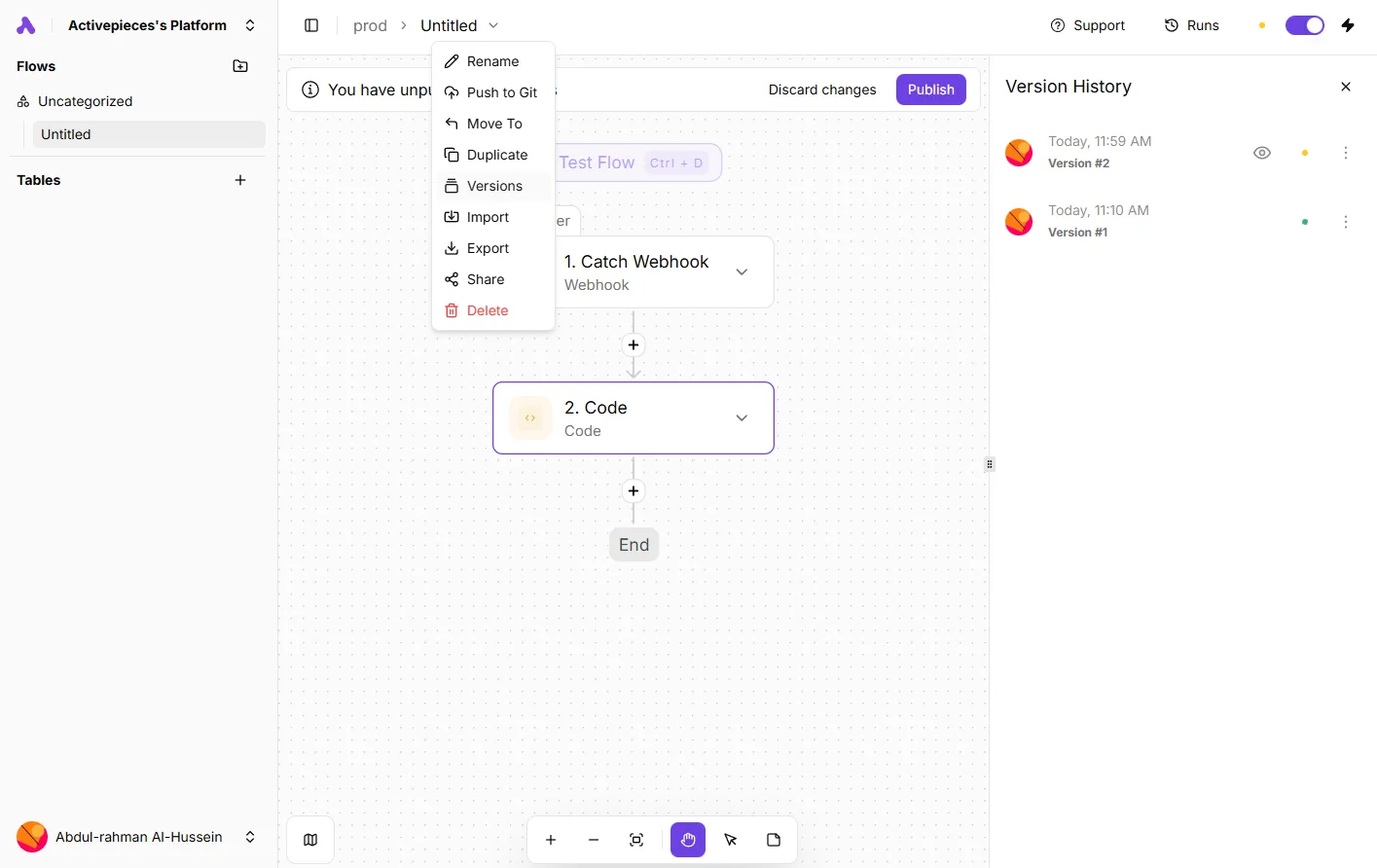
The version history below shows two saved versions of one such flow, each with a timestamp, so you can go back to the one that worked after a bad edit.
That costs some setup time, but it can be cheaper than moving up a plan.
## Otter costs versus Fireflies, Fathom and Read AI
On price, none of these four tools is cheap or expensive until you know how many people will record and for how many hours. Each vendor makes the real cost turn on a different limit.
A price copied from a review site or an older article is the quickest way to budget wrongly, so pull each number from the vendor's page on the day you decide.
The table lays out the five places where that happens for Otter, [Fireflies.ai](https://fireflies.ai/pricing), Fathom and [Read](https://www.read.ai/plans-pricing) AI.
| | Entry paid price per seat | Free-plan limits | Enterprise price published | Storage limits | Security features |
|---|---|---|---|---|---|
| Otter | Per-seat rate, which rises with every person you add | Capped transcription, so heavy users hit the wall in weeks | Quoted by sales, so you cannot budget until you ask | Check whether history is kept or trimmed | Look for single sign-on and admin controls on higher plans |
| Fireflies.ai | Per-seat rate, with annual and monthly prices that differ | Caps on recording or AI features | Confirm on its page whether a number is shown | Check per-seat storage and retention | Check which controls sit above the entry plan |
| Fathom | Per-seat rate, so compare it against your headcount | Limits on which features stay free | Confirm whether a figure is listed | Check how long recordings stay available | Check admin and sharing controls by plan |
| Read AI | Per-seat rate, with plan names that differ from the others | Caps on meetings or reports | Confirm whether a figure is listed | Check retention by plan | Check access controls by plan |
Of the five questions in the table, seat price is only one. The free-plan and storage columns tell you how soon you'll have to move to a paid plan, and the Enterprise column tells you whether you can plan the bill at all.
So the cheapest choice is whichever tool's limits sit furthest from your own usage. A team of two heavy recorders and a team of twenty light ones shouldn't buy the same plan.
## Getting an Enterprise quote that holds up
Price your own usage first, then put your questions to Otter sales in writing. **A quote built on a guess about your meetings is a quote you'll pay for twice.**
Here's the order I'd do it in.
**A quote built on a guess about your meetings is a quote you'll pay for twice.
1. Pull the last 90 days of meetings by exporting your calendar for the quarter. Three months smooths out the odd slow week and the crunch before a launch, so you see what a normal stretch costs you, not a best or worst case.
2. Count recorded hours and recorders. Add up the hours you would actually want transcribed, and count the people who would be recording, not everyone who attends. A handful of heavy recorders and a crowd of occasional ones need different plans, and this count tells you which you are.
3. Send written questions. Ask about the monthly transcription-minute cap and what happens past it, whether Otter trues up seats mid-term when headcount grows, how much the price can rise at renewal, how long Otter retains recordings, whether single sign-on (SSO) comes with the plan or costs extra, and how it bills overage. Written answers can be pointed to later; a phone call can't.
4. Trial Business by running it with your real recorders on real meetings, and watch how close they come to the caps you just asked about. Treat it as a rehearsal for the Enterprise numbers, not a preview of them.

## What to do this week before you buy
Spend this week on five jobs, in this order, and you'll walk into the sales call holding your own numbers instead of the vendor's, which means you can reject bad terms.
Skip the counting and you pay for the gap later, in an overage or a meeting nobody can find notes for.
A typical employee sits through 31 hours of meetings a month, and Otter Pro's 1,200-minute (20-hour) cap covers about 65% of that, meaning you'll need to choose which meetings get recorded.
That leaves roughly a third of meetings outside the cap. Either those go unrecorded, or you're pushed to a higher plan you never priced.
1. Count your recorded meetings and hours by pulling a month of calendars and total the meetings you would actually want transcribed. Skip the ones nobody would ever look up.
2. Separate recorders from readers. Some people run the meetings. Others only read the notes afterward. If the plan charges the same for both, you want to know before you sign.
3. Re-check the pricing page on purchase day. Prices and limits get revised. Read the page the day you buy, not the version from your notes.
4. Request two competing quotes. Ask Otter's sales team for an Enterprise quote and ask one rival vendor for theirs. Give both the same usage count so the numbers compare.
5. Decide where notes need to end up. If summaries must land in your project tracker or shared drive, confirm each plan supports that. A transcript stuck in one app costs someone's time every week.
Done by Friday, this turns a price list into a budget you can defend.
## What Activepieces does about this
Activepieces doesn't change what Otter charges. It addresses one line of the bill, the integrations that sit on higher plans than the one you priced.
Activepieces is an automation tool that moves meeting notes into a CRM, task tracker or shared drive, so a plan upgrade isn't the only way to get a summary where your team works.
Before you count that as a saving, confirm which trigger your Otter plan exposes, such as an export, an email or a webhook, because the flow can only start from something Otter actually sends.
The cost of the flow is easier to forecast than most things in this article. Activepieces bills 1 credit per flow run however many steps the flow has, and the free plan includes 1,000 credits a month. Flows are unlimited on every plan, including free.
Multiply meetings per month by the number of flows each one triggers, and you have the figure to put beside your Otter total. Zapier bills per task and Make per module, so a long flow costs more there.
Each vendor's own pricing page states its rate, and you should read those on the day you decide.
Activepieces is open source under the MIT licence for its community edition, so you can read the code and self-host it if your compliance team won't let meeting data pass through another vendor's cloud.
Self-hosting trades the credit allowance for running your own server, and some features sit in a separate commercial edition. Check which one covers what you need before you commit.
Put the automation in your Enterprise quote conversation as leverage.
If you can say that notes reach your CRM through a flow that costs a known number of credits, you can ask Otter what an integration tier is worth and decide whether it's worth paying for.
## Frequently asked questions
### Does Otter AI Enterprise have a public price?
No, **Enterprise is quoted by Otter's sales team**, so there's no number on the pricing page to compare against. The cost of that is practical: you can't budget until you've talked to them, and the quote will reflect your seat count and usage.
Walk in with your own numbers, because the person who knows your usage best sets the starting point.
### Free trials
Is there a free trial of Otter Enterprise? Don't count on one, because a quoted plan usually means any trial is something you negotiate rather than click.
If you want to test it, ask sales for a pilot with a small group and get the terms in writing. That way you learn how your team uses it before you sign for everyone.
### Guest seats
Does Otter charge for guests who don't record? Generally no, since seats are meant for people who record and transcribe, not for people who only read what's shared with them.
Confirm that in your contract wording, though. If the definition of a "user" is loose, a few guests who start recording can quietly become paid seats.
### Upgrading mid-contract
Can I move from Business to Enterprise mid-contract? It's often negotiable, but treat it as a contract question, not a settings change.
Before you sign the Business plan, ask how an upgrade works and whether what you've already paid carries over. Skipping that question is how you end up paying twice for the same months.
### Training on customer data
Does Otter train its models on customer data? Otter's privacy policy describes using de-identified data to improve its service, so read the current policy rather than assuming your meetings are excluded.
If your calls contain client or patient information, ask sales what the Enterprise agreement says about training and put the answer in the contract. A verbal assurance won't protect you later.

## Related reading
- [Otter.ai Pricing 2026: Free, Pro & Business Plans](https://www.activepieces.com/blog/otterai-pricing-2026-free-pro-business-plans)
- [Best Otter.ai Alternatives for AI Transcription (2026)](https://www.activepieces.com/blog/best-otterai-alternatives-for-ai-transcription-2026)
- [Kestra Enterprise Edition Pricing: A 2026 Guide](https://www.activepieces.com/blog/kestra-enterprise-edition-pricing-a-2026-guide)
## References
- [Peter Sorgenfrei](https://www.petersorgenfrei.com/short-form/83-meetings-are-a-waste-of-time)