Major financial institutions and global fintech firms run these types of workflows in production to manage complex automation environments. For a full list of **748 integrations**, visit a comprehensive directory of automation components to start free, so you can immediately begin automating your existing software stack. ## Adding triage and verification logic to patient intake A branching workflow is required for automated triage, where a logic engine evaluates form data to separate routine administrative tasks from immediate clinical interventions. ### Building conditional branches for urgent symptoms Clinical safety relies on the workflow’s ability to distinguish between a routine prescription refill and an acute symptom like chest pain. Using a router or "Branch" step, the automation inspects the 'Symptom Severity' field from the initial form submission to determine the next action. This logic prevents life-threatening conditions from sitting in an unread administrative inbox. 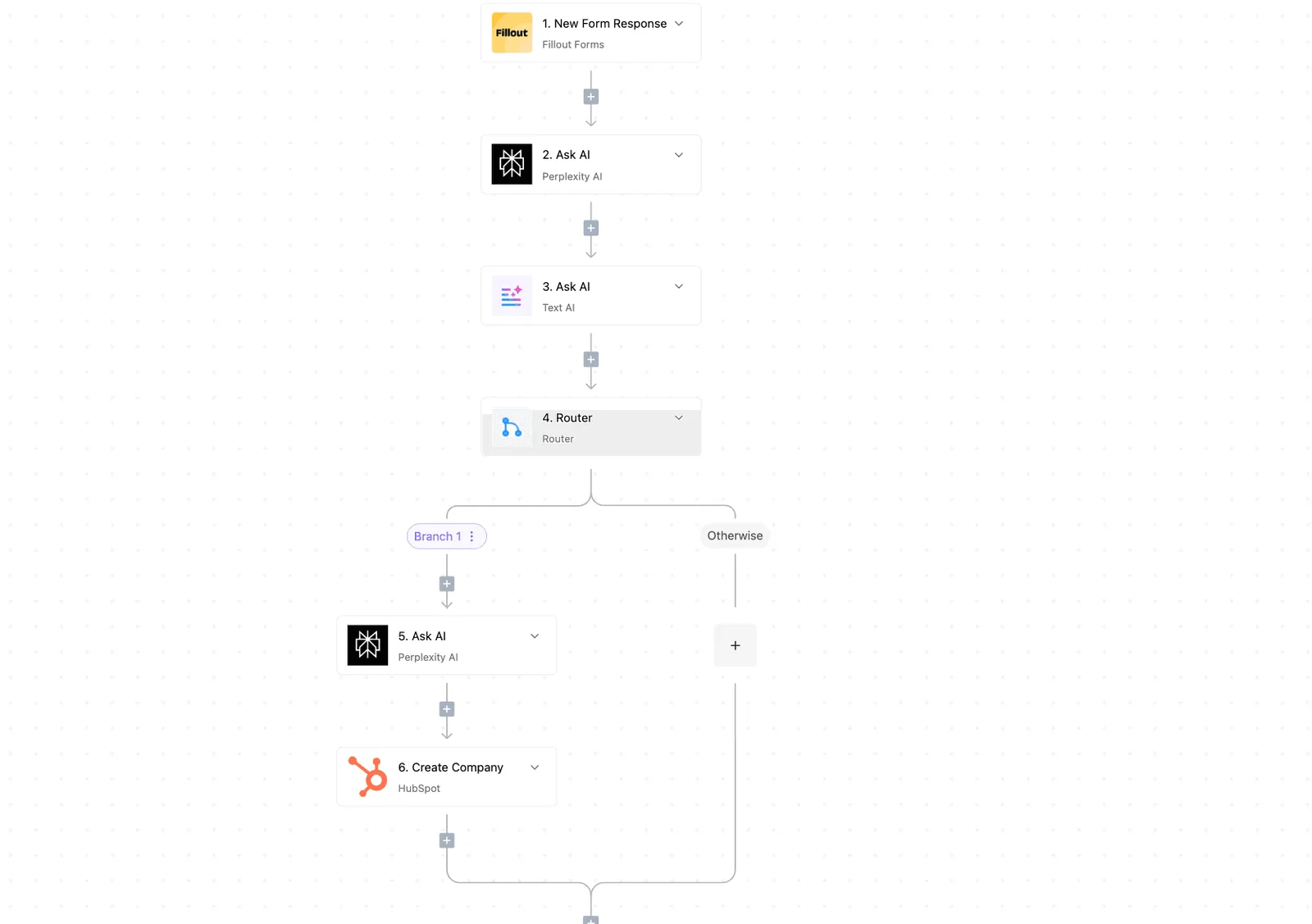 ### Automating the insurance card upload to Google Drive HIPAA Moving patient documents directly into an environment with an executed Business Associate Agreement (BAA) is necessary for securing Protected Health Information (PHI). When a patient uploads an image of their insurance card, the automation fetches the file and transfers it to Google Drive. Google Drive is a cloud storage service that supports HIPAA compliance when configured for enterprise healthcare use. This direct transfer eliminates the need for staff to download sensitive images to local, unencrypted workstations. ### Routing patient alerts to the right clinician Effective triage concludes by delivering the right information to the specific clinician responsible for that patient's care. | Scenario | Action Taken | Recipient | | :--- | :--- | :--- | | High-risk branches | Sends a high-priority alert via an internal communication tool like Slack or Microsoft Teams | The on-call physician | | Routine updates | Creates a new record in the Electronic Health Record (EHR) | The front-desk coordinator | | Insurance upload fails | Generates a follow-up task in the practice management software | The billing department | ## Choosing the right engine for healthcare data movement Matching the platform’s security architecture to the specific HIPAA technical safeguards governing your patient data is the first step in selecting an integration engine. ### Zapier: The widest app support for small clinics Zapier is the entry point for clinicians because its library of pre-built connectors covers a variety of specialized medical scheduling and billing software. Zapier's own listed certifications don't include HIPAA compliance at any tier, including Enterprise, where it instead adds SCIM provisioning and audit logs. This means smaller clinics on lower-priced plans can't legally process PHI through the platform. ### Activepieces: The choice for data residency and self-hosting Organizations that must maintain absolute control over their infrastructure to satisfy internal risk assessments or specific data residency requirements should choose Activepieces. Because it has a self-hosted version, a hospital’s IT department can install the engine on their own private servers behind a firewall. This architecture eliminates the third-party transit risks inherent in cloud-only providers. A transparent codebase accelerates security approvals more effectively than a vendor's promise. Activepieces maintains an MIT-licensed core, allowing a compliance team to clone the repository and inspect the worker architecture before running it in a fully air-gapped environment. | Feature | Zapier | Make | Activepieces | | :--- | :--- | :--- | :--- | | Self-Hosting Option | Not Available | Not Available | Available | | Visual Logic Builder | Multi-branch Canvas | Multi-branch Canvas | Multi-branch Canvas | ### Make: Complex logic for enterprise health systems Make is designed for health systems that require sophisticated routing, such as directing a patient to different specialists based on the specific ICD-10 codes found in an intake note. Its visual canvas enables advanced data manipulation and error-handling routines. ## Troubleshooting common intake automation errors and API limits Strict security protocols or vendor-imposed data throttles that protect the Electronic Health Record (EHR) from being overwhelmed are the typical causes of automation failures. ### Fixing the '415 Unsupported Media Type' error on uploads When the automation attempts to push a file format that the EHR's document management system isn't configured to accept, the 415 error occurs. This often happens with high-resolution images from a patient’s smartphone. To resolve this, use a conversion step in your workflow to normalize all incoming attachments into a standard PDF format before the upload action. ### Managing EHR rate limits during peak morning hours API rate limits are the maximum number of requests a platform allows within a specific window. Exceeding them will cause the EHR to reject new patient data, so automations must queue the requests rather than let them drop until the next cycle begins. | EHR Vendor | API Rate Limit Policy | Impact on Clinical Workflow | | :--- | :--- | :--- | | athenahealth | 500,000 requests per day | High-volume clinics must batch non-urgent updates to avoid midday lockouts. | | Epic | Throttled per application | Developers must optimize queries to prevent the EHR from slowing down for all users. | | Cerner | Tiered by contract | Capacity is restricted by your specific licensing level rather than technical overhead. | When these thresholds are reached, configure your automation to queue the requests rather than dropping them. This "retry with exponential backoff" strategy ensures that data collected during peak hours is eventually synced once the traffic subsides. ### Fixing special characters that break database records Standard database fields often reject "illegal" characters like ampersands or quotation marks, which are common in compound surnames or clinical notes. Use a "Find and Replace" function within your workflow to strip or escape these characters. This keeps the data payload in line with the strict validation rules of the destination system. ## The Monday morning intake automation checklist Identifying the specific administrative bottlenecks that currently delay patient care during the high-volume Monday morning surge is how a successful pilot begins. Automating these tasks ensures that clinical staff can focus on immediate triage rather than manual data entry into the Electronic Health Record (EHR). 1. Audit current form fields to identify which data points, such as primary insurance providers or referral IDs, are consistently formatted and suitable for programmatic extraction. 2. Sign a Business Associate Agreement (BAA) with your chosen automation vendor to ensure all data processing meets the technical safeguard requirements mandated by HIPAA. 3. Map one high-volume field, such as the patient's date of birth, from the digital intake form to the corresponding cell in the registration system to verify that the connection is stable. 4. Run a 5-patient shadow test by allowing the automation to process the records in a draft state while a staff member manually verifies each entry for clinical accuracy. This sequence establishes a baseline of trust in the system's ability to handle PHI before you scale to full-scale autonomous entry. For the extraction phase, Claude Haiku 5.5 is the most efficient choice for high-volume routing because its low latency prevents backlogs during peak hours. If the intake involves complex handwritten notes, Gemini 3.6 Flash has the multimodal capabilities to interpret diverse document types. Build your first HIPAA-compliant intake flow at [https://www.activepieces.com/pieces](https://www.activepieces.com/pieces) and start free. ## Frequently asked questions ### Do I need a BAA with my automation provider? To remain compliant with HIPAA Security Rule requirements, you must execute a Business Associate Agreement (BAA) with any automation provider that processes Protected Health Information (PHI). This legal contract ensures the vendor assumes liability for safeguarding data and subjects their infrastructure to mandatory security audits. If you use a provider without a BAA, you're strictly prohibited from passing patient names, birth dates, or clinical notes through their servers. This limitation restricts your automation to purely administrative, non-identifiable tasks. ### Can I automate intake with a legacy desktop EHR? Legacy Electronic Health Record (EHR) systems that lack modern APIs can still be automated by using a local gateway or a secure file-transfer protocol. Because these older databases reside on on-premise servers rather than the cloud, you must bridge the gap using specific methods.  * One option is a secure file-drop where the automation saves a PDF to a watched folder and the EHR’s native import utility pulls it in. * Another is a specialized interface engine like Mirth Connect that translates webhook data into the HL7 format required by older medical software. * You can also use Robotic Process Automation (RPA) tools that simulate keystrokes to manually enter data into the desktop user interface. ### How do I handle multi-language intake forms? Automating multi-language intake requires a reasoning model to detect the patient’s primary language and route the data to the correct clinical translation workflow. Modern LLMs allow you to process these forms without building separate logic for every dialect. * Setup: **1-2 weeks** * Single Clinic Pilot: 8-12 weeks * Multi-site Rollout: 12-24 weeks Once the pilot demonstrates that the translation logic is accurate, you can scale the workflow to all satellite locations. For high-volume translation and routing, Claude Haiku 5.5 by Anthropic has the speed to process forms in real-time. If the intake involves complex medical history that requires deep reasoning to categorize, Gemini 4 Argon by Google offers the frontier-class reasoning needed to ensure no clinical detail is lost in translation. ## Related reading - [What is Intelligent AI Process Automation?](https://www.activepieces.com/blog/ai-process-automation) - [9 Best Business Process Automation Tools in 2026](https://www.activepieces.com/blog/best-business-process-automation-tools) - [Process Automation Benefits: 9 Advantages You Need](https://www.activepieces.com/blog/benefits-of-workflow-automation)You don't hire for this technical implementation — you describe it.