# Perplexity Decider Integration: Setup Guide (2026)
By Emmanuel Osei-Bonsu · 2026-11-22 · Source: https://www.activepieces.com/blog/perplexity-decider-integration-setup-guide-2026
---
To get there fastest, make a hosted call: use the Sonar API, wire it into your ticket flow with a workflow tool like [Activepieces](https://www.activepieces.com) so you can test it without writing glue code, check the output on a few real tickets, and self-host Decider only if you must run the model yourself.
## Fastest path to Perplexity Decider
(If you self-host, it costs you a GPU and an ops burden, and a mis-routed ticket costs more than either.)
### What 'Decider' refers to in Perplexity's docs
Nobody should read "Decider" as a nickname for prompting Sonar to make decisions. It is an open model family, and Sonar is a separate, hosted API. Checked against Perplexity's docs on 2026-11-22, the three names map like this:
| Name | What Perplexity's docs call it | Parameter size | Access |
|---|---|---|---|
| Decider v1.3 | Decider | 27B | Open weights |
| Decider Flash v1.3 | Decider Flash | 4B | Open weights |
| Sonar API | Sonar | Not stated | Hosted API |
Read the table as a warning about naming. If a tutorial tells you to "call Decider" with an API key, ask which row it means. The two Decider rows are weights you download, meaning they're not built into the application.

**Only Sonar is a service you call**.
If you call the API, all you need is a key and an HTTP request. Self-hosting the 27B model needs a GPU that holds it, and the memory figures from [Aquanode](https://www.aquanode.io/models/qwen3.8/perplexity-ai-pplx-decider-v1-27b) show how fast that gets expensive:
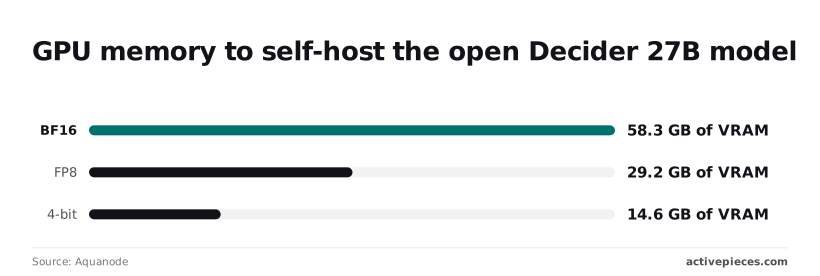
- In BF16 the model needs **58.3 GB of VRAM**. That rules out any single 48 GB card, so you're renting a larger GPU or splitting the model across two.
- In FP8 it needs 29.2 GB. A single 32 GB card has barely any room left, so plan for a bigger one.
- In 4-bit it needs 14.6 GB. This fits a 16 GB card on paper, but compressing the weights this far can change borderline calls, so test it on your hardest tickets.
Treat each number as a floor. These are weight sizes, and long inputs need extra memory on top.
You need four things in hand before you write any branching logic:
1. An API key for the hosted route, or a GPU that meets the numbers above for self-hosting.
2. Twenty or so real past tickets, including the angry ones. A decision step that handles polite emails and fails on a furious refund demand will send that customer to the wrong queue.
3. A fallback route for when the call fails or the answer's unclear. A human queue is safer than a guess.
4. Somewhere to run the step. [Activepieces](https://www.activepieces.com) runs it with unlimited flows on every plan, free included, or you can use a script you already have.
Once those are ready, the first successful call is the only thing left to prove.
## Five Stages to a Working Perplexity Decision Step
You get from nothing to a working step in five stages, and each ends with something you can run:
- a key
- a test call
- a yes/no answer
- a branch
- three checked inputs
### Work through the stages in order
(Do them in order, because a failure at stage four is almost always a stage-two problem in disguise.)
Open the API Keys tab in your Perplexity account's API settings and create a key. Copy it into your automation tool's secret store, not into the step itself. You're done when the key is saved somewhere only your workflow can read.
### Make the first call
Send a POST to `https://api.perplexity.ai/chat/completions` with the header `Authorization: Bearer `. The body needs a `model` (use `sonar`) and a `messages` array with one user message.
Use a real ticket, such as an angry "charged twice, fix it today" email. A 200 response with text in the first choice's message content is your proof. If you get a 401, the key's wrong; fix that before anything else.
### Force a one-word YES or NO answer
Add a system message: "Answer with exactly one word: YES or NO. Is this customer asking for a refund?" Run the same ticket again. You're done when the reply is one word with no explanation.
Free-text answers break the branch later, and a wrong escalation costs a customer an unnecessary hand-off.
Add a condition that checks whether the reply, trimmed and lower-cased, equals `yes`. Route YES to your refund queue and everything else to the default queue.
Sending anything unclear to the default is deliberate: a missed refund is slower to fix than a human reading one extra ticket.
### Test the Perplexity decision with three tickets
Run **one clear YES, one clear NO**, and one ambiguous message, such as "I guess I'd like my money back, but also the app crashed." Check each landing queue by hand.

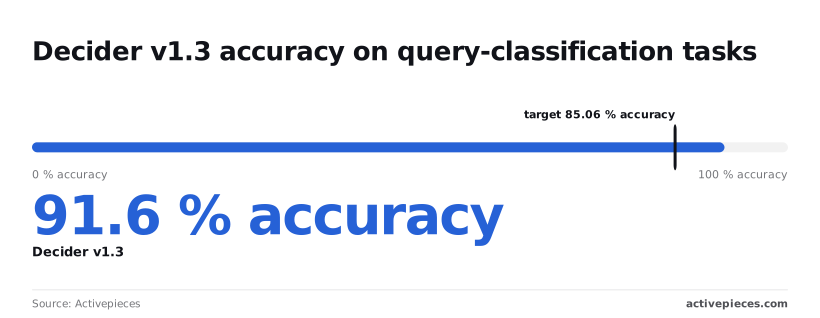
Of the three, the ambiguous case matters most. A ([source](https://www.activepieces.com/blog/perplexity-decider-how-the-decisions-api-works)) reports **91.6% accuracy for Decider v1.3** against Perplexity's own classifiers, but that is a vendor-reported result, not independent validation.
That's a vendor figure, and it means roughly one wrong call in twelve on Perplexity's own test data. Your tickets aren't that data, so your three inputs are the only check that counts.
If all three land correctly, the step works, and what remains is deciding how it behaves when it hits limits.
## Perplexity API Limits and Errors With Fixes
Read the limits first, because a wrong retry costs more than a slow one. Perplexity caps requests per minute by usage tier and by model, and every failure your step sees comes back as a small set of status codes, each with one fix.
### Perplexity API rate limits by usage tier
Start from the usage tier your account sits in, because the tier sets how many requests per minute each model accepts.
The table shows the starting tier, Tier 0, for the four search models. Three of them share one ceiling, and the deep research model gets a tenth of it.
| Model | Tier 0 requests per minute |
|---|---|
| sonar | 50 |
| sonar-pro | 50 |
| sonar-reasoning-pro | 50 |
| sonar-deep-research | 5 |
At five requests a minute, ten customer emails sent to sonar-deep-research take two minutes just to be accepted, which means emails queue before processing begins. Route only the cases that need deep research to it.

Higher tiers raise these ceilings, but I'm not quoting those figures here; read them off Perplexity's rate-limit page on the day you build.
### Perplexity API pricing and credits
Before you budget anything, know that Perplexity bills per token, with separate input and output prices per model, and the prices differ between models. Context limits differ as well.
I haven't confirmed current figures, and I won't give a number that may be stale. Copy the prices and context limits from the vendor's pricing and model pages, and write the date next to them.
A cost estimate built on last quarter's price is the kind of mistake a finance team finds before you do.
### Common error codes and fixes
| Status | Likely cause | Fix |
|---|---|---|
| 401 | Missing, mistyped or revoked API key | Regenerate the key, and check that the header carries it exactly |
| 402 | Credit balance is empty | Top up, then replay the failed request once |
| 429 | Requests per minute exceeded for that model | Wait and retry with growing delays; slow the queue |
| 400 | Malformed body, unknown model name, or bad parameter | Don't retry; fix the request and compare against the docs |
| Timeout (no status) | A slow answer, especially from a research-style model | Raise the client timeout, or pick a faster model |
When a 401 or 400 is retried, the same broken request goes out again, and a 402 retry just burns your retry budget. Only 429 and timeouts deserve an automatic retry.
**If the call fails or the reply is vague, route the case to a person instead of guessing.** A wrongly auto-closed angry customer costs more than a slow human review, so treat every unresolved error as "needs a human."
## Running the Decision Step in Activepieces
### Set up and test response branching
You can call Perplexity from a trigger and branch on the answer in Activepieces without writing code, and the free plan's 1,000 credits a month cover a test on your twenty tickets; when they run out, flows stay on and runs wait until the credits refresh.
An unresolved error can land in a human queue instead of closing a ticket.
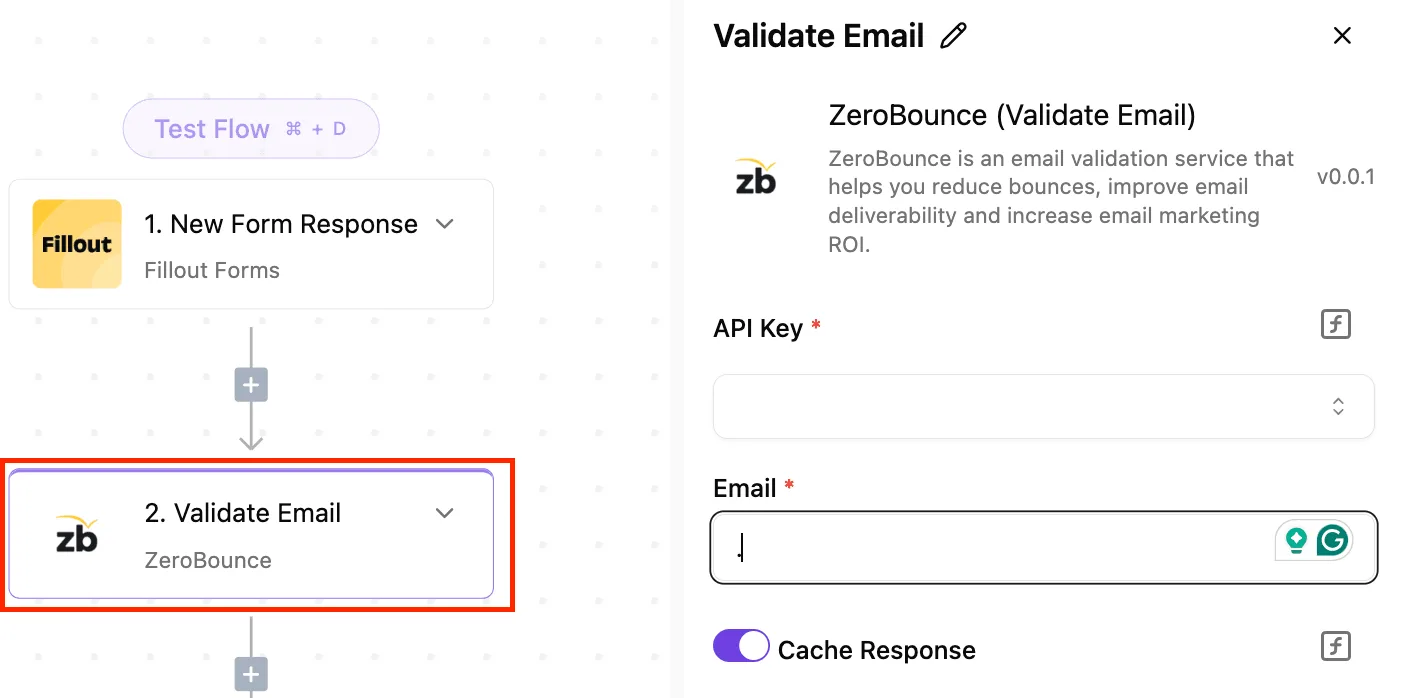
Zapier or Make can build the same flow; pick whichever your team already pays for. I haven't verified anything about the Perplexity connector beyond what the screenshot below shows.
What I can point to is the catalogue it would sit in: Activepieces counts 750 integrations in the packages/integrations/community directory of its MIT-licensed open source repo, and its Integrations Framework and MCP Server documentation describe the same integration action that runs as a step in your flow being exposed as a tool on the per-project MCP server, reachable from Claude, ChatGPT or Cursor.
So a decision step you build and test here can later be called by an agent without being rebuilt, and MoneyGram, Moneypenny, Alan and FundingSocieties run Activepieces in production.
Create the key in your Perplexity account's API settings, then paste it into a new Perplexity connection in Activepieces. Give the connection a name that says what it's for. If a key leaks, you want to know which flow to pause.
Run the step once with a fixed, harmless question before wiring anything else. One successful response tells you the key, the connection and the step all work. If it fails here, nothing downstream is the cause.
### Prompt Perplexity for one word and branch
Tell the model to reply with one word from a list you give it, such as "refund", "bug" or "unclear". A free-text paragraph can't be branched on. Always include "unclear", so a confusing email has somewhere safe to go.
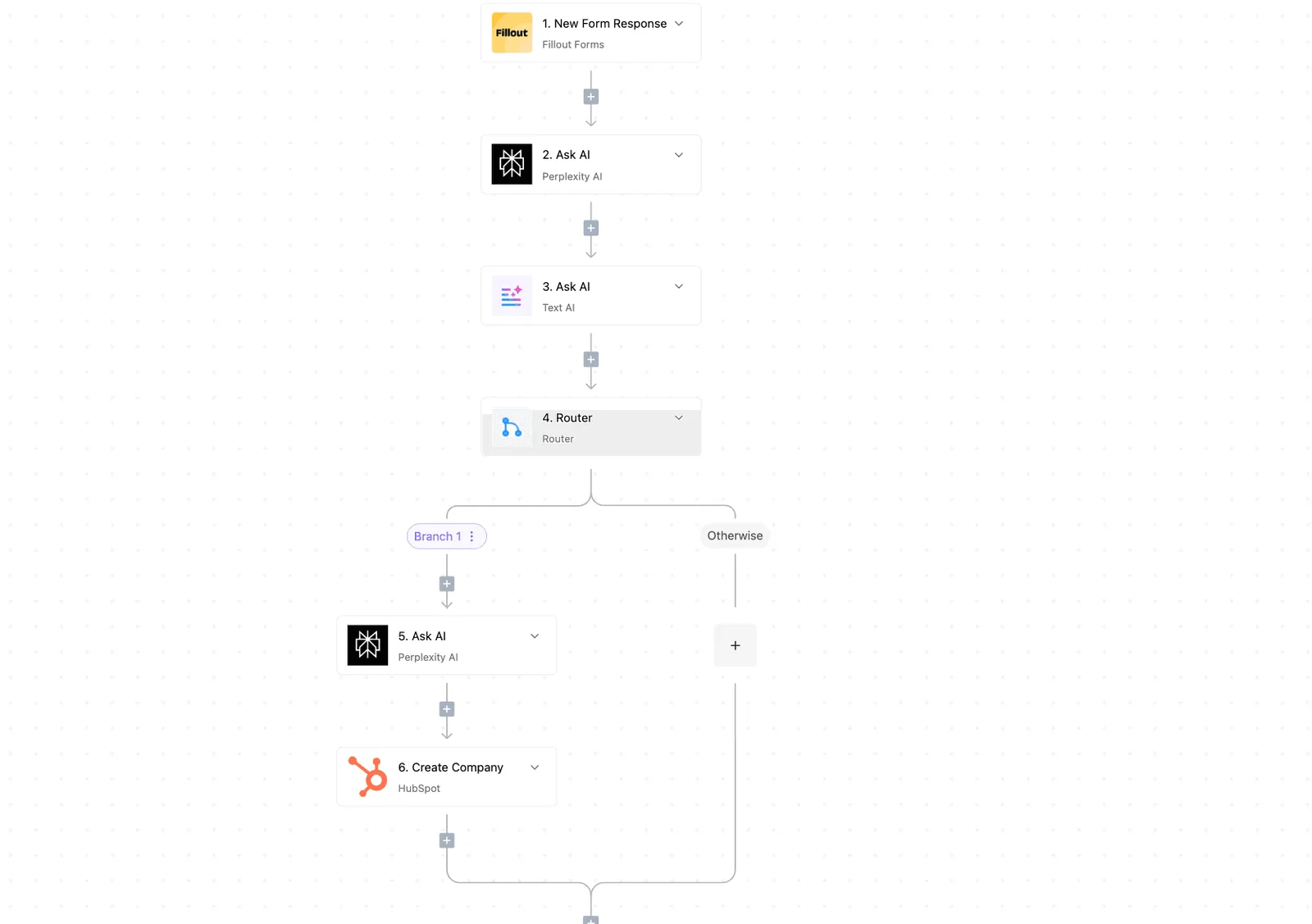
In the flow below, a Fillout form response starts things off and passes through Perplexity AI and a text step.
It then splits at a Router into a branch that runs a second Perplexity step and creates a HubSpot company, plus an Otherwise path with nothing on it yet.
Your Otherwise path is where "unclear" and failures belong.
Build the same way: route on the exact category words, and put the human-review step on Otherwise. Check the retry options on each step in the builder on the date you build.
A retry that quietly repeats a bad call is worse than a visible failure.
### Test the workflow and check the cost
Use one clear case, one angry email and one message that fits no category. The angry email is the real test: confirm it reaches a person, not an automatic reply. Then look at what a run costs you.
On its [pricing page](https://www.activepieces.com/pricing), [Activepieces](https://www.activepieces.com/pricing) lists three plans. Free is $0 per month, so you can build and test this flow before spending anything.
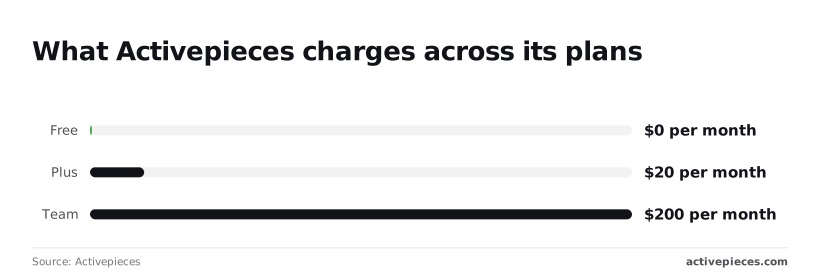
Plus is $20 per month, a small sum if one run saves a mishandled complaint. Team is $200 per month, ten times Plus, so move up only when several people need to work in the same flows.
Check the page again on your build date, because plan limits change.
## Pre-launch checklist for the Perplexity decision step
Start with five checks, in this order, before the decision step touches a live ticket. Each one guards against a specific way a wrong answer reaches a customer, and a wrong answer costs more than a slow one.
Read the list below as a checklist you can finish in an afternoon, not a project plan. It is what to do on the first day.
- Confirm the date on the Perplexity docs page you are building from against the changelog, so you know the model names and limits you copied are still the ones in force.
- Set a spend cap or a credit alert: in your account, so a loop that retries by mistake stops itself instead of running up a bill you find at month end.
- **Add a fallback branch for unclear answers**, so a vague or empty reply goes to a person instead of being treated as a yes or a no.
- Log each decision together with the input that produced it, so when a customer writes in angry you can see exactly what the step was given and what it said.
- Recheck the docs and changelog monthly, and put the date of each check in your notes.
If I could keep only one of these, it would be the third item. Picture a refund request that says "I was charged twice, but maybe it was my husband's card."
A step that has to choose between "refund" and "no refund" will choose one, and it'll sound sure about it.
Approve that refund wrongly and the money may be gone for good. Deny it wrongly and you have a customer who now writes a review. The fallback branch sends that message to a human, who costs you a few minutes and avoids both outcomes.
A step that has to choose between "refund" and "no refund" will choose one, and it'll sound sure about it.
Without the logged input, a bad decision is only a bad decision, and you can't tell whether the prompt, the data or the model was at fault. With it, you can replay the exact case and change one thing at a time.
That is why the fourth item makes the third one improvable.
Because docs change, the date you verified a claim is part of the claim. The first and last items are the same habit at different times.
Write that date down every time you check, so that whoever picks this up after you knows how old your information is.
## Frequently asked questions
Before you trust any answer below, date it when you check it, since each depends on vendor pages that change.
### Is there an official Perplexity Decider product?
Yes: Perplexity Decider is a released decision model, available through the Perplexity Decisions API, OpenRouter and Hugging Face. The step is usually a call to one of Perplexity's Sonar models, with your own prompt and your own branching around it.
Look the name up in the docs again before you rely on this, because a wrong guess here means building around a feature that doesn't exist. Don't mix it up with Gemini Decision 1, which is a Google model and a different vendor.
### Can I use Perplexity for decisions without writing code?
Yes, if your automation tool can send an HTTP request. Zapier and Make both have a generic request step that can call Perplexity's API, and a later step can read the answer and route the ticket.
The no-code part ends at the answer: you still have to decide what happens when the reply isn't one of the values you expected. A refund request sent down the wrong branch costs more than one that waited for a person.
### Does the Perplexity API cost money to test?
Assume it does until the pricing page says otherwise. API usage is billed separately from a consumer subscription, so don't take it for granted that a paid chat plan covers your test calls.
Read the current pricing and any free credit terms on the day you test, and write down what you find. Keep your first tests small, using a handful of real past messages, not a bulk run.
### Why does my decision come back with citations or extra text?
Left alone, Sonar models add sources and explanation, because they are built for search-grounded answers. Ask for one fixed set of allowed values, or a structured response if the docs for your model support it, and read only that field.
Then check the result against your allowed list. If it doesn't match, send the item to a person and don't guess.
An angry customer email is the best test: if the step answers it with a paragraph and three links, your branch has nothing to read.
### How do I keep the API key out of shared workflows?
Put the key in your automation tool's credential or secrets store, never in a prompt, a text field or a shared document.
Give each environment its own key, so a leaked test key can't spend production money. When someone leaves the team, replace the key instead of hoping nobody copied it.
## Related reading
- [Automating Zendesk Ticket Routing by Chat Workflow](https://www.activepieces.com/blog/automating-zendesk-ticket-routing-by-chat-workflow)
- [Perplexity Decider: How the Decisions API Works](https://www.activepieces.com/blog/perplexity-decider-how-the-decisions-api-works)
- [Perplexity Decider Pricing 2026: Plans and API Costs](https://www.activepieces.com/blog/perplexity-decider-pricing-2026-plans-and-api-costs)
## References
- [Aquanode](https://www.aquanode.io/models/qwen3.8/perplexity-ai-pplx-decider-v1-27b)
- [Activepieces](https://www.activepieces.com/pricing)
- [Activepieces](https://www.activepieces.com/blog/perplexity-decider-how-the-decisions-api-works)