| Buyer | Photoshop single app, annual prepaid | Annual, billed monthly | Month-to-month | Creative Cloud Pro | |---|---|---|---|---| | Solo creator | 1 seat, cheaper plan | 1 seat | 1 seat, highest single-app rate | 1 seat at the all-apps rate | | 5-person team | 5 seats, cheaper plan | 5 seats | 5 seats | 5 seats at the all-apps rate | | 20-seat company | 20 seats, cheaper plan | 20 seats | 20 seats | 20 seats at the all-apps rate | Because Pro costs more per seat than the single app, it only wins when a seat uses other Adobe apps. Prepaid annual is cheapest, but it ties up a year of cash. If client work is lumpy, month-to-month costs more per month and spares you paying for idle months. Give Pro only to the people who open other Adobe apps, because one all-apps seat handed to a Photoshop-only designer is a quiet subsidy. ### Photoshop pricing for a twenty-seat team At twenty seats, admin controls and any volume terms matter more than the sticker. Audit who logs in before renewing, since an unused seat costs as much as a busy one. Because the subscriptions carry it, Adobe can price like this. Its Digital Media segment earned [$7,707 million in FY2019](https://www.sec.gov/Archives/edgar/data/796343/000079634326000003/R49.htm), which means a business of that size already depended on recurring seats. In FY2020 the segment reached $9,233 million, and in FY2021 $11,520 million, the biggest jump at roughly $2.3 billion in one year, meaning **growth peaked in that fiscal period**.  It then slowed to $12,842 million in FY2022 and $14,216 million in FY2023, meaning expansion decelerated by more than half from the prior year. The segment then reached $15,864 million in FY2024. That's about double FY2019, so Adobe has little reason to discount the seats it already holds. ## Photoshop generative credit limits by Adobe plan Adobe caps generative use per plan, not per app. Creative Cloud Pro carries 4,000 monthly generative credits and Standard carries 25, so Standard is the plan where a heavy generative-fill habit runs dry first. Three plans look alike on credits while Standard doesn't, as the table below shows for each plan's allowance as checked on 5 November 2026. | Plan | Monthly generative credits | Cloud storage | At zero credits | |---|---|---|---| | Creative Cloud Pro | 4,000 | Included | Standard tools keep working; generative features are limited | | Standard | 25 | Included | Standard tools keep working; generative features are limited | | Photography 1TB | 1,000 | 1TB | Standard tools keep working; generative features are limited | | Photoshop single app | Listed separately by Adobe | Included | Standard tools keep working; generative features are limited | When you run a generative feature, such as filling or extending an image, Adobe deducts a credit. Ordinary editing spends none. Count only the jobs that use generation, and a retoucher who mostly masks and cleans up may never touch the cap. If you sync large libraries, Photography 1TB is the plan for you, since it states its storage in the name. On the other plans, check the storage line on Adobe's page against your file sizes. On a shared login, one allowance is split across everyone using it, so one client's assets quietly eat the space and credits another client's work needed. ## Hidden costs in Adobe's annual and monthly terms On a shared login, none of Adobe's added costs lands on the client who caused it: an early cancellation fee, a monthly-billing premium, renewal changes, sales tax and $9.99-per-terabyte storage top-ups, leaving whoever manages the shared account to cover charges they didn't incur. Each one needs its own line when you price a retainer. ### Early cancellation fee on annual-billed plans **Cancel an annual plan billed monthly after the first 14 days and Adobe charges 50% of the remaining contract**, per [Adobe Community](https://community.adobe.com/questions-6/i-need-someone-to-explain-this-how-does-the-early-cancellation-fee-work-431179), which means the grace window is your only exit path before the penalty takes effect. **Cancelling in month 1 costs $291.50**, a real exit bill that is enough to deter some customers from leaving even when dissatisfied. Month by month the fee drops by $26.50. The table below shows that decline, so a lost client in month 2 costs you far more than the same loss in month 6. | Month of cancellation | Early cancellation fee | |---|---| | 1 | $291.50 | | 2 | $265 | | 3 | $238.50 | | 4 | $212 | | 5 | $185.50 | | 6 | $159 | Even at month 6 you owe $159 for software nobody is using. Bill that exposure to the client who triggered the seat, not to the shared pool. ### Renewal price changes  A quote that was right in January is a guess by next January, because Adobe can change the price at renewal. Build a margin for it into the retainer instead of absorbing it. Decline the annual commitment and the same plan costs more per month, which makes monthly billing the other premium. That premium buys flexibility, so charge it only to clients whose work is genuinely short-term. On top of both comes sales tax, so a budget set from the pre-tax price is already short. Storage works the same way: every extra terabyte at $9.99 is a recurring charge that follows whichever project filled it. Pay for All Apps and you get every Creative Cloud program in one price. Audit each seat's real usage before renewal, and move Photoshop-only seats to a single-app plan. ## Photoshop against its closest alternatives on price Photoshop is the right tool for fewer of your seats than the invoice assumes. In [Five Elements' designer survey](https://fiveelements.org.in/designer-community-insights-2/), Illustrator led at 56% of designers, Photoshop followed at 27%, and [Figma](https://www.figma.com/pricing/) held 13%, so these three tools account for nearly the entire designer market. 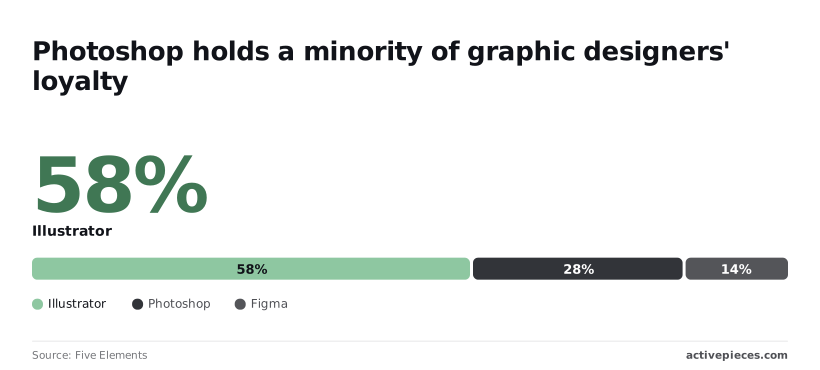 **So most designers' main tool is something else**, and a Photoshop seat is often a secondary tool billed as a primary one. The last column shows which work justifies the Adobe price. The table compares Photoshop with five alternatives. | Tool | Price model | Price | Editing depth | AI allowance | Who should stay on Photoshop | |---|---|---|---|---|---| | Photoshop | Subscription | Set by plan and billing term | Full layers, masks, retouching | Monthly generative credit cap | Compositing and retouching specialists | | Affinity | Free core app | Low | Layers, masks, RAW | Optional paid extras | Anyone needing Adobe file handoff | | Pixelmator Pro | Apple-platform app | Low | Layers, ML retouching | Built-in, no Adobe cap | Windows users or Adobe-standard clients | | Canva | Free tier plus subscription | Per seat | Templates, light edits | Plan-based | Pixel-level work | | Lightroom | Adobe subscription | Adobe plan price | Photo grading, limited layers | Adobe credits | Heavy composites | | Photoshop Express | Free plus paid tier | Low | Quick fixes | Limited | Anything beyond quick fixes | A subscription recurs on every seat at every renewal. A one-time or free tool costs you once. Price idle seats at what they cost you per month, not at what the client sees. For social graphics, product photo cleanup, batch grading and template work, Photoshop's full toolset is rarely needed. Move those seats to Canva, Affinity or Lightroom and stop paying for credits nobody uses. **Photoshop is the tool for complex composites**, client-supplied PSD files with live layers, and generative fill inside a retouching workflow. Keep those seats, and bill the client for them. ## Automating the file handling around Photoshop with Activepieces Nothing in Activepieces, an open-source workflow automation tool with an MIT-licensed core and 747 integrations in its public GitHub monorepo, runs Photoshop or changes what Photoshop costs. It handles the admin that starts once a file is exported, so the seats you keep and bill for stop doubling as filing clerks. ### Manual file handoff work around Photoshop Every finished asset triggers the same unbilled chores. Someone drags the export into the right client folder, pings whoever has to approve it, and types the deliverable into the tracking sheet. None of it needs a Photoshop seat, yet it lands on the people who hold one. On a retainer, that's paid design time spent on clerical work, and the client rarely accepts a line item for "renaming files." ### How exported files move through workflow steps? Starting at a Photoshop export folder, the flow below passes each new file through three steps. Activepieces' published pricing page lists 1 credit per flow run however many steps it has, where Zapier's pricing page bills per task, and it lists 1,000 credits a month and unlimited flows on the Free plan.  Photoshop sits outside it, marked as not run by the workflow. Because a run is 1 credit however many steps it has, the three steps below cost the same as one, and the flow begins where the design work ends. 1. The file is filed in storage under the right client. 2. The approver is notified that it's waiting. 3. The deliverable is logged in a sheet. What it won't do is open, edit, or export anything in Photoshop, and it can't reduce your plan price, your billing term, or your generative credit usage. It also won't decide whether a file is any good; the approver still does that. What you get is a consistent record: each deliverable has a place, a named reviewer who was told, and a log line you can point to when the invoice is questioned. ## What to do on Monday before renewing Photoshop Once you know which seats are doing design and which are doing housekeeping, six checks, in this order, settle whether you renew as is, downsize or switch: 1. Count the people who open Photoshop every week. 2. Check how many generative credits each person burns. 3. Compare monthly and annual billing for the plan you would keep. 4. Find the renewal date and the cancellation window. 5. Trial one alternative on a real file. 6. Re-read Adobe's pricing page. ### Audit Photoshop seats and credit use Pull the admin console's usage view and list who logged in and who actually worked in Photoshop. Every seat that only opens files for review is a seat a cheaper plan or a viewer could cover, and it's quietly billed to whichever client project carries the account. Then check credits: if one person consumes most of the generative allowance, price it into their jobs. Write down the renewal date, then read the cancellation terms for your billing term. Annual plans billed monthly can carry a fee for leaving early, so a decision made the week after renewal costs more than one made the week before. Pick one tool and run a live client file through it, not a demo image. If it handles your layers, exports and handoffs, you have leverage at renewal. If it fails, you have evidence to keep the plan. ## Frequently asked questions ### Is there a free version of Photoshop? You can try the full desktop app free for a limited time, but there is no permanent free tier of it. The trial is long enough to run a real job through, so use it on paid client work rather than on tutorials. If it covers your needs, you have a reason to buy; if you only need light edits, Adobe's free Photoshop Express app may be all you need. ### Can I buy Photoshop once instead of subscribing? Not the current Photoshop: Adobe sells it by subscription. The one-time-purchase option in Adobe's range is Photoshop Elements, a cut-down editor. It lacks features that production teams bill for, so price it against the work you actually deliver, not against the sticker. ### Does Photoshop pricing differ by country? Yes. Adobe sets regional prices, and tax treatment changes what lands on the invoice. Check the pricing page for your billing country, and if you bill a client abroad, work out which currency you're absorbing before you quote a markup. ### Is Photoshop included in Creative Cloud All Apps? Yes, Photoshop is part of the All Apps plan alongside Adobe's other desktop tools. That plan only makes sense if you open several of them every month. Otherwise you're paying for apps nobody uses, and the cost lands on whichever client project shares the account. ### Can I pause or downgrade my Photoshop plan? You can change plans, but I wouldn't count on a pause button. Adobe's rules on timing and fees depend on your billing term, and ending an annual term early can cost money. Read the cancellation terms shown at checkout before you commit. If your workload is seasonal, a monthly term costs more per month but gives you the exit. ## Related reading - [Adobe Creative Cloud Pricing 2026: Plans and Costs](https://www.activepieces.com/blog/adobe-creative-cloud-pricing-2026-plans-and-costs) - [Adobe Acrobat Pricing: 2026 Plans, Costs, and Options](https://www.activepieces.com/blog/adobe-acrobat-pricing-2026-plans-costs-and-options) - [Adobe Firefly Pricing: Plans and Credits (2026 Guide)](https://www.activepieces.com/blog/adobe-firefly-pricing-plans-and-credits-2026-guide) ## References - [Adobe Community](https://community.adobe.com/questions-6/i-need-someone-to-explain-this-how-does-the-early-cancellation-fee-work-431179) - [SEC EDGAR (Adobe 10-K)](https://www.sec.gov/Archives/edgar/data/796343/000079634326000003/R49.htm) - [Five Elements](https://fiveelements.org.in/designer-community-insights-2/)The takeaway is that the term moves the bill more than the app does.