On the Free and Pro tiers, these failed attempts are non-refundable. If you hit a streak of poor outputs, you can find your entire daily or monthly quota depleted without a single deliverable to show for it. ### Upscaling and 'Magic Brush' credit surcharges Advanced editing tools like Magic Brush (which is for localized motion control) and the 4K Upscaler carry additional surcharges beyond the initial generation cost. Using the Upscaler to bring a 720p draft to professional delivery standards triggers a secondary credit deduction; the final pro file effectively costs more than the sum of its parts. You'll often use Gemini Omni Flash to analyze and tag generated clips before sending the best candidates to a client review gallery in Frame.io. This process limits your upscaling costs to the most successful generations. ## PixVerse watermark removal and commercial rights **PixVerse requires a paid subscription to remove the platform watermark and secure commercial rights.** The unpaid version is for experimentation, but if you intend to monetize a YouTube channel or deliver assets to a paying client, you must move to a Pro or Ultra plan to legally own the generated media. ### PixVerse commercial license for YouTube and clients The PixVerse Free tier functions as a closed sandbox where all generated videos remain the property of the platform for promotional purposes. This means you can't claim copyright or revenue on these clips. Upgrading to the Pro plan grants you a commercial license, which is the baseline requirement for influencers using AI video in sponsored content or agencies white-labeling clips for brands. Without this transition, you risk DMCA takedown notices or licensing disputes if your content is used in a professional capacity. ### Concurrent generation caps on lower tiers High-volume production stalls on lower tiers because PixVerse restricts the number of videos you can process at the exact same time. While you might tolerate waiting for a single render, a professional workflow involving multiple scenes requires the higher simultaneous job capacity found in the Pro and Ultra tiers. | Plan | Simultaneous Jobs | | :--- | :--- | | Free | 2 | | Basic | 2 | | Pro | 5 | | Ultra | High-Volume Priority | Moving to the Pro plan more than doubles your throughput, allowing you to generate an entire sequence of B-roll while simultaneously refining a primary shot. ### PixVerse video storage and expiration limits PixVerse enforces strict data retention policies that can result in the permanent loss of your project files if you don't maintain a premium standing. Free accounts face shorter hosting windows. The dashboard purges generated clips after a set period, forcing a manual download workflow to avoid losing your work. Professional tiers extend this storage window and offer higher cloud capacity. You can revisit a project weeks later to adjust a prompt without finding the original seed and video file have been deleted from the server.  Once your assets are secured, you'll often use Gemini Omni Flash to generate descriptive metadata for your library. This automatically syncs the final renders to a cloud drive to ensure a permanent archive outside of the PixVerse dashboard. ## PixVerse vs Luma and Runway on value PixVerse is the lowest entry point for commercial video rights among high-end generators, positioning it as the budget-efficient choice for you if you're a high-volume creator who prioritizes output quantity over brand-name prestige. While competitors command a premium for cinematic aesthetics, PixVerse focuses on a utility-first pricing model that lowers the barrier to entry for your small-scale production. ### PixVerse vs Runway Gen-3 video quality Runway Gen-3 remains the industry benchmark for physics-accurate motion and cinematic lighting, making it the preferred choice for high-end commercial work. If your project requires hyper-realistic human movement or complex fluid dynamics, Runway’s higher price point is justified by the reduced need for post-production cleanup. Luma Dream Machine excels in spatial consistency, allowing for dramatic camera pans that maintain the 3D integrity of a scene better than most generators. For filmmakers who need to simulate professional drone shots or complex tracking movements, Luma provides a level of architectural stability that PixVerse often struggles to match. ### Price per high-definition generation PixVerse maintains a significant price advantage over its primary competitors, offering the most affordable path to professional-grade video assets. If you're balancing tight production budgets against the need for high-resolution content, the monthly overhead for PixVerse is substantially lower than for equivalent tiers on other platforms. | Provider | Pro-Tier Monthly Cost | | :--- | :--- | | PixVerse | $30 | | Runway Gen-3 | $35 | | Luma Dream Machine | $90 | | Kling AI | ~$92 | This price gap represents the difference between a sustainable monthly SaaS expense and a luxury production cost. Choosing the $30 PixVerse Pro plan allows you to allocate the remaining $60 toward additional rendering credits or third-party editing tools.  ### PixVerse character reference tool vs Runway PixVerse includes a Character Reference (CREF) feature that allows you to lock in a subject's appearance across multiple scenes. This feature is essential for narrative continuity in your episodic content. In contrast, Runway Gen-3 relies heavily on complex prompt engineering to maintain visual identity, which often results in character drift where a face or outfit changes slightly between clips. Luma Dream Machine has high motion fidelity but lacks a native, one-click character-locking mechanism. This forces you to spend extra credits on iterative near-miss generations. PixVerse’s implementation means you can produce a full storyboard with a consistent protagonist in fewer total attempts, reducing the waste of compute resources. ### Subscription flexibility and credit rollover policies PixVerse operates on a **use it or lose it** monthly credit cycle on its standard tiers. This requires you to plan your production sprints to avoid wasting your paid capacity. Unlike some boutique AI services that allow a percentage of credits to carry over to the following month, PixVerse resets the balance every thirty days. This means if you have a slow month, you can't stockpile resources for a busier period later. Professional editors often use Gemini Omni Flash to automate the batch-processing of their remaining monthly credits into generic stock assets on the final day of the billing cycle. This prevents your paid value from being left on the table before the reset occurs. ## Automating the PixVerse video production workflow You can eliminate the manual overhead of downloading and re-uploading files by connecting the generation engine to cloud storage and review platforms through external automation. Because the platform doesn't currently offer a native Sync to Cloud feature, you must build bridges between your PixVerse dashboard and your production stack to avoid the bottleneck of local file management. ### Syncing PixVerse exports to Google Drive or Dropbox Backing up high-resolution assets to Google Drive or Dropbox immediately upon completion ensures they aren't lost. Automating this transfer prevents the loss of your generated content when browser caches clear and creates a centralized repository for your production. By setting up a watch folder or monitoring the PixVerse output URL, an automation script can trigger a direct upload to a specific project folder. This means you'll never have to manually handle raw MP4 files during the ingest phase. 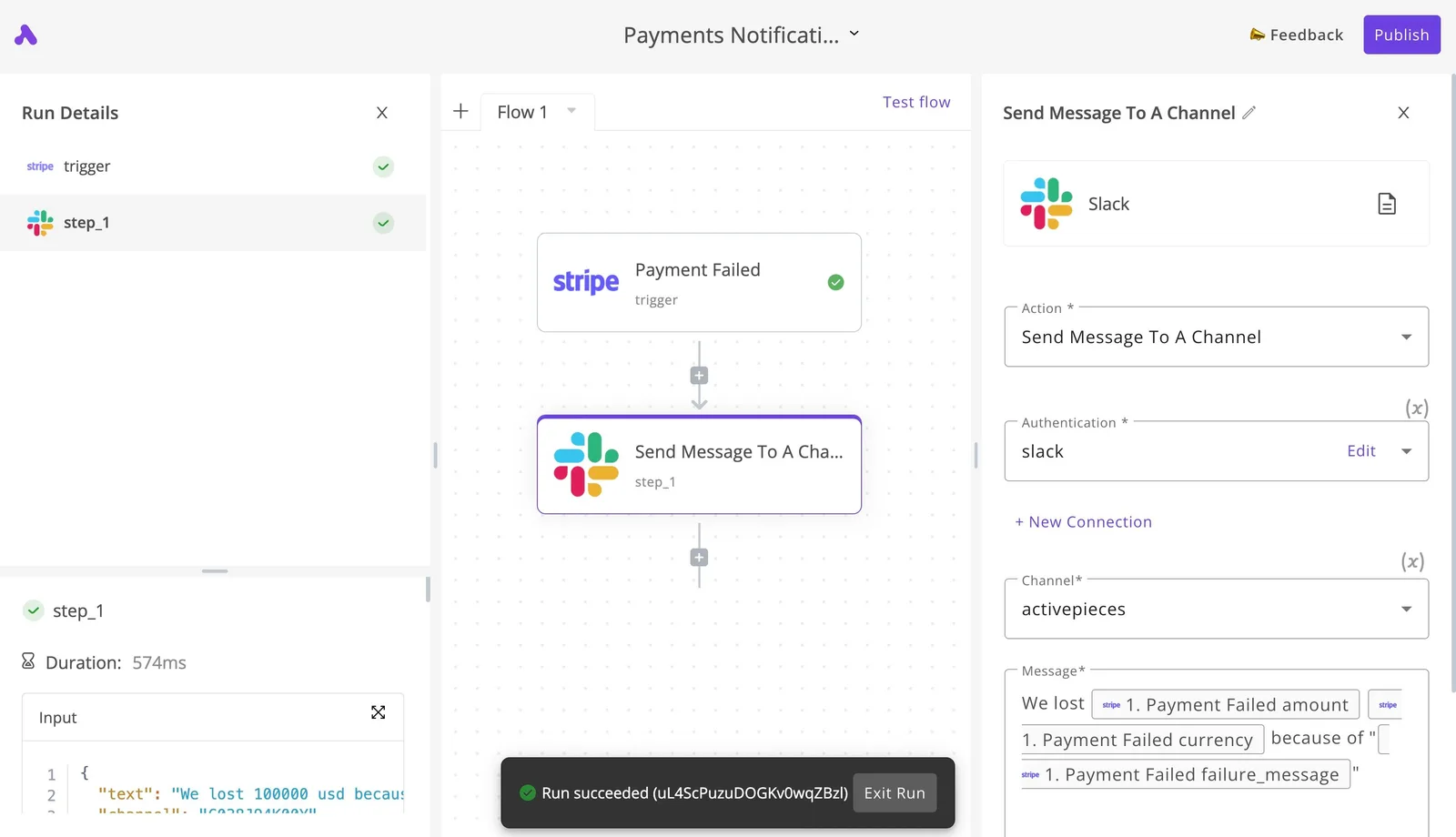 ### PixVerse Slack and Discord generation alerts When the generation finishes, real-time alerts via Slack or Discord allow you to step away from the PixVerse interface without missing the moment. This is critical if you're a high-volume user on the Pro or Unlimited plans who is managing multiple concurrent generations and needs to know the instant a prompt has been processed. Activepieces ensures that the run is the meter, not the steps inside it. A ten-step pipeline that routes PixVerse files to storage, notifies Slack, and updates a tracker costs exactly one credit, whereas per-step billing on other platforms would tax the builder for creating such a reliable, granular process. Once the notification confirms a successful run, the asset can be routed to the next stage of your creative pipeline. ### Sending video assets to Frame.io for client review Professional editors use Frame.io to gather timestamped feedback, which requires moving PixVerse exports into a review-ready environment. Automating the handoff from the generation tool to a Frame.io project folder allows your clients to begin commenting on drafts the moment they're rendered. Activepieces handles these multi-step handoffs by charging a single credit per flow run regardless of how many steps the automation contains, which you can verify on their published pricing page against the per-step billing of Zapier or Make.  This ensures that complex routing (from PixVerse to cloud storage, then to Frame.io, and finally to Slack) doesn't multiply the cost of the automation itself. Claude Sonnet 5.5 is used to analyze feedback transcripts and suggest specific prompt adjustments for the next iteration of the video. This workflow typically leads into a post-production phase where the reasoning model processes your client notes. ## Choosing the right PixVerse plan for your volume Selecting a PixVerse plan depends entirely on whether your output is for personal experimentation or a commercial pipeline where time-to-delivery is a billable metric. While the platform allows you to generate video from text or images, the transition from the Free tier to a paid subscription is triggered by the need for commercial usage rights and the removal of the PixVerse watermark, which prevents professional distribution on monetized platforms.  The following personas illustrate how production volume dictates the necessary tier: 1. The Hobbyist (Free): Operates with a daily credit allowance that expires if unused, meaning you can't stockpile resources for large projects. 2. The Social Creator (Basic): Requires the removal of watermarks for clean TikTok or YouTube Shorts aesthetics, gaining a larger monthly credit pool to sustain a daily posting cadence. 3. The Agency Producer (Pro): Moves to this level to unlock higher concurrent generation limits. Multiple scenes for a client storyboard can process simultaneously rather than queuing one by one. 4. The Studio Head (Ultra): Utilizes the highest credit ceiling to support high-fidelity upscaling for long-form content where render quality must meet broadcast standards. Once you scale past the Basic tier, the primary constraint is the Concurrent Generation cap, which dictates how many videos the engine can render at once. If you're using Claude Sonnet 5.5 to script-to-video at scale, hitting this ceiling results in idle time that stalls your creative process. To maintain momentum, you'll often automate the handoff by using cloud storage triggers to move completed renders into review folders immediately upon completion. ## What Activepieces does about this Activepieces solves the production bottleneck by automating the entire lifecycle of a PixVerse generation, from the initial prompt to the final client delivery. Because professional creators on the Pro or Unlimited plans often run five or more concurrent generations to meet deadlines, the manual task of monitoring the dashboard becomes a significant drain on creative time. By using the platform's open-source automation engine, you can build a workflow that watches for completed renders and instantly routes the high-resolution files to your permanent storage. This ensures that your daily or monthly credit allotment is never wasted on assets that might otherwise expire or be purged from the PixVerse dashboard. The platform is designed for high-volume reliability, which is why organizations like MoneyGram and FundingSocieties run Activepieces in production to manage their critical automation infrastructure. Unlike other tools that charge you for every single step in a sequence, Activepieces uses a "run-based" billing model where a single credit covers an entire multi-step pipeline. This means you can build a sophisticated flow that detects a finished PixVerse video, runs it through an AI tagger for metadata, uploads it to a specific Google Drive folder, and notifies your team on Slack, all for the cost of one task.  This predictable pricing allows you to scale your video production without the automation costs scaling linearly alongside your credit consumption. For studios requiring strict data sovereignty and security, Activepieces offers a self-hosted edition under the MIT license that can be deployed in an air-gapped environment. This allows you to maintain full control over your API keys and generated media, bypassing the privacy concerns of third-party cloud intermediaries. The enterprise version adds features like Single Sign-On (SSO) and granular Role-Based Access Control (RBAC), ensuring that only authorized team members can trigger high-credit generations or access the final commercial assets.  By moving the administrative overhead into an automated background process, you can focus entirely on the creative prompts that drive your PixVerse output. ## Frequently asked questions about PixVerse costs? PixVerse subscriptions operate on a use-it-or-lose-it monthly cycle that prioritizes active production over long-term credit hoarding. Because the platform doesn't offer a team-based seat model, you must manage your own billing cycles and licensing rights to ensure your output remains legally protected for commercial use. ### Do PixVerse credits roll over to the next month? At the end of every billing cycle, credits in PixVerse expire, which means any unused balance is forfeited rather than added to the next month’s allotment. This policy forces you to utilize your full capacity before the reset date to maximize the value of your subscription. This ensures that your monthly allocation is fully utilized for production tasks. ### Can I use PixVerse Free videos on a monetized YouTube channel? Because the PixVerse Free plan grants only a non-commercial license, you can't legally monetize content created under this tier on platforms like YouTube. You must upgrade to a Pro or Unlimited plan to secure full commercial rights. This keeps your videos compliant with copyright requirements for revenue-generating channels. This upgrade is mandatory if you're seeking to earn ad revenue. ### Is there a discount for annual PixVerse subscriptions? If you commit to an annual billing cycle, PixVerse has a reduced monthly rate, lowering the total cost of ownership for your long-term projects. This pricing structure benefits you if you have consistent production schedules and want to lock in professional features at the lowest possible entry point. The annual commitment provides a predictable cost structure for your agency. ### How do I cancel my PixVerse subscription to avoid auto-renewal? To disable auto-renewal, you must navigate to the billing section of your account settings, which stops future charges while maintaining access to paid features until the current period ends. Once the subscription expires, your account reverts to the free tier, meaning any new generations will carry watermarks and restricted usage rights. To maintain strict data sovereignty over these assets, organizations like MoneyGram and FundingSocieties run Activepieces in production to manage their automation infrastructure. The same enterprise features, including SSO and custom RBAC, are available in the self-hosted air-gapped edition as in the managed cloud, as detailed in the enterprise feature list of the technical documentation. To streamline your production pipeline, you'll often use cloud-based automation to sync finished PixVerse renders with GPT-Image-2.6 Sunburst for detailed thumbnail generation. Every video is then immediately ready for distribution without manual asset creation. ## Related reading - [HeyGen Pricing for Creators, Marketers and Teams](https://www.activepieces.com/blog/heygen-pricing-for-creators-marketers-and-teams) - [Kling AI Pricing Plans and Cost per Kept Video](https://www.activepieces.com/blog/kling-ai-pricing-plans-and-cost-per-kept-video) - [HeyGen Alternatives vs Custom AI Video Workflows in 2026](https://www.activepieces.com/blog/heygen-alternatives-vs-custom-ai-video-workflows-in-2026)The platform deducts credits the moment a generation starts, regardless of whether the resulting video meets your creative brief.