You'll prefer structured JSON from an endpoint, but support tickets are often filled with requests to sync data from internal portals or vendor dashboards that haven't updated their tech stack recently. ### Automating legacy software without an API For agents to manipulate software that lacks a public API or developer platform, browser-based tools are the only viable bridge. In these scenarios, frontier-class models like Claude Sonnet 5.5 must see the Document Object Model (DOM) to click buttons and fill forms just as a human operator would. Resource-heavy by nature, this approach is evidenced by the memory footprint of various automation frameworks. 215 MB is required by Nodriver [[5-proxy](https://5-proxy.com/nodriver-vs-seleniumbase-vs-playwright-stealth/)]. You must allocate significant system memory to support each active session. Playwright Stealth requires 280 MB according to [5-proxy](https://5-proxy.com/nodriver-vs-seleniumbase-vs-playwright-stealth/). 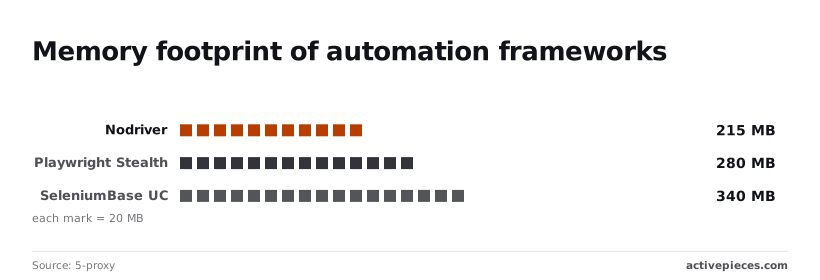 Higher concurrency on a single worker node is possible with this footprint before hitting OOM (Out of Memory) errors. This represents a 30% increase in memory usage over Nodriver, which means the application will likely crash on devices with limited RAM. Larger containers must be provisioned to handle the same number of parallel agent sessions. SeleniumBase UC requires 340 MB according to [5-proxy]. At this level, running a fleet of agents requires significantly more infrastructure spend, as each instance consumes over a third of a gigabyte just to stay resident in memory. Whether your automation stack scales linearly or becomes a budgetary bottleneck is dictated by the framework you choose. ### Real-time data extraction from dynamic sites Information from single-page applications (SPAs) that load content asynchronously via JavaScript requires browser automation for extraction. Without a live browser environment, an agent might only see a loading spinner instead of the critical shipment status or pricing data it needs.  By using the Playwright MCP server, a model like Gemini 3.8 Flash can wait for specific elements to render. It retrieves the actual data shown to users rather than an empty HTML shell. ## Technical capabilities of the Playwright MCP server Natural language prompts are translated into structured browser commands by the Playwright MCP server, letting LLMs browse and manipulate web pages. This allows an agent to bridge the gap between static knowledge and the live web without requiring a bespoke API for every target domain. ### Native browser actions for LLMs A standardized interface is provided by the server for [Claude Desktop](https://modelcontextprotocol.io/quickstart/user) or [Windsurf](https://codeium.com/windsurf) to interact with websites through a suite of native automation tools. Instead of relying purely on visual analysis, the server exposes the DOM via structured accessibility snapshots. Claude Sonnet 5.5 can identify a "Submit" button by its functional role. It doesn't rely on pixel coordinates, which reduces the likelihood of the agent clicking on decorative elements or empty space.  The primary tools are: * Navigating to specific URLs to initialize a session. * Clicking, typing, and hovering to mimic human input patterns. * Taking full-page screenshots to verify layout or visual state. * Running custom JavaScript to extract data that isn't immediately visible in the accessibility tree. The illustration below shows the request flow where an LLM Client sends a JSON-RPC request to the Playwright MCP Server. The server then executes the command in a Chromium instance, which runs headed by default unless headless mode is configured. Decoupling the reasoning from the execution ensures that the model only sees the relevant data needed for the next step. Following this execution, the server returns a text-based summary of the page state to the client. ### Securing and sandboxing the Playwright MCP server Risks are introduced when running a browser under the control of an LLM, requiring strict environmental controls to prevent unauthorized data access. The Playwright MCP server, which can be installed via the [Playwright CLI](https://playwright.dev/docs/getting-started-mcp), typically operates within your local user’s context. The agent has the same network permissions as you in this configuration. To mitigate risks, you should implement the following constraints: 1. Launch browsers in "headless" mode to prevent the agent from interacting with your active desktop session. 2. Use isolated browser contexts for each task to ensure that cookies or session tokens from a banking site don't persist when the agent moves to a public forum. 3. Restrict the server’s file system access to prevent the LLM from uploading local configuration files to a remote web form.  Responsibility for network isolation falls on the container or virtual machine hosting the process because the server lacks a built-in global firewall. An unconstrained agent running on a production server could theoretically access internal metadata services. You must wrap the execution environment in a restricted network namespace. ## Integrate Playwright MCP into automation workflows A persistent execution environment is required for integrating Playwright MCP into a workflow. The Model Context Protocol server must bridge the gap between your automation logic and a live Chromium instance. Configuring a middleware service to host the MCP server is the standard approach in a support operations flow. This service then exposes the browser's DOM as a set of callable tools for your primary orchestration platform. ### Hosting the MCP protocol bridge Connecting a cloud-based automation platform to a local or private MCP server requires a bridge that translates HTTP requests into the JSON-RPC format used by the protocol. You must host this bridge alongside the Playwright server, typically as a Docker container or a Node.js process on a reachable server. The bridge acts as a gateway that listens for incoming webhooks and forwards them to the Playwright instance. This setup is necessary because most automation engines cannot natively open the persistent stdio or WebSocket connections that the MCP server expects. ### Triggering browser sessions with HTTP requests The Activepieces HTTP step serves as the primary bridge to trigger the Playwright MCP server. It allows you to initiate a browser session from any webhook or scheduled event. MoneyGram and FundingSocieties run Activepieces to manage these complex environments, where the engine that runs the agents is public code. The MIT-licensed core ensures that every tool call made by the agent is visible in the run trace, providing a level of transparency that matches the open nature of the Integrations Framework itself. The HTTP request must use the POST method, targeting the endpoint where your MCP-to-HTTP bridge is listening. Include the authentication token in the headers to ensure only authorized automation flows can spawn browser instances. Define the initial URL and the specific task description in the JSON body, which tells the Playwright server which site to load before the AI begins its navigation. Map the response body to a subsequent variable so the flow can track the session ID for multi-step interactions. ### Passing browser context to AI providers Raw browser state must be passed to a reasoning model once the connection is established so it can interpret visual elements and execute clicks or form fills. You'll use the most capable models for this. Broken automation that requires manual support intervention is the result of a failure to understand a nested iframe or a dynamic modal. | AI Model | Primary Role in Playwright Flows | | :--- | :--- | | Anthropic Claude Fable 5.1 | Handling long-horizon agentic work where the browser must navigate through multiple pages to find a specific record. | | OpenAI GPT-6 Astra | Executing complex reasoning and coding tasks when the browser encounters custom JavaScript components that lack standard HTML tags. | | Google Gemini 3.8 Flash | Managing software engineering-heavy tasks where the agent must inspect network logs or console errors during the session. | _Prices and plan limits checked against [github.com](https://github.com/feder-cr/invisible_playwright_mcp) and [github.com](https://github.com/microsoft/playwright-mcp) and [playwright.dev](https://playwright.dev/docs/getting-started-mcp) on October 11, 2026._ Feeding the HTML snapshot or accessibility tree into these models allows the agent to determine the next logical step. It might click a "Submit" button or scrape a price, then sends that instruction back through the MCP server to be executed in the live browser. ## Operational impact on automation cost and speed Browser-first automation via the Playwright MCP server carries a higher token cost than using the Playwright CLI directly. While traditional integrations rely on structured data exchanges, this approach forces an LLM to render and interpret the entire visual layer of a site. This introduces significant compute demands. ### Compute overhead of headless browsers Substantially more memory and CPU cycles are required to run a headless browser instance than to make a standard REST call. The system must load CSS, execute JavaScript, and maintain a DOM tree for every interaction. Token counts spike when a model like Claude Sonnet 5.5 or Gemini 3.8 Flash processes these pages. The model isn't just reading a single data point; it's parsing the full accessibility tree to understand context. Furthermore, you'll accept this overhead only when the alternative is a complete data silo or a human manually re-keying information between legacy portals. ### Playwright MCP development speed vs execution latency Using the Playwright MCP server, you can move from a "missing API" ticket to a working script quickly. This remains true even if the resulting automation runs slower than a native integration. | Dimension | API-First Automation | Browser-First (MCP + Playwright) | | :--- | :--- | :--- | | **Availability** | Limited to official endpoints | Any visible web element | | **Setup Speed** | High/Developer-only | Low/Agent-assisted | | **Execution Latency** | Low/Sub-second | — | In an afternoon, a support lead can authorize a fix for a broken internal tool rather than waiting months for a backend sprint. However, every click requires a round-trip to a reasoning model like GPT-6 Astra to verify the UI hasn't shifted. These workflows are unsuitable for real-time applications where every millisecond of delay impacts the end-user experience. ## What Activepieces does about this Activepieces provides the orchestration layer that makes Playwright MCP usable for teams without requiring them to manage raw JSON-RPC sockets or custom middleware. By treating the Playwright MCP server as a first-class integration, the platform allows you to register the browser as a tool that any agent can call. This solves the problem of manual infrastructure setup, as the MIT-licensed Activepieces core manages the lifecycle of the agentic session and ensures that the browser output is correctly formatted for models like Claude or Gemini. The platform addresses the latency and cost concerns of browser automation by allowing users to combine high-speed API steps with Playwright-based browser steps in a single flow. You can use a standard REST connector for most of a task and only trigger the Playwright MCP tool when the agent hits a "walled garden" or a legacy UI, which means the majority of your automation remains lightweight and efficient.  This hybrid approach, used by organizations like MoneyGram and FundingSocieties, ensures that compute costs are only incurred for the specific parts of the workflow that truly require a live browser environment. To ensure security and observability, every browser interaction triggered through the Playwright MCP server is recorded in the Activepieces run history. You can see exactly what the agent saw, which DOM elements it interacted with, and the reasoning it used to make those choices. This visibility is critical for debugging agentic workflows that fail due to UI shifts, providing a clear audit trail that traditional headless scripts often lack. By centralizing these tools, you prevent the fragmentation of automation logic across different developer environments.  ## Frequently asked questions ### Can I run Playwright MCP on a serverless function? Technically possible but functionally impractical, running the Playwright MCP server on serverless infrastructure is difficult due to the massive overhead of cold-starting a browser environment. The system must re-initialize the Chromium browser binary every time a new ticket triggers a workflow because a serverless function terminates as soon as the task finishes. This leads to timeouts that frustrate users waiting for a response. Deploy the server on persistent containers or virtual machines to avoid these delays. The browser process stays warm and ready to act in these environments. ### Which LLMs are compatible with the Playwright MCP server? Any model that supports the Model Context Protocol and possesses sophisticated spatial reasoning capabilities for interpreting DOM elements works with the Playwright MCP server. While the protocol is standardized, the complexity of modern web interfaces means that only high-reasoning models can reliably browse pages without getting stuck in infinite loops. Anthropic supports Claude Fable 5.1 or Claude Sonnet 5.5. OpenAI supports GPT-6 Astra or GPT-6.1 Sol. Google supports Gemini 3.8 Flash or Gemini 3.1 Pro. ### Does this replace traditional Playwright scripts? Traditional scripts for predictable, high-volume testing are not replaced by the MCP server. It's a fallback for dynamic scenarios where a static selector would break. A standard script is faster and cheaper if you have a stable internal dashboard with constant IDs. It doesn't require a reasoning model to think about where the submit button moved. Specifically for third-party sites that change their layout frequently, you should use the MCP server. It's also useful for ad-hoc support tasks that are too varied to justify a dedicated codebase. ## Related reading - [Twilio MCP Server Setup for Claude in 2026](https://www.activepieces.com/blog/twilio-mcp-server-setup-for-claude-and-ai-agents-2026) - [Connect Claude to Webflow with the MCP Server](https://www.activepieces.com/blog/connect-claude-to-webflow-with-the-mcp-server) - [Cursor Review (2026 Guide)](https://www.activepieces.com/blog/cursor-review-2026-guide) ## References - [AxRegistry](https://www.axregistry.com/server/npm/%40modelcontextprotocol/server-playwright) - [5-proxy](https://5-proxy.com/nodriver-vs-seleniumbase-vs-playwright-stealth/)Walled gardens" of modern web applications are bypassed by AI agents using browser automation.