Pro at $287.88 still covers the show as long as one person owns the account and does the editing, so solo creators don't need to pay for Teams. The trigger for $599.88 is organizational: a co-host or producer who needs their own login to the same projects, meaning this cost only appears if you're adding team members with independent access.  If the extra $311.99 a year is smaller than the cost of the workaround, Teams pays for itself. If you haven't hit a limit, stay on Pro. ## Hidden costs and limits Podcastle users run into Check the recording allowance and the other meters, since any of them can run out first. The plan figures from [iTechGuides](https://www.itechguides.com/products/async/pricing/) show the gap: Free allows 1 to 2 hours, Essentials 2 to 10 and Pro 20 to 25. Recording is one meter among several, so check each allowance. 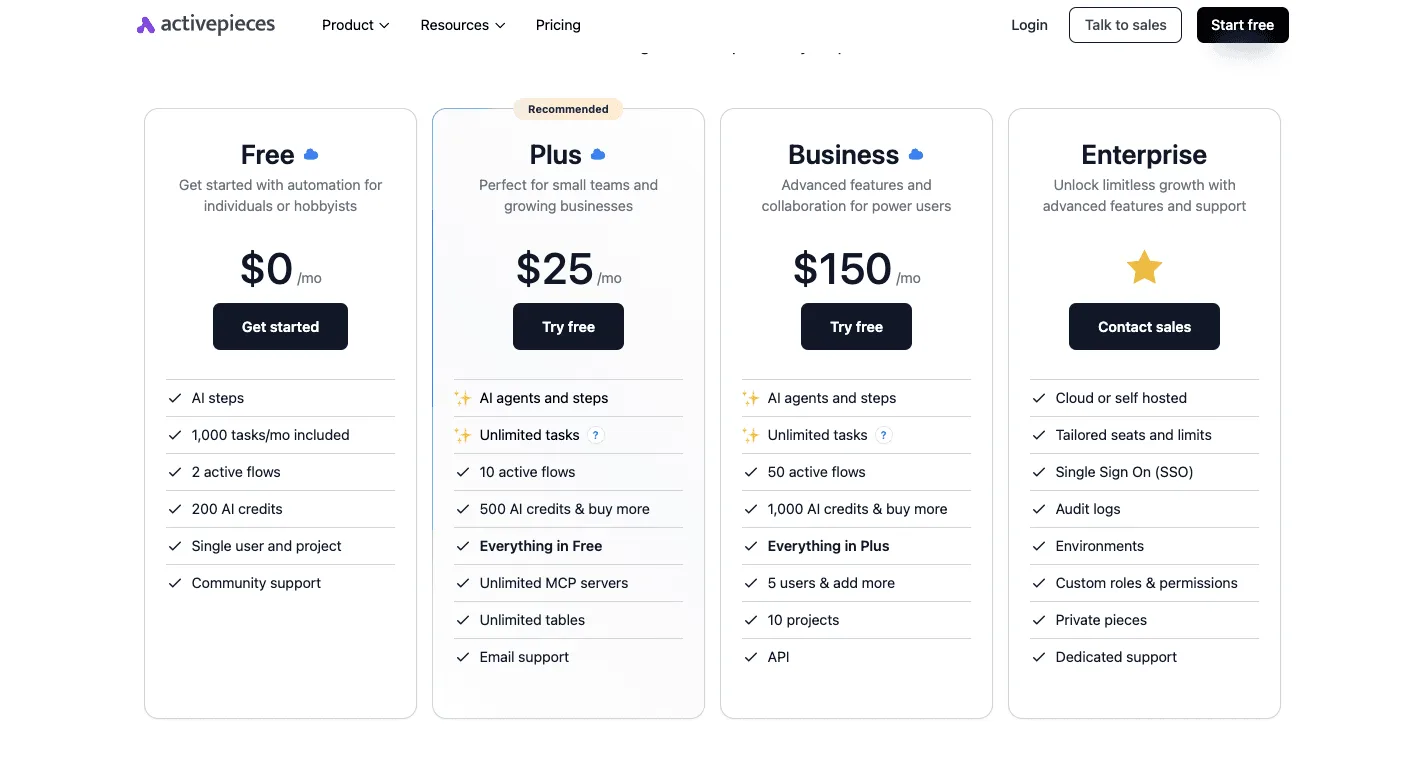 Beyond the hours, these limits turn up after you subscribe: - export quality set by plan - a transcription cap - text-to-speech hours - per-seat Teams pricing - branding on free exports - renewal and refund terms ### Export and quality gating Because export quality is gated by plan, a finished episode can come out below what you recorded. I couldn't confirm which tier unlocks which format, so check the export dialog on a trial before committing. **Free exports are also branded**. The exact form of that branding is unconfirmed, but it means free output isn't publishable as-is for a client. The transcription cap is unconfirmed beyond the upper figures above, which are the ceiling per plan and not a promise of unlimited text. Text-to-speech hours and AI credits are separate allowances. I found no verified figure for either, so a show built on synthetic voice should be tested for a month before you pay for a year. ### Podcastle hosting, seats, storage and renewal costs Expect a second bill, because Podcastle doesn't host your feed. Per [Buzzsprout](https://www.buzzsprout.com/pricing)'s pricing page, [Podbean](https://www.podbean.com/podcast-hosting-pricing) is $12 a month, Simplecast $15 and Transistor $19, which adds $144 to $228 a year to whatever Podcastle costs, so you're making two separate purchasing decisions instead of one.   If you run a three-person show, per-seat Teams pricing triples the line item, though I couldn't confirm the per-seat rate. Storage limits and renewal and refund terms are likewise unconfirmed. **Read the checkout page for auto-renewal and refund wording before choosing annual billing, because a mistaken annual purchase is the costliest error here.** ## Podcastle versus alternatives on usage limits Because annual billing is the costly mistake, check the alternatives before you commit, and compare them on which limit you'll hit rather than on the monthly figure. In The Podcast Host's [survey of podcast editing software](https://www.thepodcasthost.com/editing-production/best-podcast-editing-software/), Audacity comes first at 24% of podcasters, Adobe Audition at 16% and GarageBand at 9%. All three are free or bundled with something you already own, so a paid editor has to justify itself on workflow, not on capability. According to The Podcast Host, [Descript](https://www.descript.com/pricing) follows at 7.5%, [Riverside](https://riverside.com/pricing) at 2% and Podcastle at 1%, so Descript clearly leads among these three. A tiny share isn't a verdict on quality, but it does mean fewer community guides and fewer people to ask when a limit surprises you. I've left prices, free-tier caps and transcription allowances out of the table below. They change often, and each vendor's own pricing page is the only source worth trusting for them. | Tool | Share of podcasters | Editing approach | Who should pick it | |---|---|---|---| | Podcastle | 1% | Browser studio with AI cleanup and recording | Solo hosts who want recording and editing in one place | | Descript | 7.5% | Edit audio by editing its transcript | Talk-heavy shows with heavy cutting | | Riverside | 2% | Recording-first, each guest captured locally | Remote interviews where recording quality is the product | | Adobe Podcast | Not in the survey | Browser tool built around speech cleanup | Anyone fixing poor audio recorded elsewhere | 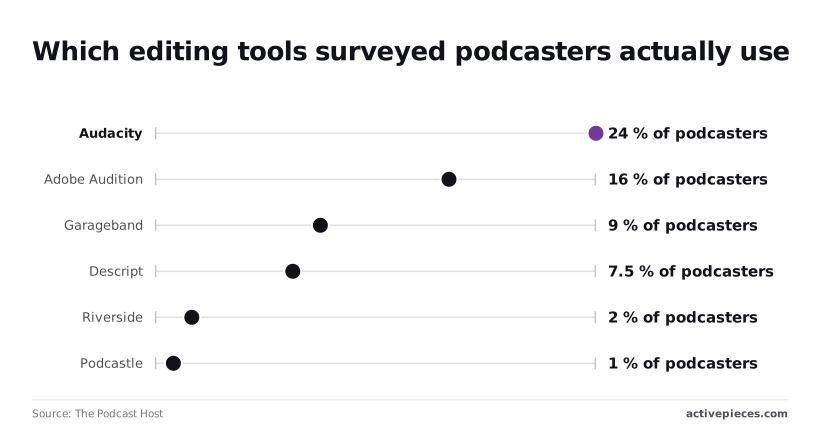 Read the rows as a filter first and a price comparison second. Each tool has a different limit that bites first, so the right pricing page to open depends on the row. If every cut you make in Descript runs through the text, its transcription allowance is the limit you'll feel. Choose it if you edit by deleting words. Stay away if you cut by waveform, since you'd pay for a workflow you never use. When remote guests are your problem, Riverside earns its place, since local capture sidesteps poor connections. At 2% of podcasters it's a specialist choice, which means most creators choose alternatives. A solo host recording in one room gains little from it. Adobe Podcast is the narrowest fit. It repairs speech, it doesn't run a show. Pick it as a rescue step for bad recordings. ## Monday checklist for choosing a Podcastle plan Choose the Podcastle plan by the first limit you hit on a real episode, not by the lowest price, and the steps below find that limit in order. 1. Log a month of recording hours. Count recording and editing sessions separately, because they may draw on different allowances and the total you actually use is the baseline for every later comparison. 2. Run one real episode on the free plan, start to finish, with the same guests, length and cleanup you'd use in production. A demo clip won't reach the limits a full episode does. 3. Check your export needs. Decide the audio quality your host or client requires before the trial ends, because a plan that records everything but caps export quality fails at the last step. 4. Pick by the first limit hit. Write down which allowance ran short first in step 2, then choose the cheapest plan that lifts that limit, since upgrading for a limit you never reach is the main way the headline price misleads. 5. Set a renewal reminder a few days before the billing date. Annual plans renew automatically, so a missed reminder commits you to another year on a tier you may have outgrown or no longer need. Take the current monthly and annual prices, and the limits for each tier, directly from Podcastle's own pricing page on the day you buy. Lay the tiers side by side on four rows: recording hours, transcription, AI credits and export quality. The tier where your step 4 limit first clears is your plan, and the tiers above it are paying for headroom you haven't shown you need. Treat the free plan as a test of fit, not a permanent home. It's enough to record and edit one episode and see which allowance runs out, and that single result tells you more than any feature list. Watch for the order in which things fail. If transcription stops first, you need a plan with more transcription. If exports degrade, you need a higher quality tier; if the AI tools stall, you need more credits. ## What Activepieces does about this Activepieces can't see inside Podcastle's meters, and I have no confirmed Podcastle integration to point you to. It handles what happens after the export, where the second bill tends to build up: hosting uploads, transcript filing, show-note drafts and client delivery. If you've picked a plan by the limit you hit first, this is how you stop the work around that plan from adding its own meter. The pricing is the reason it fits that job. Activepieces counts a run as 1 credit however many steps it has, and the free plan includes 1,000 credits a month. A weekly show that runs one flow per episode uses a few credits a month, so you can build the longer chain of transcript, clips, summary and filing without watching a counter. That matters when Podcastle's own AI credits and transcription are the allowances you're already rationing. The core is open source under the MIT licence, so you can self-host it and run flows on your own server with no per-run charge. That's the option to weigh if several people share one workflow and you'd rather not add another per-seat line to the Teams bill. Treat it as a way to keep the post-production spend flat while the Podcastle plan changes underneath it. ## Frequently asked questions ### Is Podcastle really free? Yes, Podcastle has a free plan, but it's a capped one. You can record and edit, and the limits on recording hours, transcription, AI credits and export quality are where you'll feel the ceiling. If the first limit you hit is one you can't work around, that's your signal to move up. ### Does Podcastle offer a free trial or refunds? Since you can run a real episode through it before paying anything, the free plan works as the trial. Refund terms are a different matter. They are set in Podcastle's billing terms and can change, and I have no confirmed wording to quote, so read the current terms on its pricing and legal pages before committing to an annual payment. ### Can I switch plans or cancel anytime? You manage Podcastle subscriptions from your account settings, so changing or cancelling doesn't require contacting anyone. What I can't confirm is exactly how a mid-cycle change is prorated or when access ends after cancelling. That detail decides whether upgrading for one heavy month is cheap or wasteful. If you're upgrading for a single batch of episodes, check how the change is billed first, and note the renewal date so a plan you meant to drop doesn't renew. ### Is there a discount for annual billing or students? Annual billing is typically cheaper per month than paying monthly, and Podcastle's pricing page shows the current comparison for each plan. The trade-off is commitment: an annual plan locks you in before you know which limit you'll hit first. If you're still unsure, pay monthly for a cycle or two, then switch once your usage pattern is clear. I have no confirmed information on a student discount, so check the pricing page, or ask support, rather than assuming one exists. ### Does Podcastle have an API or integrations? Podcastle is built as a browser-based studio for recording and editing, and I have no confirmed details of a public API. Don't plan an automated pipeline around one. If your workflow depends on programmatic uploads, transcript retrieval or hands-off publishing, verify what Podcastle documents today before youratchet a plan. Otherwise assume the practical route is manual: export your finished audio or transcript and carry it into your hosting or publishing tools yourself. ## Related reading - [HeyGen Pricing for Creators, Marketers and Teams](https://www.activepieces.com/blog/heygen-pricing-for-creators-marketers-and-teams) - [Compare Taskade Pricing for Small Teams](https://www.activepieces.com/blog/compare-taskade-pricing-for-small-teams) - [DeepSeek Search API vs Exa Pricing for Small Teams (2026)](https://www.activepieces.com/blog/deepseek-search-api-vs-exa-pricing-for-small-teams-2026) ## References - [The Podcast Host](https://www.thepodcasthost.com/editing-production/best-podcast-editing-software/) - [iTechGuides](https://www.itechguides.com/products/async/pricing/) - [Buzzsprout](https://www.buzzsprout.com/pricing)If a month ends with unused allowance, you're on the right plan.