## QuickBooks automation coverage and gaps Inside the books, QuickBooks automates three repeating jobs: recurring transactions, invoice reminders and bank rules. It stops where a task needs another app, a real approval chain or an AI step.  Each of those jobs leaves a trail you can check, which is why they're the ones worth trusting first. ### Native tools: recurring transactions, reminders, bank rules Post the same invoice, bill or journal entry on a schedule, and the monthly rent line appears without anyone keying it. That is what a recurring transaction does. Invoice reminders send a nudge when a receivable passes a due date. Bank rules categorize incoming feed lines by their description or amount. All three act on data already in QuickBooks, so a wrong rule misposts quietly until someone reviews the feed. ### QuickBooks automation plan requirements and pricing As of 16 October 2026, Intuit's pricing and help pages tie the first three tools to the entry plan and custom workflows to the top tier. The plan you pay for decides how much approval logic you get, but not whether any of it reaches outside the books. | Tool | Lowest plan required | Works outside QuickBooks | Supports approvals | Supports AI step | |---|---|---|---|---| | Recurring transactions | Simple Start | No | No | No | | Invoice reminders | Simple Start | No | No | No | | Bank rules | Simple Start | No | No | No | | Custom workflows | Advanced | No | Yes | No | A team that needs approvals or an AI step can't get there by upgrading alone: only one row offers approvals, and none offers an AI step. ### Where native automation stops: other apps and approvals You can see the same gap in the adoption data. In the Intuit 2026 AI Impact Report, [as reported by Zerentry](https://zerentry.com/blog/ai-tools-for-accounting): - 45% of businesses use AI in marketing - 37% of businesses use AI in customer service - only 35% of businesses use AI in bookkeeping: viz type=stackrank title="How far small-business payment times overshoot net-30 terms" unit="days to get paid" source="StealthAgents - https://stealthagents.com/research/small-business-cash-flow-statistics-2026" target="30" benchmark="Net-30 terms" Retail: 28 Service firms: 48 Medical services: 53 Manufacturing: 67 Service firms wait 48 days, and medical services wait 53 days. Manufacturing waits 67 days, more than twice the terms. For a retailer, a late send eats most of its slack. A manufacturer is already far past net-30 before any error, and a missed run pushes the invoices even further out. Customers who receive an invoice late also dispute any late fee, so the delay becomes an argument as well as a cash problem. Those disputes are what the checks in the next section are meant to prevent.  ## Silent automation failures and missed alerts **Nobody was assigned to watch it**. An expired connection stopped the 6:02 run, no alert fired, and no one checked that the output arrived. The timeline below shows how each missing check added time, so you can see which gap to close first. Nothing in that sequence was unusual. The three-hour delay came from the lack of anyone whose job it was to notice. ### Silent QuickBooks automation failures without alerts When a connection token lapses or someone edits a template field, the run fails. With no failure alert, that failure is a log entry nobody opens. How long it hides depends on how fast your customers pay. In medical and health practices, which wait 53 days, service firms at 48, and manufacturers at 67, an unsent reminder or unposted payment can sit through a full billing cycle before anyone asks why cash is short.  A slower-paying business doesn't make the error smaller, only harder to see. **Assign one named owner and one daily check that the expected output exists.** ### Automating a process nobody had written down Whoever made the last guess is who your rules encode, if they were built from habit. If nobody can state who approves a bill, what triggers a reminder, or which account a charge belongs to, the automation repeats that ambiguity on a schedule. Unreviewed bank rules are the usual example: they keep categorising a vendor's charges long after the arrangement changed. Write the procedure first, then automate the written version. ### Duplicate and miscategorised QuickBooks entries from failed runs When a failed run is retried by hand and the original partly succeeded, the same invoice is entered twice. Revenue is overstated until reconciliation catches it. A messy chart of accounts compounds this, because rules post to near-identical accounts and the misfiled entries look plausible. Each of these errors waits behind the silent failure, so the longer the gap lasts, the more cleanup you inherit at month-end. ## Four QuickBooks workflows to build after the incident First to close is the unmatched Stripe deposit sitting in undeposited funds. These four flows each pair a repeating task with a check that makes failure visible before month-end. The table shows what starts each flow, what it does, and which outside app it touches, so you can see where a human stays in the loop. | Flow | Trigger | Steps | Connected app | Piece page | |---|---|---|---|---| | Stripe to invoice | Payment succeeds | Find the customer, create the invoice, record the payment | Stripe | [Stripe](https://www.activepieces.com/pieces/stripe) | | Gmail bill with Slack approval | Bill arrives by email | Extract details, request approval, create the bill once approved | Gmail, Slack | [Gmail](https://www.activepieces.com/pieces/gmail), [Slack](https://www.activepieces.com/pieces/slack) | | Overdue reminder with AI draft | Invoice passes its due date | Pull the invoice, draft wording, hold for review | OpenAI | [OpenAI](https://www.activepieces.com/pieces/openai) | | Failure alert | Any flow errors | Post the flow name and error to a channel | Slack | [Slack](https://www.activepieces.com/pieces/slack) | A payment either happened or it didn't, and that's why only the first flow runs end to end without a person. ### Payment received to invoice (Stripe) When Stripe reports a successful payment, the flow looks up the customer in QuickBooks, creates the invoice, and records the payment against it. Stripe is the card processor here, so its record is the source and the books are the copy. If the customer lookup finds nothing, stop and alert rather than create a new customer, because duplicates are harder to clean up than a missed entry. When a vendor bill lands in a Gmail inbox, the second flow starts. It extracts the vendor, amount and due date, then sends them to a Slack channel for sign-off. Nothing posts to QuickBooks until someone approves, which gives you the audit trail a controller expects: who approved, and when. When an invoice goes overdue, an AI step drafts the reminder. Treat it as a draft only. A model can misstate a balance or take the wrong tone with a good customer, so a person reads it before anything is sent. Wire the output to a review step, never directly to send. Every flow above ends with an error branch that posts the flow name and error text to Slack. This one flow closes the silent-failure gap, and the others depend on it. Build the alert first, then add the three flows behind it. ## Fix cross-app QuickBooks gaps with Activepieces An SDK can give the overdue-reminder agent code to run, but it supplies no tenant, no role and no audit log, and those decide whether anyone can answer "what did it do to this customer's balance?" Treat the agent as a user rather than as code. Activepieces holds it to the access model your bookkeeper already works under, so RBAC, SSO and SCIM govern which connections it may use, QuickBooks included. Every tool call it makes is logged separately with its own input and output, which means a wrong balance in a draft traces to the exact lookup that fetched it. MoneyGram, Moneypenny, Alan and FundingSocieties run it in production, and native recurring invoices stay inside QuickBooks. ### Review run records to verify automation ### Reading a run record Before you trust the alert from the previous section, look at its run record. It's the simplest case. Activepieces starts a chain of steps in other apps whenever a trigger fires in one of its 741 integrations. The two-step flow below takes a failed-payment event from Stripe, the card processor, and posts it to a Slack channel. 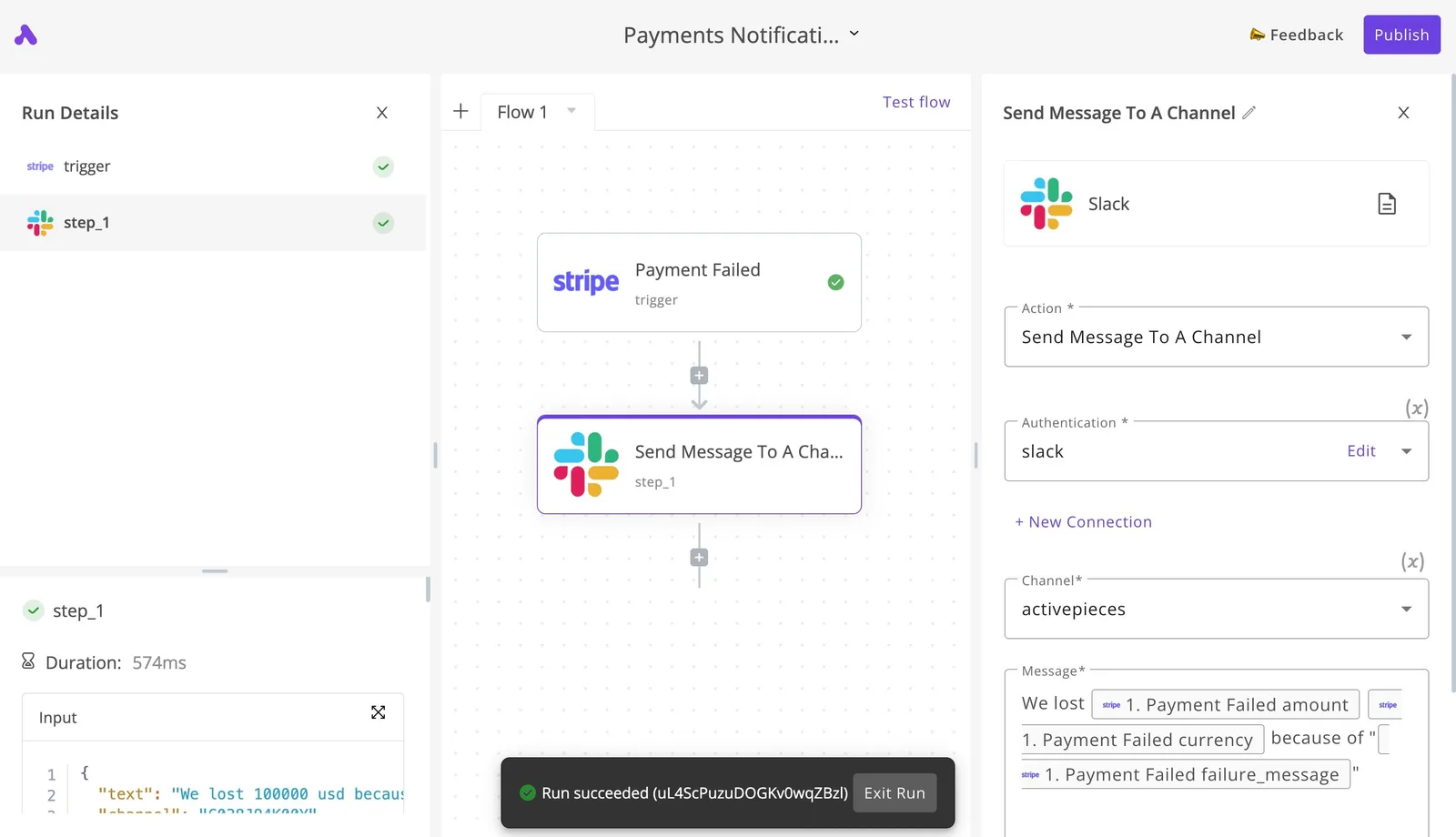 In the right panel you see the Slack action's channel and message template, and the left panel logs step_1 as completed in 574ms with "Run succeeded" at the bottom. That's the point to take from it: every run leaves a per-step record you can open, which is what an unwatched automation lacks. ### The workflows behind the alert Next come the three flows that sit behind that alert. Each is built from the same integrations: a trigger, a step that crosses into another app, and a place where a person approves or an AI step drafts something for review. ### Which QuickBooks workflows to keep native Rebuilding the monthly retainer invoice means recreating recurring work QuickBooks already does well, and it isn't worth it. That invoice should stay a native recurring transaction. The rebuild adds a second system that can fail without telling anyone, for no gain in the books. Activepieces earns its place where the task leaves QuickBooks, and its 741 integrations cover the apps those tasks start in. Examples are a bill that needs sign-off in a chat app before it posts, an AI step that reads an emailed receipt and proposes a category, or a failure that must reach a human. Each of those is a handoff, and handoffs are where silent failures start. ### Three rules for QuickBooks automation workflows None of these checks is complicated. Three of them hold the setup together, and each answers a specific way these flows go wrong. First, name an owner for every flow. One person is responsible for each automation, so a failure has an address. A flow with no owner is a flow nobody notices breaking. Second, send every failure to an alert. A failed run must post to a channel someone reads. A run that errors quietly produces a gap in the ledger that surfaces only at close. Third, count in the morning. Each day, the owner compares the number of expected records, such as payments received or bills submitted, against what the flow processed. The alert catches errors; the count catches the flow that never ran. ## Frequently asked questions ### What QuickBooks can do and how to set it up Does QuickBooks Online have built-in automation? Yes: recurring transactions, bank rules, invoice reminders and, on higher plan tiers, custom workflows with approval steps. These handle repeating work inside the books well, such as a monthly retainer invoice or a coded bank-feed line. They stop at the edge of QuickBooks, so a task that starts in another app or needs an AI step falls outside them. Can I automate QuickBooks without coding? Yes, for most routine flows. The built-in tools are configured through settings screens, and no-code automation platforms connect QuickBooks to other apps through a trigger-then-steps builder. Coding is only needed for unusual cases, such as a custom API call the platform has no ready-made step for. ### Safety and spotting failures Is it safe to let automation post entries to my books? Only where a person can still see and reverse what was posted. Let automation create drafts or pending items, and keep final posting behind an approval for anything that touches revenue, payables or tax. Each automation needs a named owner, and its output should survive an audit trail review: you should be able to trace any entry back to the run that created it. How do I know if an automated run failed? **You won't know unless you build the notice**. Many tools log errors in a run history nobody opens, so route failure alerts to a person by email or chat. Then compare counts each morning, such as invoices expected against invoices sent. A run that never fired leaves no error to find, and only the count will show it. ### Cost How much does QuickBooks automation cost? That depends on your QuickBooks plan and on whatever sits around it. The built-in features are included at different tiers, with the more capable workflow tools reserved for higher ones. Outside automation platforms usually offer a free tier and charge more as run volume grows. Check current pricing on each vendor's page before committing, and price a failed run's cleanup time alongside the subscription. ## Related reading - [ChatGPT Apps SDK: How to Build Business Workflows](https://www.activepieces.com/blog/chatgpt-apps-sdk-how-to-build-business-workflows) - [AI Vendor Lock-In: How to Build Portable AI Workflows](https://www.activepieces.com/blog/ai-vendor-lock-in-how-to-build-portable-ai-workflows) - [Shopify QuickBooks Integration Not Syncing? Fix It](https://www.activepieces.com/blog/shopify-quickbooks-integration-not-syncing-fix-it) ## References - [StealthAgents](https://stealthagents.com/research/small-business-cash-flow-statistics-2026) - [Zerentry citing Intuit 2026 AI Impact Report](https://zerentry.com/blog/ai-tools-for-accounting) - [Ataski](https://ataski.com/research/small-company-financial-benchmarks-2026)A schedule can look healthy while nothing leaves the building, and the first alarm is a person outside your company.