### Every plan compared: price, included usage, limits Read the credit column as the amount of metered usage you get before billing starts, and treat it as the number to compare, not the plan name. The table below lists each current plan with its fee and included credit, as [Railway](https://railway.com/pricing) shows them. | Plan | Monthly price | Included usage credit | |---|---|---| | Free | $0 | $1 per month | | Trial | $0 | One-time credit, not renewed monthly | | Hobby | $5 | $5 per month | | Pro | $20 | $20 per month | | Enterprise | Custom | Negotiated |  *Checked 2026-11-03.* Ranked by recurring credit, Pro ($20) sits above Hobby ($5), which sits above Free ($1). Enterprise is negotiated, so it has no list figure to rank. Resource ceilings per service, seat counts and support level also differ by plan. They matter once a single service outgrows its cap, so read them on the pricing page before you commit. Because the credit scales with the fee, the paid tiers are closer to prepaid usage than to a feature unlock. If you take the $5 Hobby plan, the first $5 of metered usage is already paid for, according to Railway. Past that, you pay for each unit consumed, so a service that runs all month can pass the credit well before the cycle ends. ### Whether the free or trial tier still exists Yes, both appear on the pricing page as of the check date, but they work differently. Railway's Free plan carries a $1 monthly credit, which covers little more than a tiny service, so use it for experiments rather than anything you want running all month.  Because the Trial is a one-time credit rather than a recurring one, it lets you test a workload once. Neither tells you what a production bill looks like. That's the exercise worth doing: take your own service's CPU, memory, storage and egress, price them on the vendor's calculator, and compare the total against the credit. Teams comparing platforms, including those weighing workflow tools such as [Activepieces](https://www.activepieces.com) against hosted infrastructure, should run the same arithmetic on each. ## Estimating a Real Railway Bill Step by Step Price each metered unit, add them up, subtract the Pro credit, and what remains is your usage owed. Run it on your own services before trusting any plan name. 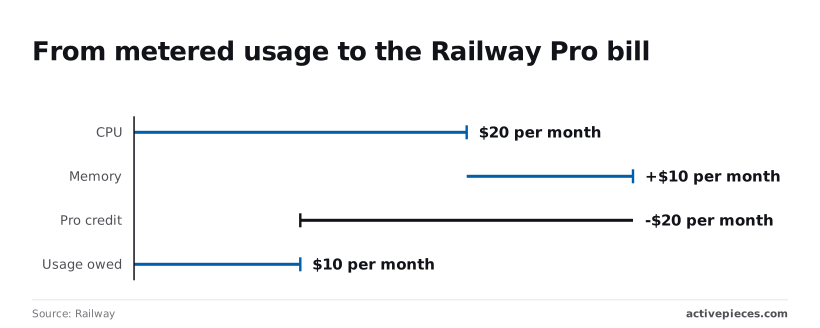 ### Step 1: Find the per-unit rates for CPU, memory, storage and egress Open [Railway's pricing page](https://railway.com/pricing) and write down four rates: CPU per vCPU-time, memory volume storage per GB, and egress per GB. Each is billed on a different meter, so a service that idles on CPU but holds a large database volume is charged on storage whatever its CPU does. Multiply each rate by your expected hours or gigabytes before you add anything. ### Step 2: Price one small service and one database Say you run a document-extraction service that pulls "payable to," invoice number and total price from each file. Add a Postgres database beside it. Suppose the pair meters $20 a month in CPU and $10 in memory per Railway's [pricing page](https://railway.com/pricing). That's $30 of raw usage, which tells you the compute half of the bill is twice as sensitive to CPU as to memory.  According to Railway, the Pro plan then applies a $20 monthly credit, so your monthly bill drops by that amount. Subtract it and usage owed is $10. This small stack costs $10 above the seat fee. The credit hides two thirds of the metered spend, so the true metered cost is $30 per Railway. Run several such stacks and the credit is gone quickly, with every dollar after that billed in full. ### Step 3: Add the costs that surprise people Four lines sit outside the CPU and memory subtotal. Egress is metered on every gigabyte leaving Railway, so a service that returns large files costs more than one that returns JSON.  Volumes bill for provisioned space, so a database volume you sized generously keeps charging even when it's mostly empty. Leave a staging service running and it still meters memory, which erodes the credit. Replicas each meter their own CPU and memory, so scaling to three copies roughly triples that service's compute line. Add these to your Step 2 figure before you compare vendors, because they're the part a plan name never shows. ### Step 4: Set usage limits and alerts Set a hard usage limit and an alert threshold in the project's usage settings, then check the Usage tab weekly for the first month. Without a cap, a runaway loop bills unchecked. With one, services can go offline once it is reached, so set the alert below the cap to leave time to react. Once the credit is spent, the next dollar of usage is your own, so the alert is what keeps $10 owed from becoming a surprise. ## Railway Compared With Render, Fly.io and Heroku Railway and Fly.io bill by metered usage. [Render](https://render.com/docs/compute-plans-update) and [Heroku](https://www.heroku.com/blog/new-low-cost-plans/) charge a fixed monthly price per instance, so the comparison turns on how much of the month your service sits idle or runs flat out. ### Entry price and free allowance A seat on Railway, an instance size on Render and Heroku, a machine size on Fly.io: that is what each vendor's entry price buys. Compare the unit before the number. On a fixed instance, a low entry price means you pay the same whether traffic arrives or not. On a metered plan, a low seat fee means the real bill starts after the included credit.  I've left vendor prices out here because they change, and a stale figure would mislead you. Read the current entry price and free allowance from each pricing page on the day you decide. To know which quantity to estimate for your own workload, look at what each vendor meters in the table. | Provider | Billing model | What you estimate | |---|---|---| | Railway | Seat fee plus metered CPU, memory, storage and egress | Average resource use across the month | | Render | Fixed price per instance | Which instance size fits your peak | | Fly.io | Metered by machine size and running time | Machine hours and how many you run | | Heroku | Fixed price per dyno | Dyno count and size | If your service runs at constant load, a fixed instance usually costs less, because you pay for a size you actually fill. A spiky or mostly idle service favours metering, because you stop paying when the load drops. ### Egress and database costs Metering surprises people most on egress, because it grows with traffic rather than with the size of your plan. [Egress Cost](https://egresscost.com/) lists Railway at **$0.05 per GB**, AWS at $0.09 and Google Cloud at $0.12, so Railway costs less per gigabyte than the alternatives.   Send 1 TB a month and you add about $50 on Railway, $90 on AWS and $120 on Google Cloud, meaning at this scale the choice of provider materially affects your monthly bill. The difference between the cheapest and most expensive provider compounds to **$840 annually**, which makes platform selection financially significant. How much of that is a pricing choice shows at the cheap end. Hetzner, a European hosting provider, charges $0.00117 per GB, which is orders of magnitude cheaper than the rates listed above. The same terabyte costs roughly $1.17. Cloudflare R2, an object storage service, charges $0 per GB, so a download-heavy workload belongs there regardless of where the app runs. Databases split the same way. A fixed-price database has a known monthly cost, while a metered one adds storage and memory to the bill as the data grows. Price both against the size your data will reach in a year, not the size it has today. ## Hosting Activepieces on Railway and What It Costs Self-hosting [Activepieces](https://www.activepieces.com/docs/install/configure-operate/production-setup) on Railway means paying metered rates for four services, so size each one against the data and run volume you expect a year out. Activepieces ships an MIT-licensed core with 746 integrations, and the flows you build run the same way on your own infrastructure as on its managed cloud. Self-hosted, it needs an app service that serves the interface and API, a worker that executes flows, Postgres for flow definitions and run history, and Redis for queuing. Railway sees four metered services, not one product with a plan name. At the article's rates of $20 per vCPU and $10 per GB of RAM per month, the table below is a pricing worksheet. It shows which line items exist and how each cost is built. You can't size Redis from this page, because queue depth depends on how many runs wait at once. Treat it as the row you measure first. | Service | vCPU | GB RAM | Count | Monthly cost | |---|---|---|---|---| | Worker | Set by your heaviest concurrent flows | Set by the largest payload a flow holds | One to start, more as runs queue | (vCPU × $20 + GB × $10) × count | | App | Set by interface and webhook traffic | Set by the same | One | vCPU × $20 + GB × $10 | | Postgres | Set by run-history queries | Set by the data size you priced for a year out | One | vCPU × $20 + GB × $10, plus storage | | Redis | To be sized | To be sized | One | To be sized | Two consequences follow. The worker is the row that scales with your automation, so a busy account pays for it in vCPU-hours, not in seats. Postgres keeps growing as run history accumulates, so it carries the storage line that the previous section told you to price at a year's volume. Because it depends on what your flows send to other services, egress sits outside the table, and only your own flows can tell you that. I haven't verified a documented deploy path for Activepieces on Railway, so I won't give steps here. Check Railway's template listing and read which services it provisions. If it creates fewer than these four, find out why before you trust the estimate. If you are self-hosting for control rather than to save money, most vendors hand you a stripped build for it. Activepieces doesn't: SSO, SCIM, custom RBAC, audit logs, release management and secret manager integration run in the air-gapped edition just as they do in its managed cloud. Regulated and public-sector organisations run that air-gapped edition in production, and MoneyGram, Moneypenny, Alan and FundingSocieties run Activepieces too. So the cost to price is the four metered lines above, not a reduced feature set.  Self-hosting only wins if the four metered lines come out below that figure and you are willing to operate them. ## What to Check on Railway Before Monday Six checks, done in order, tell you whether Railway or self-hosting is cheaper for your workload. Reprice against the live page, read your real usage, cap spend, cut idle services, pick a plan, and write down what to recheck. Follow the steps below in that sequence. Each step feeds the next, so the plan you choose fifth rests on the numbers from the first four. 1. Reopen the pricing page and compare it with 2026-11-03. Railway bills per unit of CPU, memory, storage and egress, and each unit has its own rate. Read those rates line by line, not the plan name. If any rate differs from what you assumed, every estimate you made earlier is off by that difference multiplied by your volume. 2. Open the Usage tab for last month. It shows what each service consumed in each metered unit. Use it in place of a guess. Last month's consumption, priced at today's rates, is the only estimate that comes from your own workload. 3. Set a usage limit and alerts. **Metered billing has no natural ceiling**, so a runaway job or a traffic spike becomes an invoice. A limit turns an open-ended risk into a bounded one, and an alert tells you before you reach it. 4. Remove idle services. A service nobody calls still holds memory and storage, and those meters keep running. Deleting it takes cost off the bill without changing anything your users see. Check preview environments and forgotten test databases first, since they are the most likely to be left behind. 5. Choose the plan. With real consumption and current rates in hand, compare the seat fee plus your metered total against the next tier up and the one below. The right plan is whichever has the lowest combined figure for your usage. If the metered lines dominate, the seat fee barely matters. That is the same comparison you would run against a self-hosted setup. 6. Write down what to recheck. Record the rates you used, the date you read them, and the consumption figures behind your estimate. Also note which meter grew fastest. Egress and storage tend to climb quietly, so that is where a later surprise would come from. Once those numbers are written down, the decision stops depending on memory or on plan names. Repeat the same steps whenever the rates or your traffic change, and compare the results against your previous notes. ## Frequently asked questions After you have priced your workload, most of the questions left are about the edges of the bill rather than the rates, and each answer below points back to the pricing and docs pages. Is Railway free to use in 2026? Yes: Railway has a trial with a small starting credit, and after it ends the account reverts to the Free plan with $1 of credit per month; usage beyond that is billed on metered usage. Treat the free credit as a way to measure your workload's CPU, memory, storage and egress, then price those meters at the paid rates. ### What happens when my Railway credit runs out? When the trial ends, your account reverts to the Free plan with $1 of credit per month, so **a forgotten project can still run into the Free plan's limits**. On a paid plan, usage past what the plan includes is billed at the metered rates instead of being cut off. Which of those you face depends on your plan, so confirm it in your billing settings before relying on a project in production. ### Does Railway charge for an idle service? Yes, for whatever the service holds. A running service reserves memory and may use little CPU, and storage and volumes are metered whether or not traffic arrives. The practical consequence is that "low traffic" does not mean "near zero bill". If a service really is intermittent, check Railway's docs for its sleep or scale-to-zero behavior and test it against your usage, because that setting changes which meters keep running. Egress between your own services is a separate question. Railway documents private networking inside a project, and you should read how it treats internal traffic versus traffic leaving to the public internet. Price those two paths as different line items, because public egress is the meter that tends to surprise people. ### Can I cap my Railway spending? Yes. Railway lets you set usage alerts and a spending limit in the dashboard, and the difference between them matters. An alert tells you a threshold was crossed and the bill keeps growing. A hard limit stops usage, which protects your budget but can take your service offline. Decide which failure you can tolerate, a surprise invoice or an outage, and set the one that matches. ### How often does Railway change its pricing? Assume rates and plan terms can move at any time, because Railway doesn't publish a schedule. The pricing page is the only source that reflects what is current. Keep dated notes of the rates you used, re-run your workload against the page whenever your traffic shifts, and compare the result to your earlier notes before you commit to a bigger deployment. ## Related reading - [CrewAI Pricing for 2026 and What Your Workload Costs](https://www.activepieces.com/blog/crewai-pricing-for-2026-and-what-your-workload-costs) - [Snowflake Pricing Explained for 2026 Data Teams](https://www.activepieces.com/blog/snowflake-pricing-explained-for-2026-data-teams) - [Google BigQuery Pricing Explained: 2026 Cost Guide](https://www.activepieces.com/blog/google-bigquery-pricing-explained-2026-cost-guide) ## References - [Railway](https://railway.com/pricing) - [Egress Cost](https://egresscost.com/)**An always-on service therefore bills every hour, even if nobody visits it.