# Render Pricing 2026: Free Tier, Workers & Total Cost
By Marielos Chévez · 2026-10-28 · Source: https://www.activepieces.com/blog/render-pricing-2026-free-tier-workers-total-cost
---
[Render](https://render.com/articles/ai-cost-management-predictable-pricing-vs-usage-based) is a cloud hosting platform, and what you pay's a workspace plan plus the compute, databases and bandwidth of every service you run on it, whether that's an API, a cron job, or a self-hosted automation tool like [Activepieces](https://www.activepieces.com).
The plan price on the pricing page is only the base layer of the invoice.
Render pricing is the combination of a per-workspace plan fee and the usage-based charges for each service's compute, databases and bandwidth, with plan limits such as spin-down, seat counts, build minutes and bandwidth allowances determining when a project must move to a higher tier.
## Render's pricing and billing layers
- Treat the headline plan price as a seat-and-features fee, not a hosting cost
- The hosting cost arrives separately, service by service: - Figures on Render's [pricing page](https://render.com/pricing) were last checked on 28 October 2026, and they change, so confirm them before you quote a client
### Workspace plan plus per-service compute
The workspace plan sets who can log in and which team features you get. Each web service, background worker, cron job and Postgres database then carries its own instance charge, and Render meters outbound bandwidth on top.

When several clients share a workspace, one plan fee quietly spreads across all of them. The busiest client's cheap to host and the quietest one subsidizes it. Price each client from their own services, then add a share of the plan.
Picture the invoice as the illustration below draws it: the workspace plan stacked beneath a web service, worker, cron job, Postgres database and bandwidth. It shows that the invoice's the sum of every block, not the base alone.
Bill against the sum, because each block has its own limit to watch.
### Render Monthly Fees Versus Usage Charges
Whatever the traffic, the workspace plan stays put, a recurring fee. Instance and database charges follow the size you choose for each service and accrue for as long as it exists, so an idle staging copy still costs you.

Bandwidth's the usage-driven part, rising with what your apps send out.
## Every Render Plan, Price and Limit
Add up a workspace fee, a price for every service and database, and metered bandwidth and build time, and you have Render's bill. The table below sets all of it side by side.
Read it as a stack: the workspace row's the floor, and every row under it adds to that floor.
| Item | Monthly price basis | What is included | Usage limits |
|---|---|---|---|
| Entry workspace plan | Lowest workspace fee | Core deploys for one builder | Tightest seat, build and bandwidth allowances |
| Pro workspace plan | $25/mo flat plus compute | Unlimited seats and services | 25 GB bandwidth included |
| Enterprise plan | Quoted, not listed | Negotiated terms | Set by contract |
| Free instance | No instance charge | One small service for testing | Spins down when idle |
| Paid instances | Per instance, rising with CPU and memory | Always on | Capped by instance size |
| Postgres | Per database, by size and storage | Managed database | Size is the ceiling |
| Key-value store | Per instance, by size | Managed cache | Size is the ceiling |
| Bandwidth | Allowance, then metered | Outbound traffic | Overage lands on the invoice |
| Build pipeline | Allowance, then metered | Build minutes | Frequent deploys drain it |
_Prices and plan limits checked against [render.com](https://render.com/articles/ai-cost-management-predictable-pricing-vs-usage-based) on October 28, 2026._
Render restructured its plans in April 2026. The exact dollar amounts are on [Render's pricing page](https://render.com/pricing).
If you want a charge a client will accept as flat, it's the workspace fee, the only line that doesn't depend on what you deploy. Seats are where it creeps: every contractor you add raises it, so bill seats to the client who needs them.
When the free instance sits idle, it spins down, and the first visitor after a quiet spell waits for a cold start. That's fine for a demo and wrong for a client's live webhook. **Paid instances end the spin-down**, and that's usually the first upgrade.

Because Render prices databases separately from compute, a cheap app with a large database still produces a large invoice. Shared accounts hide this, because one client's data quietly rides on another's plan.
When a chatty client or a team that deploys constantly pushes the whole workspace into overage, everyone sharing it pays. Bandwidth and build minutes are allowances, not flat fees.
## What One builder's Workload Costs on Each Plan
Add a web service, a worker and a Postgres database, and **the per-service parts come to $69 a month**. Render bills the workspace plan on top of that, so the invoice never matches the plan price on the pricing page.

### A solo builder with one app and a database
$69 a month is the minimum in [Render's own example](https://render.com/articles/ai-cost-management-predictable-pricing-vs-usage-based), yet real-world projects typically exceed it.
It has a web service on a $25 Standard plan, a worker on another $25 plan and a database on a $19 plan, meaning you're billed for all three each month.
The table shows how those three lines build the figure you would put on a client invoice.
| Line | Monthly cost |
|---|---|
| Web service | $25 |
| Worker | $25 |
| Postgres database | $19 |
| Per-service total | $69 |
At $25, the web service is the always-on instance, so the client's paying to avoid spin-down. The worker costs the same $25 because a background process needs its own instance whether or not anyone is visiting.
**At $19 the database's the smallest line**, but you can't drop it. That makes $19 the lowest a single database can cost. Quote $69 as the floor, then add the workspace fee.

### A small team with staging and production
Bring in a second person and you usually need a second environment, so the stack's built twice. Per Render, everything in the table's duplicated, so the per-service total becomes $138, which is $69 × 2.
For the client who asked for safe releases, a staging copy's a real cost, so it belongs on their invoice as its own line. If it's absorbed into a shared account, every other client on that account quietly pays for it.
**When staging mirrors production, the total doubles**, and it climbs again with each added seat, since the workspace fee sits on top of the services. Check the seat count before you quote, because a contractor added for one project raises the bill for everyone.
## Render Plan Limits and Hidden Costs
The seat cap's one of several limits that move a Render bill, and each one has a price to clear that never appears on the plan card.
The list below sets every upgrade trigger beside what it costs to clear, so you can see which one your workload hits first and quote for that one.
### Free-tier limits that stop a production app
When a free web service sits idle, it spins down, and the first visitor after a quiet spell waits through a cold start. That's fine for a demo and unacceptable for a client's customer-facing app, so the paid instance type's the real entry price.
Because free databases expire and are small, a client's data can vanish or run out of room. Move to a paid database before launch, and price it into the retainer from day one.
### Render Seats, Environments and Build Minutes
Add a contractor and every client sharing the workspace pays more, because seats belong to the workspace. Preview and staging environments are billed as services, and a busy team that spins up one per pull request pays for each.
When every push triggers a rebuild, build minutes run out faster than you expect. Past the included allowance you either pay for more or tighten your deploy habits, and if you don't charge the client for that, you're absorbing it.
Go past the plan's included outbound bandwidth and the overage is billed. A client whose app serves large files or heavy API traffic can quietly cost more than the service itself.
Persistent disks bill for the space you attach whether or not you fill it, so size them to what the app needs and charge the client for the storage.
A paid service's compute is billed prorated to the second, so you pay for the time it runs. A forgotten staging copy, a finished prototype or a cron job nobody reads still charges your account.
**A paid service bills for every hour it exists, not every hour it's used.
Audit the dashboard monthly and delete anything with no owner, or the active clients are paying for it.
## Render Compared With Railway, Fly.io, Heroku and Vercel
For a client invoice, Render's the easier platform because instances are flat, while Railway and Fly.io are cheaper for spiky or idle workloads. The same orphaned service costs you more on a flat plan and less on a metered one.
### Comparison table
Don't read the table as a price ranking; it shows how each platform bills. The unit you're charged in decides whether a quiet month stays cheap.
So read the billing column first and take the exact dollar amounts from each vendor's pricing page on the day you quote.
| Platform | Entry price | Billing model | Free option | Database cost | Team/seat pricing |
|---|---|---|---|---|---|
| Render | Workspace plan plus the smallest paid instance | Flat instance | Free web services that spin down | Priced by instance size, separate from compute | Higher workspace plans add seats |
| Railway | Subscription with usage credit | Usage-metered | Trial only | Metered like any other service | Seats on paid plans |
| Fly.io | Pay for machines as they run | Usage-metered | No permanent free tier | Billed as machines and storage | No per-seat model |
| Heroku | Smallest dyno | Flat instance | None | Tiered plans by size | Per-member on team plans |
| Vercel | Free hobby, paid Pro | Usage-metered | Hobby tier, personal use | Through a marketplace partner | Per-seat on Pro |
Use this to decide which column you're quoting against: a flat platform gives you a fixed line, a metered one gives you a range.
Metered billing wins when a client's workload's bursty or mostly idle, since you pay for the hours it runs rather than for a reserved instance.
That suits staging environments and demos, but the bill moves with traffic, so you need a cap or an alert before it reaches the invoice.
If a client wants one predictable monthly figure and the service runs all day, flat pricing wins. You can mark it up with confidence, and a runaway job can't inflate the bill, though an idle instance still costs the full price.
That's why the monthly audit matters most here.
If the workload you're pricing is a scheduled job rather than a web app, the unit matters even more.
A ten-step flow on [Activepieces](https://www.activepieces.com/pricing) costs 1 credit per run, the same as the two-step workaround it replaced, while Zapier's pricing page bills per task and Make's bills per module.
Splitting a job into smaller, safer steps shouldn't raise the invoice, and when the run is the meter, it doesn't.
## Where Activepieces Fits Next to Render
If your Render bill's mostly background workers and cron jobs gluing apps together, a workflow tool can replace that code. It won't replace the web app or database you host there.
### Jobs that are really workflows
Look at what each cron service and worker on your invoice actually does. A script that wakes every hour, pulls rows from one system, reshapes them and writes them to a spreadsheet's a workflow, not an application.
Yet on Render that script's a separate service with its own compute line, and it counts against your build minutes every time you touch it. Ten of those, and the "small" part of the bill's no longer small.

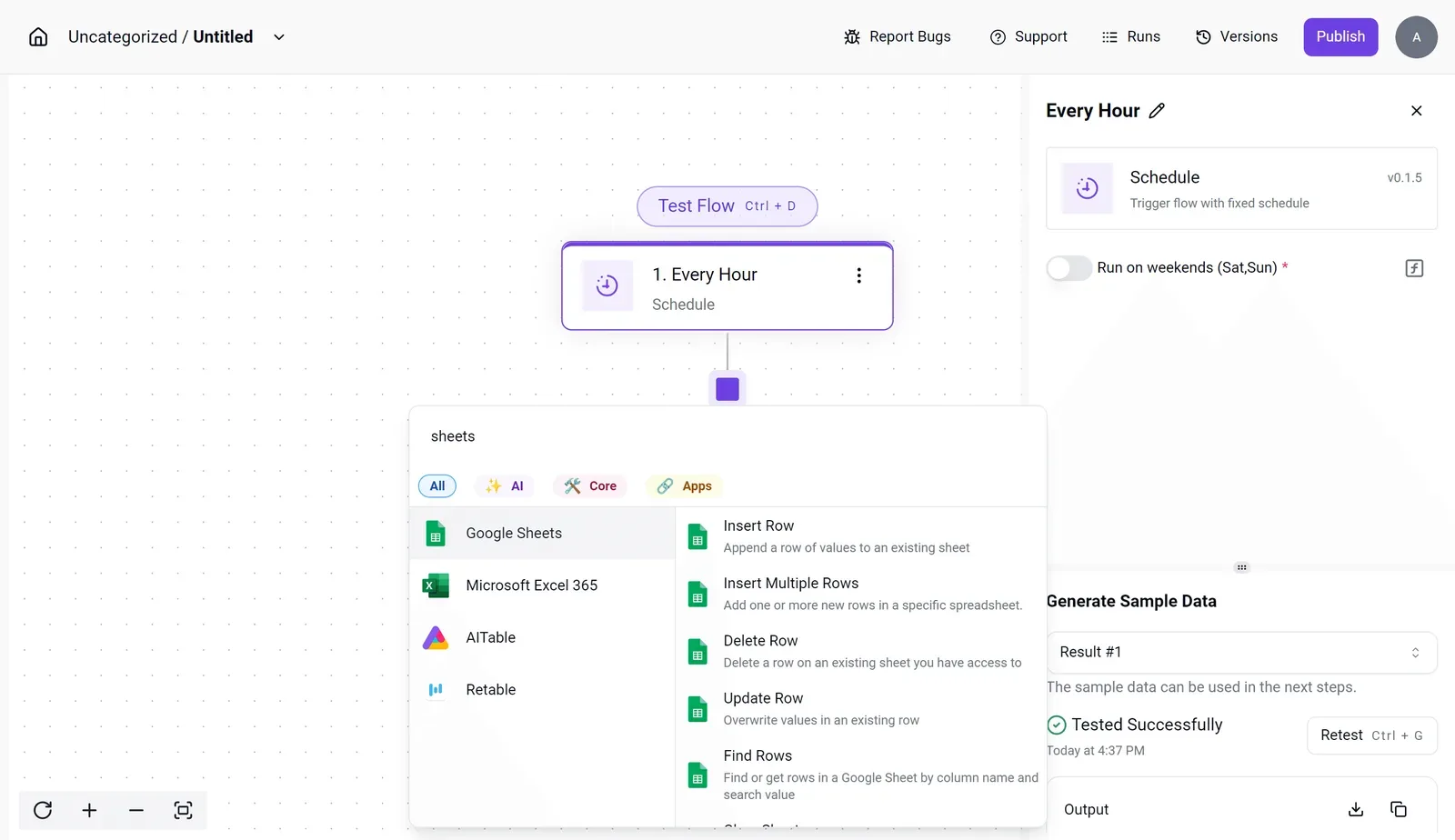
Activepieces is built for exactly this shape of job. The flow builder shows a schedule trigger set to run every hour, with a single step labeled "1. Every Hour."
The panel beside it offers spreadsheet actions such as Insert Row, Update Row and Find Rows, and a sample-data test marked "Tested Successfully."
Read the panel as the whole job: a trigger, an action, a test, with no service to size, deploy or keep awake. The schedule setting also has a weekend toggle, so a report nobody reads on Saturday stops running on Saturday.
### What does the same job cost elsewhere?
Priced on [Activepieces](https://www.activepieces.com/pricing), an hourly sync like the one above is a flow on a plan, not a service with its own instance, and every plan, including the free one, allows unlimited flows.
The meter there is the run: 24 runs a day comes to about 720 credits in a 30-day month, inside the 1,000 credits on the $0 free plan.
What changes in practice is that you stop paying compute for a process that mostly sleeps between runs.
Keep the boundary clear. Activepieces doesn't host your web app, your API or your Postgres database, so those Render lines stay.
What moves is the glue, and the 746 integrations in its open source monorepo are what connect it to the apps on either end, so any change must be tested across all 746 integration paths.
When you audit the invoice, tag every worker and cron service as "serves users" or "moves data between tools." The second group's your candidate list, and each one you retire removes a compute line you were carrying for a job that's really a flow.
## A Monday Checklist for Cutting a Render Bill
Run these six steps in order, and the invoice stops being a surprise: each one finds a line you're paying for without a client or user attached to it, so you can cut that expense.
1. List every service and its instance type.
2. Flag anything idle or oversized.
3. Check the bandwidth and disk lines.
4. Decide which free services have to be upgraded.
5. Set a spend alert.
6. Re-read the pricing page before renewing.
Of the six, the first three belong to the audit, the fourth and fifth to the clean-up, and the sixth to the renewal.
### Audit the services
Export or copy every service in the workspace into one sheet: name, type (web, worker, cron, database), instance type, and which client or product it belongs to.
The last column matters most. A service with no owner's a cost nobody agreed to, and on a shared account it's quietly carried by whoever pays the invoice.
Then read the bandwidth and disk lines separately. Bandwidth overage and attached disks bill apart from compute, so a small service can have a large footprint that the instance type hides.
### Right-Size or Remove Render Services
Sort the sheet by what each service actually does. Anything with no traffic, no recent deploys, or no owner's a deletion candidate, and deleting it removes a line rather than shaving one.
For the rest, compare the instance type to real load. If a service sits far under its memory and CPU, drop a size and bill the client at the smaller rate.
Then look at your free services. A free web service that spins down when idle's fine for a demo and wrong for anything a customer waits on.
Mark each one as "stays free" or "must be upgraded," and put the upgrade cost on the client who needs it.
### Set a Render Spend Alert
Set a spend alert at a level just above your audited total, so a forgotten preview service or a traffic spike shows up within days, not at month end.
Before you renew, open the pricing page and compare it against your sheet. Limits on seats, build minutes and bandwidth change, and a plan that fit last quarter may now be the wrong one.
## Frequently asked questions
Changing plans is cheap, but the small print on free tiers, suspension and overage's where a shared account quietly picks up costs nobody agreed to.
### Is Render free to use?
Yes, up to a point. Render offers free instance types for web services and databases, but they carry the limits that drive upgrades: web services spin down when idle, and free databases are temporary rather than permanent.
Treat free as a place to demo for a client, not to host the one they invoice you for. You can delete free resources whenever you like, so there's nothing to cancel.
### Does Render charge for a suspended service?
While a service is suspended, it stops running, so you're not paying for its compute while it's off. Check anything attached to it, such as a persistent disk or a separate database, because those are their own line items and can keep billing.
If you suspend a client project between engagements, confirm the whole stack's quiet before assuming the invoice's zero.
### Can I change plans or instance types mid-month?
Yes, and charges are prorated to the time each setting was active rather than reset for the full month. That makes it safe to upsize for a launch week and drop back afterward.
The cost's in forgetting to drop back, since the larger instance bills until you change it.
### How does Render bill for bandwidth overage?
Each workspace plan includes a bandwidth allowance, and traffic beyond it's billed at a per-gigabyte rate listed on Render's pricing page.
Overage lands on the whole workspace, so one client's media-heavy site can raise the bill for everyone sharing it. If you host several clients together, watch bandwidth per service and pass the excess on.
### Does Render offer discounts for startups or annual billing?
Render has run programs aimed at startups, and larger teams can negotiate terms with sales.
Don't build a quote on a discount you haven't received in writing. Price the client on list rates and treat any credit as margin.
## Related reading
- [DeepSeek Search API vs Exa Pricing for Small Teams (2026)](https://www.activepieces.com/blog/deepseek-search-api-vs-exa-pricing-for-small-teams-2026)
- [Snowflake Pricing Explained for 2026 Data Teams](https://www.activepieces.com/blog/snowflake-pricing-explained-for-2026-data-teams)
- [No-Code Automation Statistics 2026: Adoption for Small Teams](https://www.activepieces.com/blog/no-code-automation-statistics-2026-adoption-for-small-teams)
## References
- [Render](https://render.com/articles/ai-cost-management-predictable-pricing-vs-usage-based)