Security teams can close these reviews faster when they can inspect the underlying logic, which is why many move these flows to Activepieces. The platform ships an MIT-licensed core, allowing a lead to clone the repository and trace the queue and worker architecture before deciding to run it self-hosted or fully air-gapped. ## How AI chat intake boosts conversion rates ### Why chatbots outperform static lead forms Conversational interfaces achieve higher conversion by replacing the cognitive load of a static form with the momentum of a guided dialogue. While a standard lead-capture form yields a 2.1% conversion rate, an AI-driven intake surface reaches 44%, according to data from the lead-generation platform [ChatOnBo](https://chatonbo.com/blog/conversational-ai-vs-forms-ab-test-results), which means businesses can capture twenty times more prospects using the same volume of traffic. By simply changing the interaction model, a marketing team can generate twenty times the volume of leads from the same traffic pool. The shift from 2.1% to 44% represents a fundamental change in how users perceive the "cost" of providing their data, moving from a chore to a service, so companies can expect significantly higher engagement levels from their audience. ### AI chat conversion benchmarks by industry AI intake performance remains high across diverse sectors, though the specific conversion ceiling fluctuates based on the complexity of the offering. Data from ChatOnBo reveals the following benchmarks for AI chat conversion: 11.2% is the conversion rate for Real Estate, meaning one in nine visitors enters the sales funnel. SaaS reaches 9.1%, so software vendors can capture intent even from highly technical audiences. Professional Services sees 8.7%, which allows legal or financial firms to qualify leads before a human ever reviews the file.  Healthcare converts at 6.4%, so clinics can triage patient inquiries without violating the friction thresholds that lead to drop-offs. ### Protecting automation stability amid high conversion High conversion rates are a liability if the underlying automation logic fails to sanitize the influx of data. While an 11.2% conversion rate in Real Estate creates a massive top-of-funnel advantage, it simultaneously increases the surface area for injection attacks or malformed JSON payloads that can crash a downstream CRM like Salesforce, leaving the entire database vulnerable to corruption. If the chat-based builder generates a "black box" script to handle this **44% intake surge**, a single unhandled exception in the logic will result in thousands of lost leads. 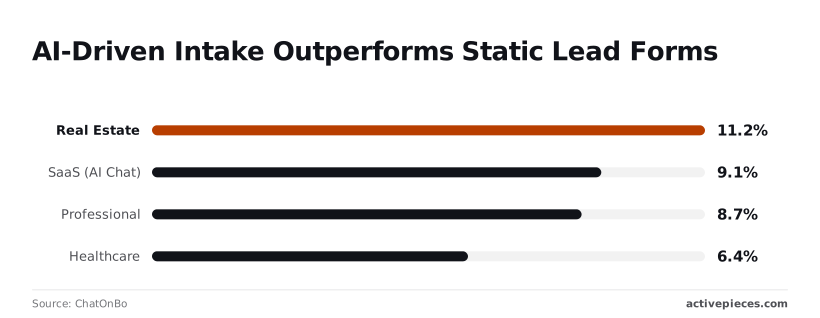 To ensure these high-volume flows are actually reviewed, companies like MoneyGram and FundingSocieties use Activepieces to bring them under standard engineering controls.Because the platform hides the JavaScript code responsible for data transformation, a logic error in a nested "if-then" statement remains invisible during the standard setup process.
By using Git Sync and Release Management, teams promote versioned flows from a test environment to production, ensuring the logic is treated as software rather than a hidden script. ## Why automated logic requires a human safety gate Human intervention is the only reliable method for identifying logical fallacies that large language models (LLMs) overlook when translating natural language into executable workflows. While these builders can generate functional syntax, they lack the operational context to distinguish between a legitimate production event and a cyclical error, often resulting in "success" logs that mask underlying data corruption. ### The risk of recursive trigger loops Automated builders frequently create workflows where the output of an action inadvertently satisfies the criteria for its own trigger. This causes an infinite loop that can exhaust operational budgets or lock user accounts. Because the LLM prioritizes the immediate request, it may not account for the fact that the update itself counts as a change. Redundant executions cascade from this oversight. To prevent these self-reinforcing cycles from reaching production, engineers should apply a three-point safety check: 1. Verify the 'Trigger Filter' to exclude test data or specific service accounts. This ensures the automation ignores its own administrative actions. 2. Map 'Dynamic Values' to ensure fields match the destination app, which prevents the system from misinterpreting a status update as a new entry. 3. Set a 'Delay' or 'Rate Limit' to prevent the workflow from firing faster than the human-in-the-loop can intervene during a failure. This checklist forces a pause in the deployment pipeline so that the logic is scrutinized for circularity before it is granted live access to the database. ### Managing API rate limits and server errors LLMs treat API calls as isolated events rather than part of a shared infrastructure. They often ignore the throttling policies of external services like the Slack communication platform or the Stripe payment processor. When an automation attempts to push bulk data without staggering the requests, the destination server will return a 429 "Too Many Requests" error. This typically results in the automation stopping entirely and leaving the data in a partially synced, inconsistent state. ### Silent failures in third-party API keys A "successful" build status in a chat interface does not guarantee that the underlying credentials have the necessary permissions to execute specific write operations. If an LLM generates a script using an API key that lacks "write" access to a specific folder in a storage service like Google Drive, the script may execute without a hard crash. Nobody sees the failure because the script fails silently while the user assumes the data has moved. Without a manual audit of the specific scopes and permission levels, these black-box builders risk creating "ghost workflows" that appear active in the dashboard but fail to deliver payloads to the intended destination. ## Reviewing Wix automation logic for production readiness Effective review requires verifying that trigger conditions precisely match intended business logic and confirming that the workflow respects the strict execution limits of the Wix environment. The ease of natural language prompting often masks underlying architectural constraints that lead to silent failures. The following diagram illustrates a user requesting a discount workflow through the Wix Chat interface, which the system translates into a linear logic chain: Trigger (New Subscriber) → Action (Send Email).  This translation process frequently omits the necessary conditional checks required to prevent duplicate coupon distribution. ### Step 1: Validating the trigger filters A production-ready review must confirm that the AI-generated trigger includes specific filters to prevent redundant executions. According to [EasternDev](https://dev.to/easterndev/i-monitored-10000-ai-api-calls-heres-what-wrong-44o6), rate limits account for 40% of automation failures, meaning nearly half of all system downtime is caused by exceeding provider thresholds rather than actual code bugs. An unfiltered trigger that fires on every site interaction will likely hit API thresholds and halt the workflow. Furthermore, 10% of failures stem from authentication issues, so developers must verify that the Wix API keys have specific "Read" permissions for the Contacts database rather than broad administrative access. ### Step 2: Managing execution timeouts in Wix Velo Because Wix Velo, the platform's full-stack development environment, imposes a 14-second timeout limit, developers must refactor any heavy data processing into background jobs. This constraint is significantly tighter than other platforms. 2,400 seconds are allowed by Make (Paid), which means developers have a forty-minute window to complete complex workflows before the platform terminates the execution. This capacity for massive data migrations means users can execute far more intensive background tasks than on competing services. Zapier (Extended) provides 600 seconds, sufficient for complex multi-step processing, so developers must optimize their workflows to fit within a much smaller execution window. Google Apps Script offers 360 seconds, supporting moderate batch operations. Wix Velo permits only 14 seconds, so any script attempting to process more than a few dozen rows will likely time out and leave data in a corrupted state. ### Step 3: Setting up the 'If-Failure' notification branch Every Wix automation requires a dedicated error-handling path to manage the 25% of failures caused by server errors and the 15% resulting from timeouts. This means that nearly half of all workflows are at risk of breaking without proactive intervention. Without a manual "If-Failure" branch, the remaining 10% of miscellaneous errors will go unnoticed by administrators, as Wix does not natively retry failed webhook deliveries, so data loss becomes inevitable for those specific transactions. 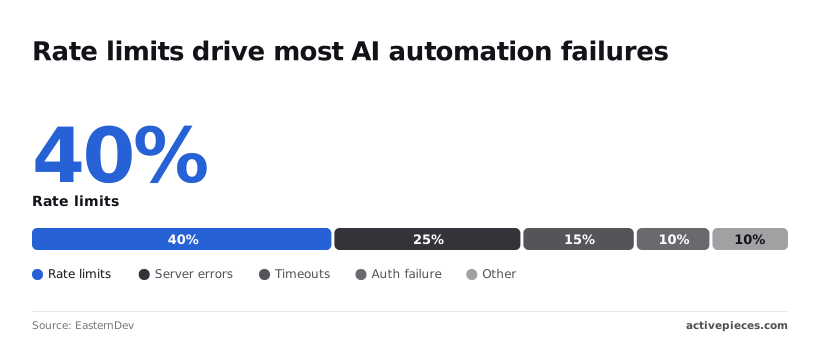 Establishing a secondary notification path ensures that when a server error occurs, the operations team receives a log entry immediately rather than discovering the gap weeks later during a manual audit. ## Managing Wix integrations through Activepieces for total visibility Activepieces provides a visual debugging environment where Wix webhooks can be inspected and transformed with more granularity than a standard chat interface allows. This transparency prevents the "silent failure" syndrome common in AI-driven builders by exposing the raw JSON payloads and the specific logic gates applied to them. ### Linking site events to the workflow Wix is the primary data source, triggering the automation via a dedicated webhook integration that captures site events like new orders or form submissions. Because this connection exposes the full data structure of the Wix event, an engineer can verify that the automation is receiving the expected fields rather than relying on an AI’s assumption of what the payload contains. When a custom field in a Wix form is renamed, the Activepieces trigger will immediately show a mismatch in the incoming data. This allows for a correction before the downstream logic processes null values.  ### Visualizing chat-generated logic as discrete steps The platform translates high-level prompts into a linear sequence of functional blocks, where each step acts as a checkpoint for the data. This modularity is necessary for auditing because it allows a reviewer to see exactly where a chat-generated script might be misinterpreting a conditional branch. * The Trigger block defines the entry point from the external service. * Action blocks execute specific tasks like data formatting or API calls. * Branch blocks manage the control flow based on specific boolean logic. ### Testing workflows with sample data without hitting production The "Test Step" feature allows for the execution of individual logic blocks using a captured Wix payload without triggering the final deployment. This isolation means a developer can iterate on complex data transformations, such as reformatting a Wix timestamp to match a database schema, without the risk of injecting malformed records into a live CRM.  By verifying each transformation in this local execution state, the team ensures that the logic generated by a prompt is functionally sound before it ever touches a production environment. ## A Monday morning audit for Wix site owners An audit of AI-generated automations must prioritize the verification of invisible triggers and silent failure points to prevent corrupted data from leaking into the CRM. Because chat-based builders often mask the exact criteria that initiate a workflow, a developer must manually inspect the "Wix Automations" dashboard to ensure a "New Order" event is not firing on abandoned carts. This oversight prevents inflated sales projections and wasted marketing spend. The following checklist provides a standardized framework for evaluating these black-box logic flows before they compromise live operations. | Dimension | Check | Status | | :--- | :--- | :--- | | Trigger | Does it fire on the exact intended event without overlap? | Pass/Fail | | Mapping | Are the source fields from the Wix form correctly aligned to the target database? | Pass/Fail | | Error Path | Does the flow have a defined behavior for when the destination API is unreachable? | Pass/Fail | This table serves as the final gate to ensure that the convenience of a prompted build does not bypass the necessity of architectural oversight. Once these dimensions are verified, the focus shifts from individual logic steps to the broader security implications of these connections. A misaligned mapping creates the potential for a malformed API call to expose sensitive customer data to unauthorized logs. By enforcing this review every Monday, site owners can identify "logic drift" where an AI-suggested update may have altered a stable path during a late-night troubleshooting session. Establishing this baseline allows the team to move from reactive patching to a proactive stance on automation stability. ## Frequently asked questions ### Can I undo an automation built by Wix chat? Reverting a chat-generated automation requires manual deletion or modification of the triggered actions. The Wix Velo development environment lacks a native "undo" button for published logic changes. When a single errant prompt overwrites a functional webhook, it permanently erases the previous configuration, forcing a developer to rebuild the logic from memory or documentation. Without a version history feature specific to the automation builder, the cost of a chat error is the total time required for manual reconstruction. ### Does Wix AI automation handle sensitive payment data? Wix AI automations interact with payment status and metadata rather than raw credit card numbers. The Wix Payments infrastructure isolates PCI-compliant data from the accessible automation layer. By separating these layers, the system ensures that even a poorly constructed chat prompt cannot accidentally log a customer’s full primary account number into a plaintext database. This shields the merchant from the most severe categories of data breaches. However, because the automation can still access customer emails, a logic flaw can still result in the mass exposure of personally identifiable information through misrouted notification emails. ### How do I see the logs for a chat-generated workflow? Detailed execution data is found within the Site Events section of the Wix dashboard. The system records the success or failure of each triggered script. Reviewing these logs is the only method for identifying "silent failures" where a flow appears active but fails to execute due to a hidden syntax error in the underlying Javascript. If these logs are not monitored, a broken integration between a store and a fulfillment provider could persist for weeks without triggering a visible system alert. ## References - [EasternDev](https://dev.to/easterndev/i-monitored-10000-ai-api-calls-heres-what-wrong-44o6) - [ChatOnBo](https://chatonbo.com/blog/conversational-ai-vs-forms-ab-test-results) - [Zapier](https://help.zapier.com/hc/en-us/articles/45405543131021-Run-longer-Code-steps-with-extended-runtimes)If the chat-based builder generates a "black box" script to handle this 44% intake surge, a single unhandled exception in the logic will result in thousands of lost leads.