According to [Invideo](https://invideo.io/faq/what-is-a-realistic-clip-discard-rate-when-making-an-ai/), a realistic keep rate is 25%. Under that assumption, 100 kept clips come with 300 discarded ones, so 400 generations. That's four takes per keeper, and the three-take column below's therefore a modest case. 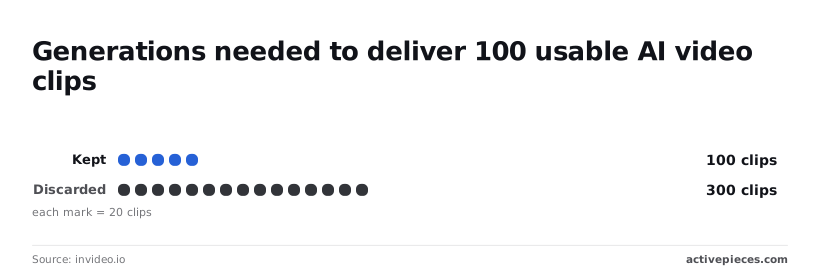 One take and three takes: the table prices each workload both ways. It assumes five seconds for each of the 5,000 app clips. Reading across a row shows the model multiplier (2.4x); reading down shows the volume multiplier, so you can isolate how much each factor affects price. | Workload | Seconds, 1 take | Seconds, 3 takes | Turbo, 1 take | Turbo, 3 takes | Gen-4.5, 1 take | Gen-4.5, 3 takes | |---|---|---|---|---|---|---| | 60 ten-second clips | 600 | 1,800 | $30 | $90 | $72 | $216 | | 300 five-second clips | 1,500 | 4,500 | $75 | $225 | $180 | $540 | | 5,000 app clips | 25,000 | 75,000 | $1,250 | $3,750 | $3,000 | $9,000 |  At one take, 60 ten-second clips for a social team's 600 seconds, or $30 on Turbo, which works out to 5 cents per second. At three takes it's $90 on Turbo or $216 on Gen-4.5, small enough that you can afford the better model for keepers. For an agency making 300 five-second clips, three takes means 4,500 seconds. That costs $225 on Turbo, against $540 on Gen-4.5, so Gen-4.5 carries a $315 monthly premium. The $315 gap's the price of rendering everything on the expensive tier instead of only the final pick. For 5,000 clips inside a consumer app, the retry multiplier decides the budget. Going from one take to three adds $2,500 on Turbo and $6,000 on Gen-4.5, so a retry policy needs a cap before launch. ## Find hidden costs in your bill Two things bound retry spending, Runway's account rules and your own cap, and five terms on its pricing and limits pages decide which bound you hit first: - Purchased credits don't expire, so an unused balance carries forward. - Refunds cover unused credits only, so credits spent on discarded takes don't come back. - Runway limits entry-tier concurrency per model, so retries queue instead of running in parallel. - The entry tier also has a daily generation cap, so a retry loop can stall before the credits run out. - Failed generations are refunded automatically, but a successful clip you dislike isn't. Check each against the live pricing page before you commit a budget. Because concurrency's per model, a batch job on one model queues behind itself while another model sits idle. Your tier sets how much you can run at once and how many you can generate per day. A launch-day spike therefore hits a wall in time before it hits one in money. If a clip is merely one you dislike, automatic refunds won't help: they protect you from platform errors, not from taste. Treat a clip you reject as fully paid for. I couldn't confirm how Runway bills a generation that moderation blocks, so test that case with a small batch and read the credit ledger before you assume it's free. Keeping that ledger by hand is the part worth automating, and Activepieces does it without touching Runway's models: a flow queues the generation requests, polls Runway for each result and writes every attempt's credit spend to a Google Sheet. A run counts as 1 credit however many steps it has, and the HTTP, Google Sheets and Gmail integrations it uses sit among the 744 integrations in the `packages/pieces/community` directory of the MIT-licensed open source monorepo on GitHub, where each integration's source is readable. The Free plan includes 1,000 credits a month and unlimited flows. Because purchased credits don't expire, over-buying costs you only the cash tied up in the balance. The refund window is narrow and covers only credits you haven't spent. I have no confirmed minimum purchase or account-level spend cap, so set your own ceiling in your application. I couldn't confirm how long Runway keeps generated files available for download. Copy each finished clip to your own storage on completion, and count that storage and egress as a separate line in the budget. ## Compare Runway with Veo and Sora You can't yet rank Runway against Veo, Sora or Luma on price. The only per-second rate I could confirm from a vendor page is Veo 3.1's $0.40. Storage's one line of the budget, and this rate's the other. ### Price per second on each vendor's own page Across the six columns that drive cost, the table lists five models. Every gap is marked "not found", and the only complete row is Veo 3.1, so treat it as a template to fill from each pricing page, not as a verdict. | Model | Price per second | Max length | Resolution | Audio | Rate limits | Date | |---|---|---|---|---|---|---| | Runway Gen-4.5 | not found | not found | not found | not found | not found | not found | | Runway Gen-4 Turbo | not found | not found | not found | not found | not found | not found | | Google Veo 3.1 | $0.40 | not found | 720p | Yes | not found | not found | | Sora 2 | not found | not found | not found | not found | not found | not found | | Luma Ray | not found | not found | not found | not found | not found | not found | At $0.40 a second, a ten-second take costs $4.00, so keeping one clip after five discards costs $24.00. Budget on that multiple, not on the single-clip price. With Veo 3.1 listed at 720p with audio, that rate buys sound in the same call. If another vendor charges separately for audio or higher resolution, its headline per-second price isn't comparable with Veo's. Compare only rows that match on resolution and audio. I can't show Runway as cheaper or dearer than any rival, because its rate's missing. Where a rival's page lacks a published rate limit or a clip length that fits your shot list, the retry count you can afford's unknowable. That vendor's the wrong choice until you find it. ## Fix runaway video spend with Activepieces Don't expect Activepieces to lower what Runway charges. It can stop you paying for takes you never see, never save or never count, which is where unknown retry costs pile up. Activepieces runs a sequence of steps on a schedule or trigger across its 744 integrations, and the same flow reaches other video vendors by swapping the HTTP request. Here is one build, the flow below. A schedule trigger reads a prompt sheet in Google Sheets, loops over the rows, submits each prompt to Runway over HTTP, runs two AI steps, and writes a log row.  It then branches on a condition before sending a Gmail message. Read it left to right as a record of every attempt, because each attempt's a billable run and each row it writes is a retry you can count later. Before you loop over a long prompt sheet, check how your plan counts a run, because Activepieces meters usage in flow runs. A loop that fires many steps per row can use up allowance faster than the clip count suggests. ### Queue Runway video jobs and save outputs On each schedule, the trigger pulls pending prompts from the sheet. The loop sends them to Runway one at a time instead of all at once, so a bad prompt batch can't spend your budget in a single burst.  After submission, the flow polls the task status until it reports done or failed. A failed task gets marked in the sheet, so a discard's recorded rather than silently repeated. On success, the flow downloads the file and stores it in your own storage straight away. Runway output links aren't permanent, so a clip you didn't save is a clip you pay for again. Saving at completion turns a possible regeneration into a one-time cost. ### Log credits and cap the spend For every job, a row gets written with the prompt, the model called, the task result and the credits it consumed. Take the credit figure from Runway's pricing page for the model you used, and record it per attempt, including failures. Summing that column gives you cost per kept clip, which is the number the headline credit price hides.  Next, the router checks the running total against a limit you set. In Branch 1, where the total crosses it, Gmail sends an alert and the loop stops. In Otherwise, the run continues. That one branch's the cap that keeps a bad week of retries from becoming a bad invoice. ## Measure your discard rate before budgeting Spend one morning measuring your own discard rate, because that rate, not the credit price on the page, sets what a finished clip costs you. The sequence below takes a few hours and needs no figure from this article. 1. Re-open the Runway pricing page and write down today's date next to the credit rate for each model you might call. Credit prices change, and a date on your estimate tells whoever reads it later whether it has expired. 2. Run 20 test generations on the cheapest model, using prompts that resemble your real jobs rather than showcase prompts. Twenty's enough to show a pattern, and the cheap model keeps the experiment from becoming the expense. 3. Count the discards. Every take you wouldn't ship counts, including the near-misses you would've regenerated. Divide discards by total runs to get your discard rate. 4. Multiply the metered unit, seconds of video, by the table price for each model, then by the number of takes you need per finished clip. If one in three takes survives, you pay for three seconds of generation to get one. That product's your cost per finished clip, and it's the figure to budget against. 5. Set a spending cap in your own code or account settings, sized to a bad week of retries rather than an average one. This is the branch the previous section described. 6. Pick a model per job. Use the cheap model for drafts and prompt iteration, and spend on a pricier one only where a lower discard rate offsets its higher rate per second. Test that offset with the same 20-run method instead of assuming it. ## Frequently asked questions A retry-based budget leaves some questions open, and these are they. Where Runway's pricing page is the authority, the answer says so rather than guess. Is there a free tier for the Runway API? Don't budget around one. API usage is metered in credits, so treat any trial allowance as enough to test a prompt or two, not to estimate a production retry rate. Check the pricing page for the current terms before you rely on it. ### Does Runway charge for failed generations? If a take finishes and you then reject it, you are charged in full, which's why the retry budget's the main cost. A job that errors out before producing output's a different case, and the billing terms govern it. Log every task's final status and compare it against your credit balance so you know which kind you're paying for. ### Is the Runway API cheaper than the Runway app subscription? Not by default. Both draw on credits, and the meter's seconds of video on the model you pick, so the unit price depends on that choice rather than on the channel. The app bundles an interface and seats; the API gives you automation and the ability to cap retries in code. Compare cost per accepted clip, not per generated second. How often does Runway change API prices? Expect changes whenever new models launch, because each model carries its own credit rate. Keep the model name and its per-second credit rate in configuration rather than hard-coded, and re-read the pricing page at the start of each budget cycle. A stale rate multiplies across every retry you planned for. Can I get an enterprise discount on the Runway API? If your volume is large, ask Runway's sales team about custom terms; committed volume's the usual lever. However big, a discount lowers the rate but leaves your discard rate untouched. If most takes get thrown away, a lower price per second still leaves you paying for most of the output you don't use. ## Related reading - [Synthesia Pricing 2026: Plan Costs and Cost per Video](https://www.activepieces.com/blog/synthesia-pricing-2026-plan-costs-and-cost-per-video) - [Claude API Pricing 2026: Rates for Every Model](https://www.activepieces.com/blog/claude-api-pricing-2026-rates-for-every-model) - [OpenAI API Pricing 2026: Cost Per Model Compared](https://www.activepieces.com/blog/openai-api-pricing-2026-cost-per-model-compared) ## References - [Runway API docs](https://docs.dev.runwayml.com/guides/pricing/) - [Runway](https://runway.com/pricing) - [invideo.io](https://invideo.io/faq/what-is-a-realistic-clip-discard-rate-when-making-an-ai/)What moves the bill 300-fold is your choice of model and iteration count.