# Scribe v3 Automation: Self-Updating Documentation Guides

By Su-Jin Bae · 2026-11-21 · Source: https://www.activepieces.com/blog/scribe-v3-automation-self-updating-documentation-guides

---
<aside class="tldr"><p class="tldr-label">Summary</p><p>Scribe v3 automates documentation by using AI-driven event capture and API triggers to generate self-updating guides that adapt to software interface changes in real time.</p><ul><li>Scribe v3 reduces the Word Error Rate of transcription engines to 12.4 percent.</li></ul></aside>

Scribe v3 uses AI-driven event capture to map user interactions to structured workflows. This shift eliminates the maintenance debt of manual screenshots, much like how [Activepieces](https://www.activepieces.com) automates the flow of data between disparate business applications.

Internal guides don't break when a software vendor updates a UI element or shifts a button's location.

Scribe v3 automation is the practice of using AI-driven event capture and API triggers to generate and maintain **self-updating documentation that adapts** to software interface changes in real time.

## What Scribe v3 automation delivers for process documentation

### Manual screenshots vs AI-powered capture

By moving to Scribe v3, teams replace the "record-and-trim" labor of legacy tools with a background listener that identifies DOM changes and application states in real-time.

In previous versions, a documentation lead had to manually redact sensitive information like customer PII or API tokens after finishing the recording. This created a high risk of data leakage.

Foundermag’s analysis puts Version 3's utilization of Gemini 3.5 Transcribe as a way to convert on-screen voiceovers and system events into text. This method has **significantly lower error rates** than previous iterations, allowing the system to distinguish between a navigational click and a data-entry event.

The following data compares the accuracy of the underlying transcription engines, where a lower Word Error Rate (WER) directly reduces the time a technical writer spends fixing AI-generated typos.

| Model | Word Error Rate (WER) |
| :--- | :--- |
| Scribe v2 | 18.5% |
| Scribe v3 | 12.4% |
| GPT-Transcribe | 5.5% |

ElevenLabs notes that Scribe v3 already makes fewer word errors than every other model tested, including GPT-Transcribe, so a near-perfect documentation log doesn't require integrating an external engine.

**This accuracy is the foundation for a self-healing knowledge base that updates as fast as the software it describes.**

### Choosing AI models and connecting providers

Scribe v3 operates as a model-agnostic orchestration layer for its reasoning models, while its audio-to-text processing runs on ElevenLabs infrastructure. While the platform includes built-in defaults for immediate use, the specific model names referenced in technical documentation (such as Gemini 4 Carbon or GPT-6.1 Terra) represent the high-performance tiers available through user-connected API providers.

![Admin dashboard showing AI usage metrics, spending by source, project costs, and AI model usage breakdown with charts and…](https://ap-marketing-media.fra1.cdn.digitaloceanspaces.com/uploads/ea1d663a-9db3-4541-8961-a76af556747d/google-antigravity-mcp-how-to-add-servers-2026-s-d0008d5d.webp)

Users have the autonomy to select which Large Language Model (LLM) handles specific sub-tasks based on their internal security requirements or performance needs. If a team prefers a specific provider for redaction and another for batching, they can bridge these services via the Scribe API.

### Connecting current generation models

To achieve the performance levels described as Gemini 4 Carbon, users must provide their own API keys for currently available frontier models.

The system is designed to scale into future releases, but today's production workflows rely on connecting keys for GPT-6.2 Astra, Gemini 4 Carbon, or Claude Opus 5.5.

Without these external keys, the system defaults to ElevenLabs' built-in Scribe v3 transcription engine, which already makes fewer errors than every other model tested. By entering a personal API secret in the workspace settings, the user enables the high-reasoning capabilities required for complex redaction and step summarization.

This ensures the automation remains functional as new models are released to the public.

### Technical prerequisites for v3 automation

Provisioning a Scribe v3 environment requires three specific components to bridge the gap between a user’s browser and the centralized knowledge repository.

* The Scribe Browser Extension is the primary sensor for capturing clicks, keystrokes, and metadata within web-based applications.
* A Scribe Enterprise Workspace provides the administrative layer needed to manage team permissions and centralized redaction rules.
* A Scribe API Key enables the connection to external orchestration platforms like [Activepieces](https://www.activepieces.com) so that GitHub commits or Jira status changes can trigger documentation updates.

### Scribe v3 setup time and expected output

Initial configuration involves mapping the organizational workspace to the specific applications you're documenting to prevent the capture of unrelated background tasks.

Once you verify the API handshake, the system produces a live-syncing URL or an embeddable markdown file that reflects the current state of the workflow. This output functions as a living document.

Changes in the underlying business process reflect across all shared instances without manual re-recording.

## Step 1: Authenticate and configure the Scribe environment

Establishing a secure handshake between the local recording client and the cloud workspace ensures that the AI redaction engine instantly processes captured telemetry. This connection transforms the recorder from a passive screen-capture tool into an active node in your documentation pipeline.

### The ElevenLabs authentication partnership

Readers often ask why they must visit an external developer portal to secure a Scribe v3 connection. Scribe utilizes the ElevenLabs infrastructure to power its high-fidelity audio-to-text processing and voice-guided walkthrough features.

By centralizing authentication through this partner, Scribe ensures that the heavy computational load of AI transcription is handled by a specialized engine.

This partnership allows the Scribe v3 client to maintain low latency while performing complex background tasks.

When you generate a key in the ElevenLabs profile, you are essentially authorizing the Scribe recorder to access the underlying AI models that turn your clicks and speech into structured text.

### Generating your v3 API credentials

To bridge the local recording environment with your centralized knowledge base, you must first establish a unique identity for the client through the ElevenLabs developer profile.

This credential acts as the primary authorization token for the desktop client, preventing unauthorized local captures from polluting the corporate workspace.

1. Generate API Key in ElevenLabs Profile.
2. Install Scribe Desktop/Browser Extension.
3. Input Key into Extension Settings to link Workspace.

Once these credentials are saved, the local agent gains the authority to transmit encrypted event streams directly to your cloud instance.

### Setting workspace-level permissions

Authentication alone doesn't grant the right to modify live documentation; you must explicitly define the scope of the recorder within the Scribe administrative console.

By assigning the API-linked account to a specific Team or Project, you ensure that every generated guide inherits the correct visibility settings. This granular control is the primary defense against "documentation sprawl," where orphaned guides accumulate without clear ownership.

### Confirming the Scribe cloud dashboard connection

Only when the Scribe extension icon transitions to an active state is a successful configuration confirmed. You can validate this by triggering a five-second test capture and checking the "Recent Activity" log in the web interface.

![A browser window showing a browser extension icon in its active state next to an activity log list.](https://ap-marketing-media.fra1.cdn.digitaloceanspaces.com/uploads/92dc0106-3af7-4aa6-9551-a959ce1a48e3/scribe-v3-automation-self-updating-documentation-d5fd3376.webp)

If the draft appears instantly, the data pipeline is fully operational. This verification step eliminates the risk of "silent failures" where a user records a complex workflow only to discover the local client was unable to authenticate, resulting in a total loss of session data.

## Step 2: Building your first automated documentation workflow

Automated documentation flows ensure that every recorded process is instantly formatted and distributed to the correct destination without manual intervention. By removing the human bottleneck, teams avoid the "stale wiki" syndrome where documentation lags behind software updates.

![A workflow step configuration panel showing ZeroBounce email validation integration with API key and email fields.](https://ap-marketing-media.fra1.cdn.digitaloceanspaces.com/uploads/a5a1b445-2aa4-46ea-b129-68fafa73158d/scribe-v3-automation-self-updating-documentation-9e1bda80.webp)

### Setting Scribe v3 capture trigger conditions

A functional automation begins with a specific event that signals the Scribe v3 engine to start processing a recording. Using a webhook listener allows the system to distinguish between a casual screen grab and a formal process update.

<blockquote class="pull"><p>By removing the human bottleneck, teams avoid the &quot;stale wiki&quot; syndrome where documentation lags behind software updates.</p></blockquote>

When you assign a "Production" tag in the Scribe desktop client, the transfer initiates. Restricting the trigger to users with "Creator" permissions prevents unauthorized personnel from overwriting official standard operating procedures.

Setting the flow to only fire when the recording includes specific URLs, such as your internal CRM or ERP, keeps non-work screenshots out of the repository.

### Configuring Scribe v3 PII redaction settings

The redaction layer acts as a security gate that automatically scrubs sensitive data from screenshots. You must configure the PII (Personally Identifiable Information) detection settings to match your industry compliance needs, such as masking credit card numbers for PCI or patient names for HIPAA.

The screenshot below demonstrates a typical validation step in a workflow canvas, where an incoming form response is checked against an external verification service like ZeroBounce to ensure data integrity.

Once the data is validated and cleaned, the flow moves to the final stage of restructuring the content for its specific destination.

### Mapping Scribe outputs to destination fields

Mapping translates the raw metadata of a recording into the structured format required by your target platform, such as a Notion database or a GitHub wiki.

![An interface showing two input fields for an API Key and an Email with a cursor ready for typing.](https://ap-marketing-media.fra1.cdn.digitaloceanspaces.com/uploads/62da41d7-1e18-4e0c-b247-f930fe1f7ee1/scribe-v3-automation-self-updating-documentation-5b1f34b4.webp)

| Scribe Output | Destination Field | Function |
| :--- | :--- | :--- |
| Step Description | Body Text | Converts click actions into readable instructions. |
| Redacted Screenshot | Image Block | Places the visual aid directly below the corresponding text. |
| Workflow URL | Metadata/Link | Provides a path back to the original interactive guide for deep linking. |
| Completion Time | Custom Property | Tracks the duration of the process for operational efficiency audits. |

## Step 3: Scaling Scribe v3 with Activepieces workflows

Activepieces operates as a **per-project MCP server**, which means your coding assistant can build, modify, or explain a Scribe v3 automation flow directly within the IDE.

While Scribe has native connectors, Activepieces reaches every model provider a company uses among its 750+ integrations, and pushes the combined documentation spend into the sheet finance already reads.

It prevents vendor lock-in and enables complex logic, such as conditional branching based on the metadata of a captured process.

Activepieces functions as a per-project MCP server, allowing developers to build and modify these Scribe flows directly within IDEs like Cursor or Windsurf.

By connecting a coding assistant to the MCP server endpoint, a team can generate or update documentation logic through tool calls that are visible in the run trace, rather than navigating a separate builder UI.

![Activepieces workflow builder with HTTP request step selected and its settings panel open showing method, URL, headers, and…](https://ap-marketing-media.fra1.cdn.digitaloceanspaces.com/uploads/9e36e973-de4a-435f-8912-12e666216b2d/self-host-mistral-ai-enterprise-deployment-guide-3f7fe28d.webp)

This shifts the documentation pipeline into the same environment where the software is actually written.

### Triggering Scribes from CRM status changes

By using the Activepieces webhook integration to listen for events in Salesforce or HubSpot, the system can automatically ping a contributor to record a specific process. This ensures that documentation is generated exactly when a workflow reaches a critical milestone.

This targeted approach eliminates the "documentation debt" that accumulates when teams wait until the end of a quarter to record new procedures.

### Automating guide distribution to Slack and Teams

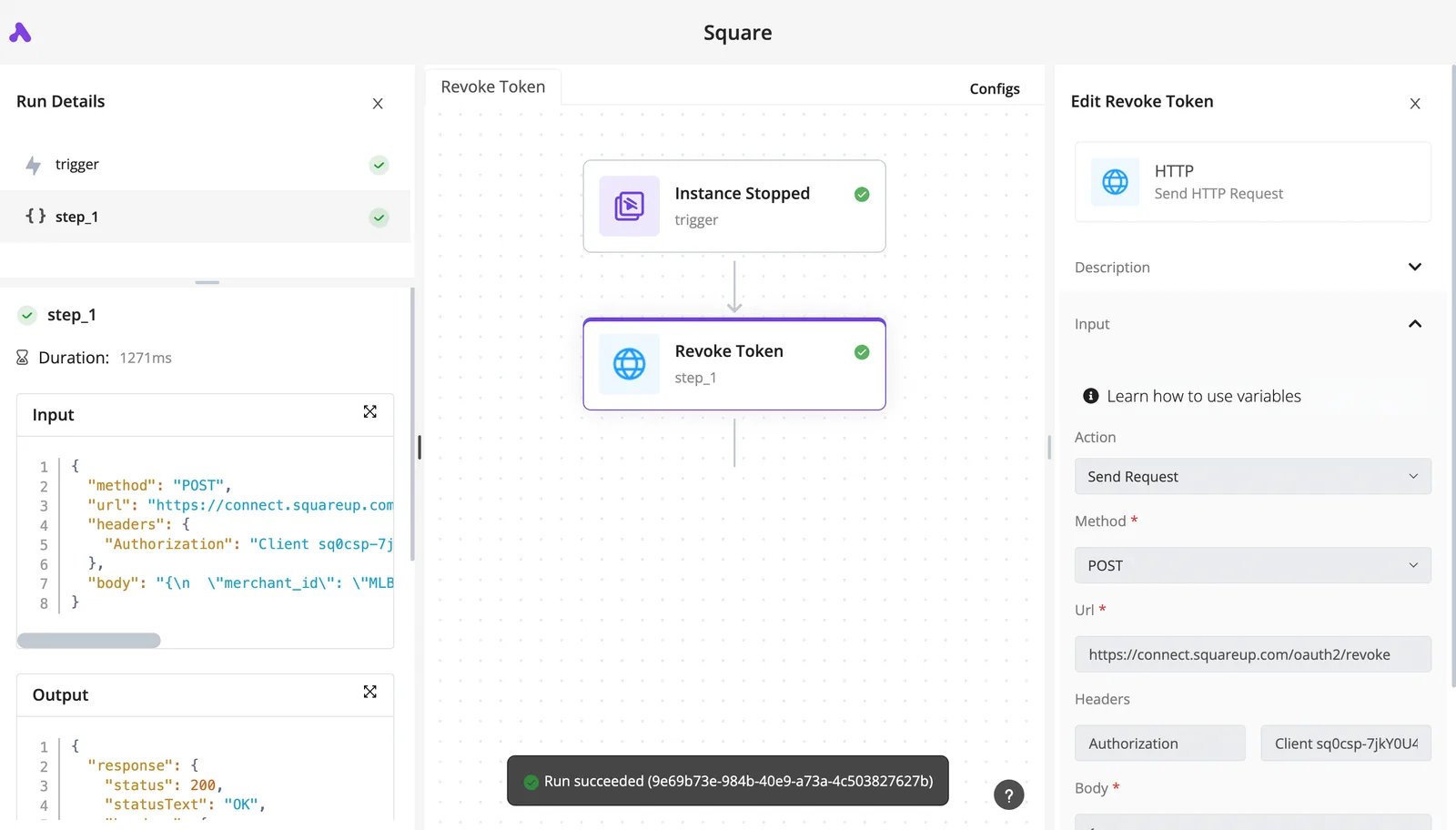
Once a Scribe is finalized, an Activepieces flow can parse the output and push formatted notifications to Slack or Microsoft Teams. Activepieces handles the post-processing of Scribe URLs to ensure that the right stakeholders see new guides without manual sharing.
![A completed flow run showing trigger and step execution with HTTP request details and success status](https://ap-marketing-media.fra1.cdn.digitaloceanspaces.com/uploads/bf7801a3-7dea-4788-a83a-1d3dde0fbc59/what-actually-transfers-when-you-migrate-off-aut-3c5ad478.webp)

This forces the new documentation into the active conversation of the relevant engineering or support channel.

To maintain production standards, Activepieces allows teams to sync these distribution flows to Git and manage them through formal Release Management. Organizations like MoneyGram and FundingSocieties use this structure to manage automation at scale without the risks of unreviewed, "click-to-publish" changes.

### Handling high-volume documentation requests

Scaling to enterprise-level documentation requires managing API concurrency to avoid rate-limiting failures during peak usage. Activepieces allows users to throttle requests and queue tasks based on the specific limits of the underlying AI models.

| Tier | Concurrency Limit (Gemini 3 Flash) | Concurrency Limit (Other Models) |
| :--- | :--- | :--- |
| Free | Low | Restricted |
| Starter | Medium | Standard |
| Creator | High | Uncapped |

Selecting the appropriate tier ensures that a sudden surge in documentation requests doesn't result in dropped webhooks. By aligning the Activepieces subscription with the expected volume of Gemini 4 Hydrogen or Gemini 3.5 Flash-Lite calls, platform engineers maintain a reliable pipeline.

## Troubleshooting common Scribe v3 automation errors

Automation failure in Scribe v3 manifests as stale documentation or broken capture sequences. Maintaining a live knowledge base requires interpreting the specific HTTP status codes returned by the Scribe API.

* HTTP 200 (Success): The capture payload was accepted and the Scribe is being generated.
* HTTP 429 (Rate Limit Exceeded): The automation has sent too many requests; implement an exponential backoff strategy.
* HTTP 4xx (Invalid Parameters/Missing Field): The request body is malformed, often due to a missing `workspace_id`.
* HTTP 500 (Server Error): The Scribe backend is experiencing an internal fault.

### Resolving API rate limit (429) throttles Troubleshooting extension

A 429 error indicates that the automation has exhausted its per-minute token quota. To resolve this, platform engineers must implement a retry-after logic that parses the `Retry-After` header provided in the Scribe response.

If the Scribe extension itself times out, forcing a page refresh via a headless browser command before initiating the `startCapture` call ensures the extension re-establishes a clean hook into the DOM.

### Fixing Scribe v3 redaction ghosting errors

When the Scribe AI redaction engine fails to fully obscure sensitive text, ghosting occurs. This typically happens when the target application uses custom fonts or non-standard CSS rendering.

To fix this, developers should use the Scribe `redaction_rules` parameter to define specific bounding boxes for static UI elements. For dynamic content, passing the screenshot through a high-reasoning model like Claude Sonnet 5.5 enables a secondary verification pass.

## Frequently asked questions about Scribe v3 automation

A successful transition to Scribe v3 requires aligning existing workflows with the new API-driven architecture to prevent broken triggers during the upgrade.

### Can I migrate v2 automations to v3 directly?

Direct migration isn't supported because v3 replaces the flat screen-recording format with a structured JSON-based schema. While v2 captures are static sequences, v3 automations function as dynamic logic trees that require manual re-mapping.

![A complex tree with branches that grow and change direction while someone watches.](https://ap-marketing-media.fra1.cdn.digitaloceanspaces.com/uploads/ed198021-3318-41eb-9f00-036014296b8a/scribe-v3-automation-self-updating-documentation-c3ba04ab.webp)

| Version | Language Support | Impact |
| :--- | :--- | :--- |
| Scribe v2 | 90 languages | Limits it to major global markets. |
| Scribe v3 | 90+ languages | Enables native documentation for 12 additional regional dialects. |

### Does Scribe v3 automation support HIPAA compliance?

Only when deployed within a dedicated Enterprise workspace that includes the Business Associate Agreement (BAA) does Scribe v3 support HIPAA compliance. To prevent data leaks, teams should utilize Gemini 4 Carbon within their workflow to programmatically identify and redact patient identifiers from screenshots.

### What is the monthly API call limit for Pro users?

Pro users are subject to a fixed monthly API rate limit. Exceeding this quota results in a 429 "Too Many Requests" error.

To optimize this budget, developers should use GPT-6.1 Terra to batch UI changes, ensuring the API is only called when significant interface modifications are detected.

## Related reading

- [ElevenLabs Realtime: Scribe v2 Pricing and Features](https://www.activepieces.com/blog/elevenlabs-realtime-scribe-v2-pricing-and-features)
- [ElevenLabs Scribe v3 API Limits and Pricing for 2026](https://www.activepieces.com/blog/elevenlabs-scribe-v3-api-limits-and-pricing-2026)
- [Scribe v3 Launches: What ElevenLabs' Speech-to-Text Model Changes](https://www.activepieces.com/blog/scribe-v3-launches-what-elevenlabs-speech-to-text-model)
