# Slack Automation Examples: 7 Workflows to Copy (2026)
By Wren Castellano · 2026-10-15 · Source: https://www.activepieces.com/blog/slack-automation-examples-7-workflows-to-copy-2026
---
Start with a Typeform-to-HubSpot-to-[Slack](https://slack.com/blog/news/new-slack-research-shows-accelerating-ai-use-at-work) alert: each form submission creates a contact and pings your sales channel in seconds, so no lead sits unseen for hours.
## 1. Form-to-Slack lead alert with CRM record
I compared platforms on Slack triggers, HubSpot and Typeform support, and price per run. The table was checked on 2026-10-15.
| Platform | Slack-native triggers | HubSpot/Typeform support | Self-hosting | Pricing unit | Check date |
|---|---|---|---|---|---|
| Activepieces | Yes | Both | Yes | Credits (meter AI usage); unlimited flows on every plan | 2026-10-15 |
| Slack Workflow Builder | Yes | Webhook only | No | Included in paid Slack plans | 2026-10-15 |
| Zapier | Yes | Both | No | Tasks | 2026-10-15 |
| Make | Yes | Both | No | Credits (formerly operations) | 2026-10-15 |
Workflow Builder needs a webhook to reach HubSpot; the other three connect directly. The flow below works on any of them.
This flow fits Activepieces' free plan: $0, 1,000 credits a month, unlimited flows, up to 5 users, no card needed, so there's no financial hurdle to trying it. Sign-up is at https://cloud.activepieces.com/sign-up
1. Trigger: a new Typeform response.
2. Create or update a HubSpot contact from the answers.
3. Post a Slack message to your sales channel with the lead's name and a link to the contact.

391%. That is the lift in conversion from calling within 1 minute in the [Leads360 speed-to-call study](https://cdn2.hubspot.net/hubfs/69576/leads360%5Fwp%5Fspeed%5Fto%5Fcall.pdf), so an alert that lands instantly is worth more than a nicer report.
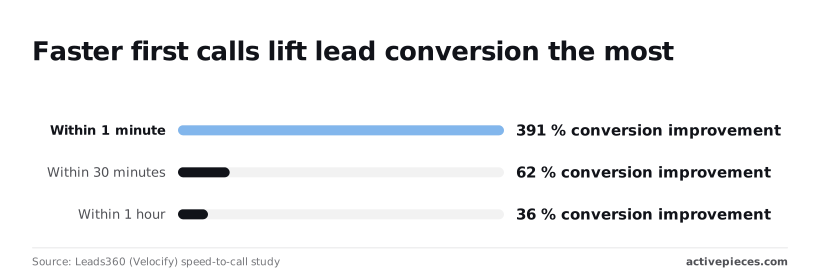
**Within 30 minutes the lift fell to 62%**, and within 1 hour to 36%, which means every hour of delay burns most of the advantage.
[Typeform](https://www.activepieces.com/pieces/typeform) captures the lead, [HubSpot](https://www.activepieces.com/pieces/hubspot) stores it as a CRM contact, and [Slack](https://www.activepieces.com/pieces/slack) delivers the alert.
You skip manual copy-pasting and the "did anyone follow up?" thread. It breaks with duplicate submissions, which create noisy alerts, and once you pass five workflows, when per-task billing starts to matter. Add a HubSpot email lookup before creating the contact.
## 2. Daily stand-up digest in Slack from Google Sheets
**Nobody chases anyone and the meeting goes away**, because a schedule-triggered flow asks everyone for updates in Slack, logs their replies in Google Sheets, and posts one digest at a fixed hour.
The trigger's a schedule, weekdays only, set to your team's start of day.
1. Send each teammate a direct message asking for yesterday's work and any blockers.
2. Write every reply to a new row in a Google Sheet, with a name and date.
3. At the cutoff hour, read that day's rows.
4. Post one formatted message in the team channel, listing anyone who didn't reply.

Slack handles the questions and the final post. Google Sheets holds the replies and doubles as a searchable history.
You save the daily meeting and the manager's habit of pinging people one by one. It breaks when replies arrive in threads the flow doesn't watch, or when someone answers after the cutoff and silently drops out of the digest.
**Whatever tool you use, build the equivalent alert for failures before you add the next flow.**
## 3. Zendesk ticket escalation to the right Slack channel
Once your failure alerts are in place, build the flow that posts every new or upgraded high-priority Zendesk ticket to the channel that owns it. It tags whoever is on call, so **no escalation sits unseen in a queue**.
The trigger is Zendesk's "ticket created" or "ticket updated" event, filtered to priority changes.
1. Read the ticket's priority and the requester's organization tier.
2. Branch: enterprise customers go first, then P1, P2 and P3.
3. Post a message with the subject and ticket link to the matching channel.
4. Tag the on-call person or Slack user group.
To see where each branch lands and how fast someone should answer, read the table.
| Zendesk priority | Target Slack channel | Who is tagged | Target first response |
|---|---|---|---|
| P1 | #support-urgent | On-call engineer | 15-30 min |
| P2 | #support-escalations | Support lead | 1-2 h |
| P3 | #support-queue | No tag | 4-8 business h |
| Enterprise tier | #support-enterprise | Account owner and on-call | 15-30 min, whatever the priority |

Leaving P3 untagged keeps pings meaningful.
Use a Slack user group for the tag, so changing the on-call rotation means editing one group instead of the flow.
It breaks when priorities are set inconsistently: if agents leave everything at normal, nothing escalates. It also breaks past a handful of flows, when channel names change or user groups go stale and posts land nowhere. Point your failure alert at this flow first.
## 4. Approval requests with Slack buttons
**The approver answers in one click** instead of digging through email, and the requester stops asking "did anyone see this?" That is what an approval flow does: it turns a request into a Slack message with Approve and Deny buttons.
The trigger is a submitted request form, such as a purchase or a time-off request. The order matters, because the wait step is where most people get this wrong:
1. Submit the request form (a Google Form or Typeform works fine).
2. Post a Slack message with Approve and Deny buttons to the approver, ideally in a direct message so it doesn't get buried in a channel.
3. Wait for the click, and send a reminder after a set number of hours if nobody has answered.
4. Update the source system, such as the spreadsheet row or ticket, with the decision.
5. Notify the requester of the outcome in Slack.
You need a form tool for intake, Slack for the buttons and notifications, and whatever system holds the record you're updating.
Activepieces, which MoneyGram, Moneypenny, Alan and FundingSocieties run in production, lets you describe the approval to its built-in chat, buttons and reminder included, and it publishes the flow in your account.
That flow is the same artifact someone would have assembled by hand, it sits under the same RBAC and audit logs, and each run leaves a trace anyone on the team can read.
Check your plan first: the wait-for-response step often needs a paid tier on hosted tools.
### Time saved and where it breaks
You save the back-and-forth: no chasing, no forwarded emails, and the record updates itself. It breaks when approvers change.
If the approver name is hardcoded, requests go to someone who left, so route by a lookup table or role instead.
## 5. Scheduled KPI report in Slack from Google Sheets
**Stop copying figures into Slack by hand**: a weekday schedule that reads your numbers from Google Sheets and posts them to a channel replaces the person who does it.
The trigger is a schedule, set to weekday mornings before the team starts work. Then:
1. Read the row or range holding yesterday's figures from the sheet.
2. Format them into one short message: a line per metric, with the change from the day before.
3. Check each figure against a threshold you set. If one crosses it, add a flagged line at the top, such as "Signups below target."
4. Post to the channel.
Keep the threshold values in cells on the sheet, not inside the automation. Then whoever owns the targets can change them without opening the flow.
[Google Sheets](https://www.activepieces.com/pieces/google-sheets) supplies the numbers, and [Slack](https://www.activepieces.com/pieces/slack) receives the post.
You get back the daily few minutes someone spent pasting numbers, and the report arrives on time even when that person is out.
The catch is that the flow trusts the sheet.
If a formula breaks or the upstream data hasn't updated, the bot will post a wrong or empty number with full confidence, so people stop questioning it. Add a check that skips the post and pings the sheet owner when a cell is blank.
Past five workflows, the pain is sheets that get renamed or restructured: a moved column silently changes what the report says. Give each report a named range, and the flow survives most edits.
## 6. AI summary of long threads saved to Notion
React to a long Slack thread with a single emoji and it goes to an OpenAI model. The flow writes a summary with action items into a Notion page and posts the link back in the thread.
The trigger's a reaction, say a 📝, added to the parent message. The flow then:
1. Pulls every reply in the thread.
2. Sends the text to the model with a prompt asking for a short summary, decisions made, and action items with owners.
3. Creates a Notion page with the result.
4. Replies in the thread with the page link.
[Slack](https://www.activepieces.com/pieces/slack) supplies the reaction and the thread, [OpenAI](https://www.activepieces.com/pieces/openai) writes the summary, and [Notion](https://www.activepieces.com/pieces/notion) stores it. For high-volume use, GPT-6 Luna is the cost-sensitive pick, so a busy workspace won't run up the monthly bill on routine threads.
Nobody rereads a sprawling thread to catch up, and action items stop hiding in message forty.
It breaks on very long threads that exceed the model's input, and on threads where the real decision happened in a call. Past five workflows, you'll also be tracing which emoji triggers what.
Because every thread you react to leaves Slack, settle these before anyone uses it:
- Which channels are excluded, such as HR, legal, and anything with customer escalations
- Whether your provider retains API data or trains on it
- How customer names and emails get redacted before sending
- Who is allowed to trigger the flow
- Where summaries are stored, and who can open that Notion space
## 7. New-hire onboarding checklist and Slack welcome posts
Nobody retypes the same name into Slack, Jira, and a reminder app when a new-hire record in your HR tool starts the whole onboarding sequence on its own.
### Onboarding automation trigger and steps
The trigger is "employee created" in the HR system.
The list below shows the order the steps fire in, and each step uses data from the one before it: the Jira tasks need the hire's name and manager, and the DM needs the link to the tasks.
1. HR record created (the trigger).
2. Welcome post goes to the team channel.
3. Jira onboarding tasks are created, one per item on your checklist.
4. The checklist link is DM'd to the new hire.
5. The manager gets a Slack reminder on day 1 and again on day 5.
Because the two reminders are delayed steps, make sure your tool can pause a run for days without eating your task quota.
### Apps used in the onboarding automation
Slack handles the welcome post, the DM, and the manager nudges. Jira holds the onboarding tasks. Your HR tool (BambooHR, for example) supplies the trigger and the hire's details. The automation platform in the middle connects them.
You save the chasing: no one asks "did IT get the laptop request?" because the task already exists with the right owner.
If the start date or manager field is blank when the record is created, you get tasks with no assignee and reminders aimed at nobody. The HR record itself is the first thing to break.
Past five workflows, expect to spend more time maintaining field mappings like this than building new flows. Add a check that stops the run and pings HR when the manager is missing.
## How to choose the right Slack automation platform
Use Slack's built-in Workflow Builder when every step happens in Slack. Move to a connector tool like Zapier or Make once a second app joins, and to n8n when data must stay on your servers.

Vendor prices change, so read the current pricing page before you commit. The table below pairs each situation with a pick and the pricing model to check.
| Situation | Recommended platform | Pricing model to check |
|---|---|---|
| Slack-only tasks | Workflow Builder | Bundled with your Slack plan, so no extra bill |
| Many-app workflows | Zapier or Make | Zapier bills per task, Make per credit |
| Self-hosting | n8n | Self-hosted version runs on your own server, cloud bills per execution |
| Many-app workflows with AI, self-hosting, or governance needs | Activepieces | Free plan is $0 with 1,000 credits a month, unlimited flows and up to 5 users; Plus $20 a month, Team $200 a month, Ultimate through sales |
Put welcome messages, form-to-channel posts and reminders in Workflow Builder. It costs nothing extra, and nothing breaks until you need a second app, at which point you'll rebuild the flow elsewhere.
Once Slack talks to your CRM and spreadsheet, use Zapier or Make. Per-task billing means a flow with five steps uses up your allowance faster than you'd guess. Past five workflows, that's the line item that surprises people.

To keep payloads on your own infrastructure, use n8n. The catch is that you now own uptime, updates and backups, so one person must be on the hook for them.
Mistakes that waste the hours saved:
The catch is that you now own uptime, updates and backups, so one person must be on the hook for them.
- No named owner, so a broken flow sits unfixed.
- Noisy channels that train everyone to mute the bot.
- No error alert, so failures stay silent.
- Broad permissions on the connected Slack account.
- Automating a process that was already broken.
Fix these before you build the next flow.
## Slack automation FAQ
What's Slack automation? It's a trigger that kicks off a fixed set of steps without anyone typing them, like a new form response posting to a channel and pinging the approver.
Once you've fixed the handoffs above, this is how you stop re-doing them by hand.
Is Slack automation free? Partly. Workflow Builder, Slack's built-in tool, comes with paid plans, and third-party tools like Zapier or Make have free tiers with caps on runs.
I'd check each one's current pricing page before committing. Free usually holds up for one daily flow, but past five workflows you'll likely hit run limits, and that's when the monthly bill shows up.
Do you need to code? No. Triggers, steps and app connections are point-and-click in Workflow Builder and the usual third-party tools. Code only helps when you need to reshape messy data between apps, and by then you've probably outgrown your first flow anyway.
### How much time does it really save?
Less than the best-case headlines, but still a real chunk of the week.
Asana's 2023 research puts the gain from improved processes at 4.9 hours a week, while Slack's figure for people already using automation is 3.6 hours, suggesting that your actual gains depend on whether you already use automation.
That gap suggests your actual gains depend on whether you already use automation, and the rest comes from fixing the process underneath it.
Read those figures as a range rather than a promise: your result depends on how many repeatable handoffs you actually have. So pick one that fires daily and measure it for a week before adding another.
## Related reading
- [No-Code Automation Statistics 2026: Adoption for Small Teams](https://www.activepieces.com/blog/no-code-automation-statistics-2026-adoption-for-small-teams)
- [Notion Automations Guide 2026: How They Work & Examples](https://www.activepieces.com/blog/notion-automations)
- [Asana Automations: A Quick Guide for Modern Teams](https://www.activepieces.com/blog/asana-automations)
## References
- [Leads360 (Velocify) speed-to-call study](https://cdn2.hubspot.net/hubfs/69576/leads360%5Fwp%5Fspeed%5Fto%5Fcall.pdf)