# Snowflake Cortex Pricing: AI Credit Costs in 2026
By Dario Espinoza-Blum · 2026-11-10 · Source: https://www.activepieces.com/blog/snowflake-cortex-pricing-ai-credit-costs-in-2026
---
You pay for [Snowflake](https://www.snowflake.com/legal-files/CreditConsumptionTable.pdf) Cortex in credits as you use it, with no monthly plan fee, and **an AI credit costs $2.00 or $2.20** depending on where the model runs. Doing nothing about that means a bill you can't predict.
## Snowflake Cortex pricing table, checked 10 November 2026
### What Snowflake Cortex is and what a credit is
Inside the Snowflake data platform, Cortex is the set of AI features: text generation, questions asked of your data in plain English, search over documents, and document reading. A credit is Snowflake's billing unit, and each feature spends credits at its own rate.
The dollar price of a credit depends on its type and your edition. Whether [Activepieces](https://www.activepieces.com) or a hand-written query calls Cortex, Cortex charges the same credits.
### The table: every Cortex product and its credit rate
Read the last column first, because it shows which rates you should confirm against Snowflake's own page before budgeting. The table below lists each current Cortex product, what it bills by, and the dollar value of its credit.
| Product | Billing unit | Credit rate | Credit type | Dollar value | Unverified |
|---|---|---|---|---|---|
| AI_COMPLETE | Per million tokens | Differs by model | AI credit | $2.00 global, $2.20 regional | Yes |
| Cortex Analyst | Per message | Not confirmed here | AI credit | $2.00 global, $2.20 regional | Yes |
| Cortex Search | Per GB indexed and serving time | Not confirmed here | Not confirmed here | Not confirmed here | Yes |
| AI Parse Doc | Per page | Not confirmed here | AI credit | $2.00 global, $2.20 regional | Yes |
| Cortex Code | AI Credit | Not confirmed here | Not confirmed here | Not confirmed here | Yes |
I marked every row unverified because this page confirms only the dollar price of a credit. Treat any credit rate you read elsewhere, including in our later worked examples, as an estimate until you check it.
What grows your bill is the billing unit. Per-token charges grow with the length of your text, per-message charges with how many questions people ask, and per-seat or per-hour charges with headcount and clock time.
The table doesn't show free allowances or usage limits because I haven't confirmed any, so don't assume any trial credit covers your testing.
### Credit price by edition and region
On the Standard edition a credit is $2, on Enterprise $3 and on Business Critical $4, according to Snowflake's [pricing documentation](https://docs.snowflake.com/en/user-guide/snowflake-cortex/pricing), which means your edition choice determines per-credit cost.
An Enterprise credit therefore **costs 50% more than a Standard one**, and a Business Critical credit costs double, making edition selection a major factor in your monthly spend.
Here is where the surprises tend to come from: the edition prices apply to the warehouse and storage charges around the AI calls.
If you require the model to stay in your region, an AI credit costs $2.20 instead of the $2 you pay when it runs globally. That is 10% more on every AI call, so decide that up front rather than after the first invoice.
## A monthly Cortex bill for one named workload
Multiply each of three lines by $2.00 per credit and you have the month's bill: token credits for the summaries, Cortex Analyst credits for the staff, and warehouse time around both.
If you chose to keep data in region, the extra 10% applies to the two AI lines, not the warehouse.
### The workload and its assumptions
Take 50,000 support tickets summarised once each by a single named model, plus 30 staff asking Cortex Analyst questions about the ticket data. Price is $2.00 per credit, so every credit figure converts by doubling it.
That rate depends on your Snowflake edition and region, so check it against your contract before trusting the dollars.
Re-run the whole backlog every month and you pay for the same work twice, which I count among the doubling risks below. Each ticket is summarised once here.
### Line-by-line credit math
You can swap in your own token counts and the rates from Snowflake's consumption table, because the table shows the arithmetic for each line.
Credits and dollars are written as formulas because those rates and your ticket length are the two inputs I can't know for you.
| Line | Quantity | Credits | Dollars at $2.00 per credit | Arithmetic |
|---|---|---|---|---|
| Ticket summaries | 50,000 tickets | Tickets × tokens per ticket ÷ 1,000,000 × the model's credit rate per million tokens | Summary credits × $2.00 | Input and output tokens are priced separately, so count both |
| Cortex Analyst | 30 staff | Staff × usage per person × Analyst's published rate | Analyst credits × $2.00 | Heavy users cost more than the average |
| Warehouse | Hours the warehouse runs | Hours × the warehouse size's credits per hour | Warehouse credits × $2.00 | Analyst's questions run as queries, so they bill here too |
| Storage | Tickets and summaries kept | Billed in dollars per terabyte rather than credits | Terabytes × your storage rate | Small next to the AI lines, but it never stops |
| Total | | Sum of the credit lines | Sum of the dollar lines | Add 10% to the first two lines if you stay in region |
Nobody put the warehouse and storage lines on the estimate, and those are the ones that surprise people. The first two lines are the ones you chose.
### Total in credits and dollars, and what doubles it
Add the credit lines, multiply by $2.00, and add the storage dollars, which is your total charge at Standard edition rates. That's your month.
Without anyone deciding to spend more, four things can double a line:
- Longer tickets: summary cost scales with tokens, so tickets twice as long cost twice as much.
- Re-summarising the backlog: running the full set again instead of only new tickets repeats the entire summary line.
- A warehouse left running: **idle hours bill the same as busy ones**, so a warehouse that never suspends can outspend the AI.
- A bigger model: moving to a more capable model raises the credit rate on every ticket, so test on a sample before committing all 50,000.
Do the arithmetic on a small batch first. It costs a few credits, and finding a wrong assumption in the table is much cheaper than finding it on the invoice.
## Hidden Cortex costs and limits teams hit
The bill does not stop at the token rate. That rate covers only the AI call itself. The warehouse, search service and storage around it bill on their own clocks, and Cortex also caps how fast you can call it.
### Snowflake Cortex charges beyond the token rate
Whether or not anyone is asking questions, most of these charges keep running, because they run on a clock. The list shows what bills beyond the token rate and when each charge starts.
- Warehouse compute bills for every second the warehouse runs the SQL around your AI calls: the filtering, joining and writing of results.
- Cortex Search indexing bills when the index is first built and each time it refreshes, so a table that changes often keeps it busy.
- Cortex Search serving bills for as long as the service exists, even overnight with no queries.
- Storage bills for the source tables, the index and any saved AI output, every month.
- Cross-region inference adds no line of its own in most setups, but it changes where the call runs, so check your account's usage view the first week.
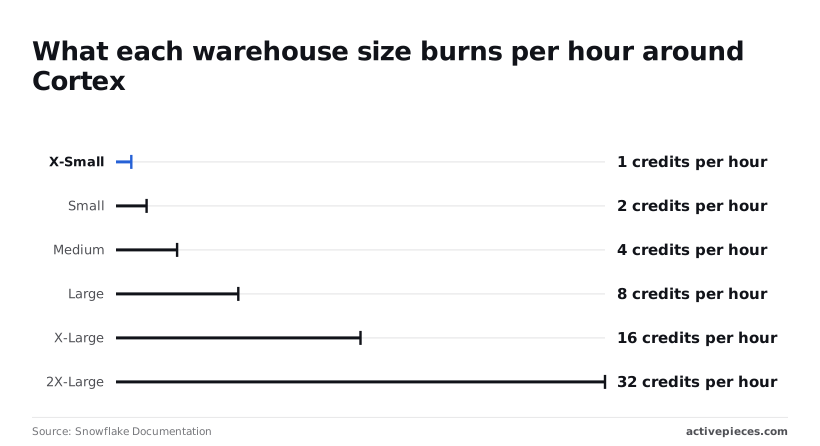
Of these, warehouse size moves fastest. Per [Snowflake's warehouse documentation](https://docs.snowflake.com/en/user-guide/warehouses-overview), X-Small burns 1 credit per hour, Small 2, [Medium](https://medium.com/@karthikrajashekaran/snowflake-ai-just-got-cheaper-again-44a28d2090ca) 4, Large 8, X-Large 16 and 2X-Large 32.
Each size doubles the last, so a Large left running costs eight times an X-Small for the same text. Size up only when the SQL is slow, not when the AI call is.

### Snowflake Cortex rate limits and quotas by model
A batch job over a big table stalled first at mistral-large, an older model, in the quotas the community page recorded. A [community quota page](https://snowflakesolutions.net/question/what-are-the-usage-quotas-of-snowflake-cortex/) lists it at 100 requests per minute, and limits differ widely by model, so you need to verify your specific model's throughput ceiling.
Mixtral-8x7b and llama2-70b-chat each allow 400, and mistral-7b and SUMMARIZE each allow 500. TRANSLATE allows 2,000.

Those are older models, so confirm current numbers in Snowflake's own documentation before you size a job around them.
When your account sits in a region without the model you chose, cross-region inference sends the call elsewhere. That keeps the feature working, but your data leaves its home region and responses can slow down.
If your contract restricts where data may travel, find that out before launch.
### Snowflake Cortex budgets and spend controls
You set a monthly limit, and a Snowflake budget tracks credits against it and warns you when you approach it.
**By default it warns rather than stops, so doing nothing means finding out after the credits are gone.**
Set the budget before the pilot, and pair it with a small warehouse and a short auto-suspend time so the clock stops when the work does.
A warning only helps if someone reads it, which is the case for a Monday check that lands in a channel your team already watches.
The Activepieces pricing page lists 1 credit per flow run, however many steps the flow has, where Zapier's pricing page bills per task and Make's per module, so the five-step spend check described at the end of this integration costs about four or five credits a month against the 1,000 on its free plan.
## Snowflake Cortex against Databricks, BigQuery and Bedrock
With the budget and the warehouse clock under control, the next question is what the same job costs elsewhere. **Cortex wins on keeping your data in place**, not on a lower token rate.
### Price for the same one-million-token job
Text goes in and text comes out, and every platform charges for that same raw work, but each counts it in a different currency.
Cortex wins on keeping your data in place, not on a lower token rate.
The table below shows the billing unit and the pricing each one needs from you. Cortex is the only one that requires two conversions: credits to dollars, then dollars to your job.
| | Billing unit | Cost of a one-million-token summarising job | Batch or cached discount | Free tier | Best fit |
|---|---|---|---|---|---|
| Cortex | Credits per million tokens | Model's credit rate times your edition's dollar price per credit | Check the rate table for your chosen model | Trial credits for new accounts | Data already in Snowflake |
| Databricks Mosaic AI | Platform usage units, billed per model | Model's rate times your contract's unit price | Batch inference and reserved capacity are available | Trial credit for new workspaces | Teams already running pipelines on Databricks |
| BigQuery AI functions | Dollars per token, billed on the model called | Model's per-token rate, no conversion | Batch and context caching are offered for some models | Monthly free query allowance, which covers queries, not model calls | Data already in BigQuery |
| Bedrock | Dollars per token, by model | Model's per-token rate, no conversion | Batch mode and prompt caching on supported models | Varies by model and account age | Mixed models in one AWS account |
Work the first row yourself, with your own contract in hand. Skip that step and you're comparing a rate you can't see against three you can.
### Cortex free tier, batch discounts and commitments
Don't count a free tier in a production estimate, because **free tiers are for testing**.
Batch and caching discounts do move the estimate, but only if your work can wait or repeats the same opening text. A nightly summary of yesterday's tickets can wait, so it qualifies. A chat window can't.
If you pay the live rate for work that could have run overnight, you're overpaying for speed nobody asked for.
Commitments cut the other way. A prepaid credit contract lowers your dollar price per credit, but unused credits are money spent on nothing. Size the commitment to the pilot's measured usage, not the forecast.
### When keeping data in Snowflake outweighs a lower rate
Move to a cheaper token rate elsewhere and you move the data too: copying it out, securing it in a second place, and paying for the pipeline that carries it. Those costs rarely appear on the AI invoice, which is why they get missed.

If the data already sits in Snowflake and the volume is modest, Cortex is usually the honest choice, because the move costs more than the rate gap saves.
If the volume is large and steady, or the work spans several models, price an outside platform in full, pipeline included, before you decide.
## Set up a weekly Cortex spend check with Activepieces
Catch a runaway bill within days with a five-step Activepieces workflow that reads last week's credits and messages you when they pass your limit.
That suits you if you stay on Cortex rather than buying an outside platform.
Activepieces runs a chain of steps on a schedule from an MIT-licensed core, with 747 integrations to wire them together, Snowflake among them, and no code needed, allowing you to connect Snowflake with hundreds of other services without writing code.
Do nothing and you find out at invoice time, after a badly aimed query has already run all month. The five steps below are the whole job:
1. Add a Schedule trigger set for Monday morning.
2. Connect the Snowflake integration with a login that can read account usage.
3. Run a query against the account usage views for last week's Cortex credits.
4. Add a condition that compares the total to your limit.
5. Send the result to Slack or email.
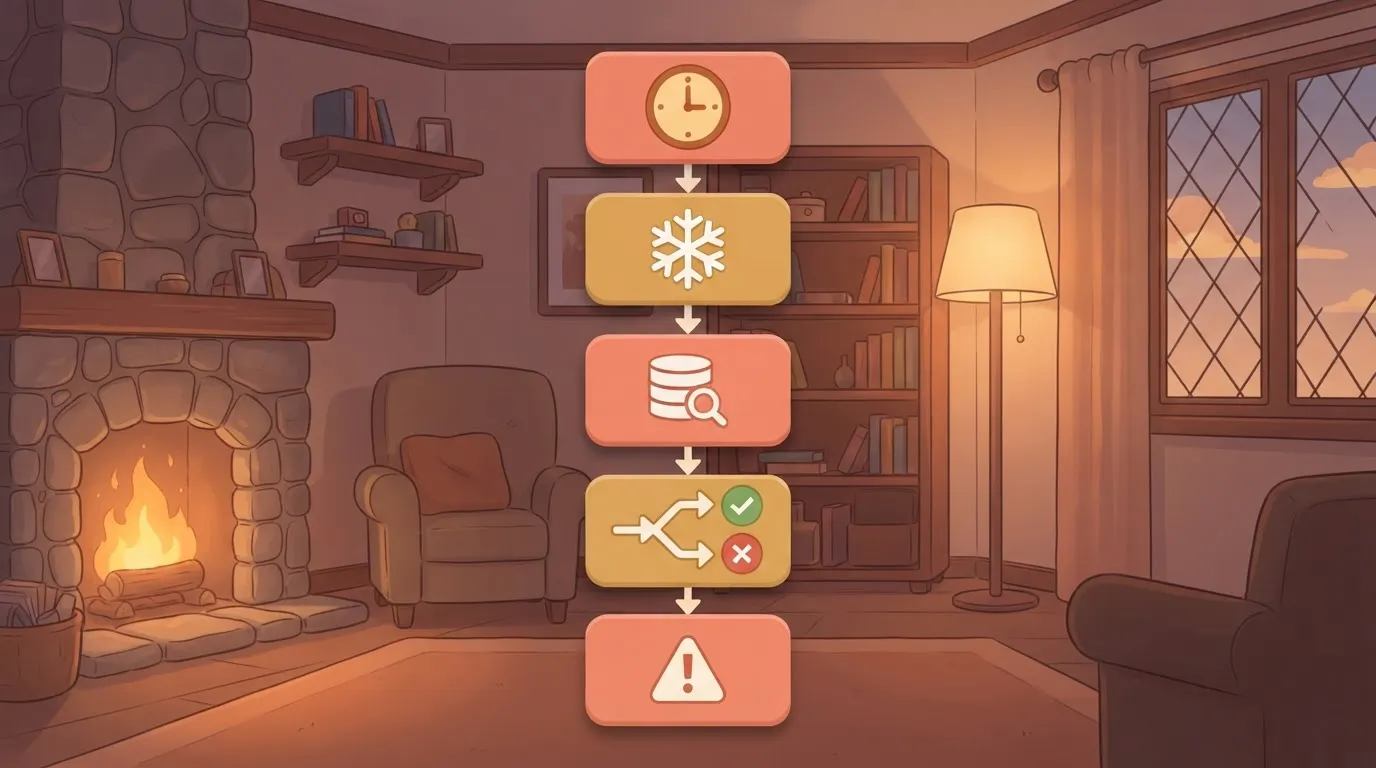
Read the workflow top to bottom and each step is one block on the canvas, so someone who has never written code can follow it. The three stages below group them by what you decide at each point.
Pick the Schedule trigger, choose weekly, and set Monday at 08:00 in your own time zone. Monday morning means the previous week is complete and the alert lands before anyone starts new experiments.
Check the time zone setting, because a default you didn't choose can shift the cutoff and split a day's usage across two reports.
### Stage 2: Query last week's Cortex credits
Add the Snowflake integration and sign in with a role that can read the account usage schema, nothing broader. That limits the damage if the connection details ever leak.
Then add a query step that sums Cortex credits from the account usage views over the past seven days.
Because the account usage views trail real time, Monday morning is a sensible read point, but a spike from Sunday night may be only partly counted.
Group the result by service, and ideally by user or warehouse, so the alert names the culprit rather than just a total.
Since warehouse and search usage sit in neighbouring views you can sum the same way, the charges around the AI calls show up here too.
### Stage 3: Alert when the total passes your limit
Add a condition that continues only when the weekly total is above your limit. Set the limit from your credit rate and edition price, so the alert reads as dollars you would actually mind.
Then add a Slack or email step that sends the total, the top spender and a link to the usage page.
If you want a quiet week to produce no message, leave the condition as it is. If you want proof the check is still running, add a short "all clear" branch.
Some of this you get already from Snowflake's own budgets, which can notify you when spend crosses a threshold you set inside the account.
The workflow adds a fixed weekly rhythm and a breakdown in a channel your team already reads. The two together cost little and close most of the gap between a surprise and a decision.
## Frequently asked questions
These are the questions the body leaves open, answered short enough to quote.
### Does Snowflake Cortex have a free tier or trial credits?
There's no flat plan fee, and AI calls are billed in AI Credits at the rates listed.
Some models or features may be restricted on trial accounts, so test one small call before you plan a proof of concept around it. Once the credits run out, every call is billed.
### Is Cortex billed separately from my warehouse?
Yes, and that separation is where the surprises come from. The AI call itself is charged in credits by the amount of text it processes.
The warehouse that runs your query is charged for the time it stays on. Storage, and any search service you build, are charged on their own meters.
One workflow can therefore show up on three or four lines of the bill. Judging cost by the AI line alone undercounts it.
### How much does a Snowflake credit cost?
It depends on your edition and your region, so no single dollar figure is true for everyone. Your contract or order form states the price per credit.
Multiply the credit rate for the model you use by that price to get the real cost of a call.
Editions change what you pay per credit, not the number of credits an AI call consumes. Where the model runs matters too: routing a request to another region can change availability and the rate, so check which setting your account uses.
### How do I see what Cortex has cost me so far?
Open the cost management pages in Snowsight, Snowflake's web console, for a quick view by service. For detail, query the usage views in the shared account database, which list credits by function, model and date.
Run that query weekly, not monthly. Budgets can alert you when spending crosses a line you set, but treat them as a smoke alarm rather than a shutoff.
Unless you've confirmed otherwise in your own account, assume nothing stops the calls automatically.
Can you use your own model API key with Cortex? Not for Cortex's built-in functions. Those run Snowflake-hosted models and bill in Snowflake credits, so there's no slot for a key from another provider.
You can call an outside model from your own code inside Snowflake, but that's a separate arrangement. The outside provider bills you directly, and your warehouse time is charged on top.
## Related reading
- [Snowflake Pricing Explained for 2026 Data Teams](https://www.activepieces.com/blog/snowflake-pricing-explained-for-2026-data-teams)
- [Best Data Automation Tools of 2026 for Analytics Teams](https://www.activepieces.com/blog/best-data-automation-tools-of-2026-for-analytics-teams)
- [Agent Analytics: 7 Best AI Agents for Data Analysis in 2026](https://www.activepieces.com/blog/ai-agents-for-analytics)
## References
- [Snowflake Documentation](https://docs.snowflake.com/en/user-guide/snowflake-cortex/pricing)
- [Snowflake Documentation](https://docs.snowflake.com/en/user-guide/warehouses-overview)
- [Snowflake Solutions](https://snowflakesolutions.net/question/what-are-the-usage-quotas-of-snowflake-cortex/)