# Stripe API Guide: Keys, Limits and Versions (2026)
By Alex Kim · 2026-11-19 · Source: https://www.activepieces.com/blog/stripe-api-guide-keys-limits-and-versions-2026
---
The [Stripe](https://stripe.com/pricing/local-payment-methods) API is a REST API at api.stripe.com that every Stripe account can use, test mode included, and it authenticates with a secret key sent with each request, which is why it is just as easy to call from a workflow tool such as [Activepieces](https://www.activepieces.com) as from your own code.
This page was checked on 2026-11-19, and the behaviour described comes from [docs.stripe.com](https://docs.stripe.com).
The first call takes minutes. Running it safely in production takes longer, and that gap is what the rest of this integration is about.
It's Stripe's programmatic interface to the same objects the Dashboard manages: payments, customers, subscriptions and invoices. Requests are form-encoded over HTTPS and responses come back as JSON.
A test-mode key and a live-mode key hit the same host, so **the key you send decides whether money moves**. Keep that in mind when you wire up configuration.
## Understand Stripe API access and authentication
A test-mode key and a live-mode key hit the same host, so the key you send decides whether money moves.
### Core actions in a Stripe API integration
Start with the list below, which shows the five actions that make up most integrations. Each one has its own failure modes, such as duplicate charges, missed events and rejected keys, so the list works as a map of where to look first.
- Create a PaymentIntent to collect a single payment
- Store a Customer so payment details and history attach to one record
- Start a Subscription for recurring billing
- Issue an Invoice for amounts owed
- Receive webhook events that report what happened afterwards
Because webhooks tell you the outcome, they carry as much operational weight as the calls you make. Whether you write these calls by hand or generate them some other way, the API itself behaves the same way.

If you're wondering whether API access is a separate tier, it isn't; the docs describe it as available to any account, so a new account can create test keys straight away.
What differs between accounts is what you are allowed to do in live mode, which depends on account activation rather than a subscription plan.
## Get the right Stripe API key
**Make a restricted key your default** for any code you write. A secret key grants full account access and can't be scoped down after the fact, while a restricted key carries only the permissions you tick when you create it.
Depending on the mode you are in, you will see different keys in the Dashboard under the developers area.
### Test keys and live keys
Nothing created with a test key touches real money, and live keys cannot see it. Every Stripe account has a test mode and a live mode, each with its own set of keys and its own data.
A charge you test can't be found in production, and a customer you create in production can't be fetched with a test key.
You get test keys immediately. Live keys depend on the activation state of the account. A contractor with a fresh account may be able to build a complete flow and still be unable to run it against real cards.
Treat a key's mode as part of its identity. Check the prefix before you paste it anywhere, because a live key in a development config is the commonest way real charges are created by accident.

### Publishable, secret and restricted keys compared
Read the leak column of the table below first: it decides which key you may place in each environment, and only the publishable key is designed to be visible. The table sets the three key types and OAuth for Connect side by side.
| Key type | Where it is used | What it can do | Impact if leaked | Key prefix |
|---|---|---|---|---|
| Publishable | Browser or mobile client code | Create tokens and confirm payments from the client; no reading of account data | Low: it's meant to be public | `pk_test_` or `pk_live_` |
| Secret | Your server only | Full API access to the account | Severe: whoever holds it can act as your account | `sk_test_` or `sk_live_` |
| Restricted | Your server, or a third-party service | Only the resources you grant, each set to none, read or write | Bounded by the permissions you granted | `rk_test_` or `rk_live_` |
| OAuth for Connect | Platforms acting on connected accounts | Access to a connected account, within the scope that account approved | Limited to the connected accounts that authorized the platform | Issued through the OAuth flow rather than created in the Dashboard |
Pay attention to two rows. The secret key has no scope, so every integration that holds one is a full-access integration.
The restricted key lets you grant, for example, write access to payment intents and nothing else, so a leak of that key can't refund charges or read customer lists.
### Stripe API OAuth for Connect platforms
If you build a platform that acts on behalf of other Stripe accounts, you don't ask those users for their keys. They authorize your platform through OAuth, and you receive access to their account within the scope they approved.
For software that serves many businesses, OAuth is the sanctioned route, and it keeps each business able to revoke your access without rotating anything on their side. If you only operate your own account, you don't need it.

### Storing and rotating a key
Keep keys out of source control and client bundles, and load them from a secrets manager or environment variable at runtime.
Create one restricted key per integration, named for what uses it, so that when one leaks you can identify the source and revoke only that key.
Rotate through the Dashboard: create the replacement, deploy it, confirm traffic has moved, then delete the old key. The same rule applies after any suspected exposure.
## Authenticate and send a first Stripe API request
You need only a test-mode secret key for a first request, and sending it shows you that authentication, encoding and versioning all behave as documented before any retry logic depends on them.
Because calls made with an exposed or over-scoped key fail in the same way as calls made with a correct one, confirm the basics in test mode, where a mistake costs nothing.
### A working curl request
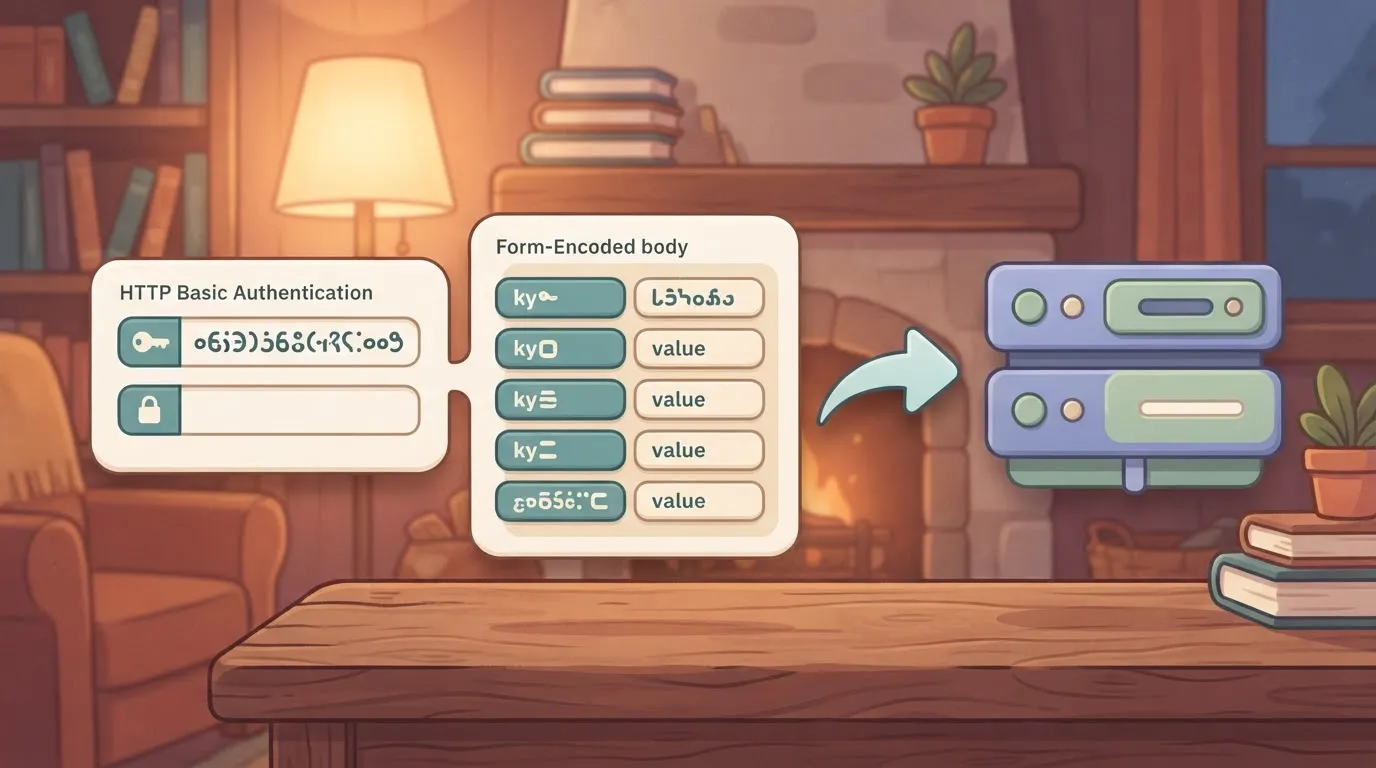
Send the secret key as the username in HTTP Basic auth and leave the password empty; that is how Stripe authenticates. Request bodies are form-encoded, not JSON, which is the first thing hand-written clients get wrong. The steps below create a customer.
1. Copy the test-mode secret key from the Developers section of the Dashboard. It begins with `sk_test_`.
2. Export it as an environment variable so it never lands in shell history or source: `export STRIPE_KEY=sk_test_...`
3. Run `curl -u "$STRIPE_KEY:" -X POST https://api.stripe.com/v1/customers -d email=test@example.com`. The trailing colon after the key supplies the empty password.
4. Read the `id` field in the response. It starts with `cus_`, and it's the handle every later call uses to refer to this customer.
5. Add a `Stripe-Version` header to the same request, as described below, so the response shape stops depending on your account's default.
That sequence confirms the key works, the body encoding is accepted, and the response carries the identifier you will store.
If you would rather not hand-roll the requests, Stripe maintains official libraries for several languages that handle form encoding and authentication for you.
They also expose retry and idempotency options on requests, so check each one's documented defaults before assuming a call is safe to repeat. A library doesn't remove the need to verify what your integration sends; it changes where you look.
### Pinning an API version
Without a version header, a request uses the API version set as your account's default. That means a default changed in the Dashboard can alter response fields for code you didn't touch.

Send `Stripe-Version` with an explicit version string on every request, for example `-H "Stripe-Version: "` using a version taken from your own Dashboard or the changelog.
Stripe's versioning documentation describes which changes are treated as backward compatible and which require a new version. Pin, upgrade deliberately in test mode, and compare the responses before moving live traffic.
## Stripe API endpoints and pricing per transaction
You are billed for the money that moves, not the API calls you make. The test-mode comparison you run before going live costs nothing, while the same flow in live mode is charged per transaction.
### Stripe API endpoints compared by cost basis
Read the cost column below as the thing that triggers a fee, because a retry loop only costs money where a charge actually succeeds.
The table maps each resource family to its purpose and what Stripe charges against it, with fees as listed on stripe.com/pricing and checked 2026-11-19.
| Resource | Purpose | Cost basis |
|---|---|---|
| PaymentIntents | Collect a single payment | Percentage of the transaction |
| Customers | Store payer records | No separate line on the pricing page |
| Subscriptions | Recurring billing | Billing product fee on recurring volume |
| Invoices | Bill and track payment | Invoicing fee on paid invoices |
| Checkout Sessions | Hosted payment page | Fee of the payment method used |
| Payouts | Move balance to a bank | Depends on payout type |
| Connect | Pay out to other accounts | Platform fees per Connect pricing |
| Webhook endpoints | Receive event notifications | No separate line on the pricing page |
Where a family carries payments, it inherits its fee from the payment method, which is where the percentages below apply.
### Where the API is free and where fees apply
Look through the pricing page and you will find no per-call fee, so reads, customer creation and webhook delivery are not metered line items as of 2026-11-19. Fees attach when money moves.
On [Stripe's payment method pricing](https://stripe.com/pricing/local-payment-methods), ACH debit costs 0.8% of the transaction, which makes it the cheapest rail here for large, non-urgent invoices.
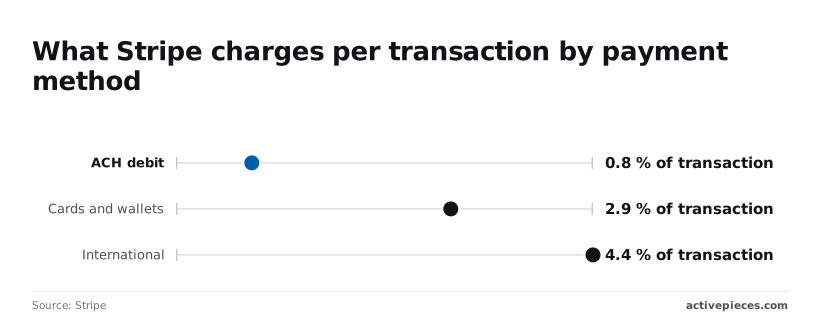
According to Stripe's pricing, cards and wallets cost 2.9%, so that's your baseline for checkout flows.
International cards cost 4.4% according to Stripe, a 1.5-point premium that a cross-border customer base will feel on every order.
Rates vary by country, so confirm yours before modelling margins.
## Stay under Stripe API rate limits
Beyond fees, there is a second ceiling on volume: Stripe's default live-mode limit is 25 requests per second, so traffic exceeding this rate will face failures and delays.
You stay under it by backing off on 429s, using library retries, caching reads and requesting an increase.
Checked against [Stripe's rate limit documentation](https://docs.stripe.com/rate-limits) on 19 November 2026, **the default endpoint allows 25 requests per second**, meaning request throttling will occur beyond this rate. A loop that fires faster than that gets rejected rather than queued.
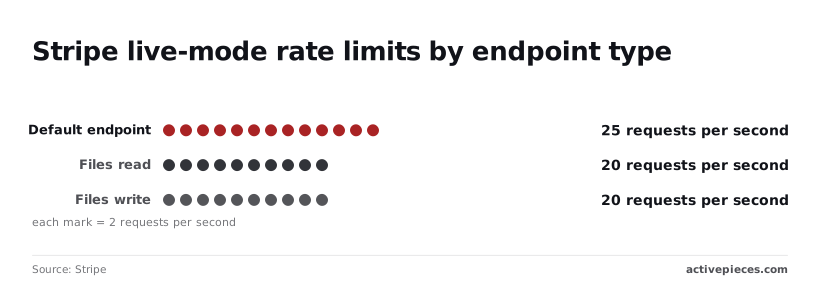
20 requests per second is the cap on file reads, and on file writes too. Both sit five requests per second below the default, so a bulk document upload needs its own throttle.
Check the same page for test-mode limits before load testing, and don't assume the live figures apply.
It shows that file endpoints are the tightest of the three, so size your concurrency to them rather than to the default.
When a limit is exceeded, Stripe signals it with HTTP 429. Treat it as an instruction to slow down, not as a failure.
Retrying immediately from many workers at once makes the next burst worse, because they all return in the same instant. Pair every retry with an idempotency key so a request that did succeed isn't applied twice.
To stay under the limits, use four measures:
- Exponential backoff with jitter on 429: double the wait after each rejection and add a random offset, so parallel workers spread out.
- Library automatic retries: set the retry count in the official client library's configuration instead of writing your own loop.
- Caching reads: store objects that rarely change, such as products and prices, and refresh them from webhook events rather than polling.
- Requesting an increase: contact Stripe support with your expected peak rate and the endpoints involved.
Even with all four in place, you have not shown that your code behaves this way under load, though each lowers the odds of a rejected call. That takes a trace of what actually ran.
Activepieces' built-in chat takes a described Stripe process and publishes it as a live flow in your account, under the same RBAC and audit logs as any flow a person built by hand.
The run trace lists each step's request and response, so whether a 429 was retried and whether the idempotency header went out is a line you read rather than something you infer. MoneyGram, Moneypenny, Alan and FundingSocieties run Activepieces in production.
## Common Stripe API errors and the fixes documented
Whether the failure was yours, the card's, or Stripe's decides which documented fix applies. A trace of what ran lets you see which of the three happened.
Treat the last column of the table below as the one that decides your code path. The table maps each status code to its usual cause, the fix Stripe's docs give, and whether a retry is safe.
| Code | Typical cause | Documented fix | Safe to retry? |
|---|---|---|---|
| 400 | Missing or malformed parameter | Correct the request | No, until changed |
| 401 | Invalid or revoked API key | Supply a valid key | No |
| 402 | Valid parameters, but the request failed, such as a card decline | Read the decline code; ask for another payment method | Only with a new method |
| 403 | Key lacks permission for the resource | Widen the restricted key's scope | No |
| 404 | Object ID missing, or from another mode or account | Check the ID and test versus live mode | No |
| 409 | Idempotency key reused with different parameters, or conflicting concurrent requests | Use a fresh key for a new request | Same key and body only |
| 429 | Too many requests | Back off exponentially | Yes, after waiting |
| 5xx | Fault on Stripe's side | Retry, then check Stripe's status page | Yes, with an idempotency key |
So the only codes you retry blindly are 429 and 5xx. A retried 4xx fails the same way each time, and a retry on a payment without an idempotency key risks a second charge.
### Idempotency keys for safe retries
**Send an idempotency key on every request that creates or changes an object.** If a timeout leaves you unsure whether the charge went through, resend with the same key and Stripe returns the original result instead of creating a second charge.
The consequence is plain: a hand-written retry loop without keys is **a double-billing bug waiting for a slow network**.
Verify each webhook's signature against the raw request body, using the endpoint's signing secret. Parsing the body first and re-serialising it changes the bytes and breaks verification.
Stripe retries events your endpoint fails to acknowledge, so return a success response quickly and make handlers safe to run twice, or a retry will repeat your side effects.
When a launch fails, it is most often a mode mismatch: test keys in live, live IDs queried in test, or a webhook secret copied from the wrong mode. Each surfaces as a 401 or 404 that looks like a bug in your code.
Check the key and secret mode first, then confirm in the trace that the live run used what you intended.
## Call Stripe endpoints without code using Activepieces
Describe a Stripe flow, publish it live, and Activepieces gives you a run trace that shows which key, which request and which retry actually happened, on the free plan too, which includes unlimited flows. The behaviours that cause incidents become things you can inspect.

An HTTP step reaches any endpoint the action doesn't cover using a restricted key, and a separate code service sits beside it for high volume.
Read it as a split of responsibilities, with the no-code flow handling event-driven work and the code service taking the load that a flow shouldn't.
### Stripe triggers and actions in a no-code workflow
Stripe is one of the 750 integrations counted in Activepieces' open source monorepo, and it supplies a trigger that fires on Stripe events and a set of actions that act on Stripe objects, enabling workflows that both respond to and control Stripe.
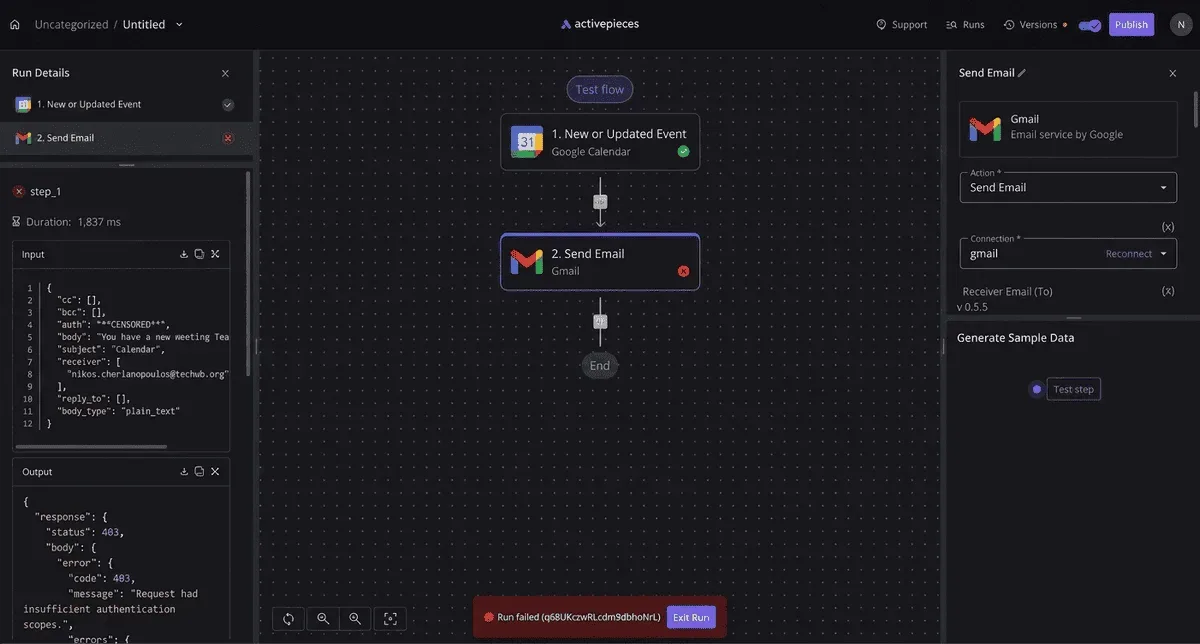
That covers the common pattern of reacting to a payment event and then writing back to Stripe or to another system.
Which events and actions the integration exposes changes as the integration is updated. Because the integrations live in the open source monorepo's community integrations directory, you can read the current source there before you design around a specific one.
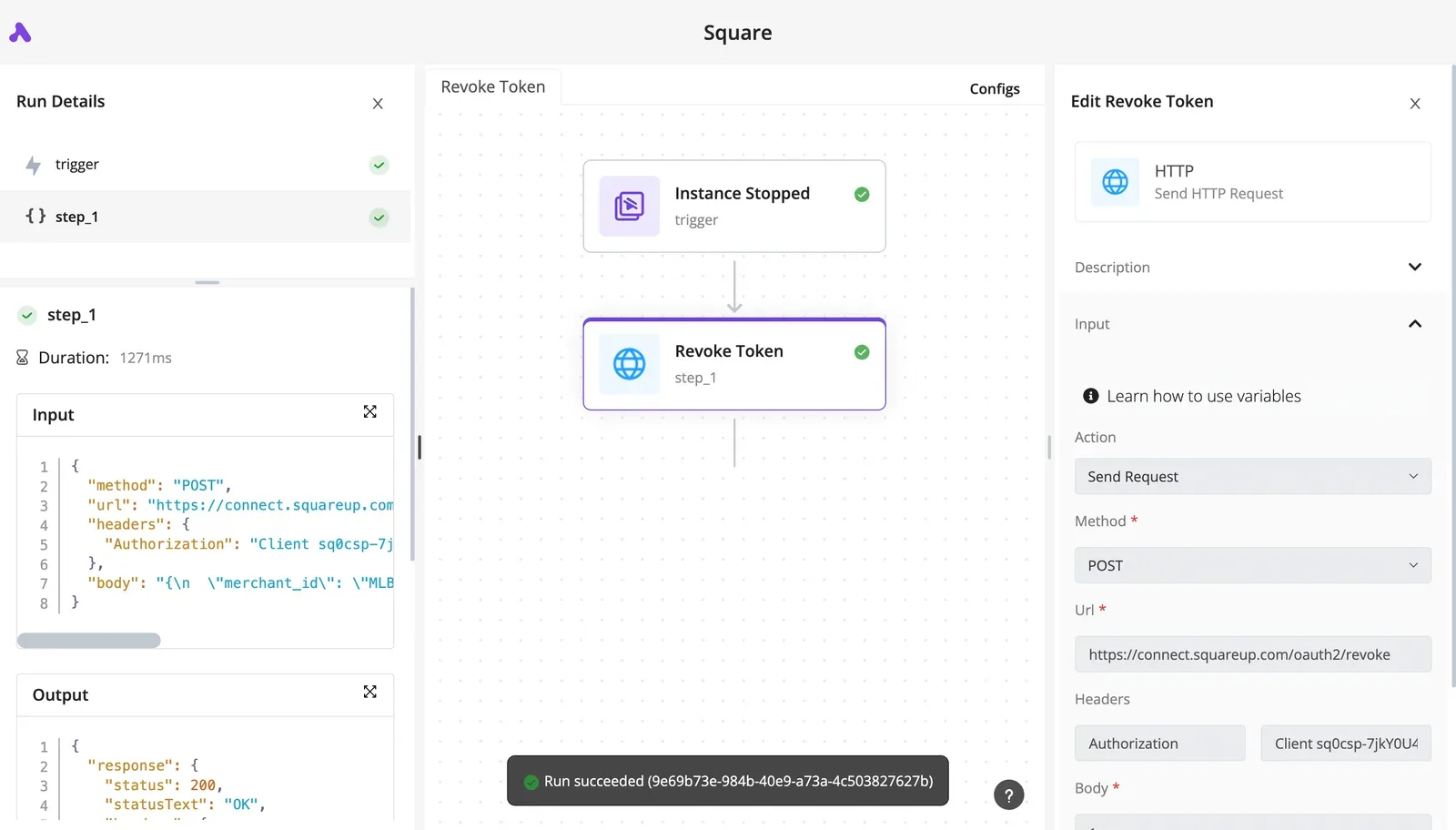
After publishing, open the run trace and check the inputs and outputs of each step. This is where you confirm that the flow received the event you expected and that the action ran once, not twice.
### Calling any endpoint with the HTTP step
When the Stripe integration lacks an action you need, the HTTP step can call the Stripe API directly.
Create a restricted key in the Stripe Dashboard with only the permissions that endpoint requires, and store it as a connection or secret rather than pasting it into the step.
Then check the trace: the request headers, the response status and any retry should all be visible. The HTTP step sends what you configure and nothing more.
If the endpoint needs an idempotency key, you must add that header yourself, and the trace is how you verify it was sent.
### When to write Stripe API code instead
When the work is moderate and event-driven, a flow suits it, since each event runs as a discrete execution. For sustained high volume, tight control over backoff, or logic that needs tests and version control, a code service is the better home.
Keep orchestration in Activepieces, where a run is 1 credit however many steps it has, and move the hot path into code. Use the trace on the flow side to confirm the handoff behaves as intended.
## Frequently asked questions
### Is the Stripe API free to use?
You pay nothing per API call, because Stripe's fees attach to the payments and other paid products you run through it. Heavy polling therefore costs you nothing directly, but it can hit rate limits, so use webhooks for state changes rather than repeated reads.
### Does Stripe have a sandbox for testing the API?
Yes, Stripe provides test mode and isolated sandbox environments with their own keys and data, so nothing you create moves real money. A test key only works against test objects and a live key only against live ones.
Treat a successful test run as proof of your logic, not of live behaviour such as account-specific limits or real card network responses.
### Can I use the Stripe API without a website?
Yes. The API is plain HTTPS called from a server, script or scheduled job, so no storefront is required for tasks such as creating customers, issuing invoices or reconciling payouts.
Collecting card details is the one limit. That needs a Stripe-hosted page such as Checkout or a payment link, or your own form built on Stripe's client libraries, so card data never touches your servers.
### How do I know which Stripe API version my account uses?
Open the Dashboard's developer settings and you will see your account's default API version. Individual requests can override it with a version header, and responses report the version that handled them, so you can confirm what a given call actually ran against.
Even on an upgraded account, events can still arrive in the older shape, because webhook endpoints carry their own version, until you change the endpoint.
### What should I do first if my Stripe key may have leaked?
Roll the key in the Dashboard, which issues a replacement and revokes the exposed one, and deploy the new value everywhere the old one lived. Then review your request logs for calls you didn't make.
If the key was restricted, the damage is limited to what its permissions allow, which is why a leaked broad secret key is the worst case.
## Related reading
- [How to handle errors in production AI agents](https://www.activepieces.com/blog/how-to-handle-errors-in-production-ai-agents)
- [How to Build an AI Agent Harness for Production](https://www.activepieces.com/blog/how-to-build-an-ai-agent-harness-for-production)
- [Cohere Pricing 2026 for Trial, Production and Enterprise](https://www.activepieces.com/blog/cohere-pricing-2026-for-trial-production-and-enterprise)
## References
- [Stripe](https://stripe.com/pricing/local-payment-methods)
- [Stripe](https://docs.stripe.com/rate-limits)